By Rajesh Kannan, Co-Founder & CTO, Gramosoft · Last updated: · Lab results from our own local test on November 4, 2026 (Python 3.13, httpx 0.28, curl 8.5, Node 22, Go 1.24, Chromium 141)
You copied Chrome's User-Agent, added every header a browser sends, and moved to residential IPs. The site still blocks you on the first request. The reason is often below the headers: the HTTP/2 frames your client sends before it asks for anything. This guide explains HTTP/2 fingerprinting, shows what six real clients look like, and covers the routes that hold up, including GcrawlAI.
TL;DR
- What it is: a server identifies your HTTP client from its first HTTP/2 frames: the SETTINGS values, the connection WINDOW_UPDATE, priority signals and the order of the pseudo-headers.
- Why headers don't help: those frames come from your HTTP library, not from the headers you set, so a Chrome User-Agent on a Python client is a contradiction the server can see.
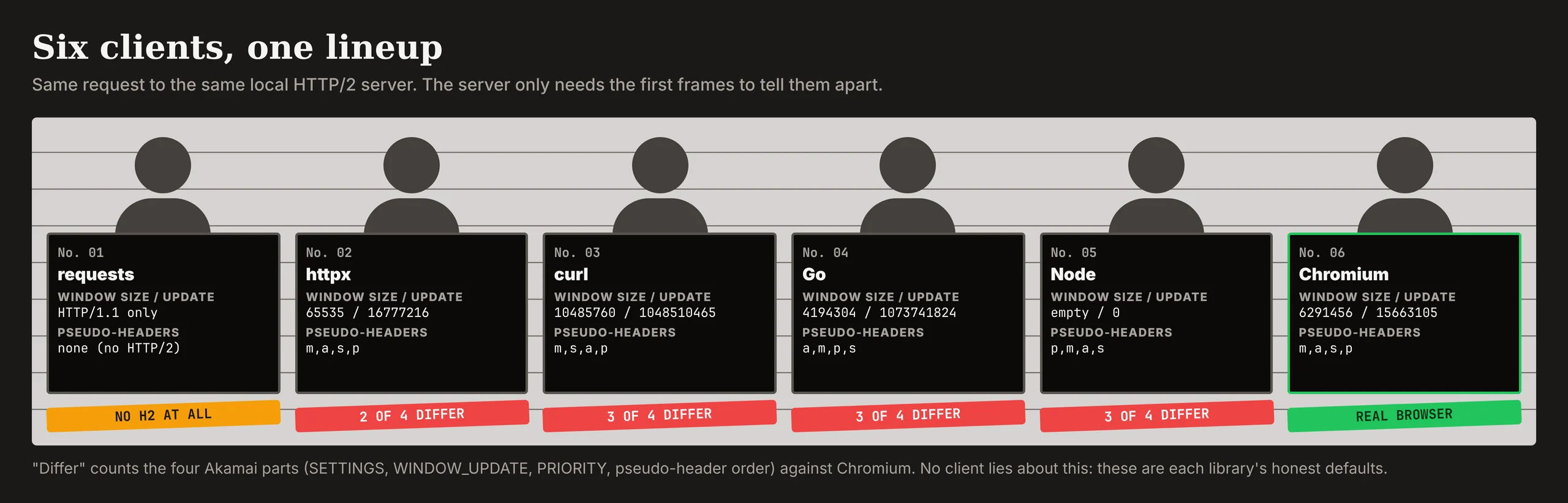
- What we measured: on our own HTTP/2 server, httpx, curl, Go and Node each sent a different fingerprint from Chromium, and Python
requestsdidn't speak HTTP/2 at all. - The real signal is a mismatch: anti-bot systems compare TLS, HTTP/2, headers and IP and look for the layer that disagrees with the rest.
- What holds up: an official API or permission first; for public pages you may collect, a real browser, for example through GcrawlAI, so every layer comes from the same software.
What is HTTP/2 fingerprinting? It's a way for a server to tell which software opened a connection from the HTTP/2 frames sent before the first request: SETTINGS values and order, the connection WINDOW_UPDATE size, priority frames or flags, and pseudo-header order. Each HTTP library has its own defaults, so a scraper that claims to be Chrome but uses httpx, Go or Node frames is easy to spot. A real browser, for example through GcrawlAI, sends a consistent fingerprint.
Your client and what the server sees
| Client (our lab) | Speaks HTTP/2? | Akamai parts that match Chromium |
|---|---|---|
Python requests |
No, HTTP/1.1 only | None: no HTTP/2 frames at all |
httpx (http2=True) |
Yes | 2 of 4 (priority and pseudo-header order) |
curl, Go net/http, Node http2 |
Yes | 1 of 4 each (no PRIORITY frames) |
| Chromium 141 (a real browser) | Yes | 4 of 4: it is the reference |
Browser-consistent pages in one request: GcrawlAI
An HTTP/2 fingerprint comes from the network stack that opens the connection, so the most reliable way to send Chrome's fingerprint is to use Chrome. Running browsers yourself means pools, proxies and upkeep. GcrawlAI fetches each page in a real browser inside one API request and returns the HTML or Markdown.
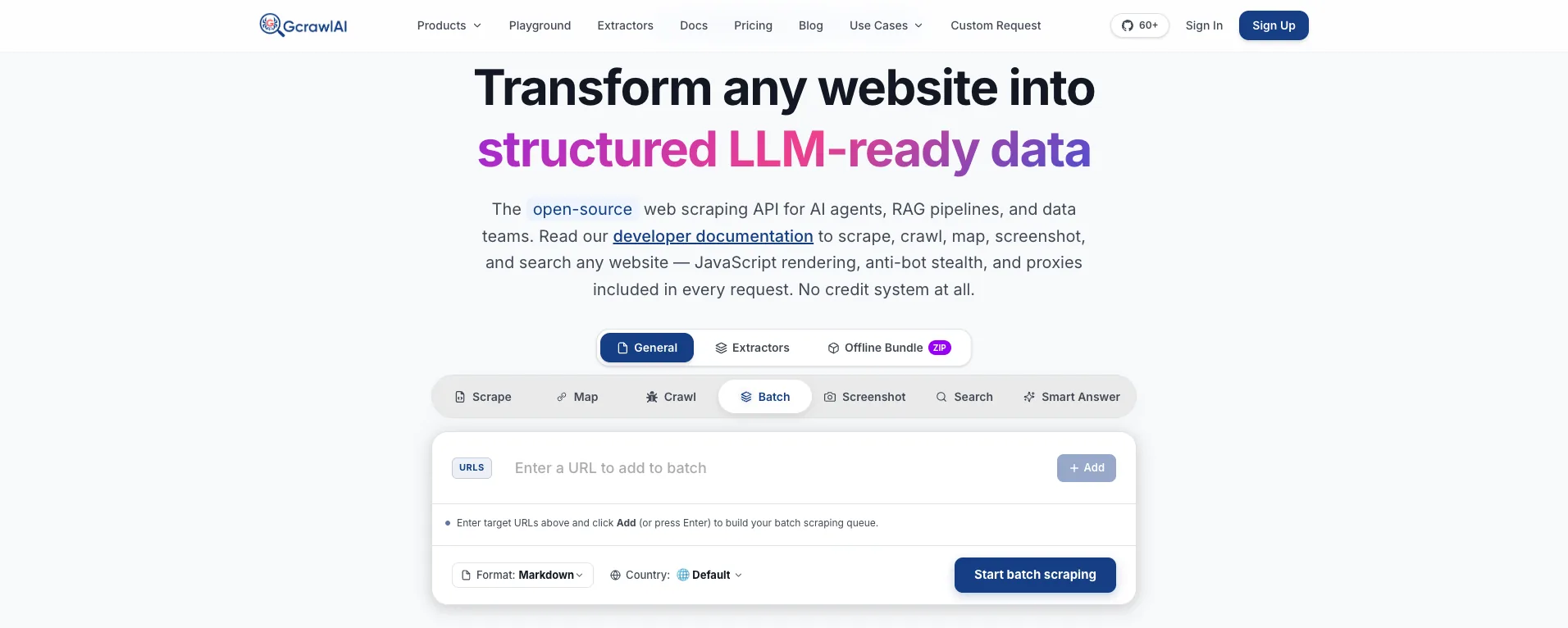
The homepage puts it in one line: JavaScript rendering, anti-bot stealth and proxies come with every request, with no credit system. Because the browser is real, its TLS handshake, HTTP/2 frames and headers already agree with each other, so there's no fingerprint profile for you to keep in step with Chrome releases.
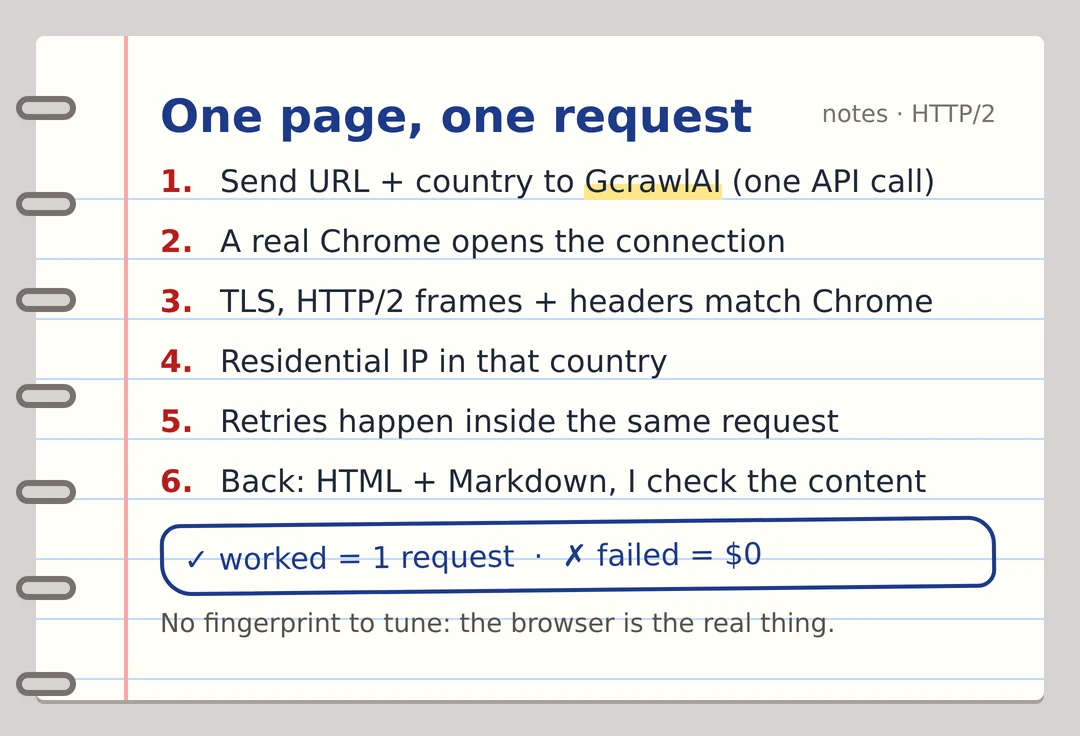
Here's the client. It asks GcrawlAI for a public page and keeps it only if the products you need are in it:
# pip install gcrawl-sdk parsel
"""Let GcrawlAI fetch a public page you're allowed to collect in a real browser, so the HTTP/2
connection comes from a browser network stack, then keep the page only if your fields are in it."""
import os

from gcrawl_sdk import GcrawlClient, ScrapeOptions
from parsel import Selector

gc = GcrawlClient(api_key=os.getenv("GCRAWL_API_KEY", "gc-YOUR_API_KEY"))

page = gc.scrape(url="https://example.com/category/laptops",
                 options=ScrapeOptions(html_enabled=True, markdown_enabled=True, proxy_geo="US"), wait=True)
items = Selector(page.html or "").css("li.product")
print(f"{len(items)} products" if len(items) >= 5 else "page came back without products: check before storing")
- Rendering and access: a real browser through residential IPs in the country you choose, with retries and stealth escalation inside the request.
- Output you can check: HTML, Markdown or JSON, plus extractors that return structured fields for common page types.
- Scrape, crawl, screenshots and Search API: scrape single pages, crawl whole sites, capture screenshots, or use the Search API.
- For developers and AI agents: a Python SDK, an MCP server for Claude, Cursor and other agents, the Playground to test a page before you write code, and the docs.
The MIT-licensed core also runs on your own servers: clone it from GitHub and the setup script in the code download starts the API with Redis and a Celery worker.
Pricing is a free plan of 50 requests a month with no card, paid plans from $0.67 to $1.45 per 1,000 requests, and a self-hosted core that costs nothing. Failed requests are never charged. The full plan table is in the cost section.
Where it falls short: HTTP/2 is one signal among many, so a consistent fingerprint doesn't guarantee every page, with GcrawlAI or anything else. Test your own targets on the free plan. It won't solve CAPTCHAs meant for humans or log in for you, and it doesn't make collecting a site's data acceptable when that site's terms say no.
"Teams spend weeks tuning headers on a client whose first HTTP/2 frame already says Python. Once you see the frames side by side, the fix stops being about headers."
Rajesh Kannan, Co-Founder & CTO at Gramosoft
What HTTP/2 fingerprinting is
HTTP/2 fingerprinting identifies the software behind a connection from the frames it sends while setting the connection up. It works because the protocol leaves many values to the implementation, and every browser and library picks its own. The server reads them before your first request is processed, so no header or cookie you set can change them.
Akamai researchers published the method in 2017, and Scrapfly's guide notes it is now standard in commercial anti-bot products. Scrappey lists Akamai and Cloudflare among the vendors that check it at the edge alongside TLS fingerprints such as JA4.
It identifies software, not people. Every Chrome user on the same version sends the same frames, so the fingerprint can't track you as an individual. What it can do is tell a server that a request claiming to be Chrome actually came from httpx, Go or Node. That gap between the claim and the frames is what gets scrapers flagged.
The four parts of an HTTP/2 fingerprint
After the TLS handshake and the fixed HTTP/2 preface, a client sends a SETTINGS frame, usually a WINDOW_UPDATE, sometimes PRIORITY frames, and then its first HEADERS frame. Each of these carries values the implementation chose. Together they make up the fingerprint, and each one alone is often enough to name the library.
- SETTINGS: which parameters the client sends, their values and their order, for example
HEADER_TABLE_SIZE(id 1),ENABLE_PUSH(2),MAX_CONCURRENT_STREAMS(3),INITIAL_WINDOW_SIZE(4),MAX_FRAME_SIZE(5) andMAX_HEADER_LIST_SIZE(6). Leaving one out is a signal too. - WINDOW_UPDATE: how much the client raises the connection's flow-control window right away. Chromium sent 15,663,105 in our lab, which is 15 MB minus the default 65,535.
- Priority: older clients send PRIORITY frames that build a stream tree. Scrapfly explains that RFC 9218 replaced that scheme in 2022 and modern Chrome sends no PRIORITY frames, putting the priority on the HEADERS frame instead.
- Pseudo-header order: the order of
:method,:authority,:schemeand:pathin the first request. Chrome sends method, authority, scheme, path; other clients pick other orders.
Servers can look past these four, too: HEADERS frame flags, the order of normal headers inside HPACK, and how the client opens, reuses and closes streams. ScrapeForge notes that Chrome, Firefox and Safari each ship distinct, stable values, as do Go, httpx, Node and curl.
How to read an Akamai HTTP/2 fingerprint string
Most tools print the fingerprint in the format Akamai published: four fields joined by pipes, S|WU|P|PS. Learning to read it takes a minute and saves hours, because you can compare two strings by eye and see exactly which part of your client differs from the browser it claims to be.
Here is the string Chromium 141 sent to our lab server:
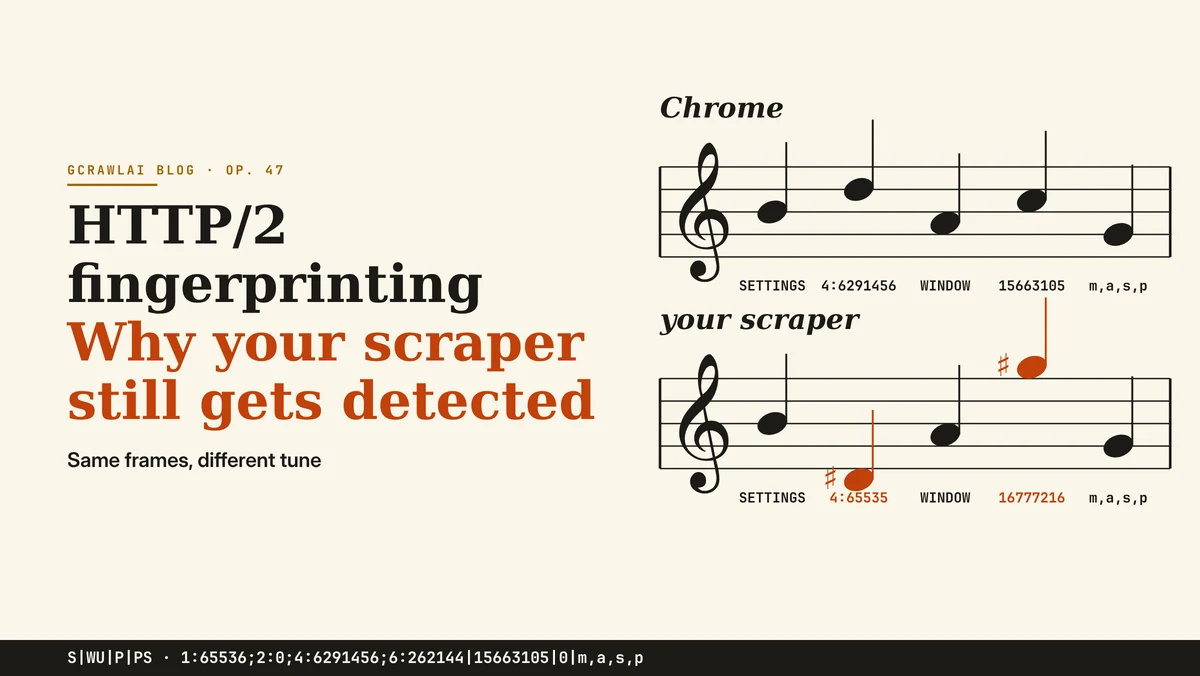
1:65536;2:0;4:6291456;6:262144|15663105|0|m,a,s,p
| Field | Chromium's value | What it says |
|---|---|---|
| S, SETTINGS | 1:65536;2:0;4:6291456;6:262144 |
Header table 65,536, push off, a 6 MB stream window, a 256 KB header list limit, in that order |
| WU, WINDOW_UPDATE | 15663105 |
The connection window was raised by about 15 MB |
| P, PRIORITY frames | 0 |
No PRIORITY frames; the priority rides on the HEADERS frame |
| PS, pseudo-headers | m,a,s,p |
:method, :authority, :scheme, :path |
That string matches the Chrome value Scrapfly publishes for a newer Chrome release, which tells you these values change slowly. They do change, though, so a profile copied once will drift as Chrome updates.
What six real clients sent to our HTTP/2 server
We ran a small HTTPS server on our own machine that logs the raw HTTP/2 frames of every client that connects, then sent the same request from six clients with their default settings. No site was involved. The server and the comparison script are in the code download, so you can repeat it with your own client.
Each client's full fingerprint, as our server recorded it on November 4, 2026:
| Client | Protocol | Akamai fingerprint |
|---|---|---|
Python requests 2.34 |
HTTP/1.1 | None: it negotiated HTTP/1.1, so no HTTP/2 frames |
httpx 0.28 (http2=True) |
h2 | 1:4096;2:0;4:65535;5:16384;3:100;6:65536|16777216|0|m,a,s,p |
curl 8.5 (--http2) |
h2 | 3:100;4:10485760;2:0|1048510465|0|m,s,a,p |
Node 22 http2 |
h2 | |0|0|p,m,a,s (an empty SETTINGS frame, no WINDOW_UPDATE) |
Go 1.24 net/http |
h2 | 2:0;4:4194304;5:16384;6:10485760|1073741824|0|a,m,p,s |
| Chromium 141 (Playwright) | h2 | 1:65536;2:0;4:6291456;6:262144|15663105|0|m,a,s,p |
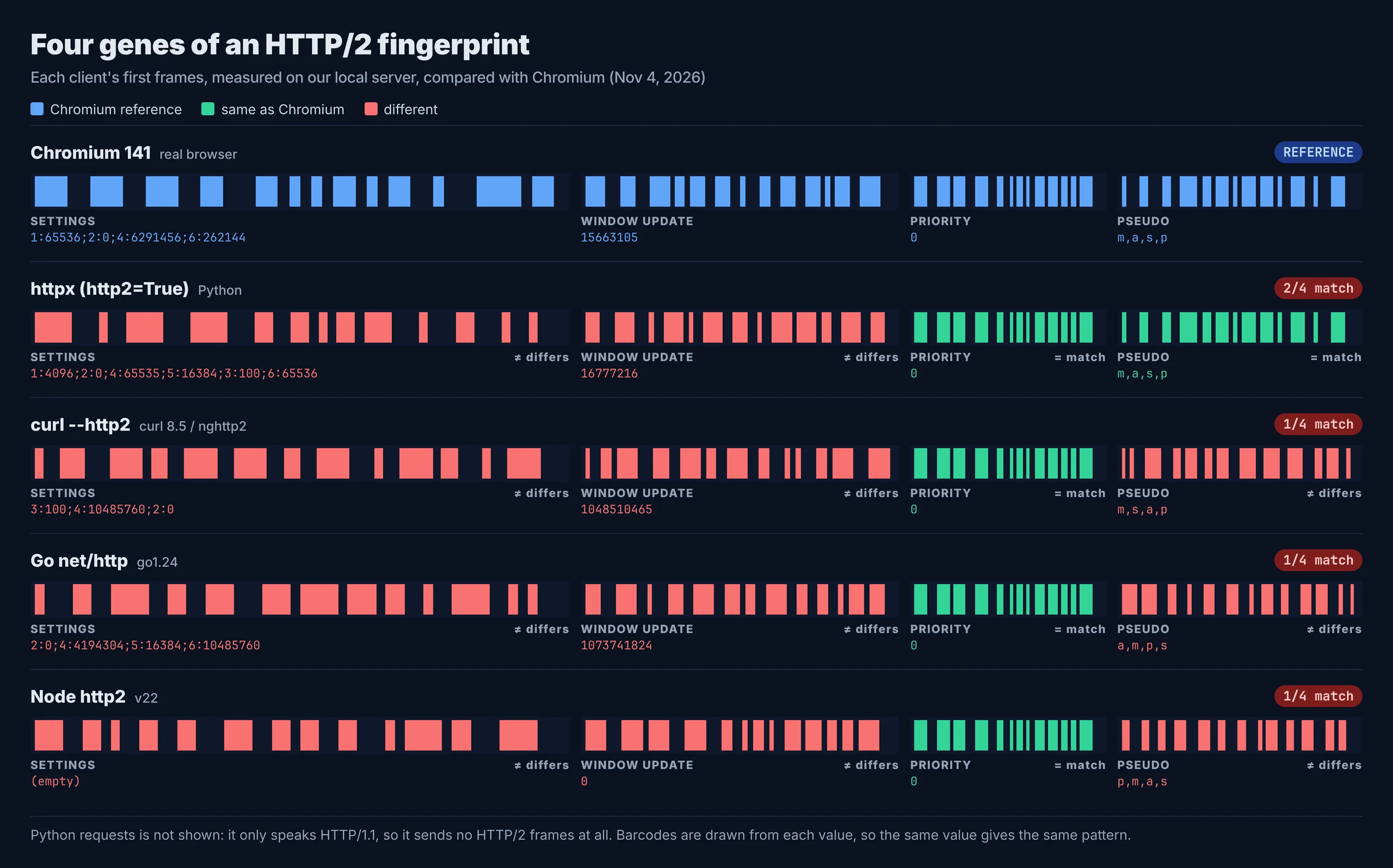
- No two clients matched. Every library sent its own SETTINGS and window size, so each string names its library.
- httpx came closest: same pseudo-header order and no PRIORITY frames, but a 4,096 header table, a 65,535 stream window and a 16,777,216 window update that Chrome doesn't send.
- Chromium flagged its HEADERS frame with a priority (exclusive, weight 256), and its first normal headers were the
sec-ch-uaclient hints. None of the libraries did either. - Python
requestsnever reached HTTP/2. A site that only sees Chrome over HTTP/2 can flag a "Chrome" that speaks HTTP/1.1.
"We expected httpx to be close to Chrome, and on half the string it is. But the first SETTINGS frame differs on three values, and that frame goes out before the request does."
Rajesh Kannan, Co-Founder & CTO at Gramosoft
How to check your own client
Don't guess what your scraper sends; measure it. Point your client at a server that reports the fingerprint back, then compare it with a real browser part by part. Run the lab server from the code download, then this script, which compares httpx with the Chromium string we recorded. Swap in whichever client you actually use.
# pip install httpx[http2]   (run h2_fingerprint_server.py first)
"""Compare your client's HTTP/2 fingerprint with real Chromium's, part by part."""
import httpx

CHROMIUM = "1:65536;2:0;4:6291456;6:262144|15663105|0|m,a,s,p"   # Chromium 141, our lab
PARTS = ["SETTINGS", "WINDOW_UPDATE", "PRIORITY", "pseudo-headers"]

with httpx.Client(http2=True, verify=False) as client:          # swap in your own client here
    mine = client.get("https://127.0.0.1:8447/").json()["akamai"]

for name, a, b in zip(PARTS, mine.split("|"), CHROMIUM.split("|")):
    print(f"{name:<15} {'match' if a == b else 'DIFFERENT'}\n  yours:    {a}\n  chromium: {b}")
For httpx it reported SETTINGS and WINDOW_UPDATE as different and the priority and pseudo-header order as a match. Knowing which field differs tells you whether you're looking at a library default, a version gap or a different protocol altogether.
- Public echo services such as the ones Scrappey and ScrapeForge mention return the same Akamai string over the internet.
- Compare with the browser you claim, on the same version and operating system, not with a string copied from an old article.
- Treat the result as a summary. ScrapeOps points out that public tests check simplified summaries and can miss HPACK, frame-level and connection lifecycle differences.
Why the mismatch matters more than the fingerprint
A non-browser fingerprint on its own isn't proof of a bad bot: plenty of apps, monitors and partners call sites with Go or curl. What anti-bot systems score is inconsistency, when one layer of a request contradicts another. A User-Agent that says Chrome over frames that say httpx is the classic case.
- TLS against HTTP/2: Scrappey gives the example of a JA4 that says Chrome while the SETTINGS frame carries httpx's 4,096 header table. For the TLS side, read our guide to JA3 and JA4 TLS fingerprints.
- HTTP/2 against headers: a Chrome User-Agent without Chrome's client hints, or with headers in an order Chrome never uses.
- Connection against session: ScrapeOps notes that thousands of sessions repeating the same sequence, timing and teardown can reveal the automation behind individually valid requests.
- Proxies don't fix it: a new IP changes network identity and reputation, but not the client's TLS, HTTP/2 or session behaviour.
This is also why rotating one attribute at a time backfires. A real browser keeps its User-Agent, TLS, HTTP/2 and headers together; a client that changes them independently looks less like any browser with each change. Our overview of how websites detect scrapers covers the other signals.
HTTP/3 and QUIC: the next layer
Many large sites now offer HTTP/3, which runs over QUIC on UDP instead of TCP. That moves connection setup into new places a server can read: QUIC transport parameters, HTTP/3 SETTINGS and how the client upgrades from HTTP/2. Most scraping libraries don't speak HTTP/3 at all, which is a signal by itself.
Scrapfly lists QUIC transport parameters alongside SETTINGS frames and pseudo-header order as connection-layer signals, and calls protocol fingerprints a moving target as browsers change priority behaviour, SETTINGS and HTTP/3 use. A browser that would normally switch to HTTP/3 but never does is one more inconsistency for the server to weigh.
What to do instead of tuning frames
You can't fix an HTTP/2 fingerprint with headers, and keeping a hand-made browser profile current is a treadmill. The routes that hold up remove the mismatch rather than disguise it. Start with the one that carries the least risk and upkeep, and move on only when it can't give you the data.
- Use an official API, feed or data licence where one exists. No fingerprint question arises at all.
- Be honest about your client. If you call a site with httpx or Go, don't send a Chrome User-Agent: a library identifying as itself, at a polite rate, is consistent, and some sites allow it.
- Use a real browser when you need browser-only pages. Playwright or a managed service such as GcrawlAI sends TLS, HTTP/2 and headers that come from the same software. Our headless browser comparison covers the options.
- Keep one identity per session. One IP, one cookie jar and one client per session, without per-request header rotation.
- Pace requests and check content. A fingerprint that passes doesn't excuse a request rate that doesn't. Validate the fields in each page before storing it.
Libraries that impersonate browser network stacks do exist, and the competitor guides cover them. We don't walk through tuning or forging fingerprints here: they exist to get past a control a site chose to turn on, and they drift out of date with each browser release.
What browser-consistent pages cost
Sites that score HTTP/2 fingerprints usually need a real browser and premium IPs, so compare providers on their protected-page price, not their headline rate. For 100,000 successful protected pages a month, credit-based APIs cost $249 to $399 at list price and GcrawlAI costs $101. For plain pages, they're cheaper.
| Option, 100,000 successful pages a month | Plain HTML pages | Protected pages (JS rendering + premium proxies) | Are failed requests billed? |
|---|---|---|---|
| GcrawlAI (every request rendered, residential IPs included) | $101 (Growth $79 + 20,000 overage at $1.10 per 1,000) | $101 (same request, no multiplier) | No: failed requests are never charged |
| ScraperAPI | $49 (Hobby, 100,000 credits) | $299 (Business; 25 credits per page = 2.5M credits) | Charges only 200 and 404 responses |
| ZenRows | $39 (Build B3, 120,000 credits) | $399 (Growth G3; 25 credits per page = 2.5M credits) | Failed requests never charged; 404 and 410 count as successful |
| ScrapingBee | $49 (Freelance, 250,000 credits; JS off) | $249 (Business; 25 credits per page = 2.5M credits) | Charges only 200, 404 and 410 |
List-price arithmetic, not a benchmark. Credit costs and billing rules come from ScraperAPI's credit docs, ZenRows' pricing docs and ScrapingBee's FAQ, checked November 1, 2026. The honest read: for plain HTML, ZenRows, ScraperAPI and ScrapingBee cost less than GcrawlAI. Whatever you use, count cost per page with your fields in it, not per response.
GcrawlAI plans (GcrawlAI pricing, checked October 28, 2026):
| Plan | Price | Requests/month | Concurrent | Per 1,000 | Overage per 1,000 |
|---|---|---|---|---|---|
| Free | $0 forever, no card | 50 | 2 | – | – |
| Starter | $29/month | 20,000 | 10 | $1.45 | $1.60 |
| Growth (most popular) | $79/month | 80,000 | 35 | $0.99 | $1.10 |
| Pro | $199/month | 250,000 | 50 | $0.80 | $0.90 |
| Scale | $499/month | 750,000 | 100 | $0.67 | $0.75 |
| Enterprise | Volume pricing | 2M+ | Custom | – | – |
| Self-hosted | $0 (MIT) | Your servers | Your servers | Infrastructure only | – |
Every plan, Free included, has scrape, crawl, the Search API, JavaScript rendering, residential IP rotation and stealth escalation in each request, and each feature counts as one request. Failed requests are never charged. Annual billing charges 10 months for 12, unused requests on paid plans roll over once, and Indian customers are billed in INR with a GST invoice.
Which route fits your project
The right route depends on what the site checks and what you're allowed to collect. Many sites never look at HTTP/2 frames, and a polite library is fine there. Others score every layer, and only a real browser or an official source holds up. The table shows where GcrawlAI fits in each case.
| Your situation | Route | Where GcrawlAI fits |
|---|---|---|
| The site has an API, feed or partner programme | Use it | Not needed; use GcrawlAI for your other sources |
| The site doesn't score fingerprints | Your own client, honest User-Agent, polite pace | Move to GcrawlAI only if blocks start |
| Blocked on the first request despite good headers | A real browser | GcrawlAI renders each page in a real browser, one request per page |
| CAPTCHA on every visit | Stop and ask for access | Not a GcrawlAI job; the site wants a human |
| You need full control of the stack | Self-host | The MIT GcrawlAI core on your servers |
| AI agents need the page | A tool the agent can call | GcrawlAI MCP server with scrape, crawl and Search API |
When your own Python is enough
Most sites don't block on HTTP/2 frames, and for them your own Python client is fine: it costs nothing and it's fast. Keep it honest and consistent. Let httpx or requests identify as themselves, pace requests, and check every page for the fields you need before you store it.
When a site starts refusing you on the first request and the pages are public and allowed, move the fetching to GcrawlAI and keep your checks. Its free Cloud plan's 50 requests a month are enough to test your real targets, the Playground shows the result without code, and the MIT core self-hosts for free. For the build-or-buy trade-off, read web scraping with Python vs a scraping API.
Is it OK to scrape a site that fingerprints clients?
A site that scores HTTP/2 fingerprints is telling you it filters automated traffic. That doesn't make every collection unlawful, but it raises the bar. Read the terms and robots.txt, ask for an API or data licence, stay on public pages, keep your request rate low, and don't collect personal data you have no basis to hold.
Don't forge another client's identity to get past a block, and leave logins, checkouts and account pages alone. For the rules a site publishes, read how to check if a website allows scraping, and for the legal background, what web scraping is and where it's legal. Get advice for your own case.
Frequently asked questions
What is HTTP/2 fingerprinting?
It identifies the software that opened a connection from its first HTTP/2 frames: the SETTINGS values and order, the connection WINDOW_UPDATE, priority frames or flags, and pseudo-header order. Each browser and library has its own defaults, so the frames name the client before any request is processed.
What is an Akamai HTTP/2 fingerprint?
A string in the format Akamai published, S|WU|P|PS: SETTINGS pairs, the WINDOW_UPDATE increment, PRIORITY frames and pseudo-header order. Chromium 141 sent 1:65536;2:0;4:6291456;6:262144|15663105|0|m,a,s,p to our lab server.
Why does my scraper get blocked even with Chrome headers?
Because headers are only one layer. Your HTTP library still sends its own TLS handshake and HTTP/2 frames, and a Chrome User-Agent over httpx or Go frames is a mismatch the server can see before it reads your headers.
Does httpx have a browser HTTP/2 fingerprint?
No. In our lab, httpx with http2=True matched Chromium on pseudo-header order and priority but sent different SETTINGS (a 4,096 header table and a 65,535 stream window) and a 16,777,216 window update instead of 15,663,105.
Does Python requests use HTTP/2?
No. requests only speaks HTTP/1.1, so it sends no HTTP/2 frames at all. That avoids an HTTP/2 mismatch, but a client that claims to be a modern browser and speaks HTTP/1.1 is itself inconsistent.
Do proxies change my HTTP/2 fingerprint?
No. A proxy changes your IP address and its reputation, but the TLS handshake and HTTP/2 frames still come from your client. Rotating IPs on a client with a non-browser fingerprint just repeats the same fingerprint from more addresses.
Is GcrawlAI open source, and can I use it commercially?
Related guides
- JA3 and JA4 TLS Fingerprints Explained
- How Websites Detect Scrapers: 13 Signals Anti-Bot Systems Check
- Web Scraping Without Getting Blocked: The 2026 Playbook
- 10 Best Headless Browsers for Scraping in 2026: Playwright, Camoufox, Cloud Browsers and More
- 10 Best User Agents for Web Scraping in 2026: Current Strings, Matching Headers and Rotation
- Residential vs Datacenter Proxies, and How IP Rotation Works (2026 Guide)
- How to Fix 403 Forbidden Errors in Python Requests (2026)
- Web Scraping with Python vs a Scraping API: When to Stop Writing Your Own Scraper