By Rajesh Kannan, Co-Founder & CTO, Gramosoft · Last updated: · TLS, header and JavaScript results measured in our own local tests on November 2, 2026; traffic figures from Imperva's 2025 Bad Bot Report and Cloudflare's own posts
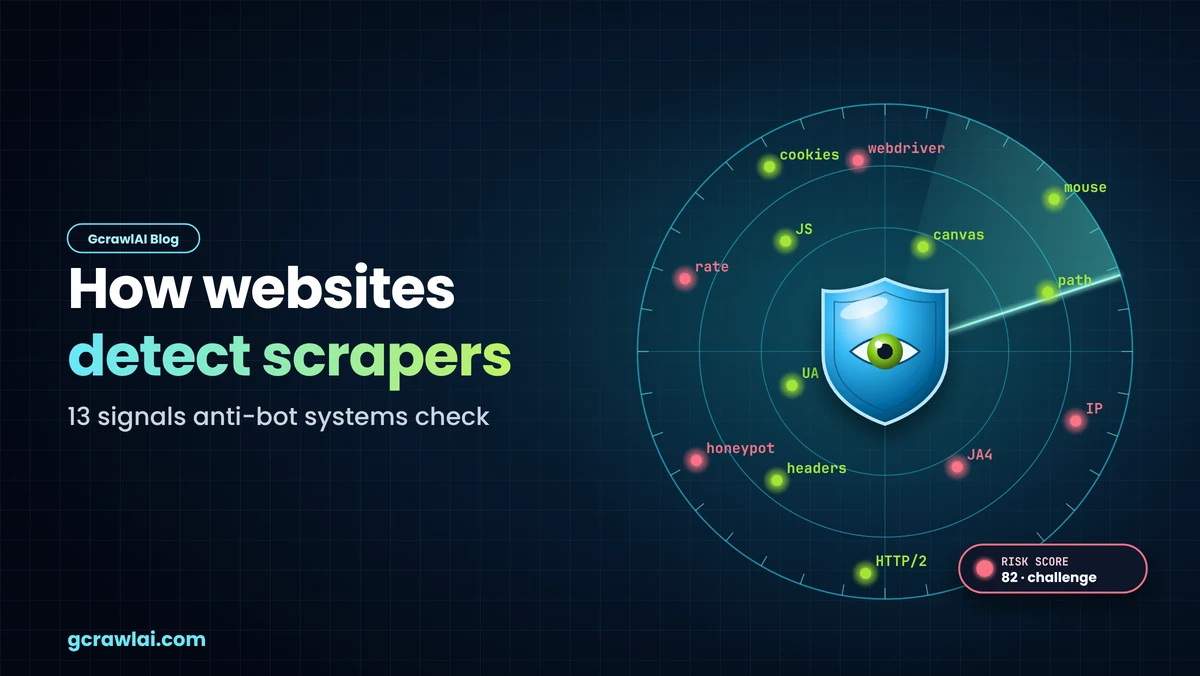
Your scraper gets a 403, a CAPTCHA, or a page that looks fine but holds nothing. Somewhere between the TCP connection and the tenth page, the site decided you weren't a person. This guide walks through the 13 signals anti-bot systems check, in the order a visit exposes them, with our own measurements of what Python clients and headless Chrome give away, and how GcrawlAI sends a visitor that holds together.
TL;DR
- It's a score, not a rule: sites add up many weak signals and act on the total: allow, challenge or block.
- Most scrapers are caught before the page loads: a datacenter IP and a non-browser TLS fingerprint are read at the connection.
- Our test: python-requests sent 5 headers to Chromium's 14, and its JA4 fingerprint looked nothing like Chrome's.
- Headless Chrome tells on itself:
navigator.webdrivertrue, "HeadlessChrome" in the User-Agent, zero plugins and a software GPU. - Contradictions weigh most: a Chrome User-Agent on a Python handshake is worse than either alone.
- Fastest route: GcrawlAI sends a real browser through residential IPs, so all 13 signals agree.
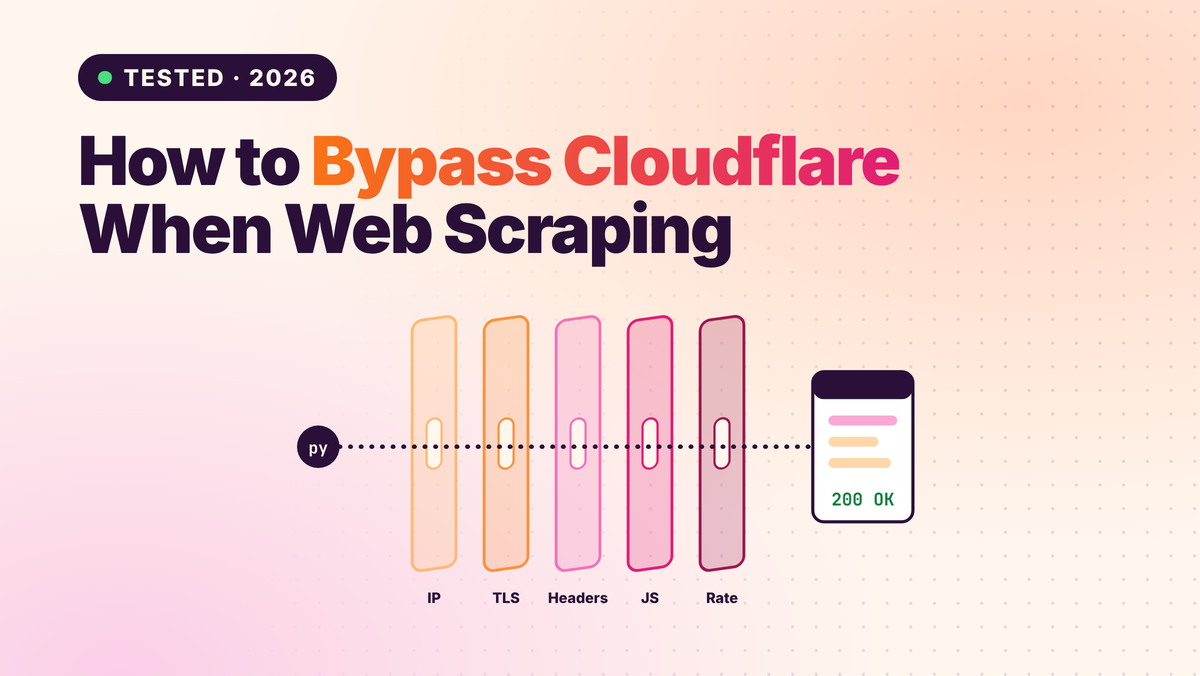
How do websites detect scrapers? They score 13 kinds of signal together: IP reputation and geography, TLS and HTTP/2 fingerprints, headers, User-Agent and timing, JavaScript challenges, automation flags, device fingerprints, behaviour, navigation and cookies, and honeypot traps. No single check blocks you; the combined score and the contradictions between layers do. GcrawlAI keeps every signal consistent in one request.
The 13 signals at a glance
| # | Signal | When it's read | What gives a scraper away |
|---|---|---|---|
| 1 | IP reputation and ASN | Connection | A cloud or datacenter range, or an IP with a bad history |
| 2 | Geography | Connection | IP country disagrees with timezone or language |
| 3 | TLS fingerprint (JA4) | Connection | A library's handshake, not a browser's |
| 4 | HTTP/2 fingerprint | Connection | SETTINGS values and frame order unlike Chrome, or no HTTP/2 |
| 5 | Header set and order | First request | Too few headers, in the wrong order |
| 6 | User-Agent and client hints | First request | A default library UA, or a UA that disagrees with sec-ch-ua |
| 7 | Rate and timing | First requests | Too fast, too evenly spaced, too many at once |
| 8 | JavaScript challenge | Page load | No JavaScript ran, or the sensor never reported |
| 9 | Automation flags | Page load | webdriver true, "HeadlessChrome", missing browser objects |
| 10 | Device fingerprint | Page load | Canvas, WebGL, fonts and screen that don't add up |
| 11 | Behaviour | Session | No pointer, scroll or keyboard rhythm |
| 12 | Path and cookies | Session | Straight to the data, no assets loaded, cookies dropped |
| 13 | Honeypots | Session | Following a link or filling a field no human could see |
Send one coherent visitor with GcrawlAI
GcrawlAI answers all 13 checks with the same identity. Each request runs in a real browser through a residential IP in the country you choose, so the IP, TLS handshake, headers, JavaScript view and session tell one consistent story. When a site still challenges, stealth escalates and the request retries with a fresh identity, and failed requests are never billed.
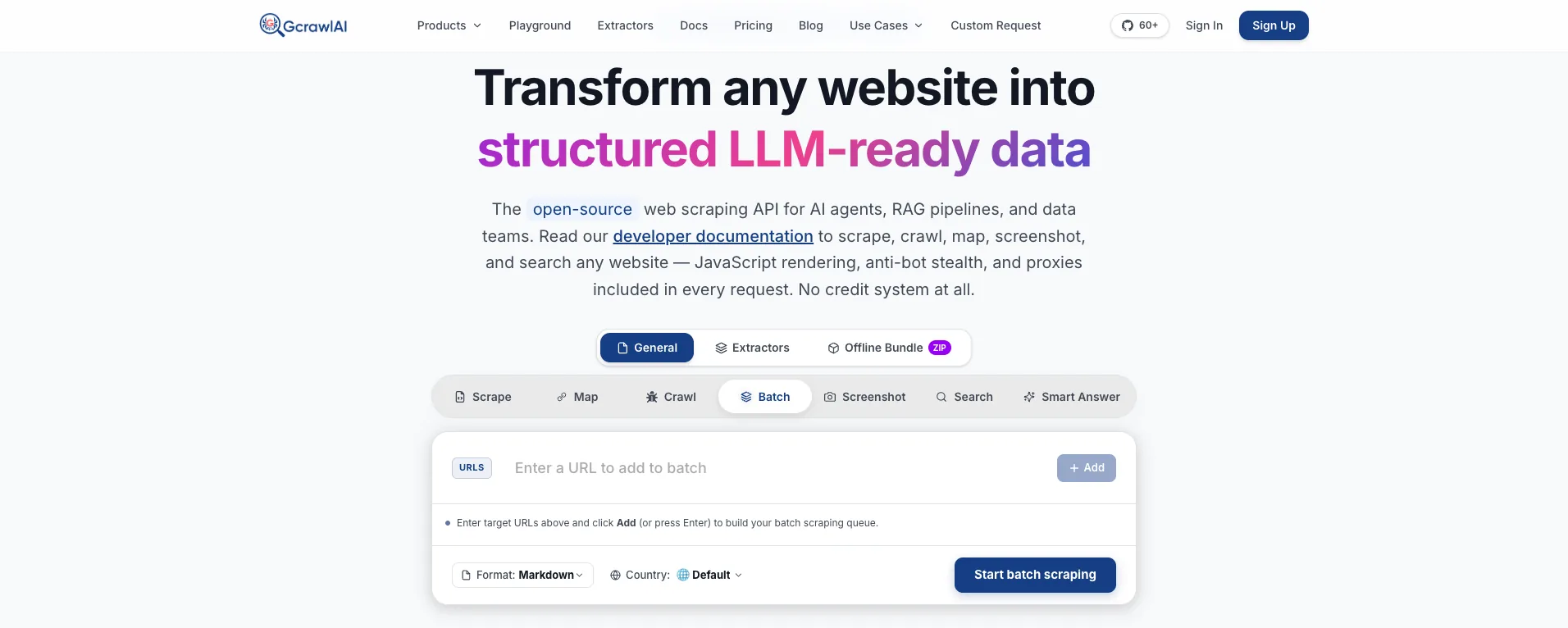
The homepage puts it plainly: JavaScript rendering, anti-bot stealth and proxies are included in every request, with no credit system. That matters here because the signals in this guide are read together. Fixing your IP but not your handshake, or your headers but not your browser, only moves the contradiction somewhere else.
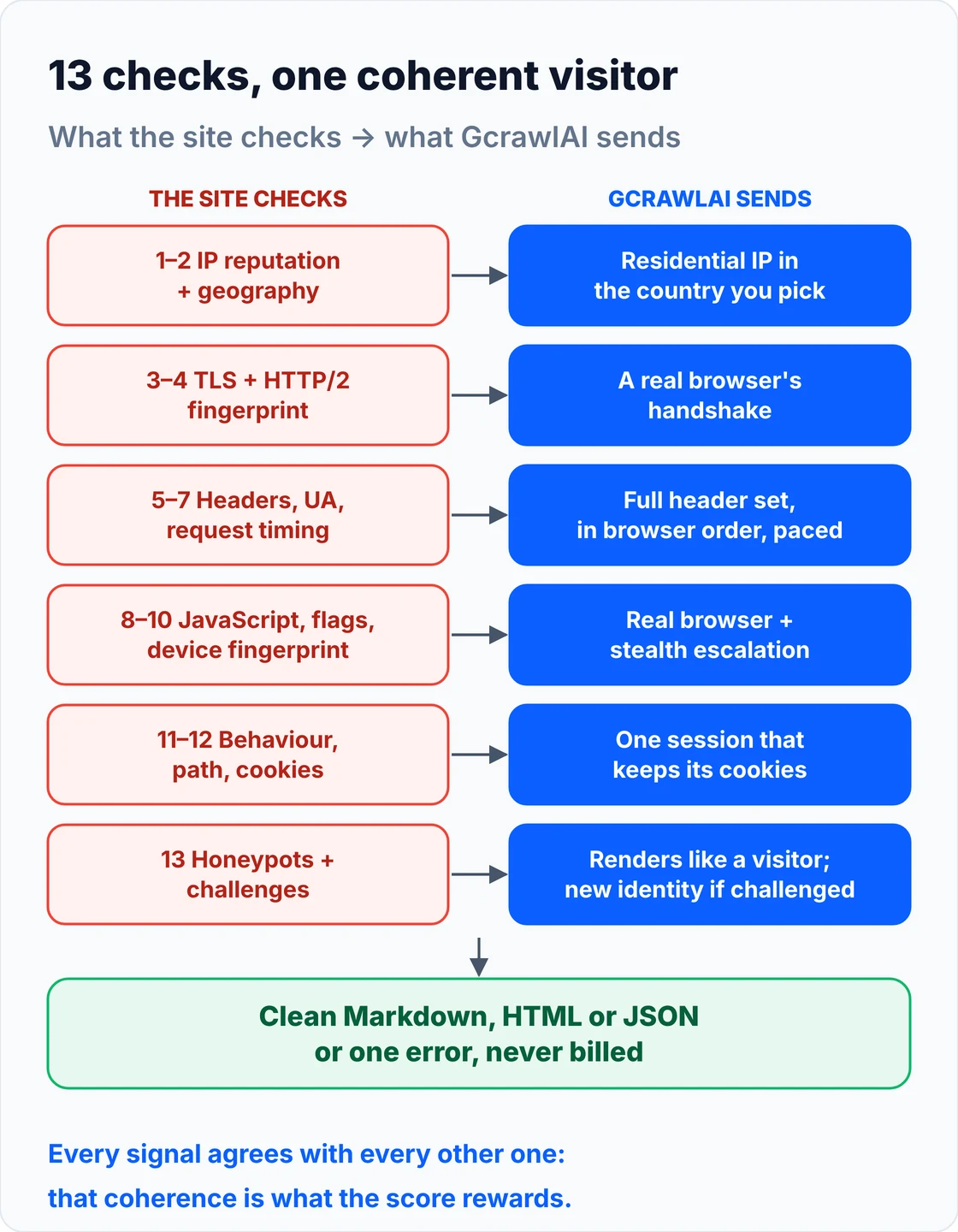
Your code asks for a page and gets content back, or one error to queue. A 4xx from the GcrawlAI API itself means a key, plan or payload problem, not something to retry:
# pip install gcrawl-sdk
"""Fetch a protected page through GcrawlAI: every detection layer handled in one request."""
import logging
import os

from gcrawl_sdk import GcrawlClient, ScrapeOptions
from gcrawl_sdk.exceptions import GcrawlAPIError, GcrawlTimeoutError

log = logging.getLogger("scraper")
gc = GcrawlClient(api_key=os.getenv("GCRAWL_API_KEY", "gc-YOUR_API_KEY"))


def fetch_markdown(url: str, geo: str = "US") -> str | None:
    """One request: rendering, residential IPs, stealth escalation and internal retries included."""
    try:
        page = gc.scrape(url=url, options=ScrapeOptions(markdown_enabled=True, proxy_geo=geo), wait=True)
    except GcrawlTimeoutError:
        log.warning("timeout, requeue: %s", url)          # the API call itself timed out
        return None
    except GcrawlAPIError as err:
        if err.status_code < 500:                         # key, plan or payload problem: fix, don't retry
            log.error("request rejected %s: %s", err.status_code, err.response_data)
            raise
        log.warning("api %s, requeue: %s", err.status_code, url)
        return None
    return page.markdown or None                          # empty = nothing useful on the page


if __name__ == "__main__":
    md = fetch_markdown("https://example.com/")
    print(md[:300] if md else "no content, queued for retry")
- Network signals (1–4): rotating residential IPs with country targeting, and a real browser's TLS and HTTP/2 handshake.
- Request signals (5–7): the browser's own header set, User-Agent and client hints, with concurrency limits per plan.
- Page-load signals (8–10): real JavaScript execution and stealth escalation for the automation and fingerprint checks.
- Session signals (11–13): sessions that keep cookies, pages rendered the way a visitor sees them, and a fresh identity when a challenge appears.
- Scrape, crawl, screenshots and Search API: scrape to Markdown, HTML or JSON, crawl whole sites, capture screenshots, or use the Search API.
- For developers and AI agents: a Python SDK, an MCP server for Claude, Cursor and other agents, the Playground to test a page that keeps flagging you, and the docs.
The MIT-licensed core runs on your own servers if you'd rather own the stack:
git clone https://github.com/GramosoftAI/GcrawlAI.git && cd GcrawlAI
python -m venv .venv && source .venv/bin/activate
pip install -r requirements.txt && playwright install
cp .env.example .env                      # add your database, Redis and proxy settings
python -m api.core.db_setup
redis-server &
celery -A web_crawler.crawler.celery_config worker -l info &
uvicorn api.api:app --port 8000
Pricing is a free plan of 50 requests a month with no card, paid plans from $0.67 to $1.45 per 1,000 requests, and a self-hosted core that costs nothing. The plan table is in the cost section.
Where it falls short: GcrawlAI fetches public pages; it won't log in for you or get past a site that refuses every visitor on a path, and those URLs come back as an error. Every request runs a browser through residential IPs, so plain pages cost the same as hard ones, and the ecosystem is younger, with fewer ready-made integrations.
"Teams ask us which signal got them blocked. Usually it's two signals disagreeing: a Chrome User-Agent on a Python handshake, or a US IP with a German timezone. The detector isn't looking for a bot. It's looking for a story that doesn't add up."
Rajesh Kannan, Co-Founder & CTO at Gramosoft
How detection works: a score, not a rule
Anti-bot systems don't block on one clue. They collect signals from the connection, the request, the page and the session, add them into a risk score, and act on thresholds: let the visit through, show a challenge, or block it. Each signal is weak alone. Signals that contradict each other are the strongest evidence of all.
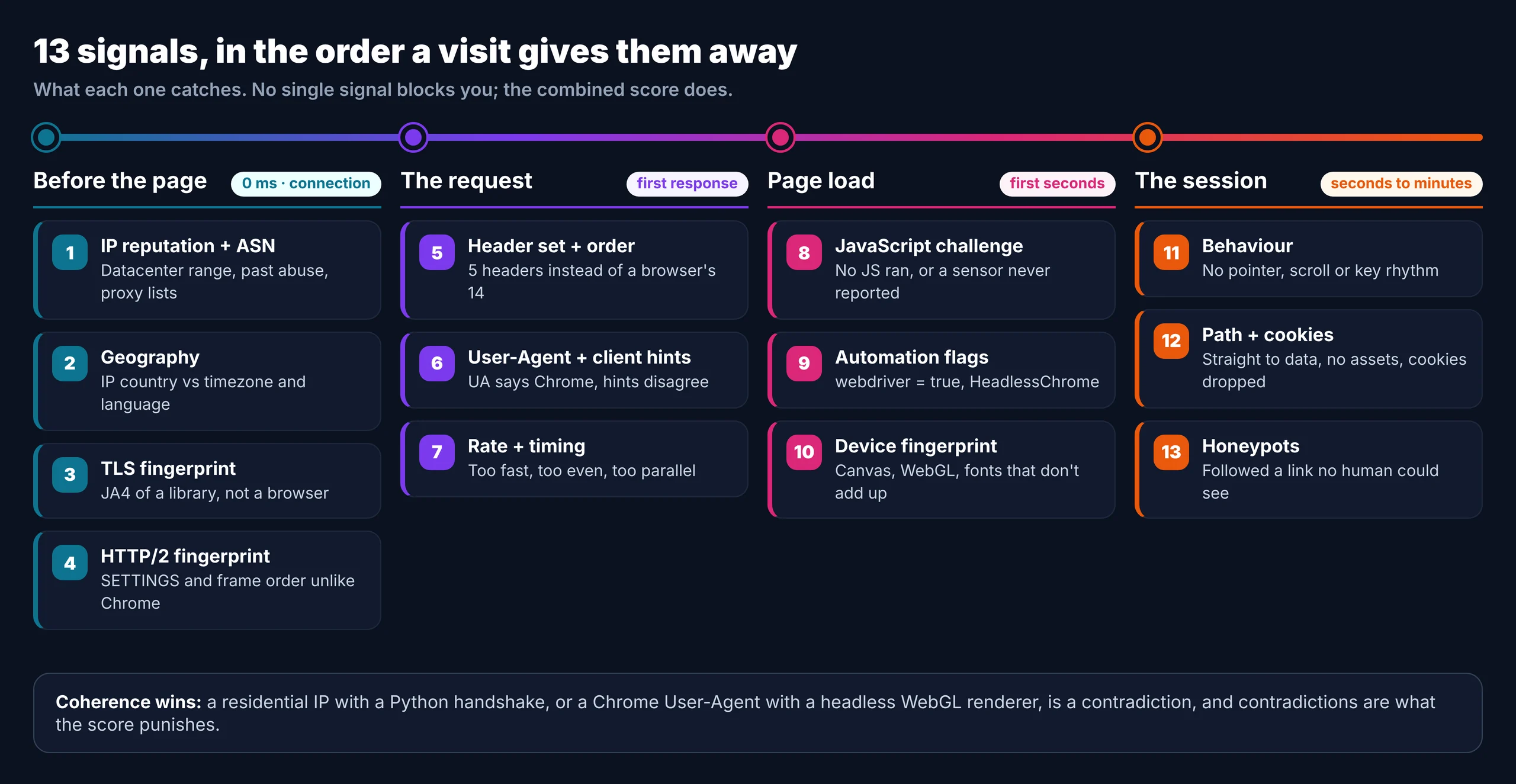
The stakes are high on both sides. Imperva's 2025 Bad Bot Report found automated traffic made up 51% of web traffic in 2024, the first time in a decade it passed human traffic. Most protected sites buy detection from a handful of vendors: Cloudflare, Akamai, DataDome, HUMAN (formerly PerimeterX), Kasada, AWS WAF and Imperva. Their checks differ in depth, but they read the same 13 kinds of signal.
- Allow: the page loads normally.
- Challenge: a JavaScript interstitial or a CAPTCHA, which is usually the visible result of signals you tripped earlier.
- Block: a 403, a 429, or a vendor block page.
- Soft block: a 200 with empty results or a decoy page, the hardest to notice.
Detection is also moving later in the visit. In July 2026 Cloudflare introduced Precursor, a session-based script that collects pointer movement, keyboard timing, focus changes and page visibility, and keeps its behavioural profile across page refreshes. A clean first request no longer guarantees a clean tenth one.
What our own tests showed
To see what sites actually read, we pointed four clients at a local server on November 2, 2026 and recorded each TLS handshake, header set and JavaScript view: python-requests, httpx, curl_cffi with its Chrome profile, and Chromium 141 driven by Playwright. No site was involved, so nothing here depends on any vendor's rules.
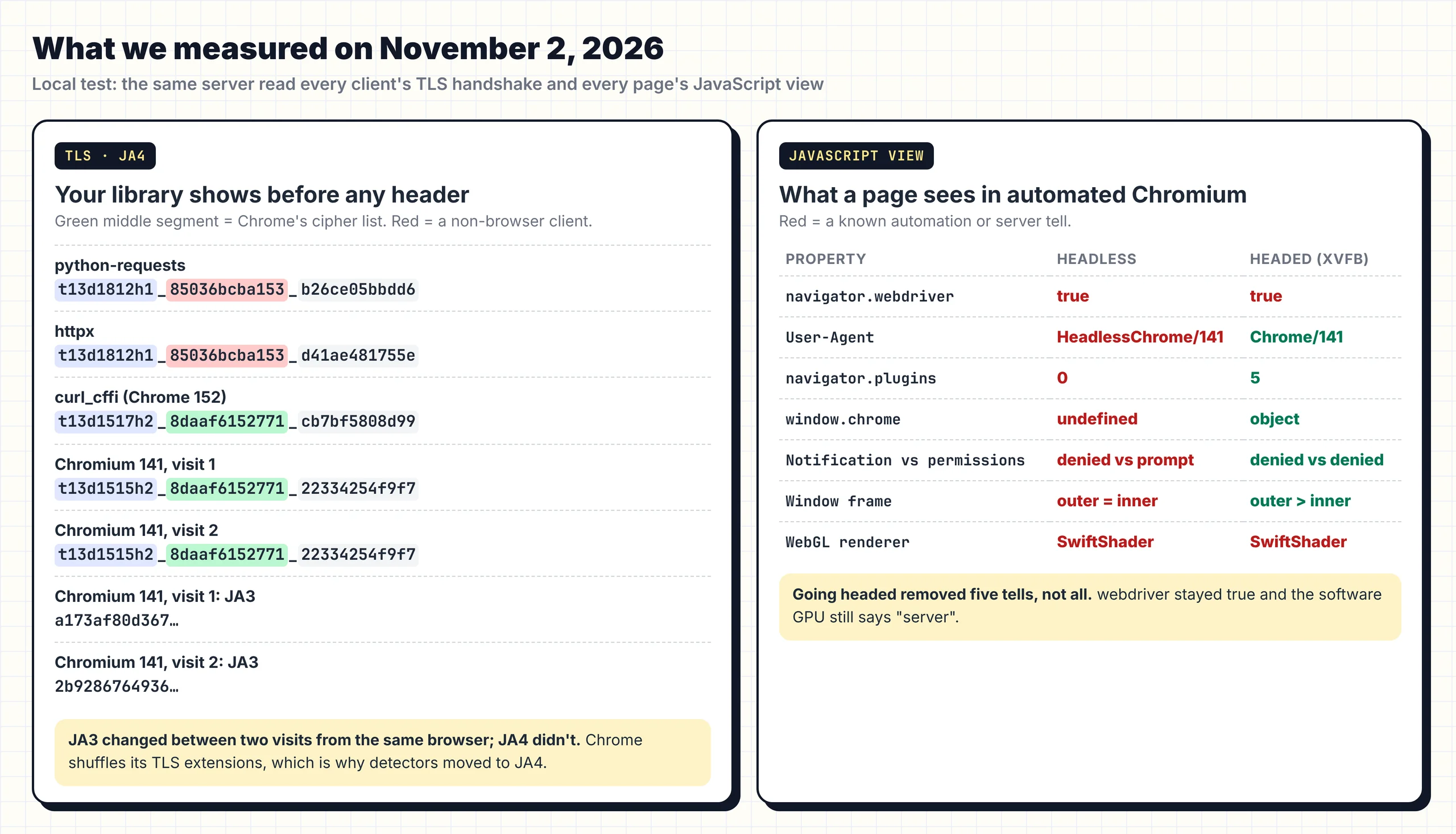
Three findings stand out. The Python clients announced themselves before sending a single header: their JA4 fingerprint shares nothing with Chromium's. Chromium's own JA3 hash changed between two visits while its JA4 stayed fixed, which is why detectors moved to JA4. And default headless Chromium showed all seven automation tells we checked; running it headed fixed five of them.
The capture scripts (a raw TLS listener that computes JA3 and JA4, a header echo server and the JavaScript probe below) are in the code download, so you can run them against your own stack.
Before the page loads: signals 1 to 4
The first four signals are read at the connection, before the site renders anything or runs a script. They're cheap for the defender and decisive: an IP from a cloud provider or a handshake from a Python library can end the visit at the edge, and no header or delay you add later is ever read.
1. IP reputation and ASN
Every IP belongs to a network (its ASN), and that network says who you are. Ranges owned by AWS, Google Cloud, Azure or DigitalOcean start with little trust, because people don't browse from server farms. Residential and mobile IPs start neutral. Addresses with a history of abuse, or listed by proxy and VPN databases, start worse. The same scraper that works from your laptop and fails on a cloud server is almost always failing here.
2. Geography
Detectors compare where the IP is with what the browser says: timezone, Accept-Language, locale and sometimes currency. A residential IP in Brazil with a US English browser and a New York timezone is a contradiction a real visitor rarely produces. Pick the proxy country to match the audience, then make the browser agree with it.
3. TLS fingerprint (JA3 and JA4)
Every HTTPS connection opens with a ClientHello listing the client's ciphers, extensions and settings. Hashing it gives a fingerprint of the software, not the person. JA3 hashed the list in order; since Chrome started shuffling its extensions in 2023, the field moved to JA4, which sorts them first. Our capture shows both effects:
| Client | Ciphers / extensions | ALPN | JA4 |
|---|---|---|---|
| python-requests 2.34 | 18 / 12 | http/1.1 | t13d1812h1_85036bcba153_b26ce05bbdd6 |
| httpx 0.28 | 18 / 12 | http/1.1 | t13d1812h1_85036bcba153_d41ae481755e |
| curl_cffi, Chrome 152 profile | 15 / 17 | h2 | t13d1517h2_8daaf6152771_cb7bf5808d99 |
| Chromium 141, two visits | 15 / 15 | h2 | t13d1515h2_8daaf6152771_22334254f9f7 both times |
The Python clients offer more ciphers, no HTTP/2 and a completely different cipher hash. curl_cffi's Chrome profile matched Chromium's cipher hash exactly, with a newer Chrome's extension list. Chromium's JA3 was a173af80… on the first visit and 2b928676… on the second, while JA4 didn't move.
4. HTTP/2 fingerprint
A browser that negotiates HTTP/2 sends a SETTINGS frame with its own values, window updates and pseudo-header order. Chrome's pattern differs from Firefox's, and both differ from most HTTP libraries. Our Python clients offered only HTTP/1.1, which on a site every browser reaches over HTTP/2 is a signal in itself. Akamai in particular is known for reading this layer closely.
The request: signals 5 to 7
Once the connection is accepted, the site reads the request itself: which headers arrived, in what order, what the User-Agent claims, and how fast requests keep coming. These are the signals most tutorials cover, and they're the easiest to fix, but fixing them alone does nothing if signals 1 to 4 already flagged you.
5. Header set and order
Browsers send a full, predictable set of headers in a fixed order. Our echo server recorded what each client sent to the same URL:
| Client | Headers | Order (first five) |
|---|---|---|
| python-requests | 5 | Host, User-Agent, Accept-Encoding, Accept, Connection |
| httpx | 5 | Host, Accept, Accept-Encoding, Connection, User-Agent |
| curl_cffi (Chrome profile) | 17 | sec-ch-ua, sec-ch-ua-mobile, sec-ch-ua-platform, upgrade-insecure-requests, user-agent |
| Chromium 141 (headless) | 14 | Host, Connection, sec-ch-ua, sec-ch-ua-mobile, sec-ch-ua-platform |
No Accept-Language, no sec-fetch-*, no client hints: a five-header request is easy to spot. (curl_cffi's extra headers over plain HTTP include an HTTP/2 upgrade request, which wouldn't appear on HTTPS.)
6. User-Agent and client hints
The default User-Agents were python-requests/2.34.2 and python-httpx/0.28.1: an announcement, not a disguise. Headless Chromium sent HeadlessChrome/141.0.0.0, and its sec-ch-ua listed Chromium without "Google Chrome". Swapping in a Chrome User-Agent string fixes the label but not the handshake, so the request now claims Chrome while its TLS says Python, a stronger signal than the honest default.
7. Request rate and timing
Detectors watch volume per IP, concurrency, and the spacing between requests. A request exactly every 500 ms is mechanical; so are ten parallel connections from one address. Rate limits answer with 429s and often a Retry-After header; ignoring it turns a warning into a block. Pace with jitter, keep one or two requests in flight per site, and back off when told to.
Page load: signals 8 to 10
If the page runs JavaScript, it can inspect the browser that's running it. This is where plain HTTP clients fail outright, because they never run the script, and where automated browsers get caught, because the script can see they're automated. These three signals decide most fights with headless browsers.
8. JavaScript challenges
Anti-bot scripts run in the page, collect a sensor payload and exchange it for a cookie that later requests must carry. A client that never runs JavaScript never gets that cookie, so protected requests fail or return a challenge page such as Cloudflare's "Just a moment…". Some vendors add proof-of-work puzzles or WebAssembly checks that are harder to fake than plain JavaScript.
9. Automation flags
Under automation, navigator.webdriver is true by the WebDriver standard, and headless mode leaves more traces. This probe prints what a page sees:
"""What does an automated Chrome reveal to a page's JavaScript? Prints the values anti-bot scripts commonly read.
pip install playwright && playwright install chromium
Run headless:   python headless_probe.py
Run headed:     python headless_probe.py --headed        (on a server: xvfb-run python headless_probe.py --headed)
"""
import json, sys
from playwright.sync_api import sync_playwright

PROBE = """async () => {
  const gl = document.createElement('canvas').getContext('webgl');
  const dbg = gl && gl.getExtension('WEBGL_debug_renderer_info');
  let perm = 'n/a';
  try { perm = (await navigator.permissions.query({name: 'notifications'})).state; } catch (e) {}
  return {
    webdriver: navigator.webdriver,
    userAgent: navigator.userAgent,
    plugins: navigator.plugins.length,
    languages: navigator.languages.join(','),
    webglRenderer: dbg ? gl.getParameter(dbg.UNMASKED_RENDERER_WEBGL) : 'no WebGL',
    windowChrome: typeof window.chrome,
    notification: `${Notification.permission} / permissions API: ${perm}`,
    screen: `${screen.width}x${screen.height}, window outer ${outerWidth}x${outerHeight}`,
  };
}"""

headed = "--headed" in sys.argv
with sync_playwright() as p:
    browser = p.chromium.launch(headless=not headed)
    page = browser.new_page()
    page.set_content("<html><body>probe</body></html>")
    print(json.dumps(page.evaluate(PROBE), indent=2))
    browser.close()
Our results with Chromium 141 on a Linux server:
| Property | Headless (default) | Headed (under Xvfb) |
|---|---|---|
navigator.webdriver |
true | true |
| User-Agent | HeadlessChrome/141 | Chrome/141 |
navigator.plugins |
0 | 5 |
window.chrome |
undefined | object |
| Notification vs permissions API | denied vs prompt (mismatch) | denied vs denied |
| Window frame | outer = inner size | outer larger than inner |
| WebGL renderer | SwiftShader (software) | SwiftShader (software) |
Running headed fixed five tells, but webdriver stayed true and the software GPU still says "server". Patching properties one by one creates its own signal: detectors check whether a property has been overridden, not only its value.
10. Device fingerprint
Scripts draw hidden canvas and WebGL images, read the GPU renderer, list fonts, measure audio output and check screen size and hardware. Faking any one is easy; making them agree is hard. A Windows User-Agent with Linux fonts, or a gaming GPU claimed beside a SwiftShader renderer, is a contradiction. The fix is a real, consistent device profile, not a random one per request.
The session: signals 11 to 13
The last signals build up over seconds or minutes: how the visitor moves, what it requests, whether it keeps its cookies, and whether it touches things no person could see. A scraper can pass every check on the first page and still be flagged on the fiftieth, because these signals score the session, not the request.
11. Behaviour
People move the pointer in curves, scroll in bursts, pause to read and type with uneven gaps. Scripts either produce no events at all or produce them too evenly. Session-level scripts like Cloudflare's Precursor score that rhythm across the whole visit, so behaviour is also why very high page rates from one session look wrong even with perfect fingerprints.
12. Navigation path and cookies
A visitor arrives from somewhere, loads images and stylesheets, and keeps cookies between pages. A scraper often jumps straight to deep URLs, skips every asset, walks pagination in perfect order, and drops cookies between requests, so it never looks like a returning visitor. Anti-bot cookies such as __cf_bm, _abck or datadome are tied to the identity that earned them; reuse them with a different IP and they become evidence.
13. Honeypots
A honeypot is a link or form field hidden from people with CSS, off-screen positioning or aria-hidden. A crawler that follows every anchor in the raw HTML, or fills every input, flags itself at once. This filter drops the obvious traps before your crawler follows or fills them:
"""Drop links and form fields a human can't see before your crawler follows or fills them.

Static HTML only catches inline styles and attributes; trap classes defined in a stylesheet need a real
browser (Playwright's locator.is_visible()). Use this as a first filter, not the only one.
pip install beautifulsoup4
"""
import re
from bs4 import BeautifulSoup

HIDDEN_STYLE = re.compile(
    r"display\s*:\s*none|visibility\s*:\s*hidden|opacity\s*:\s*0(\.0+)?\s*(;|$)"
    r"|(left|top)\s*:\s*-\d{3,}px|(width|height)\s*:\s*0(px)?\s*(;|$)", re.I)


def is_hidden(tag):
    """True if the tag or any ancestor is hidden by attribute or inline style."""
    for node in [tag, *tag.parents]:
        if getattr(node, "attrs", None) is None:
            continue
        if node.has_attr("hidden") or node.get("aria-hidden") == "true":
            return True
        if HIDDEN_STYLE.search(node.get("style", "")):
            return True
    return False


def visible_links(html, base_selector="a[href]"):
    soup = BeautifulSoup(html, "html.parser")
    keep, traps = [], []
    for a in soup.select(base_selector):
        bucket = traps if is_hidden(a) or "nofollow" in (a.get("rel") or []) else keep
        bucket.append(a["href"])
    return keep, traps


def fillable_fields(html):
    """Visible inputs only: never fill a field a person couldn't see."""
    soup = BeautifulSoup(html, "html.parser")
    return [i.get("name") for i in soup.select("input[name], textarea[name]")
            if i.get("type") != "hidden" and not is_hidden(i)]


if __name__ == "__main__":
    page = """
    <a href="/products">Products</a>
    <a href="/trap-1" style="display:none">offers</a>
    <div style="position:absolute; left:-9999px"><a href="/trap-2">archive</a></div>
    <a href="/trap-3" aria-hidden="true" tabindex="-1">.</a>
    <a href="/admin" rel="nofollow">admin</a>
    <form><input name="email"><input name="website" style="visibility:hidden"><input type="hidden" name="csrf"></form>
    """
    keep, traps = visible_links(page)
    print("follow:", keep)
    print("skip:  ", traps)
    print("fill:  ", fillable_fields(page))
    assert keep == ["/products"] and len(traps) == 4 and fillable_fields(page) == ["email"]
    print("All checks passed.")
Static parsing only sees inline styles; traps hidden by a stylesheet need a real browser's visibility check, such as Playwright's is_visible().
Which signal caught you?
Read the symptom before changing anything. Each pattern points to a layer, and fixing the wrong layer wastes a week. Hold everything constant and change one thing at a time: the IP type, then the client, then the browser. Whichever change flips the result is the signal that caught you, and the table shows where GcrawlAI covers it.
| Symptom | Likely signals | Where GcrawlAI fits |
|---|---|---|
| Works at home, blocked on a cloud server | 1 IP reputation | GcrawlAI routes through residential IPs |
| 403 on the first request in Python, fine in Chrome | 3–6 TLS, HTTP/2, headers | GcrawlAI sends a real browser's handshake and headers |
| Wrong prices or a consent wall | 2 geography | GcrawlAI picks the IP country per request |
| 429s after a burst | 7 rate and timing | GcrawlAI concurrency limits and async crawl jobs |
| "Just a moment…" or a challenge page | 8 JavaScript challenge | GcrawlAI renders every page in a real browser |
| Headless works locally, fails on the real site | 9–10 flags and fingerprint | GcrawlAI stealth escalation inside the request |
| Fine for minutes, then blocked | 11–12 behaviour and session | GcrawlAI retries with a fresh identity |
| Blocked right after crawling links | 13 honeypots | Crawl with GcrawlAI and filter hidden links |
What staying undetected costs
Every signal you fix yourself costs money or time: residential bandwidth, browser servers, and the engineer who keeps them matched to each site's checks. For 100,000 successful protected pages a month, credit-based scraping APIs cost $249 to $399 and GcrawlAI costs $101; for plain pages that never trigger detection, GcrawlAI is pricier.
| Option, 100,000 successful pages a month | Plain HTML pages | Protected pages (JS rendering + premium proxies) | Are failed requests billed? |
|---|---|---|---|
| GcrawlAI (every request rendered, residential IPs included) | $101 (Growth $79 + 20,000 overage at $1.10 per 1,000) | $101 (same request, no multiplier) | No: failed requests are never charged |
| ScraperAPI | $49 (Hobby, 100,000 credits) | $299 (Business; 25 credits per page = 2.5M credits) | Charges only 200 and 404 responses |
| ZenRows | $39 (Build B3, 120,000 credits) | $399 (Growth G3; 25 credits per page = 2.5M credits) | Failed requests never charged; 404 and 410 count as successful |
| ScrapingBee | $49 (Freelance, 250,000 credits; JS off) | $249 (Business; 25 credits per page = 2.5M credits) | Charges only 200, 404 and 410 |
List-price arithmetic, not a benchmark. Credit costs and billing rules come from ScraperAPI's credit docs, ZenRows' pricing docs and ScrapingBee's FAQ, checked November 1, 2026. The honest read: for plain HTML that never trips detection, ZenRows, ScraperAPI and ScrapingBee cost less than GcrawlAI. GcrawlAI wins on pages behind the signals in this guide, because residential IPs, a real browser and stealth are already in the one request.
GcrawlAI plans (GcrawlAI pricing, checked October 28, 2026):
| Plan | Price | Requests/month | Concurrent | Per 1,000 | Overage per 1,000 |
|---|---|---|---|---|---|
| Free | $0 forever, no card | 50 | 2 | – | – |
| Starter | $29/month | 20,000 | 10 | $1.45 | $1.60 |
| Growth (most popular) | $79/month | 80,000 | 35 | $0.99 | $1.10 |
| Pro | $199/month | 250,000 | 50 | $0.80 | $0.90 |
| Scale | $499/month | 750,000 | 100 | $0.67 | $0.75 |
| Enterprise | Volume pricing | 2M+ | Custom | – | – |
| Self-hosted | $0 (MIT) | Your servers | Your servers | Infrastructure only | – |
Every plan, Free included, has scrape, crawl, the Search API, JavaScript rendering, residential IP rotation and stealth escalation in each request. Failed requests are never charged. Annual billing charges 10 months for 12, unused requests on paid plans roll over once, and Indian customers are billed in INR with a GST invoice.
When doing it yourself is enough
Many sites run no serious detection at all. For those, a polite client with a full header set, sensible pacing and cookies is enough, and the probes in this guide tell you quickly whether a site reads deeper signals. Bring in GcrawlAI when blocks come back after every fix and keeping signals consistent becomes the job.
Even then you can stay on your own servers: the MIT-licensed GcrawlAI core self-hosts for free, and the free Cloud plan's 50 requests a month are enough to test the pages that keep flagging you. Paste one into the Playground to compare. For the build-or-buy trade-off, read web scraping with Python vs a scraping API.
"Detection is a moving target because the vendors retrain every week. The scrapers that last aren't the cleverest; they're the most boring: one consistent identity, a polite pace, and the humility to stop when a site says no."
Rajesh Kannan, Co-Founder & CTO at Gramosoft
Detection is also a signal to respect
Being detected isn't always a puzzle to solve. A login wall, a terms-of-service ban, personal data, a robots.txt disallow or a refusal that survives a clean session are the site saying no. Looking like a person doesn't give you permission to data behind a control, and the right answer is an API, a licence or a request.
Keep request rates low enough never to burden a site, identify yourself where that's expected, and don't collect personal data you have no basis to hold. For the legal background, read what web scraping is and where it's legal, and get advice for your own case.
Frequently asked questions
How do websites detect scrapers?
They score many signals together: IP reputation, geography, TLS and HTTP/2 fingerprints, headers, User-Agent, timing, JavaScript challenges, automation flags, device fingerprints, behaviour, cookies and honeypots. No single check decides; the combined score and contradictions between layers do.
What is the most common reason scrapers get blocked?
The network layer: a datacenter IP combined with a non-browser TLS fingerprint. Both are read at the connection, before any header or page content, so later fixes never get a chance to count.
Can websites detect headless Chrome?
Yes. In our test, default headless Chromium reported navigator.webdriver true, "HeadlessChrome" in its User-Agent, zero plugins, no window.chrome and a software WebGL renderer. Running it headed fixed some tells, not all.
What is JA4, and how is it different from JA3?
Both hash the TLS ClientHello. JA3 keeps the extension order, so Chrome's shuffled extensions give it a new JA3 on each connection; JA4 sorts them first and stays stable. In our test Chromium's JA3 changed between visits while JA4 didn't.
Does rotating User-Agents stop detection?
No. The TLS handshake, header order and JavaScript checks still identify the client, and a User-Agent that disagrees with them adds a contradiction. Rotation also breaks the consistent identity a session needs.
Do residential proxies stop detection?
They fix one signal: IP reputation. A residential IP with a Python handshake, a headless browser or a mismatched timezone still gets caught. Proxies help only when everything else already looks like a browser.