By Rajesh Kannan, Co-Founder & CTO, Gramosoft · Last updated: · Proxy prices checked on Decodo and Oxylabs pricing pages on November 1, 2026
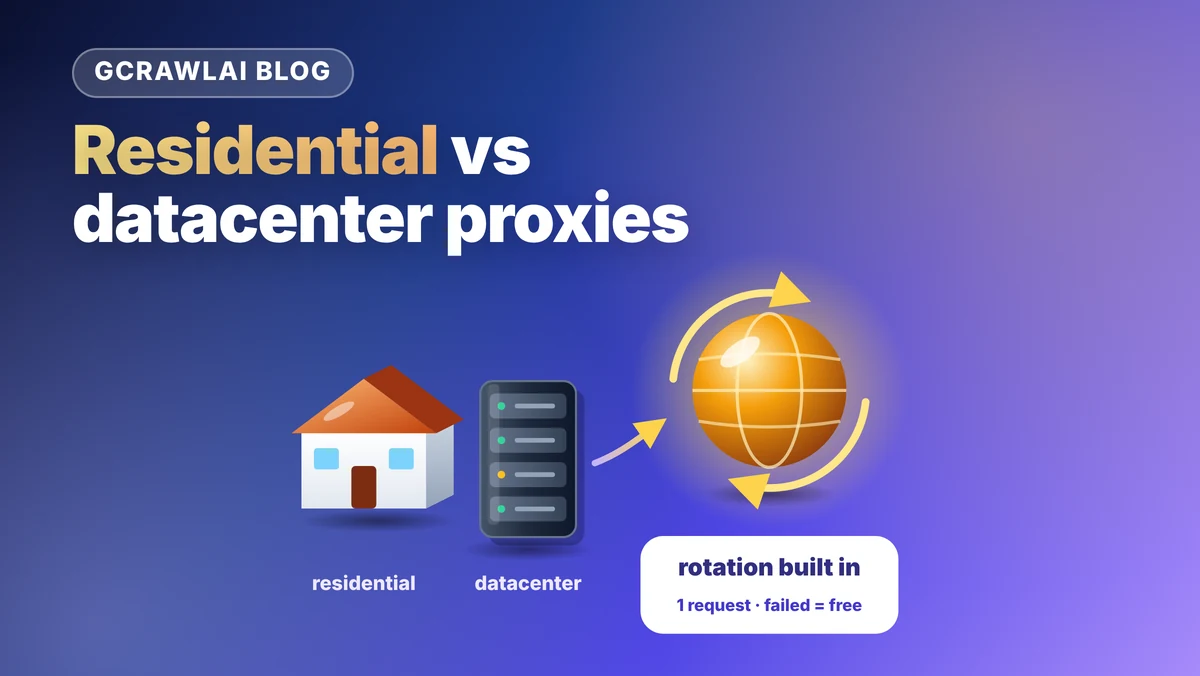
Residential and datacenter proxies differ in one thing that matters more than any other: who owns the IP address a website sees. That one fact drives cost, speed and how often you get blocked. How the IP rotates is a separate decision, and getting it wrong breaks scrapers that bought the right proxies. This guide starts with the GcrawlAI route, where residential IPs and rotation are built into every request, then explains each proxy type, how rotation works under the hood, what each option costs, and Python code to run your own pool.
TL;DR
- Least work: GcrawlAI sends every request through an in-country residential IP and retries a blocked page on a fresh one. One request per page, failed requests never charged, 50 free requests a month.
- Datacenter proxies are cheap and fast but come from hosting networks that sites can identify in one lookup. Start here for unprotected sites.
- Residential proxies use consumer ISP addresses, are billed per GB (from $2 to $6 per GB at Decodo and Oxylabs) and get through far more bot checks, but not all of them.
- ISP proxies are static IPs registered to consumer ISPs but hosted in data centres: the middle ground for long sessions.
- Rotation is a separate choice: rotate per request for independent pages, keep a sticky session for multi-step flows, and always switch IPs after a 403 or 429.
What is the difference between residential and datacenter proxies? A datacenter proxy uses an IP owned by a hosting or cloud company; a residential proxy uses an IP that a consumer internet provider assigned to a home connection. Datacenter is cheaper and faster but easier to block. GcrawlAI uses residential IPs with rotation built into every request.
Quick comparison (prices checked November 1, 2026):
| Option | IP comes from | Billed by | Block risk | Best for |
|---|---|---|---|---|
| GcrawlAI (managed) | Residential, in-country | Successful request | Low; blocked pages retried | Protected sites, no pool to run |
| Datacenter proxy | Hosting or cloud network | IP or GB | High on protected sites | Unprotected pages at volume |
| Residential proxy | Consumer ISP connections | GB | Lower | Protected and geo-specific pages |
| ISP (static residential) | ISP-registered, hosted in data centres | IP | Medium | Long sessions, one stable IP |
| Mobile proxy | Mobile carrier networks | Port or GB | Lowest IP risk | Mobile-only content |
How GcrawlAI handles residential IPs and rotation for you
GcrawlAI picks the proxy type and the rotation for you. Every request goes out through a residential IP in the country you choose, each page keeps one IP while it loads, and a blocked page is retried on a fresh IP from another residential pool. You pay one request for a successful page and nothing for a failed one.
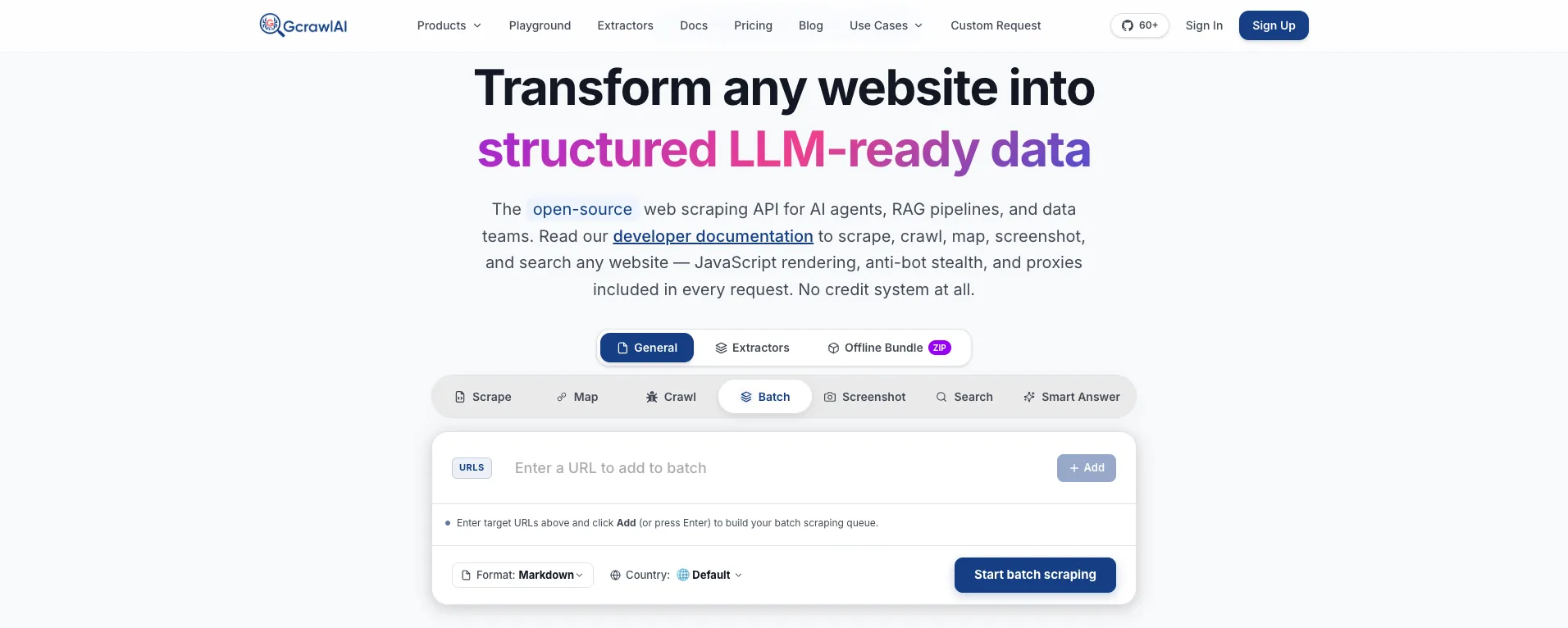
The homepage says it plainly: JavaScript rendering, anti-bot stealth and proxies are included in every request, with no credit system. The Batch tab shown above takes a list of URLs, a format and a country, and runs them as one job.
Here is what the open-source core does with each page, from its proxy code: it gives the page its own session ID so the exit IP stays fixed while the page renders, picks the country from proxy_geo (or, if you don't set one, from the target's country domain or server location), prefers large consumer ISPs where the proxy network supports ISP targeting, and on a block moves to the next residential provider with a new session. The managed Cloud API runs the same logic with the proxy accounts already attached.
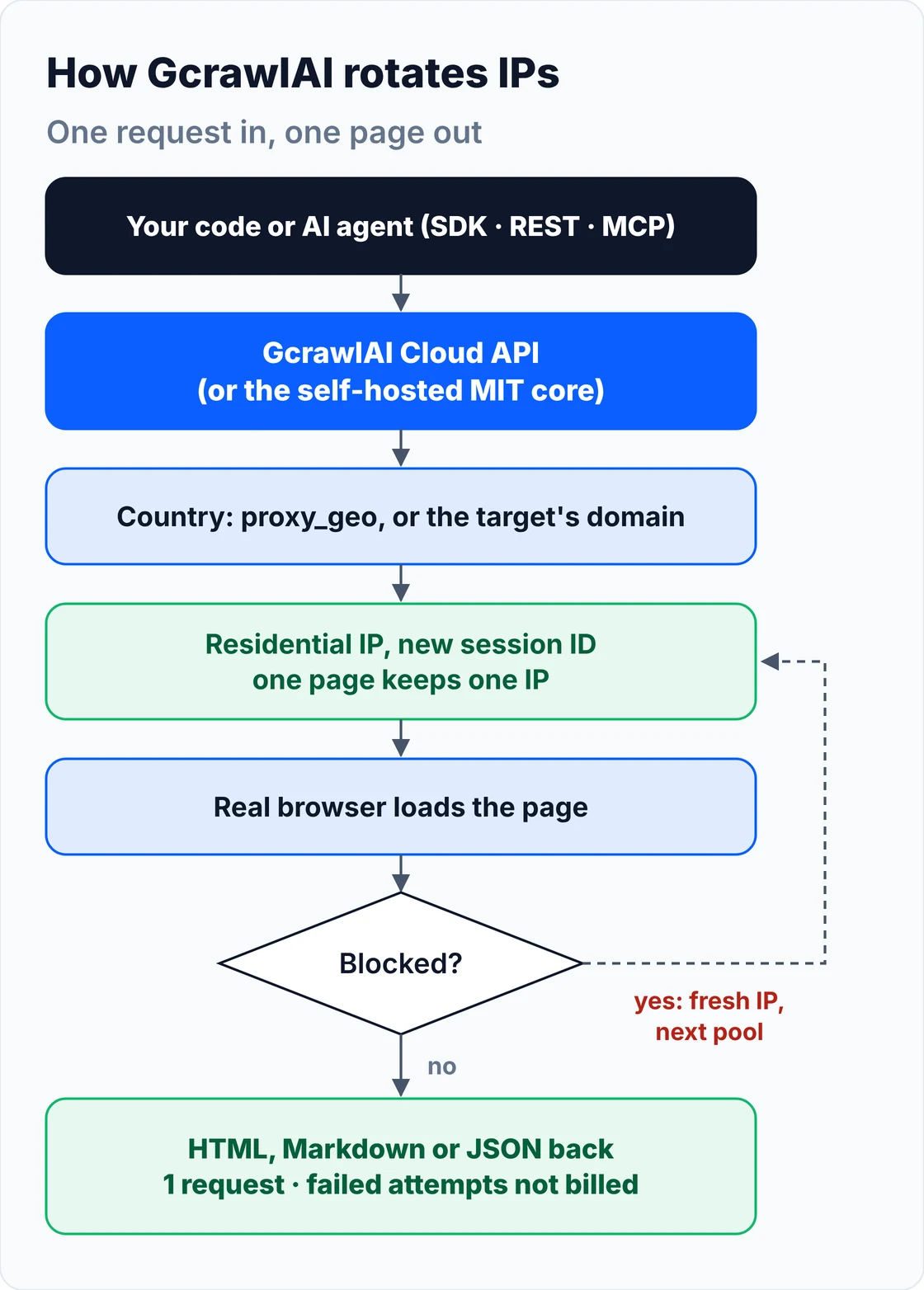
- Country targeting:
proxy_geoon scrape,geoon crawl and the Search API, so prices and results match the market you're checking. - Rotation and retries: a new IP per page, a fixed IP within a page, and a fresh IP from another pool when a page is blocked.
- Everything in one request: JavaScript rendering, residential IPs, anti-bot handling for Cloudflare, DataDome, Akamai and PerimeterX, CAPTCHA solving, and HTML, Markdown or JSON output.
- Bulk jobs: batch runs and async crawls with webhooks, in place of your own queue and proxy pool.
- Agents and testing: a Python SDK, an MCP server for Claude, Cursor and other agents, the Playground, a free proxy list and the docs.
The same product page from the US and from India, then a crawl, with no proxy code:
# pip install gcrawl-sdk
from gcrawl_sdk import GcrawlClient, ScrapeOptions

client = GcrawlClient(api_key="gc-YOUR_API_KEY")   # or GCRAWL_API_KEY; base_url="http://localhost:8000" when self-hosted

if __name__ == "__main__":
    # No proxy URL, no pool, no rotation code: every request goes out through a residential IP,
    # in the country you ask for, and a blocked attempt is retried on a fresh IP. One request, all included.
    us = client.scrape(url="https://www.example-shop.com/product/123",
                       options=ScrapeOptions(proxy_geo="US", markdown_enabled=True), wait=True)
    print(us.markdown[:200])

    # Same product from India: the exit IP moves to an Indian residential network.
    india = client.scrape(url="https://www.example-shop.com/product/123",
                          options=ScrapeOptions(proxy_geo="IN"), wait=True)
    print(india.markdown[:200])

    # A 200-page crawl: each page is one request; pages that still fail are not billed.
    job = client.crawl(url="https://docs.example.com/", limit=200, formats=["markdown"], geo="US", wait=True)
    print(job.status, len(job.pages), "pages,", job.pages_failed, "failed (not billed)")
The MIT-licensed core runs on your own servers. You bring the residential proxy accounts; the core handles sessions, country targeting and the fallback order:
git clone https://github.com/GramosoftAI/GcrawlAI.git && cd GcrawlAI
python -m venv .venv && source .venv/bin/activate
pip install -r requirements.txt && playwright install
cp .env.example .env                      # add your database, Redis and proxy settings
python -m api.core.db_setup
redis-server &
celery -A web_crawler.crawler.celery_config worker -l info &
uvicorn api.api:app --port 8000
# .env in the self-hosted GcrawlAI core: bring your own residential proxy accounts.
# The core tries attempt 1, then 2, then 3 when a page is blocked, each with a fresh session.
ATTEMPT_1_PROXY_HOST=gate.provider-one.example
ATTEMPT_1_PROXY_PORT=8080
ATTEMPT_1_PROXY_USER=your_user
ATTEMPT_1_PROXY_PASS=your_pass
ATTEMPT_2_PROXY_HOST=gate.provider-two.example
ATTEMPT_2_PROXY_PORT=9999
ATTEMPT_2_PROXY_USER=your_user
ATTEMPT_2_PROXY_PASS=your_pass
ATTEMPT_3_PROXY_HOST=gate.provider-three.example
ATTEMPT_3_PROXY_PORT=1000
ATTEMPT_3_PROXY_USER=your_user
ATTEMPT_3_PROXY_PASS=your_pass
Pricing is a free plan of 50 requests a month with no card, paid plans from $0.67 to $1.45 per 1,000 requests, and a self-hosted core that costs nothing. The full plan table is in the cost section.
Where it falls short: you don't get raw proxy access. You can't point a mail client, a game or your own browser at GcrawlAI, pick a specific ISP, or pin one IP across hours of separate requests. Datacenter IPs aren't offered, so on easy sites a cheap datacenter proxy can cost less. Self-hosting means buying and configuring your own proxy accounts.
"Most teams don't fail because they bought the wrong proxy. They fail because they rotate at the wrong moment, or keep hammering an IP that's already burned. We put the rotation rules inside the request so nobody has to tune them per site."
Rajesh Kannan, Co-Founder & CTO at Gramosoft
What a proxy changes, and what it doesn't
A proxy changes the IP address a website sees, and with it the network owner (the ASN), the apparent location and the IP's reputation. It doesn't change your TLS fingerprint, headers, cookies or browser behaviour. That's why a residential IP alone won't rescue a scraper that looks like Python in every other way.
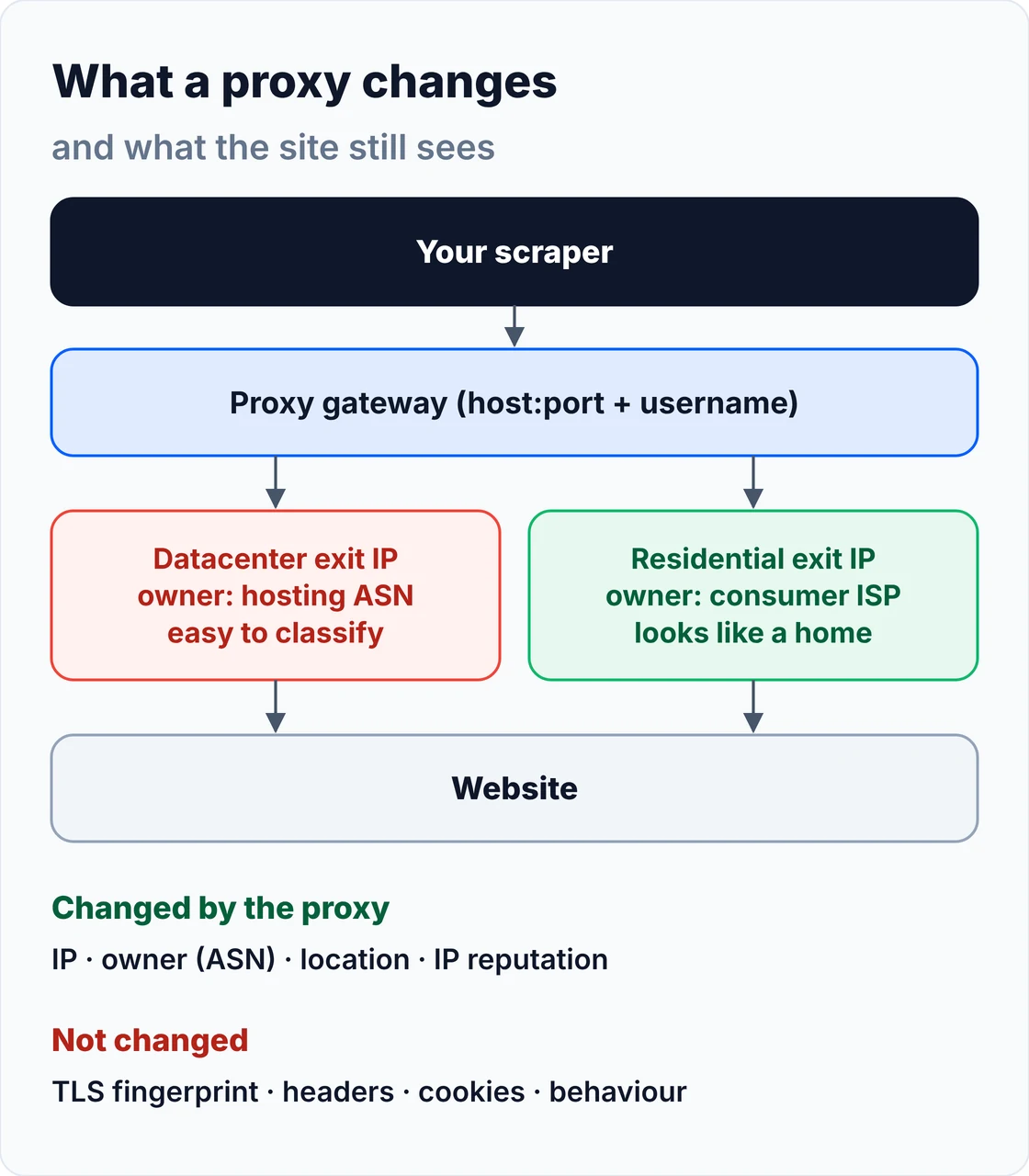
Your scraper connects to the proxy, the proxy opens the connection to the site from its exit IP, and the response comes back the same way. The site looks up the exit IP's ASN and owner, geolocates it, and checks its recent history. A hosting ASN is easy to spot: AWS publishes its IP ranges as JSON so anyone can identify AWS traffic, and the other clouds do the same. A few lines of Python can check an IP against that list:
# How a site can tell a datacenter IP in one lookup: AWS publishes its ranges as JSON.
import ipaddress
import json
import urllib.request

def load_aws_ranges():
    with urllib.request.urlopen("https://ip-ranges.amazonaws.com/ip-ranges.json", timeout=20) as r:
        data = json.load(r)
    return [ipaddress.ip_network(p["ip_prefix"]) for p in data["prefixes"]]

def is_aws(ip: str, nets) -> bool:
    addr = ipaddress.ip_address(ip)
    return any(addr in n for n in nets)

if __name__ == "__main__":
    nets = load_aws_ranges()
    for ip in ["3.5.140.2", "52.95.110.1", "49.37.200.10"]:   # replace with your proxy exit IPs
        print(ip, "AWS" if is_aws(ip, nets) else "not in AWS ranges")
Everything above the network layer still counts. If your headers or TLS handshake give you away, see our guide to fixing 403 errors in Python requests; Cloudflare in particular combines IP reputation with fingerprints, as covered in how to bypass Cloudflare when web scraping.
What is a datacenter proxy?
A datacenter proxy routes your requests through an IP address owned by a hosting or cloud provider, on a server in a data centre. It's fast, stable and cheap, often sold per IP with generous or unlimited bandwidth. The catch is that the IP's owner is obviously not a household, so protected sites can challenge whole ranges at once.
- Shared or dedicated: shared IPs are used by several customers at once; dedicated IPs are yours alone, so nobody else burns their reputation.
- Static or rotating: a fixed list of IPs you cycle through yourself, or a gateway that hands out a different IP per request.
- Subnet risk: IPs are sold in blocks, so if a neighbour in the same
/24abuses a site, the site may block the whole block, including your "fresh" IP.
Prices are low. Oxylabs' datacenter page lists shared datacenter IPs from $0.70 per IP or $0.44 per GB and dedicated IPs from $1.20 per IP; Decodo starts its datacenter traffic plans at 10 GB for $6. On documentation sites, public data portals and small shops, that's all you need.
What is a residential proxy?
A residential proxy routes your requests through an IP address that a consumer internet provider assigned to a home connection, so the site sees an ordinary broadband user. Providers reach these IPs through apps and devices that share their bandwidth, and bill per GB. You get far fewer IP-based blocks and precise locations, at a much higher price.
You don't connect to a home router directly. You connect to the provider's gateway, which forwards your request to an available exit device in the country, state or city you asked for. Because those devices go offline when people close an app or switch off a laptop, residential IPs come and go, and your code has to expect dropped connections and changing IPs.
Prices are per GB. Decodo's residential plans run from $3.75 per GB on the 3 GB plan down to $2 per GB at 1,000 GB, with pay-as-you-go at $4 per GB. Oxylabs charges $6 per GB on small usage, falling to $2.50 per GB past 1,000 GB.
Where the IPs come from matters. The good networks pay users who knowingly share bandwidth. The bad ones don't ask. The US Department of Justice dismantled the 911 S5 botnet in May 2024, which sold access to more than 19 million IP addresses taken from infected Windows computers. In January 2026 Google's threat intelligence team disrupted the IPIDEA network, which enrolled devices through SDKs hidden in apps and trojanised "free VPN" apps. Ask any provider how its IPs are sourced and how users consent.
ISP and mobile proxies: the two in-between types
ISP proxies, also sold as static residential proxies, are IP addresses registered to consumer ISPs but hosted on servers in data centres. They look residential to IP databases while staying fast and fixed. Mobile proxies use carrier IPs that many phones share through carrier-grade NAT, which makes them very hard to block, and expensive.
ISP proxies suit long sessions where one stable IP matters more than variety: a logged-in dashboard you're allowed to access, a regional QA check that runs every hour, an allow-listed partner API. They're priced per IP with bandwidth included; Oxylabs' shared ISP proxies start at $1.50 per IP and fall to $1.10 per IP at volume, with each IP shared by up to three users. The pool is small, though, so if a site burns your IPs you don't get fresh ones automatically.
Mobile proxies route through 4G and 5G carrier networks. Because a carrier puts many subscribers behind one public IP, blocking it would block real customers too, so sites are cautious. They're the right tool for content that only exists on mobile networks, and an expensive habit for everything else.
Residential vs datacenter vs ISP vs mobile proxies compared
Residential proxies win on block rate and location coverage, datacenter proxies win on price and speed, ISP proxies win on stable long sessions, and mobile proxies are the last resort for mobile-only content. The right choice depends on how hard the site defends itself, how many pages you need, and whether your workflow needs one IP throughout.
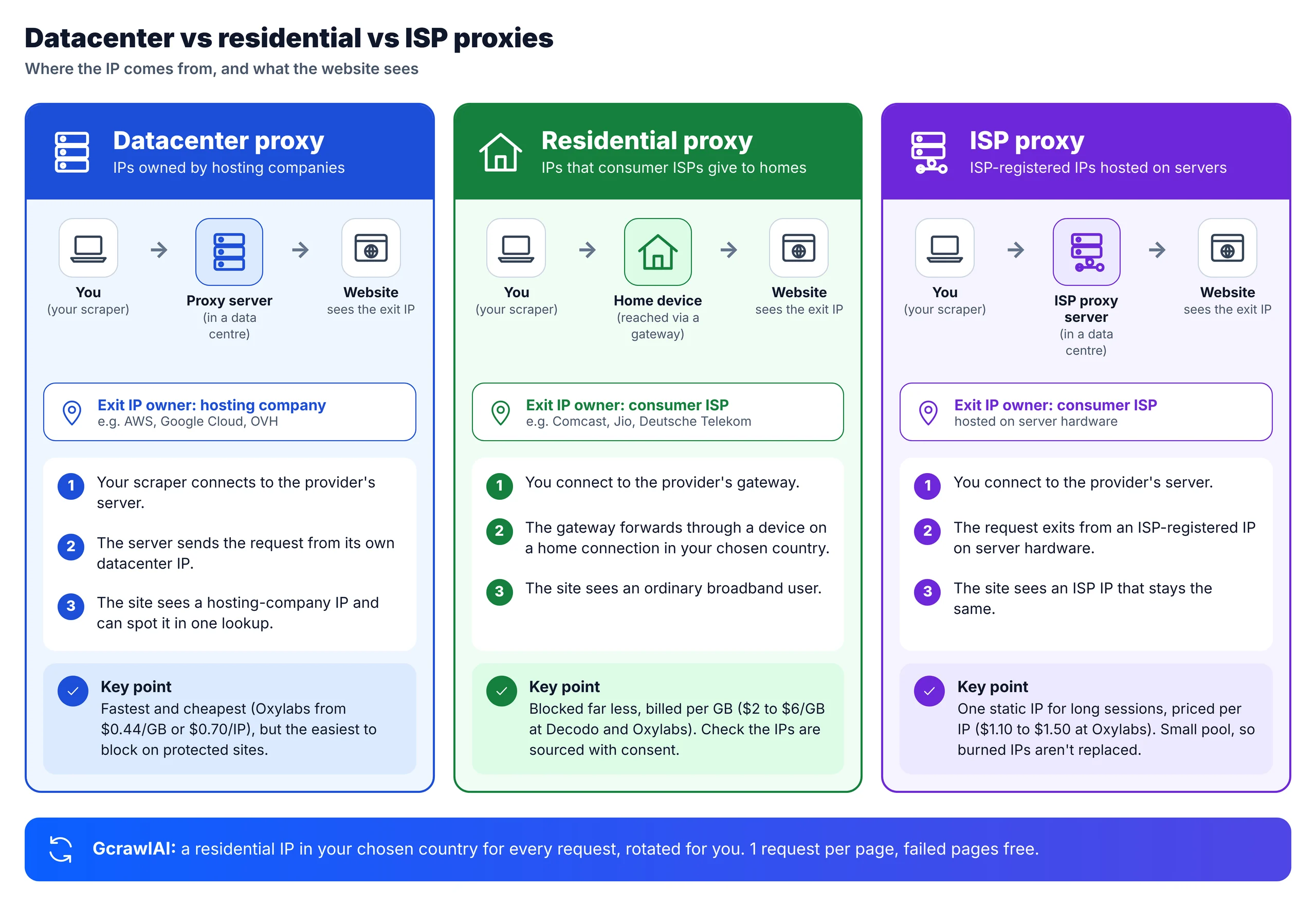
| Factor | Datacenter | Residential | ISP | Mobile |
|---|---|---|---|---|
| IP owner the site sees | Hosting or cloud company | Consumer ISP | Consumer ISP | Mobile carrier |
| Where traffic exits | Data centre server | Real home device | Data centre server | Phone or modem |
| Usual billing | Per IP or per GB | Per GB | Per IP | Per port or GB |
| Speed and stability | Fast, stable | Variable | Fast, stable | Variable |
| Block risk on protected sites | High | Low to medium | Medium | Low |
| Location precision | Country, often the colo's city | Country, state, city | Country, some cities | Country, carrier |
| Pool size | Large but clustered | Very large | Small | Small |
| Session length | As long as you like | Minutes (sticky sessions) | As long as you like | Minutes to hours |
A residential IP isn't a pass. IP intelligence vendors flag known residential proxy networks, and sites still check browser and behaviour signals. Treat the proxy type as one layer of the request, not the whole answer.
How IP rotation works
IP rotation means sending your requests from different exit IPs over time, so no single address carries all the traffic. With a residential gateway you connect to one hostname and the provider picks the exit IP for you: a new one per request by default, or the same one while you reuse a session ID.
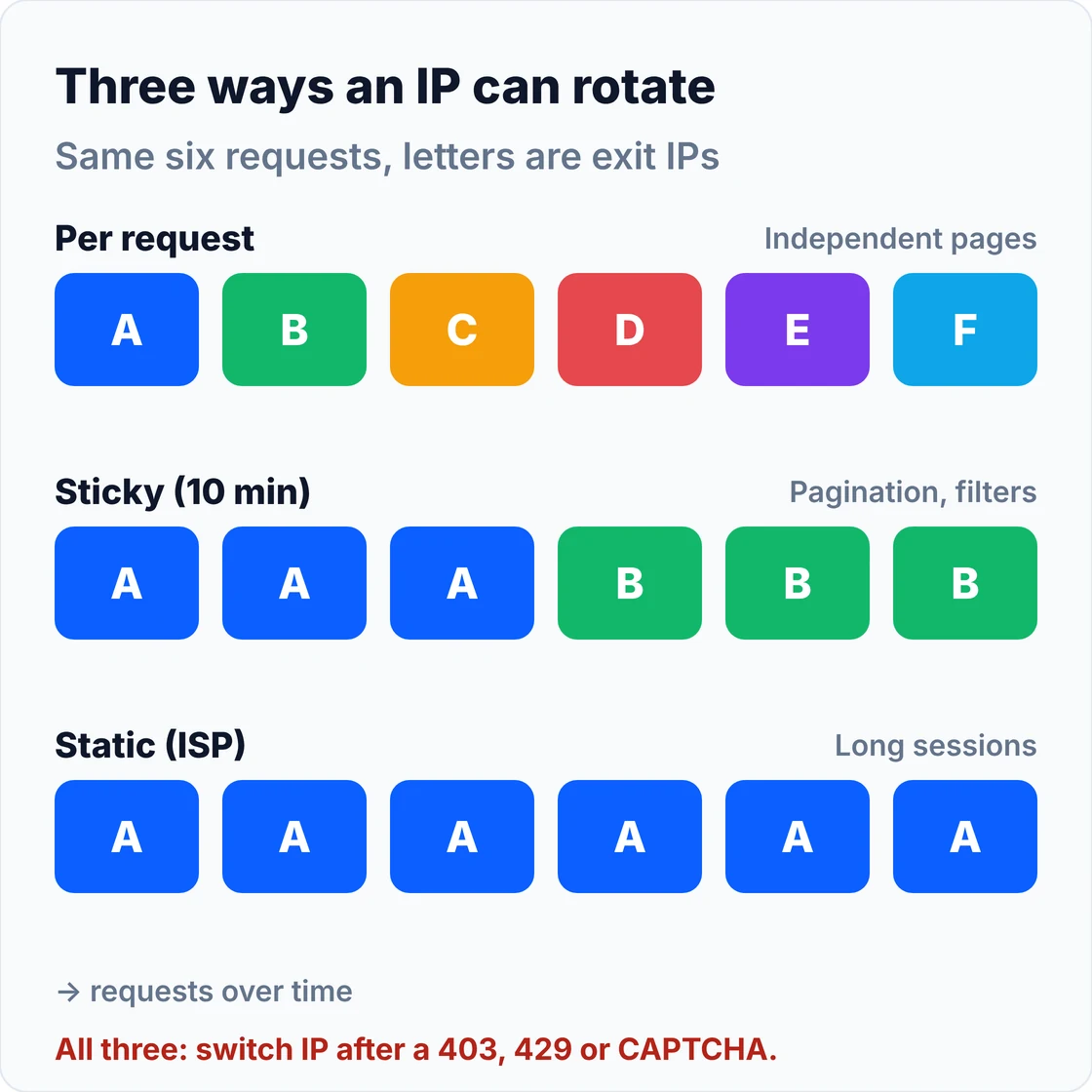
The session ID lives in the proxy username. On Oxylabs' residential network, per their session control docs, leaving out sessid rotates the IP on every request; adding sessid-abcd1234 keeps one IP for 10 minutes by default (or until 60 seconds without a request), and sesstime stretches that up to 1,440 minutes. Decodo says its sticky sessions last up to 30 minutes. The keywords differ by provider, but the pattern is the same everywhere:
# Rotating vs sticky sessions through a residential gateway (Oxylabs' documented username format).
# Other providers use the same idea with different keywords: check your provider's docs.
import uuid
import requests

USER, PASS = "USERNAME", "PASSWORD"
GATEWAY = "pr.oxylabs.io:7777"


def proxies(username: str) -> dict:
    url = f"http://{username}:{PASS}@{GATEWAY}"
    return {"http": url, "https": url}


def rotating(country: str = "US") -> dict:
    # No session id: the gateway picks a new exit IP for every request.
    return proxies(f"customer-{USER}-cc-{country}")


def sticky(country: str = "US", minutes: int = 10) -> dict:
    # Same sessid = same exit IP, for up to `minutes` (default 10, max 1440 on Oxylabs).
    sid = uuid.uuid4().hex[:8]
    return proxies(f"customer-{USER}-cc-{country}-sessid-{sid}-sesstime-{minutes}")


if __name__ == "__main__":
    check = "https://ip.oxylabs.io/location"
    print("rotating:", [requests.get(check, proxies=rotating(), timeout=20).json().get("ip") for _ in range(3)])
    p = sticky(minutes=30)
    print("sticky:  ", [requests.get(check, proxies=p, timeout=20).json().get("ip") for _ in range(3)])
With datacenter or ISP IPs you usually get a list of fixed addresses instead of a gateway, so rotation is your job: pick an IP per session, track which ones get blocked, and rest them. That's what the rotator in the next section does.
Rotation strategies: per request, sticky, static and on failure
Rotate per request for independent pages such as product or search pages, use sticky sessions for anything that carries state across pages, keep a static IP for long sessions and allow-lists, and always switch to a fresh IP after a 403, 429 or CAPTCHA. Retrying a blocked request on the same IP only makes its reputation worse.
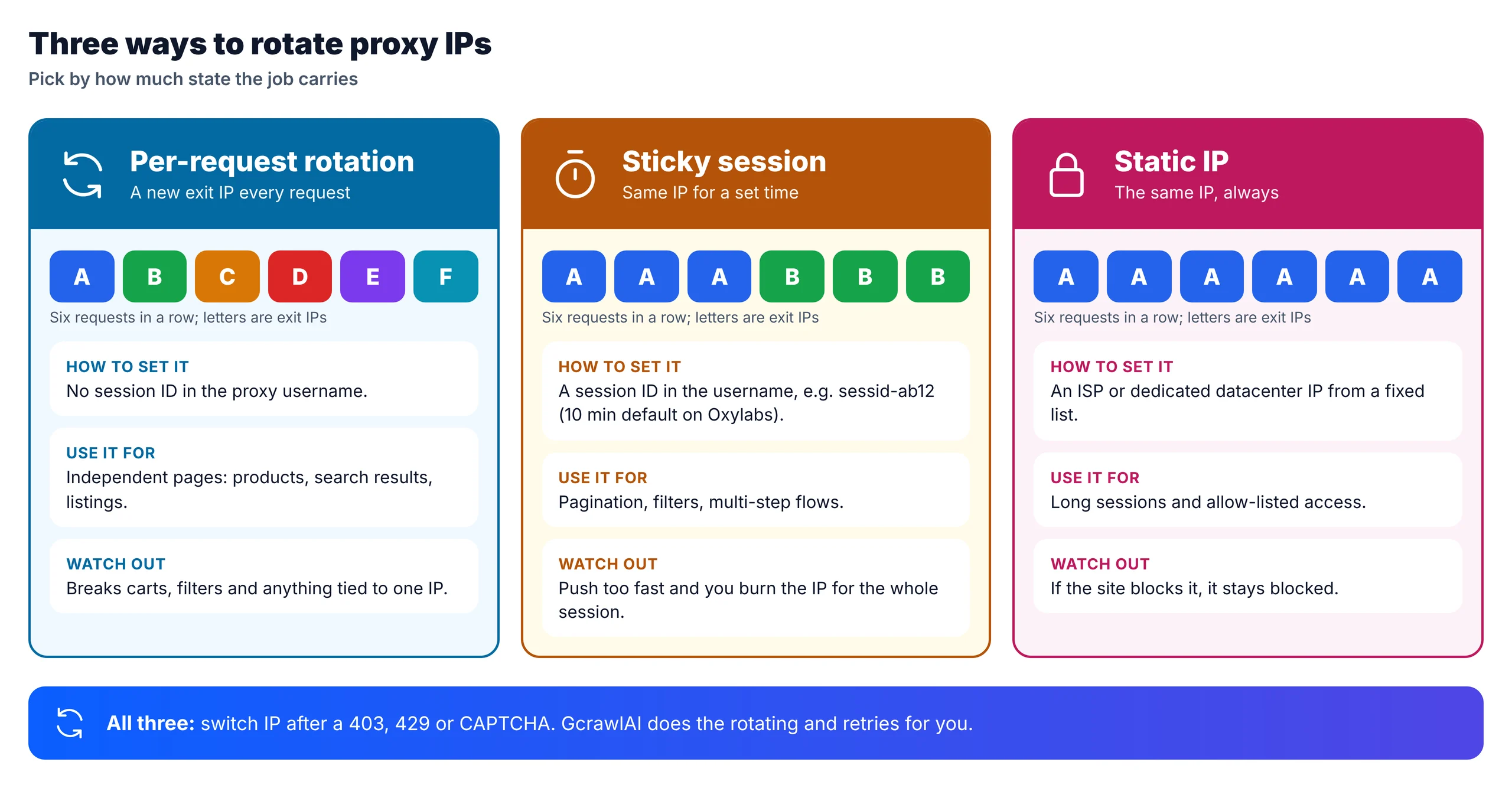
| Strategy | How the IP changes | Use it for | Breaks when |
|---|---|---|---|
| Per request | New IP every request | Independent pages at volume | The site ties cookies or a cart to the IP |
| Sticky session | Same IP for N minutes | Pagination, filters, multi-step flows | You push too fast and burn the IP |
| Static (ISP or dedicated) | Never, unless you change it | Long sessions, allow-listed access | The site blocks that IP for good |
| On failure | New IP after 403, 429, CAPTCHA | Every setup, on top of the above | You ignore Retry-After on a 429 |
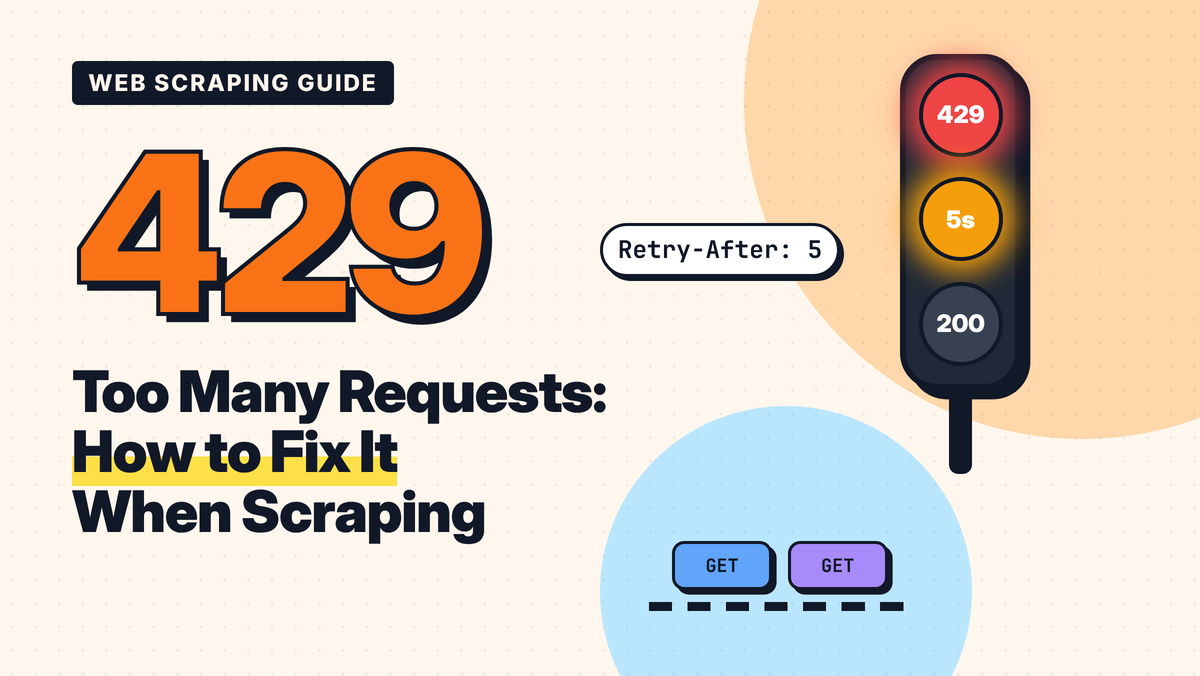
Rotation doesn't replace pacing. Many sites rate-limit by cookie or account as well as by IP, so a 429 means slow down, not just switch; our guide to fixing 429 Too Many Requests covers Retry-After and backoff, and Cloudflare's version is explained in Cloudflare error 1015.
If you run your own pool, a rotator needs only a few rules: one proxy per session, a cool-down after a block, respect for Retry-After, and a cap on failures before a proxy leaves the pool:
"""A small proxy rotator for your own pool: sticky per session, cool-down on blocks, Retry-After aware."""
import random
import time
from dataclasses import dataclass, field


@dataclass
class Proxy:
    url: str
    kind: str                      # "datacenter", "isp" or "residential"
    country: str
    cooldown_until: float = 0.0
    fails: int = 0
    ok: int = 0


@dataclass
class Rotator:
    pool: list[Proxy]
    cooldown_s: float = 300.0      # rest a proxy after a block
    max_fails: int = 3             # drop it after this many blocks in a row
    sessions: dict = field(default_factory=dict)
    clock: callable = time.monotonic

    def _healthy(self, country: str, kinds: tuple[str, ...]) -> list[Proxy]:
        now = self.clock()
        return [p for p in self.pool if p.country == country and p.kind in kinds
                and p.cooldown_until <= now and p.fails < self.max_fails]

    def get(self, session_id: str, country: str, kinds=("datacenter",)) -> Proxy:
        """Same session -> same proxy (sticky). A new session picks a fresh, healthy proxy."""
        p = self.sessions.get(session_id)
        if p and p.cooldown_until <= self.clock() and p.fails < self.max_fails:
            return p
        choices = self._healthy(country, kinds)
        if not choices:
            raise RuntimeError(f"no healthy {kinds} proxy left for {country}")
        p = random.choice(choices)
        self.sessions[session_id] = p
        return p

    def report(self, session_id: str, status: int, retry_after: float | None = None):
        """Feed back the response status. 403/429/5xx cool the proxy and end the session."""
        p = self.sessions.get(session_id)
        if p is None:
            return
        if status in (403, 429) or status >= 500:
            p.fails += 1
            wait = retry_after if (status == 429 and retry_after) else self.cooldown_s
            p.cooldown_until = self.clock() + wait
            self.sessions.pop(session_id, None)          # next call picks a different IP
        else:
            p.ok += 1
            p.fails = 0
The test below fakes a site that blocks one burned datacenter IP and rate-limits once. It's a logic check run offline with a fake clock, not a scraping test:
# Offline logic check: a fake clock and fake responses, no network. Not a scraping test.
import random
from rotator import Proxy, Rotator

random.seed(3)
now = [0.0]
pool = [Proxy(f"http://dc{i}.example:8000", "datacenter", "US") for i in range(1, 4)] + \
       [Proxy(f"http://res{i}.example:8000", "residential", "US") for i in range(1, 3)]
r = Rotator(pool, cooldown_s=300, clock=lambda: now[0])

# The fake target blocks dc2 (its subnet is burned) and rate-limits once at step 4.
def fake_status(proxy, step):
    if "dc2" in proxy.url:
        return 403, None
    return (429, 60.0) if step == 4 else (200, None)

for step in range(1, 8):
    p = r.get("session-A", "US")
    status, ra = fake_status(p, step)
    r.report("session-A", status, ra)
    print(f"t={now[0]:>4.0f}s step {step}: {p.url:<24} -> {status}"
          + ("  (cooled, new IP next)" if status != 200 else ""))
    now[0] += 30

# Escalate a hard target to residential only, keeping one IP for the whole session.
for step in range(1, 4):
    p = r.get("checkout-flow", "US", kinds=("residential",))
    r.report("checkout-flow", 200)
    print(f"sticky residential step {step}: {p.url}")
t=   0s step 1: http://dc1.example:8000  -> 200
t=  30s step 2: http://dc1.example:8000  -> 200
t=  60s step 3: http://dc1.example:8000  -> 200
t=  90s step 4: http://dc1.example:8000  -> 429  (cooled, new IP next)
t= 120s step 5: http://dc2.example:8000  -> 403  (cooled, new IP next)
t= 150s step 6: http://dc3.example:8000  -> 200
t= 180s step 7: http://dc3.example:8000  -> 200
sticky residential step 1: http://res2.example:8000
sticky residential step 2: http://res2.example:8000
sticky residential step 3: http://res2.example:8000
The session stays on one IP until the 429, cools that IP for the 60 seconds the site asked for, skips the burned dc2 after one 403, and settles on a healthy IP. The second session escalates to residential IPs only and keeps one for the whole flow.
"Rotate on evidence, not on a timer. A 403 or a CAPTCHA is the site telling you that IP is done; a 429 is the site telling you to wait. Treat them differently and your pool lasts much longer."
Rajesh Kannan, Co-Founder & CTO at Gramosoft
What each proxy type costs for 10,000 pages
For 10,000 pages a month, datacenter and ISP proxies are the cheapest if the site lets them through, and residential proxies cost $11 to $50 depending on page size and provider. GcrawlAI Starter costs $29 with residential IPs, rendering and retries included, and charges nothing for failed pages. On easy sites, a datacenter proxy is cheaper.
| Route for 10,000 pages a month | Monthly cost | What you still run |
|---|---|---|
| GcrawlAI Starter (20,000 requests) | $29 | Nothing; residential IPs, rendering and retries included, failed pages free |
| Oxylabs shared datacenter, HTML only (3 GB at $0.60/GB) | $1.80 | Rotation, retries, block handling |
| Decodo datacenter (10 GB plan) | $6 | Rotation, retries, block handling |
| Oxylabs shared ISP (10 IPs at $1.50) | $15 | Rotation across 10 IPs, retries |
| Decodo residential, HTML only (3 GB plan) | $11.25 | Sessions, retries, TLS and headers |
| Oxylabs residential, HTML only (3 GB at $6/GB) | $18 | Sessions, retries, TLS and headers |
| Decodo residential, rendered pages (10 GB plan) | $35 + servers | Browser fleet, sessions, retries |
| Oxylabs residential, rendered pages (10 GB at $5/GB) | $50 + servers | Browser fleet, sessions, retries |
List-price arithmetic, not a benchmark, checked on Decodo and Oxylabs pricing pages on November 1, 2026. We assume about 0.3 MB per HTML-only page and about 1 MB per rendered page; blocked attempts burn traffic too, so real proxy bills run higher on protected sites. The honest read: if datacenter IPs get through, they beat everything here on price. GcrawlAI earns its $29 on sites that block datacenter ranges and need a browser, where the residential-plus-browser routes cost more and still leave the retries to you.
GcrawlAI plans (GcrawlAI pricing, checked October 28, 2026):
| Plan | Price | Requests/month | Concurrent | Per 1,000 | Overage per 1,000 |
|---|---|---|---|---|---|
| Free | $0 forever, no card | 50 | 2 | – | – |
| Starter | $29/month | 20,000 | 10 | $1.45 | $1.60 |
| Growth (most popular) | $79/month | 80,000 | 35 | $0.99 | $1.10 |
| Pro | $199/month | 250,000 | 50 | $0.80 | $0.90 |
| Scale | $499/month | 750,000 | 100 | $0.67 | $0.75 |
| Enterprise | Volume pricing | 2M+ | Custom | – | – |
| Self-hosted | $0 (MIT) | Your servers | Your servers | Infrastructure only | – |
Every plan, Free included, has residential IP rotation, geotargeting by country, JavaScript rendering and anti-bot handling in each request. Failed requests are never charged. Annual billing charges 10 months for 12, unused requests on paid plans roll over once, and Indian customers are billed in INR with a GST invoice.
Which proxy type should you use?
Start with datacenter proxies and move up only when the data shows you must: residential when datacenter ranges get blocked or you need precise locations, ISP when one stable IP matters, mobile only for mobile-only content. If you'd rather not run a pool at all, GcrawlAI handles residential IPs and rotation per request.
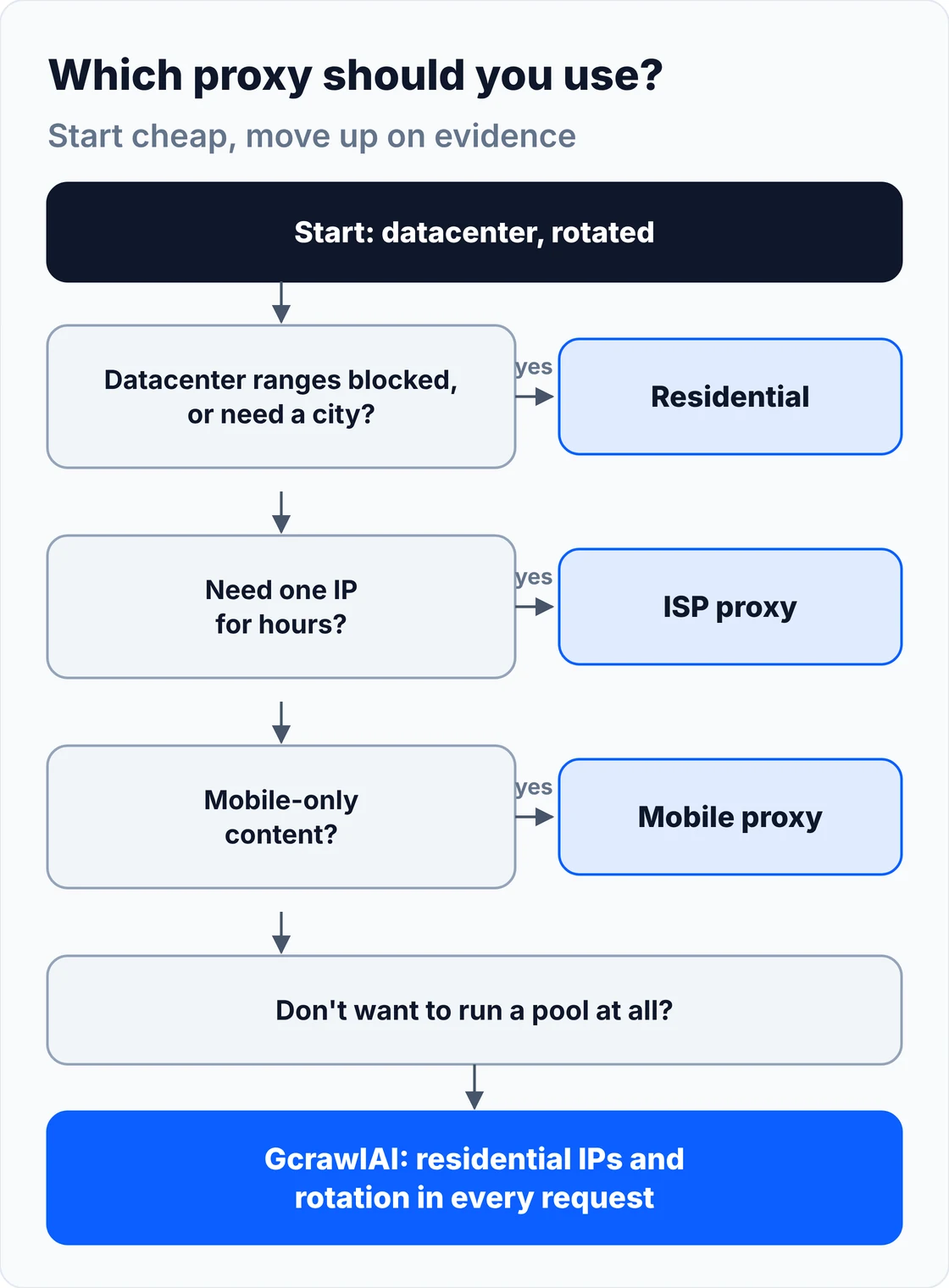
| Your situation | Use | Where GcrawlAI fits |
|---|---|---|
| Protected site (Cloudflare, DataDome, Akamai) | Residential with rotation, plus a real browser | GcrawlAI does all three in one request |
| Unprotected pages at high volume | Datacenter, rotated per request | Switch when 403s start or upkeep costs more than $1.45 per 1,000 pages |
| Prices or results by country or city | Residential in that location | GcrawlAI's proxy_geo sets the country per request |
| Long session on one IP | ISP or dedicated datacenter | GcrawlAI keeps one IP per page; for hours on one IP, use ISP proxies |
| Pagination or filters within a visit | Residential sticky session | GcrawlAI crawl handles each page as its own request |
| Mobile-only content | Mobile proxy | GcrawlAI's mobile-viewport screenshots show the mobile layout; carrier-only content needs a mobile proxy |
| AI agents and RAG pipelines | Managed residential access | GcrawlAI via the Python SDK or MCP |
When running your own proxies still makes sense
Running your own proxy pool still makes sense when the sites are easy and the volume is huge, when you need raw proxy access for tools other than scraping, or when you must pin one IP for hours. If you still want rendering and retries on top of your own proxies, self-host the GcrawlAI core with them.
The self-hosted GcrawlAI core takes up to three proxy accounts and tries them in order when a page is blocked, with a new session each time, so your own pool gets the same session and fallback logic as the Cloud API. If your proxy bills keep climbing because of retries on protected sites, or your team spends more time on pool health than on data, move those targets to the Cloud API and keep cheap datacenter proxies for the easy ones. Our comparison of a Python scraper vs a scraping API walks through that trade-off.
Are residential proxies legal and ethical?
Using residential or datacenter proxies is legal in most countries; the law cares about what you collect and how. The ethical question is where residential IPs come from: some networks use hijacked devices. Choose providers that show how users consent, collect only public data, and respect each site's terms and rate limits.
A new IP doesn't grant permission. Don't use proxies to get past logins, paywalls or explicit blocks, keep personal data out of your datasets unless you have a lawful basis under rules such as GDPR, and keep request rates reasonable. For the wider picture, read what web scraping is, how it works and where it's legal, and get legal advice for your own case.
Frequently asked questions
Are residential proxies better than datacenter proxies for web scraping?
On protected sites, yes: residential IPs get blocked far less. On unprotected sites, datacenter proxies are faster and much cheaper, so start with datacenter and switch only when blocks show up. GcrawlAI uses residential IPs in every request, at one request per page, with failed requests never charged.
How does IP rotation work?
You connect to a proxy gateway and it picks the exit IP. Without a session ID you get a new IP on every request; with a session ID in the username you keep the same IP for a set time, for example 10 minutes by default on Oxylabs and up to 30 minutes on Decodo.
Should I rotate my IP on every request?
Only for independent pages. Anything that carries state, such as pagination, filters, a cart or a logged-in view you're allowed to access, needs a sticky session. Always switch IPs after a 403, 429 or CAPTCHA, and wait as long as Retry-After asks.
What is an ISP proxy?
An ISP proxy, or static residential proxy, is an IP address registered to a consumer internet provider but hosted on a server in a data centre. Sites see a residential owner, and you get datacenter speed and a fixed IP. It's priced per IP, from $1.10 to $1.50 per IP at Oxylabs for shared ISP proxies.
How much do residential proxies cost?
Residential proxies are billed per GB. As of November 1, 2026, Decodo charges $3.75 per GB on its 3 GB plan, falling to $2 per GB at 1,000 GB, and $4 per GB pay-as-you-go; Oxylabs charges $6 per GB on small usage, falling to $2.50 per GB past 1,000 GB.
Can websites detect residential proxies?
Sometimes. IP intelligence vendors track known residential proxy networks, and sites also check TLS fingerprints, headers, cookies and behaviour. A residential IP lowers one risk signal; it doesn't make automated traffic invisible.
Is GcrawlAI open source, and can I use it commercially?
Yes. The GcrawlAI core is MIT licensed on GitHub, so you can self-host it with your own proxy accounts and use it commercially. The managed Cloud API adds the residential IPs and anti-bot handling, with a Python SDK and MCP for AI agents, a free plan of 50 requests a month and paid plans from $0.67 to $1.45 per 1,000 requests.