
Last updated: · Tested with Python 3.13, Requests 2.34.2 and curl_cffi 0.16.3
The page opens fine in Chrome. You copy the URL into a Python script, call requests.get(), and get back 403 Forbidden. Same URL, same machine, same network.
Nothing is broken. The server simply looked at your request, decided it wasn't from a person using a browser, and refused it. The good news is that a 403 is rarely random. It comes from a specific check, and once you know which one, the fix is usually a few lines of code.
This guide shows you how to read a 403 to find out what blocked you, then works through eight fixes in the order you should try them, cheapest first. Every fix was run against a test site we built to block bots the way real sites do, and the outputs below are the real results.
- A 403 means the server understood your request and refused it. In scraping, that almost always means something about the request looked automated.
- Read the response first. The
Serverheader, cookies, page title andRetry-Aftertell you whether it's the site's own rules, a rate limit or a bot-protection service like Cloudflare. - Fix in this order: a real User-Agent, a full browser header set, a
Sessionwith cookies andReferer, slower requests with backoff, a browser TLS fingerprint withcurl_cffi, a better IP, a real browser, and finally a scraping API such as GcrawlAI. - In our test, a User-Agent alone still got a 403. It took the User-Agent, browser headers and a session cookie together to get a 200, and backoff turned 3 blocked requests out of 8 into 0.
- Stop if the 403 is about access, not detection: a login you don't have, an API key without permission, or a site that forbids scraping.
How do I fix a 403 Forbidden error in Python Requests? Send the headers a real browser sends (starting with a browser User-Agent, since the default is python-requests/2.x), use requests.Session() so cookies persist, add a Referer, and slow down when you see Retry-After. If it still fails, the block is below the HTTP layer: switch to curl_cffi with impersonate="chrome" to fix your TLS fingerprint, use residential proxies, or send the URL to a scraping API that handles rendering and anti-bot checks.
What a 403 Forbidden error means in Python Requests
A 403 Forbidden error in Python Requests means the server received your request, understood it and refused to serve it. When you scrape, that almost always means the site decided the request came from a script rather than a browser, based on its headers, cookies, request rate, TLS fingerprint or IP address.
HTTP 403 means "I know what you're asking for, and you can't have it." It's different from the codes it gets confused with:
Swipe sideways to see the full table →
| Status | What the server is saying | What usually fixes it |
|---|---|---|
| 401 Unauthorized | "I don't know who you are." | Send valid credentials or an API key. |
| 403 Forbidden | "I know what you want, and I'm refusing." | Change what made the request look automated, or accept that you don't have access. |
| 404 Not Found | "There's nothing here." Some sites use it to hide blocked pages. | Check the URL first. If the browser sees the page, treat it like a 403. |
| 429 Too Many Requests | "You're going too fast." | Slow down and honour Retry-After. Many sites send a 403 for this instead. |
In Python, a 403 doesn't raise an exception on its own. requests.get() returns a normal response with status_code set to 403, so a script that doesn't check it will happily parse an "Access denied" page as if it were data. Call response.raise_for_status() or check the status before you parse.
Here's the problem in its simplest form:
import requests

URL = "https://shop.example.com/products"

response = requests.get(URL)
print(response.status_code)                       # 403
print(response.request.headers["User-Agent"])     # python-requests/2.34.2
That second line is usually the whole story. Every request your script sends announces itself as
python-requests, and plenty of sites block that string on sight.
Why Python Requests gets a 403 when the browser doesn't
Python Requests gets a 403 when the browser doesn't because the two send very different requests. Chrome sends a real User-Agent, more than a dozen headers, cookies from earlier pages and a browser TLS handshake. Requests sends python-requests, four headers, no cookies and a TLS fingerprint that identifies it as Python.
Your browser and your script send very different requests, even to the same URL. A site can reject yours at any of six layers, and each needs a different fix:
Swipe sideways to see the full diagram →
- IP reputation. Datacenter and cloud IPs, VPN exits and addresses with a history of abuse are blocked or challenged before anything else is checked.
- TLS fingerprint. The way your client opens the encrypted connection identifies the library, not the browser your headers claim to be.
- HTTP headers. A missing or default User-Agent, missing
Accept-Language, or none of theSec-Fetch-*headers Chrome always sends. - Cookies and session. Pages that expect a cookie set by an earlier page, a CSRF token or a same-site
Referer. - Rate and behaviour. Too many requests, too evenly spaced, from one client.
- JavaScript challenge. A script that must run in a real browser and prove it, which Requests can't execute.
Step 0: Read the 403 before you change anything
To find out why you got a 403, read the whole response, not just the status code. The Server header, cookies, page title and any Retry-After header usually show whether the block came from the site's own rules, a rate limit, or a bot-protection service such as Cloudflare, Akamai or DataDome.
Most people start swapping User-Agents at random. It's faster to look at what came back. The status code is only one line of the response; the headers and body usually tell you who blocked you and why.
import re
import requests

SIGNATURES = {
    "Cloudflare": lambda r: "cf-ray" in r.headers or r.headers.get("server", "").lower() == "cloudflare",
    "Akamai":     lambda r: "akamaighost" in r.headers.get("server", "").lower(),
    "DataDome":   lambda r: "x-datadome" in r.headers or "datadome" in r.headers.get("set-cookie", "").lower(),
    "Imperva":    lambda r: "x-iinfo" in r.headers or "incapsula" in r.text.lower(),
    "AWS WAF / CloudFront": lambda r: "x-amz-cf-id" in r.headers,
}

def diagnose(response):
    """Print what a 403 response tells you before you change anything."""
    title = re.search(r"<title>(.*?)</title>", response.text, re.I | re.S)
    print("Status:      ", response.status_code)
    print("Server:      ", response.headers.get("server", "-"))
    print("Retry-After: ", response.headers.get("retry-after", "-"))
    print("Page title:  ", title.group(1).strip() if title else "-")
    print("Cookies set: ", list(response.cookies.keys()) or "-")
    vendors = [name for name, test in SIGNATURES.items() if test(response)]
    print("Blocked by:  ", ", ".join(vendors) or "the site's own rules")
    if response.headers.get("cf-mitigated") == "challenge":
        print("Cloudflare sent a JavaScript challenge: Requests can't solve it.")

diagnose(requests.get("https://shop.example.com/products"))
Run that against the URL that's failing. These are the most common signs of each bot-protection service:
Swipe sideways to see the full table →
| If you see | You're probably dealing with | What it means for you |
|---|---|---|
server: cloudflare, a cf-ray header, a "Just a moment..." or "Attention Required!" page |
Cloudflare | cf-mitigated: challenge means a JavaScript challenge (Cloudflare docs): jump to fix 7 or 8. |
Server: AkamaiGHost, an "Access Denied" page with a reference number |
Akamai | Usually headers, TLS fingerprint and IP together. Start with fix 5. |
An x-datadome header or a datadome cookie |
DataDome | Strong fingerprinting. Expect to need fixes 5 to 8. |
An x-iinfo header or "Incapsula incident ID" |
Imperva | Cookies and JavaScript checks. Fix 3, then 7. |
x-amz-cf-id and "Request blocked" from CloudFront |
AWS WAF | Often IP or rate rules. Fixes 4 and 6. |
A Retry-After header |
A rate limit | Slow down. Fix 4. |
| A plain "Forbidden" with none of the above | The site's own rules | Usually headers or cookies. Fixes 1 to 3. |
Also try two quick comparisons. Open the URL in your browser in a private window: if it's blocked there too, it's your IP, not your code. Then, in Chrome DevTools, right-click the request in the Network tab and choose Copy as cURL. If that command works in a terminal and your script doesn't, the difference between the two requests is your answer.
How we tested these fixes
Testing against a real site's bot protection is unreliable (its rules change by the hour) and unfair to the site. So we built ShieldMart, a small fictional shop that runs on our machine and blocks requests in four layers, the way many real sites do: User-Agent, browser headers, a session cookie plus Referer, and a limit of 5 requests per 10 seconds. For the TLS fix, a second local server recorded the opening of each client's encrypted connection.
The code samples use shop.example.com as a placeholder. Swap in your own URL. We ran them with Python 3.13, Requests 2.34.2 and curl_cffi 0.16.3 in October 2026.
Fix 1: Send a real browser User-Agent
Setting a browser User-Agent fixes a 403 only on simple sites. Requests identifies itself as python-requests/2.x by default, which many sites block on sight, so replace it with a current Chrome string copied from your own browser. On sites with more checks, it gets you one layer further but not all the way.
The default User-Agent is python-requests/ plus the version number. Replacing it with a current browser string is the first thing to try, and on simple sites it's all you need.
import requests

URL = "https://shop.example.com/products"
headers = {
    "User-Agent": "Mozilla/5.0 (Windows NT 10.0; Win64; x64) AppleWebKit/537.36 "
                  "(KHTML, like Gecko) Chrome/150.0.0.0 Safari/537.36",
}

response = requests.get(URL, headers=headers)
print(response.status_code)
Copy the User-Agent from your own browser rather than an old list online, and keep it current. A Chrome version from three years ago is its own red flag. Rotating random User-Agents doesn't help much on its own; consistency between the User-Agent and the rest of the request matters more.
On ShieldMart this got past the first check and was stopped at the next one. That's typical. A browser User-Agent with no other browser headers looks exactly like what it is.
Fix 2: Send the full set of browser headers
Send the same headers a real browser sends: Accept, Accept-Language, the Sec-Ch-Ua client hints and the Sec-Fetch-* headers, alongside a matching User-Agent. The quickest way to get a correct, consistent set is to copy the request headers for the page from your browser's DevTools Network tab.
Requests sends four headers by default: User-Agent, Accept-Encoding, Accept: */* and Connection. Chrome sends more than a dozen, including Accept-Language, client hints (Sec-Ch-Ua) and the Sec-Fetch-* headers that describe how the page was opened.
import requests

URL = "https://shop.example.com/products"

# The headers Chrome sends when you open a page. Copy yours from DevTools > Network.
BROWSER_HEADERS = {
    "User-Agent": "Mozilla/5.0 (Windows NT 10.0; Win64; x64) AppleWebKit/537.36 "
                  "(KHTML, like Gecko) Chrome/150.0.0.0 Safari/537.36",
    "Accept": "text/html,application/xhtml+xml,application/xml;q=0.9,"
              "image/avif,image/webp,*/*;q=0.8",
    "Accept-Language": "en-US,en;q=0.9",
    "Sec-Ch-Ua": '"Chromium";v="150", "Google Chrome";v="150", "Not.A/Brand";v="99"',
    "Sec-Ch-Ua-Mobile": "?0",
    "Sec-Ch-Ua-Platform": '"Windows"',
    "Sec-Fetch-Dest": "document",
    "Sec-Fetch-Mode": "navigate",
    "Sec-Fetch-Site": "none",
    "Sec-Fetch-User": "?1",
    "Upgrade-Insecure-Requests": "1",
}

if __name__ == "__main__":
    response = requests.get(URL, headers=BROWSER_HEADERS)
    print(response.status_code)
The easiest way to get a correct set is from your own browser: DevTools, Network tab, click the page request, and copy the request headers. Leave out Cookie and anything with a session ID; you'll handle those in the next fix. And keep the set consistent: a Windows Chrome User-Agent with Sec-Ch-Ua-Platform: "macOS" is easier to spot than no client hints at all.
Fix 3: Use a Session, keep cookies and send a Referer
Many sites set a cookie on the first page you visit and expect to see it on every request after that. A script that jumps straight to a deep URL has no cookie, no Referer and no history, which is not how people browse. requests.Session() stores cookies between requests, so visit the page a person would come from first.
import requests
from fix_headers import BROWSER_HEADERS

HOME = "https://shop.example.com/"
URL = "https://shop.example.com/products"

with requests.Session() as session:
    session.headers.update(BROWSER_HEADERS)

    home = session.get(HOME)                       # picks up the session cookie
    print("cookies:", list(session.cookies.keys()))

    response = session.get(URL, headers={"Referer": HOME, "Sec-Fetch-Site": "same-origin"})
    print(response.status_code)
If the site uses a CSRF token, read it from the first page (usually a hidden <input> or a <meta> tag) and send it back in the form or header the site expects. And reuse one session for a whole run rather than creating a new one for every request.
Here's what the first three fixes did on ShieldMart, run one after another:
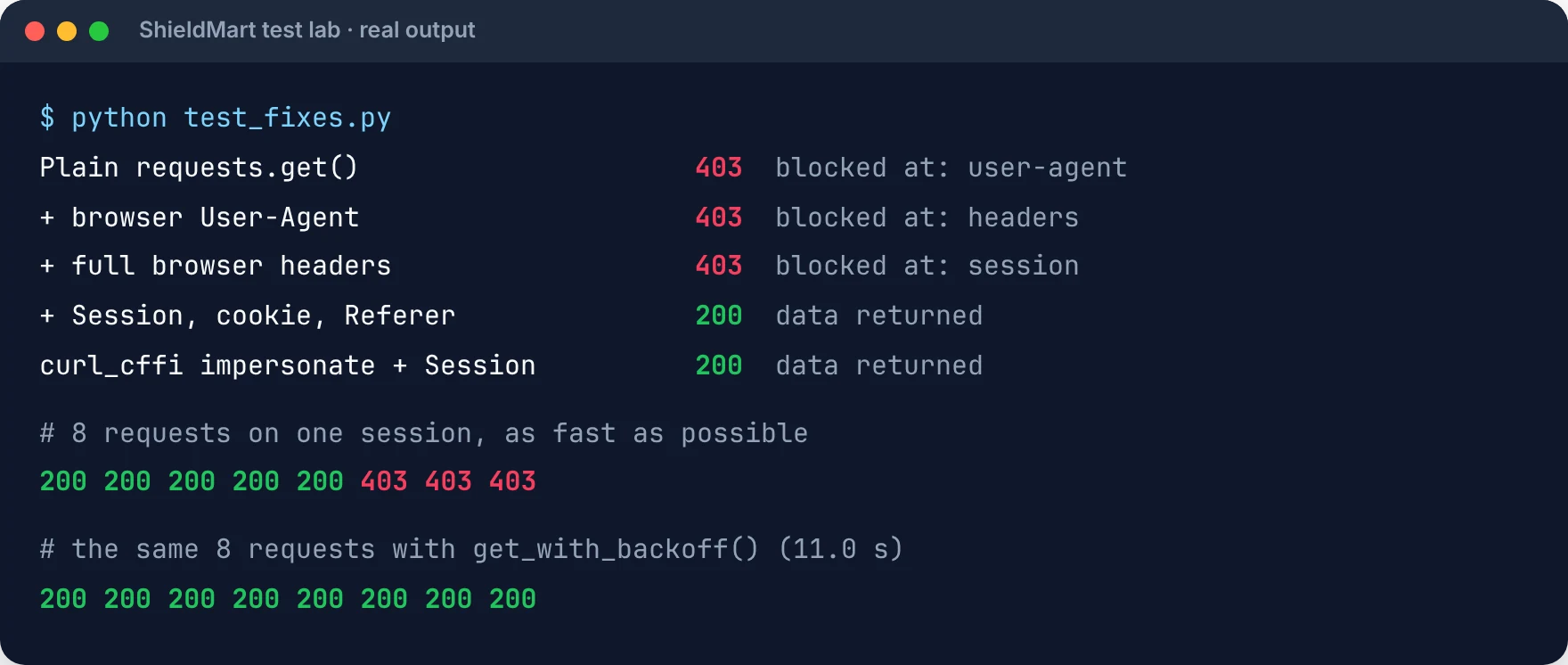
No single change was enough. The User-Agent, the headers and the session each got the request one layer further, and only the combination returned a 200. That's the most useful thing to take from this guide: if a fix seems to do nothing, it may have worked and exposed the next check.
Fix 4: Slow down and back off when you're rate-limited
If your first requests succeed and the 403s start later, you're being rate-limited. Some sites send a proper 429 for this; many send a 403 so you can't tell. Either way, look for a Retry-After header and wait that long before the next request.
import random
import time
import requests

def get_with_backoff(session, url, max_tries=5, **kwargs):
    """Retry 403/429 responses, honouring Retry-After, with exponential backoff and jitter."""
    for attempt in range(max_tries):
        response = session.get(url, timeout=30, **kwargs)
        if response.status_code not in (403, 429):
            return response
        retry_after = response.headers.get("Retry-After")
        wait = float(retry_after) if retry_after and retry_after.isdigit() else 2 ** attempt
        wait += random.uniform(0, 1)
        print(f"{response.status_code} on try {attempt + 1}, waiting {wait:.1f}s")
        time.sleep(wait)
    return response
"A 403 is rarely random. It's one specific check saying no, and the response usually tells you which one if you read past the status code."
Rajesh Kannan, Co-Founder & CTO at Gramosoft
The function retries only on 403 and 429, uses Retry-After when the server sends one, and otherwise waits 1, 2, 4, 8 seconds plus a random jitter. On ShieldMart, eight requests sent as fast as possible came back as five 200s and three 403s. With backoff, all eight succeeded and the run took 11 seconds.
Beyond backoff, spread your requests out from the start: add a short random pause between pages, run fewer requests in parallel against the same site, and schedule large jobs outside the site's busy hours.
Fix 5: Fix your TLS fingerprint with curl_cffi
If you still get a 403 with perfect headers, cookies and a clean IP, the site is probably checking your TLS fingerprint. Replace Requests with curl_cffi and pass impersonate="chrome". It sends the same encrypted handshake, HTTP/2 settings and default headers as a real Chrome browser, usually with a one-line change to your import.
This is the fix that explains the most confusing 403s: the ones you get with perfect headers, a fresh session and a clean IP. Before any HTTP header is sent, your client opens a TLS connection with a ClientHello message that lists the ciphers, extensions and protocols it supports. That list is a fingerprint, often hashed into a JA3 or JA4 value, and it identifies the library that made the connection, not the browser your User-Agent claims to be.
We captured the ClientHello from each client on our local TLS server:
Swipe sideways to see the full table →
| Client | Cipher suites | Extensions | GREASE values | ALPN (protocols offered) | JA3 hash across runs |
|---|---|---|---|---|---|
| Python Requests 2.34 | 18 | 11 | 0 | http/1.1 | Identical every time |
| httpx | 18 | 11 | 0 | http/1.1 | Identical every time |
| curl_cffi, impersonate="chrome" | 15 | 15 | 4 | h2, http/1.1 | Changes per connection, like Chrome |
Three things give Requests away. It never sends GREASE values (random placeholders Chrome deliberately adds), it doesn't offer HTTP/2, and its fingerprint is the same on every run, which makes it trivial to put on a blocklist. Changing headers can't fix any of that, because none of it is in the headers.
curl_cffi fixes it by using a build of curl that reproduces real browsers' handshakes. It has a Requests-style API, so the change is usually one import:
from curl_cffi import requests   # pip install curl_cffi

URL = "https://shop.example.com/products"

# impersonate sends Chrome's real TLS handshake, HTTP/2 settings and default headers
response = requests.get(URL, impersonate="chrome")
print(response.status_code)
With impersonate, curl_cffi also sends that browser's default headers in the right order, so you can drop most of your hand-built header dict. Use a session (curl_cffi.requests.Session(impersonate="chrome")) to keep cookies, exactly as in fix 3. On ShieldMart, a curl_cffi session that visited the homepage first got a 200 with nothing added but a Referer, no hand-built header dict.
Fix 6: Change your IP with proxies
If the page is blocked in your own browser too, or your script runs on a cloud server, the problem is your IP address. Sites score IPs by type and history: datacenter ranges from AWS, Google Cloud or Azure are treated with suspicion, and residential or mobile IPs are not.
import requests
from fix_headers import BROWSER_HEADERS

URL = "https://shop.example.com/products"
PROXY = "http://USERNAME:PASSWORD@proxy.example.net:8000"   # residential, rotating

response = requests.get(
    URL,
    headers=BROWSER_HEADERS,
    proxies={"http": PROXY, "https": PROXY},
    timeout=30,
)
print(response.status_code, response.headers.get("server"))- Use residential or mobile proxies for protected sites; datacenter proxies are cheap but often blocked already.
- Match the country to the site's audience. A Brazilian IP asking for an Indian store's prices can be blocked by geography alone.
- Keep one IP per session when the site uses cookies. Rotating the IP mid-session while keeping the same cookie is a classic bot signal.
- Avoid free proxy lists. They're slow, shared and mostly blocked.
Fix 7: Use a real browser for JavaScript challenges
Some 403s come with a page that runs a script: Cloudflare's "Just a moment...", a "press and hold" button, or a silent check that sets a cookie and reloads. Requests and curl_cffi can't run JavaScript, so they never pass. A browser driven by Playwright can, and because it really is Chrome, its headers, cookies and TLS fingerprint all match.
from playwright.sync_api import sync_playwright   # pip install playwright && playwright install chromium

HOME = "https://shop.example.com/"

with sync_playwright() as p:
    browser = p.chromium.launch()
    page = browser.new_page()
    page.goto(HOME)
    with page.expect_response(lambda r: "/products" in r.url) as info:
        page.click("a[href='/products']")          # a real click: real cookies, referer and headers
    response = info.value
    print(response.status, response.json()["items"][0])
    browser.close()
On ShieldMart, Playwright opened the homepage, clicked through to the products page and got a 200 with the real data, because the click produced exactly the cookie, Referer and headers the site checks. The cost is speed and memory: a browser is far heavier than a single HTTP request. Use it for the pages that need it, and keep plain requests for the rest. Our guide to scraping dynamic JavaScript websites with Python covers waiting, scrolling and capturing API calls with Playwright.
Plain headless Chrome is also detectable. Sites check for automation flags and headless quirks, so tough targets need a stealth-patched browser, and keeping those patches current is a job in itself.
Fix 8: Send the hard pages to a scraping API
Fixes 1 to 7 work, but on well-protected sites you end up maintaining all of them at once: browser headers that match a real build, a TLS library, a proxy pool, stealth browsers, and retry logic, for every site you scrape. When the 403s keep coming back, that's the point where an API is cheaper than your time.
GcrawlAI takes a URL and returns the page as HTML or clean Markdown. Behind that one call it handles the layers from this guide: rotating residential proxies with country targeting, real browser rendering for JavaScript challenges, and stealth browsers that escalate when a site pushes back. One request is one request, with JavaScript rendering, proxies and anti-bot handling included, so there are no credit multipliers for the features that actually get you past a 403.
from gcrawl_sdk import GcrawlClient, ScrapeOptions   # pip install gcrawl-sdk

client = GcrawlClient(api_key="gc-YOUR_API_KEY")

result = client.scrape(
    url="https://shop.example.com/products",
    options=ScrapeOptions(html_enabled=True, markdown_enabled=True, proxy_geo="US"),
    wait=True,
)
print(result.markdown[:500])
"Most teams don't need an API for every page. Send the easy pages direct, and pay only for the ones that keep coming back blocked."
Rajesh Kannan, Co-Founder & CTO at Gramosoft
You don't have to move everything at once. The pattern that saves the most money is a fallback: try a cheap direct request, and send only the blocked pages to the API.
from curl_cffi import requests as cffi
from gcrawl_sdk import GcrawlClient, ScrapeOptions

gcrawl = GcrawlClient(api_key="gc-YOUR_API_KEY")

def fetch(url):
    """Try a cheap direct request first; send only the blocked pages to GcrawlAI."""
    response = cffi.get(url, impersonate="chrome", timeout=30)
    if response.status_code == 200:
        return response.text
    if response.status_code in (401, 404):
        raise RuntimeError(f"{response.status_code}: not a blocking problem, check the URL or credentials")
    result = gcrawl.scrape(url=url, options=ScrapeOptions(html_enabled=True), wait=True)
    return result.html
Note the 401 and 404 check: those aren't blocking problems, and an API won't fix them. GcrawlAI is a cloud API with a Python SDK and MCP support for AI agents, and it's open source if you'd rather run it yourself. Requests cost $1 to $6 per 1,000 depending on plan, and the free plan includes 50 requests a month with no card. If you're deciding whether it's time to stop maintaining your own scraper, our comparison of web scraping with Python vs a scraping API walks through the trade-off.
Which fix for which 403?
Match the fix to when the 403 appears. A 403 on the first request points to headers. Deeper pages failing points to cookies or a missing Referer. 403s after a few successes mean a rate limit. A 403 in your own browser means your IP, and a challenge page means you need a real browser or a scraping API.
Swipe sideways to see the full diagram →
Swipe sideways to see the full table →
| Symptom | Likely cause | Fix |
|---|---|---|
| 403 on the very first request, plain page | Default User-Agent or headers | Fixes 1 and 2 |
| Homepage works, deeper pages return 403 | Missing cookie, CSRF token or Referer |
Fix 3 |
| First few requests work, then 403s | Rate limit | Fix 4 |
| 403 even with perfect headers; curl from DevTools works | TLS fingerprint | Fix 5 |
| 403 in your browser too, or only on your server | IP reputation or geo-block | Fix 6 |
| 403 with a "Just a moment..." or challenge page | JavaScript challenge | Fix 7 or 8 |
| 403s return after every fix, across many sites | Several layers at once | Fix 8 |
When a 403 means you should stop
Not every 403 is a puzzle to solve. If the page needs a login you don't have, your API key lacks permission for that endpoint, or the site's terms forbid automated access, the 403 is the site telling you no, and getting around it can create legal problems. Check the site's terms and robots.txt, prefer an official API when one exists, and scrape public data at a pace that doesn't hurt the site. For the bigger picture, see what web scraping is, how it works and when it's legal.
Frequently asked questions
Does changing the User-Agent fix a 403?
Sometimes, on simple sites. In our test, a browser User-Agent alone still returned a 403; it took the User-Agent, a full browser header set and a session cookie with a Referer together to get a 200.
What is the difference between 401, 403 and 429?
401 means the server doesn't know who you are and wants credentials. 403 means it knows what you want and refuses. 429 means you're sending too many requests. Many sites send 403 for rate limits too, so check for a Retry-After header.
How do I bypass a Cloudflare 403 in Python?
If the response has cf-mitigated: challenge or a "Just a moment..." page, Cloudflare wants a JavaScript check that Requests can't run. Use a real browser such as Playwright, or a scraping API that renders the page. For plain Cloudflare 403s without a challenge, try curl_cffi with impersonate="chrome" and a residential IP.
What is TLS fingerprinting, and how do I fix it in Python?
It's identifying a client by how it opens an encrypted connection, often summarised as a JA3 or JA4 hash. Python Requests has a fixed, well-known fingerprint. Switch to curl_cffi and pass impersonate="chrome" to send the same handshake as a real Chrome browser.
How do I handle a 403 error in Python code?
Check response.status_code or call response.raise_for_status(), which raises requests.HTTPError. Then read the headers and body to find the cause, retry with backoff if it's a rate limit, and don't parse the error page as data.
Should I use a proxy to fix a 403?
Only if the block is about your IP: the page is blocked in your browser too, or only on your cloud server. Use residential proxies in the site's country and keep one IP per session. If your headers or TLS fingerprint are the problem, a proxy alone won't help.