By Rajesh Kannan, Co-Founder & CTO, Gramosoft · Last updated: · Browserbase, Browserless and Bright Data prices checked on their pricing pages on November 1, 2026; open-source licenses from each project's repository
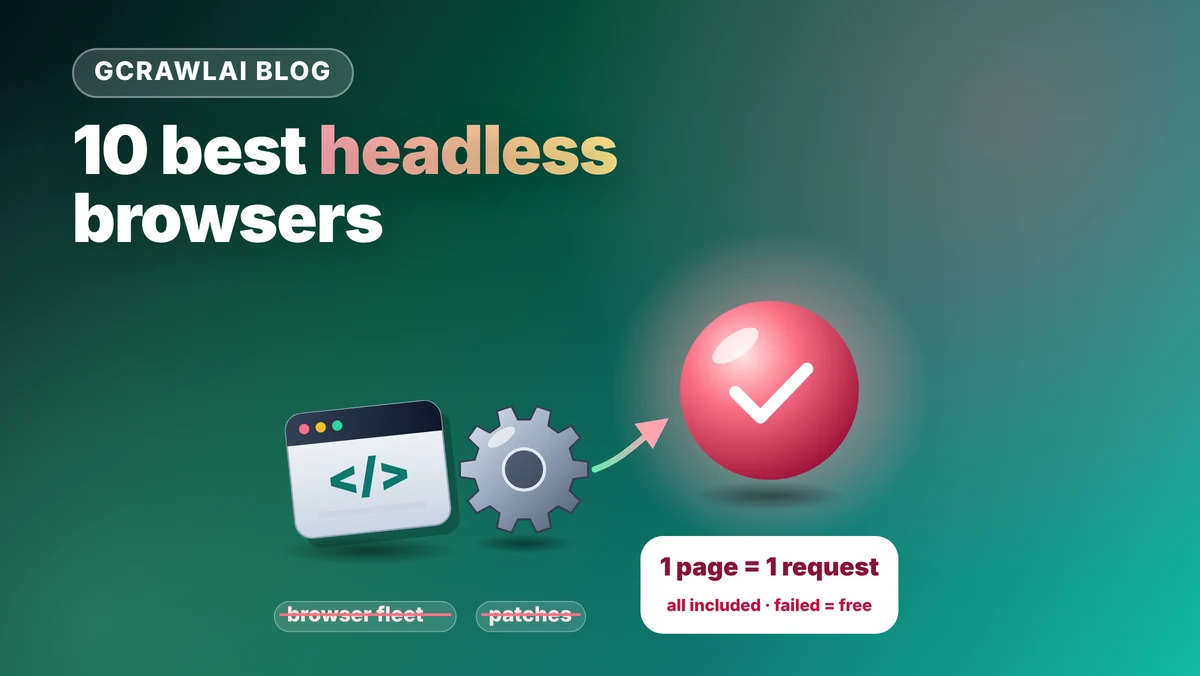
A headless browser runs a real browser engine without a window, so your scraper sees a page after its JavaScript has run. The hard part in 2026 isn't rendering; it's not being flagged. This guide ranks ten options, from open-source libraries and stealth builds to cloud browsers, starting with GcrawlAI, which runs the browser for you and returns the page in one request.
TL;DR
- Best overall for scraping: GcrawlAI. A real browser, residential IPs and anti-bot handling in every request, failed requests never charged, a Python SDK, MCP for AI agents and an MIT core you can self-host.
- Best libraries: Playwright for most new code, Puppeteer for Node teams already on it, Selenium with SeleniumBase UC mode for existing Selenium suites.
- Best stealth builds: Camoufox (patched Firefox), nodriver (raw CDP, no WebDriver), Patchright (a drop-in Playwright fork) and CloakBrowser (source-patched Chromium behind the Playwright API).
- Best cloud browsers: Browserbase and Browserless, when you need to drive a remote browser step by step.
- Honest cost note: on unprotected pages, open-source Playwright on your own server costs only the server. The paid options pull ahead once you need residential IPs and anti-bot handling.
What is the best headless browser for scraping? For collecting pages at scale, it's GcrawlAI: you send a URL and it runs a real browser through residential IPs, handles bot protection, and returns HTML, Markdown or JSON, at one request per page. If you want to write browser code yourself, start with Playwright, and add Camoufox, nodriver, Patchright or CloakBrowser when sites start detecting it.
Quick comparison (details and sources for each tool follow)
| Tool | Type | Best for | Languages | Cost |
|---|---|---|---|---|
| GcrawlAI | Managed browser in a scraping API, open source | Pages from protected and JavaScript sites, AI agents | Python SDK, REST, MCP | 50 requests/month free; from $29/month |
| Playwright | Automation library | New browser code, cross-browser | Python, Node, Java, .NET | Free (Apache-2.0) |
| Puppeteer | Automation library | Node teams on Chrome | Node | Free (Apache-2.0) |
| Selenium + SeleniumBase | Automation framework | Existing Selenium suites, CAPTCHA pages | Many; SeleniumBase is Python | Free (Apache-2.0, MIT) |
| Camoufox | Stealth Firefox build | Strict fingerprinting | Python | Free (MPL-2.0) |
| nodriver | Stealth CDP library | Async Python on Chrome | Python | Free (AGPL-3.0) |
| Patchright | Stealth Playwright fork | Upgrading existing Playwright code | Python, Node | Free (Apache-2.0) |
| CloakBrowser | Source-patched Chromium build | Stealth with the Playwright or Puppeteer API, CDP agents | Python, Node, .NET | Free key for 1 session; paid plans for more |
| Browserbase | Cloud browser | AI agents, session replay | Any CDP client | Free 1 hour; from $20/month |
| Browserless | Cloud browser, self-hostable | Hosted Puppeteer or Playwright | Any CDP client, BrowserQL | 1,000 units free; from $25/month |
The 10 best headless browsers for scraping in 2026
These ten tools cover three ways to get a rendered page: a managed browser behind a scraping API, a library you run on your own servers, and a cloud browser you drive remotely. They're ranked by how well each one gets a protected, JavaScript-heavy page with the least work on your side, with GcrawlAI first.
1. GcrawlAI: a managed browser in every request
Best for: teams that need rendered pages from protected sites without running a browser fleet, plus RAG pipelines and AI agents · License: MIT core, managed Cloud API · Language: Python SDK (gcrawl-sdk 0.5.8), REST, MCP
GcrawlAI runs the headless browser on its side. You send a URL; it loads the page in a real browser through residential IPs, deals with Cloudflare, DataDome, Akamai and PerimeterX, scrolls if you ask, and returns HTML, Markdown or JSON. There are no stealth patches to keep current after a Chrome update, and a blocked page, CAPTCHA, timeout or server error isn't billed.
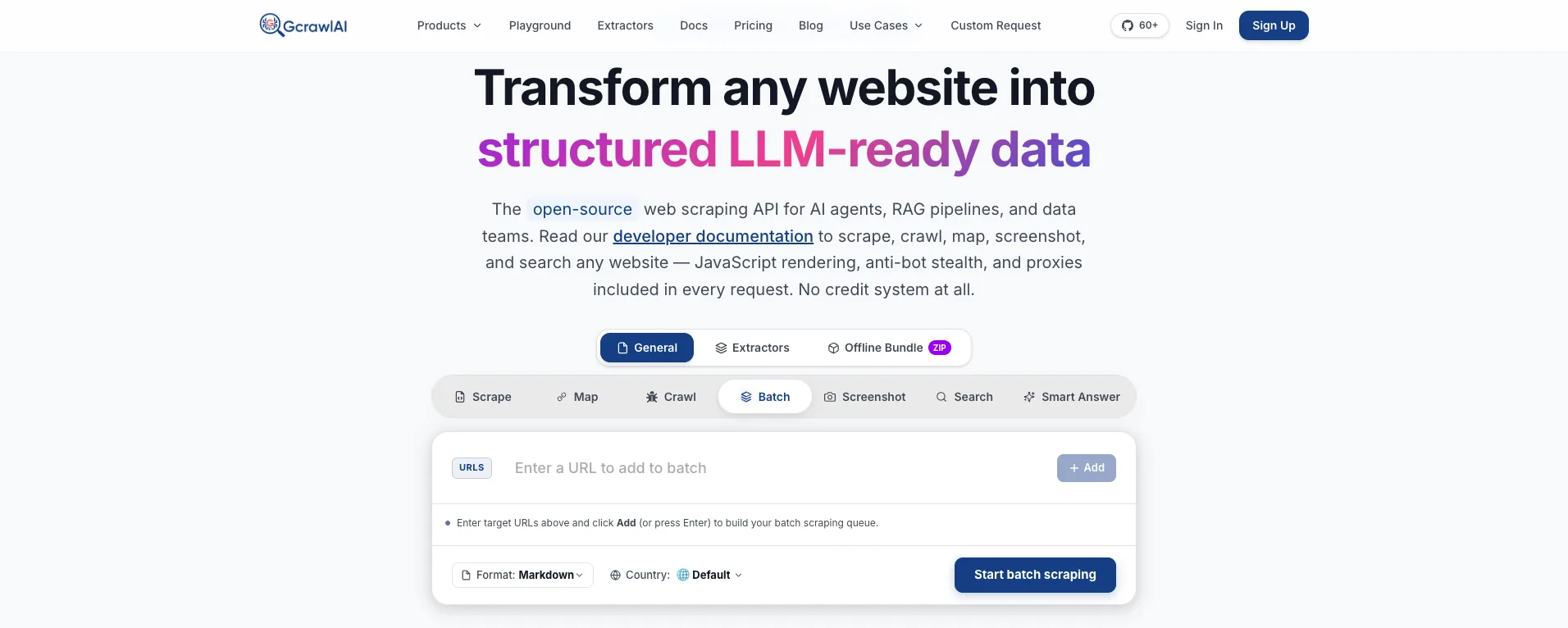
The homepage says it plainly: JavaScript rendering, anti-bot stealth and proxies are included in every request, with no credit system. The Batch tab shown above takes a list of URLs, a format (Markdown by default) and a country, and runs them as one job, which is what most teams build a browser pool for.
- Scrape, crawl and map: scrape a rendered page into HTML, Markdown or JSON, crawl a site with depth control and duplicate filtering, or map its URLs first.
- Bulk jobs: batch runs and async jobs with webhooks, in place of your own queue and browser pool.
- Search and Deep Search: a Search API at one request per results page, and Deep Search, which merges several engines into one list.
- Extractors: ready-made structured data for common targets, and custom extractors through a custom request.
- Screenshots and offline bundles: screenshots on mobile, tablet and desktop, and offline HTML bundles for audits.
- Agents and testing: an MCP server for Claude, Cursor and other agents, the Playground, a free proxy list, and the docs.
A rendered page through residential IPs, a whole-site crawl and a search, each priced as one request per page:
# pip install gcrawl-sdk
from gcrawl_sdk import GcrawlClient, ScrapeOptions

client = GcrawlClient(api_key="gc-YOUR_API_KEY")   # or GCRAWL_API_KEY; base_url="http://localhost:8000" when self-hosted

if __name__ == "__main__":
    # One page in a real browser through residential IPs: one request. No browser fleet, stealth patches or proxy account to run.
    page = client.scrape(
        url="https://www.example-shop.com/product/123",
        options=ScrapeOptions(html_enabled=True, markdown_enabled=True, proxy_geo="US", auto_scroll=True),
        wait=True,
    )
    print(len(page.html or ""), "bytes of rendered HTML")   # for your own selectors
    print(page.markdown[:300])                              # LLM-ready Markdown

    # A whole-site crawl: every page one request, however long it takes to render.
    job = client.crawl(url="https://docs.example.com/", limit=200, formats=["markdown"], wait=True)
    print(job.status, len(job.pages), "pages,", job.pages_failed, "failed (not billed)")

    # Ranked search results, one request per page of results.
    hits = client.search(query="best running shoes 2026", pagination=1, geo="US")
    for r in hits.results[:3]:
        print(r.position, r.title, r.url)
The diagram shows what moves off your plate. With a self-run headless browser you operate the fleet, the stealth patches and the proxies; with GcrawlAI that's one request.
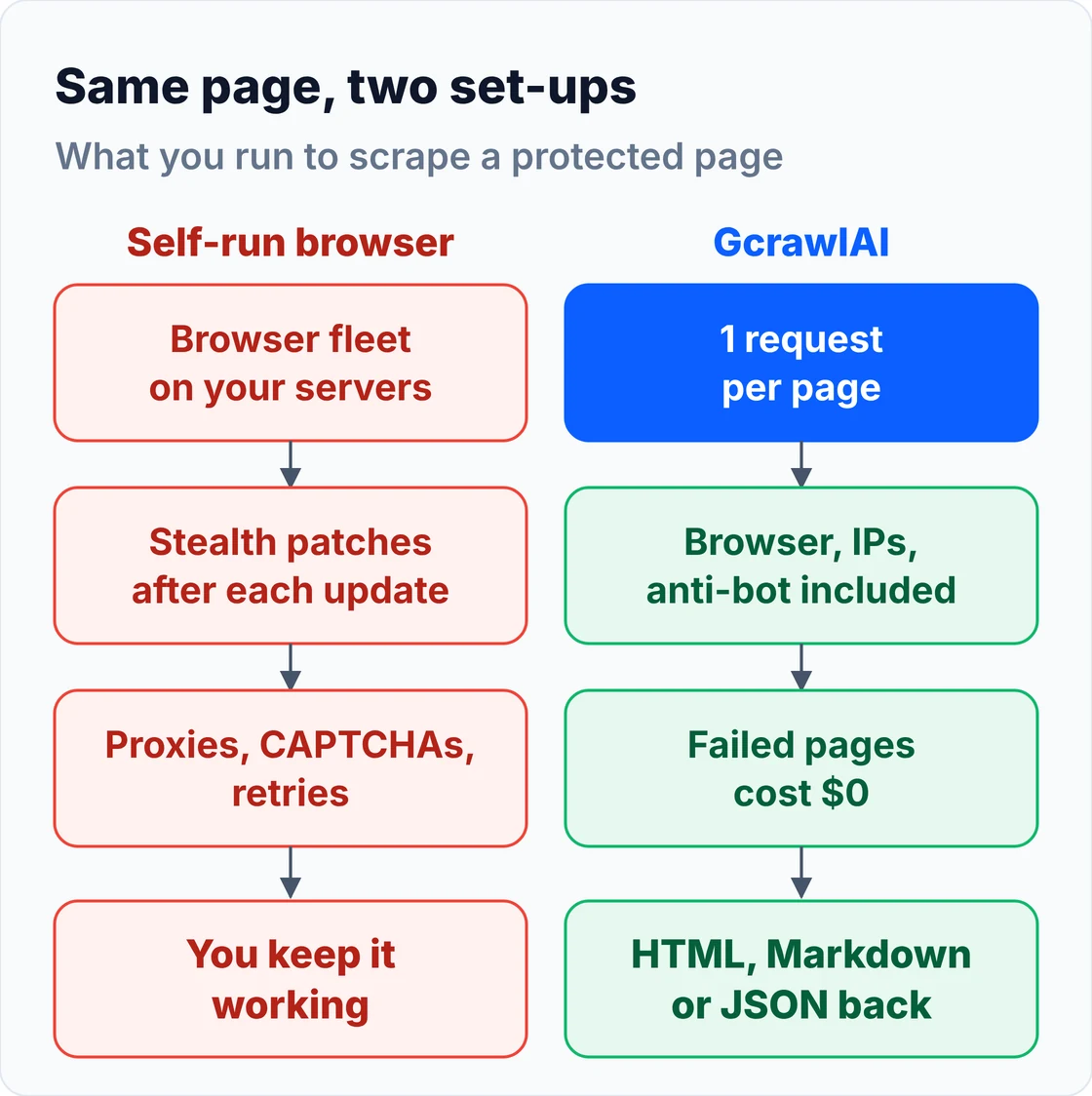
The MIT core is itself built on a headless browser, so you can run the same engine on your own servers:
git clone https://github.com/GramosoftAI/GcrawlAI.git && cd GcrawlAI
python -m venv .venv && source .venv/bin/activate
pip install -r requirements.txt && playwright install
cp .env.example .env                      # add your database, Redis and proxy settings
python -m api.core.db_setup
redis-server &
celery -A web_crawler.crawler.celery_config worker -l info &
uvicorn api.api:app --port 8000
Pricing (GcrawlAI pricing, checked October 28, 2026):
| Plan | Price | Requests/month | Per 1,000 |
|---|---|---|---|
| Free | $0 forever, no card | 50 | – |
| Starter | $29/month | 20,000 | $1.45 |
| Growth (most popular) | $79/month | 80,000 | $0.99 |
| Pro | $199/month | 250,000 | $0.80 |
| Scale | $499/month | 750,000 | $0.67 |
| Enterprise | Volume pricing | 2M+ | Custom |
| Self-hosted | $0 (MIT) | Your servers | Infrastructure only |
Every page is one request on every site, failed requests are never charged, and unused requests on paid plans roll over once.
Where it falls short: GcrawlAI returns pages; it isn't a remote browser you drive click by click over CDP. For multi-step flows such as filling forms or stepping through a checkout, a library or a cloud browser gives you that control. The ecosystem is younger, and self-hosting means bringing your own proxy accounts.
"A headless browser is the easy part. Keeping it undetected, feeding it clean IPs and restarting it when it hangs is the job. We put all of that behind one request so teams can spend their time on the data."
Rajesh Kannan, Co-Founder & CTO at Gramosoft
2. Playwright: the default library for new code
Best for: new scrapers that need a browser control API · Type: automation library by Microsoft for Chromium, Firefox and WebKit · License: Apache-2.0
Playwright drives three browser engines from one API, with bindings for Python, Node, Java and .NET. Its locators wait for elements automatically, and its request routing lets you block images or capture the JSON a page loads, which is often faster than parsing the rendered HTML.
A rendered page in a few lines, and the flag that gives stock headless Chromium away:
# pip install playwright && playwright install chromium
from playwright.sync_api import sync_playwright

with sync_playwright() as p:
    browser = p.chromium.launch(headless=True)
    page = browser.new_page()
    page.goto("https://quotes.toscrape.com/js/", wait_until="networkidle")  # a JavaScript-rendered demo page
    for quote in page.locator(".quote .text").all_inner_texts()[:3]:
        print(quote)
    print(page.evaluate("navigator.webdriver"))  # True: stock headless Chromium announces automation
    browser.close()
| Item | Detail |
|---|---|
| Browsers | Chromium, Firefox, WebKit |
| Languages | Python, Node, Java, .NET |
| Cost | Free; you pay for servers and proxies |
Where it falls short: as shipped it sets navigator.webdriver and leaves automation traces that anti-bot systems read, so protected sites need a stealth layer, residential proxies, or both. Our guide to dynamic JavaScript websites covers it in more depth.
3. Puppeteer: Node's Chrome library
Best for: Node teams with existing Puppeteer scrapers · Type: automation library maintained by the Chrome team · License: Apache-2.0
Puppeteer controls Chrome over the DevTools Protocol, and newer versions can drive Firefox through WebDriver BiDi. It has a large community, and the puppeteer-extra stealth plugin is still the most common way to hide the obvious automation flags in Node.
| Item | Detail |
|---|---|
| Browsers | Chrome and Chromium; Firefox via WebDriver BiDi |
| Languages | Node |
| Cost | Free; you pay for servers and proxies |
Where it falls short: it's Node only, waits are more manual than Playwright's, and community stealth plugins lag behind anti-bot updates.
4. Selenium with SeleniumBase: for existing suites and CAPTCHA pages
Best for: teams with Selenium code, and Python projects that hit challenge pages · Type: WebDriver framework, plus the SeleniumBase wrapper with UC mode · License: Apache-2.0 (Selenium), MIT (SeleniumBase)
Selenium is the oldest of these and supports the most languages. On its own it's easy to detect, which is why scrapers pair it with SeleniumBase, whose UC mode hides common driver flags and adds helpers that reconnect during page loads and click Turnstile-style checkboxes.
| Item | Detail |
|---|---|
| Browsers | Chrome, Firefox, Edge, Safari (UC mode is Chrome only) |
| Languages | Selenium: many; SeleniumBase: Python |
| Cost | Free; you pay for servers and proxies |
Where it falls short: it's heavier and slower than CDP libraries, and SeleniumBase's documentation recommends headed mode for UC, which means a display or virtual framebuffer on Linux servers.
5. Camoufox: a stealth Firefox build
Best for: targets with strict browser fingerprinting · Type: custom Firefox build driven through a Playwright-style Python API · License: MPL-2.0
Camoufox changes fingerprint values inside the Firefox engine instead of patching them with JavaScript, so canvas, WebGL, fonts and navigator properties stay consistent with each other. That makes it one of the hardest open-source browsers to fingerprint.
| Item | Detail |
|---|---|
| Browsers | Firefox only |
| Languages | Python |
| Cost | Free; you pay for servers and proxies |
Where it falls short: it's heavier and slower than Chromium tools, it can't pose as Chrome, and it doesn't fix a flagged IP.
6. nodriver: raw CDP with no WebDriver
Best for: async Python scrapers on Chrome · Type: CDP automation library from the author of undetected-chromedriver · License: AGPL-3.0
nodriver talks to Chrome directly over the DevTools Protocol, with no WebDriver or Playwright layer in between, so it avoids the driver traces older tools leave. It's async, fast, and the successor its author recommends over undetected-chromedriver.
| Item | Detail |
|---|---|
| Browsers | Chrome and Chromium |
| Languages | Python (async) |
| Cost | Free; you pay for servers and proxies |
Where it falls short: the AGPL-3.0 license needs care in closed-source products, the documentation is thin, and the API is async only.
7. Patchright: a drop-in Playwright fork
Best for: teams with working Playwright code that now gets blocked · Type: patched Playwright distribution · License: Apache-2.0
Patchright keeps Playwright's API and patches the automation signals it leaks during setup, so an existing scraper usually needs only a changed import. It can also drive a real installed Chrome, which keeps the TLS fingerprint consistent with the browser it claims to be.
| Item | Detail |
|---|---|
| Browsers | Chromium and installed Chrome |
| Languages | Python, Node |
| Cost | Free; you pay for servers and proxies |
Where it falls short: it fixes the control channel, not canvas fingerprints or IP reputation, and it trails upstream Playwright releases.
8. CloakBrowser: source-patched Chromium behind the Playwright API
Best for: Playwright or Puppeteer scrapers and CDP-based AI agents that need Chromium-level stealth · Type: custom Chromium binary with fingerprint patches compiled into the source, launched through MIT-licensed wrappers
CloakBrowser makes its fingerprint changes in Chromium's source and ships them as a prebuilt binary, so there's no runtime script for a site to spot. Its wrappers launch that binary through the standard Playwright and Puppeteer APIs, it exposes Chrome DevTools Protocol for agent frameworks, and an optional humanize mode adds curved mouse paths, typing delays and wheel scrolling.
Plans (CloakBrowser release notes, checked November 1, 2026):
| Option | Browser build | Concurrent sessions |
|---|---|---|
| No key | Older build hosted on GitHub | – |
| Free GitHub key | Current stable build (Chromium 155 as of October 20) | 1 |
| Paid plans | Same current build | More, priced on cloakbrowser.dev |
| Item | Detail |
|---|---|
| Browsers | Chromium (Linux, Windows, macOS) |
| Languages | Python, Node, .NET wrappers (MIT) |
| Binary license | Proprietary; internal use allowed, embedding for third parties needs an OEM or SaaS license |
Where it falls short: the browser binary isn't open source, more than one parallel session needs a paid plan, and you still bring your own proxies and CAPTCHA solving. Humanize mode makes each step noticeably slower.
9. Browserbase: cloud browsers for AI agents
Best for: AI agents and multi-step flows that need session replay · Type: managed Chromium you connect to with Playwright, Puppeteer or Selenium, plus the Stagehand framework
Browserbase runs the browsers for you and gives you a connection URL, so your existing automation code runs remotely. It adds session recordings, persistent contexts and, on paid plans, CAPTCHA solving, and it bills browser hours plus proxy traffic.
Pricing (Browserbase pricing, checked November 1, 2026):
| Plan | Price/month | Browser hours | Extra hour | Proxy GB | Extra GB | Concurrent |
|---|---|---|---|---|---|---|
| Free | $0 | 1 | – | – | – | 3 |
| Developer | $20 | 100 | $0.12 | 1 | $12 | 25 |
| Startup | $99 | 500 | $0.10 | 5 | $10 | 100 |
| Scale | Custom | 500+ | Usage-based | 5+ | Custom | 250+ |
Where it falls short: proxy traffic at $10 to $12 per GB dominates the bill on heavy pages, and free sessions are capped at 15 minutes.
10. Browserless: hosted or self-hosted Chrome
Best for: teams that already script Puppeteer or Playwright and want hosted browsers, or a self-hosted option · Type: hosted Chrome over CDP, plus BrowserQL, a query language for browser automation
Browserless bills in units, where one unit is up to 30 seconds of browser time per connection, and converts proxy traffic and CAPTCHA solves into units too. It can also be self-hosted, which matters when data must stay in your network.
Pricing (Browserless pricing, checked November 1, 2026, billed annually):
| Plan | Price/month | Units | Concurrent | Max session | Extra unit |
|---|---|---|---|---|---|
| Free | $0 | 1,000 | 2 | 2 min | – |
| Prototyping | $25 | 20,000 | 10 | 15 min | $0.0020 |
| Starter | $140 | 180,000 | 40 | 30 min | $0.0017 |
| Scale | $350 | 500,000 | 100 | 60 min | $0.0015 |
Residential proxy traffic costs 6 units per MB, datacenter 2 units per MB, and a successful CAPTCHA solve 10 units. A reconnect starts a new unit.
Where it falls short: unit maths takes a while to forecast, and its built-in residential proxies are listed only on the Free and Starter plans.
How sites detect headless browsers
Anti-bot systems check several layers before and after a page loads, and each tool on this list fixes only some of them. Knowing which layer is blocking you tells you whether you need a stealth library, better IPs, or a managed browser that handles all of them.
| Layer | What the site checks | What fixes it |
|---|---|---|
| IP reputation | Datacenter or residential address, abuse history | Residential proxies with rotation |
| TLS and HTTP/2 | Whether the handshake matches the claimed browser | A real browser engine, or a real installed Chrome |
| Automation traces | navigator.webdriver, CDP setup calls, driver artifacts |
Patchright, nodriver, CloakBrowser, SeleniumBase UC mode |
| Fingerprint | Canvas, WebGL, fonts, screen and hardware values | Engine-level spoofing such as Camoufox or CloakBrowser |
| Behaviour | Timing, scrolling, request rate | Pacing, realistic waits, fewer requests per identity |
A stealth library can't fix a flagged IP, and good proxies can't hide a leaked automation flag. GcrawlAI handles all five on its side. Our guides to scraping past Cloudflare and fixing 403 errors go deeper on each layer.
What 10,000 and 100,000 rendered pages a month cost
For protected pages that need residential IPs, GcrawlAI costs $29 for 10,000 rendered pages and $101 for 100,000. Cloud browsers bill browser time plus proxy traffic, and self-hosted libraries cost servers plus a proxy plan. The table assumes about 15 seconds and 1 MB of residential traffic per page.
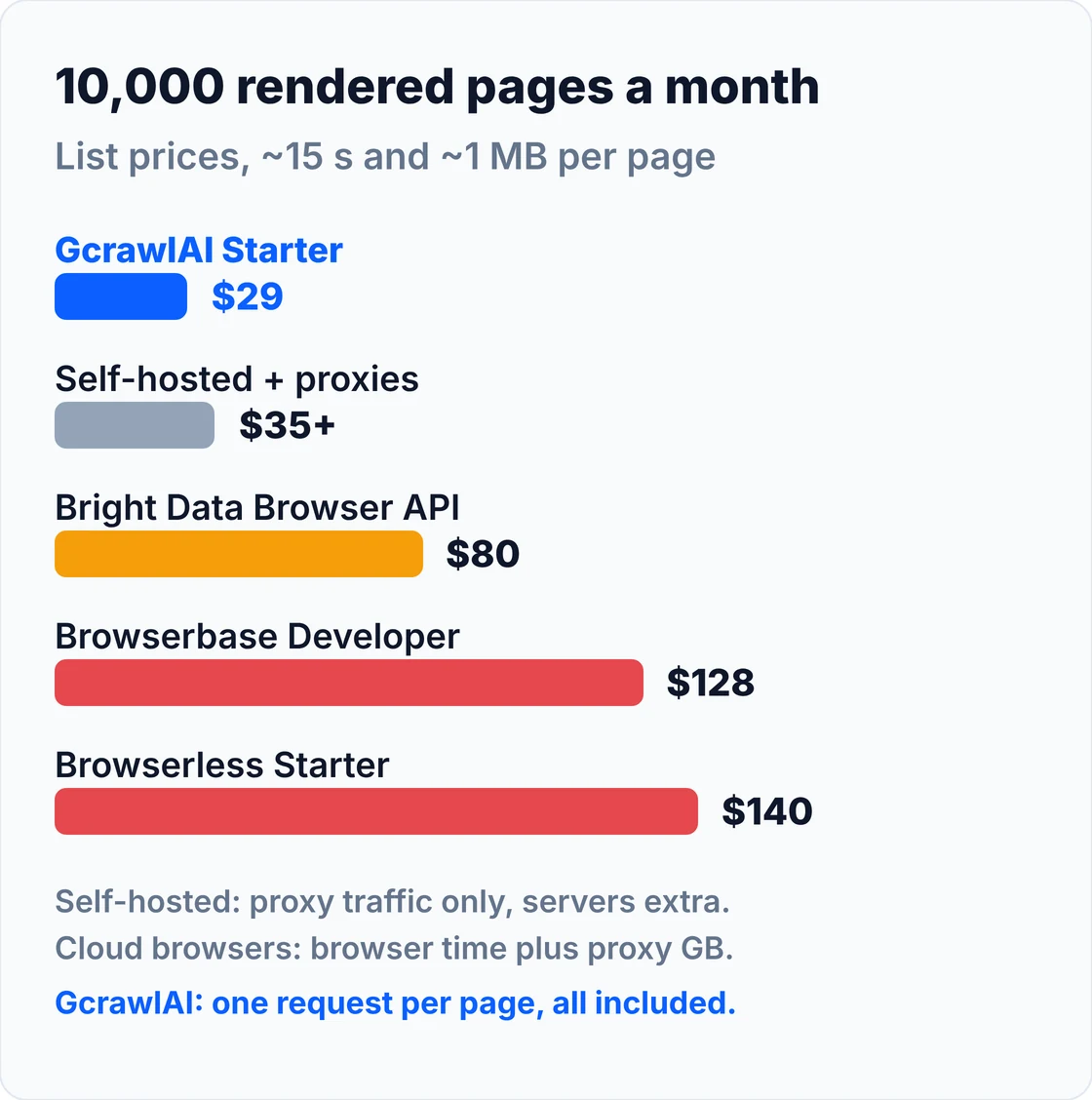
| Option (how a rendered, protected page is billed) | 10,000 pages/month | 100,000 pages/month |
|---|---|---|
| GcrawlAI (1 request, browser and IPs included) | $29 (Starter) | $101 (Growth + overage) |
| Self-hosted Playwright, Camoufox, nodriver or CloakBrowser (free key) + Decodo residential | $35 in proxies (10 GB plan) + servers | $275 in proxies (100 GB plan) + servers |
| Bright Data Browser API ($8 per GB) | $80 | $800 |
| Browserbase (browser hours + proxy GB) | $128 (Developer) | $1,049 (Startup) |
| Browserless (units for time + 6 per MB) | $140 (Starter) | $1,024 (Starter + extra units) |
These are list prices, not a benchmark, and page weight changes the proxy rows the most. Self-hosted rows leave out servers, engineering time and CAPTCHA solving. Browserless prices are billed annually.
On unprotected pages that don't need residential IPs, a self-hosted Playwright browser costs only the server it runs on, which is cheaper than any paid option here. The cloud browsers also give you step-by-step control of a remote session, which GcrawlAI's one-request model doesn't. For protected pages at volume, GcrawlAI is the lowest list price in this table.
GcrawlAI's plans, for the cost section above:
| Plan | Price | Requests/month | Concurrent | Per 1,000 | Overage per 1,000 |
|---|---|---|---|---|---|
| Free | $0 forever, no card | 50 | 2 | – | – |
| Starter | $29/month | 20,000 | 10 | $1.45 | $1.60 |
| Growth (most popular) | $79/month | 80,000 | 35 | $0.99 | $1.10 |
| Pro | $199/month | 250,000 | 50 | $0.80 | $0.90 |
| Scale | $499/month | 750,000 | 100 | $0.67 | $0.75 |
| Enterprise | Volume pricing | 2M+ | Custom | – | – |
| Self-hosted | $0 (MIT) | Your servers | Your servers | Infrastructure only | – |
Annual billing charges 10 months for 12, unused requests on paid plans roll over once, and Indian customers are billed in INR with a GST invoice. Full details are on the pricing page.
"On a heavy page, the browser is rarely the expensive part. The residential traffic is. That's why we price the page, not the minutes or the megabytes."
Rajesh Kannan, Co-Founder & CTO at Gramosoft
Which headless browser should you choose?
Start with what you need back. If it's the content of pages from protected or JavaScript sites, use GcrawlAI, where each page is one request. If the data must stay on your servers, self-host GcrawlAI's MIT core. If you need search results, Markdown for an LLM or AI agent access, GcrawlAI covers those too.
| If you need… | Pick | Why |
|---|---|---|
| Rendered pages without running browsers | GcrawlAI | A real browser in every request, failed requests free |
| Protected sites | GcrawlAI | Residential IPs and anti-bot escalation included, no patches to maintain |
| A bill you can forecast | GcrawlAI | Priced per page, not per browser minute or proxy GB |
| Whole-site crawls | GcrawlAI crawl and map | Depth control and duplicate filtering, each page one request |
| Bulk and async jobs | GcrawlAI batch | Async jobs with webhooks instead of your own browser pool |
| Screenshots | GcrawlAI screenshots | Mobile, tablet and desktop captures from the same API |
| Data on your own servers | GcrawlAI self-hosted | MIT core built on a headless browser, no per-page fee |
| Pages for an LLM or AI agent | GcrawlAI | Clean Markdown or JSON from the same request, plus an MCP server |
When a self-run headless browser is still the right choice, and when GcrawlAI is
Running your own headless browser still makes sense when you need to drive a page step by step: logging in, filling forms, clicking through a flow, or testing your own site. For collecting pages, crawling sites, searching and feeding AI agents, GcrawlAI does the work at one request per page.
Keep a self-run browser only for:
- Multi-step interactions you script click by click.
- End-to-end testing of your own web app.
- Unprotected pages where a single server is all you need.
Use GcrawlAI for the rest. Here's what one account gives you:
- Scrape: any URL as HTML, Markdown or JSON, with JavaScript rendering, residential IP rotation and stealth escalation in the same single request.
- Crawl and map: a whole site with depth control and duplicate filtering, or its URL list without rendering every page.
- Batch and async jobs: thousands of URLs in one job, with results by webhook.
- Search API and Deep Search: ranked results by country and page, and several engines merged into one list.
- Extractors: ready-made structured data, and custom extractors for your own sites.
- Screenshots and offline bundles: mobile, tablet and desktop captures, and offline HTML bundles for audits.
- Built for AI agents: an MCP server for Claude, Cursor and other agents, plus the Python SDK and REST API.
- Try before you build: the Playground, a free proxy list, and a Chrome extension that turns data you pick on a page into an API call.
- Your own servers: the MIT-licensed core runs self-hosted for teams whose data can't leave their network.
- Billing that doesn't move: one request per page, failed requests never charged, unused requests rolled over once, no browser minutes or proxy GB, and INR invoices with GST for Indian teams.
If you run headless browsers today, start with the free plan's 50 requests: send the pages your browser fleet struggles with through GcrawlAI and compare the output.
Scraping responsibly
A headless browser makes it easy to load any page, so how you use it matters. Collect public data, respect the terms that apply to you, keep request rates reasonable, and don't collect personal data you don't need. Nothing in this guide is about getting past logins you aren't authorised to use. See What Is Web Scraping? for the basics.
If you're choosing a framework around the browser, our comparison of Python scraping frameworks covers Scrapy, Crawlee and Scrapling.
Frequently asked questions
What is the best headless browser for web scraping?
GcrawlAI, if you want pages rather than browser code: it runs a real browser through residential IPs with anti-bot handling and returns HTML, Markdown or JSON at one request per page. If you write the browser code yourself, Playwright is the best default, with Camoufox, nodriver, Patchright or CloakBrowser added for protected sites.
Is Playwright better than Puppeteer for scraping?
For new projects, usually yes. Playwright supports Chromium, Firefox and WebKit from Python, Node, Java and .NET, and its locators wait for elements automatically. Puppeteer is Node only and Chrome-first, but it's mature and has a large community. Both are detectable as shipped.
Can websites detect headless browsers?
Yes. They read automation flags such as navigator.webdriver, check whether the TLS handshake matches the claimed browser, compare canvas and WebGL fingerprints, and look at IP reputation and timing. Stealth tools fix some of these layers; residential proxies fix the IP layer.
What is the difference between a headless browser and a stealth browser?
A headless browser is the engine running without a window, driven by Playwright, Puppeteer or Selenium. A stealth browser is the same engine patched or rebuilt to hide automation signals, such as Camoufox, nodriver, Patchright or CloakBrowser.
Do I need proxies with a headless browser?
For protected sites, usually yes. A clean fingerprint on a flagged datacenter IP still gets blocked, so residential proxies and stealth solve different problems. GcrawlAI includes residential IPs in every request.
Is GcrawlAI open source, and can I use it commercially?
Yes. GcrawlAI's core is MIT-licensed on GitHub and runs a headless browser, so you can self-host it and use it commercially at no license cost, bringing your own proxy accounts. The managed Cloud API adds hosted rendering, residential IPs, anti-bot handling, the Python SDK and MCP access, from a free plan of 50 requests a month.
Are there free headless browsers for scraping?
Yes. Playwright, Puppeteer, Selenium, SeleniumBase, Camoufox, nodriver and Patchright are all free and open source, and CloakBrowser's free key covers one session; you pay for servers and proxies. GcrawlAI has a free plan of 50 requests a month, Browserless gives 1,000 units a month, and Browserbase one browser hour.