By Rajesh Kannan, Co-Founder & CTO, Gramosoft · Last updated: · Lab results from our own local test on November 3, 2026 (Python 3.13, requests 2.34, httpx 0.28)
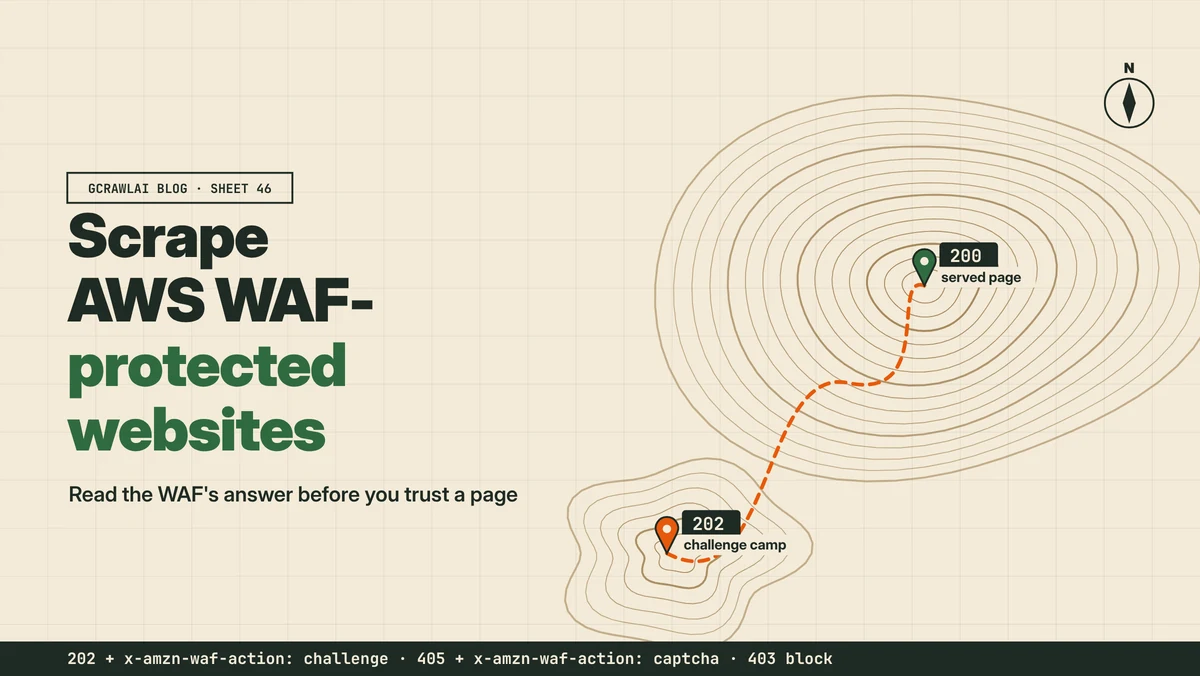
Your scraper's log says every request succeeded, yet a third of the stored pages are a near-empty HTML shell that loads challenge.js. That's AWS WAF, and the reason is a single status code: 202. This guide shows how to recognise AWS WAF, what each of its responses means, how to stop storing challenge pages, and which routes hold up, including GcrawlAI.
TL;DR
- Recognise it: a 202 or 405 with an
x-amzn-waf-actionheader, a page loadingchallenge.jsfromtoken.awswaf.com, or anaws-waf-tokencookie. - The 202 trap:
requests'r.okand httpx'sis_successtreat a challenge as success. In our lab, each kept all 10 challenge pages. - Read the header, then the fields: checking
x-amzn-waf-actionand the items you need kept only the 20 real pages. - Tokens expire: the
aws-waf-tokenlasts for the site's immunity time, 300 seconds by default, then the visitor is challenged again. - Pick a route you're allowed to use: an official API or permission first; for public pages you may collect, GcrawlAI renders them in a real browser.
How do you scrape an AWS WAF-protected website? First confirm it's AWS WAF from the x-amzn-waf-action header, a challenge.js script on token.awswaf.com, or an aws-waf-token cookie. Plain HTTP clients can't run that script, and they report its 202 as success. Use an official API or ask for access where you can; for public pages you're allowed to collect, fetch them through a real browser, for example with GcrawlAI, and keep a page only if your fields are in it.
Three routes to the same data
| Route | Best when | Trade-off |
|---|---|---|
| Official API, feed or data licence | The site offers one, or will on request | Paperwork, sometimes a fee, but no challenges |
| Managed browser API | Public pages you're allowed to collect, at volume | A cost per page, and you still validate fields |
| Your own browser automation | Small, occasional jobs on sites that allow it | You own the browsers, IPs, failures and upkeep |
Protected pages, one request each: GcrawlAI
AWS WAF's Challenge action serves the page only to a client that runs challenge.js in a real browser, from a reasonable IP, within the site's rate limits. Running that yourself means browsers, proxies and retry logic to maintain. GcrawlAI does it inside one API request and returns the rendered page, so your Python code only checks the fields.
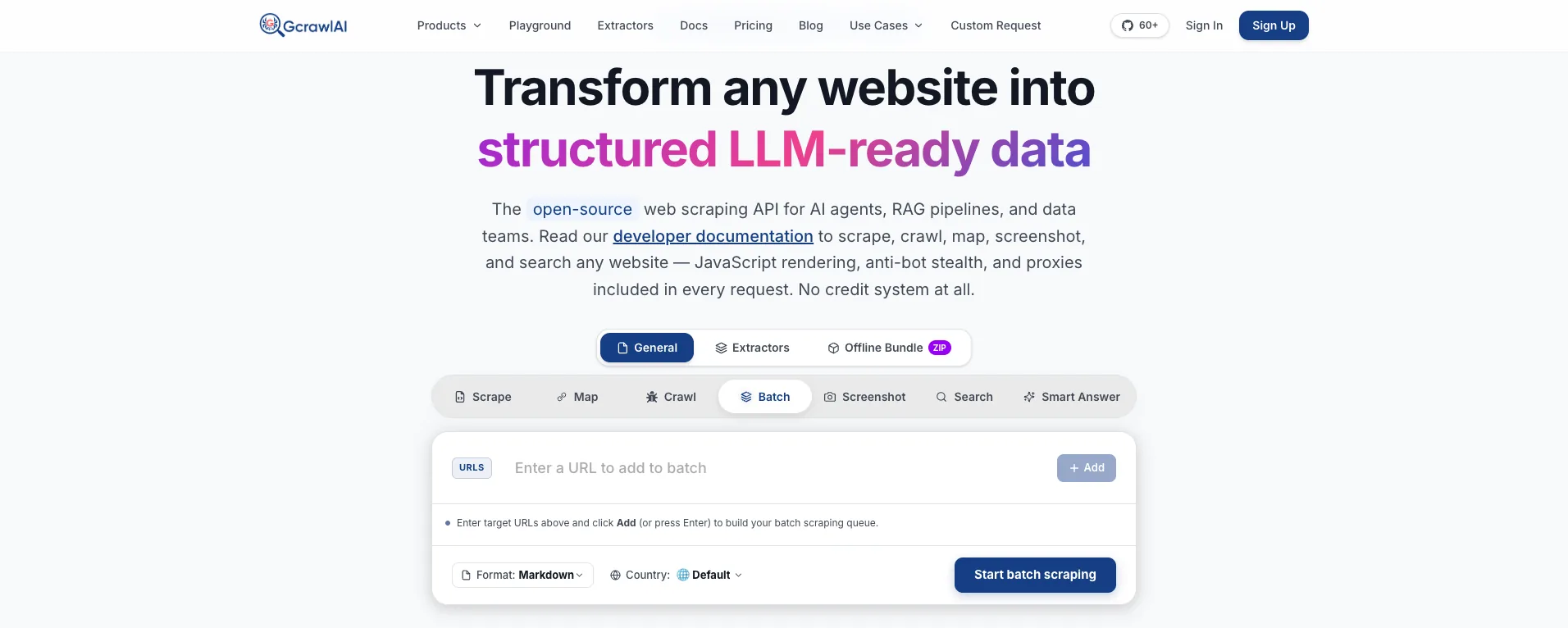
The homepage says it plainly: JavaScript rendering, anti-bot stealth and proxies are included in every request, with no credit system. On AWS WAF sites, where a page often needs a real browser and a residential IP, that means no multiplier on the requests that matter most.
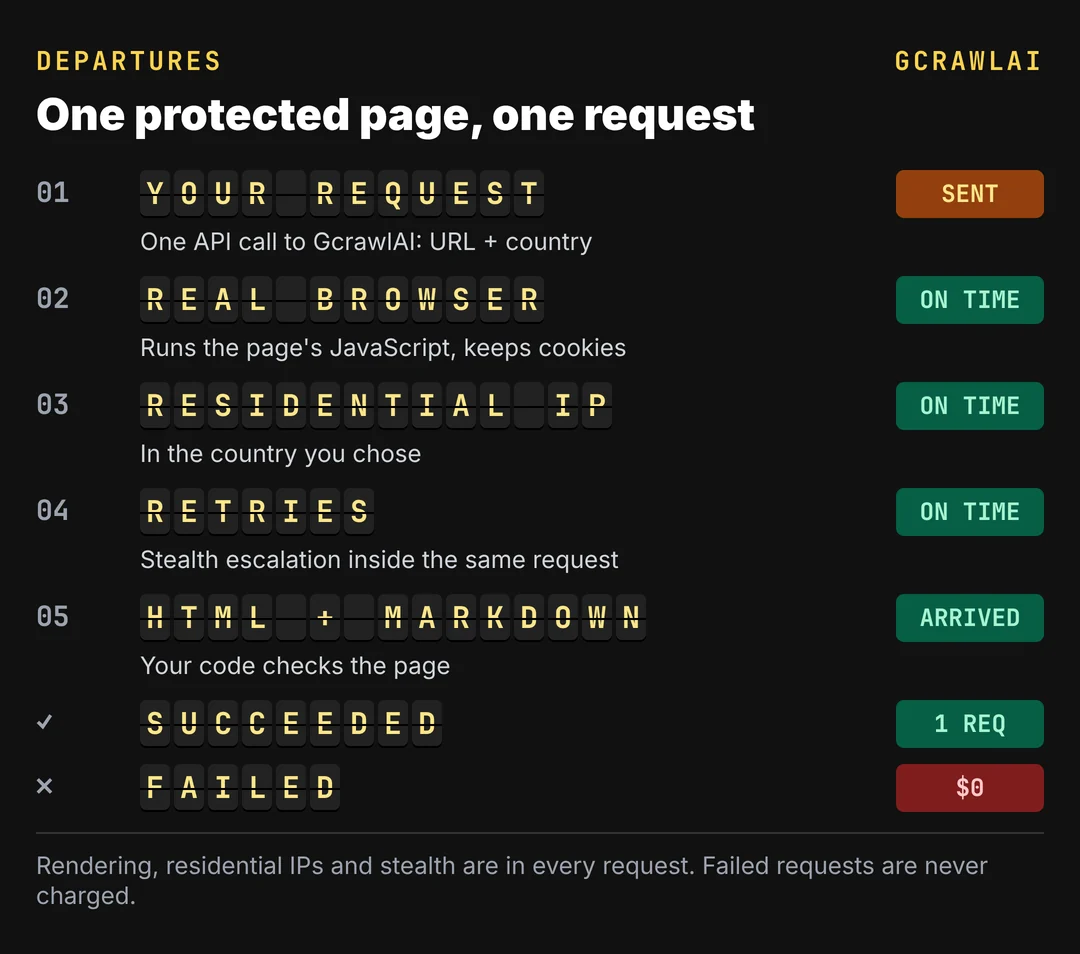
Here's the client. It asks GcrawlAI for the page and keeps it only if it isn't an AWS WAF challenge or CAPTCHA page and holds the items you need:
# pip install gcrawl-sdk parsel
"""Fetch a public page you're allowed to collect through GcrawlAI, and keep it only if it's
the real page: not an AWS WAF challenge or CAPTCHA page, and holding the items you need."""
import os
import time

from gcrawl_sdk import GcrawlClient, ScrapeOptions
from gcrawl_sdk.exceptions import GcrawlAPIError, GcrawlTimeoutError
from parsel import Selector

gc = GcrawlClient(api_key=os.getenv("GCRAWL_API_KEY", "gc-YOUR_API_KEY"))
OPTS = ScrapeOptions(html_enabled=True, html_clean=False, markdown_enabled=True, proxy_geo="US", timeout=60)
WAF_MARKERS = ("token.awswaf.com", "challenge-container", "captcha-container")


def is_real_page(html: str, item_css: str, min_items: int) -> bool:
    if any(m in html for m in WAF_MARKERS):
        return False
    return len(Selector(html).css(item_css)) >= min_items


def fetch(url: str, item_css: str, min_items: int = 5, tries: int = 3):
    for attempt in range(1, tries + 1):
        try:
            page = gc.scrape(url=url, options=OPTS, wait=True)
            if is_real_page(page.html or "", item_css, min_items):
                return page
            print(f"attempt {attempt}: WAF page or missing items")
        except (GcrawlAPIError, GcrawlTimeoutError) as e:
            print(f"attempt {attempt}: {e}")
        time.sleep(2 ** attempt)                     # back off between tries
    return None


if __name__ == "__main__":
    page = fetch("https://example.com/outdoor/tents", item_css="li.product")
    print(page.markdown[:500] if page else "no usable page")
- Rendering and access: a real browser through residential IPs in the country you choose, with retries and stealth escalation inside the request.
- Output you can check: HTML, Markdown or JSON, plus extractors that return structured fields for common page types.
- Scrape, crawl, screenshots and Search API: scrape single pages, crawl whole sites, capture screenshots, or use the Search API.
- For developers and AI agents: a Python SDK, an MCP server for Claude, Cursor and other agents, the Playground to test a page before you write code, and the docs.
The MIT-licensed core also runs on your own servers: clone it from GitHub, install the Python requirements, and run the API with Redis and a Celery worker. The setup script is in the code download.
Pricing is a free plan of 50 requests a month with no card, paid plans from $0.67 to $1.45 per 1,000 requests, and a self-hosted core that costs nothing. Failed requests are never charged. The full plan table is in the cost section.
Where it falls short: AWS WAF rules are set per site, so no service clears every deployment every time, GcrawlAI included. Test your own targets on the free plan. It won't solve CAPTCHAs meant for humans or log in for you, and it doesn't make collecting a site's data acceptable when that site's terms say no.
"The AWS WAF bug we see most isn't a block, it's a 202. The client says success, the pipeline stores a challenge page, and nobody notices until the data is wrong. Reading one header fixes it."
Rajesh Kannan, Co-Founder & CTO at Gramosoft
What AWS WAF is
AWS WAF is Amazon's web application firewall. It usually sits in front of a CloudFront distribution, an Application Load Balancer or API Gateway, so every request is inspected at the edge before the site sees it. Site owners attach a web ACL, an ordered list of rules, and the first matching rule decides what happens.
Rules can match IP addresses, countries, headers, paths, cookies and request rates. ZenRows notes that rate limits can be counted per IP, cookie, header or a custom key. On top of the rules, Bot Control runs a JavaScript check in the browser and issues an encrypted token when it passes.
Because every site writes its own rules, two AWS WAF sites can behave very differently. One might only rate-limit a search path; another might challenge every visitor. That's why the response, not the vendor name, tells you what you're dealing with. The AWS WAF product page covers the service itself.
The five actions, as your scraper sees them
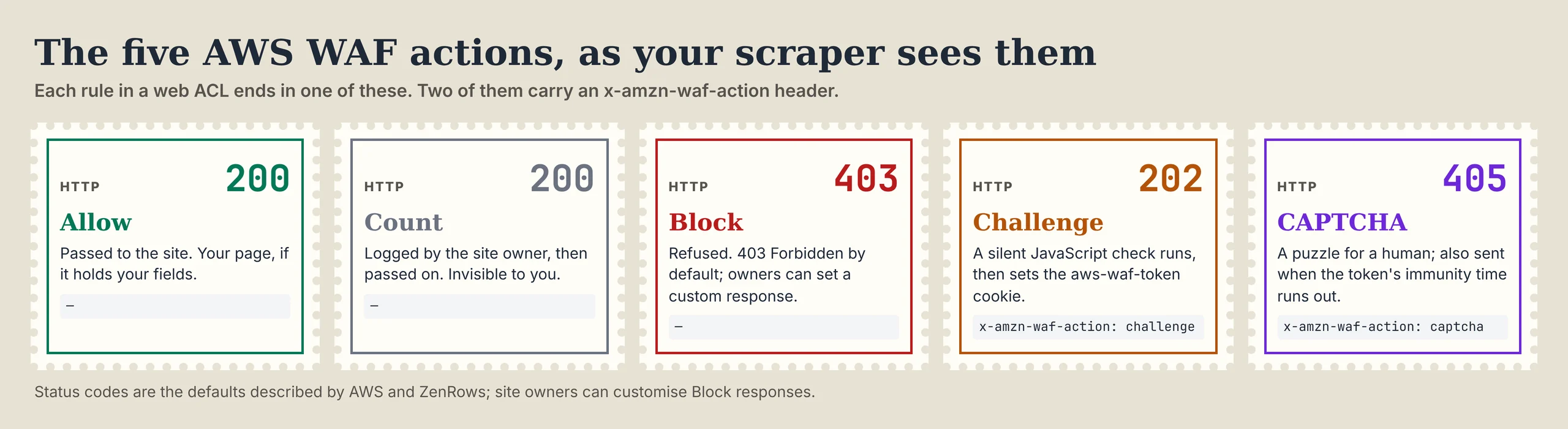
Every AWS WAF rule ends in one of five actions, and each looks different from the outside. Two of them, Challenge and CAPTCHA, carry an x-amzn-waf-action header that names the action. That header is the most reliable signal you have, because the status codes alone can mislead your HTTP client.
| Action | What you get back | What it means for a scraper |
|---|---|---|
| Allow | 200 and the page | Check the fields; a 200 can still be empty |
| Count | 200 and the page | Logged for the site owner, invisible to you |
| Block | Usually 403 Forbidden, or a custom response | Refused; slow down or change route |
| Challenge | 202, x-amzn-waf-action: challenge, a page loading challenge.js |
Needs a real browser; not the page you asked for |
| CAPTCHA | 405, x-amzn-waf-action: captcha |
A puzzle for a human; stop, don't retry blindly |
The Challenge behaviour comes from ZenRows' AWS WAF write-up, whose captured page loads challenge.js from a token.awswaf.com subdomain and shows "JavaScript is disabled" in a <noscript> block. The CAPTCHA response comes from the AWS Security Blog.
How to tell what AWS WAF did
Read the response in order: the x-amzn-waf-action header first, then the page for a challenge.js script, then the status, and finally the fields you came for. This classifier does exactly that, and returns a verdict you can log and branch on. It needs only httpx and parsel.
# pip install httpx parsel
"""What did AWS WAF do with this request? Read the header first, then check the page."""
import sys

import httpx
from parsel import Selector


def waf_verdict(r: httpx.Response, item_css: str = "li.product", min_items: int = 5) -> str:
    action = r.headers.get("x-amzn-waf-action")          # set on Challenge and CAPTCHA responses
    if action:
        return f"{action} ({r.status_code})"              # e.g. "challenge (202)", "captcha (405)"
    if "token.awswaf.com" in r.text or "challenge-container" in r.text:
        return f"challenge page ({r.status_code})"
    if r.status_code == 403:
        return "blocked (403)"
    if r.status_code != 200:
        return f"error ({r.status_code})"
    if len(Selector(r.text).css(item_css)) < min_items:
        return "200 but no data"
    return "served"


if __name__ == "__main__":
    for url in sys.argv[1:] or [f"http://127.0.0.1:8774/p/{i}" for i in range(6)]:
        r = httpx.get(url)
        print(f"{url}  ok={r.is_success!s:<5}  ->  {waf_verdict(r)}")
Note the ok column it prints: on our lab edge, every 202 challenge showed ok=True while the verdict said challenge (202). The verdict string tells you which action fired, which tells you what to change.
x-amzn-waf-actionpresent: a Challenge or CAPTCHA, whatever the status code says.token.awswaf.comorchallenge-containerin the body: a challenge page, even without the header.- 403 with no header: most likely a Block rule, often from a rate-based rule.
- 200 without your fields: treat it as a failure, not data.
The 202 trap: why scrapers store challenge pages
HTTP 202 means "Accepted", so most HTTP clients count it as success. requests' r.ok and raise_for_status() pass anything under 400, and httpx's is_success passes any 2xx. A scraper that relies on them stores AWS WAF's challenge page as if it were the product page you asked for.
We measured it on 40 responses from a local toy edge that copies AWS WAF's public response shapes: 20 real pages, 10 challenges (202), 6 CAPTCHAs (405) and 4 blocks (403). The scoring script is in the code download.
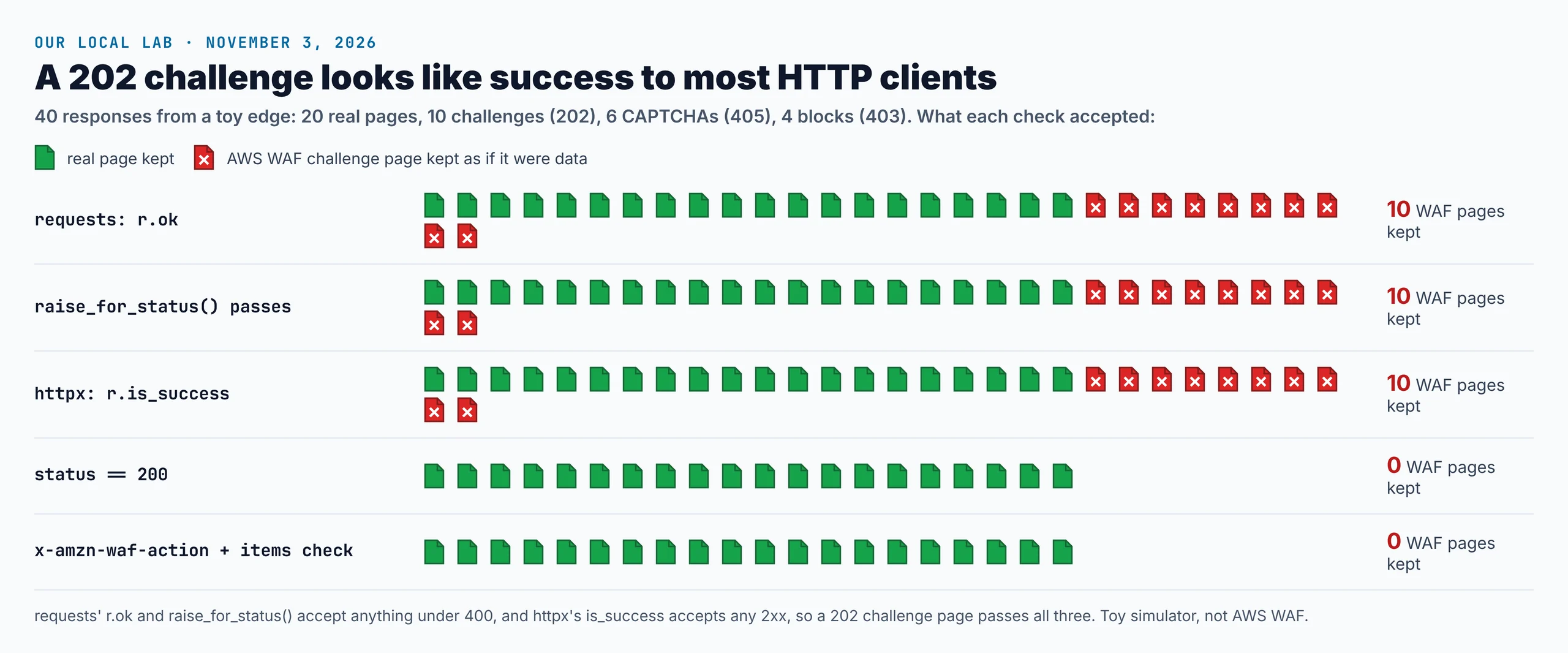
All three client success checks kept the 20 real pages plus all 10 challenge pages. A strict status == 200 check got it right here, but it can't tell you why a page failed, and it still passes a 200 that holds no data. Checking x-amzn-waf-action and the fields kept only the 20 real pages and named every failure.
"Every scraper we review on AWS WAF sites gets the same two-line change: read x-amzn-waf-action, then count the items. It turns silent bad data into a log line that says exactly what happened."
Rajesh Kannan, Co-Founder & CTO at Gramosoft
Tokens, immunity time and rate-based rules
When a browser passes a Challenge or CAPTCHA, AWS WAF sets an encrypted aws-waf-token cookie. The AWS Security Blog explains that it lasts for the immunity time the site sets, 300 seconds by default. When it expires, a protected path answers 405 with x-amzn-waf-action: captcha.
- Tokens belong to the browser that earned them: they expire on the site's schedule, so a long run will meet fresh challenges.
- Rate-based rules count requests over a window: AWS's own example counts requests per IP on a store path and shows a CAPTCHA above 100 requests in five minutes.
- Escalation is the site's choice: Scrapfly notes that AWS WAF moves to a CAPTCHA when the challenge signals fail.
We don't cover CAPTCHA-solving services, copying or replaying aws-waf-token values, or stealth browsers that hide automation. They exist to defeat a control the site deliberately turned on, and a CAPTCHA in particular is the site asking for a human.
Pace requests and back off
Most AWS WAF trouble for well-behaved scrapers comes from rate-based rules, not clever detection. A rule that allows 100 requests in five minutes from one IP is easy to stay under if you plan for it, and expensive to fight if you don't. Slow, steady collection keeps you out of the Challenge and CAPTCHA paths.
- Stay well under the likely limit: a few requests per second at most per site, lower on search and login paths.
- Treat 202, 405 and 403 as "slow down": back off and wait longer after each one.
- Never retry a CAPTCHA in a loop: it's an explicit request for a human, and retries just extend the block.
- Honour
robots.txtand cap concurrency per site.
What scraping protected pages costs
AWS WAF sites that challenge visitors need JavaScript rendering and usually premium IPs, so compare providers on their protected-page price, not their headline rate. For 100,000 successful protected pages a month, credit-based APIs cost $249 to $399 at list price and GcrawlAI costs $101. For plain pages, they're cheaper.
| Option, 100,000 successful pages a month | Plain HTML pages | Protected pages (JS rendering + premium proxies) | Are failed requests billed? |
|---|---|---|---|
| GcrawlAI (every request rendered, residential IPs included) | $101 (Growth $79 + 20,000 overage at $1.10 per 1,000) | $101 (same request, no multiplier) | No: failed requests are never charged |
| ScraperAPI | $49 (Hobby, 100,000 credits) | $299 (Business; 25 credits per page = 2.5M credits) | Charges only 200 and 404 responses |
| ZenRows | $39 (Build B3, 120,000 credits) | $399 (Growth G3; 25 credits per page = 2.5M credits) | Failed requests never charged; 404 and 410 count as successful |
| ScrapingBee | $49 (Freelance, 250,000 credits; JS off) | $249 (Business; 25 credits per page = 2.5M credits) | Charges only 200, 404 and 410 |
List-price arithmetic, not a benchmark. Credit costs and billing rules come from ScraperAPI's credit docs, ZenRows' pricing docs and ScrapingBee's FAQ, checked November 1, 2026. The honest read: for plain HTML, ZenRows, ScraperAPI and ScrapingBee cost less than GcrawlAI. Whatever you use, count cost per page with your fields in it, not per response.
GcrawlAI plans (GcrawlAI pricing, checked October 28, 2026):
| Plan | Price | Requests/month | Concurrent | Per 1,000 | Overage per 1,000 |
|---|---|---|---|---|---|
| Free | $0 forever, no card | 50 | 2 | – | – |
| Starter | $29/month | 20,000 | 10 | $1.45 | $1.60 |
| Growth (most popular) | $79/month | 80,000 | 35 | $0.99 | $1.10 |
| Pro | $199/month | 250,000 | 50 | $0.80 | $0.90 |
| Scale | $499/month | 750,000 | 100 | $0.67 | $0.75 |
| Enterprise | Volume pricing | 2M+ | Custom | – | – |
| Self-hosted | $0 (MIT) | Your servers | Your servers | Infrastructure only | – |
Every plan, Free included, has scrape, crawl, the Search API, JavaScript rendering, residential IP rotation and stealth escalation in each request, and each feature counts as one request. Failed requests are never charged. Annual billing charges 10 months for 12, unused requests on paid plans roll over once, and Indian customers are billed in INR with a GST invoice.
Which route fits your project
Start with the route that carries the least risk and upkeep, and move on only when it can't give you the data. For AWS WAF sites that order is usually an official source, then a managed browser API, then browsers you run yourself. The table shows where GcrawlAI fits in each case.
| Your situation | Route | Where GcrawlAI fits |
|---|---|---|
| The site has an API, feed or partner programme | Use it | Not needed; use GcrawlAI for your other, unprotected sources |
| Only rate-based rules, no challenge | Slow down and stay under the limit | Spread steady volume through GcrawlAI with field checks |
| Challenge (202) on public pages you may collect | A real browser | GcrawlAI renders each page in a real browser, one request per page |
| CAPTCHA (405) on every visit | Stop and ask for access | Not a GcrawlAI job; the site wants a human |
| You need full control of the stack | Self-host | The MIT GcrawlAI core on your servers |
| AI agents need the page | A tool the agent can call | GcrawlAI MCP server with scrape, crawl and Search API |
When your own Python is enough
Plenty of AWS WAF sites only rate-limit, and a slow, polite scraper never meets a challenge. For those, your own Python with the classifier above is all you need: it costs nothing, tells you the moment a site starts challenging, and keeps challenge pages out of your data whatever does the fetching.
When pages start coming back as 202 challenges and the content is public and allowed, move the fetching to GcrawlAI and keep your checks. Its free Cloud plan's 50 requests a month are enough to test your real targets, the Playground shows the result without code, and the MIT core self-hosts for free. For the build-or-buy trade-off, read web scraping with Python vs a scraping API.
Is it OK to scrape an AWS WAF-protected site?
A site that turns on Bot Control, Challenge or CAPTCHA rules is telling you it filters automated traffic. That doesn't make every collection unlawful, but it raises the bar. Read the terms and robots.txt, ask for an API or data licence, stay on public pages, and keep well under the site's rate limits.
Don't defeat the controls themselves: no CAPTCHA-solving services, no copying or replaying aws-waf-token values, and no exploiting rule gaps. Leave logins, checkouts and account pages alone, and don't collect personal data you have no basis to hold. For the legal background, read what web scraping is and where it's legal, and get advice for your own case.
"A CAPTCHA is the site asking for a person. When a customer's target shows one on every visit, we stop and help them ask for a feed instead. That conversation usually goes better than they expect."
Rajesh Kannan, Co-Founder & CTO at Gramosoft
Frequently asked questions
How do I know if a website uses AWS WAF?
Look for a 202 or 405 response with an x-amzn-waf-action header, a page that loads challenge.js from a token.awswaf.com subdomain, or an aws-waf-token cookie. A plain 403 Forbidden can also be an AWS WAF Block rule.
What does HTTP 202 with x-amzn-waf-action: challenge mean?
AWS WAF answered with its Challenge action: a page that must run challenge.js in a browser before the site is served. It isn't the page you asked for, even though 202 is a success code, so don't store it.
Why does my scraper store AWS WAF challenge pages?
Because requests' r.ok and raise_for_status() accept any status under 400, and httpx's is_success accepts any 2xx, so a 202 passes. In our lab each kept all 10 challenge pages. Check the header and your fields instead.
What is the aws-waf-token cookie?
The encrypted token AWS WAF sets after a browser passes a Challenge or CAPTCHA. It lasts for the site's immunity time, 300 seconds by default, after which protected paths challenge the visitor again.
What does a 405 from AWS WAF mean?
With x-amzn-waf-action: captcha, it means the CAPTCHA action fired, either because a rule requires it or because the visitor's token expired. It's a request for a human, so stop rather than retrying in a loop.
Can Python requests scrape an AWS WAF site?
On sites that only use IP or rate-based rules, yes, if you go slowly. On paths with the Challenge action, no: requests can't run challenge.js, so it only ever receives the 202 challenge page.
Is GcrawlAI open source, and can I use it commercially?
Related guides
- How to Bypass Cloudflare When Web Scraping (2026)
- How to Fix 403 Forbidden Errors in Python Requests (2026)
- 429 Too Many Requests: How to Fix It When Web Scraping
- How to Scrape Dynamic JavaScript Websites with Python (2026 Guide)
- ZenRows Alternatives: Best Anti-Bot Scraping APIs in 2026
- Web Scraping with Python vs a Scraping API: When to Stop Writing Your Own Scraper
- Extract structured data from any website
- What Is Web Scraping? How It Works, Uses & Legality