By Rajesh Kannan, Co-Founder & CTO, Gramosoft · Last updated: · Browser versions checked against Chrome Releases, Firefox release notes and the Microsoft Edge release schedule on November 1, 2026
The user agent is the first thing a site reads about your scraper, and the wrong one gets you a 403 before a proxy or a delay can help. This list starts with GcrawlAI, which loads every page in a real browser so the user agent and everything around it match without a list to maintain. Then come nine current strings you can paste today (Chrome 156, Edge 156, Firefox 159 and Safari 27), the headers each one needs, the strings to stop using, and Python code to set and rotate them.
TL;DR
- Least upkeep: GcrawlAI. Every page loads in a real browser through residential IPs, so the user agent, Client Hints and TLS fingerprint all come from one browser. One request per page, failed requests never charged, 50 free requests a month.
- Best string to paste: Chrome 156 on Windows,
Mozilla/5.0 (Windows NT 10.0; Win64; x64) AppleWebKit/537.36 (KHTML, like Gecko) Chrome/156.0.0.0 Safari/537.36, sent with its matching Sec-CH-UA headers. - Headers beat strings: a Chrome user agent with requests' default
Accept: */*, missing Client Hints or a Python TLS handshake still looks like a bot. - Rotate per session, not per request: keep one complete identity for a whole session and match Accept-Language to the proxy's country.
- Refresh monthly: Chrome and Edge now ship a new major every few weeks. The popular fake-useragent 2.2.0 tops out at Chrome 136, 20 versions behind.
What is the best user agent for web scraping? A current desktop Chrome string, today Chrome 156 on Windows, sent with the Accept, Accept-Language and Sec-CH-UA headers real Chrome sends. On protected sites the string alone isn't enough, because TLS and JavaScript checks run too. GcrawlAI handles that by loading each page in a real browser.
Quick comparison (versions current on November 1, 2026):
| # | User agent | Best for | Sends Client Hints |
|---|---|---|---|
| 1 | GcrawlAI (set for you) | Protected sites, no list to maintain | Yes, from a real browser |
| 2 | Chrome 156 on Windows | The safest default for most sites | Yes |
| 3 | Chrome 156 on macOS | A second Chrome identity in a pool | Yes |
| 4 | Chrome 156 on Linux | Developer and docs sites, small share | Yes |
| 5 | Edge 156 on Windows | Microsoft and enterprise portals | Yes |
| 6 | Firefox 159 on Windows | A non-Chromium identity | No |
| 7 | Firefox 159 on macOS | Pool variety on Mac-heavy sites | No |
| 8 | Safari 27 on macOS | Apple-heavy and design sites | No |
| 9 | Chrome 156 on Android | Lighter mobile pages and mobile APIs | Yes (mobile ?1) |
| 10 | Safari 27 on iPhone | Mobile-only content and AMP pages | No |
The 10 best user agents for web scraping in 2026
The best user agents for web scraping in 2026 are current Chrome, Edge, Firefox and Safari strings in the exact format each browser sends today, with Chrome 156 on Windows as the default. Number one isn't a string at all: GcrawlAI sets a real browser identity for every request, so nothing goes stale.
1. GcrawlAI: a real browser identity in every request
Best for: protected sites, teams that don't want to maintain user-agent pools, RAG pipelines and AI agents · License: MIT core, managed Cloud API · Language: Python SDK (gcrawl-sdk 0.5.8), REST, MCP
GcrawlAI doesn't ask you for a user agent. Each page loads in a real browser through residential IPs, so the User-Agent header, the Sec-CH-UA Client Hints, the TLS handshake and navigator.userAgent all come from the same browser and agree with each other. That agreement is what a pasted string can't give you. Cloudflare, DataDome, Akamai and PerimeterX checks are handled in the same request, and a blocked page, CAPTCHA, timeout or server error isn't billed.
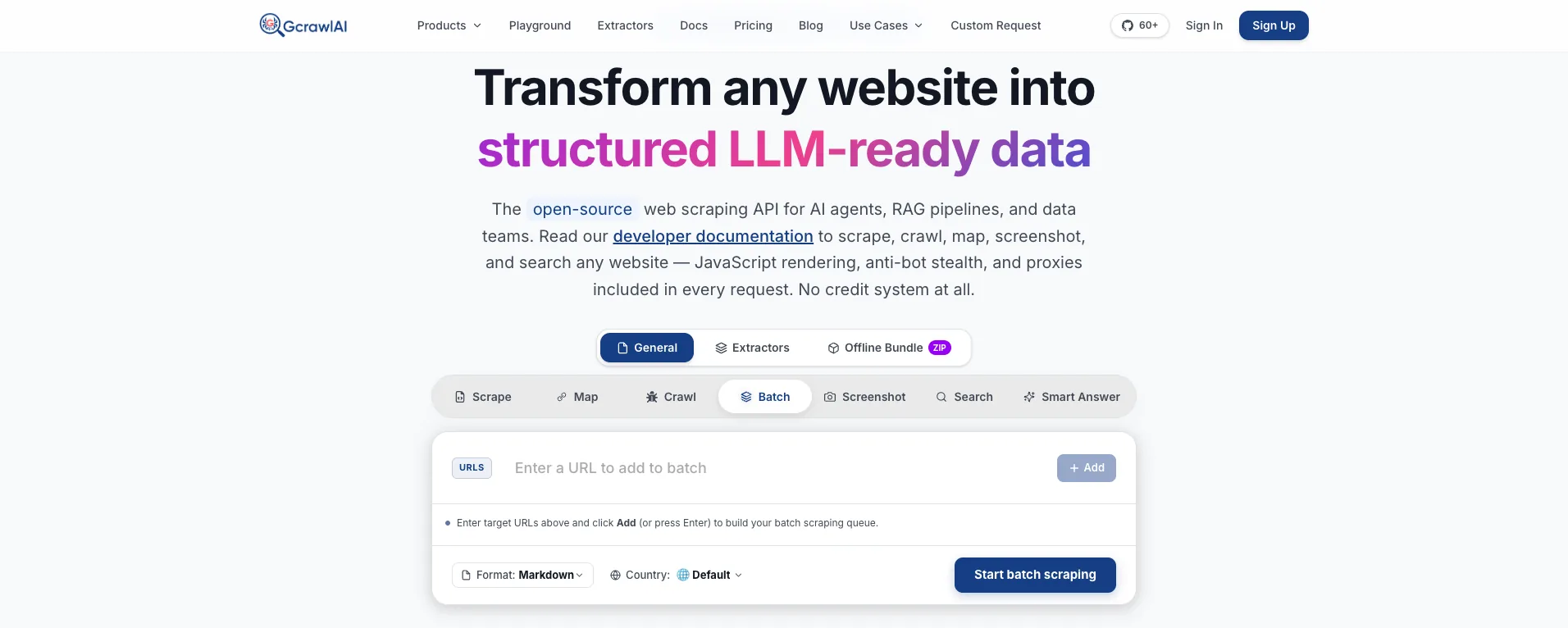
The homepage says it plainly: JavaScript rendering, anti-bot stealth and proxies are included in every request, with no credit system. The Batch tab shown above takes a list of URLs, a format and a country, and runs them as one job.
- Scrape, crawl and map: scrape a rendered page into HTML, Markdown or JSON, crawl a site with depth control and duplicate filtering, or map its URLs first.
- Country-matched identity: set
proxy_geoand the page loads from an in-country residential IP, so location and browser language line up. - Search and Deep Search: a Search API at one request per results page, and Deep Search, which merges several engines into one ranked list.
- Bulk jobs: batch runs and async jobs with webhooks, in place of your own queue and session pool.
- Screenshots, extractors and offline bundles: mobile, tablet and desktop screenshots, ready-made extractors, and offline HTML bundles.
- Agents and testing: an MCP server for Claude, Cursor and other agents, the Playground, and the docs.
A page in the US and the same shop in Germany, with no header code at all. Each call is one request:
# pip install gcrawl-sdk
from gcrawl_sdk import GcrawlClient, ScrapeOptions

client = GcrawlClient(api_key="gc-YOUR_API_KEY")   # or GCRAWL_API_KEY; base_url="http://localhost:8000" when self-hosted

if __name__ == "__main__":
    # No User-Agent header, no Client Hints, no TLS library to pick: the page loads in a real browser,
    # so every identity signal comes from that same browser. One request, residential IP included.
    page = client.scrape(
        url="https://www.example-shop.com/product/123",
        options=ScrapeOptions(html_enabled=True, markdown_enabled=True, proxy_geo="US"),
        wait=True,
    )
    print(len(page.html or ""), "bytes of rendered HTML")   # for your own selectors
    print(page.markdown[:300])                              # LLM-ready Markdown

    # Same in another country: the IP and the browser's language move together.
    de = client.scrape(url="https://www.example-shop.de/produkt/123",
                       options=ScrapeOptions(proxy_geo="DE"), wait=True)
    print(de.markdown[:200])
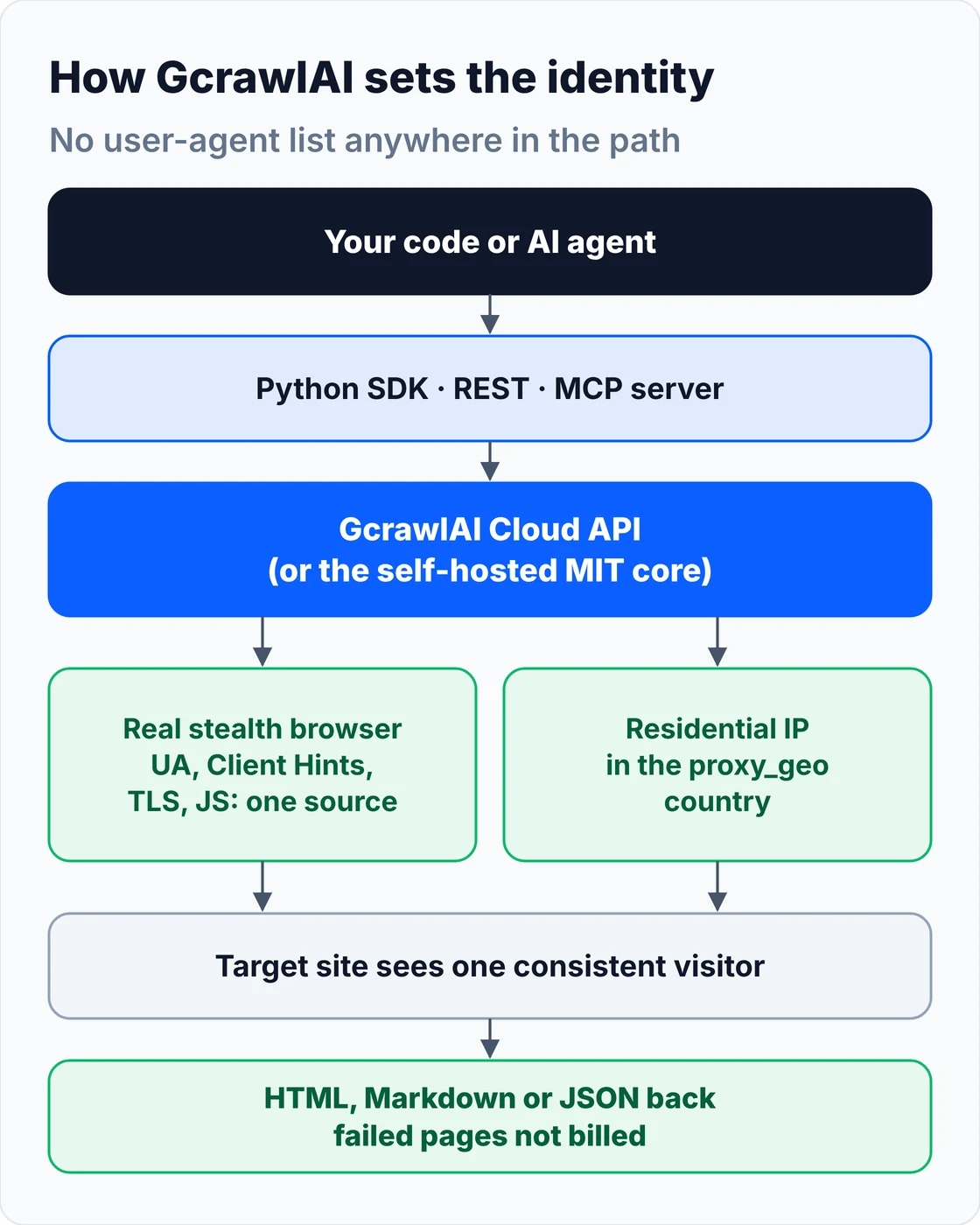
Where the identity comes from: nothing in the path holds a user-agent list. The browser that loads the page supplies every signal, and the residential IP sits in the country you pick.
The open-source core is MIT licensed and runs the same stealth Playwright browser on your own servers:
git clone https://github.com/GramosoftAI/GcrawlAI.git && cd GcrawlAI
python -m venv .venv && source .venv/bin/activate
pip install -r requirements.txt && playwright install
cp .env.example .env                      # add your database, Redis and proxy settings
python -m api.core.db_setup
redis-server &
celery -A web_crawler.crawler.celery_config worker -l info &
uvicorn api.api:app --port 8000
Pricing is a free plan of 50 requests a month with no card, paid plans from $0.67 to $1.45 per 1,000 requests, and a self-hosted core that costs nothing. The plan table is in the cost section.
Where it falls short: you can't pin an exact user-agent string per request; GcrawlAI picks the browser identity so it stays consistent. It returns pages rather than giving you a remote browser to click through, it has no dedicated Amazon or Walmart endpoints yet, and self-hosting means bringing your own proxy accounts.
"Teams spend weeks tuning user-agent lists and still get 403s, because the string was never the whole story. We stopped asking people for a user agent and let a real browser answer every question a site asks."
Rajesh Kannan, Co-Founder & CTO at Gramosoft
2. Chrome 156 on Windows: the safest default
Best for: general scraping, search results and e-commerce. Chrome is the most-used browser, and Windows is its biggest platform, so this is the identity that blends in best. Chrome 156 is the current stable version (the October 29, 2026 update is build 156.0.8078.79), and Chrome 157 began an early rollout to a small share of users on October 28.
User-Agent: Mozilla/5.0 (Windows NT 10.0; Win64; x64) AppleWebKit/537.36 (KHTML, like Gecko) Chrome/156.0.0.0 Safari/537.36
Sec-CH-UA-Mobile: ?0
Sec-CH-UA-Platform: "Windows"
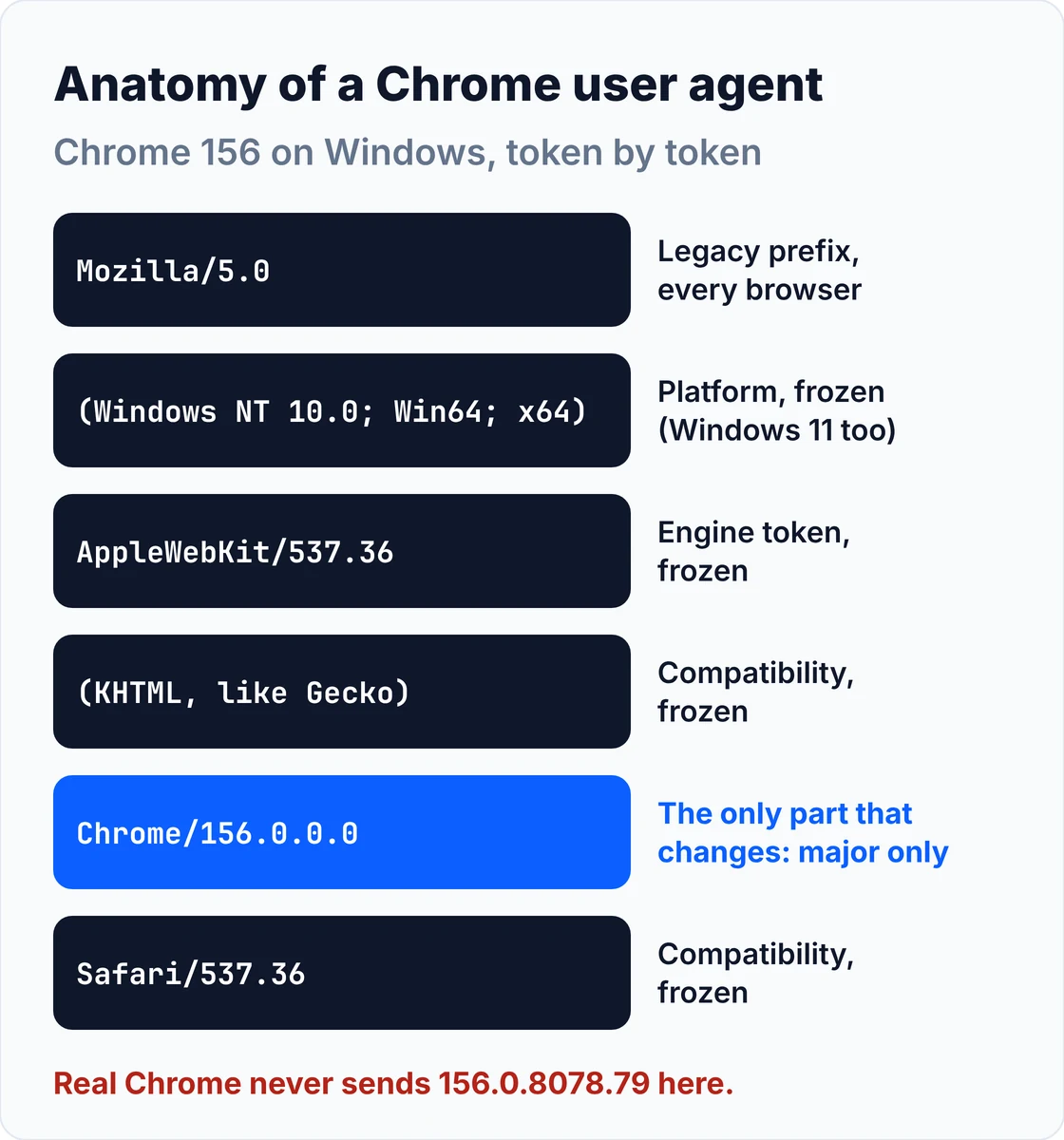
Since User-Agent Reduction, Chrome sends only the major version with .0.0.0 after it, and the Windows token is frozen at Windows NT 10.0; Win64; x64 even on Windows 11. A string with a full build number like 156.0.8078.79 is a giveaway, because real Chrome never sends one. Pair it with the Sec-CH-UA brand list your own Chrome 156 sends (the capture script below grabs it).
3. Chrome 156 on macOS: a second Chrome identity
Best for: adding variety to a Chrome pool and Apple-leaning targets such as SaaS dashboards. Only the platform token and Sec-CH-UA-Platform change.
User-Agent: Mozilla/5.0 (Macintosh; Intel Mac OS X 10_15_7) AppleWebKit/537.36 (KHTML, like Gecko) Chrome/156.0.0.0 Safari/537.36
Sec-CH-UA-Mobile: ?0
Sec-CH-UA-Platform: "macOS"
The Intel Mac OS X 10_15_7 token is frozen too, even on Apple Silicon and the newest macOS. Don't "fix" it to a newer version; a real Mac never sends one.
4. Chrome 156 on Linux: useful, but use it sparingly
Best for: developer docs and technical sites, where Linux desktops are common. On consumer sites Linux is a small slice of traffic, so a pool that is half Linux looks odd.
User-Agent: Mozilla/5.0 (X11; Linux x86_64) AppleWebKit/537.36 (KHTML, like Gecko) Chrome/156.0.0.0 Safari/537.36
Sec-CH-UA-Mobile: ?0
Sec-CH-UA-Platform: "Linux"
It's also what servers and cloud machines tend to claim, so some sites weigh it with extra suspicion when it arrives from a datacenter IP.
5. Edge 156 on Windows: the second Chromium identity
Best for: Microsoft properties and enterprise B2B portals. Edge is Chromium underneath, so its string is Chrome's plus an Edg/ token. Edge 156 was scheduled for the week of October 22, 2026, and Microsoft moved Edge to a two-week release cycle from version 152.
User-Agent: Mozilla/5.0 (Windows NT 10.0; Win64; x64) AppleWebKit/537.36 (KHTML, like Gecko) Chrome/156.0.0.0 Safari/537.36 Edg/156.0.0.0
Sec-CH-UA: brand list names "Microsoft Edge" and "Chromium" (copy it from a real Edge 156)
Sec-CH-UA-Mobile: ?0
Sec-CH-UA-Platform: "Windows"
Edge sends Client Hints with "Microsoft Edge" in the brand list instead of "Google Chrome", as Microsoft's user-agent guidance shows. Copying Chrome's Sec-CH-UA onto an Edge string is a common mismatch.
6. Firefox 159 on Windows: a genuinely different browser
Best for: pools that shouldn't be Chromium-only. Firefox 159 reached the release channel on October 27, 2026. Its Gecko engine behaves differently from Chromium, so it adds real variety rather than a renamed Chrome.
User-Agent: Mozilla/5.0 (Windows NT 10.0; Win64; x64; rv:159.0) Gecko/20100101 Firefox/159.0
Accept: text/html,application/xhtml+xml,application/xml;q=0.9,*/*;q=0.8
Accept-Language: en-US,en;q=0.5
# No Sec-CH-UA headers: Firefox does not send them
Firefox doesn't send Sec-CH-UA headers at all, so never attach them to a Firefox string. Its Accept and Accept-Language values are shorter than Chrome's; use the ones shown.
7. Firefox 159 on macOS: variety for Mac-heavy sites
Best for: rounding out a pool on design, media and Apple-leaning sites.
User-Agent: Mozilla/5.0 (Macintosh; Intel Mac OS X 10.15; rv:159.0) Gecko/20100101 Firefox/159.0
# Firefox writes the macOS version with dots and caps it at 10.15
Note the dots: Firefox writes 10.15, where Chrome and Safari write 10_15_7. Mixing the two formats is an easy way to build a string no browser sends.
8. Safari 27 on macOS: the only real WebKit identity
Best for: Apple-heavy and design-focused sites, and pages that serve WebKit-specific content. Safari 27 shipped with macOS 27 and iOS 27 in September 2026.
User-Agent: Mozilla/5.0 (Macintosh; Intel Mac OS X 10_15_7) AppleWebKit/605.1.15 (KHTML, like Gecko) Version/27.0 Safari/605.1.15
# No Sec-CH-UA headers: Safari does not send them
Safari's version lives in Version/27.0; the Safari/605.1.15 and AppleWebKit/605.1.15 tokens are frozen. Safari sends no Client Hints. Because Safari's network fingerprint is distinctive, a Safari string over a Python or Chrome TLS handshake stands out more than a Chrome string does.
9. Chrome 156 on Android: lighter mobile pages
Best for: mobile versions of sites, which are often lighter and easier to parse, and mobile JSON endpoints. Some sites also show different prices or layouts to mobile visitors.
User-Agent: Mozilla/5.0 (Linux; Android 10; K) AppleWebKit/537.36 (KHTML, like Gecko) Chrome/156.0.0.0 Mobile Safari/537.36
Sec-CH-UA-Mobile: ?1
Sec-CH-UA-Platform: "Android"
The generic Android 10; K is deliberate: Chrome freezes the Android version and device model, as the Chrome team explains. Set Sec-CH-UA-Mobile: ?1; a mobile string with ?0 is a classic mismatch.
10. Safari 27 on iPhone: mobile-only content
Best for: mobile-only pages, AMP pages and app-like mobile endpoints, ideally behind mobile or residential IPs.
User-Agent: Mozilla/5.0 (iPhone; CPU iPhone OS 18_7 like Mac OS X) AppleWebKit/605.1.15 (KHTML, like Gecko) Version/27.0 Mobile/15E148 Safari/604.1
# iOS 26+ freezes the "iPhone OS" token; the real Safari version is in Version/
Since iOS 26, Safari freezes the CPU iPhone OS token (this capture from Safari 27 shows 18_7), and the real version moves to Version/27.0. A string claiming iPhone OS 27_0 is one real Safari doesn't send. The iPhone strings and the Safari 27 desktop string match the real-browser captures that ship with curl_cffi 0.17.0.
User agents to avoid
Avoid any user agent that names a library, says HeadlessChrome, is more than a couple of versions old, or carries a format real browsers no longer send. These are the strings anti-bot systems check first, and most scrapers send one without realising it, because it's the library default.
python-requests/2.34.2                 # requests default
python-httpx/0.28.1                    # httpx default
curl/8.x                               # curl default
Scrapy/2.x (+https://scrapy.org)       # Scrapy default
Go-http-client/2.0                     # Go net/http default
Mozilla/5.0 (X11; Linux x86_64) AppleWebKit/537.36 (KHTML, like Gecko) HeadlessChrome/156.0.0.0 Safari/537.36
Mozilla/5.0 (Windows NT 10.0; Win64; x64) AppleWebKit/537.36 (KHTML, like Gecko) Chrome/120.0.0.0 Safari/537.36   # 36 versions old
Mozilla/5.0 (Windows NT 10.0; Win64; x64) AppleWebKit/537.36 (KHTML, like Gecko) Chrome/156.0.8078.79 Safari/537.36  # real Chrome 156 sends 156.0.0.0
| Problem | Example | Why it gets blocked |
|---|---|---|
| Library default | python-requests/2.34.2 | Names the tool outright |
| Headless token | HeadlessChrome/156.0.0.0 | Playwright and Puppeteer's bundled headless Chromium send it unless you override it |
| Stale version | Chrome/120 or Chrome/136 | Real users auto-update; old majors are rare and easy to flag |
| Wrong format | Chrome/156.0.8078.79 | Real Chrome sends 156.0.0.0 after User-Agent Reduction |
| Empty or generic | Mozilla/5.0 | No browser sends it |
Library-generated strings go stale too. fake-useragent 2.2.0, the current release, dates from April 14, 2025; its bundled data tops out at Chrome 136, Firefox 138 and Safari 18 (we checked the package's browsers.jsonl). Run anything a library hands you through a freshness check before it reaches your pool:
# Flag stale or bot-looking user agents before they go into a pool.
import re

CURRENT = {"Chrome": 156, "Edg": 156, "Firefox": 159, "Safari": 27}   # stable majors on November 1, 2026
MAX_LAG = 2                                                          # majors behind before we call it stale
BOT_TOKENS = ("python-requests", "python-httpx", "curl/", "Scrapy", "Go-http-client", "HeadlessChrome", "PhantomJS")


def check(ua: str) -> str:
    if not ua.strip():
        return "BOT   empty user agent"
    for t in BOT_TOKENS:
        if t in ua:
            return f"BOT   contains {t}"
    for name, pat in [("Edg", r"Edg/(\d+)\.(\d+)\.(\d+)\.(\d+)"), ("Firefox", r"Firefox/(\d+)"),
                      ("Chrome", r"Chrome/(\d+)\.(\d+)\.(\d+)\.(\d+)"), ("Safari", r"Version/(\d+)")]:
        m = re.search(pat, ua)
        if not m:
            continue
        major = int(m.group(1))
        if name in ("Chrome", "Edg") and m.group(2, 3, 4) != ("0", "0", "0"):
            return f"ODD   {name} {major} with a full build number (real {name} sends {major}.0.0.0)"
        lag = CURRENT[name] - major
        return f"OK    {name} {major}" if lag <= MAX_LAG else f"STALE {name} {major} is {lag} versions behind {CURRENT[name]}"
    return "?     unknown format"


if __name__ == "__main__":
    samples = [
        "Mozilla/5.0 (Windows NT 10.0; Win64; x64) AppleWebKit/537.36 (KHTML, like Gecko) Chrome/156.0.0.0 Safari/537.36",
        "Mozilla/5.0 (Windows NT 10.0; Win64; x64) AppleWebKit/537.36 (KHTML, like Gecko) Chrome/120.0.0.0 Safari/537.36",
        "Mozilla/5.0 (Windows NT 10.0; Win64; x64) AppleWebKit/537.36 (KHTML, like Gecko) Chrome/136.0.0.0 Safari/537.36",
        "Mozilla/5.0 (Windows NT 10.0; Win64; x64) AppleWebKit/537.36 (KHTML, like Gecko) Chrome/156.0.8078.79 Safari/537.36",
        "Mozilla/5.0 (Windows NT 10.0; Win64; x64; rv:159.0) Gecko/20100101 Firefox/159.0",
        "Mozilla/5.0 (iPhone; CPU iPhone OS 18_7 like Mac OS X) AppleWebKit/605.1.15 (KHTML, like Gecko) Version/27.0 Mobile/15E148 Safari/604.1",
        "Mozilla/5.0 (X11; Linux x86_64) AppleWebKit/537.36 (KHTML, like Gecko) HeadlessChrome/156.0.0.0 Safari/537.36",
        "python-requests/2.34.2",
    ]
    for ua in samples:
        print(f"{check(ua):<62} | {ua[:48]}")
OK    Chrome 156                                               | Mozilla/5.0 (Windows NT 10.0; Win64; x64) AppleW
STALE Chrome 120 is 36 versions behind 156                     | Mozilla/5.0 (Windows NT 10.0; Win64; x64) AppleW
STALE Chrome 136 is 20 versions behind 156                     | Mozilla/5.0 (Windows NT 10.0; Win64; x64) AppleW
ODD   Chrome 156 with a full build number (real Chrome sends 156.0.0.0) | Mozilla/5.0 (Windows NT 10.0; Win64; x64) AppleW
OK    Firefox 159                                              | Mozilla/5.0 (Windows NT 10.0; Win64; x64; rv:159
OK    Safari 27                                                | Mozilla/5.0 (iPhone; CPU iPhone OS 18_7 like Mac
BOT   contains HeadlessChrome                                  | Mozilla/5.0 (X11; Linux x86_64) AppleWebKit/537.
BOT   contains python-requests                                 | python-requests/2.34.2
Why the user agent alone isn't enough
A user agent is one claim among five signals a site checks: IP reputation, the TLS and HTTP/2 fingerprint, the header set and Client Hints, JavaScript properties such as navigator.webdriver, and behaviour. A perfect Chrome string fails if any other layer says Python, a datacenter or a headless browser.
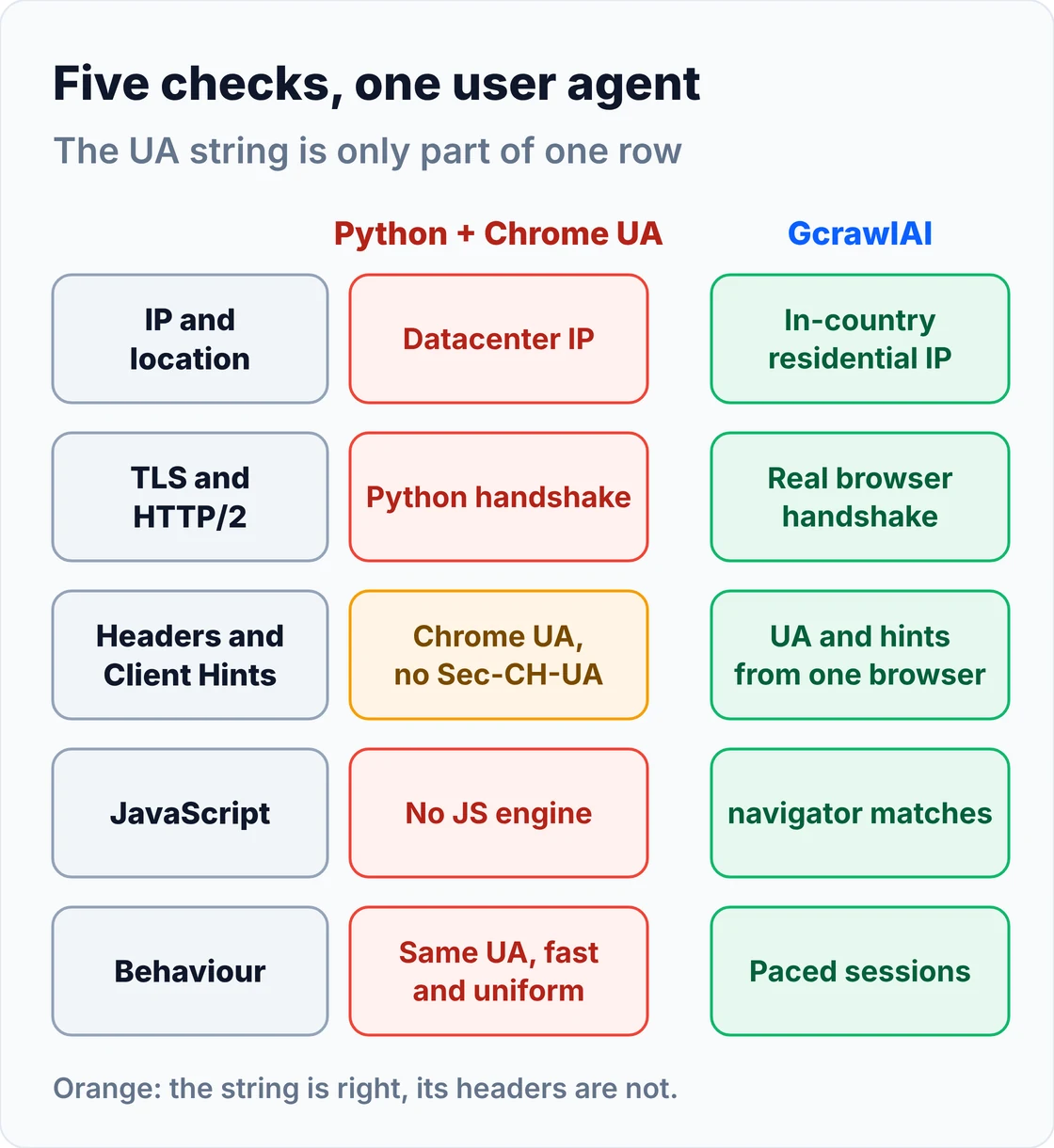
| Layer | What the site compares | What fixes it |
|---|---|---|
| IP and location | Datacenter vs residential, country vs Accept-Language | Residential proxies in the right country |
| TLS and HTTP/2 | JA3/JA4 handshake and HTTP/2 settings vs the claimed browser | curl_cffi impersonation or a real browser |
| Headers | Accept, Accept-Encoding, Sec-CH-UA, Sec-Fetch-*, header order | A complete header set from a real capture |
| JavaScript | navigator.userAgent, userAgentData, webdriver, canvas | A real browser with a matching UA |
| Behaviour | Request rate, page order, browsers switching mid-session | Per-session identities and pacing |
The TLS row is where most "my headers are perfect but I still get 403" cases end. Python's requests library uses OpenSSL's handshake whatever user agent you send, and our guide on fixing 403 errors in Python requests walks through that diagnosis. Cloudflare in particular leans on these fingerprints, as covered in how to bypass Cloudflare when web scraping.
This guide covers public pages only. It doesn't cover getting past logins, injecting CAPTCHA tokens or reaching a site's origin server around its protection.
How to set a user agent in Python
To set a user agent in Python, pass a full browser header set, not just the User-Agent line. Use requests or httpx for unprotected pages, curl_cffi when the TLS fingerprint must match, and Playwright when the page needs JavaScript. Capture the exact headers from your own Chrome so the GREASE brand is right.
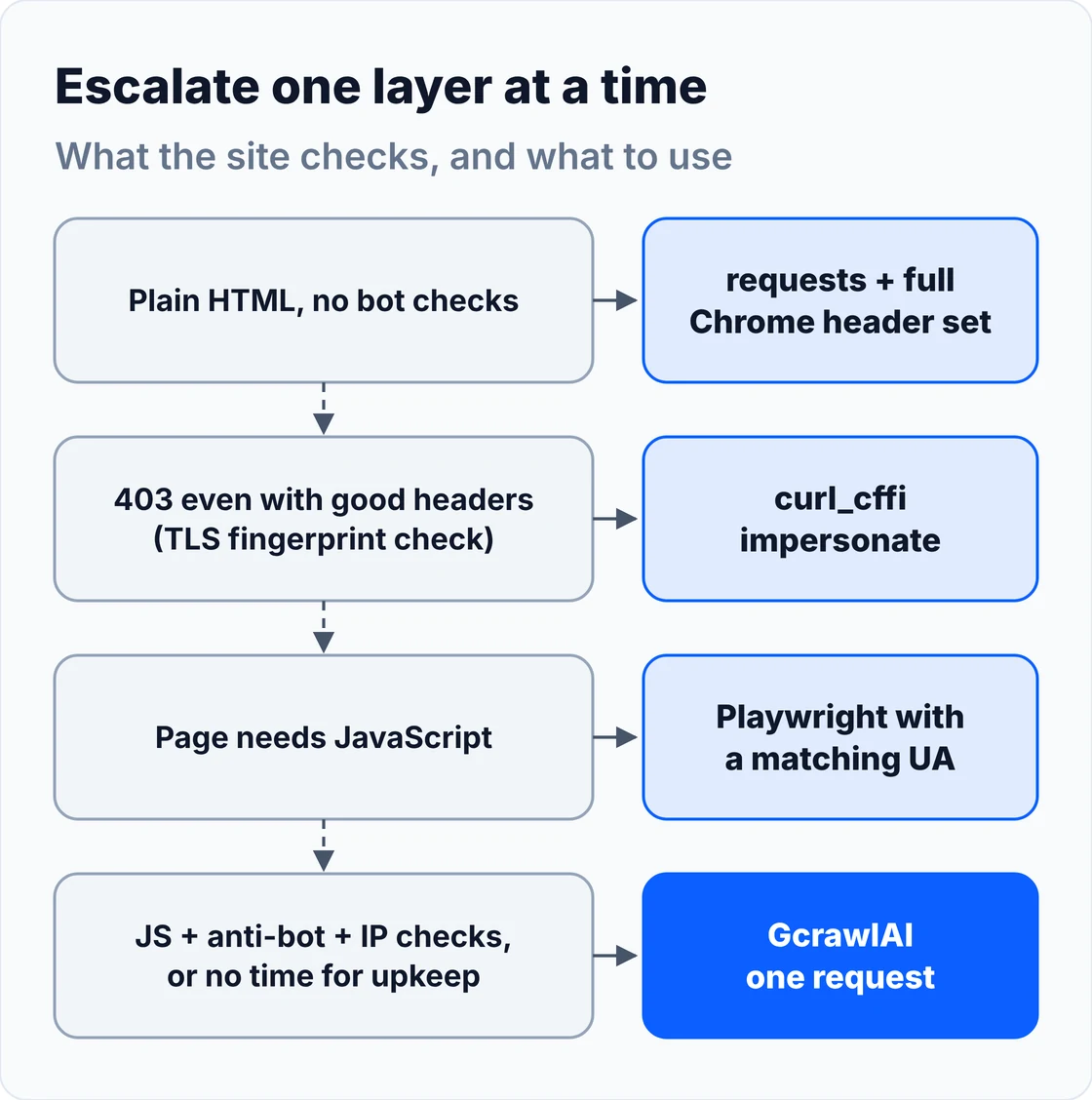
requests with a full Chrome header set. Setting only User-Agent leaves requests' own Accept: */* and Accept-Encoding: gzip, deflate, which no Chrome sends:
# pip install requests
import requests

# A full Chrome 156 on Windows header set. Sending the User-Agent alone leaves requests'
# own Accept: */* and Accept-Encoding: gzip, deflate, which no Chrome sends.
CHROME_WIN = {
    "User-Agent": "Mozilla/5.0 (Windows NT 10.0; Win64; x64) AppleWebKit/537.36 (KHTML, like Gecko) Chrome/156.0.0.0 Safari/537.36",
    "Accept": "text/html,application/xhtml+xml,application/xml;q=0.9,image/avif,image/webp,image/apng,*/*;q=0.8,application/signed-exchange;v=b3;q=0.7",
    "Accept-Language": "en-US,en;q=0.9",
    "Accept-Encoding": "gzip, deflate, br, zstd",   # br needs `pip install brotli`, zstd needs `pip install zstandard`
    # The brand list carries a GREASE entry that changes with each Chrome release.
    # Replace this line with the exact value capture_headers.py prints from your own Chrome 156.
    "Sec-CH-UA": '"Chromium";v="156", "Google Chrome";v="156", "Not_A Brand";v="99"',
    "Sec-CH-UA-Mobile": "?0",
    "Sec-CH-UA-Platform": '"Windows"',
    "Upgrade-Insecure-Requests": "1",
    "Sec-Fetch-Site": "none",
    "Sec-Fetch-Mode": "navigate",
    "Sec-Fetch-User": "?1",
    "Sec-Fetch-Dest": "document",
}

if __name__ == "__main__":
    r = requests.get("https://httpbin.org/headers", headers=CHROME_WIN, timeout=20)
    r.raise_for_status()
    print(r.json()["headers"]["User-Agent"])
curl_cffi when the TLS fingerprint matters. curl_cffi 0.17.0 (October 26, 2026) copies a real browser's handshake, HTTP/2 settings, header order and its matching user agent. Its newest Chrome target is 152, a few versions behind stable, so let it send its own user agent rather than pasting a 156 string over a 152 handshake:
# pip install curl_cffi   (0.17.0, October 26, 2026)
from curl_cffi import requests

# impersonate= sets the TLS handshake, HTTP/2 settings, header order AND a matching User-Agent
# and Client Hints for that browser build. Don't override the User-Agent with a different version:
# a Chrome 156 string on a Chrome 152 handshake is a mismatch you created yourself.
if __name__ == "__main__":
    r = requests.get("https://httpbin.org/headers", impersonate="chrome", timeout=20)   # newest Chrome target
    print(r.json()["headers"]["User-Agent"])

    # Other real targets in 0.17.0 include "chrome152_macos", "firefox155", "safari270" and "safari270_ios".
    with requests.Session(impersonate="safari270_ios") as s:
        print(s.get("https://httpbin.org/user-agent", timeout=20).json())
Playwright for JavaScript pages. Set the user agent on the browser context so the header and navigator.userAgent change together. Keep it on the same major version as the bundled Chromium, because Client Hints still report the real build. Our guide to scraping dynamic JavaScript websites with Python covers the rest of that setup.
# pip install playwright && playwright install chromium
from playwright.sync_api import sync_playwright

UA = "Mozilla/5.0 (Windows NT 10.0; Win64; x64) AppleWebKit/537.36 (KHTML, like Gecko) Chrome/156.0.0.0 Safari/537.36"

if __name__ == "__main__":
    with sync_playwright() as p:
        # Bundled headless Chromium announces "HeadlessChrome" in its user agent, so set one on the context.
        # That changes the header and navigator.userAgent together. It does NOT change the bundled
        # Chromium's real version, Client Hints or navigator.webdriver, so keep UA and browser on the same major.
        browser = p.chromium.launch(headless=True)
        ctx = browser.new_context(user_agent=UA, locale="en-US", extra_http_headers={"Accept-Language": "en-US,en;q=0.9"})
        page = ctx.new_page()
        page.goto("https://httpbin.org/headers")
        print(page.evaluate("navigator.userAgent"))
        print(page.evaluate("navigator.userAgentData && navigator.userAgentData.brands"))  # check this matches UA
        browser.close()
Capture your own browser's headers. The Sec-CH-UA brand list includes a GREASE entry that Chrome changes between releases, so any fixed example, including ours, will drift. This script opens your installed Chrome, reads what it actually sent and saves it as JSON for your pool:
# Capture the exact header set YOUR installed Chrome sends, including the GREASE brand.
# pip install playwright   (no browser download needed: channel="chrome" uses your installed Chrome)
import json
from playwright.sync_api import sync_playwright

if __name__ == "__main__":
    with sync_playwright() as p:
        browser = p.chromium.launch(channel="chrome", headless=False)   # headed: a real Chrome user agent
        page = browser.new_page()
        page.goto("https://httpbin.org/headers")
        headers = json.loads(page.inner_text("pre"))["headers"]
        headers.pop("Host", None); headers.pop("X-Amzn-Trace-Id", None)
        print(json.dumps(headers, indent=2))
        with open("chrome_headers.json", "w") as f:
            json.dump(headers, f, indent=2)   # paste into your header pool
        browser.close()
How to rotate user agents without getting flagged
Rotate user agents per session, not per request. Pick one complete identity (user agent, matching headers, Client Hints and a sticky proxy) at the start of a session, keep it until the session ends, and set Accept-Language to the proxy's country. Real people don't switch browsers between two clicks.
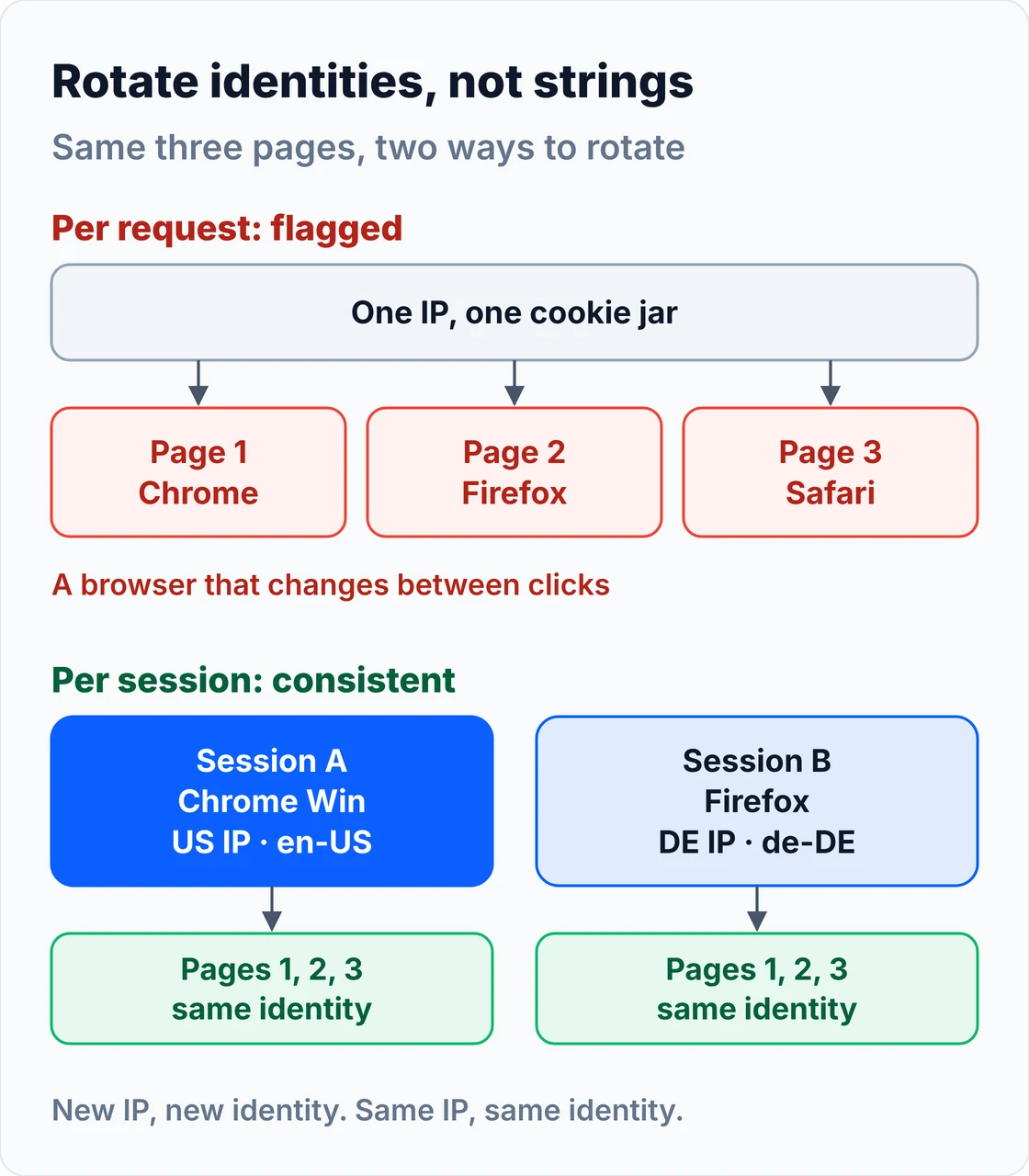
- Rotate whole header sets. A Chrome user agent with a Firefox Accept header, or a mobile string with
Sec-CH-UA-Mobile: ?0, is worse than one honest string repeated. - Keep the pool small and fresh. Ten real, current identities beat a thousand generated ones. Weight it towards Chrome on Windows, like real traffic.
- Tie the identity to the proxy session. One identity per sticky IP; a new IP gets a new identity.
- Match language to location.
en-USfrom a German residential IP is a small but real mismatch. - Refresh every month. Edge moved to a two-week cycle from version 152, and Chrome 157 was already in early rollout by October 28. A pool built in the summer is already behind.
This version keeps one identity per session and sets the language from the proxy's country. The output below is a logic check run offline, not a scraping test:
# Rotate whole identities per session, not user agents per request.
import random
import requests

# Each entry is a complete, internally consistent header set (capture real ones with capture_headers.py).
POOL = {
    "chrome_win": {
        "User-Agent": "Mozilla/5.0 (Windows NT 10.0; Win64; x64) AppleWebKit/537.36 (KHTML, like Gecko) Chrome/156.0.0.0 Safari/537.36",
        "Accept": "text/html,application/xhtml+xml,application/xml;q=0.9,image/avif,image/webp,image/apng,*/*;q=0.8,application/signed-exchange;v=b3;q=0.7",
        "Accept-Encoding": "gzip, deflate, br, zstd",
        "Sec-CH-UA": '"Chromium";v="156", "Google Chrome";v="156", "Not_A Brand";v="99"',   # replace with your capture
        "Sec-CH-UA-Mobile": "?0", "Sec-CH-UA-Platform": '"Windows"',
    },
    "chrome_mac": {
        "User-Agent": "Mozilla/5.0 (Macintosh; Intel Mac OS X 10_15_7) AppleWebKit/537.36 (KHTML, like Gecko) Chrome/156.0.0.0 Safari/537.36",
        "Accept": "text/html,application/xhtml+xml,application/xml;q=0.9,image/avif,image/webp,image/apng,*/*;q=0.8,application/signed-exchange;v=b3;q=0.7",
        "Accept-Encoding": "gzip, deflate, br, zstd",
        "Sec-CH-UA": '"Chromium";v="156", "Google Chrome";v="156", "Not_A Brand";v="99"',
        "Sec-CH-UA-Mobile": "?0", "Sec-CH-UA-Platform": '"macOS"',
    },
    "firefox_win": {   # Firefox sends no Sec-CH-UA headers, so none here
        "User-Agent": "Mozilla/5.0 (Windows NT 10.0; Win64; x64; rv:159.0) Gecko/20100101 Firefox/159.0",
        "Accept": "text/html,application/xhtml+xml,application/xml;q=0.9,*/*;q=0.8",
        "Accept-Encoding": "gzip, deflate, br, zstd",
    },
}
# Accept-Language follows the proxy's country, so the language and the IP tell the same story.
LANG = {"US": {"chrome": "en-US,en;q=0.9", "firefox": "en-US,en;q=0.5"},
        "DE": {"chrome": "de-DE,de;q=0.9,en;q=0.8", "firefox": "de,en-US;q=0.7,en;q=0.3"}}


def new_session(country: str, proxy_url: str | None = None, rng=random) -> tuple[str, requests.Session]:
    name = rng.choice(list(POOL))
    s = requests.Session()
    s.headers.clear()                       # drop requests' default python-requests headers
    s.headers.update(POOL[name])
    s.headers["Accept-Language"] = LANG[country]["firefox" if name.startswith("firefox") else "chrome"]
    if proxy_url:                           # one sticky proxy session per identity
        s.proxies = {"http": proxy_url, "https": proxy_url}
    return name, s


if __name__ == "__main__":
    rng = random.Random(7)                  # fixed seed so the demo output is repeatable
    for sid, country in [("session-1", "US"), ("session-2", "DE")]:
        name, s = new_session(country, rng=rng)
        for path in ["/", "/category/shoes", "/product/123"]:
            # In real use: s.get(BASE + path, timeout=20). Here we only show what would be sent.
            print(f"{sid} {country} {path:<16} {name:<12} {s.headers['User-Agent'][:44]}... "
                  f"Lang={s.headers['Accept-Language'].split(',')[0]}")
session-1 US /                chrome_mac   Mozilla/5.0 (Macintosh; Intel Mac OS X 10_15... Lang=en-US
session-1 US /category/shoes  chrome_mac   Mozilla/5.0 (Macintosh; Intel Mac OS X 10_15... Lang=en-US
session-1 US /product/123     chrome_mac   Mozilla/5.0 (Macintosh; Intel Mac OS X 10_15... Lang=en-US
session-2 DE /                chrome_win   Mozilla/5.0 (Windows NT 10.0; Win64; x64) Ap... Lang=de-DE
session-2 DE /category/shoes  chrome_win   Mozilla/5.0 (Windows NT 10.0; Win64; x64) Ap... Lang=de-DE
session-2 DE /product/123     chrome_win   Mozilla/5.0 (Windows NT 10.0; Win64; x64) Ap... Lang=de-DE
Rotation also won't save you from rate limits. If you see 429s, slow down first; our guide to fixing 429 Too Many Requests covers pacing and backoff.
"The scrapers that last don't have the biggest user-agent list. They have a small set of identities that each tell one consistent story, from the IP to the last header."
Rajesh Kannan, Co-Founder & CTO at Gramosoft
What it costs: DIY user agents vs GcrawlAI
Hand-set user agents cost nothing, and on unprotected sites a plain request with good headers is the cheapest option by far. On protected sites you also pay for residential proxies, and often a browser. For 10,000 protected pages a month, GcrawlAI Starter costs $29 with the browser and IPs included.
| Route for 10,000 pages a month | Monthly cost | What you still run |
|---|---|---|
| GcrawlAI Starter (20,000 requests) | $29 | Nothing; failed pages not billed |
| requests or curl_cffi on your own IP | $0 | Header pool upkeep; blocked quickly on protected sites |
| curl_cffi + Decodo residential, HTML only (~0.3 MB/page, 3 GB) | $11.25 | Header pool, retries, block detection |
| curl_cffi + Oxylabs residential, HTML only (3 GB at $6/GB) | $18 | Header pool, retries, block detection |
| Headless browser + Decodo residential (~1 MB/page, 10 GB) | $35 + servers | Browser fleet, stealth patches, retries |
| Headless browser + Oxylabs residential (10 GB at $6/GB) | $60 + servers | Browser fleet, stealth patches, retries |
List-price arithmetic, not a benchmark. Proxy prices are from Decodo's residential pricing (3 GB plan at $3.75/GB, 10 GB plan $35) and Oxylabs' residential pricing ($6/GB entry rate), checked November 1, 2026. Page weights are our assumption; failed attempts burn proxy traffic too. The honest read: if plain requests with good headers get through, DIY with a cheap proxy plan beats GcrawlAI on price. It wins when pages need a browser or keep getting blocked, because retries, rendering and IPs are inside one request and failures cost nothing.
GcrawlAI plans (GcrawlAI pricing, checked October 28, 2026):
| Plan | Price | Requests/month | Concurrent | Per 1,000 | Overage per 1,000 |
|---|---|---|---|---|---|
| Free | $0 forever, no card | 50 | 2 | – | – |
| Starter | $29/month | 20,000 | 10 | $1.45 | $1.60 |
| Growth (most popular) | $79/month | 80,000 | 35 | $0.99 | $1.10 |
| Pro | $199/month | 250,000 | 50 | $0.80 | $0.90 |
| Scale | $499/month | 750,000 | 100 | $0.67 | $0.75 |
| Enterprise | Volume pricing | 2M+ | Custom | – | – |
| Self-hosted | $0 (MIT) | Your servers | Your servers | Infrastructure only | – |
Every plan, Free included, has JavaScript rendering, residential IP rotation and anti-bot handling in each request. Failed requests are never charged. Annual billing charges 10 months for 12, unused requests on paid plans roll over once, and Indian customers are billed in INR with a GST invoice.
Which user agent should you use?
Use Chrome 156 on Windows for most unprotected sites, add macOS Chrome, Edge and Firefox for pool variety, and switch to mobile strings only when you want the mobile site. Whenever a target fingerprints TLS or JavaScript, or you don't want to maintain a pool, send the page through GcrawlAI instead.
| Your situation | Use | When to switch to GcrawlAI |
|---|---|---|
| Protected site (Cloudflare, DataDome, Akamai) | GcrawlAI | Start there; the browser identity is set for you |
| Simple, unprotected pages | Chrome 156 Windows with full headers | When 403s start or upkeep eats your time |
| High volume, need a pool | Chrome Win/Mac, Edge, Firefox per session | When pool refreshes and block handling cost more than $1.45 per 1,000 pages |
| Mobile pages or mobile APIs | Chrome Android or Safari iPhone | When the mobile site also needs JavaScript or residential IPs |
| JavaScript-rendered pages | Playwright with a matching UA | When you'd rather not run browsers; GcrawlAI renders in every request |
| Geo-specific prices or content | UA plus in-country proxy and Accept-Language | GcrawlAI's proxy_geo moves IP and identity together |
| AI agents and RAG pipelines | GcrawlAI via SDK or MCP | From the start; agents shouldn't manage headers |
When a hand-set user agent is still enough
A hand-set user agent is still enough for unprotected sites: documentation, public data portals, small shops and your own staging servers. Use a current Chrome string with full headers there and keep your code simple. Move a site to GcrawlAI the day it starts answering with 403s, CAPTCHAs or empty pages.
The signals that it's time to hand the identity to GcrawlAI: your success rate drops after a browser release, the same headers work from your laptop but fail from a server, a site sends a JavaScript challenge, or you find yourself maintaining TLS libraries and Client Hints per target. At that point you're running browser-identity infrastructure, and that's the part GcrawlAI puts inside one request. If you're weighing the trade-off more broadly, see when to stop writing your own scraper.
Is it legal to change your user agent?
Changing your user agent is legal in most places; browsers let anyone do it. What matters legally is what you scrape and how: public data, the site's terms, personal data rules such as GDPR, and the load you put on the server. A user agent never makes restricted access acceptable.
Scrape public pages, keep request rates reasonable, honour robots.txt where it applies, and don't use a disguise to get past logins or paywalls. Some teams also send a contact address in a custom header for good-faith crawling. For the wider picture, read what web scraping is, how it works and where it's legal, and take advice from a lawyer for your own case.
Frequently asked questions
What is the best user agent for web scraping in 2026?
Chrome 156 on Windows: Mozilla/5.0 (Windows NT 10.0; Win64; x64) AppleWebKit/537.36 (KHTML, like Gecko) Chrome/156.0.0.0 Safari/537.36, with matching Sec-CH-UA, Accept and Accept-Language headers. On protected sites, use GcrawlAI, which loads each page in a real browser so every signal matches, at one request per page with failed requests never charged.
Should I rotate user agents on every request?
No. Rotate per session: one complete identity (user agent, headers, Client Hints, sticky proxy) for a whole session, then a new one with a new IP. Switching browsers on every request from the same IP is itself a bot signal.
Does the fake-useragent library still work?
It runs, but its data is old. Version 2.2.0, released April 14, 2025, is still the latest, and its newest strings are Chrome 136, Firefox 138 and Safari 18. It also gives you only the string, not the matching headers or TLS fingerprint. Check its output against current versions before using it.
Can websites detect a fake user agent?
Yes. Sites compare the user agent with Client Hints, the TLS and HTTP/2 fingerprint, header order, navigator.userAgent in JavaScript and the IP. Any mismatch, such as a Chrome string on a Python handshake, exposes it.
Should I use a mobile or desktop user agent?
Desktop Chrome by default. Use Chrome on Android or Safari on iPhone when you want the mobile site, which is often lighter and easier to parse, and pair it with mobile or residential IPs and Sec-CH-UA-Mobile: ?1 for Chrome.
What are Sec-CH-UA headers and do I need them?
They are User-Agent Client Hints that Chromium browsers (Chrome, Edge) send with every request: the brand list and major version, whether it's mobile, and the platform. If you claim Chrome or Edge, send them and keep them in step with the user agent. Firefox and Safari don't send them, so leave them off those strings.