By Rajesh Kannan, Co-Founder & CTO, Gramosoft · Last updated: · Fingerprints measured in our own local capture on November 3, 2026; algorithm details from FoxIO's JA4 specification and Salesforce's JA3 README
Before a site reads your URL, headers or cookies, it has already seen how your client opens an encrypted connection. JA3 and JA4 turn that opening message into a short fingerprint, and most anti-bot systems check it. This guide explains how both are computed, why JA3 stopped working for Chrome, and what 11 real clients looked like in our own capture. It also covers how GcrawlAI keeps the handshake a site sees consistent with a real browser.
TL;DR
- Both come from the ClientHello: the first TLS message, sent unencrypted, listing ciphers, extensions and other settings your TLS library chose.
- JA3 (2017): five fields in the order sent, GREASE removed, MD5-hashed into 32 opaque characters.
- Why JA3 broke: Chrome shuffles its extension order on every connection, so one browser makes many JA3s. In our test, Chromium made 8 connections and 8 different JA3s.
- JA4 (2023): sorts the lists before hashing and adds a readable prefix like
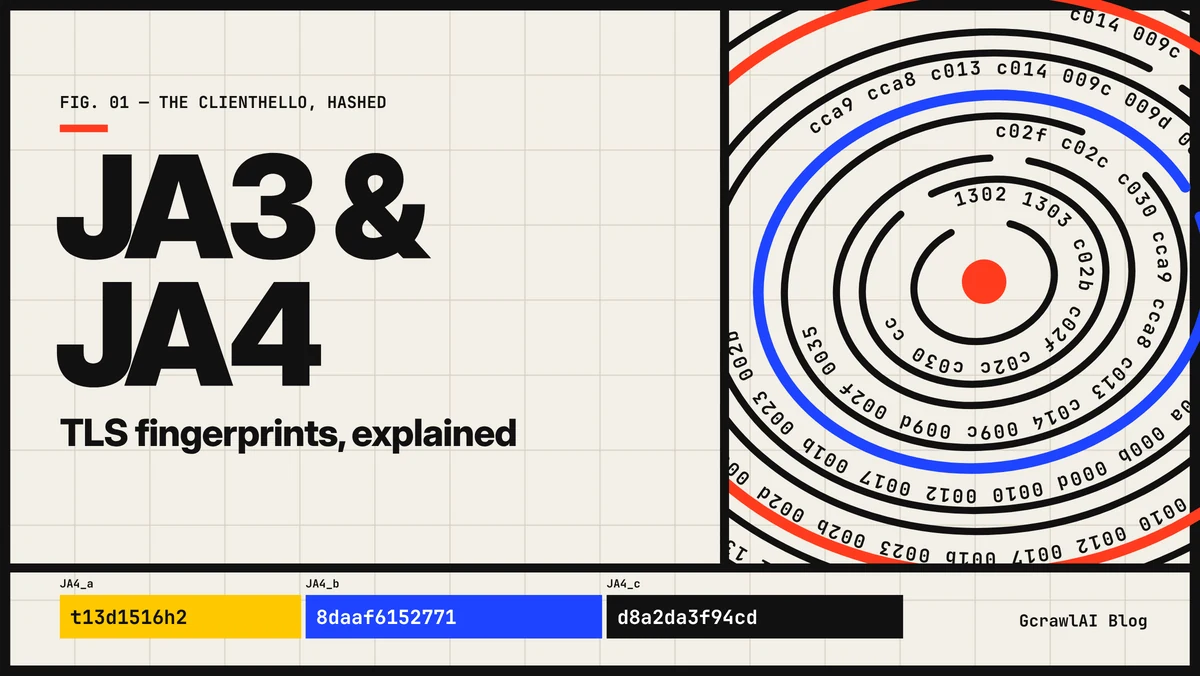
t13d1516h2, so it stays the same. - Your User-Agent can't change either one: the TLS library builds the handshake. A Chrome User-Agent on a Python handshake is a mismatch sites look for.
- Fastest route: GcrawlAI sends each request from a real browser, so the fingerprint a site scores is a browser's.
What are JA3 and JA4? They are TLS client fingerprints computed from the ClientHello, the first message of an HTTPS connection. JA3 joins five fields in the order sent and hashes them with MD5. JA4 sorts the cipher and extension lists, hashes them with SHA-256 and adds a readable prefix, so it survives Chrome's extension shuffling. GcrawlAI sends a real browser's handshake in every request.
JA3 and JA4 at a glance
| JA3 | JA4 | |
|---|---|---|
| Published | 2017, Salesforce | 2023, FoxIO |
| Output | 32-character MD5 hash | 36-character a_b_c string |
| Extension order | Kept, so shuffling changes the hash | Sorted, so shuffling doesn't |
| Readable without a lookup | No | Part a: transport, TLS version, SNI, counts, ALPN |
| QUIC | Not covered | Covered, with a q prefix |
| Licence | Open source (BSD 3-Clause) | JA4 BSD 3-Clause; other JA4+ methods FoxIO License 1.1 |
Get past TLS fingerprinting with GcrawlAI
A TLS fingerprint describes the software that opened the connection, so the cleanest fix is to let real browser software open it. GcrawlAI runs every request in a real browser through a residential IP in the country you choose. The site computes a browser's JA3 and JA4, with matching headers, HTTP/2 settings and JavaScript behind them.
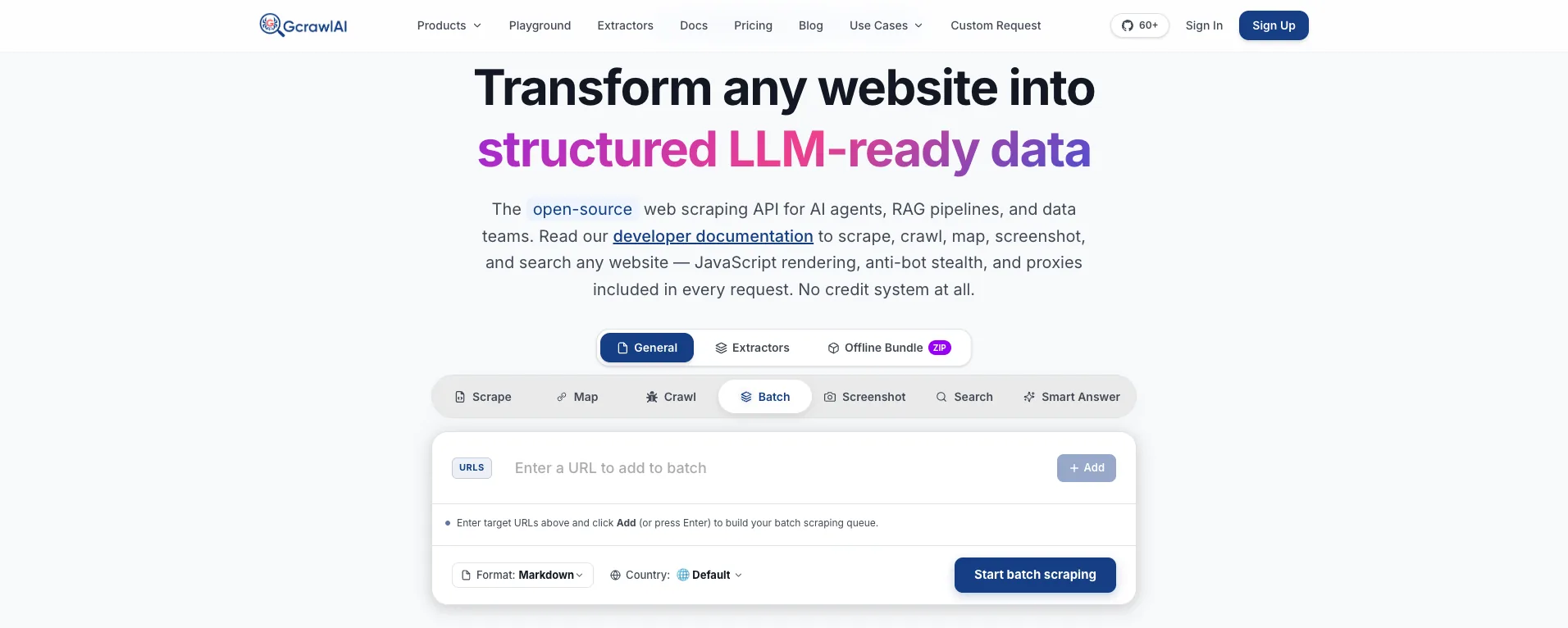
The homepage puts it plainly: JavaScript rendering, anti-bot stealth and proxies are included in every request, with no credit system. That matters for fingerprints because the TLS layer is checked together with the others. A browser-shaped handshake with Python's headers, or a perfect handshake from a datacenter IP, still tells a story that doesn't add up.
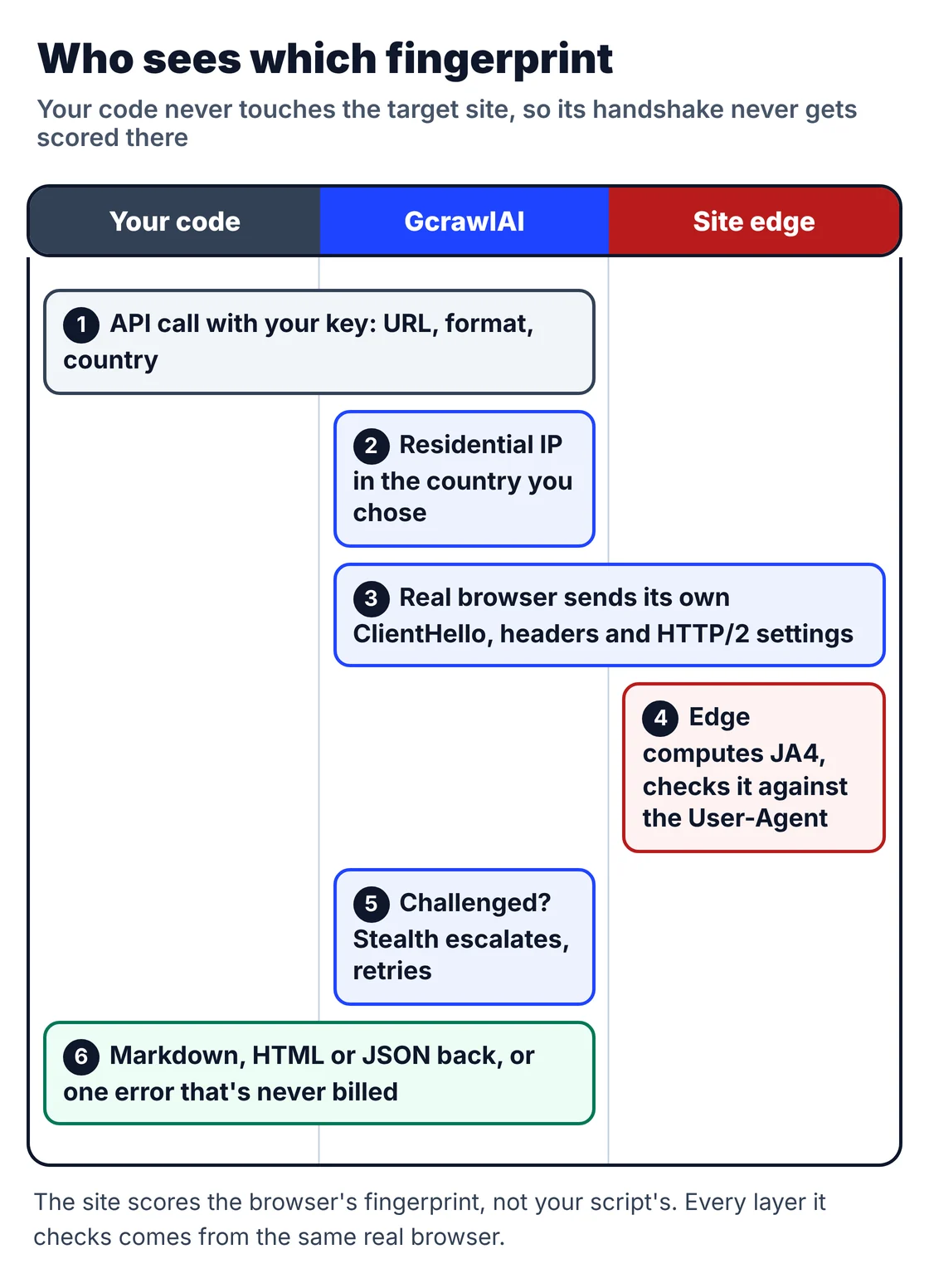
You don't have to route everything through it. This function tries a plain request first and sends only the URLs that come back blocked through GcrawlAI:
# pip install gcrawl-sdk requests
"""Try a plain request first; when the TLS layer gets it blocked, send that URL through GcrawlAI instead."""
import os

import requests
from gcrawl_sdk import GcrawlClient, ScrapeOptions
from gcrawl_sdk.exceptions import GcrawlAPIError, GcrawlTimeoutError

gc = GcrawlClient(api_key=os.getenv("GCRAWL_API_KEY", "gc-YOUR_API_KEY"))
BLOCKED = {401, 403, 429, 503}


def fetch_html(url: str, geo: str = "US") -> str | None:
    try:
        r = requests.get(url, timeout=15)
        if r.status_code not in BLOCKED and "challenge" not in r.text[:5000].lower():
            return r.text                                   # the cheap path worked
    except requests.RequestException:
        pass
    try:                                                    # real browser, residential IP, stealth: one request
        page = gc.scrape(url=url, options=ScrapeOptions(html_enabled=True, markdown_enabled=False, proxy_geo=geo), wait=True)
    except GcrawlTimeoutError:
        return None                                         # requeue later
    except GcrawlAPIError as err:
        if err.status_code < 500:                           # key, plan or payload problem: fix, don't retry
            raise
        return None
    return page.html or None


if __name__ == "__main__":
    html = fetch_html("https://example.com/")
    print(len(html or ""), "characters")
- The handshake: a real browser's ClientHello, so JA3 and JA4 match the User-Agent the browser sends.
- The layers around it: residential IPs with country targeting, browser headers and HTTP/2 settings, JavaScript rendering, and stealth escalation when a challenge appears.
- Scrape, crawl, screenshots and Search API: scrape to Markdown, HTML or JSON, crawl whole sites, capture screenshots, or use the Search API.
- For developers and AI agents: a Python SDK, an MCP server for Claude, Cursor and other agents, the Playground to test a URL your client gets blocked on, and the docs.
The MIT-licensed core runs on your own servers if you'd rather own the stack:
git clone https://github.com/GramosoftAI/GcrawlAI.git && cd GcrawlAI
python -m venv .venv && source .venv/bin/activate
pip install -r requirements.txt && playwright install
cp .env.example .env                      # add your database, Redis and proxy settings
python -m api.core.db_setup
redis-server &
celery -A web_crawler.crawler.celery_config worker -l info &
uvicorn api.api:app --port 8000
Pricing is a free plan of 50 requests a month with no card, paid plans from $0.67 to $1.45 per 1,000 requests, and a self-hosted core that costs nothing. The plan table is in the cost section.
Where it falls short: GcrawlAI fetches public pages; it won't log in for you or get past a site that refuses every visitor, and those URLs come back as an error. Every request runs a browser, so pages your plain client already fetches cost the same as hard ones. And it doesn't let you choose or inspect the exact fingerprint sent; if you're testing your own detection rules, use the tools in this guide.
"Teams spend weeks tuning a TLS impersonation profile, then get blocked on HTTP/2 settings or a JavaScript check. The fingerprint was never the whole problem. It's one layer of a story, and every layer has to come from the same client."
Rajesh Kannan, Co-Founder & CTO at Gramosoft
What a TLS fingerprint is
Every HTTPS connection starts with a ClientHello, the message in which the client lists what it supports. It travels unencrypted, because the server needs it before any keys exist. The list and its order are set by the client's TLS library, not by your code, so they reveal which software is connecting, without reading a single header.
The ClientHello carries the TLS versions offered, the cipher suites, the extensions (server name, ALPN, supported groups, key share and more), the key-exchange groups, the elliptic curve point formats and the signature algorithms. Different libraries fill those in differently:
| Client | TLS library |
|---|---|
| Chrome, Edge and other Chromium browsers | BoringSSL |
| Firefox | NSS |
| Python requests, httpx, urllib; curl on Linux | OpenSSL |
Go net/http |
Go's crypto/tls |
Node.js fetch |
OpenSSL, configured by Node |
| curl_cffi | curl-impersonate's BoringSSL build, shaped to a chosen browser |
That's why the User-Agent header can't help. It's sent later, inside the encrypted connection, and it can say anything. The ClientHello can only say what the library actually does.
How JA3 works
JA3 was created at Salesforce in 2017 by John Althouse, Jeff Atkinson and Josh Atkins, whose initials gave it the name. It takes five ClientHello fields, writes each list as decimal numbers joined by hyphens, joins the five fields with commas and MD5-hashes the result into a 32-character fingerprint.
- TLS version: the legacy version field, usually 771 (TLS 1.2), even for TLS 1.3 clients.
- Ciphers: in the order the client offered them.
- Extensions: in the order they appear.
- Elliptic curves: the supported groups.
- Point formats: the elliptic curve point formats.
One detail many guides get wrong: GREASE did not break JA3. GREASE values are dummy codes browsers add on purpose (RFC 8701), and Salesforce's JA3 README says JA3 ignores them completely. The same README notes the project is no longer actively maintained by Salesforce; its creator now maintains JA4 at FoxIO. The server-side twin, JA3S, does the same for the ServerHello.
Why JA3 broke: Chrome's extension shuffle
Chrome 110, released in February 2023, started shuffling the order of its TLS extensions on every new connection, so servers couldn't come to depend on a fixed order. JA3 hashes extensions in the order sent, so one Chrome install started producing a different JA3 almost every time. A browser allowlist built on JA3 stopped working.
We watched it happen. This script loads a local page three times in Chromium and prints the extension order and both fingerprints for each connection:
"""One Chromium ClientHello, three connections: the JA3 string changes because the extension order is shuffled; JA4 doesn't."""
import os, socket, threading, time
from ja34 import parse_client_hello, ja3_string, ja3, ja4
from playwright.sync_api import sync_playwright

os.environ["NO_PROXY"] = os.environ["no_proxy"] = "127.0.0.1,localhost"
hellos = []


def serve():
    s = socket.socket(); s.setsockopt(socket.SOL_SOCKET, socket.SO_REUSEADDR, 1)
    s.bind(("127.0.0.1", 8446)); s.listen(8)
    while True:
        conn, _ = s.accept(); data = conn.recv(16384); conn.close()
        if data[:1] == b"\x16":
            hellos.append(parse_client_hello(data))


threading.Thread(target=serve, daemon=True).start()
with sync_playwright() as p:
    browser = p.chromium.launch(executable_path=os.getenv("CHROME_PATH") or None)
    for _ in range(3):
        ctx = browser.new_context(ignore_https_errors=True)
        try:
            ctx.new_page().goto("https://localhost:8446/", timeout=4000)
        except Exception:
            pass
        ctx.close()
    browser.close()
time.sleep(0.5)

for h in hellos[:3]:
    extensions = ja3_string(h).split(",")[2]
    print("extensions as sent:", extensions[:47] + "...")
    print("  JA3", ja3(h), "  JA4", ja4(h))
extensions as sent: 16-10-43-11-51-17613-65281-13-35-23-45-0-5-27-1...
  JA3 9bf6c14363c73907b6248196e9b24ac9   JA4 t13d1515h2_8daaf6152771_22334254f9f7
extensions as sent: 5-27-43-45-51-10-35-13-16-23-18-0-17613-11-6528...
  JA3 f92a8260e96fb937ee1b21665cc42c73   JA4 t13d1515h2_8daaf6152771_22334254f9f7
extensions as sent: 18-10-5-45-35-65281-16-13-27-23-43-51-0-17613-1...
  JA3 bea4280c78b8120ad11eddbe3f96788d   JA4 t13d1515h2_8daaf6152771_22334254f9f7
Same browser, same settings, three extension orders and three JA3s. JA4 didn't move. JA3 still works for clients that don't shuffle, which includes most libraries and scripts, so it remains useful for spotting automation. It just can't recognise a real modern browser any more.
How JA4 works
JA4 was published by FoxIO in 2023 to fix that. It sorts the cipher and extension lists before hashing, so order no longer matters, and swaps one opaque hash for three parts separated by underscores. The first part is readable by eye; the other two are truncated SHA-256 hashes you can match independently of each other.
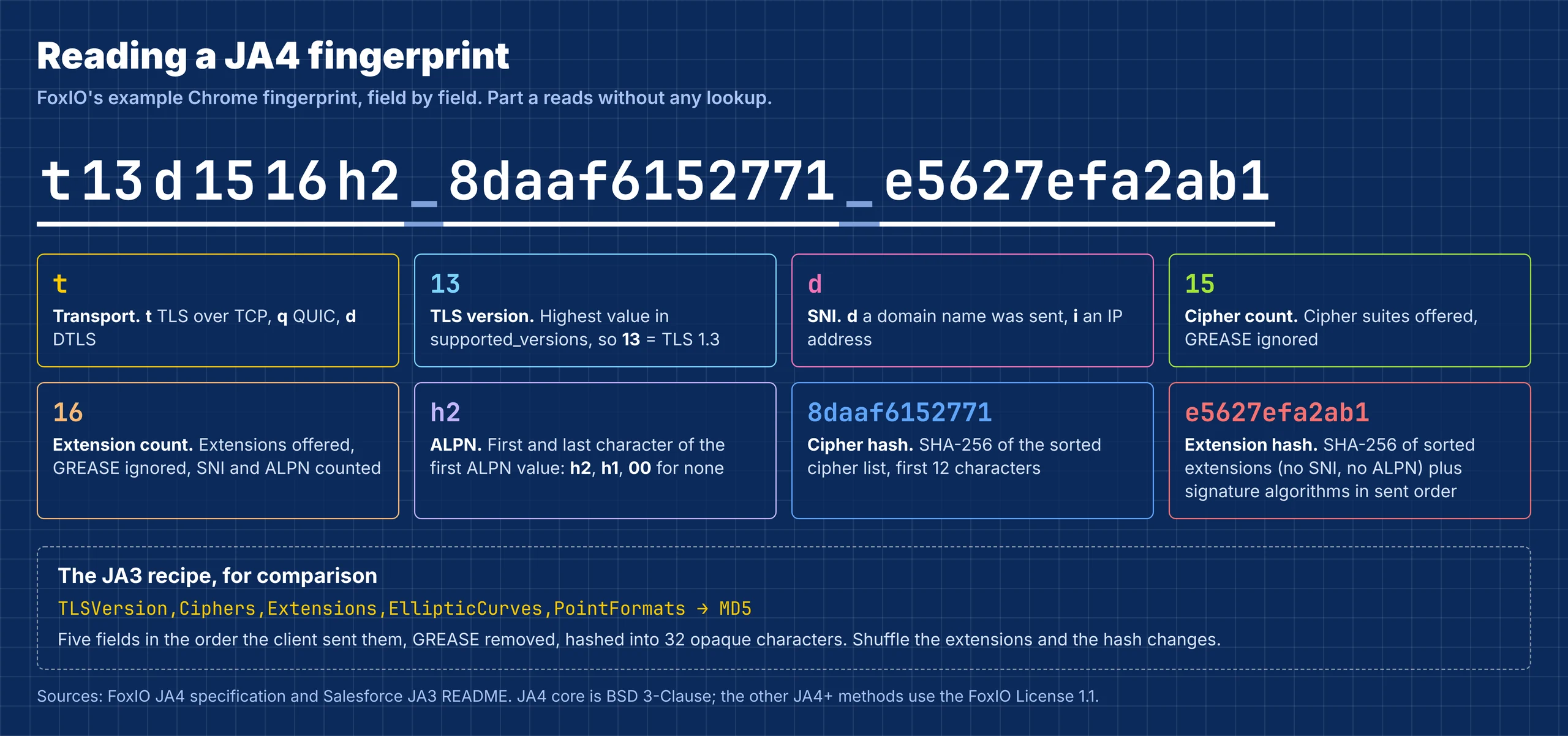
- Part a tells you a lot without any database: TCP or QUIC, the highest TLS version offered, whether a domain name was sent, how many ciphers and extensions there were, and the first ALPN value.
- Part b identifies the cipher set. Clients built on the same TLS library often share it.
- Part c covers the extension set and signature algorithms. SNI and ALPN are left out of the hash because part a already records them.
Here's the whole calculation in standard-library Python. It reads a raw ClientHello, applies the GREASE, sorting and hashing rules from FoxIO's JA4 specification, and returns both fingerprints:
"""Compute JA3 and JA4 from a raw TLS ClientHello record. Standard library only."""
import hashlib, struct
from collections import namedtuple

Hello = namedtuple("Hello", "legacy_version ciphers extensions groups point_formats sig_algs alpn versions sni")


def is_grease(v):
    """GREASE values (RFC 8701) look like 0x0A0A, 0x1A1A ... 0xFAFA."""
    return (v & 0x0F0F) == 0x0A0A and (v >> 8) == (v & 0xFF)


def u16(b, i):
    return struct.unpack(">H", b[i:i + 2])[0]


def parse_client_hello(data):
    pos = 5 + 4                                          # record header + handshake header
    legacy = u16(data, pos); pos += 2 + 32                # client_version + random
    pos += 1 + data[pos]                                 # session id
    n = u16(data, pos); pos += 2
    ciphers = [u16(data, pos + i) for i in range(0, n, 2)]; pos += n
    pos += 1 + data[pos]                                 # compression methods
    end = pos + 2 + u16(data, pos); pos += 2
    exts, groups, points, sigs, alpn, versions, sni = [], [], [], [], [], [], ""
    while pos < end:
        t, ln = u16(data, pos), u16(data, pos + 2)
        body = data[pos + 4:pos + 4 + ln]; pos += 4 + ln
        exts.append(t)
        if t == 0x0000 and ln > 5:
            sni = body[5:].decode(errors="replace")
        elif t == 0x000A:
            groups = [u16(body, 2 + i) for i in range(0, u16(body, 0), 2)]
        elif t == 0x000B:
            points = list(body[1:1 + body[0]])
        elif t == 0x000D:
            sigs = [u16(body, 2 + i) for i in range(0, u16(body, 0), 2)]
        elif t == 0x0010:
            i, lst = 2, []
            while i < len(body):
                lst.append(body[i + 1:i + 1 + body[i]].decode()); i += 1 + body[i]
            alpn = lst
        elif t == 0x002B:
            versions = [u16(body, 1 + i) for i in range(0, body[0], 2)]
    return Hello(legacy, ciphers, exts, groups, points, sigs, alpn, versions, sni)


def ja3_string(h):
    keep = lambda xs: "-".join(str(x) for x in xs if not is_grease(x))
    return f"{h.legacy_version},{keep(h.ciphers)},{keep(h.extensions)},{keep(h.groups)},{'-'.join(map(str, h.point_formats))}"


def ja3(h):
    return hashlib.md5(ja3_string(h).encode()).hexdigest()


def ja4(h):
    sha12 = lambda s: hashlib.sha256(s.encode()).hexdigest()[:12] if s else "000000000000"
    ciphers = [c for c in h.ciphers if not is_grease(c)]
    exts = [e for e in h.extensions if not is_grease(e)]
    top = max((v for v in h.versions if not is_grease(v)), default=h.legacy_version)
    version = {0x0304: "13", 0x0303: "12", 0x0302: "11", 0x0301: "10"}.get(top, "00")
    alpn = (h.alpn[0][0] + h.alpn[0][-1]) if h.alpn else "00"
    part_a = f"t{version}{'d' if 0x0000 in exts else 'i'}{min(len(ciphers), 99):02d}{min(len(exts), 99):02d}{alpn}"
    part_b = sha12(",".join(f"{c:04x}" for c in sorted(ciphers)))
    ext_list = ",".join(f"{e:04x}" for e in sorted(e for e in exts if e not in (0x0000, 0x0010)))
    sig_list = ",".join(f"{s:04x}" for s in h.sig_algs if not is_grease(s))
    part_c = sha12(ext_list + ("_" + sig_list if sig_list else ""))
    return f"{part_a}_{part_b}_{part_c}"
We checked it against FoxIO's own test captures: it produced their published JA4 for all 135 ClientHellos in seven of their pcap files. The verification script is in the code download.
Our test: 11 clients, three visits each
To see JA3 and JA4 on real clients, we ran a local TLS server that records each ClientHello and hangs up, then pointed 11 clients at it, three page loads each. Everything ran offline on November 3, 2026, so these values come from our machine's library versions and may differ from yours.
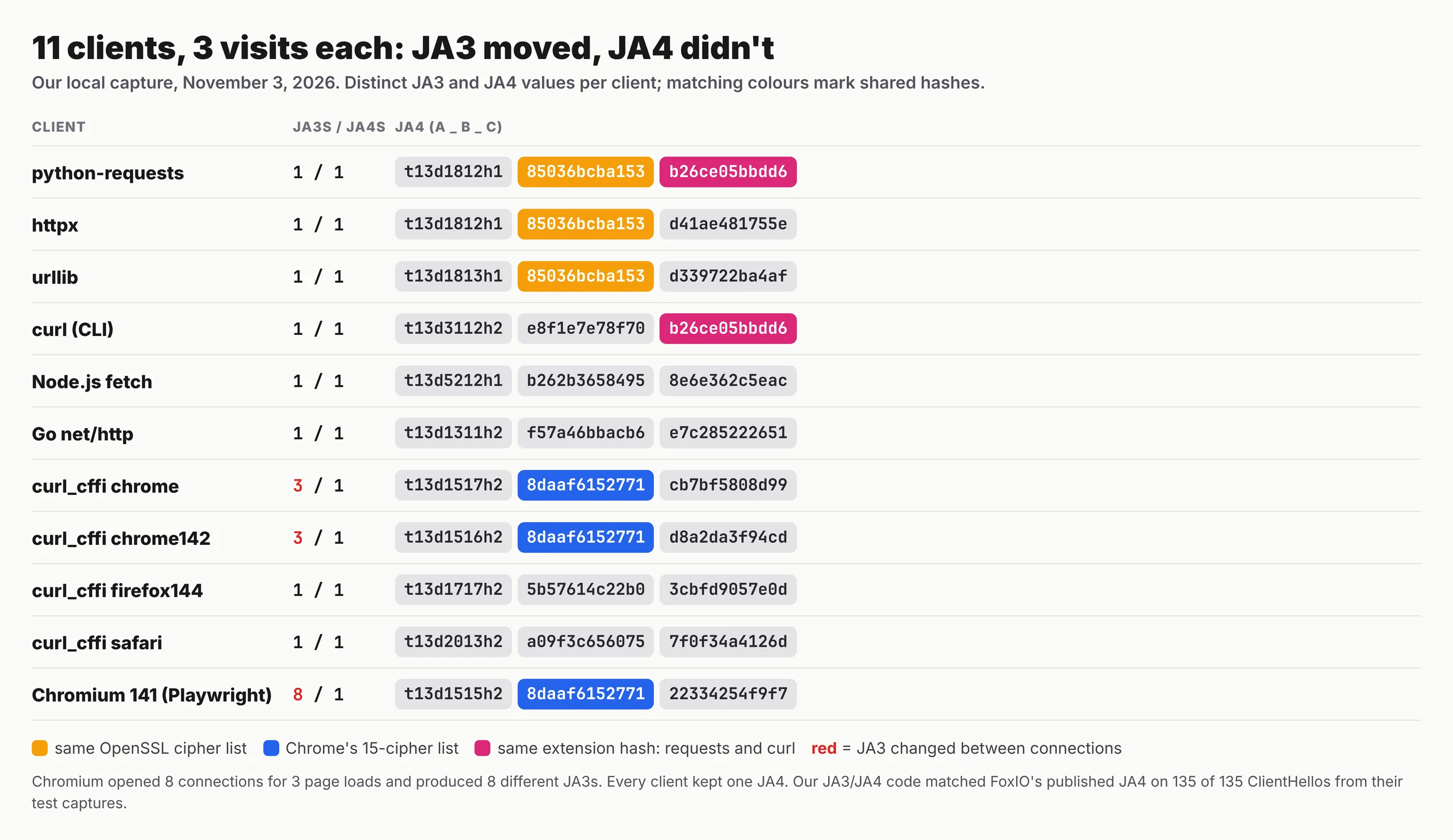
client               conns JA3s JA4s  JA4
python-requests          3    1    1  t13d1812h1_85036bcba153_b26ce05bbdd6
httpx                    3    1    1  t13d1812h1_85036bcba153_d41ae481755e
urllib                   3    1    1  t13d1813h1_85036bcba153_d339722ba4af
curl (CLI)               3    1    1  t13d3112h2_e8f1e7e78f70_b26ce05bbdd6
Node.js fetch            3    1    1  t13d5212h1_b262b3658495_8e6e362c5eac
Go net/http              3    1    1  t13d1311h2_f57a46bbacb6_e7c285222651
curl_cffi chrome         3    3    1  t13d1517h2_8daaf6152771_cb7bf5808d99
curl_cffi chrome142      3    3    1  t13d1516h2_8daaf6152771_d8a2da3f94cd
curl_cffi firefox144     3    1    1  t13d1717h2_5b57614c22b0_3cbfd9057e0d
curl_cffi safari         3    1    1  t13d2013h2_a09f3c656075_7f0f34a4126d
Chromium 141             8    8    1  t13d1515h2_8daaf6152771_22334254f9f7
Four things stood out.
- JA3 is unstable only for browser-shaped clients. Chromium opened 8 connections for 3 page loads and produced 8 JA3s; both curl_cffi Chrome profiles changed JA3 on every visit. Every other client kept one JA3, and every client kept one JA4.
- Shared parts reveal shared libraries. python-requests, httpx and urllib all have cipher hash
85036bcba153, Python's OpenSSL defaults. requests and the curl CLI share extension hashb26ce05bbdd6. That partial match is something a single JA3 hash can't show. - Our Playwright Chromium didn't match desktop Chrome. Chromium 141 under Playwright sent 15 extensions and no Encrypted Client Hello extension. curl_cffi's
chrome142profile, built to copy desktop Chrome, sent 16. Same cipher hash, different part a and part c. - Impersonation profiles are versions. curl_cffi's bare
chromealias pointed to its newest profile (chrome152) and produced a different JA4 fromchrome142. Pin the profile that matches the User-Agent you send.
Our values line up with independent measurements. Node.js fetch gave exactly the JA4 that BigMike.help published for Node.js 26. curl_cffi's firefox144 profile matched the Firefox-based JA4 ScrapingBee measured for its Stealth mode. The chrome142 cipher and extension hashes matched the browser profile in the same ScrapingBee test.
"The surprise for us was the Playwright result. People assume an automated Chromium has a perfect Chrome fingerprint because it is Chrome. Ours wasn't byte-for-byte the same as desktop Chrome, and a detector only needs one byte."
Rajesh Kannan, Co-Founder & CTO at Gramosoft
Read a JA4 without a database
A JA3 hash means nothing until you look it up. A JA4 explains itself, and you can compare its parts separately: two clients with the same part b share a cipher list, and two with the same part c share extensions. This short script decodes part a and reports which parts two fingerprints have in common:
"""Read a JA4 fingerprint without a database: decode part a, then compare parts b and c with another client."""

TRANSPORT = {"t": "TLS over TCP", "q": "QUIC", "d": "DTLS"}
VERSION = {"13": "TLS 1.3", "12": "TLS 1.2", "11": "TLS 1.1", "10": "TLS 1.0"}


def read_ja4(fp):
    a, b, c = fp.split("_")
    return {
        "transport": TRANSPORT.get(a[0], a[0]),
        "tls": VERSION.get(a[1:3], a[1:3]),
        "sni": "domain" if a[3] == "d" else "IP address",
        "ciphers": int(a[4:6]),
        "extensions": int(a[6:8]),
        "alpn": {"h2": "HTTP/2", "h1": "HTTP/1.1", "h3": "HTTP/3", "00": "none"}.get(a[8:10], a[8:10]),
        "cipher_hash": b,
        "extension_hash": c,
    }


def compare(x, y):
    a, b = x.split("_"), y.split("_")
    return [name for name, i in (("part a", 0), ("cipher hash", 1), ("extension hash", 2)) if a[i] == b[i]]


chromium = "t13d1515h2_8daaf6152771_22334254f9f7"
print(read_ja4(chromium))
print("curl_cffi chrome142 shares:", compare(chromium, "t13d1516h2_8daaf6152771_d8a2da3f94cd"))
print("python-requests shares:   ", compare(chromium, "t13d1812h1_85036bcba153_b26ce05bbdd6"))
print("requests vs curl CLI:     ", compare("t13d1812h1_85036bcba153_b26ce05bbdd6", "t13d3112h2_e8f1e7e78f70_b26ce05bbdd6"))
{'transport': 'TLS over TCP', 'tls': 'TLS 1.3', 'sni': 'domain', 'ciphers': 15, 'extensions': 15, 'alpn': 'HTTP/2', 'cipher_hash': '8daaf6152771', 'extension_hash': '22334254f9f7'}
curl_cffi chrome142 shares: ['cipher hash']
python-requests shares:    []
requests vs curl CLI:      ['extension hash']
For logging and rules, that partial matching is JA4's biggest practical win. You can group every client with Python's OpenSSL cipher list, or flag a handshake whose part a claims HTTP/2 while its cipher hash belongs to a library that only speaks HTTP/1.1. FoxIO also defines raw variants: JA4_r lists the values unhashed, and JA4_o keeps the original order for when you need it.
The JA4+ family
JA4 is the TLS client member of a larger family FoxIO calls JA4+. Each method fingerprints a different layer with the same idea: a readable prefix plus short hashes. Detection systems combine them, so a client that passes the TLS check can still be caught at the HTTP or TCP layer.
| Method | What it fingerprints |
|---|---|
| JA4 | The TLS ClientHello, over TCP or QUIC |
| JA4S | The server's response (ServerHello) |
| JA4H | The HTTP request: method, version, cookies, Referer, header count and order, language |
| JA4X | How an X.509 certificate was generated |
| JA4L | Latency, as a rough measure of distance |
| JA4T | TCP settings such as window size and options |
| JA4SSH | SSH sessions |
The licences differ. According to FoxIO's repository, JA4 itself is BSD 3-Clause, like JA3, with no patent claims. The other JA4+ methods use the FoxIO License 1.1, which allows internal and research use but requires a commercial arrangement to build them into a product you sell.
Where sites use JA3 and JA4
The fingerprint is computed wherever TLS ends: at a CDN, a load balancer or the origin server. Bot management products compare it with the User-Agent and with fingerprints they've seen before. Security teams use the same values to spot malware and unknown tools on their own networks, without decrypting any traffic.
- Bot management: Cloudflare exposes JA3 and JA4 to Bot Management customers for use in rules and analytics. Other anti-bot vendors use TLS fingerprints as one signal among many.
- Consistency checks: a Chrome User-Agent with a cipher hash from Python's OpenSSL is a contradiction, and contradictions weigh more than any single signal.
- Threat hunting: intrusion detection tools such as Zeek and Suricata log TLS fingerprints so analysts can find a tool across hosts and IPs.
There are gaps. A plain-HTTP request has no ClientHello to fingerprint, and a resumed TLS session may skip the full handshake. With Encrypted Client Hello, an observer on the network only sees the outer hello, though the server that terminates TLS still sees the full one. And when a load balancer terminates TLS in front of your server, the server sees the load balancer's fingerprint, not the client's.
What changes your fingerprint, and what doesn't
Because the TLS library builds the ClientHello, only a change in that library, or in how it's configured, changes the fingerprint. Most of the things people try first leave it exactly as it was. This table sorts the common attempts by whether the site would see a different JA3 or JA4.
| Change | New JA3/JA4? | Why |
|---|---|---|
| Changing the User-Agent or other headers | No | Headers are sent after the handshake |
| A VPN, or an HTTP CONNECT or SOCKS proxy | No | The tunnel carries your client's own handshake |
| A proxy that terminates TLS and reconnects | Yes | The site sees the proxy's handshake instead |
| Upgrading your TLS library or browser | Often | Cipher and extension lists change between versions |
| Switching to curl_cffi with a browser profile | Yes | The ClientHello is rebuilt to match that browser version |
| Driving a real browser | Yes | The browser's own TLS stack builds the handshake |
| Clearing cookies or using incognito | No | Neither touches the TLS stack |
Fixing the fingerprint alone rarely gets you through. Sites also check HTTP/2 settings, header order, JavaScript signals and IP reputation, and a browser-perfect JA4 on top of a Python HTTP/2 stack is its own contradiction.
What getting past TLS checks costs
A fingerprint check is free for the site and costs you every time it fails. Matching it yourself means impersonation libraries, browser servers and the time to keep profiles current. For 100,000 successful protected pages a month, credit-based APIs cost $249 to $399 and GcrawlAI costs $101; for plain pages, they're cheaper.
| Option, 100,000 successful pages a month | Plain HTML pages | Protected pages (JS rendering + premium proxies) | Are failed requests billed? |
|---|---|---|---|
| GcrawlAI (every request rendered, residential IPs included) | $101 (Growth $79 + 20,000 overage at $1.10 per 1,000) | $101 (same request, no multiplier) | No: failed requests are never charged |
| ScraperAPI | $49 (Hobby, 100,000 credits) | $299 (Business; 25 credits per page = 2.5M credits) | Charges only 200 and 404 responses |
| ZenRows | $39 (Build B3, 120,000 credits) | $399 (Growth G3; 25 credits per page = 2.5M credits) | Failed requests never charged; 404 and 410 count as successful |
| ScrapingBee | $49 (Freelance, 250,000 credits; JS off) | $249 (Business; 25 credits per page = 2.5M credits) | Charges only 200, 404 and 410 |
List-price arithmetic, not a benchmark. Credit costs and billing rules come from ScraperAPI's credit docs, ZenRows' pricing docs and ScrapingBee's FAQ, checked November 1, 2026. The honest read: for plain HTML that no TLS check blocks, ZenRows, ScraperAPI and ScrapingBee cost less than GcrawlAI, and curl_cffi on your own servers costs less still. GcrawlAI wins on protected pages, because a real browser, residential IPs and stealth are in the one request.
GcrawlAI plans (GcrawlAI pricing, checked October 28, 2026):
| Plan | Price | Requests/month | Concurrent | Per 1,000 | Overage per 1,000 |
|---|---|---|---|---|---|
| Free | $0 forever, no card | 50 | 2 | – | – |
| Starter | $29/month | 20,000 | 10 | $1.45 | $1.60 |
| Growth (most popular) | $79/month | 80,000 | 35 | $0.99 | $1.10 |
| Pro | $199/month | 250,000 | 50 | $0.80 | $0.90 |
| Scale | $499/month | 750,000 | 100 | $0.67 | $0.75 |
| Enterprise | Volume pricing | 2M+ | Custom | – | – |
| Self-hosted | $0 (MIT) | Your servers | Your servers | Infrastructure only | – |
Every plan, Free included, has scrape, crawl, the Search API, JavaScript rendering, residential IP rotation and stealth escalation in each request, and each feature counts as one request. Failed requests are never charged. Annual billing charges 10 months for 12, unused requests on paid plans roll over once, and Indian customers are billed in INR with a GST invoice.
Which approach fits
Match the fix to where you're blocked. If the TLS check is the only thing stopping you, an impersonation library is the cheapest answer. If the site also checks JavaScript, HTTP/2 and IP reputation, the handshake has to come from a whole browser. The table shows where GcrawlAI fits in each case.
| Your situation | What to change | Where GcrawlAI fits |
|---|---|---|
| 403 in Python, fine in a browser, no JavaScript challenge | curl_cffi with a pinned browser profile | Send the URLs that still fail to GcrawlAI |
| Correct JA4 but still challenged | A real browser for JavaScript and HTTP/2 | GcrawlAI renders in a real browser with stealth escalation |
| Blocked only from your cloud servers | Residential IPs | GcrawlAI includes residential IPs in every request |
| Many protected domains, no time to maintain profiles | Hand the whole fetch over | GcrawlAI scrape and crawl, one request per page |
| AI agents need live pages | A tool the agent can call | GcrawlAI MCP server with scrape, crawl and Search API |
| Writing your own detection rules | Log JA4, keep JA3 for older data | Test rules with this guide's scripts; use GcrawlAI for your own scraping |
When matching the handshake yourself is enough
Plenty of sites check TLS fingerprints lightly or not at all. If a pinned curl_cffi profile gets clean responses, and the User-Agent and headers match that profile's browser version, you may not need anything more. Bring in GcrawlAI when blocks return after the handshake matches and the work becomes keeping every layer consistent.
Even then you can stay on your own servers: the MIT-licensed GcrawlAI core self-hosts for free, and the free Cloud plan's 50 requests a month are enough to test the URLs your client gets blocked on. Paste one into the Playground to compare. For the build-or-buy trade-off, read web scraping with Python vs a scraping API.
Use fingerprint knowledge responsibly
Understanding JA3 and JA4 helps you debug blocks and build better defences, and the same knowledge can be misused. Matching a browser's handshake doesn't give you permission to data behind a login, a terms-of-service ban or a clear refusal. Treat a block that survives a clean, consistent browser as the site saying no.
Test detection only on systems you own or are allowed to test, keep request rates low, and don't collect personal data you have no basis to hold. For the legal background, read what web scraping is and where it's legal, and get advice for your own case.
Frequently asked questions
What is a JA3 fingerprint?
An MD5 hash of five fields from the TLS ClientHello: version, ciphers, extensions, elliptic curves and point formats, in the order the client sent them, with GREASE values removed. It identifies the TLS software, not the person using it.
What is the difference between JA3 and JA4?
JA3 keeps the order of ciphers and extensions, so Chrome's shuffling changes it on every connection. JA4 sorts both lists, hashes them with SHA-256 and adds a readable prefix, so the same client keeps the same JA4 and you can compare its parts.
What does t13d1516h2 mean?
It's part a of a JA4: TLS over TCP, TLS 1.3, a domain name sent in SNI, 15 cipher suites, 16 extensions, and HTTP/2 as the first ALPN value. GREASE values aren't counted.
Does changing my User-Agent change my JA3 or JA4?
No. The TLS library builds the handshake before any header is sent. Changing only the User-Agent makes things worse: a Chrome User-Agent on a Python handshake is a mismatch detection systems look for.
Do proxies or VPNs change my TLS fingerprint?
Not usually. A VPN, CONNECT or SOCKS tunnel carries your client's own handshake. Only a proxy that terminates TLS and opens a new connection changes it, and then the site sees the proxy's fingerprint.
Is JA3 dead?
Not for every use. It can no longer recognise modern browsers, because their JA3 changes on each connection. It still identifies most libraries and tools, which don't shuffle, and years of logs and threat data use it. New rules should use JA4.
Is GcrawlAI open source, and can I use it commercially?
Related guides
- How to Fix 403 Forbidden Errors in Python Requests (2026)
- How to Bypass Cloudflare When Web Scraping (2026)
- 429 Too Many Requests: How to Fix It When Web Scraping
- How to Scrape Dynamic JavaScript Websites with Python (2026 Guide)
- Best Free Proxy Sites for Web Scraping in 2026
- ZenRows Alternatives: Best Anti-Bot Scraping APIs in 2026
- Python Web Scraping Frameworks Compared: Scrapy vs Crawlee vs Scrapling (2026)
- Web Scraping with Python vs a Scraping API: When to Stop Writing Your Own Scraper
- What Is Web Scraping? How It Works, Uses & Legality