By Rajesh Kannan, Co-Founder & CTO, Gramosoft · Last updated: · Lab results from our own local test on November 4, 2026 (Chromium 141, Python requests 2.34, httpx 0.28, curl 8.5)
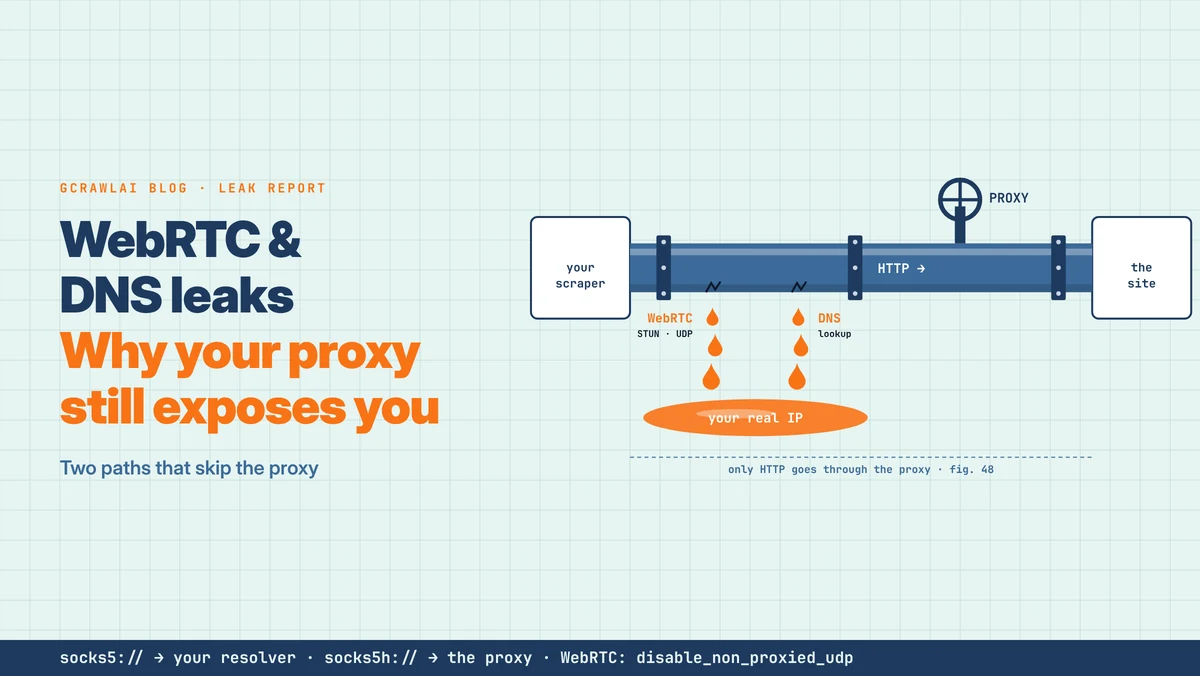
Your proxy works. An IP checker shows the proxy's address, the country is right, and the pages load. Yet the site still ties your sessions back to one machine. Often the cause isn't the proxy at all but two paths that never touch it: WebRTC and DNS. This guide shows how each one leaks, what we measured in a local lab, how to close both, and where GcrawlAI fits.
TL;DR
- WebRTC leak: in a browser, a page can start a WebRTC connection without a prompt. Its STUN request goes out over UDP, skips HTTP and SOCKS proxies, and returns your own public address to the page.
- DNS leak: with
socks5://in Python requests orcurl --socks5, your machine looks up the hostname before the proxy sees it.socks5h://moves the lookup to the proxy. - What we measured: through both an HTTP and a SOCKS5 proxy, Chromium sent its STUN request directly. The
--force-webrtc-ip-handling-policyflag changed nothing in Chromium 141; the same setting as a browser preference stopped it. - Plain HTTP clients have no WebRTC: requests, httpx and curl only need the DNS fix.
- Or skip the problem: with GcrawlAI the browser, DNS and network traffic all run on its side, so nothing leaves from your machine.
Why does a proxy still expose your scraper? A proxy only carries the traffic that is sent to it. In a browser, WebRTC's STUN requests travel over UDP outside HTTP and SOCKS proxies, so a page can read your own public address. In scripts, a socks5:// proxy URL makes your machine resolve hostnames itself. Set WebRTC IP handling to disable_non_proxied_udp, use socks5h://, and test the exact setup you run, or fetch pages through GcrawlAI so nothing runs on your machine.
Which leak applies to you
| Your setup | WebRTC leak? | DNS leak? |
|---|---|---|
| Python requests, httpx, curl, Scrapy | No, there's no browser | Only with a socks5:// URL that resolves locally |
| Playwright, Puppeteer or Selenium with a proxy | Yes, by default | Browsers resolve through HTTP and SOCKS5 proxies, but test it |
| Anti-detect or cloud browser profiles | Depends on the profile's WebRTC setting | Depends on the profile and proxy type |
| GcrawlAI Cloud API | No, the browser runs on GcrawlAI | No, names resolve at the exit |
Nothing on your machine to leak: GcrawlAI
Every leak in this guide starts on the machine that runs the browser or the script. Closing them means browser preferences, proxy URL schemes and tests to repeat whenever something changes. GcrawlAI moves the whole fetch off your machine: the browser, its DNS lookups and its network traffic run on GcrawlAI's side, through the exit you choose.
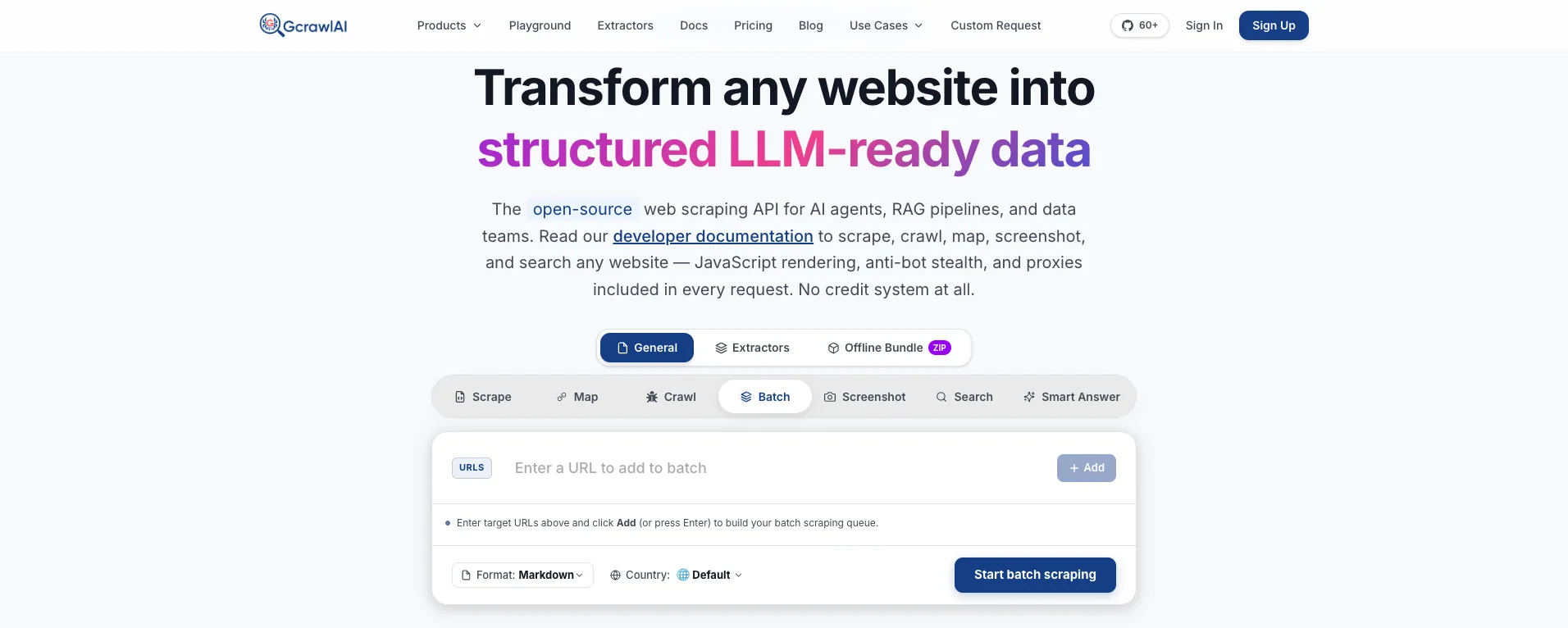
The homepage says it in one line: JavaScript rendering, anti-bot stealth and proxies are included in every request, with no credit system. Because the real browser runs on GcrawlAI's infrastructure, your own IP, resolver and WebRTC stack are never part of the request, and the page arrives as HTML or Markdown.
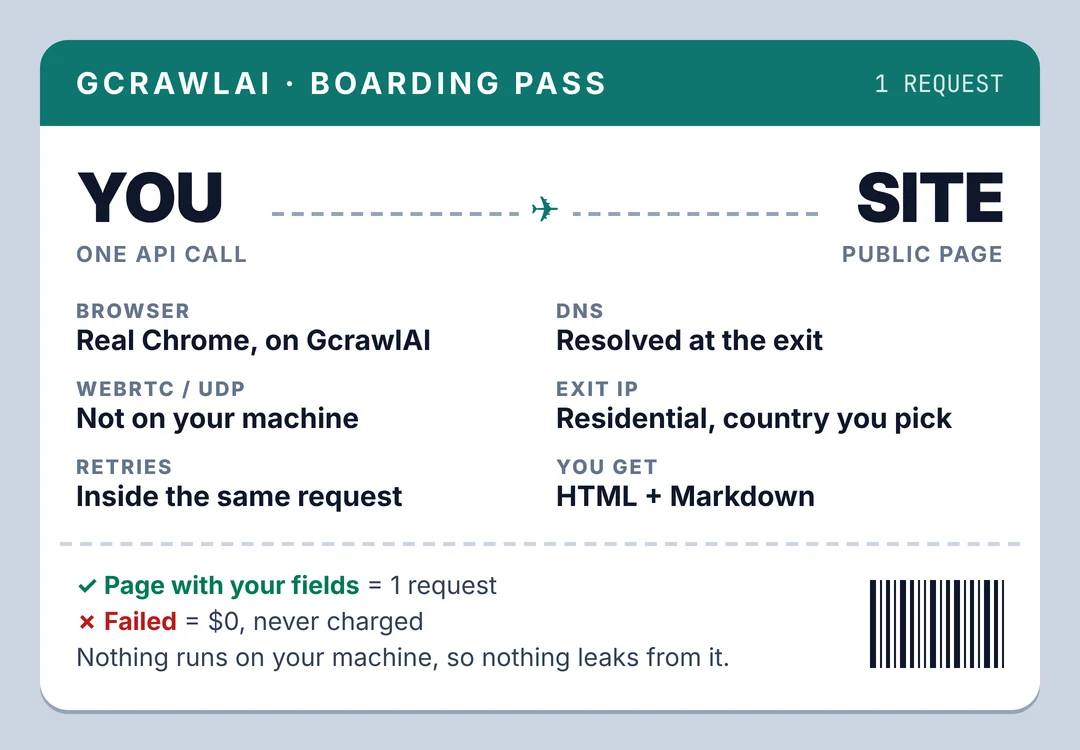
Here's the client. It asks GcrawlAI for a public page through a German exit and keeps it only if the products you need are there:
# pip install gcrawl-sdk parsel
"""Let GcrawlAI fetch a public page you're allowed to collect. The browser, its DNS lookups and its
network traffic all run on GcrawlAI's side, through the exit IP for the country you pick, so nothing
leaves from your own machine. Keep the page only if your fields are in it."""
import os

from gcrawl_sdk import GcrawlClient, ScrapeOptions
from parsel import Selector

gc = GcrawlClient(api_key=os.getenv("GCRAWL_API_KEY", "gc-YOUR_API_KEY"))

page = gc.scrape(url="https://example.com/category/laptops",
                 options=ScrapeOptions(html_enabled=True, markdown_enabled=True, proxy_geo="DE"), wait=True)
items = Selector(page.html or "").css("li.product")
print(f"{len(items)} products" if len(items) >= 5 else "page came back without products: check before storing")
- Rendering and access: a real browser through residential IPs in the country you choose, with retries and stealth escalation inside the request.
- Output you can check: HTML, Markdown or JSON, plus extractors that return structured fields for common page types.
- Scrape, crawl, screenshots and Search API: scrape single pages, crawl whole sites, capture screenshots, or use the Search API.
- For developers and AI agents: a Python SDK, an MCP server for Claude, Cursor and other agents, the Playground to test a page before you write code, and the docs.
The MIT-licensed core also runs on your own servers: clone it from GitHub and the setup script in the code download starts the API with Redis and a Celery worker. Self-hosted, the leak checks in this guide apply to your servers.
Pricing is a free plan of 50 requests a month with no card, paid plans from $0.67 to $1.45 per 1,000 requests, and a self-hosted core that costs nothing. Failed requests are never charged. The full plan table is in the cost section.
Where it falls short: moving the fetch off your machine removes these leaks, but it doesn't make every page reachable, with GcrawlAI or anything else. Test your own targets on the free plan. It won't solve CAPTCHAs meant for humans or log in for you, and it doesn't make collecting a site's data acceptable when that site's terms say no.
"When a team tells us their residential proxies are burned, we run one WebRTC check first. More often than not the proxy is fine, and the browser is announcing the office IP on every page."
Rajesh Kannan, Co-Founder & CTO at Gramosoft
Three paths out of one machine
A proxy is a route, not a disguise. It carries the traffic your software sends to it and nothing else. A browser or script behind a proxy can still send traffic on other paths: WebRTC connection checks over UDP and hostname lookups through your own resolver. Each path can show a site a different network.
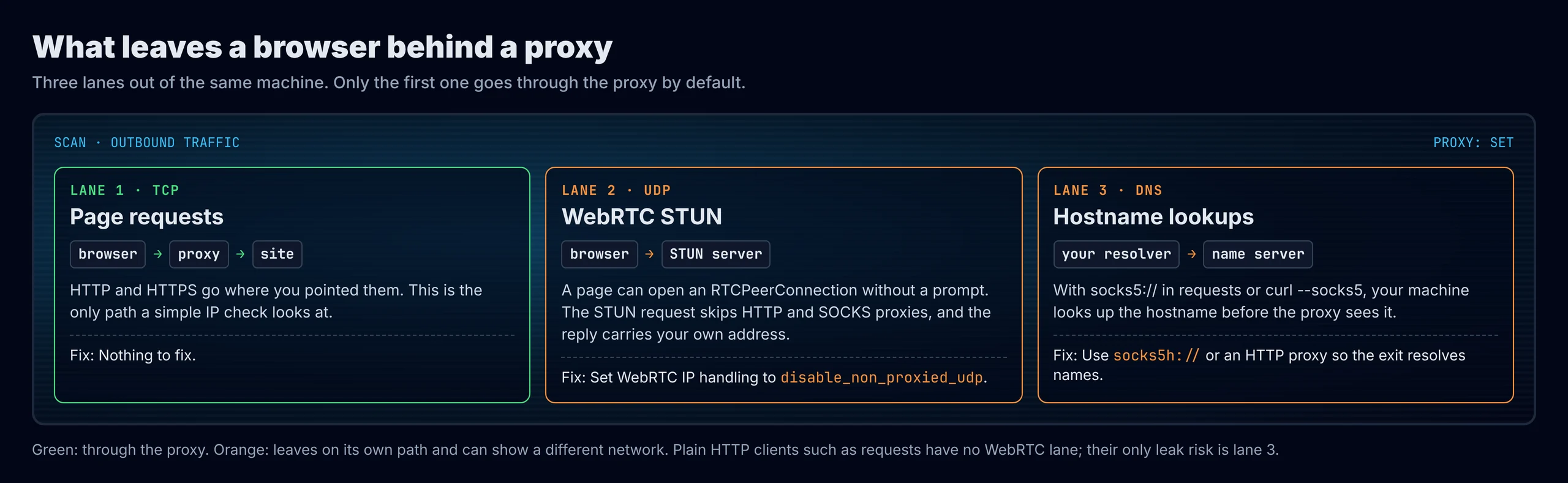
ScrapePass describes the same three channels as WebRTC, DNS and the application layer, meaning the browser's timezone and locale. Of the three, a leaked IP is the strongest signal, because it's an address rather than a statistical guess.
- Page requests: HTTP and HTTPS go through the proxy. This is the only path a basic IP checker tests.
- WebRTC: only in browsers, including headless Playwright, Puppeteer and Selenium sessions.
- DNS: in any client, decided by the proxy type and the URL scheme you use.
How a WebRTC leak exposes your IP
WebRTC powers video calls in the browser. Before a call, the browser gathers ICE candidates, the network addresses another peer could reach it on. To learn its public address, it asks a STUN server over UDP. Any page can start this with a few lines of JavaScript, and no permission prompt appears.
The IETF's RFC 8828 on WebRTC IP handling says plainly that when a proxy is set but direct internet access is allowed, the STUN checks bypass the proxy and reveal the client's public address. Chromium's proxy documentation adds that its SOCKS5 support is TCP-only and can't relay UDP.
| Candidate type | What it holds | A leak? |
|---|---|---|
| host | An address on your own network card; modern Chrome and Firefox hide it behind a random .local name |
Usually no, when it shows as .local |
| srflx (server reflexive) | The public address the STUN server saw | Yes, if it differs from the proxy's exit IP |
| relay | An address on a TURN relay | No, it's the relay's address |
A page script can send the srflx address to its server and compare it with the IP your HTTP requests came from. ScrapePass notes that vendors also compare that address across sessions, which links a rotating proxy pool back to one origin machine.
How a DNS leak happens
Before connecting, someone has to turn the site's hostname into an IP address. With an HTTP proxy, the client sends the hostname and the proxy resolves it. With SOCKS5, it depends on the client: some send the hostname, and some look it up on your own machine first and send only the IP.
A local lookup goes to your own resolver, usually your ISP's or your office's. The site's name servers then see a resolver in one place while the connection comes from a proxy somewhere else. Shifter lists this socks5 versus socks5h mix-up among the common mistakes behind detected residential proxies.
| Client and proxy setting | Who resolves the hostname |
|---|---|
Python requests with socks5:// |
Your machine (leaks) |
Python requests with socks5h:// |
The proxy |
httpx with socks5:// |
The proxy (in our test it sent the hostname) |
curl --socks5 or socks5:// |
Your machine (leaks) |
curl --socks5-hostname or socks5h:// |
The proxy |
| Any client with an HTTP proxy | The proxy |
Browsers add one more case: a browser using DNS over HTTPS can send lookups to its own provider, depending on its settings. ScrapePass advises verifying rather than assuming, because DNS over HTTPS can override how a browser resolves through a proxy.
What we measured in a local leak lab
We built a small lab on one machine: a test site, our own SOCKS5 and HTTP proxies that log what they receive, and a STUN server that logs who contacts it. No outside site was involved. Then we sent the same requests through each proxy with common clients and Chromium setups. The lab scripts are in the code download.
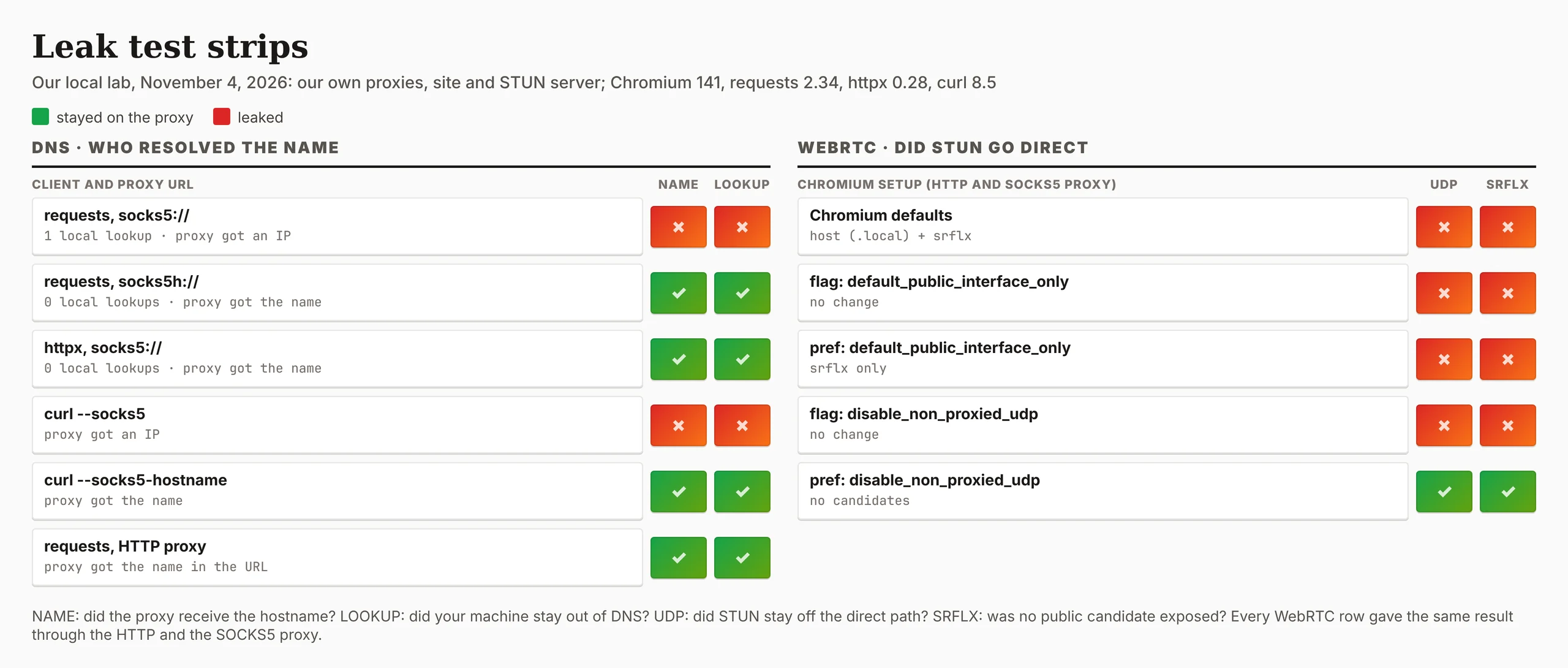
On the DNS side, Python requests with socks5:// made one lookup on our machine and the proxy received an IP address. Switching to socks5h:// made zero local lookups and the proxy received the hostname. httpx sent the hostname even with socks5://, and curl followed the same split as requests.
On the WebRTC side, Chromium sent its STUN request straight to our STUN server through both the HTTP and the SOCKS5 proxy, and the page saw an srflx candidate with the machine's own address. Host candidates showed only as .local names.
- The command-line flag did nothing:
--force-webrtc-ip-handling-policy=disable_non_proxied_udpleft the STUN request and the srflx candidate unchanged in Chromium 141, headless and headed. - The preference worked: the same value set as the browser's
webrtc.ip_handling_policypreference, which Chrome's policy also controls, produced no candidates and no STUN traffic. default_public_interface_onlyisn't a fix: it hid the host candidate but still sent STUN directly and exposed the srflx address.
"The flag result surprised us. Plenty of guides recommend it, and it changed nothing in our build. That's the reason to test the browser you actually run instead of trusting a setting you read about."
Rajesh Kannan, Co-Founder & CTO at Gramosoft
How to check your own browser setup
Test the exact browser, proxy and profile you run in production, not your personal browser. The script below opens Chromium through your proxy, reads the exit IP the web sees, gathers WebRTC candidates, and flags any public address that differs. It runs twice: with defaults, then with the fix applied.
# pip install playwright && playwright install chromium
"""Does WebRTC show sites an address other than your proxy's? Opens Chromium through PROXY, reads the
exit IP the web sees, gathers WebRTC candidates, and reports any public (srflx) address that differs.
Runs twice: Chromium defaults, then with the WebRTC IP handling preference set to
disable_non_proxied_udp (the same setting as Chrome's WebRtcIPHandling policy)."""
import json, os, tempfile
from pathlib import Path
from playwright.sync_api import sync_playwright

PROXY = os.getenv("PROXY", "http://127.0.0.1:8899")              # your proxy: http://user:pass@host:port
EXIT_IP_URL = os.getenv("EXIT_IP_URL", "https://api.ipify.org")
STUN = os.getenv("STUN", "stun:stun.l.google.com:19302")
GATHER = """async (stun) => { const pc = new RTCPeerConnection({iceServers: [{urls: stun}]}); pc.createDataChannel("x");
  const out = []; pc.onicecandidate = e => e.candidate && out.push([e.candidate.type, e.candidate.address]);
  await pc.setLocalDescription(await pc.createOffer()); await new Promise(r => setTimeout(r, 3000)); return out; }"""

for label, policy in [("Chromium defaults", None), ("disable_non_proxied_udp", "disable_non_proxied_udp")]:
    profile = Path(tempfile.mkdtemp()); (profile / "Default").mkdir()
    if policy:
        (profile / "Default" / "Preferences").write_text(json.dumps({"webrtc": {"ip_handling_policy": policy}}))
    with sync_playwright() as p:
        ctx = p.chromium.launch_persistent_context(str(profile), proxy={"server": PROXY})
        page = ctx.new_page()
        exit_ip = page.goto(EXIT_IP_URL).text().strip()
        cands = page.evaluate(GATHER, STUN); ctx.close()
    leaks = sorted({addr for kind, addr in cands if kind == "srflx" and addr != exit_ip})
    print(f"{label:<24} exit IP {exit_ip:<15} candidates {len(cands)}  ->  "
          + (f"LEAK: WebRTC shows {', '.join(leaks)}" if leaks else "no other public address"))
In our lab it reported a leak with defaults and none with the preference set, through both proxies. Against the internet, set PROXY to your proxy and it uses a public IP echo and Google's public STUN server.
- Browser test pages: BrowserLeaks lists ICE candidates, and Scrapfly's testing-tools guide covers WebRTC and DNS leak tests alongside other layers.
- A timeout isn't a pass: Scrapfly notes a WebRTC test that times out may mean UDP is blocked, not that the setup is clean.
- For DNS in scripts: check the proxy URL scheme.
socks5h://or an HTTP proxy keeps the lookup on the proxy.
How to close both leaks
Both fixes are settings, not tricks. The goal is that every path your software uses goes through the route you chose, so the site sees one consistent network. Make one change at a time and re-run the same test after each one, so you know which change made the difference.
- Chrome and Chromium: set WebRTC IP handling to
disable_non_proxied_udp, through the WebRtcIPHandling policy on managed browsers or the profile preference in automation. Google describes it as allowing UDP only through a proxy that supports it. - Firefox:
media.peerconnection.ice.proxy_only_if_behind_proxyset to true, which Lokesh Kapoor's proxy testing guide recommends overproxy_only, which breaks WebRTC when no proxy is set. - Scripts: use
socks5h://instead ofsocks5://in requests and curl, or an HTTP proxy. - Timezone, locale and IPv6: match the browser's timezone and language to the exit country, and make sure an IPv4-only proxy isn't sitting next to a direct IPv6 route.
Turning WebRTC off entirely also stops the leak, but AntiBrow points out that a browser with no WebRTC at all is unusual in itself. The policy above keeps WebRTC working and keeps its traffic on the proxy route, falling back to TCP when the proxy can't carry UDP.
What leak-free pages cost
Pages that need a real browser also need rendering and usually premium IPs, so compare providers on their protected-page price, not their headline rate. For 100,000 successful protected pages a month, credit-based APIs cost $249 to $399 at list price and GcrawlAI costs $101. For plain pages, they're cheaper.
| Option, 100,000 successful pages a month | Plain HTML pages | Protected pages (JS rendering + premium proxies) | Are failed requests billed? |
|---|---|---|---|
| GcrawlAI (every request rendered, residential IPs included) | $101 (Growth $79 + 20,000 overage at $1.10 per 1,000) | $101 (same request, no multiplier) | No: failed requests are never charged |
| ScraperAPI | $49 (Hobby, 100,000 credits) | $299 (Business; 25 credits per page = 2.5M credits) | Charges only 200 and 404 responses |
| ZenRows | $39 (Build B3, 120,000 credits) | $399 (Growth G3; 25 credits per page = 2.5M credits) | Failed requests never charged; 404 and 410 count as successful |
| ScrapingBee | $49 (Freelance, 250,000 credits; JS off) | $249 (Business; 25 credits per page = 2.5M credits) | Charges only 200, 404 and 410 |
List-price arithmetic, not a benchmark. Credit costs and billing rules come from ScraperAPI's credit docs, ZenRows' pricing docs and ScrapingBee's FAQ, checked November 1, 2026. The honest read: for plain HTML, ZenRows, ScraperAPI and ScrapingBee cost less than GcrawlAI. Whatever you use, count cost per page with your fields in it, not per response.
GcrawlAI plans (GcrawlAI pricing, checked October 28, 2026):
| Plan | Price | Requests/month | Concurrent | Per 1,000 | Overage per 1,000 |
|---|---|---|---|---|---|
| Free | $0 forever, no card | 50 | 2 | – | – |
| Starter | $29/month | 20,000 | 10 | $1.45 | $1.60 |
| Growth (most popular) | $79/month | 80,000 | 35 | $0.99 | $1.10 |
| Pro | $199/month | 250,000 | 50 | $0.80 | $0.90 |
| Scale | $499/month | 750,000 | 100 | $0.67 | $0.75 |
| Enterprise | Volume pricing | 2M+ | Custom | – | – |
| Self-hosted | $0 (MIT) | Your servers | Your servers | Infrastructure only | – |
Every plan, Free included, has scrape, crawl, the Search API, JavaScript rendering, residential IP rotation and stealth escalation in each request, and each feature counts as one request. Failed requests are never charged. Annual billing charges 10 months for 12, unused requests on paid plans roll over once, and Indian customers are billed in INR with a GST invoice.
Which route fits your project
The right route depends on what runs on your machine. A Python script behind a proxy only needs the right URL scheme. A browser fleet needs WebRTC settings, DNS checks and tests after every change. A managed API removes your machine from the request. The table shows where GcrawlAI fits in each case.
| Your situation | Route | Where GcrawlAI fits |
|---|---|---|
| Python requests, httpx or Scrapy through a proxy | Use socks5h:// or an HTTP proxy |
Move to GcrawlAI when pages need a browser |
| A few Playwright or Puppeteer sessions | Set the WebRTC policy, test each profile | Use GcrawlAI for the pages you'd rather not run yourself |
| A browser fleet on cloud servers | Managed browser API | GcrawlAI runs the browser, DNS and exit IP, one request per page |
| You need full control of the stack | Self-host | The MIT GcrawlAI core on your servers, with these checks |
| AI agents need the page | A tool the agent can call | GcrawlAI MCP server with scrape, crawl and Search API |
| The site offers an API or feed | Use it | Not needed; use GcrawlAI for your other sources |
When your own Python is enough
If your scraper is a Python script with requests, httpx or Scrapy, it has no WebRTC at all, and the only leak is DNS. Changing socks5:// to socks5h://, or using an HTTP proxy, closes it. That fix is free, takes seconds, and covers most server-side scrapers.
When pages need a real browser and you'd rather not maintain browser profiles, WebRTC settings and leak tests, move the fetching to GcrawlAI and keep your field checks. Its free Cloud plan's 50 requests a month are enough to test your real targets, the Playground shows the result without code, and the MIT core self-hosts for free. For the build-or-buy trade-off, read web scraping with Python vs a scraping API.
Using proxies responsibly
Closing leaks makes your setup consistent; it doesn't change what you're allowed to collect. Read the site's terms and robots.txt, prefer an official API or data licence, stay on public pages, keep request rates low, and don't collect personal data you have no basis to hold. A proxy is not permission.
Leave logins, checkouts and account pages alone, and don't use rotating identities to get around a block a site has put on you. For the rules a site publishes, read how to check if a website allows scraping, and for the legal background, what web scraping is and where it's legal. Get advice for your own case.
Frequently asked questions
What is a WebRTC leak?
A browser behind a proxy exposes a different public address through WebRTC. To gather connection candidates, the browser sends a STUN request over UDP, which skips HTTP and SOCKS proxies, and the reply holds your own public IP. Any page can read it without a permission prompt.
What is a DNS leak with a proxy?
Your own machine resolves the site's hostname instead of the proxy, so your resolver, usually your ISP's or your office's, handles the lookup. In our lab, Python requests with socks5:// did this; socks5h:// sent the hostname to the proxy instead.
What is the difference between socks5 and socks5h?
With socks5://, requests and curl look up the hostname on your machine and send the proxy an IP address. With socks5h://, they send the hostname and the proxy resolves it. Use socks5h:// to keep DNS on the proxy.
Do Python scrapers need to worry about WebRTC?
No. requests, httpx, curl and Scrapy don't run WebRTC, so they can't leak through it. WebRTC matters in browsers, including headless Playwright, Puppeteer and Selenium. For scripts, check the DNS path instead.
How do I stop WebRTC leaks in Playwright?
Set Chromium's WebRTC IP handling to disable_non_proxied_udp. In our test with Chromium 141, the command-line flag had no effect, while the same value set as the profile preference stopped the leak. Run a leak check with your own browser version to confirm.
Does a residential proxy hide WebRTC and DNS leaks?
No. A proxy only carries the traffic sent to it. The WebRTC STUN request and a local DNS lookup leave on their own paths, whatever kind of IP the proxy has. You fix them in the browser and in the proxy URL.
Is GcrawlAI open source, and can I use it commercially?
Related guides
- Residential vs Datacenter Proxies, and How IP Rotation Works (2026 Guide)
- How Websites Detect Scrapers: 13 Signals Anti-Bot Systems Check
- Web Scraping Without Getting Blocked: The 2026 Playbook
- 10 Best Headless Browsers for Scraping in 2026: Playwright, Camoufox, Cloud Browsers and More
- JA3 and JA4 TLS Fingerprints Explained
- Best Free Proxy Sites for Web Scraping in 2026
- How to Fix 403 Forbidden Errors in Python Requests (2026)
- Web Scraping with Python vs a Scraping API: When to Stop Writing Your Own Scraper
Your proxy is only one of three paths
Start with 50 free requests a month, no card. Send the public pages you're allowed to collect through GcrawlAI, let the browser and DNS run on its side, and pay only for requests that succeed.