By Rajesh Kannan, Co-Founder & CTO, Gramosoft · Last updated: · Rules checked against RFC 9309, Google's robots.txt specification and Cloudflare's Content Signals post on November 2, 2026; parser behaviour tested on Python 3.11, 3.12 and 3.13 and Protego the same day
Before you point a scraper at a site, you want to know one thing: are you allowed to? Most guides stop at "read robots.txt". That's the right first step, but robots.txt is easy to misread, older Python parsers misread it too, and it answers only one of the questions that matter. This guide starts with where GcrawlAI fits, then shows how to read robots.txt the way the standard defines it, what it can't tell you, and a Python checker you can run before every new project.
TL;DR
- Open
/robots.txton the exact host you'll scrape. Each subdomain has its own file. - Your bot obeys one group: the one naming its token, otherwise
*. Inside it, the longest matching rule wins and Allow wins a tie. File order doesn't matter. - A 404 means no rules; a 5xx means stop. RFC 9309 says an unreachable file means assume everything is disallowed.
- robots.txt is not permission. The standard says its rules are "not a form of access authorization". Terms, logins, personal data and copyright still decide.
- Test your parser: the Python 3.11 and 3.12 builds we tested read rules in file order and ignore wildcards. Protego, Scrapy's default, follows the standard.
- Fastest route: GcrawlAI reads terms pages as clean Markdown, finds URLs from sitemaps, and fetches the pages you're allowed to scrape.
How do you check if a website allows scraping? Open https://host/robots.txt, find the group for your bot (or *), and test each URL path: the longest matching rule wins. Then check what robots.txt can't tell you: whether pages need a login, what the terms of service say about bots, whether an official API exists, and whether the data is personal or copyrighted. GcrawlAI can read the terms page as clean Markdown for review.
The six checks at a glance
| Check | Where to look | What it tells you |
|---|---|---|
| robots.txt | https://host/robots.txt |
Which paths your bot may crawl, at what pace, and where the sitemap is |
| Access controls | Login forms, 401/403, CAPTCHAs, paywalls | Whether the content is public at all |
| Terms of service | Footer links: Terms, Legal, Acceptable use | Whether bots, scraping or data mining are banned or licensed |
| Official API or feed | Developers, API, Docs pages; RSS; data exports | A sanctioned route that's usually cheaper and steadier |
| Personal data | The fields you plan to collect | Whether privacy law applies, even to public pages |
| Content rights and AI signals | Copyright notices, licences, Content-Signal lines |
What you may reuse, and how the owner feels about AI training |
Check and scrape with GcrawlAI
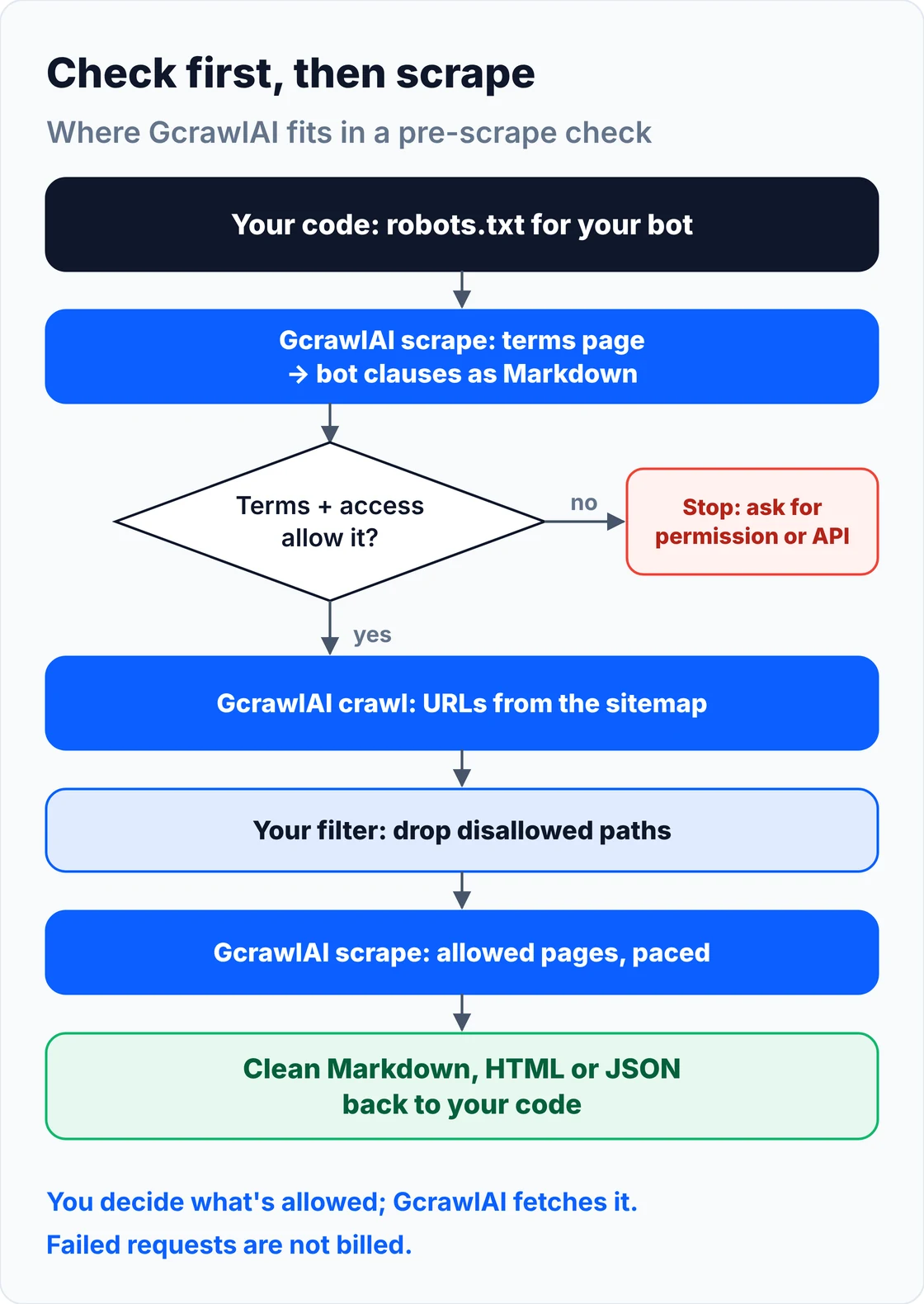
GcrawlAI doesn't decide whether you may scrape a site; you do. What it does is make the checking and the scraping quick. It reads a terms page as clean Markdown so you can search it for bot clauses, discovers URLs from the sitemap a robots.txt lists, and returns the pages you're allowed to fetch.
The homepage promise is one API for scraping, crawling and search, with JavaScript rendering, stealth and proxies in every request. For a pre-scrape check that matters because terms pages are often long, script-heavy documents. Getting them back as Markdown turns "read 9,000 words of legal text" into "search for the paragraphs that mention bots".
This reads a terms page through GcrawlAI and pulls out every paragraph that mentions scraping, crawling, robots, automated access or data mining, so a person can review them:
# pip install gcrawl-sdk
"""Read a site's terms page through GcrawlAI as clean Markdown and pull out the clauses about bots.

Terms pages are often JavaScript-heavy or long; Markdown makes them easy to search and to hand to a reviewer.
"""
import os
import re

from gcrawl_sdk import GcrawlClient, ScrapeOptions
from gcrawl_sdk.exceptions import GcrawlAPIError, GcrawlTimeoutError

gc = GcrawlClient(api_key=os.getenv("GCRAWL_API_KEY", "gc-YOUR_API_KEY"))
CLAUSES = re.compile(r"scrap|crawl|spider|robot|\bbots?\b|automated|data mining|harvest|extract", re.I)


def terms_clauses(terms_url: str) -> list[str]:
    """Return the paragraphs of a terms page that mention scraping, crawling or automated access."""
    try:
        page = gc.scrape(url=terms_url, options=ScrapeOptions(markdown_enabled=True), wait=True)
    except (GcrawlTimeoutError, GcrawlAPIError) as err:
        raise SystemExit(f"could not read {terms_url}: {err}")
    paragraphs = [p.strip() for p in (page.markdown or "").split("\n\n") if p.strip()]
    return [p for p in paragraphs if CLAUSES.search(p)]


if __name__ == "__main__":
    for clause in terms_clauses("https://www.example.com/terms"):
        print("-", clause[:300])
- Terms and policy pages as Markdown: scrape returns clean Markdown, HTML or JSON, so legal pages are easy to search, diff over time and hand to a reviewer.
- Sitemap-led discovery: crawl jobs find URLs from sitemaps and links with async jobs and webhooks; filter the list through your robots.txt check before you scrape.
- Search API for the alternatives: the Search API returns ranked results, handy for finding a site's developer portal, data licence or official feed.
- For developers and AI agents: a Python SDK, an MCP server for Claude, Cursor and other agents, the Playground to try a URL, and the docs.
- Billing that suits careful scraping: failed requests are never charged, so a page that turns out to be blocked or unavailable costs nothing.
The MIT-licensed core runs on your own servers if you'd rather keep everything in-house:
git clone https://github.com/GramosoftAI/GcrawlAI.git && cd GcrawlAI
python -m venv .venv && source .venv/bin/activate
pip install -r requirements.txt && playwright install
cp .env.example .env                      # add your database, Redis and proxy settings
python -m api.core.db_setup
redis-server &
celery -A web_crawler.crawler.celery_config worker -l info &
uvicorn api.api:app --port 8000
Pricing is a free plan of 50 requests a month with no card, paid plans from $0.67 to $1.45 per 1,000 requests, and a self-hosted core that costs nothing. The plan table and a cost comparison are in the cost section.
Where it falls short: GcrawlAI is a fetching tool, not a lawyer. It won't tell you whether a terms clause is enforceable, whether your use is fair, or whether data counts as personal where you operate. Keep your robots.txt check in your own code, as below, so the decision and the record stay with you. Every request also goes through a browser, so plain pages cost the same as hard ones.
"The cheapest scraping project is the one you check before you build. Ten minutes with robots.txt, the terms and the developer page has saved our clients weeks of work on data they could have licensed, or shouldn't have taken."
Rajesh Kannan, Co-Founder & CTO at Gramosoft
What robots.txt is, and what it isn't
robots.txt is a plain-text file at the root of a host that tells crawlers which paths they may request. The convention dates from 1994 and became a standard, RFC 9309, in September 2022. It expresses the site owner's crawling preferences. It doesn't lock anything, grant a licence, or make your use of the data legal.
The standard is blunt about that. RFC 9309 says the rules "are not a form of access authorization". Ignoring a disallow won't by itself make scraping unlawful, and obeying an allow won't make it lawful. What it does do is tell you, in the owner's own words, which parts of the site they don't want bots in. That's the clearest signal of intent you'll get, so treat a disallow as a no.
- One file per host: it must live at
scheme://host/robots.txt.shop.example.comandwww.example.comeach need their own, and so dohttpandhttpsin principle. - Not every site has one: Cloudflare's Learning Center says only 37% of its top 10,000 domains had a robots.txt file in 2025.
- It's public: anyone can read it, so a disallowed path is a request, not a secret. Never treat a listed path as an invitation.
How to read a robots.txt file
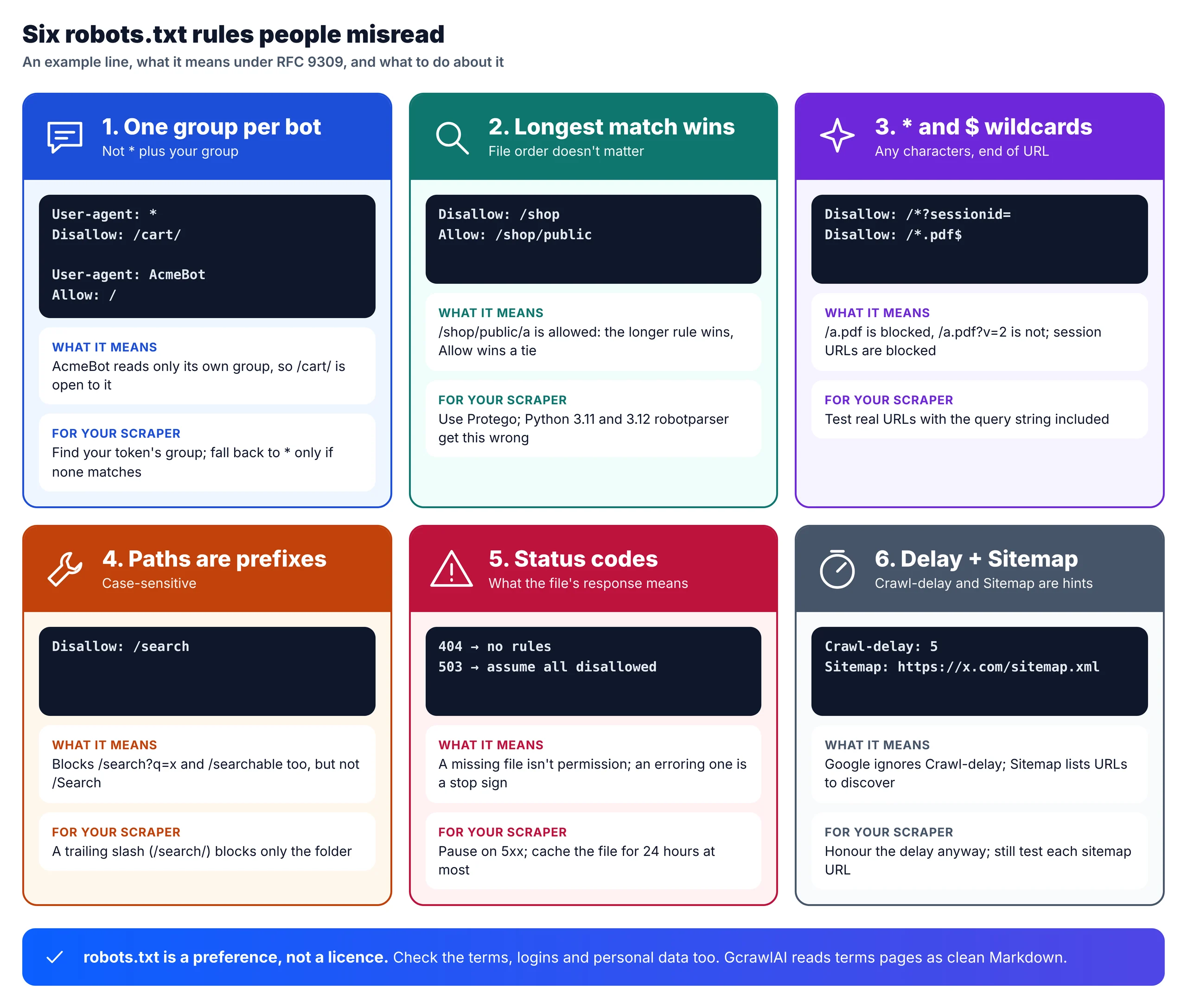
A robots.txt file is a set of groups. Each group starts with one or more User-agent lines and lists Allow and Disallow rules. Your crawler obeys exactly one group, then tests each URL path against that group's rules: the longest matching rule wins. Everything else is detail.
# example: https://shop.example/robots.txt
User-agent: *
Disallow: /cart/
Disallow: /search
Disallow: /*?sessionid=
Disallow: /*.pdf$
Allow: /search/help
Crawl-delay: 5

User-agent: AcmePriceBot
Disallow: /account/
Allow: /

Sitemap: https://shop.example/sitemap.xml
- Pick your group. Match your bot's product token (
AcmePriceBot) against eachUser-agentline, ignoring case. If a group names you, obey only that group; the*rules don't add on top. If none does, obey*. If neither exists, no rules apply. - Find every rule that matches the path. Rules are prefixes and case-sensitive:
Disallow: /searchblocks/search?q=kettleand/searchable, but not/Search. - Take the longest match. Under RFC 9309 the most specific rule wins, measured in characters.
Allow: /search/helpbeatsDisallow: /searchfor/search/help/faq. If an Allow and a Disallow are equally long, Allow wins. - Apply the wildcards.
*matches any run of characters and$anchors the end./*.pdf$blocks/files/a.pdfbut not/files/a.pdf?v=2. - Read the extras.
Sitemaplines apply to everyone and point at URL lists.Crawl-delayisn't in RFC 9309, but it tells you the pace the owner wants.
Two edge cases catch people. An empty Disallow: allows everything, while Disallow: / blocks the whole site. And don't borrow another bot's token to land in a friendlier group: the standard expects the token to match how your crawler really identifies itself. Send a User-Agent that names your bot and gives a contact, so the owner can reach you instead of blocking you.
What the robots.txt response itself tells you
Before you parse any rules, look at the status code the robots.txt request returned. RFC 9309 treats a missing file and a failing server very differently: a 4xx means there are no rules, while a 5xx or a network error means you must assume the whole site is disallowed until the file comes back.
| robots.txt response | RFC 9309 says | What to do |
|---|---|---|
| 200 with rules | Parse at least 500 KiB of it | Find your group and test each path |
| 404 or 410 | "Unavailable": the crawler may access any resource | No crawl rules, but still do the other five checks |
| 401 or 403 | Also unavailable | Treat as a warning sign: review access before you go further |
| 429 | Google treats it like a server error | Back off and honour Retry-After |
| 5xx or timeout | "Unreachable": assume complete disallow | Pause and retry later; don't crawl meanwhile |
| Redirect | Follow at least five hops | Use the file you land on, for the host you started from |
Cache what you fetch, but not for long: RFC 9309 says no more than 24 hours unless the file is unreachable. Long runs should refetch it daily, because owners change rules mid-crawl. Google's own crawler stops crawling for 12 hours when robots.txt returns a server error, then falls back to the last good copy for up to 30 days. Your scraper can afford to be at least as careful.
Check robots.txt in Python, and test your parser
Python ships a robots.txt parser, urllib.robotparser, but we found it disagreeing with RFC 9309 on two older Python versions. For a check you can trust, use Protego, the parser Scrapy uses by default, and wrap it with the status-code and caching rules above. Here's the difference, then the checker.
We ran the same two rules through the standard library and through Protego on three Python versions on November 2, 2026:
"""Does your robots.txt parser follow RFC 9309? Two lines that older Python versions get wrong."""
import sys
from urllib.robotparser import RobotFileParser

from protego import Protego

ROBOTS = "User-agent: *\nDisallow: /shop\nAllow: /shop/public\nDisallow: /*?sessionid=\n"
CASES = [("https://x.example/shop/public/a", True),      # longest match: Allow wins
         ("https://x.example/p?sessionid=1", False)]    # wildcard: blocked

stdlib = RobotFileParser(); stdlib.parse(ROBOTS.splitlines())
protego = Protego.parse(ROBOTS)
print("Python", sys.version.split()[0])
for url, want in CASES:
    print(f"{url}: RFC 9309 says {'allowed' if want else 'blocked'} | "
          f"stdlib {'allowed' if stdlib.can_fetch('MyBot', url) else 'blocked'} | "
          f"protego {'allowed' if protego.can_fetch(url, 'MyBot') else 'blocked'}")
Python 3.11.17
/shop/public/a: RFC 9309 says allowed | stdlib blocked | protego allowed
/p?sessionid=1: RFC 9309 says blocked | stdlib allowed | protego blocked
Python 3.12.3
/shop/public/a: RFC 9309 says allowed | stdlib blocked | protego allowed
/p?sessionid=1: RFC 9309 says blocked | stdlib allowed | protego blocked
Python 3.13.16
/shop/public/a: RFC 9309 says allowed | stdlib allowed | protego allowed
/p?sessionid=1: RFC 9309 says blocked | stdlib blocked | protego blocked
On the Python 3.11.17 and 3.12.3 builds we tested, the standard library applied rules in file order, so a longer Allow after a shorter Disallow lost, and it treated * as a literal character, so the session-ID rule never matched. Python 3.13.16 and Protego both followed RFC 9309. If you can't control the Python version your scraper runs on, don't rely on urllib.robotparser.
This checker fetches robots.txt once per origin, follows the RFC's status rules, caches for 24 hours and returns a verdict with the crawl delay and sitemaps:
"""Check robots.txt the way RFC 9309 says a crawler should, for one URL and one bot token.

- 200: parse the rules (Protego follows RFC 9309: longest match wins, * and $ wildcards)
- 4xx: "unavailable", no protocol rules (401/403 still mean: review access before going further)
- 5xx or network error: "unreachable", assume everything is disallowed and retry later
- cache each origin's verdict for at most 24 hours
pip install protego requests
"""
import time
from dataclasses import dataclass, field
from urllib.parse import urlsplit

import requests
from protego import Protego

BOT_TOKEN = "AcmePriceBot"                                     # the short name your rules are matched against
BOT_UA = "AcmePriceBot/1.0 (+https://acme.example/bot; bot@acme.example)"   # what you send as User-Agent
CACHE_SECONDS = 24 * 3600


@dataclass
class RobotsVerdict:
    allowed: bool
    reason: str
    crawl_delay: float | None = None
    sitemaps: list = field(default_factory=list)


_cache = {}


def _get(url):
    return requests.get(url, headers={"User-Agent": BOT_UA}, timeout=15, allow_redirects=True)


def check(url, token=BOT_TOKEN, get=_get, now=time.time):
    parts = urlsplit(url)
    origin = f"{parts.scheme}://{parts.netloc}"                # scheme + host + port: subdomains have their own file
    cached = _cache.get(origin)
    if not cached or now() - cached[0] > CACHE_SECONDS:
        try:
            r = get(origin + "/robots.txt")
            status, text = r.status_code, r.text
        except requests.RequestException:
            status, text = None, ""
        _cache[origin] = cached = (now(), status, text)
    _, status, text = cached

    if status is None or status >= 500:
        return RobotsVerdict(False, "robots.txt unreachable: assume complete disallow, retry later")
    if status in (401, 403):
        return RobotsVerdict(True, f"robots.txt returned {status}: no rules, but review access before scraping")
    if 400 <= status < 500:
        return RobotsVerdict(True, f"robots.txt returned {status}: no rules (still check terms, API, data)")

    rules = Protego.parse(text[:500 * 1024])                   # RFC 9309: parse at least 500 KiB
    path = parts.path or "/"
    target = f"{origin}{path}" + (f"?{parts.query}" if parts.query else "")
    ok = rules.can_fetch(target, token)
    return RobotsVerdict(ok, "allowed by robots.txt" if ok else "disallowed by robots.txt for this bot",
                         rules.crawl_delay(token), list(rules.sitemaps))


if __name__ == "__main__":
    for u in ["https://books.toscrape.com/catalogue/page-2.html", "https://www.example.com/search?q=x"]:
        print(u, check(u))
The code download includes an offline test that runs this checker against a fake shop with no network, covering the six rules in the infographic above, the 404 and 503 cases and the preflight below.
What robots.txt can't tell you: five more checks
robots.txt answers one question, which paths a crawler may request. It says nothing about whether the content is behind a login, what the terms of service allow, whether an official API exists, whether the data is personal, or who owns it. Those five checks decide most real scraping projects, so run them next.
- Access controls. If a page needs a login, a paid account or a solved CAPTCHA, it isn't public. Logging in usually means you accepted the terms, and getting past a technical barrier doesn't give you permission to what's behind it. Stop at 401, 403 and login forms.
- Terms of service. Open the Terms, Legal or Acceptable Use link in the footer and search for "scrap", "crawl", "robot", "automated" and "data mining". Some ban bots outright, some allow personal use only, some point you to a licence. How enforceable a footer-only terms page is varies by country, so ask a lawyer when it matters.
- An official API or feed. Look for Developers, API or Docs pages, RSS feeds and data downloads. A sanctioned route is usually steadier than scraping and comes with clear terms.
- Personal data. Names, emails, photos and profiles are personal data even on public pages. Privacy regulators in several countries said so in a joint statement on data scraping, and the UK regulator took action against Clearview AI in 2022 over scraped images. Collect only what you have a basis to hold.
- Content and database rights. Copyright covers articles, photos and reviews; the EU also protects databases. Facts like prices are generally safer than prose. The EU lets owners opt out of text and data mining in machine-readable form, and robots.txt is one way they do it.
Two common shortcuts are wrong. A noindex meta tag or X-Robots-Tag header tells search engines not to index a page; it says nothing about scraping. And the HTTP Allow response header lists the methods a URL accepts, usually after a 405; it has nothing to do with permission. An llms.txt file, where one exists, curates content for AI agents, but it's a guide, not a licence.
This preflight collects that evidence for one URL, so a person can decide quickly:
"""Pre-scrape check for one URL: robots.txt plus the signals robots.txt can't give you.

It doesn't decide legality. It collects evidence so a person can: robots verdict, crawl delay,
sitemaps, whether the page needs a login, search-indexing directives (not permissions), links to
terms and developer/API pages, and whether the site publishes llms.txt.
"""
import re
from urllib.parse import urljoin, urlsplit

import robots_check

LOGIN = re.compile(r'type=["\']password["\']|/login|/signin|sign in to continue', re.I)
TERMS = re.compile(r'href=["\']([^"\']*(?:terms|tos|conditions|legal)[^"\']*)["\']', re.I)
API = re.compile(r'href=["\']([^"\']*(?:/api|developer|/docs)[^"\']*)["\']', re.I)
META_ROBOTS = re.compile(r'<meta[^>]+name=["\']robots["\'][^>]+content=["\']([^"\']+)', re.I)


def preflight(url, token=robots_check.BOT_TOKEN, get=robots_check._get):
    origin = "{0.scheme}://{0.netloc}".format(urlsplit(url))
    report = {"url": url, "robots": robots_check.check(url, token, get=get)}
    if not report["robots"].allowed:
        report["next"] = "Stop: excluded or unknown. Ask for permission, an API or a licence."
        return report

    page = get(url)
    html = page.text if page.status_code == 200 else ""
    report["status"] = page.status_code
    report["login_required"] = page.status_code in (401, 403) or bool(LOGIN.search(html))
    report["indexing_directives"] = {                          # about search engines, not about you
        "meta_robots": (META_ROBOTS.search(html) or [None, None])[1],
        "x_robots_tag": page.headers.get("X-Robots-Tag"),
    }
    report["terms_links"] = sorted({urljoin(url, m) for m in TERMS.findall(html)})[:5]
    report["api_links"] = sorted({urljoin(url, m) for m in API.findall(html)})[:5]
    llms = get(origin + "/llms.txt")
    report["llms_txt"] = llms.status_code == 200 and llms.text.lstrip().startswith("#")
    report["next"] = ("Stop: content needs a login." if report["login_required"] else
                      "Read the terms links, prefer an API if listed, then run a small paced pilot.")
    return report


if __name__ == "__main__":
    import pprint
    pprint.pprint(preflight("https://books.toscrape.com/"))
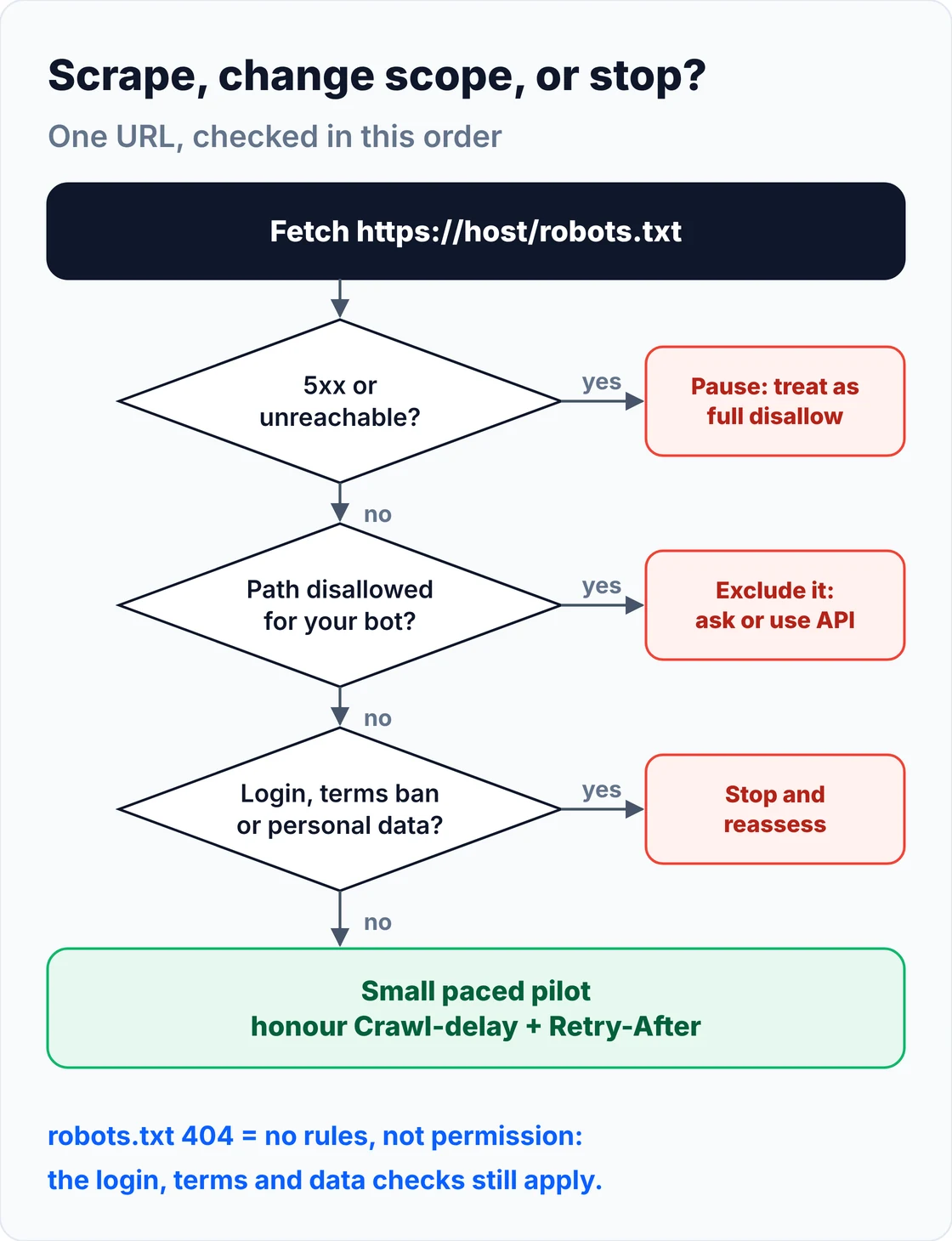
Scrape, change scope, or stop?
Put the checks in order and most decisions make themselves. A server error on robots.txt means pause. A disallowed path means exclude it and ask. A login, a terms ban or personal data means stop and reassess. Everything else gets a small, paced pilot before the full run, with a written record of what you checked.
| What you found | What to do |
|---|---|
| Path disallowed for your group | Exclude it; ask the owner, or use an API, feed or licence |
| Allowed, or no rule matches | Run the other checks, then a small paced pilot |
| robots.txt returns 404 | No crawl rules; the other checks still apply |
| robots.txt returns 5xx or times out | Pause; treat the site as fully disallowed; retry later |
| Login page, 401/403 or a CAPTCHA | Stop and reassess whether you're authorised |
| 429 Too Many Requests | Honour Retry-After and lower your total rate |
| Sitemap or feed listed | Use it for discovery instead of crawling every link |
Pace by total load, not per worker: ten workers each waiting ten seconds still send about one request a second. Keep a short record for each site: the host, the date, your bot's token, which group applied, which paths you excluded, your rate, and who signed off. If anyone asks later, you'll have the answer in a minute.
AI crawlers and Content Signals
Many robots.txt files now carry rules aimed at AI crawlers, and some add a newer line about how content may be used. If your scraper feeds an AI product, read both: the bot-specific groups tell you where named crawlers may go, and Content Signals tell you what the owner allows the content to be used for.
You'll see groups for tokens such as GPTBot, OAI-SearchBot, ClaudeBot, Google-Extended, Applebot-Extended, CCBot, PerplexityBot and Bytespider. Some of these are crawlers; Google-Extended is a control token rather than a separate crawler. Vendors rename agents, so check each vendor's own page rather than copying a list. And if your bot isn't one of them, these groups don't apply to you: you fall back to *.
In September 2025 Cloudflare introduced Content Signals, a line such as Content-Signal: search=yes, ai-train=no with three signals: search, ai-input and ai-train. Cloudflare says they "express preferences" and are not technical countermeasures, and frames them as a reservation of rights under EU copyright law. If you'll use the content to train or ground a model, a no there is a clear answer.
robots.txt settings in Scrapy and other tools
Most scraping tools can check robots.txt for you, but the defaults differ, so look before you rely on them. Scrapy ships a robots.txt middleware that's off in its global defaults and on in new project templates, and it uses Protego. Plain HTTP clients like requests and httpx don't check anything.
# settings.py (Scrapy)
ROBOTSTXT_OBEY = True                      # default is False in Scrapy's global settings;
                                           # the startproject template sets True
ROBOTSTXT_USER_AGENT = "AcmePriceBot"      # the token your rules are matched against
USER_AGENT = "AcmePriceBot/1.0 (+https://acme.example/bot; bot@acme.example)"
DOWNLOAD_DELAY = 5                         # match Crawl-delay; Scrapy doesn't read it for you
AUTOTHROTTLE_ENABLED = True
CONCURRENT_REQUESTS_PER_DOMAIN = 1
- Scrapy: per the Scrapy settings docs,
ROBOTSTXT_OBEYcontrols the middleware andROBOTSTXT_PARSERdefaults to Protego. Set the delay yourself. - requests, httpx, curl_cffi: no robots.txt support; call a checker like the one above before each new origin.
- Protego on its own:
pip install protego, thenProtego.parse(text).can_fetch(url, token). It also readsCrawl-delayandSitemap. - Browser tools: Playwright and Selenium load whatever you point them at. Filter URLs before they reach the browser.
- GcrawlAI: run your robots.txt check in your own code and send only allowed URLs to scrape or crawl, so the decision stays visible in your logs.
For a framework comparison, see Scrapy vs Crawlee vs Scrapling.
What checking and scraping cost
Checking is nearly free: one robots.txt request per host, a terms page and a look at the developer pages. The cost arrives with the scraping itself. For 100,000 successful protected pages a month, credit-based scraping APIs cost $249 to $399 and GcrawlAI costs $101; for plain HTML pages, GcrawlAI is pricier.
| Option, 100,000 successful pages a month | Plain HTML pages | Protected pages (JS rendering + premium proxies) | Are failed requests billed? |
|---|---|---|---|
| GcrawlAI (every request rendered, residential IPs included) | $101 (Growth $79 + 20,000 overage at $1.10 per 1,000) | $101 (same request, no multiplier) | No: failed requests are never charged |
| ScraperAPI | $49 (Hobby, 100,000 credits) | $299 (Business; 25 credits per page = 2.5M credits) | Charges only 200 and 404 responses |
| ZenRows | $39 (Build B3, 120,000 credits) | $399 (Growth G3; 25 credits per page = 2.5M credits) | Failed requests never charged; 404 and 410 count as successful |
| ScrapingBee | $49 (Freelance, 250,000 credits; JS off) | $249 (Business; 25 credits per page = 2.5M credits) | Charges only 200, 404 and 410 |
List-price arithmetic, not a benchmark. Credit costs and billing rules come from ScraperAPI's credit docs, ZenRows' pricing docs and ScrapingBee's FAQ, checked November 1, 2026. The honest read: for plain HTML that never blocks, ZenRows, ScraperAPI and ScrapingBee cost less than GcrawlAI, and many sites that allow scraping are exactly that kind of site. GcrawlAI wins once pages need a browser or sit behind bot checks. Whichever you use, the cheapest page is the one you didn't need: excluding disallowed and off-scope paths early cuts the bill.
GcrawlAI plans (GcrawlAI pricing, checked October 28, 2026):
| Plan | Price | Requests/month | Concurrent | Per 1,000 | Overage per 1,000 |
|---|---|---|---|---|---|
| Free | $0 forever, no card | 50 | 2 | – | – |
| Starter | $29/month | 20,000 | 10 | $1.45 | $1.60 |
| Growth (most popular) | $79/month | 80,000 | 35 | $0.99 | $1.10 |
| Pro | $199/month | 250,000 | 50 | $0.80 | $0.90 |
| Scale | $499/month | 750,000 | 100 | $0.67 | $0.75 |
| Enterprise | Volume pricing | 2M+ | Custom | – | – |
| Self-hosted | $0 (MIT) | Your servers | Your servers | Infrastructure only | – |
Every plan, Free included, has scrape, crawl, the Search API, JavaScript rendering, residential IP rotation and stealth escalation in each request. Failed requests are never charged. Annual billing charges 10 months for 12, unused requests on paid plans roll over once, and Indian customers are billed in INR with a GST invoice.
Which check, which tool?
Each check has a simple tool of its own: a parser for robots.txt, your eyes for logins, a search through the terms, a look for an API. GcrawlAI helps wherever pages have to be fetched, read or discovered, while the judgement stays with you and, for anything contested, with a lawyer.
| You need to | Do this yourself | Where GcrawlAI fits |
|---|---|---|
| Test paths against robots.txt | Protego or the checker above | Send only allowed URLs to GcrawlAI |
| Read the terms of service | Search for bot and scraping clauses | GcrawlAI returns the terms page as clean Markdown |
| Find an official API or feed | Check Developers, API and RSS links | GcrawlAI's Search API finds developer portals and data licences |
| Discover URLs to scrape | Parse the Sitemap lines | GcrawlAI crawl reads sitemaps and links as async jobs |
| Spot login walls and personal data | Preflight, plus a look at the fields | Use GcrawlAI only for the public, non-personal pages |
| Scrape the allowed pages | requests or Scrapy, paced | GcrawlAI scrape, with failed requests never charged |
| Recheck rules on long runs | Refetch robots.txt every 24 hours | Schedule GcrawlAI crawls after each daily check |
When doing it yourself is enough
For a handful of sites, the checks in this guide are all you need: Protego for robots.txt, ten minutes on the terms and developer pages, and requests or Scrapy for plain HTML. Bring in GcrawlAI when the allowed pages need a browser, the site list grows past what you can review, or terms pages are too heavy to read.
Even then you can stay on your own servers: the MIT-licensed GcrawlAI core self-hosts for free, and the free Cloud plan's 50 requests a month are enough to pull a few terms pages as Markdown and test the pages you plan to scrape. Paste a URL into the Playground to see what comes back. For the build-or-buy trade-off, read web scraping with Python vs a scraping API.
"We treat a robots.txt disallow as a no, even though the standard says it isn't access control. The owner wrote it down. If the data matters, the right next step is an email asking for access, not a cleverer crawler."
Rajesh Kannan, Co-Founder & CTO at Gramosoft
Scrape like a guest
Checking permission is the start, not the end. Once you're scraping, keep the load low, identify your bot, honour Retry-After and Crawl-delay, recheck robots.txt daily, and collect only the fields you need. If a site asks you to stop, stop. A polite scraper rarely gets blocked, and rarely gets a lawyer's letter.
When the answer is no, ask. Many owners will grant access, point you to an API or sell a licence when you explain what you need. Legal outcomes in this area depend on the facts and the country: courts in the US have found scraping public data unlikely to breach anti-hacking law while letting contract claims go ahead. For the background, read what web scraping is and where it's legal, and get advice for your own case. This guide isn't legal advice.
Frequently asked questions
How do I check if a website allows scraping?
Open /robots.txt on the exact host, find the group for your bot (or *) and test your URL paths against it. Then check whether pages need a login, read the terms of service for bot clauses, look for an official API, and check whether the data is personal or copyrighted.
Does robots.txt make scraping legal or illegal?
Neither by itself. RFC 9309 says its rules are not access authorization. Legality depends on how you access the site, its terms, the kind of data and the law where you operate. Treat a disallow as the owner's clear wish and respect it.
What if a website has no robots.txt?
If /robots.txt returns a 404, there are no crawl rules, so robots.txt doesn't restrict you. That isn't blanket permission: the terms, logins, personal data and copyright checks still apply, and you should still pace requests gently.
Which rule wins when Allow and Disallow both match?
The longest matching rule wins, and Allow wins a tie, under RFC 9309. File order doesn't matter. Some parsers, including the Python 3.11 and 3.12 standard-library builds we tested, used file order instead, so test yours.
Does Crawl-delay matter if Google ignores it?
Yes. Google's crawler ignores Crawl-delay, but the line tells you the pace the owner wants. Treat it as the gap in seconds between your requests to that host, across all your workers combined.
Does a noindex tag mean I can't scrape a page?
No. noindex and X-Robots-Tag tell search engines not to list a page in results. They say nothing about scraping. Use robots.txt, the terms and the other checks in this guide instead.