By Rajesh Kannan, Co-Founder & CTO, Gramosoft · Last updated: · Facts checked against Imperva's 2025 Bad Bot Report, Cloudflare's own posts and curl_cffi's release page on November 2, 2026; billing rules checked on ScraperAPI, ZenRows and ScrapingBee pages on November 1, 2026
Your scraper works for an afternoon, then the 403s start, or worse, it keeps returning 200s with nothing useful in them. Getting blocked in 2026 isn't one rule tripping. Sites score every request across several layers, and you fail when the combined score drops too low. This playbook starts with how GcrawlAI handles every layer in one request, then shows how to read a block, name the layer that caught you, apply the cheapest fix, and know when a block means stop.
TL;DR
- Diagnose before you fix: a 429 is rate, a 403 on a page that loads in Chrome is usually your TLS fingerprint, and "fine at home, blocked on a cloud server" is IP reputation.
- Fix the cheapest failing layer first: pacing and headers, then a browser-grade TLS client, then the site's JSON API, then residential IPs, and a real browser only for JavaScript pages.
- Keep one identity per session: same IP, same header set, same cookies. Rotating IPs per request breaks the session the site already trusts.
- Don't trust status 200: many blocks are soft. Check for text only the real page contains.
- Fastest route: GcrawlAI sends a real browser through residential IPs with stealth escalation, and never bills blocked pages.
How do you scrape a website without getting blocked? Make every request look like one consistent, unhurried browser session: browser-grade TLS, a complete header set, residential IPs held per session, carried cookies and jittered pacing. Diagnose which layer blocked you and fix the cheapest one first. GcrawlAI handles every layer in one request. Stop at login walls, terms-of-service bans and payment gates.
Read the block, then fix it
| You see | Layer that caught you | Cheapest first fix |
|---|---|---|
| 403 in Python, page loads in Chrome | TLS or headers | curl_cffi with a Chrome profile, full header set |
| Fine at home, blocked on a cloud server | IP reputation | Residential IP from the site's country |
| 429, often with Retry-After | Rate | Wait as told, cut concurrency, add jitter |
| Worked for a while, then 403s | Behaviour or volume | Slow down, serial per session, rotate per session |
| "Just a moment..." or a CAPTCHA | Challenge | Fix the layers above; real browser for the page |
| 200 with empty results | Soft block | Content marker; compare with a real browser |
Stay unblocked with GcrawlAI
GcrawlAI applies every layer of this playbook in each request. A real browser loads the page through a rotating residential IP from the country you choose, so the TLS fingerprint, headers, session and JavaScript all match. When a site still pushes back, the IP switches and stealth escalates inside the same request, and blocked pages are never billed.
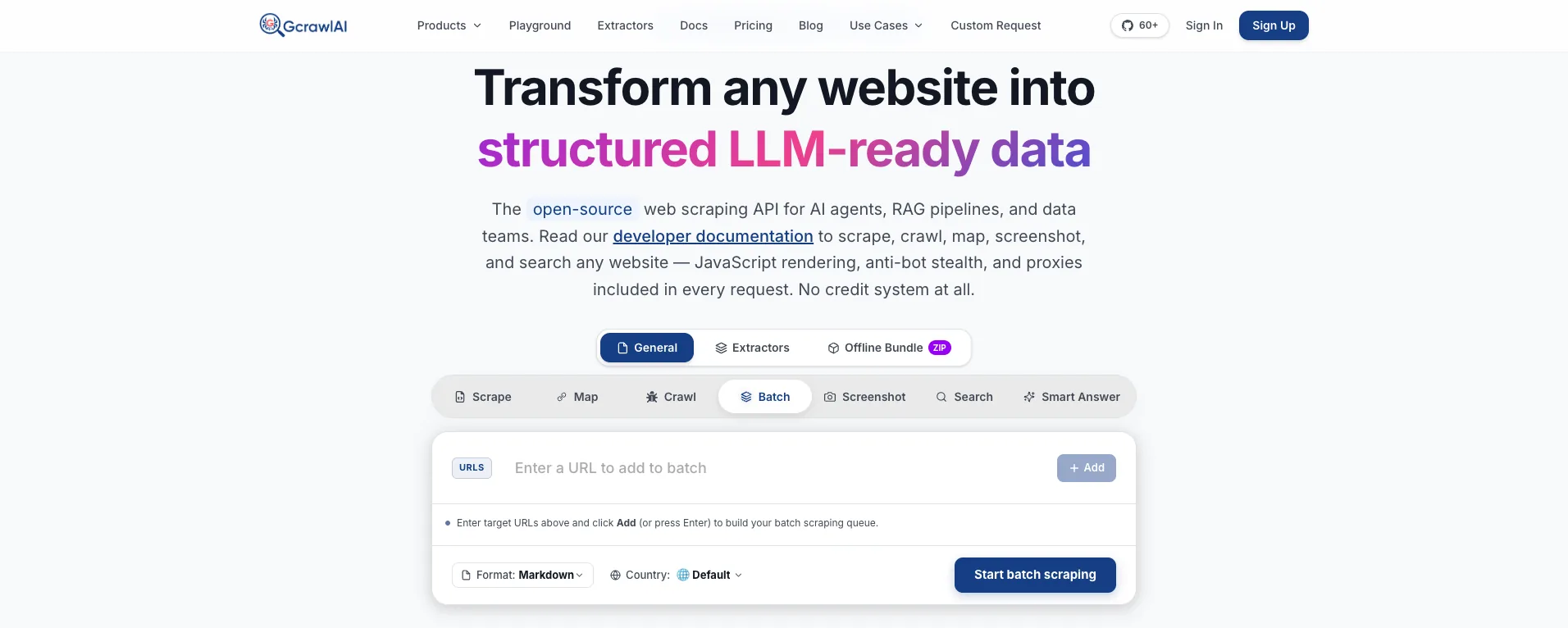
The homepage puts it plainly: JavaScript rendering, anti-bot stealth and proxies are included in every request, with no credit system. That matters here because the expensive rungs of the ladder below, residential IPs and a real browser, are the default rather than a multiplier you turn on after the first block.
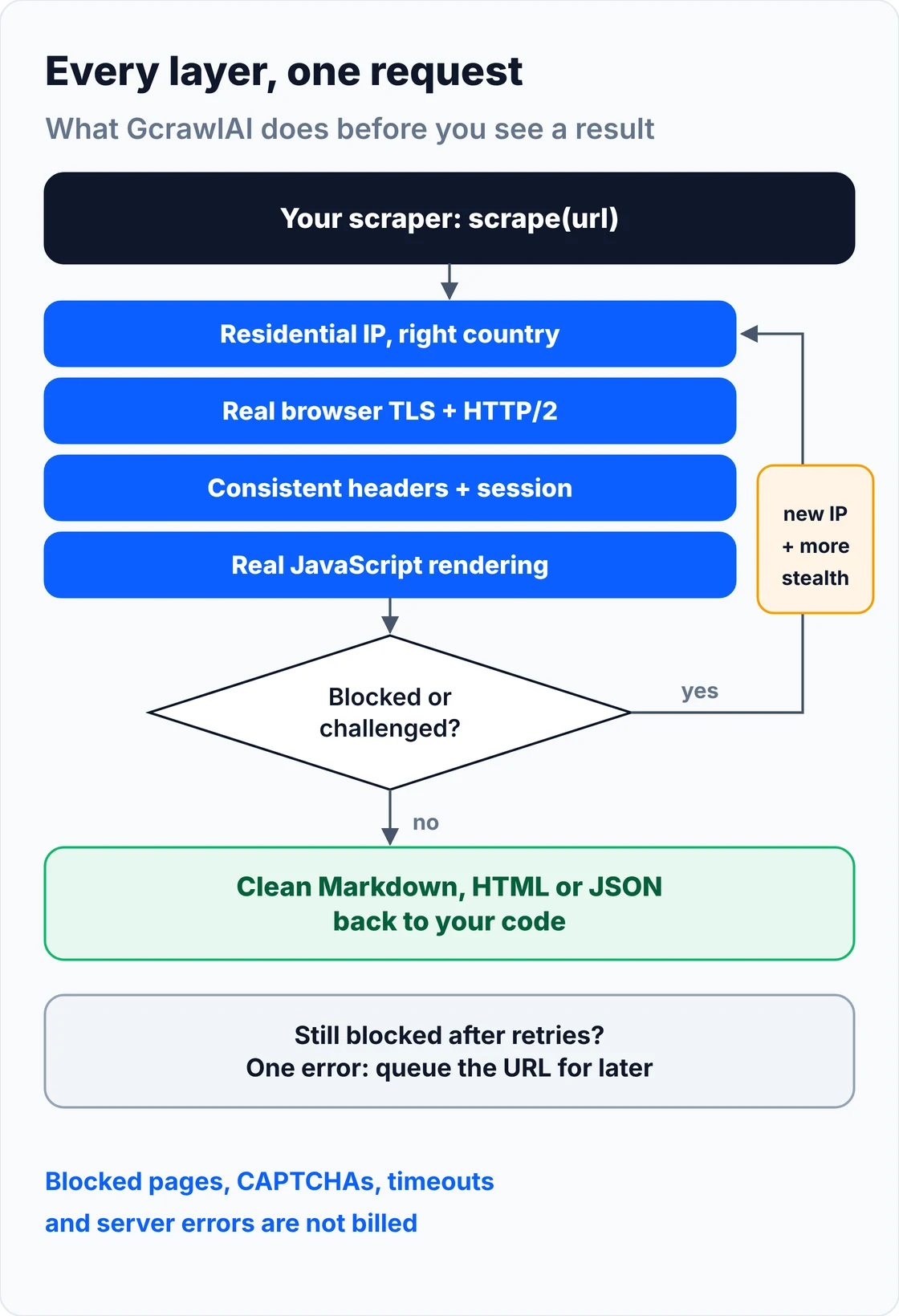
Your code handles two outcomes: content, or one error to queue. A 4xx from the GcrawlAI API itself means a key, plan or payload problem to fix, not something to retry:
# pip install gcrawl-sdk
"""Fetch a protected page through GcrawlAI: every detection layer handled in one request."""
import logging
import os

from gcrawl_sdk import GcrawlClient, ScrapeOptions
from gcrawl_sdk.exceptions import GcrawlAPIError, GcrawlTimeoutError

log = logging.getLogger("scraper")
gc = GcrawlClient(api_key=os.getenv("GCRAWL_API_KEY", "gc-YOUR_API_KEY"))


def fetch_markdown(url: str, geo: str = "US") -> str | None:
    """One request: rendering, residential IPs, stealth escalation and internal retries included."""
    try:
        page = gc.scrape(url=url, options=ScrapeOptions(markdown_enabled=True, proxy_geo=geo), wait=True)
    except GcrawlTimeoutError:
        log.warning("timeout, requeue: %s", url)          # the API call itself timed out
        return None
    except GcrawlAPIError as err:
        if err.status_code < 500:                         # key, plan or payload problem: fix, don't retry
            log.error("request rejected %s: %s", err.status_code, err.response_data)
            raise
        log.warning("api %s, requeue: %s", err.status_code, url)
        return None
    return page.markdown or None                          # empty = nothing useful on the page


if __name__ == "__main__":
    md = fetch_markdown("https://example.com/")
    print(md[:300] if md else "no content, queued for retry")
- Every layer in one call: IP reputation, TLS and HTTP/2 fingerprint, headers, session and rendering are handled together, so you're not matching five tools to each other.
- Residential IPs and geotargeting: pick a country per request, so prices, language and IP location agree.
- Stealth escalation and internal retries: a blocked load is retried with a stronger setup inside the same request, and retries never multiply the cost.
- Scrape, crawl, batch and Search API: scrape pages to Markdown, HTML or JSON, crawl whole sites with async jobs and webhooks, and use the Search API for ranked results.
- For developers and AI agents: a Python SDK, an MCP server for Claude, Cursor and other agents, the Playground to test a URL that keeps blocking you, and the docs.
The MIT-licensed core runs on your own servers if you'd rather own the stack:
git clone https://github.com/GramosoftAI/GcrawlAI.git && cd GcrawlAI
python -m venv .venv && source .venv/bin/activate
pip install -r requirements.txt && playwright install
cp .env.example .env                      # add your database, Redis and proxy settings
python -m api.core.db_setup
redis-server &
celery -A web_crawler.crawler.celery_config worker -l info &
uvicorn api.api:app --port 8000
Pricing is a free plan of 50 requests a month with no card, paid plans from $0.67 to $1.45 per 1,000 requests, and a self-hosted core that costs nothing. Failed requests are never charged. The plan table and a cost comparison are in the cost section.
Where it falls short: GcrawlAI fetches public pages; it won't log in for you or get past a site that refuses every visitor on a path, and those URLs come back as an error to queue. Every request goes through a browser, so plain pages cost the same as hard ones, and the ecosystem is younger, with fewer ready-made integrations.
"Most blocks we debug come from one contradiction: a Chrome User-Agent on a Python handshake, a US IP with German headers, a new IP under an old cookie. Make the identity agree with itself before you buy anything."
Rajesh Kannan, Co-Founder & CTO at Gramosoft
How sites decide to block you: six layers
Sites don't block scrapers with one check. They score each request across six layers, IP reputation, TLS fingerprint, headers, browser fingerprint, behaviour and challenges, and refuse when the combined score drops below a threshold. That's why fixing one layer while another leaks still gets you blocked, and why the same scraper passes one site and fails the next.
The pressure is real on both sides. Imperva's 2025 Bad Bot Report found automated traffic made up 51% of all web traffic in 2024, the first time in a decade it passed human traffic, with bad bots alone at 37%. Defences are tuned for that world, so a default scraper starts with a low score.
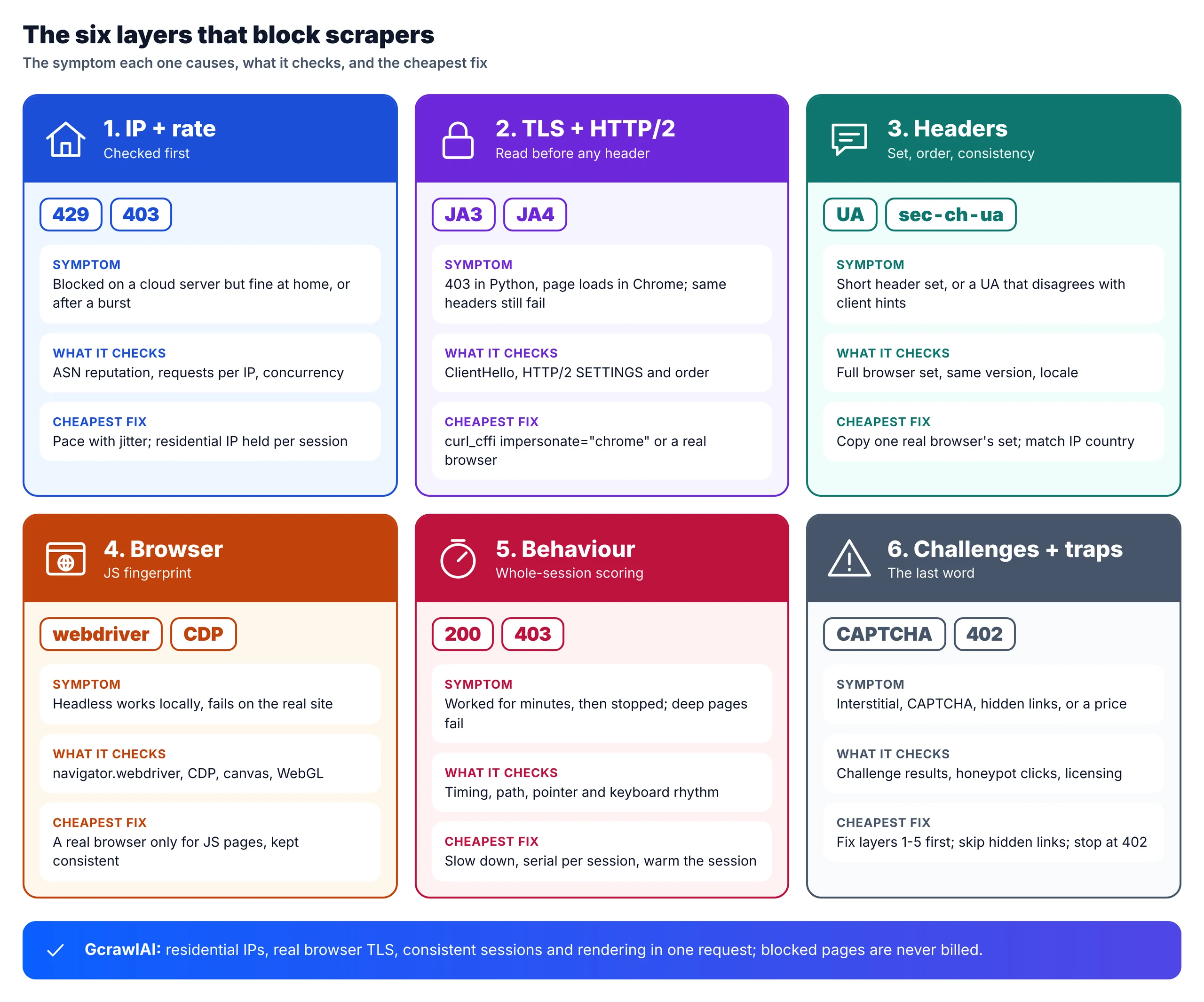
- 1. IP reputation and rate: checked first. Datacenter ranges score low, residential and mobile addresses higher, and many requests from one IP add risk on any network.
- 2. TLS and HTTP/2 fingerprint: the ClientHello (hashed as JA3 or JA4) and HTTP/2 settings are read before any header. Python
requestsandhttpxsend a handshake no browser sends, which is why "same headers, same cookies, still 403" is so common. - 3. Headers: a browser sends a specific set in a specific order. A short set, or a User-Agent that disagrees with its
sec-ch-uaclient hints, stands out. - 4. Browser fingerprint: on JavaScript pages the site reads
navigator.webdriver, DevTools Protocol artefacts, canvas, WebGL and fonts, and checks they're consistent. - 5. Behaviour: pace, regularity, navigation path and session history. Cloudflare's Precursor, launched July 13, 2026, collects pointer movement, keyboard timing, focus and page visibility across a whole session, and a refresh doesn't reset it.
- 6. Challenges and traps: CAPTCHAs, JavaScript interstitials and invisible honeypot links, plus a newer licensing layer: Cloudflare's Pay Per Crawl can answer a crawler with 402 Payment Required.
Diagnose the block before you change anything
Diagnose a block by saving the raw response, status, headers, body and redirect chain, and matching it to the layer that caught you. Then compare with the same URL in Chrome. Most wasted effort comes from guessing: a stealth browser won't fix a rate limit, and a proxy won't fix a Python TLS fingerprint.
| Symptom | Most likely layer | What to check |
|---|---|---|
| 403 on the first request, page loads in Chrome | TLS or headers | Same request with curl_cffi and a full header set |
| Same code works at home, fails on AWS or GCP | IP reputation | Same request through a residential IP |
429, Retry-After or RateLimit-* headers |
Rate | Requests per minute and concurrency per domain |
| Clean for a few hundred pages, then 403s | Behaviour or volume | Pace, burstiness, how deep sessions go |
| 503 or 403 with "Just a moment...", or a CAPTCHA | Challenge | Which vendor answered; whether a browser passes |
Redirect loop to /login or /challenge |
Session | Whether cookies persist between requests |
| 200 with an empty shell or zero results | Soft block | Whether your content marker is present |
| 402 Payment Required | Licensing | The site's terms for crawler access |
This function turns that table into a verdict per failed response, so your logs say which layer to fix rather than just counting errors:
"""Map a failed response to the detection layer that most likely caught it, and the cheapest first fix.

Diagnose before you change anything: a stealth browser won't fix a rate limit, and a proxy won't fix a TLS fingerprint.
"""
import re
from dataclasses import dataclass

CHALLENGE = re.compile(r"<title>Just a moment\.\.\.</title>|cf_chl_|captcha-delivery\.com|px-captcha|awswaf|KPSDK"
                       r"|g-recaptcha|h-captcha|cf-turnstile|verify (?:that )?you are (?:a )?human", re.I)
SMALL_PAGE = 60_000


@dataclass
class Diagnosis:
    layer: str
    first_fix: str


def diagnose(status, headers, body, marker, history=(), works_in_browser=None, ok_before=0):
    """status/headers/body: the failed response. marker: text only the real page contains.
    history: redirect statuses/URLs. works_in_browser: the same URL loads in Chrome. ok_before: clean requests before this one."""
    h = {k.lower(): str(v).lower() for k, v in headers.items()}
    final_url = str(history[-1]) if history else ""

    if status == 402:
        return Diagnosis("licensing", "The site is charging for crawler access (402): stop, or license it")
    if status == 429 or "retry-after" in h:
        return Diagnosis("rate", "Honour Retry-After, cut concurrency per domain, add jittered delays")
    if re.search(r"/(login|signin|challenge|captcha)", final_url):
        return Diagnosis("session", "Persist cookies in one session per identity; a redirect loop means state was lost")
    if h.get("x-amzn-waf-action") or h.get("cf-mitigated") or (len(body) < SMALL_PAGE and CHALLENGE.search(body)):
        return Diagnosis("challenge", "Page needs a real browser; fix IP and fingerprint first so fewer challenges fire")
    if status in (401, 403, 405, 503):
        if ok_before > 20:
            return Diagnosis("behaviour", "Worked, then stopped: slow down, cap concurrency, rotate per session")
        if works_in_browser:
            return Diagnosis("tls-headers", "Browser-grade TLS client (curl_cffi) plus a complete, consistent header set")
        return Diagnosis("ip", "Datacenter IP likely scored down: try a residential IP from the site's country")
    if status == 200 and marker and marker.lower() not in body.lower():
        return Diagnosis("soft-block", "200 without your marker: treat as blocked, save the HTML, compare with Chrome")
    return Diagnosis("ok", "Nothing to fix")
For the codes themselves, see our guides to fixing 403 Forbidden in Python requests, fixing 429 Too Many Requests and Cloudflare error 1015.
The playbook: fix the cheapest failing layer first
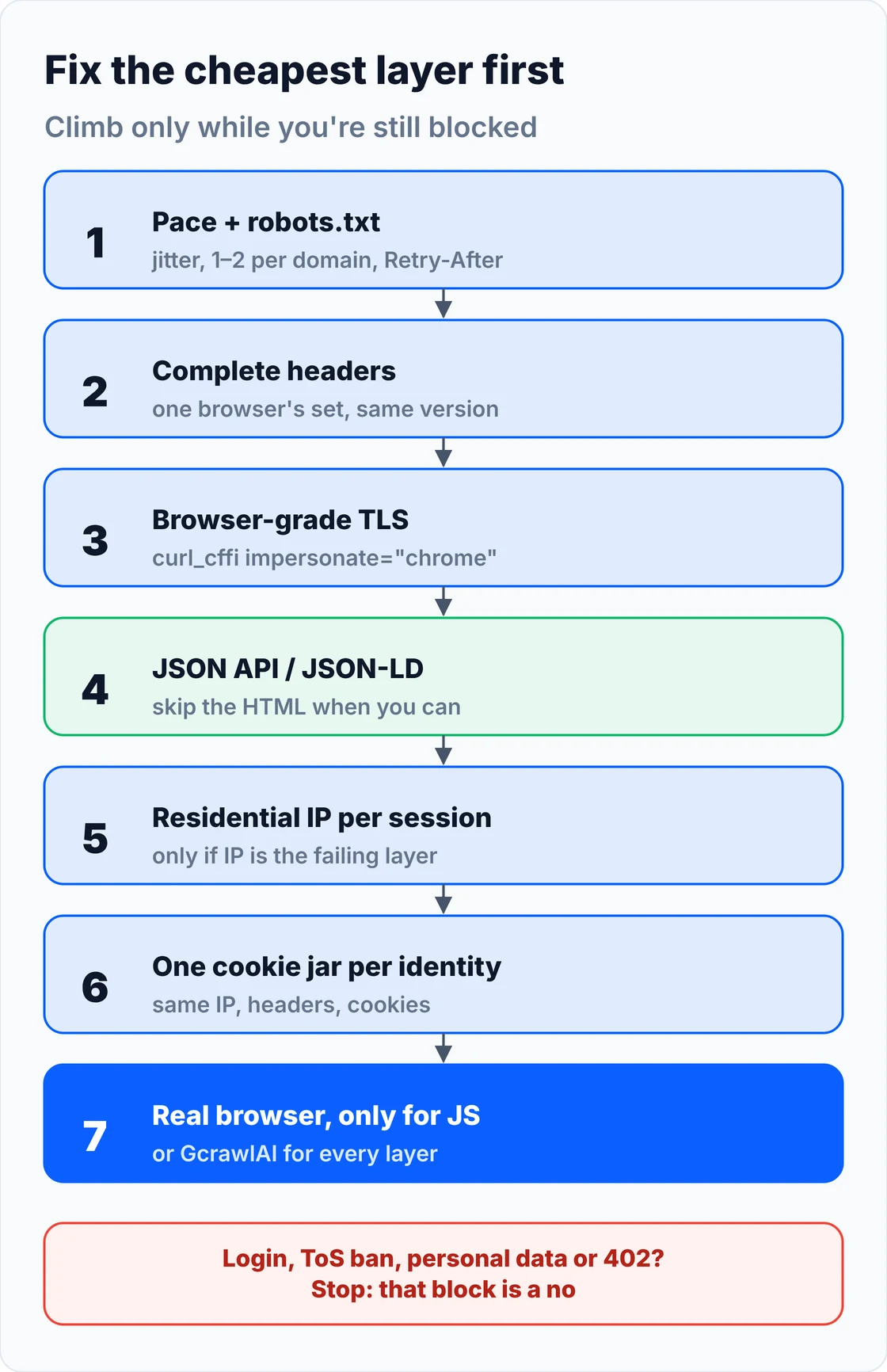
Treat the fixes as a ladder, not a checklist. Start with pacing and headers, which cost nothing, then a browser-grade TLS client, the site's own JSON API, residential IPs, consistent sessions, and a real browser only where pages need JavaScript. Climb one rung at a time and stop as soon as the blocks stop.
1. Pace requests and read robots.txt
Most blocks are self-inflicted. Read robots.txt (standardised as RFC 9309) and honour its rules, keep one or two requests in flight per domain, add random delays rather than a fixed interval, and when a 429 or 503 carries Retry-After, wait exactly that long. Concurrency is itself a signal: no person opens thirty pages of one site at once.
2. Send one browser's complete header set
Copy a real browser's full header set and keep it identical across the session: Accept, Accept-Language, Accept-Encoding, the sec-ch-ua client hints and sec-fetch-* values, all naming the same browser version as the User-Agent. Match Accept-Language to your IP's country, and only set a Referer that would be true. Rotating User-Agents alone does little, because the TLS handshake underneath still says Python.
3. Match a real browser's TLS and HTTP/2 fingerprint
This is the fix most people skip and the one that most often clears "403 in Python, fine in Chrome". curl_cffi replays a real browser's handshake with a requests-style API; impersonate="chrome" tracks the newest Chrome profile the library ships. It has no JavaScript engine, so it won't pass browser fingerprinting or JavaScript challenges, and a profile can be burned on one site while passing on others.
4. Use the site's JSON API or structured data
Many pages load their data from a JSON endpoint the page itself calls. Open DevTools, filter Network by Fetch/XHR, and look for the response that holds the data; or read the JSON-LD block that product pages publish for search engines. Either is lighter and more stable than rendered HTML. An API behind a login is a different matter: it isn't public data.
5. Move to residential IPs, held per session
Proxies fix the IP layer and nothing else. Use residential or mobile IPs when the signature is "fine at home, blocked on a cloud server", pick the site's own country, and keep one IP for a whole session on any site that sets cookies. Rotating per request breaks the session score the site's cookies carry. Our comparison of free proxy sites explains why shared free pools are usually flagged already.
6. Keep one cookie jar per identity
Treat each session as one visitor: one IP, one header set, one cookie jar. Warm it up with the homepage or a category page before deep URLs. Anti-bot cookies such as __cf_bm, datadome or _abck are bound to the identity that earned them, so moving them to a new IP or client makes things worse.
7. Use a real browser only where pages need JavaScript
When content only exists after scripts run, you need a browser engine, and default automation leaks its identity through navigator.webdriver and DevTools Protocol artefacts. Tools such as nodriver, Camoufox and Patchright reduce those leaks; patch-style stealth plugins are themselves fingerprinted. A browser is the heaviest rung, so render only the pages that need it. Our guide to scraping dynamic JavaScript websites with Python covers the rendering side.
8. Skip honeypots and cache what you can
Don't follow links hidden with display:none, zero size or off-screen positioning, respect rel="nofollow", and fill only visible form fields. Cache responses and use ETag or If-Modified-Since on revisits: the request you don't send can't be blocked, and fetching only what changed cuts the volume that trips rate limits.
This fetcher combines the first six rungs in one class: robots.txt, per-domain pacing with jitter, Retry-After, a curl_cffi session with one consistent identity, a content-marker check, and a breaker that pauses a domain when blocks pass 30%:
"""A fetcher that stays unblocked by being consistent and polite, not by being clever.

- robots.txt checked once per domain (RFC 9309)
- one identity per session: browser-grade TLS (curl_cffi), one header set, one IP, one cookie jar
- per-domain pacing with jitter, Retry-After honoured, backoff on soft blocks
- success means the content marker is present, not just status 200
- a per-domain breaker pauses domains whose block rate climbs
pip install curl_cffi
"""
import random
import time
from collections import Counter, defaultdict, deque
from urllib.parse import urlparse
from urllib.robotparser import RobotFileParser

UA = ("Mozilla/5.0 (Windows NT 10.0; Win64; x64) AppleWebKit/537.36 "
      "(KHTML, like Gecko) Chrome/141.0.0.0 Safari/537.36")
HEADERS = {  # keep the UA, client hints and TLS profile on the same Chrome family
    "User-Agent": UA,
    "Accept": "text/html,application/xhtml+xml,application/xml;q=0.9,*/*;q=0.8",
    "Accept-Language": "en-US,en;q=0.9",   # match your IP's country
}


def default_session(proxy=None):
    from curl_cffi import requests as cffi
    s = cffi.Session(impersonate="chrome")         # latest Chrome TLS + HTTP/2 profile in curl_cffi
    s.headers.update(HEADERS)
    if proxy:
        s.proxies = {"http": proxy, "https": proxy}  # one sticky IP for the whole session
    return s


class PoliteFetcher:
    def __init__(self, proxy=None, min_gap=3.0, jitter=2.0, make_session=default_session,
                 robots_txt=None, clock=time.monotonic, sleep=time.sleep):
        self.session = make_session(proxy)
        self.min_gap, self.jitter = min_gap, jitter
        self.clock, self.sleep = clock, sleep
        self.robots_txt = robots_txt                 # dict domain -> text, for tests; else fetched
        self.robots, self.last = {}, defaultdict(float)
        self.recent = defaultdict(lambda: deque(maxlen=20))
        self.paused_until = defaultdict(float)
        self.stats = Counter()

    def allowed(self, url):
        dom = urlparse(url).netloc
        if dom not in self.robots:
            rp = RobotFileParser()
            text = (self.robots_txt or {}).get(dom)
            if text is None:
                r = self.session.get(f"https://{dom}/robots.txt", timeout=15)
                text = r.text if r.status_code == 200 else ""
            rp.parse(text.splitlines())
            self.robots[dom] = rp
        return self.robots[dom].can_fetch(UA, url)

    def _pace(self, dom):
        wait = self.last[dom] + self.min_gap + random.uniform(0, self.jitter) - self.clock()
        if wait > 0:
            self.sleep(wait)
        self.last[dom] = self.clock()

    def get(self, url, marker, attempts=3):
        dom = urlparse(url).netloc
        if not self.allowed(url):
            self.stats["robots_disallowed"] += 1
            return None
        if self.clock() < self.paused_until[dom]:
            self.stats["paused"] += 1
            return None
        for i in range(attempts):
            self._pace(dom)
            r = self.session.get(url, timeout=25)
            ok = r.status_code == 200 and marker.lower() in r.text.lower()
            self._record(dom, ok)
            if ok:
                self.stats["ok"] += 1
                return r.text
            if r.status_code in (402, 401):
                self.stats[f"stop_{r.status_code}"] += 1        # a price or a login: not ours to retry
                return None
            ra = r.headers.get("Retry-After", "")
            wait = float(ra) if ra.isdigit() else (2 ** i) * 5 + random.uniform(0, 3)
            self.stats["soft_block" if r.status_code == 200 else f"http_{r.status_code}"] += 1
            self.sleep(wait)
            if self.clock() < self.paused_until[dom]:
                break
        return None

    def _record(self, dom, ok):
        r = self.recent[dom]
        r.append(ok)
        if len(r) >= 10 and r.count(False) / len(r) > 0.3:     # >30% blocked: stop and change approach
            self.paused_until[dom] = self.clock() + 900
            self.stats["breaker_opened"] += 1
            r.clear()
The offline test below fakes responses and the clock, so it runs in under a second with no network. It checks the diagnosis for nine responses, a soft block followed by the real page, Retry-After, a 402 that stops without retrying, a robots.txt disallow, per-domain pacing and the breaker:
"""Offline test: fake responses and a fake clock, no network, no real sleeping."""
from diagnose_block import diagnose
from polite_fetcher import PoliteFetcher

REAL = "<html><h1>Blue Kettle</h1>" + "<p>1.7 L, $39</p>" * 5000 + "</html>"

out = []
cases = [
    ("429 with Retry-After", dict(status=429, headers={"Retry-After": "30"}, body="", marker="Blue Kettle"), "rate"),
    ("402 Payment Required", dict(status=402, headers={}, body="", marker="Blue Kettle"), "licensing"),
    ("403, page works in Chrome", dict(status=403, headers={}, body="Forbidden", marker="Blue Kettle", works_in_browser=True), "tls-headers"),
    ("403 from a cloud server", dict(status=403, headers={}, body="Forbidden", marker="Blue Kettle", works_in_browser=False), "ip"),
    ("403 after 50 clean pages", dict(status=403, headers={}, body="Forbidden", marker="Blue Kettle", ok_before=50), "behaviour"),
    ("503 Cloudflare interstitial", dict(status=503, headers={}, body="<title>Just a moment...</title>", marker="Blue Kettle"), "challenge"),
    ("Redirected to /login", dict(status=200, headers={}, body="Sign in", marker="Blue Kettle", history=["https://shop.example/login"]), "session"),
    ("200, zero results", dict(status=200, headers={}, body="<p>0 results</p>", marker="Blue Kettle"), "soft-block"),
    ("200, real page", dict(status=200, headers={}, body=REAL, marker="Blue Kettle"), "ok"),
]
for name, kw, want in cases:
    d = diagnose(**kw)
    assert d.layer == want, (name, d)
    out.append(f"{name}: {d.layer} -> {d.first_fix}")


class Resp:
    def __init__(self, status, text, headers=None):
        self.status_code, self.text, self.headers = status, text, headers or {}


class Session:
    def __init__(self, replies):
        self.replies, self.headers, self.proxies = list(replies), {}, {}

    def get(self, url, **kw):
        return self.replies.pop(0)


class Clock:
    def __init__(self):
        self.t = 1000.0
        self.slept = []

    def now(self):
        return self.t

    def sleep(self, s):
        self.slept.append(round(s, 1))
        self.t += s


ROBOTS = {"shop.example": "User-agent: *\nDisallow: /cart\n"}


def fetcher(replies):
    c = Clock()
    f = PoliteFetcher(make_session=lambda p: Session(replies), robots_txt=ROBOTS, clock=c.now, sleep=c.sleep)
    return f, c


# Soft block (200 without marker), then the real page.
f, c = fetcher([Resp(200, "<p>0 results</p>"), Resp(200, REAL)])
html = f.get("https://shop.example/p/1", marker="Blue Kettle")
out.append(f"Soft block then real page: {'ok' if html else 'failed'}, stats {dict(f.stats)}")
assert html and f.stats["soft_block"] == 1

# 429 with Retry-After: waits exactly what the server asked.
f, c = fetcher([Resp(429, "", {"Retry-After": "30"}), Resp(200, REAL)])
f.get("https://shop.example/p/2", marker="Blue Kettle")
out.append(f"429 Retry-After honoured: waited {30.0 in c.slept}")
assert 30.0 in c.slept

# 402 is a price, not a retry.
f, c = fetcher([Resp(402, "")])
assert f.get("https://shop.example/p/3", marker="Blue Kettle") is None and f.stats["stop_402"] == 1
out.append("402 Payment Required: stopped, no retry")

# robots.txt disallow is respected.
f, c = fetcher([])
assert f.get("https://shop.example/cart", marker="x") is None and f.stats["robots_disallowed"] == 1
out.append("robots.txt Disallow: skipped")

# Pacing: two requests to one domain are at least min_gap apart.
f, c = fetcher([Resp(200, REAL), Resp(200, REAL)])
f.get("https://shop.example/p/4", marker="Blue Kettle")
t1 = c.t
f.get("https://shop.example/p/5", marker="Blue Kettle")
out.append(f"Per-domain pacing: gap {round(c.t - t1, 1)}s (min 3s + jitter)")
assert c.t - t1 >= 3.0

# Breaker: a domain blocked on most requests gets paused.
f, c = fetcher([Resp(403, "Forbidden")] * 30)
for i in range(4):
    f.get(f"https://shop.example/p/{10 + i}", marker="Blue Kettle")
paused = f.get("https://shop.example/p/99", marker="Blue Kettle") is None and f.stats["paused"] >= 1
out.append(f"Breaker after repeated 403s: {'paused' if paused else 'open'}, stats {dict(f.stats)}")
assert f.stats["breaker_opened"] == 1 and paused

print("\n".join(out))
print("All checks passed.")
429 with Retry-After: rate -> Honour Retry-After, cut concurrency per domain, add jittered delays
402 Payment Required: licensing -> The site is charging for crawler access (402): stop, or license it
403, page works in Chrome: tls-headers -> Browser-grade TLS client (curl_cffi) plus a complete, consistent header set
403 from a cloud server: ip -> Datacenter IP likely scored down: try a residential IP from the site's country
403 after 50 clean pages: behaviour -> Worked, then stopped: slow down, cap concurrency, rotate per session
503 Cloudflare interstitial: challenge -> Page needs a real browser; fix IP and fingerprint first so fewer challenges fire
Redirected to /login: session -> Persist cookies in one session per identity; a redirect loop means state was lost
200, zero results: soft-block -> 200 without your marker: treat as blocked, save the HTML, compare with Chrome
200, real page: ok -> Nothing to fix
Soft block then real page: ok, stats {'soft_block': 1, 'ok': 1}
429 Retry-After honoured: waited True
402 Payment Required: stopped, no retry
robots.txt Disallow: skipped
Per-domain pacing: gap 3.2s (min 3s + jitter)
Breaker after repeated 403s: paused, stats {'http_403': 10, 'breaker_opened': 1, 'paused': 1}
All checks passed.
Soft blocks: when a 200 is lying
Many 2026 blocks arrive as HTTP 200: a challenge page, an empty shell that never loads its data, or a real-looking page with zero results. A scraper that checks only the status code stores these as successes. Define a content marker per site, text only the real page contains, and treat its absence as a block.
- Pick a stable marker: the product name you requested, a price label, or a result count above zero. Avoid markers that also appear on challenge pages, such as a widget class.
- Test the detector on a known-good page: if the marker is missing there too, your detector is wrong, not the site.
- Spot-check values: open a sample of scraped pages in a real browser now and then and compare prices, stock and counts. Some vendors report flagged sessions receiving degraded data, so a run that looks clean isn't proof.
- Save the HTML of failures: a stored body shows what the site sent when a selector suddenly returns nothing.
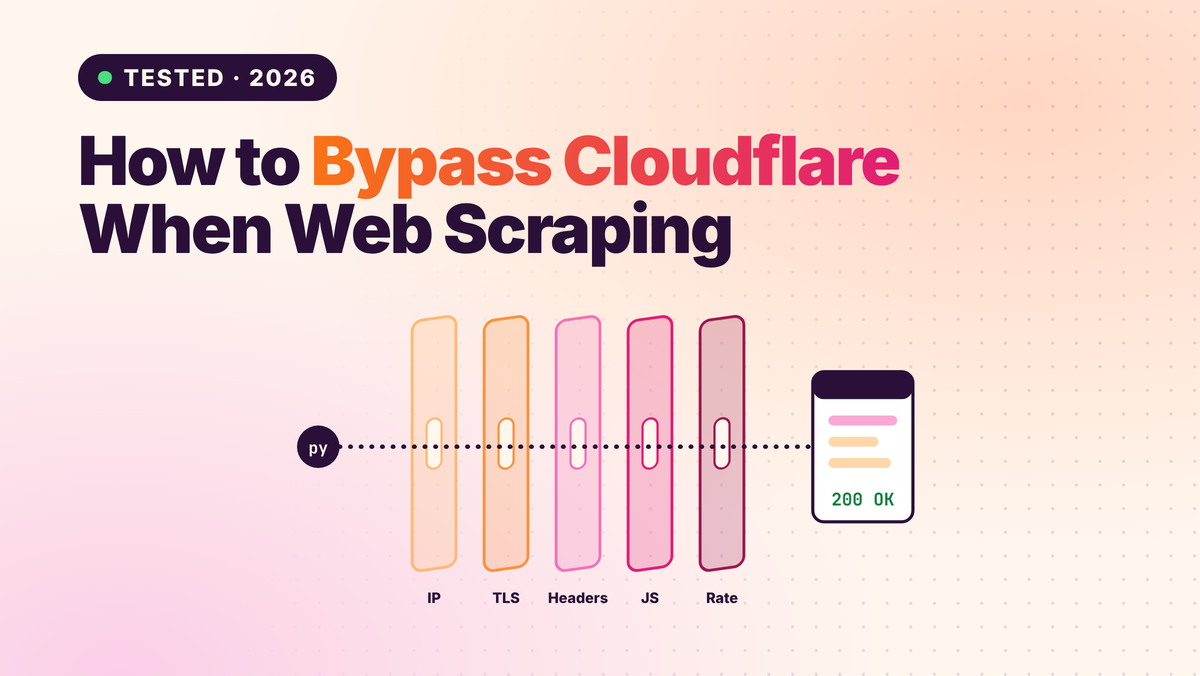
When the soft block is a CAPTCHA, our guide to bypassing Cloudflare when web scraping covers the challenge side in depth.
Settings for Scrapy, requests and Playwright
Each tool has its own defaults that either help or hurt. requests and httpx send a Python TLS fingerprint and no browser headers, Scrapy ships with pacing and robots.txt controls you should turn on, and Playwright needs care to keep its fingerprint consistent. Set the polite defaults first, then add the fixes the diagnosis calls for.
| Tool | Default that gets you blocked | First change |
|---|---|---|
| requests / httpx | Python TLS, minimal headers | curl_cffi with impersonate="chrome", full header set |
| Scrapy | Python TLS; robots.txt and throttling off in custom projects | ROBOTSTXT_OBEY, AutoThrottle, 1–2 per domain |
| Playwright / Puppeteer | navigator.webdriver, headless tells |
A hardened browser, one context per identity |
| Selenium | WebDriver leaks | A CDP-based driver; render only JS pages |
In Scrapy, these settings stop most rate and behaviour blocks; Scrapy's own TLS isn't a browser's, so protected sites still need a browser-grade client or an API:
# settings.py: a Scrapy project that stays polite enough not to trip rate and behaviour checks
ROBOTSTXT_OBEY = True                    # RFC 9309; Scrapy reads robots.txt per domain
CONCURRENT_REQUESTS_PER_DOMAIN = 2       # concurrency per domain is itself a signal
DOWNLOAD_DELAY = 3                       # seconds between requests to one domain...
RANDOMIZE_DOWNLOAD_DELAY = True          # ...varied 0.5x to 1.5x so it isn't a metronome
AUTOTHROTTLE_ENABLED = True              # backs off when the site slows down
AUTOTHROTTLE_TARGET_CONCURRENCY = 1.0
COOKIES_ENABLED = True                   # keep the session the site gave you
HTTPCACHE_ENABLED = True                 # the request you don't make can't be blocked
HTTPCACHE_EXPIRATION_SECS = 6 * 3600
RETRY_HTTP_CODES = [500, 502, 503, 504, 522, 524, 408, 429]   # Scrapy's default list
HTTPERROR_ALLOWED_CODES = [403, 429]     # let blocks reach your callback so you can log the layer
DEFAULT_REQUEST_HEADERS = {
    "Accept": "text/html,application/xhtml+xml,application/xml;q=0.9,*/*;q=0.8",
    "Accept-Language": "en-US,en;q=0.9",
}
USER_AGENT = ("Mozilla/5.0 (Windows NT 10.0; Win64; x64) AppleWebKit/537.36 "
              "(KHTML, like Gecko) Chrome/141.0.0.0 Safari/537.36")
For a framework comparison, see Scrapy vs Crawlee vs Scrapling.
What staying unblocked costs
Staying unblocked costs money at three points: residential bandwidth, browser rendering and, above all, engineering time to keep the stack working. For 100,000 successful protected pages a month, credit-based scraping APIs cost $249 to $399 and GcrawlAI costs $101; for plain HTML that never blocks, GcrawlAI is pricier.
| Option, 100,000 successful pages a month | Plain HTML pages | Protected pages (JS rendering + premium proxies) | Are blocked requests billed? |
|---|---|---|---|
| GcrawlAI (every request rendered, residential IPs included) | $101 (Growth $79 + 20,000 overage at $1.10 per 1,000) | $101 (same request, no multiplier) | No: blocked pages, CAPTCHAs, timeouts and server errors never billed |
| ScraperAPI | $49 (Hobby, 100,000 credits) | $299 (Business; 25 credits per page = 2.5M credits) | Charges only 200 and 404 responses |
| ZenRows | $39 (Build B3, 120,000 credits) | $399 (Growth G3; 25 credits per page = 2.5M credits) | Failed requests never charged; 404 and 410 count as successful |
| ScrapingBee | $49 (Freelance, 250,000 credits; JS off) | $249 (Business; 25 credits per page = 2.5M credits) | Charges only 200, 404 and 410 |
List-price arithmetic, not a benchmark. Credit costs and billing rules come from ScraperAPI's credit docs and status code docs, ZenRows' pricing docs and ScrapingBee's FAQ, checked November 1, 2026. The honest read: for plain HTML that never blocks, ZenRows, ScraperAPI and ScrapingBee cost less than GcrawlAI. GcrawlAI wins once pages need a browser or sit behind bot checks, because rendering, residential IPs and stealth are already in the one request. A do-it-yourself stack adds residential bandwidth, which Forage AI puts at roughly $2 to $8.50 per GB, browser servers, and the engineer who keeps it all matched to each site's latest checks.
GcrawlAI plans (GcrawlAI pricing, checked October 28, 2026):
| Plan | Price | Requests/month | Concurrent | Per 1,000 | Overage per 1,000 |
|---|---|---|---|---|---|
| Free | $0 forever, no card | 50 | 2 | – | – |
| Starter | $29/month | 20,000 | 10 | $1.45 | $1.60 |
| Growth (most popular) | $79/month | 80,000 | 35 | $0.99 | $1.10 |
| Pro | $199/month | 250,000 | 50 | $0.80 | $0.90 |
| Scale | $499/month | 750,000 | 100 | $0.67 | $0.75 |
| Enterprise | Volume pricing | 2M+ | Custom | – | – |
| Self-hosted | $0 (MIT) | Your servers | Your servers | Infrastructure only | – |
Every plan, Free included, has scrape, crawl, the Search API, JavaScript rendering, residential IP rotation and stealth escalation in each request. Failed requests are never charged. Annual billing charges 10 months for 12, unused requests on paid plans roll over once, and Indian customers are billed in INR with a GST invoice.
Which fix for which block?
Match the fix to the layer: rate blocks need pacing, fingerprint blocks need a browser-grade client, IP blocks need residential addresses, session blocks need one consistent identity, and JavaScript pages need a browser. GcrawlAI covers all of those layers in one request, so your own code only has to handle parsing and scheduling.
| You're getting | Do this yourself | Where GcrawlAI fits |
|---|---|---|
| 403 in Python, fine in Chrome | curl_cffi, full header set | GcrawlAI sends a real browser's fingerprint |
| Blocked only from cloud servers | Residential IP, sticky per session | GcrawlAI includes residential IPs in every request |
| 429s and slow-downs | Retry-After, jitter, 1–2 per domain | GcrawlAI crawl spreads load with async jobs |
| Blocks after many clean pages | Slower pace, serial sessions, breaker | GcrawlAI retries with a fresh identity internally |
| JavaScript-only content | A hardened real browser | GcrawlAI renders every page by default |
| Soft blocks returning 200 | Content markers, spot checks | GcrawlAI returns content or an error, not a challenge page |
| Login walls or 402 prices | Stop; official API or a licence | Use GcrawlAI for the public pages around them |
When doing it yourself is enough
Your own stack is enough when the sites are lightly protected, volumes are modest, and pacing, a full header set, curl_cffi and caching keep blocks rare. The diagnosis and fetcher in this guide cover that. Bring in GcrawlAI when blocks keep returning after each fix and maintenance becomes the job.
Even then you can stay on your own servers: the MIT-licensed GcrawlAI core self-hosts for free with the same browser engine, and the free Cloud plan's 50 requests a month are enough to test the URLs that keep blocking you. Paste one into the Playground to see whether it comes back clean. For the build-or-buy trade-off, read web scraping with Python vs a scraping API, and for a shorter reference, the GcrawlAI anti-bot guide.
"Every fix in this playbook has a shelf life, because the sites keep updating their checks. Budget for monitoring, not just for the first fix. When keeping a scraper alive takes more hours than using its data, the stack has become the product."
Rajesh Kannan, Co-Founder & CTO at Gramosoft
When a block means stop
Some blocks are a technical puzzle; others are the site saying no. Data behind a login, an explicit terms-of-service ban, personal data, a robots.txt disallow on your path, a refusal that persists across clean sessions, or a 402 price all mean stop. Getting past a technical control doesn't give you permission to the data behind it.
If that data matters to your business, ask the site owner for an approved route, use an official API, or license it. Keep request rates low enough never to burden a site, and don't collect personal data you have no basis to hold. For the legal background, read what web scraping is and where it's legal, and get advice for your own case.
Frequently asked questions
Why does my scraper get a 403 when the page works in my browser?
Usually the TLS and HTTP/2 fingerprint. Python's requests and httpx send a handshake no browser sends, and sites read it before any header, so copying Chrome's headers doesn't help. A browser-grade client such as curl_cffi, or a real browser, fixes it. GcrawlAI sends a real browser's fingerprint on every request.
Do rotating proxies stop you from getting blocked?
Only when IP reputation is the failing layer, typically "fine at home, blocked on a cloud server". A residential IP with a Python TLS fingerprint is still caught, and rotating on every request breaks the session the site's cookies track. Rotate per session, not per request.
Does rotating user agents still work?
Not on its own. The User-Agent is one of the weakest signals once a site reads TLS fingerprints, and a rotated string that disagrees with your handshake or client hints adds risk. Keep one current User-Agent per session, consistent with the rest of the identity.
How fast can I scrape without getting blocked?
There's no universal number; it depends on the site's protection and your identity. Start with one or two requests in flight per domain and a few seconds of jittered delay, honour Retry-After, and slow down when errors rise. Concurrency against one domain is itself a signal.
What is a soft block?
A block that returns HTTP 200: a challenge page, an empty shell or a page with zero results. Check every response for text only the real page contains, test that check on a known-good page, and spot-check scraped values against a real browser.
Do I need a headless browser to avoid blocks?
Only for pages that need JavaScript or sites that score the browser itself. A browser is the heaviest and most detectable option when misconfigured, so try headers, curl_cffi and the site's JSON API first, and render only the pages that need it.