By Rajesh Kannan, Co-Founder & CTO, Gramosoft · Last updated: · Lab results from our own side-by-side test on November 5, 2026 (requests 2.34.2, httpx 0.28.1, aiohttp 3.14.5, Python 3.13)
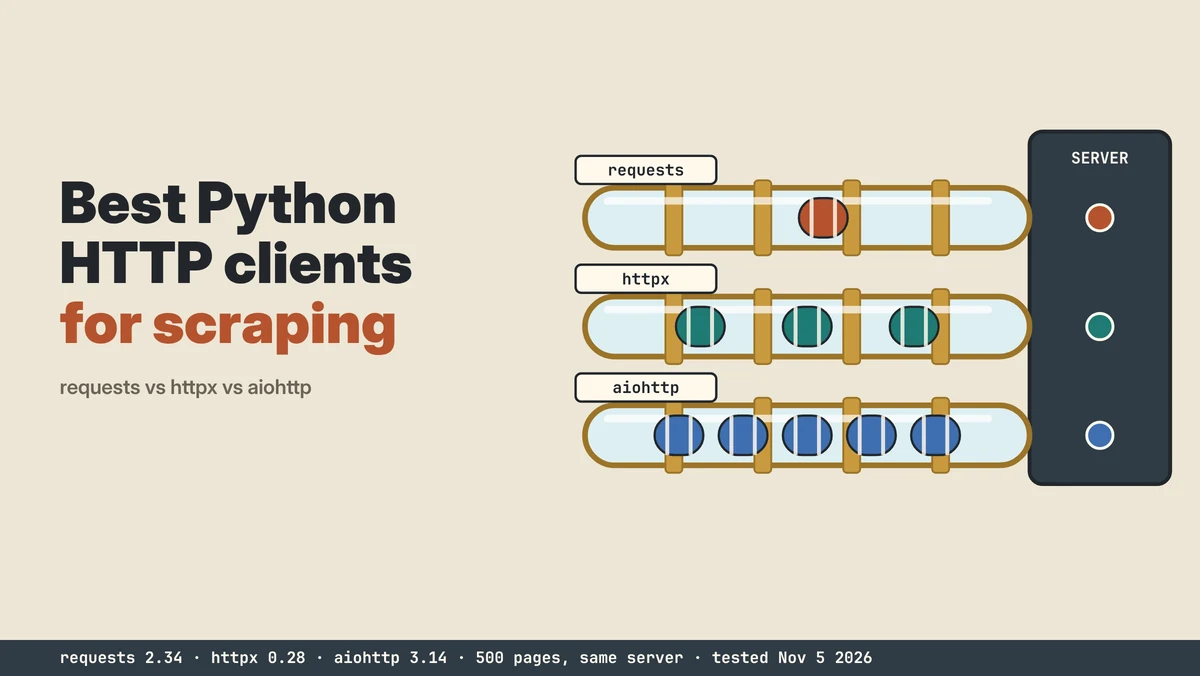
requests, httpx and aiohttp are the three Python HTTP clients most scrapers start with. requests is the simple synchronous default, httpx adds async and HTTP/2 behind a requests-like API, and aiohttp is async-only and built for throughput. This guide compares them on features, defaults and our own benchmark, and shows when GcrawlAI should take over.
TL;DR
- requests: the easiest client and fine for small, sequential jobs. It has no default timeout, so set one on every call.
- httpx: one API for sync and async, plus HTTP/2. Defaults are stricter: a 5-second timeout and redirects not followed.
- aiohttp: async only, and the fastest in our lab at 913 pages a second with one shared session.
- What our lab found: how you use the client mattered more than which one. Creating a new httpx client per request took 19.7 seconds for 500 pages against 1.0 second with a shared one, and 50 threads with requests nearly matched aiohttp.
- When the data has to be complete: GcrawlAI doesn't use a plain HTTP client at all. Every request goes through a proxy, a real browser and stealth mode, for one request per page.
Which Python HTTP client is best for web scraping? For new projects, httpx: it covers sync and async with one API, supports HTTP/2 and has safe default timeouts. Use aiohttp when the scraper is fully async and throughput is the goal; it was fastest in our lab. Keep requests for simple scripts and existing code. None of them runs JavaScript or looks like a browser, which is why GcrawlAI skips plain HTTP entirely and fetches every page through a proxy, a real browser and stealth mode.
requests vs httpx vs aiohttp at a glance
| Question | requests | httpx | aiohttp |
|---|---|---|---|
| Sync / async | Sync only | Both, same API | Async only |
| HTTP/2 | No | Yes, with httpx[http2] |
No (client) |
| Default timeout | None | 5 s per phase | 300 s total |
| Follows redirects by default | Yes | No | Yes |
| Best for | Simple scripts, small jobs | New projects, mixed sync and async | High-concurrency async crawlers |
Why GcrawlAI doesn't use httpx: proxy, browser and stealth on every request
requests, httpx and aiohttp return whatever HTML the server sends, which on modern sites often means missing data: no JavaScript content, block pages, wrong-country prices. GcrawlAI doesn't use a plain HTTP client at all. Every request goes through a proxy, a real browser and stealth mode, so the page arrives complete.
The homepage puts it in one line: JavaScript rendering, anti-bot stealth and proxies come with every request, with no credit system. There's no cheaper plain-HTTP mode to fall back to, by design: we chose complete data over a faster raw fetch.
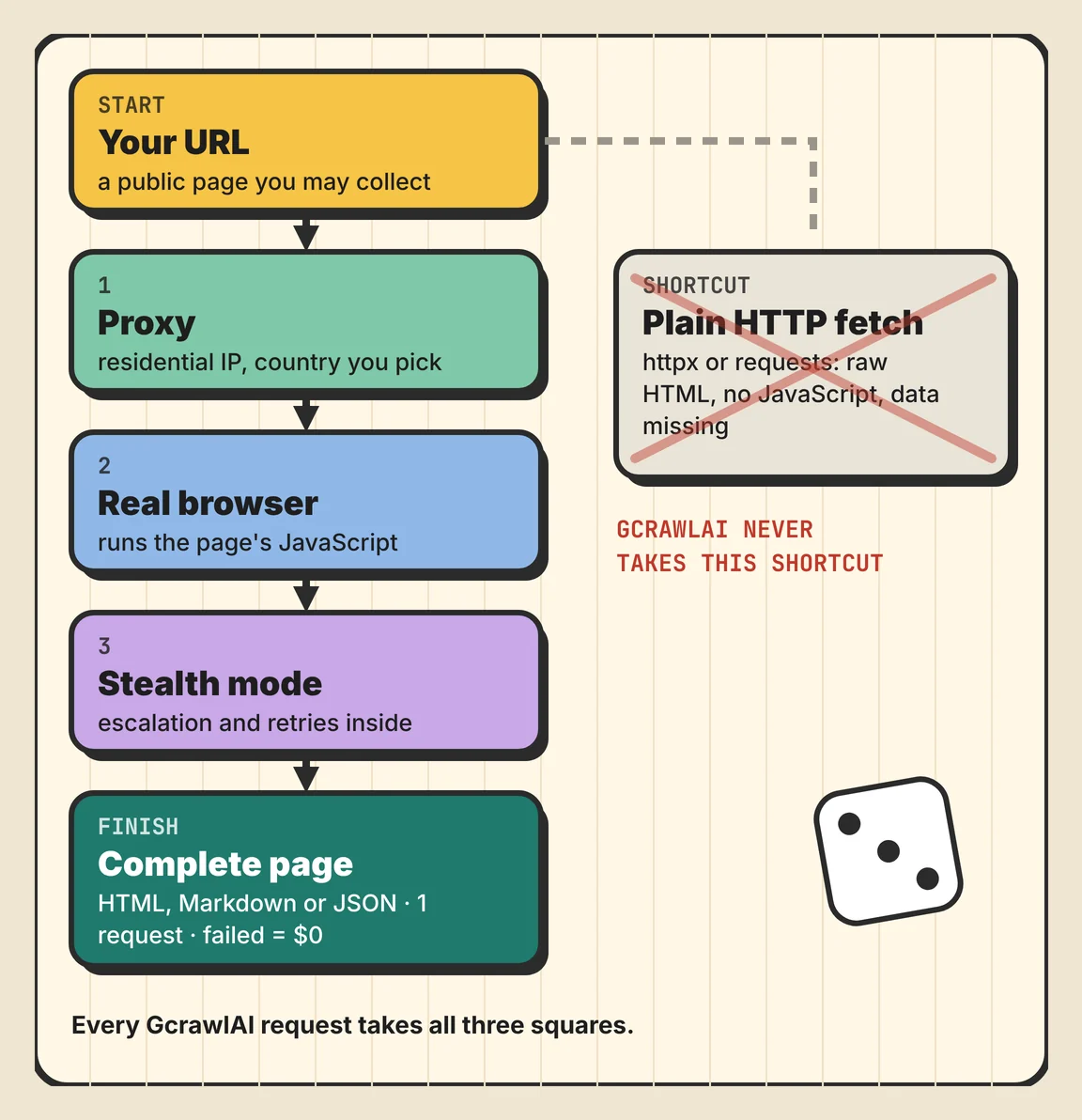
The board above shows the path every request takes, and the shortcut GcrawlAI never takes. In code, you send the URL and get rendered HTML and Markdown back, then check the text a complete page always contains:
# pip install gcrawl-sdk
"""GcrawlAI never fetches with a plain HTTP client: every request goes through a proxy in the country you pick,
a real browser that runs the page's JavaScript, and stealth mode. One request per page; failed requests aren't charged."""
import os
from gcrawl_sdk import GcrawlClient, ScrapeOptions

gc = GcrawlClient(api_key=os.getenv("GCRAWL_API_KEY", "gc-YOUR_API_KEY"))
pages = {"https://example.com/products/1": "Add to cart",     # URL -> text a complete page always contains
         "https://example.com/products/2": "Add to cart"}

for url, must_have in pages.items():
    page = gc.scrape(url=url, options=ScrapeOptions(html_enabled=True, markdown_enabled=True, proxy_geo="US"), wait=True)
    html = page.html or ""
    print(url, "complete" if must_have in html else "check this page", f"({len((page.markdown or '').split())} words of Markdown)")
- Every request, the full path: a residential IP in the country you choose, a real browser that runs the page's JavaScript, and stealth escalation with retries inside the request. Never a plain HTTP fetch.
- Output you can check: HTML, Markdown or JSON, plus extractors that return structured fields for common page types.
- Scrape, crawl, screenshots and Search API: scrape single pages, crawl whole sites, capture screenshots, or use the Search API.
- For developers and AI agents: a Python SDK, an MCP server for Claude, Cursor and other agents, the Playground to test a page before you write code, and the docs.
The MIT-licensed core also runs on your own servers: clone it from GitHub and the setup script in the code download starts the API with Redis and a Celery worker.
Pricing is a free plan of 50 requests a month with no card, paid plans from $0.67 to $1.45 per 1,000 requests, and a self-hosted core that costs nothing. Failed requests are never charged. The full plan table is in the cost section.
Where it falls short: because every request runs a real browser, a call takes longer than a raw httpx fetch, so for a JSON API you control, your own client is quicker. No service reaches every page, GcrawlAI included, so test your targets on the free plan. It won't solve CAPTCHAs meant for humans or log in for you.
"We dropped plain HTTP from GcrawlAI on purpose. A fast fetch that misses half the data isn't fast, it's wrong. Every request gets a proxy, a browser and stealth, so the page our users get is the page a person sees."
Rajesh Kannan, Co-Founder & CTO at Gramosoft
requests vs httpx vs aiohttp: features and defaults
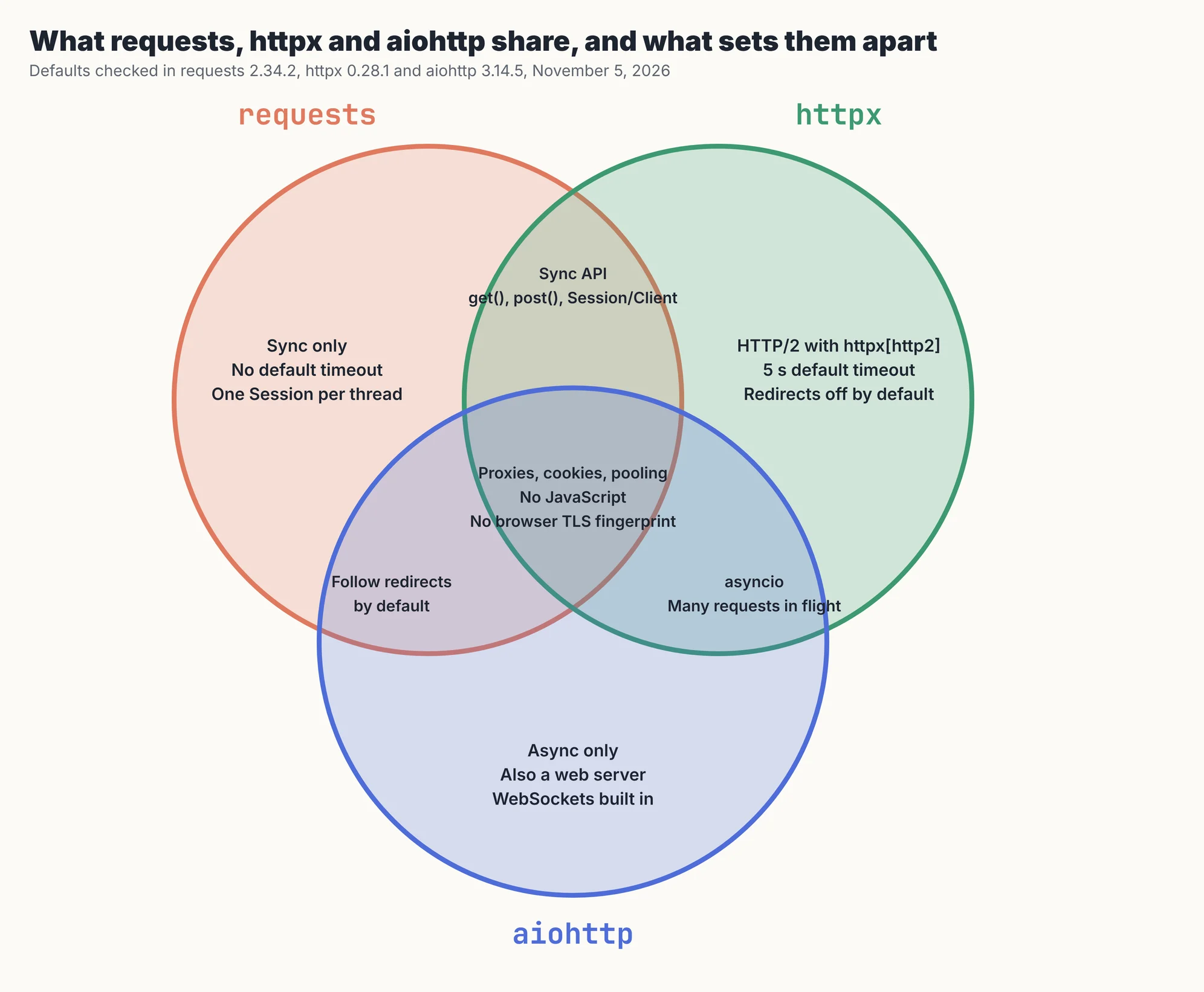
The three clients share the basics: sessions, cookies, proxies, connection pooling and JSON helpers. They differ in concurrency model, HTTP/2 support and, most practically, defaults. A missing timeout or an unfollowed redirect changes what your scraper does more often than raw speed does, so check defaults before you choose.
| Feature | requests 2.34.2 | httpx 0.28.1 | aiohttp 3.14.5 |
|---|---|---|---|
| Concurrency | Threads or processes | Threads or asyncio | asyncio |
| Default timeout (our test) | None: waited the full 8 s | 5 s: raised ReadTimeout at 5.1 s | 300 s total: waited the full 8 s |
| 302 redirect (our test) | Followed, 200 | Returned 302 | Followed, 200 |
| Default pool | 10 connections per host (HTTPAdapter) | 100 connections, 20 kept alive | 100 connections (TCPConnector) |
| Also a server | No | No | Yes, plus WebSockets |
| Fresh install (packages / size) | 5 / 3.7 MB | 7 / 4.7 MB | 9 / 13.9 MB |
| Import time (median of 5) | 97 ms | 69 ms | 169 ms |
Install sizes are fresh virtual environments on Python 3.13 without pip itself; timeouts and redirects were measured against our local server. Decodo's comparison says aiohttp has no default timeout; in version 3.14.5 the session default was a 300-second total, which is long enough to feel like none. Decodo also notes httpx powers the OpenAI and Anthropic Python SDKs.
Each client in practice
All three can scrape the same static page with nearly identical code. The differences show up when you add concurrency, retries and proxies at scale. Here's where each one fits, what it costs you, and the mistake people most often make with it, based on the sources below and our lab.
requests: simple and synchronous
requests is built on urllib3 and has been the default Python client since 2011. Its API is the easiest to read, and its documentation and community are the largest. It's synchronous, so concurrency means threads, and it has no HTTP/2 or async support. In our lab a Session with 50 threads fetched 500 pages in 0.59 seconds, close to aiohttp, so "requests is slow" usually means "requests is used sequentially". Give each thread its own Session, and always pass timeout=.
httpx: one API for sync and async
httpx keeps requests' style but adds AsyncClient, HTTP/2 and stricter defaults: a 5-second timeout per phase and no automatic redirects. That makes it the easiest path from a sync script to an async crawler. Its catch is the client object: creating one took about 37 ms in our lab, so a client per request turned a 1-second job into 19.7 seconds. Leapcell saw the same direction: per-request clients were slower than a shared one.
aiohttp: async-first throughput
aiohttp is async-only, includes a web server and WebSocket support, and was the fastest client in our lab: 0.55 seconds for 500 pages with a shared session. Its API is more verbose, with nested async with blocks and awaited bodies, and it doesn't do HTTP/2. IPRoyal points out the project even documents why its request lifecycle is so verbose. Choose it when the whole crawler is async and you want the most pages per core.
What our side-by-side lab measured
We ran the same 500 page fetches through nine client set-ups against one local server. Each page took 50 ms to answer and returned 15 KB of HTML; concurrent set-ups were capped at 50 requests in flight. We recorded the median of three runs, pages per second, the TCP connections each set-up opened, and whether every page was correct.
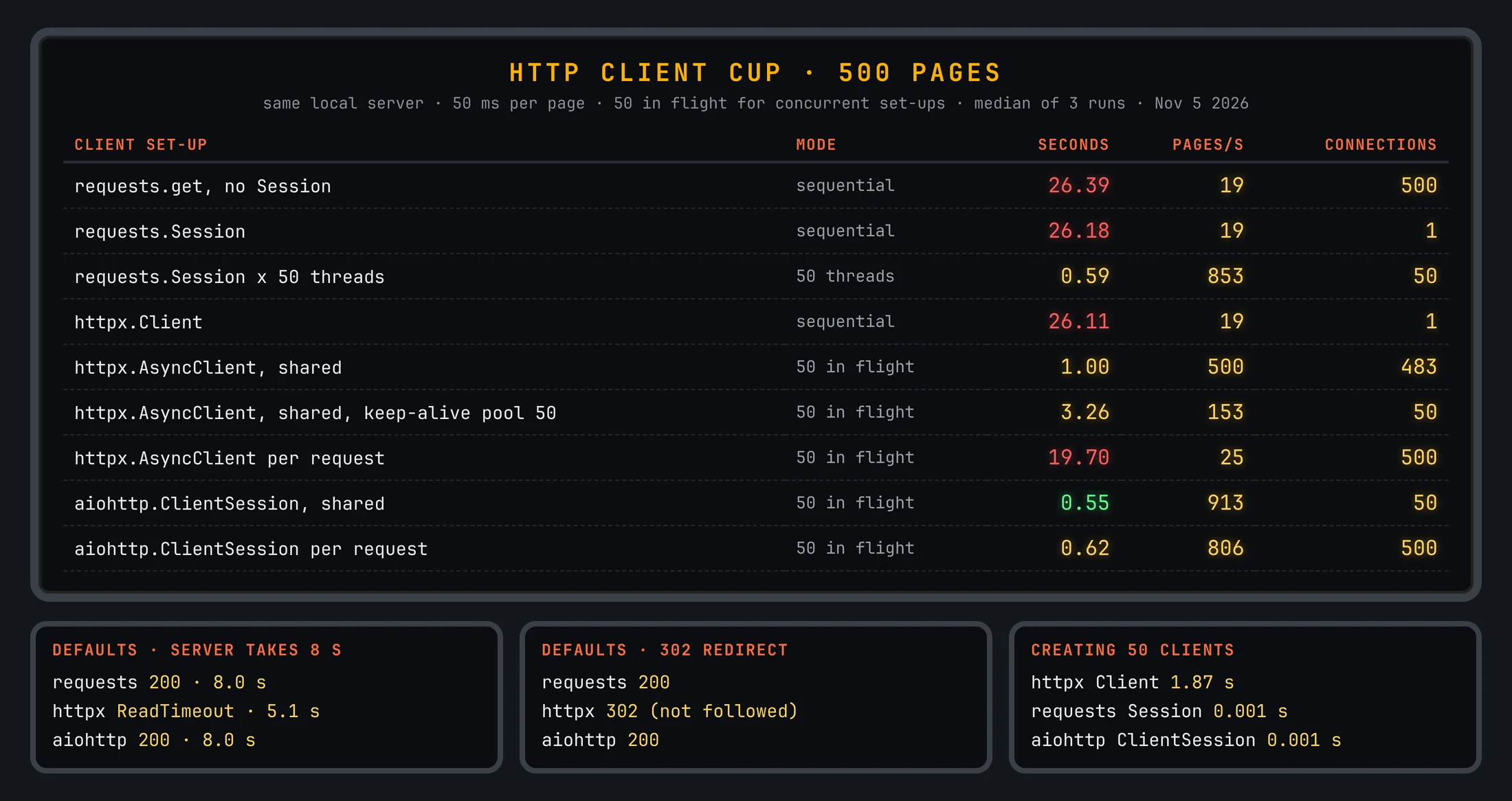
| Client set-up | Mode | Seconds | Pages per second | Connections opened |
|---|---|---|---|---|
| requests.get, no Session | Sequential | 26.39 | 19 | 500 |
| requests.Session | Sequential | 26.18 | 19 | 1 |
| requests.Session × 50 threads | 50 threads | 0.59 | 853 | 50 |
| httpx.Client | Sequential | 26.11 | 19 | 1 |
| httpx.AsyncClient, shared | 50 in flight | 1.00 | 500 | 483 |
| httpx.AsyncClient, shared, keep-alive pool 50 | 50 in flight | 3.26 | 153 | 50 |
| httpx.AsyncClient per request | 50 in flight | 19.70 | 25 | 500 |
| aiohttp.ClientSession, shared | 50 in flight | 0.55 | 913 | 50 |
| aiohttp.ClientSession per request | 50 in flight | 0.62 | 806 | 500 |
Every set-up returned all 500 correct pages. Four results matter for scrapers:
- Concurrency beats the library. Every sequential set-up took about 26 seconds, because the server's 50 ms per page dominates. Fifty threads with requests, or 50 tasks with aiohttp, finished in about half a second.
- Reuse the client. A new httpx client per request was 20 times slower than a shared one, because each client takes about 37 ms to create. Making 50 requests Sessions or aiohttp sessions took about a millisecond in total.
- httpx's default pool keeps only 20 idle connections. With 50 in flight it opened 483 connections for 500 pages. Raising the keep-alive pool to 50 cut that to 50, but made the run three times slower in our tests; check both settings against your own targets.
- Sessions matter more over the internet. Without a Session, requests opened 500 connections instead of 1. On localhost that cost almost nothing; over a real network each new HTTPS connection adds a handshake.
Published benchmarks disagree widely. Bright Data timed 1,000 requests at about 51 seconds for requests, 7 for httpx and 4 for aiohttp; Oxylabs measured 10.22 against 3.79 seconds for httpx and aiohttp; Thordata found the async clients nearly tied at 1.87 and 1.82 seconds. Set-up details like client reuse and pool limits explain much of the spread.
The lab is local: no TLS, no proxies, no real network latency and no HTTP/2, so it isolates client overhead. Over the internet, handshakes and server speed matter more. The scripts and results are in the code download.
"We expected a library ranking. What we got was a lesson in object lifetimes: the same httpx code ran 20 times faster once we stopped creating a client per URL."
Rajesh Kannan, Co-Founder & CTO at Gramosoft
Set these four things in any client
Most scraper failures we see come from defaults, not from the library. A request without a timeout can hang a worker for minutes, an unfollowed redirect returns an empty body, and a 200 response can be a block page. Set timeouts, redirects, a concurrency cap and a content check, whichever client you use.
Here's that pattern in httpx: one shared AsyncClient, at most 20 requests in flight, explicit timeouts, redirects followed, and a check on the page content rather than the status code:
# pip install httpx      (httpx 0.28.1)
"""Fetch many pages concurrently with one shared httpx.AsyncClient: a cap on requests in flight,
explicit timeouts, redirects followed, and a content check instead of trusting the status code."""
import asyncio, os
import httpx

URLS = [os.getenv("BASE", "https://example.com") + f"/page/{i}" for i in range(100)]   # pages you may collect

async def fetch(client, sem, url):
    async with sem:                                   # at most 20 requests in flight
        try:
            r = await client.get(url)
            r.raise_for_status()
        except httpx.HTTPError as e:
            return url, f"failed: {type(e).__name__}"
        return url, "ok" if "<h1>" in r.text else "check: unexpected page"   # a 200 can still be a block page

async def main():
    sem = asyncio.Semaphore(20)
    timeout = httpx.Timeout(10.0, connect=5.0)
    async with httpx.AsyncClient(timeout=timeout, follow_redirects=True,
                                 headers={"User-Agent": "my-research-bot/1.0 (you@example.com)"}) as client:
        results = await asyncio.gather(*(fetch(client, sem, u) for u in URLS))
    print(sum(s == "ok" for _, s in results), "of", len(results), "pages ok")

asyncio.run(main())
- Timeouts: use a short connect timeout and a longer read timeout. requests takes
timeout=(5, 30), httpxhttpx.Timeout(10.0, connect=5.0), aiohttpaiohttp.ClientTimeout(total=30, connect=5). - Redirects: pass
follow_redirects=Truein httpx, or you'll get a 302 with no page. - Concurrency: cap requests in flight with a semaphore or connector limit, and keep the rate polite for each site.
- Content checks: a 200 can still be a CAPTCHA, a login page or an empty shell, as ProxiesThatWork stresses. Check for text the real page always has.
What no Python HTTP client fixes
A faster client doesn't change what the server sends you. None of these three runs JavaScript, so client-rendered pages come back as empty shells. All three use Python's TLS stack, which anti-bot systems can tell apart from a browser. And none of them makes collecting a site's data acceptable when its terms say no.
This guide doesn't cover TLS impersonation libraries, header tuning or other ways around bot detection. When a page needs a browser, use one, or check whether the data sits in a JSON endpoint the page already calls; our guide to hidden API scraping shows how to find it. We also didn't test HTTP/2: ProxyWing reports a 17% gain for httpx with HTTP/2, which we haven't verified.
What rendered pages cost
requests, httpx and aiohttp are free, and for plain HTML they're the cheapest route there is. Cost starts when pages need a browser, proxies or anti-bot handling. For 100,000 successful protected pages a month, credit-based APIs cost $249 to $399 at list price and GcrawlAI costs $101.
| Option, 100,000 successful pages a month | Plain HTML pages | Protected pages (JS rendering + premium proxies) | Are failed requests billed? |
|---|---|---|---|
| GcrawlAI (every request rendered, residential IPs included) | $101 (Growth $79 + 20,000 overage at $1.10 per 1,000) | $101 (same request, no multiplier) | No: failed requests are never charged |
| ScraperAPI | $49 (Hobby, 100,000 credits) | $299 (Business; 25 credits per page = 2.5M credits) | Charges only 200 and 404 responses |
| ZenRows | $39 (Build B3, 120,000 credits) | $399 (Growth G3; 25 credits per page = 2.5M credits) | Failed requests never charged; 404 and 410 count as successful |
| ScrapingBee | $49 (Freelance, 250,000 credits; JS off) | $249 (Business; 25 credits per page = 2.5M credits) | Charges only 200, 404 and 410 |
List-price arithmetic, not a benchmark. Credit costs and billing rules come from ScraperAPI's credit docs, ZenRows' pricing docs and ScrapingBee's FAQ, checked November 1, 2026. The honest read: for plain HTML, ZenRows, ScraperAPI and ScrapingBee cost less than GcrawlAI, and your own httpx or aiohttp scraper costs only servers. Use an API for the pages that need rendering, not for everything.
GcrawlAI plans (GcrawlAI pricing, checked October 28, 2026):
| Plan | Price | Requests/month | Concurrent | Per 1,000 | Overage per 1,000 |
|---|---|---|---|---|---|
| Free | $0 forever, no card | 50 | 2 | – | – |
| Starter | $29/month | 20,000 | 10 | $1.45 | $1.60 |
| Growth (most popular) | $79/month | 80,000 | 35 | $0.99 | $1.10 |
| Pro | $199/month | 250,000 | 50 | $0.80 | $0.90 |
| Scale | $499/month | 750,000 | 100 | $0.67 | $0.75 |
| Enterprise | Volume pricing | 2M+ | Custom | – | – |
| Self-hosted | $0 (MIT) | Your servers | Your servers | Infrastructure only | – |
Every plan, Free included, has scrape, crawl, the Search API, JavaScript rendering, residential IP rotation and stealth escalation in each request, and each feature counts as one request. Failed requests are never charged. Annual billing charges 10 months for 12, unused requests on paid plans roll over once, and Indian customers are billed in INR with a GST invoice.
Which client fits your scraper
Pick by how your code runs and how much you fetch. Simple scripts suit requests, mixed or growing projects suit httpx, and fully async crawlers chasing throughput suit aiohttp. Pages that need a browser need something else entirely. The table shows where GcrawlAI fits in each case.
| Your situation | Client | Where GcrawlAI fits |
|---|---|---|
| A script that fetches a few hundred pages | requests (Session, timeout) | GcrawlAI when pages come back empty: proxy, browser and stealth on every call |
| A new project that may grow into async | httpx | GcrawlAI when the data must be complete, with no browser fleet to run |
| A fully async crawler, maximum pages per core | aiohttp | GcrawlAI for targets where raw HTML misses prices, reviews or stock |
| APIs that support HTTP/2 | httpx[http2] | Use the GcrawlAI Search API to find fresh sources |
| Pages built in JavaScript or behind anti-bot checks | None of the three | GcrawlAI renders each page in a real browser, one request per page |
| AI agents that need web pages | A tool the agent can call | GcrawlAI MCP server with scrape, crawl and Search API |
When your own Python is enough
For static HTML, sitemaps and JSON endpoints, an HTTP client and a parser are all you need, and they're faster and cheaper than any browser or API. Start there. Check View Source and the network tab first; if the data is in the response, requests, httpx or aiohttp will get it.
When pages start coming back empty, blocked or incomplete, a faster client won't help. Move them to GcrawlAI, which never fetches with plain HTTP: every request goes through a proxy, a real browser and stealth mode, and your parsing code stays the same. Its free Cloud plan's 50 requests a month are enough to test your real targets, the Playground shows the result without code, and the MIT core self-hosts for free. For the build-or-buy trade-off, read web scraping with Python vs a scraping API.
Scraping responsibly with any client
An async client can send thousands of requests a second, which is exactly why it needs limits. Read the site's terms and robots.txt, prefer an official API, stay on public pages, cap concurrency per site, identify your bot in the User-Agent, and don't collect personal data you have no basis to hold.
Back off on 429 and 503 responses instead of retrying at full speed, and stop when a site shows a CAPTCHA. For the details, read how to handle 429 Too Many Requests and how to check if a website allows scraping.
Frequently asked questions
Which is the best Python HTTP client for web scraping?
For most new scrapers, httpx: one API for sync and async, HTTP/2 support and a 5-second default timeout. aiohttp is the choice for fully async, high-volume crawlers and was fastest in our lab. requests remains fine for simple scripts and existing code.
Is httpx faster than requests?
Not for sequential fetching: in our lab both took about 26 seconds for 500 pages, because the server's response time dominated. httpx gets faster when you use its async client, which fetched the same pages in 1 second. requests with 50 threads did it in 0.59 seconds.
Is aiohttp faster than httpx?
In our lab, yes: 0.55 seconds against 1.00 for 500 pages with shared clients and 50 requests in flight. Published tests range from nearly tied to almost three times faster, depending largely on how the clients were set up.
Does requests support async?
No. requests is synchronous; you get concurrency with threads or processes. For async code, use httpx's AsyncClient or aiohttp.
Why does my httpx request return a 302 instead of the page?
httpx doesn't follow redirects by default, unlike requests and aiohttp. Pass follow_redirects=True to the client or the request.
Can requests, httpx or aiohttp scrape JavaScript pages?
No. They fetch the HTML the server sends and don't run scripts. Look for the JSON endpoint the page calls, use a headless browser, or send the page to a rendering API such as GcrawlAI.
Does GcrawlAI use httpx or another plain HTTP client?
No. GcrawlAI fetches every page through a proxy, a real browser and stealth mode, because raw HTTP responses often miss JavaScript content or return block pages. The core is MIT licensed on GitHub, and you can call it from any Python code. The managed Cloud API adds residential IPs and stealth escalation, with a Python SDK and MCP for AI agents, a free plan of 50 requests a month and paid plans from $0.67 to $1.45 per 1,000 requests.
Related guides
- Web Scraping with Python vs a Scraping API: When to Stop Writing Your Own Scraper
- Python Web Scraping Frameworks Compared: Scrapy vs Crawlee vs Scrapling (2026)
- How to Scrape Dynamic JavaScript Websites with Python (2026 Guide)
- Playwright vs Puppeteer vs Selenium for Web Scraping (2026)
- Hidden API Scraping: Find the JSON Behind Any Website
- How to Fix 403 Forbidden Errors in Python Requests (2026)
- 429 Too Many Requests: How to Fix It When Web Scraping
- How Websites Detect Scrapers: 13 Signals Anti-Bot Systems Check