
- A dynamic website builds its content with JavaScript after the page loads, so
requests+ BeautifulSoup only sees an empty shell and returns zero results. - Try the cheap methods first. The data is often already in the HTML as embedded JSON (
__NEXT_DATA__, JSON-LD), or you can call the JSON API the page uses behind the scenes. Both are fast and need no browser. - Use a headless browser (Playwright) when the data only exists after rendering, or you need to scroll, click or log in. Wait for the element you want, never for a fixed number of seconds.
- Measured on our local test pages: the JSON API returned 100 records in about 15 ms; rendering the same data in headless Chromium took about 4.4 s and used roughly 700 MB of memory.
- Use GcrawlAI when you'd rather not run browsers at all, or when the site blocks headless browsers. One API call renders the page, auto-scrolls, gets past bot checks and returns HTML or Markdown.
You open the page in Chrome and the data is right there: product cards, prices, reviews. You write the scraper you've written a hundred times, run it, and get back... nothing. Zero results. No error, just an empty list.
Your code isn't broken. You've met a dynamic website, and your scraper is reading the page before the page exists. It's one of the most common walls in web scraping, so this guide from the GcrawlAI team covers the whole picture: why it happens, how to confirm it in thirty seconds, and four ways to get the data with Python, ordered from cheapest to most powerful. Every code sample in this post was run before publishing.
What is a dynamic JavaScript website?
A dynamic website sends a mostly empty HTML page first, then uses JavaScript to fetch the data and build the content in your browser. Sites built with React, Vue, Angular or Next.js often work this way. A plain HTTP client like Python's requests downloads that first HTML but never runs the JavaScript, so the content you see in the browser never reaches your scraper.
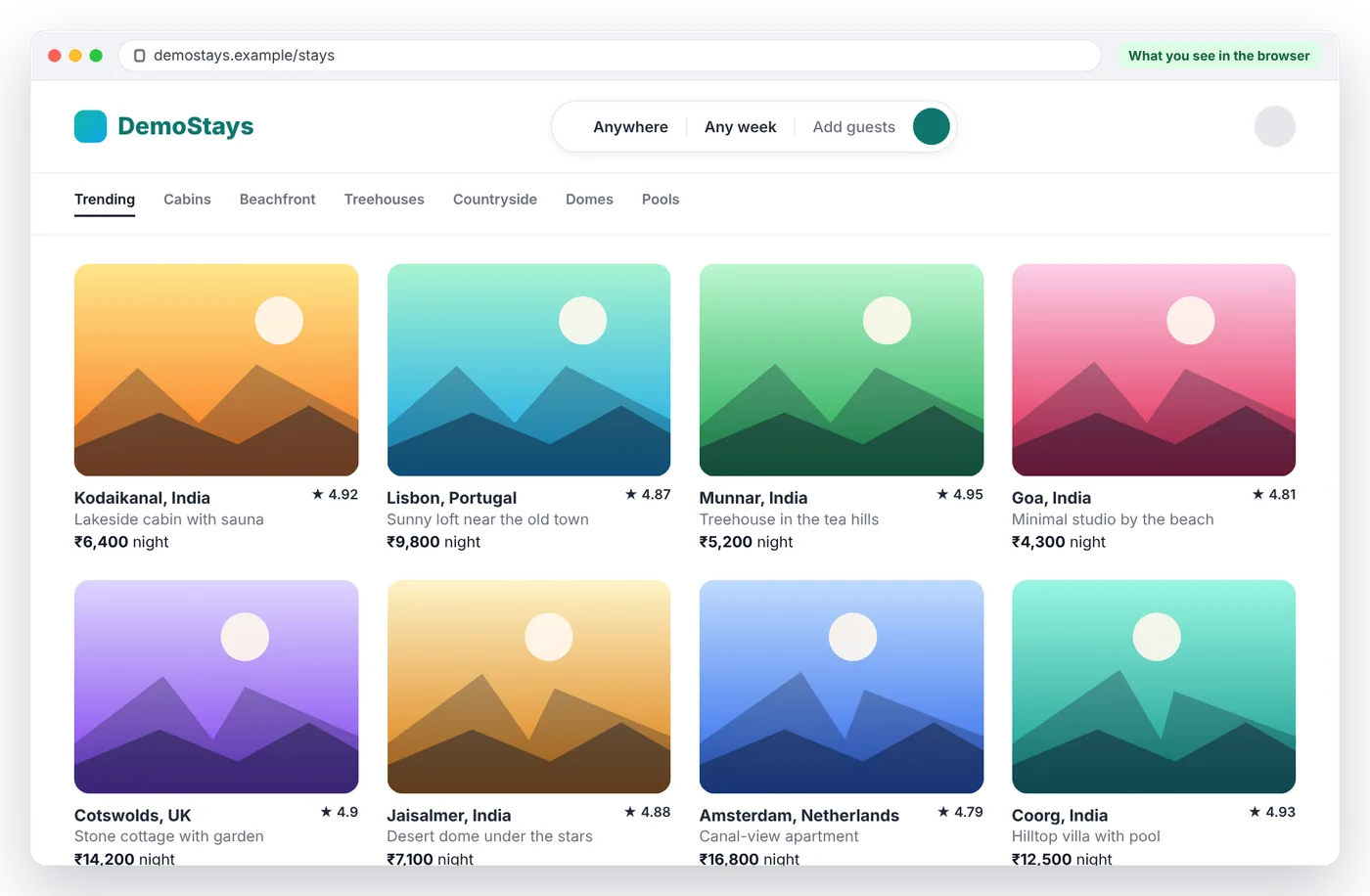
To show this on a real page, we built DemoStays, a small fictional rental site that loads its listings with JavaScript, the way many travel, shopping and job sites do. In Chrome it looks like any normal listings page:
Now look at the same URL the way a scraper sees it. On the left is View Page Source, which is exactly what requests.get() downloads. On the right is Inspect, the live page after JavaScript has run:
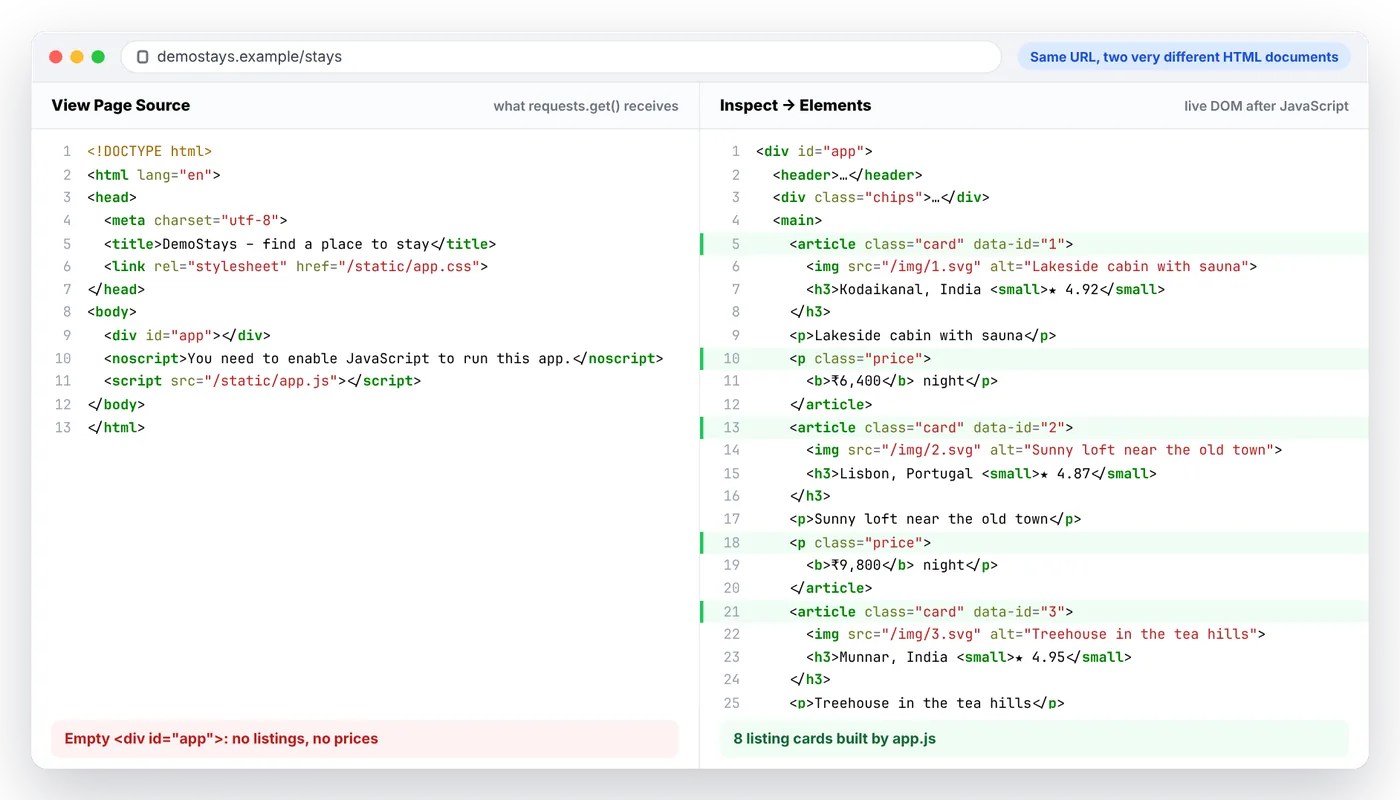
The HTML that requests receives is thirteen lines long and contains an empty <div id="app">. Every listing, price and rating is added later by app.js. Here's the same failure in code, against the JavaScript version of the quotes practice site:
import requests
from bs4 import BeautifulSoup

html = requests.get("https://quotes.toscrape.com/js/", timeout=15).text
soup = BeautifulSoup(html, "lxml")

print(len(soup.select("div.quote"))) # 0: the quotes don't exist yetSwipe sideways to see the full diagram →
That diagram is the key to this whole guide. Each method below gets the data at a different point in that sequence. The earlier the point, the faster and cheaper your scraper.
Step 1: confirm the page is actually dynamic
Don't reach for a headless browser until you're sure you need one. Three quick checks in Chrome:
- View source vs Inspect. Right-click and choose "View Page Source" to see the raw HTML the server sent. Then right-click on the data and choose "Inspect" to see the live page. If the data is in Inspect but not in View Source, JavaScript is adding it.
- Disable JavaScript. In DevTools, open the command menu (Ctrl+Shift+P), type "Disable JavaScript" and reload. If the content disappears, the page is dynamic.
- Check the Network tab. Reload with DevTools open, filter by "Fetch/XHR", and look for responses that contain your data as JSON. If you find one, skip ahead to Method 2.
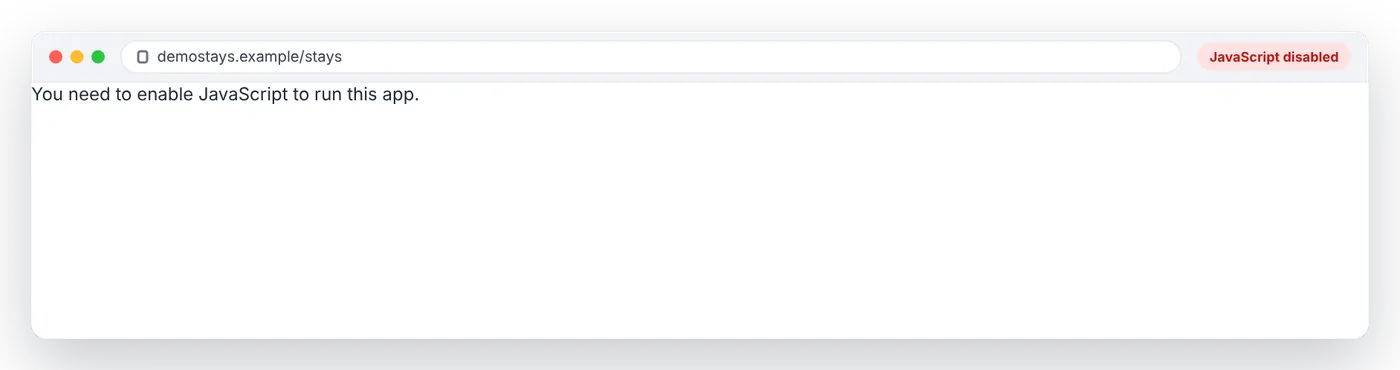
Here's DemoStays with JavaScript turned off. All that's left is the fallback message in the page's <noscript> tag, which is close to what a plain HTTP scraper gets:
Or let Python check for you. This compares the raw HTML with the rendered page:
import requests
from bs4 import BeautifulSoup
from playwright.sync_api import sync_playwright

def is_dynamic(url: str, selector: str) -> bool:
    """True if the elements you want only appear after JavaScript runs."""
    raw_html = requests.get(url, timeout=15).text
    raw_count = len(BeautifulSoup(raw_html, "lxml").select(selector))

    with sync_playwright() as p:
        browser = p.chromium.launch(headless=True)
        page = browser.new_page()
        page.goto(url)
        page.locator(selector).first.wait_for(timeout=10_000)
        rendered_count = page.locator(selector).count()
        browser.close()

    print(f"{selector}: {raw_count} in raw HTML, {rendered_count} after rendering")
    return raw_count == 0 and rendered_count > 0

print("Dynamic?", is_dynamic("https://quotes.toscrape.com/js/", "div.quote"))
Output from our test run:
div.quote: 0 in raw HTML, 10 after rendering
Dynamic? True
Four ways to scrape a dynamic website with Python
Swipe sideways to see the full table →
| Method | Speed | Needs a browser? | Breaks when | Best for |
|---|---|---|---|---|
| 1. Read embedded JSON | Fastest | No | The site changes its data structure | Next.js, Nuxt and shop pages with JSON-LD |
| 2. Call the hidden API | Very fast | No | The API needs tokens or signed requests | Listings, search results, infinite scroll feeds |
| 3. Headless browser (Playwright) | Slow | Yes, you run it | Bot detection; memory at scale | Pages that need rendering, clicks, scrolls or logins |
| 4. Scraping API (GcrawlAI) | Fast to build, no infrastructure | Yes, managed for you | Rarely; it's built for the hard cases | Protected sites, scale, teams that don't want to run browsers |
Not sure which one fits your page? Follow this:
Swipe sideways to see the full diagram →
Method 1: read the data that's already in the HTML
This is the method most tutorials skip, and it's often the easiest win. Many "dynamic" sites actually send all the data in the first HTML response. It's just hidden in a <script> tag as JSON, waiting for JavaScript to turn it into visible content. You can skip the JavaScript and read the JSON directly:
import json
import requests
from bs4 import BeautifulSoup

html = requests.get("https://example.com/product/123", timeout=15).text
soup = BeautifulSoup(html, "lxml")

# Next.js sites ship the page's data as JSON inside this script tag
next_data = soup.find("script", id="__NEXT_DATA__")
if next_data:
    product = json.loads(next_data.string)["props"]["pageProps"]["product"]
    print(product["name"], product["price"])

# Many shops also embed schema.org data for search engines
for tag in soup.find_all("script", type="application/ld+json"):
    data = json.loads(tag.string)
    if data.get("@type") == "Product":
        print(data["name"], data["offers"]["price"])
Where to look:
<script id="__NEXT_DATA__">on Next.js sites built with the Pages Router, which holds the page's full props. Newer App Router sites stream their data inself.__next_f.push(...)chunks instead, which are messier to parse but still contain the data.<script type="application/ld+json">, the schema.org data that many shops, recipe sites and job boards add for search engines. It usually includes names, prices, ratings and availability.- Variables like
window.__INITIAL_STATE__orwindow.__NUXT__inside inline scripts. Search View Source for a value you can see on the page, such as a product price, and you'll often find it inside one of these.
No browser, no waiting, one request per page. If your data is there, you're done.
Method 2: call the hidden JSON API
When the data isn't in the HTML, the page's JavaScript has to fetch it from somewhere, usually a JSON endpoint. If you call that endpoint yourself, you get clean, structured data without rendering anything.
To find it, open DevTools, go to the Network tab, filter by "Fetch/XHR" and reload the page (or scroll, if it's an infinite feed). Click through the requests until you find one whose response contains your data. Right-click it and choose "Copy as cURL" to see the exact URL, parameters and headers.
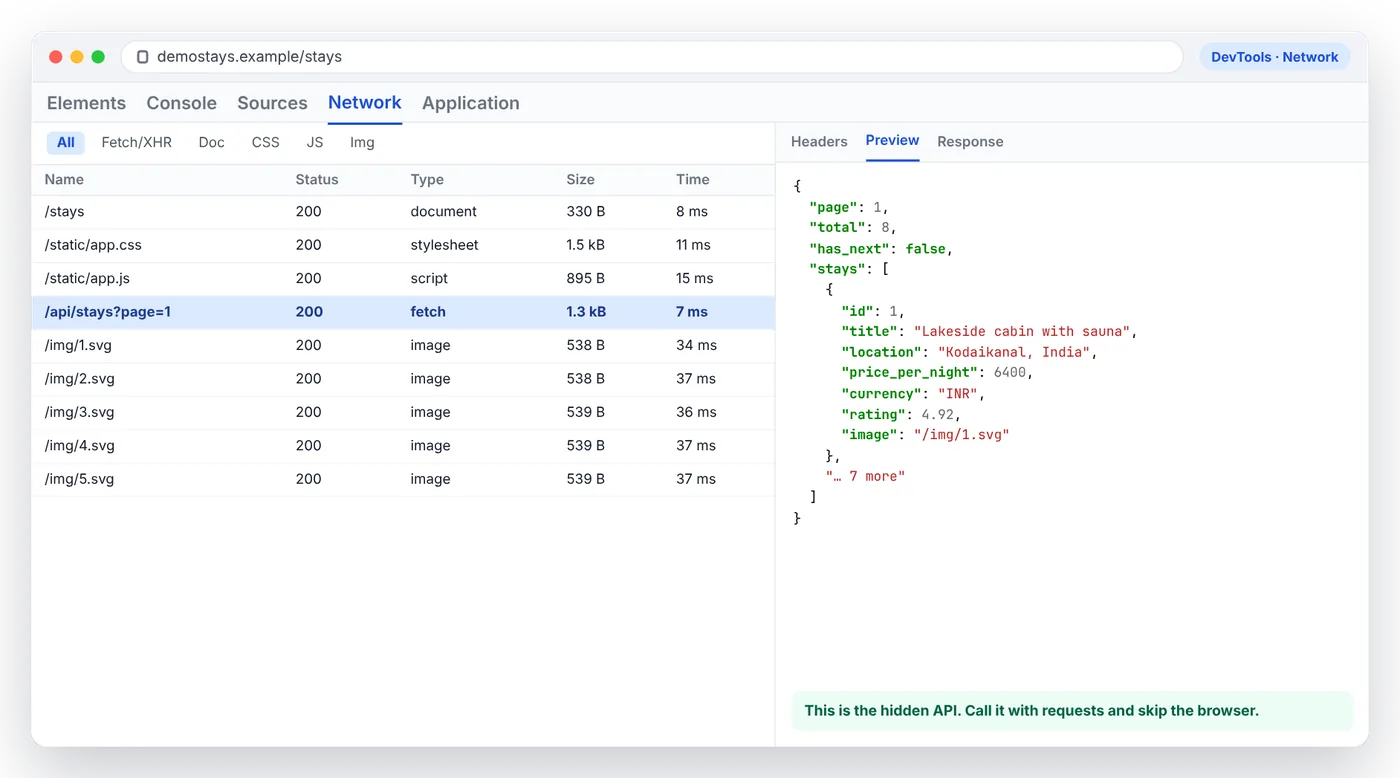
On DemoStays, one request out of nine holds everything: /api/stays?page=1 returns every listing's title, location, price and rating as clean JSON. That's the request your scraper should make.
On the infinite-scroll version of the quotes practice site, the page loads its data from /api/quotes?page=N. Here's a scraper that calls it directly and follows the pages until has_next is false:
import requests

session = requests.Session()
quotes, page = [], 1

while True:
    r = session.get("https://quotes.toscrape.com/api/quotes", params={"page": page}, timeout=15)
    r.raise_for_status()
    data = r.json()
    quotes += [{"text": q["text"], "author": q["author"]["name"], "tags": q["tags"]} for q in data["quotes"]]
    if not data["has_next"]:
        break
    page += 1

print(len(quotes), "quotes from", page, "API pages")
On our test setup this returned all 100 quotes in about 15 milliseconds. It's the fastest method in this guide by a wide margin.
When this gets harder: some APIs need cookies from a real session, short-lived tokens, or request signatures generated by the page's JavaScript. If you copy a request and it returns 401, 403 or an empty result, try sending the same headers and cookies your browser sent. If the request is signed, Method 3's response capture trick (below) is usually less effort than reverse-engineering the signing code.
Method 3: render the page with a headless browser
When the data only exists after JavaScript runs, or you need to click, scroll or log in, you need a real browser. Playwright is the best default for new Python projects: it drives Chromium, Firefox and WebKit through one API, and its locators wait automatically. Install it with:
pip install playwright
playwright install chromium
Wait for the element, not for a number of seconds
This scraper loads the JavaScript version of the quotes site and clicks through every page:
from playwright.sync_api import sync_playwright

quotes = []
with sync_playwright() as p:
    browser = p.chromium.launch(headless=True)
    page = browser.new_page()
    page.goto("https://quotes.toscrape.com/js/", wait_until="domcontentloaded")

    while True:
        page.locator("div.quote").first.wait_for()  # wait for JS to render, not time.sleep()
        for q in page.locator("div.quote").all():
            quotes.append({
                "text": q.locator("span.text").inner_text(),
                "author": q.locator("small.author").inner_text(),
                "tags": q.locator("a.tag").all_inner_texts(),
            })
        next_link = page.locator("li.next a")
        if next_link.count() == 0:
            break
        next_link.click()
        page.wait_for_load_state("domcontentloaded")

    browser.close()

print(len(quotes), "quotes")
The important line ispage.locator("div.quote").first.wait_for(). It continues the moment the first quote appears, whether that takes 100 milliseconds or 5 seconds. A fixedtime.sleep(3)is either too long, which slows every page, or too short, so you scrape an empty page whenever the site is slow. Waiting fornetworkidleis another common trap: pages with analytics, chat widgets or open websockets may never go quiet, so your scraper hangs until it times out.
Handle infinite scroll
Infinite scroll pages load more items as you approach the bottom. The pattern is a loop: scroll, wait for new items, and stop when the count stops growing.
Swipe sideways to see the full diagram →
from playwright.sync_api import sync_playwright

MAX_ROUNDS = 50  # safety cap: some feeds never end

with sync_playwright() as p:
    browser = p.chromium.launch(headless=True)
    page = browser.new_page()
    page.goto("https://quotes.toscrape.com/scroll", wait_until="domcontentloaded")
    quotes = page.locator("div.quote")
    quotes.first.wait_for()

    previous = 0
    for _ in range(MAX_ROUNDS):
        count = quotes.count()
        if count == previous:  # nothing new loaded on the last scroll
            break
        previous = count
        page.mouse.wheel(0, 20_000)
        try:  # wait until more items appear, or give up after 3 s
            page.wait_for_function(
                "n => document.querySelectorAll('div.quote').length > n", arg=count, timeout=3_000
            )
        except Exception:
            pass

    texts = quotes.locator("span.text").all_inner_texts()
    browser.close()

print(len(texts), "quotes after scrolling")
On our test page the count grew from 10 to 100 over a few rounds, then stopped growing and the loop ended.
The best trick: capture the API responses while the browser runs
Here's a technique that combines Method 2 and Method 3. Let the browser load the page normally, so cookies, tokens and request signing all happen the way the site expects, but listen to the network and keep the JSON responses instead of parsing HTML. You get structured data without writing a single CSS selector:
import json
from playwright.sync_api import sync_playwright

captured = []

def on_response(response):
    # Keep the JSON the page fetches for itself; skip everything else
    if "/api/quotes" in response.url and response.ok:
        captured.extend(response.json()["quotes"])

with sync_playwright() as p:
    browser = p.chromium.launch(headless=True)
    page = browser.new_page()

    # Don't download images, fonts or stylesheets: faster, less bandwidth
    page.route("**/*", lambda route: route.abort()
               if route.request.resource_type in ("image", "font", "stylesheet", "media")
               else route.continue_())
    page.on("response", on_response)

    page.goto("https://quotes.toscrape.com/scroll", wait_until="domcontentloaded")
    for _ in range(12):
        page.mouse.wheel(0, 20_000)
        page.wait_for_timeout(400)
    browser.close()

print(len(captured), "quotes captured straight from the API responses")
print(json.dumps(captured[0], indent=2)[:200])
This example also blocks images, fonts, stylesheets and media with page.route(). The page still works, because the data comes from the JSON, but the browser downloads far less. In our test, the blocked version didn't fetch a single image or stylesheet.
What about Selenium, requests-html, Pyppeteer or Splash?
- Selenium works well and has a huge community. If your team already uses it, keep using it. For a new project, Playwright's automatic waiting saves a lot of boilerplate.
- requests-html and Pyppeteer still show up in older tutorials, but neither has been actively maintained for years. Avoid them for anything new.
- Scrapy + Splash uses an old rendering engine that can struggle with modern JavaScript frameworks. If you like Scrapy,
scrapy-playwrightis the better way to add rendering.
For a full comparison of these tools, see our guide to Python web scraping frameworks.
What a headless browser really costs: we measured
We timed the same job, getting 100 quotes, two ways on local copies of the practice pages:
Swipe sideways to see the full table →
| Approach | Time for 100 records | Memory |
|---|---|---|
Hidden JSON API with requests (Method 2) |
~15 ms | ~45 MB (whole Python process) |
| Headless Chromium rendering 10 pages (Method 3) | ~4.4 s | ~700 MB peak (all browser processes) |
Two honest caveats. Our test pages add a 250 ms rendering delay on purpose, which accounts for about 2.5 seconds of the browser's time. And the browser's memory figure adds up all of Chromium's processes, which slightly overstates memory they share. Even so, the browser was more than 100 times slower after removing that delay, and used over ten times the memory. That's fine for a few hundred pages. At tens of thousands of pages a day, it becomes a server bill and a capacity problem, which is exactly why Methods 1 and 2 are worth trying first.
Skip the browser fleet
GcrawlAI renders JavaScript, auto-scrolls, rotates proxies and gets past bot checks, then hands you clean HTML or Markdown. It's open source, and the free plan includes 50 requests a month with no card required.
Method 4: let GcrawlAI render the page for you
Running Playwright on your laptop is easy. Running it reliably for thousands of pages, with proxies, patched browsers and bot-detection workarounds, is a project in its own right. And many sites detect default headless browsers within a few requests, no matter how good your waits are.
GcrawlAI handles all five scraping jobs in one API call. It fetches through rotating, geo-targeted proxies, renders the page in a managed browser (with auto-scroll for lazy-loaded content), parses it into clean HTML, Markdown, SEO metadata, images or links, orchestrates single pages, batches and full-site crawls, and unblocks protected sites with stealth browsers that escalate automatically. Here's the infinite-scroll page again, with no browser on your side:
pip install gcrawl-sdk
from bs4 import BeautifulSoup
from gcrawl_sdk import GcrawlClient, ScrapeOptions

client = GcrawlClient(api_key="gc-YOUR_API_KEY")

result = client.scrape(
    url="https://quotes.toscrape.com/scroll",
    options=ScrapeOptions(
        html_enabled=True,      # rendered HTML, after JavaScript has run
        markdown_enabled=False,
        auto_scroll=True,       # keep scrolling so lazy content loads
        scroll_delay=500,       # ms between scroll steps
        timeout=60,
    ),
    wait=True,
)

soup = BeautifulSoup(result.html, "lxml")
quotes = [q.select_one("span.text").get_text(strip=True) for q in soup.select("div.quote")]
print(len(quotes), "quotes")
Your BeautifulSoup selectors stay the same, but the scrolling, waiting, browser management and blocking are handled for you. If the data is going to an LLM, set markdown_enabled=True instead and skip selectors entirely. From any language, it's one POST request:
curl -X POST "https://gcrawlai.com/gc/api/v1/scrape" \
  -H "X-API-Key: gc-YOUR_API_KEY" \
  -H "Content-Type: application/json" \
  -d '{
    "url": "https://quotes.toscrape.com/scroll",
    "auto_scroll": true,
    "scroll_delay": 500,
    "html": {"enabled": true, "clean": false},
    "markdown": {"enabled": false, "clean": false}
  }'
The API returns a job ID that you poll for the result. In Python, wait=True does the polling for you. For help deciding when it's worth switching from your own scraper, see Web scraping with Python vs a scraping API.
Troubleshooting: common problems and fixes
Swipe sideways to see the full table →
| Symptom | Likely cause | Fix |
|---|---|---|
| Playwright returns 0 items | You read the page before the content rendered | Wait for the specific element with locator.wait_for() |
| Scraper hangs until timeout | Waiting for networkidle on a page that never goes quiet |
Use domcontentloaded plus an element wait |
| Infinite scroll stops at the first batch | Scrolling the window when the page scrolls an inner container | Scroll that container's element, or use mouse.wheel() over it |
| Images have placeholder URLs | Lazy loading keeps the real URL in data-src |
Read data-src, or scroll the image into view first |
| The element exists but locators can't find it | It's inside an <iframe> |
Use page.frame_locator("iframe") to reach inside |
| Works on your laptop, fails on a server | Missing browser dependencies, or a datacenter IP that gets flagged | Run playwright install --with-deps chromium; use residential proxies or a scraping API |
| 403, CAPTCHA or "verify you are human" pages | The site detects headless browsers or automation | Slow down, use realistic sessions, or let GcrawlAI handle unblocking |
Scrape responsibly
Rendering a page doesn't change the rules. Check the site's terms of service and robots.txt, keep your request rate reasonable (especially on small sites), and take extra care with personal data, which privacy laws such as the GDPR and India's DPDP Act regulate even when it's publicly visible. This isn't legal advice. If you're collecting anything sensitive at scale, get proper legal guidance first.
Frequently asked questions
How do I know if a website is dynamic?
Compare View Page Source with Inspect Element in your browser. If the data appears in Inspect but not in the page source, JavaScript is adding it. You can also disable JavaScript and reload: if the content disappears, the site is dynamic.
What is the best Python library for scraping JavaScript websites?
Playwright is the best default in 2026. It drives real Chromium, Firefox and WebKit browsers, waits for elements automatically, and supports sync and async code. Selenium is a solid alternative if your team already uses it. For large-scale or protected sites, a scraping API such as GcrawlAI avoids running browsers yourself.
Can you scrape a JavaScript website without a browser?
Often, yes. Check whether the data is embedded in the HTML as JSON, for example in a __NEXT_DATA__ or application/ld+json script tag, or find the JSON API the page calls in your browser's Network tab and request it directly with Python. Both are much faster than rendering the page.
How do I scrape infinite scroll pages with Python?
Either call the API the page uses to load each batch, or use Playwright to scroll in a loop: scroll down, wait for new items to appear, and stop when the item count stops growing. Always set a maximum number of rounds. GcrawlAI can also auto-scroll the page for you.
Why does my Playwright scraper return empty results?
Usually because it reads the page before JavaScript has finished rendering. Wait for the specific element you need with locator.wait_for() instead of using time.sleep() or waiting for networkidle. Also check that the content isn't inside an iframe.
Is it legal to scrape dynamic websites?
Whether a page is rendered with JavaScript doesn't change the legal picture. What matters is the site's terms of service, how you access the data, and whether it includes personal data. Public, non-personal data is generally lower risk. This isn't legal advice.
