By Rajesh Kannan, Co-Founder & CTO, Gramosoft · Last updated: · Tested with Python 3.13, Requests 2.34.2, urllib3 2.8.0 and Scrapy 2.19.0
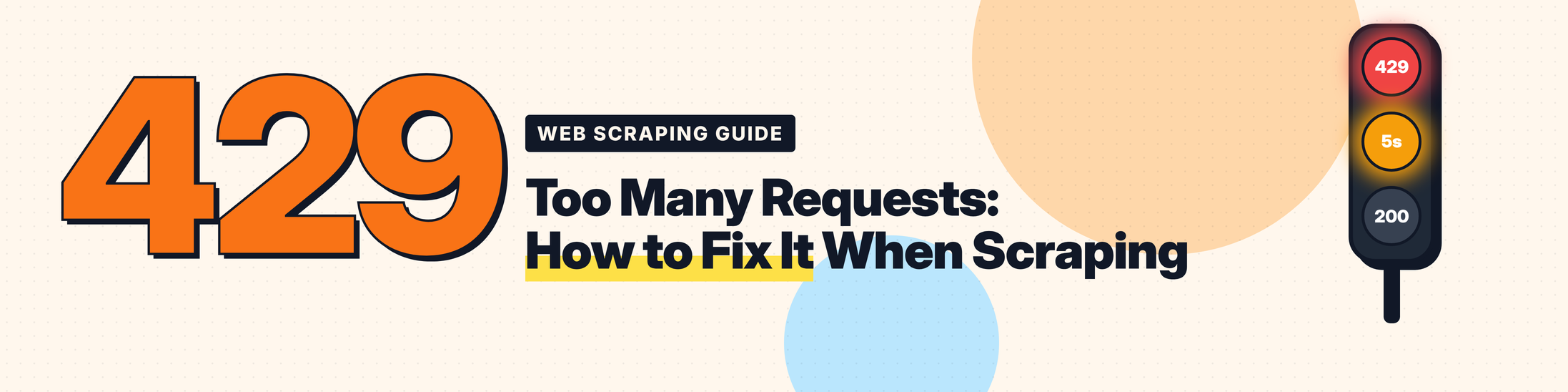
Your scraper runs fine for the first few pages. Then the responses change: 429 Too Many Requests, again and again, and if you keep pushing, the 429s turn into 403s and nothing gets through at all.
A 429 is the friendliest error a website can send you. It isn't saying you're a bot or that you're banned. It's saying you're going too fast, and very often it tells you exactly how long to wait. The trouble is that most scrapers either ignore that message or react to it badly, and that's how a short pause becomes a block.
This guide explains what a 429 means, how to read one, and eight fixes in the order you should reach for them. We tested every fix against a local site with the same kinds of rate limits real sites use, and the numbers below are from those runs.
TL;DR
- 429 Too Many Requests means you hit a rate limit. The server counted too many requests from your IP, session or API key in a time window. It's temporary.
- Wait for
Retry-After. It can be seconds (Retry-After: 5) or a date. If it's missing, back off exponentially with jitter, starting at a few seconds, not milliseconds. - Prevent it instead of reacting to it: pace requests per site, read
RateLimit-Remaining, and cap how many requests run at once. In our test, pacing gave 12 of 12 pages with zero 429s. - Ignoring 429s gets you blocked. A naive loop got 5 pages, two 429s, then five 403s. Ten parallel workers got 5 pages and fifteen 403s in five seconds.
- Find out what the limit counts (IP, session or endpoint) before you rotate proxies, and use a scraping API such as GcrawlAI when you need more throughput than one client is allowed.
How do I fix 429 Too Many Requests when web scraping? Slow down to what the site allows. Read the Retry-After header on the 429 and wait that long before the next request; if it's missing, retry with exponential backoff and random jitter. Then stop the 429s happening: keep a fixed gap between requests to each site, limit concurrent requests, and pause when RateLimit-Remaining reaches zero. If one IP isn't allowed enough requests, spread them across IPs or a scraping API.
What 429 Too Many Requests means
429 Too Many Requests is the HTTP status code a server sends when a client has made more requests in a time window than the server allows. It means you hit a rate limit. It's a temporary, client-side error: the server is working fine, and it's asking you to slow down, often with a Retry-After header that says when to try again.
The code was defined in RFC 6585, and three details in that short spec explain most of the confusion around it:
- The wait is optional. A 429 may include
Retry-After. Plenty of sites leave it out, and then you have to guess. - The counting is up to the site. The spec doesn't say how you're identified. It can be per IP, per session cookie, per API key, per page or across the whole site.
- It's never cached. A 429 must not be stored by a cache, so every new request gets a fresh answer.
It also gets confused with its neighbours:
Swipe sideways to see the full table →
| Status | What it means | Does waiting help? | What to do |
|---|---|---|---|
| 429 Too Many Requests | You went over a rate limit | Yes | Wait for Retry-After, then slow down |
| 403 Forbidden | The server refuses your request | Rarely | Fix what looks automated. See our 403 Forbidden guide |
| 503 Service Unavailable | The server is overloaded or down | Yes | Retry with backoff. Some rate limiters send 503 instead of 429 |
| Cloudflare 1015 | A site's Cloudflare rate-limiting rule blocked you | Yes | Treat it like a 429: it is one, with Cloudflare's page |
One overlap matters for scrapers: a site that keeps getting hit after sending 429s often escalates to 403. If you see 429s followed by 403s, the 403 isn't a new problem. It's the same rate limit, now enforced as a block.
Why scrapers get 429 errors
Scrapers get 429 errors because they send requests faster or more densely than a site's rate limiter allows, usually in one of six ways: too many requests per minute, too many at the same time, hitting a stricter endpoint such as search, retrying too soon after a 429, sharing one IP across several jobs, or reusing one session for a long run.
- Too many requests in a window. The classic case: the site allows, say, 60 requests a minute and your loop sends 200.
- Bursts from concurrency. Your average rate looks low, but 10 workers fire at once and the first second blows the limit.
- A stricter endpoint. Search, filters and anything that hits a database often have their own, lower limit, which is why product pages load while search returns 429.
- Retrying too fast. Every retry during the cooldown counts against the same limit, so impatient retries keep the 429s going and can turn them into a block.
- A shared IP. Two scraping jobs, a CI server and a teammate on the same office IP all add up.
- A per-session limit. Some sites count requests per cookie, not per IP, so one long-lived session hits the limit even at a gentle pace.
How to read a 429 response
Read three things in a 429 response: the Retry-After header, which tells you how long to wait in seconds or as a date; any RateLimit-* or X-RateLimit-* headers, which tell you the limit, what's left and when it resets; and the body, which sometimes explains which limit you hit.
Here's a real 429 from our test site, captured with curl -i after the sixth request in five seconds:
HTTP/1.1 429 Too Many Requests
Server: paceshop-edge
Content-Type: application/json
RateLimit-Limit: 5
RateLimit-Remaining: 0
RateLimit-Reset: 5
Retry-After: 5

{"error":"too many requests"}Retry-Afterhas two valid forms under RFC 9110: a whole number of seconds (Retry-After: 120) or an HTTP date (Retry-After: Wed, 21 Oct 2026 07:28:00 GMT). Some APIs also send decimals like5.0, which isn't valid but does happen.RateLimit-Limit,-Remainingand-Reset(or the olderX-RateLimit-*names) are a live counter. They come on successful responses too, which is what lets you slow down before the 429.- The body may name the limit, the quota or a billing problem. Read it before you retry, because some 429s won't clear with time (more on that below).
How we tested
We built PaceShop, a small fictional shop that runs on our machine, with the kinds of limits real sites use: 5 requests per 5 seconds per IP on product pages, a stricter 2 per 5 seconds on search with no Retry-After, a per-session limit on an orders page, and an escalation rule that blocks a client with 403 for 20 seconds after it ignores three 429s in a row. Every result below comes from running the code in this article against it.
The samples use shop.example.com as a placeholder. Never test rate-limit handling by hammering a site you don't own; run a local limiter like ours instead.
First, the baseline: a plain loop over 12 pages, no waiting.
import requests

BASE = "https://shop.example.com"

for page in range(1, 13):
    r = requests.get(f"{BASE}/products?page={page}", timeout=30)
    print(page, r.status_code, "Retry-After:", r.headers.get("Retry-After"))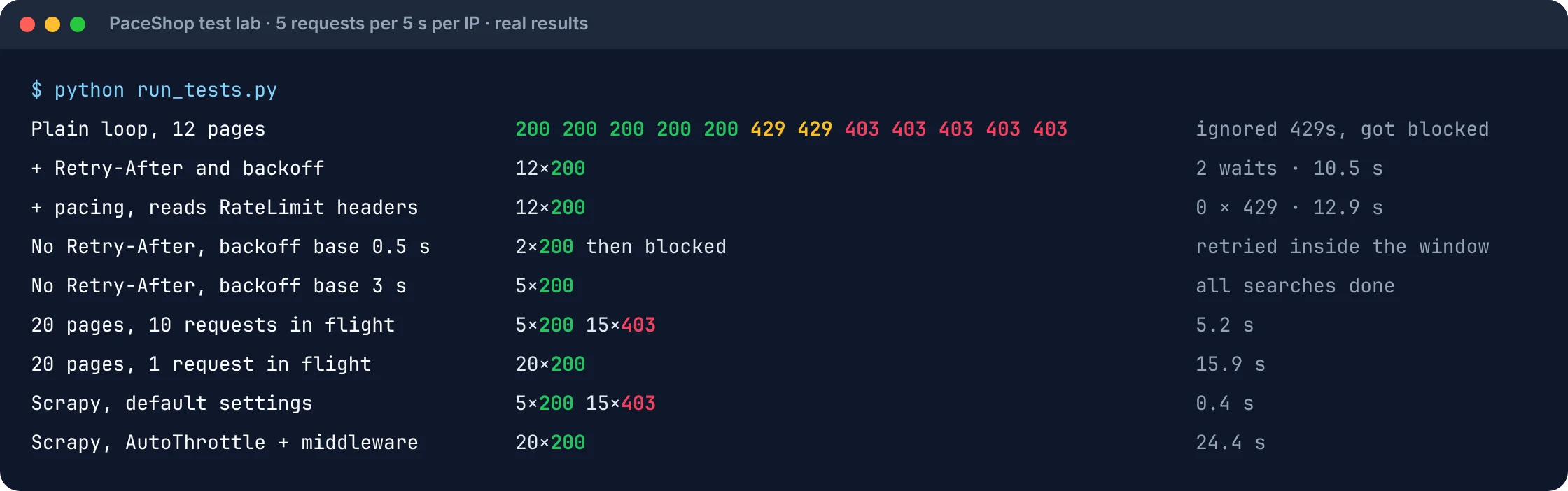
Five pages worked, two 429s asked it to wait 5 seconds, and because the loop didn't listen, the next five requests were blocked with 403. That's the pattern to avoid. The fixes below turn the same 12 pages into 12 successes.
Fix 1: Wait for Retry-After, in both formats
When a 429 includes Retry-After, wait exactly that long before sending another request to the site. Parse both legal formats, seconds and HTTP date, and tolerate decimals. This one change turned our 12-page run from five successes and a block into 12 successes, with two short waits and 10.5 seconds in total.
from datetime import datetime, timezone
from email.utils import parsedate_to_datetime

def retry_after_seconds(response):
    """Seconds to wait from Retry-After, or None if the header is missing or unreadable."""
    value = response.headers.get("Retry-After")
    if not value:
        return None
    try:
        return max(0.0, float(value))           # "10", and the "10.0" some APIs send
    except ValueError:
        pass
    try:
        when = parsedate_to_datetime(value)     # "Wed, 21 Oct 2026 07:28:00 GMT"
    except (TypeError, ValueError):
        return None
    if when.tzinfo is None:
        when = when.replace(tzinfo=timezone.utc)
    # an HTTP date has whole seconds only, so add a second of margin
    return max(0.0, (when - datetime.now(timezone.utc)).total_seconds()) + 1
Two details matter. Parse with float(), not int(), so a decimal like 5.0 doesn't crash your scraper. And add a second of margin to the date form, because an HTTP date has no fractions of a second and you'll otherwise wake up a moment early and get another 429.
Fix 2: Back off exponentially when there's no Retry-After
When a 429 has no Retry-After, retry with exponential backoff and random jitter: wait a few seconds, then roughly double the wait each time, and give up after a handful of tries. Start the backoff in seconds, not milliseconds. Retries that come too fast are counted against the same limit and can get you blocked.
import random
import time
import requests
from retry_after import retry_after_seconds

class RateLimited(Exception):
    pass

def get_with_backoff(session, url, max_retries=4, base=2.0, cap=60.0, **kwargs):
    """GET a URL, waiting out 429s instead of hammering the server."""
    for attempt in range(max_retries + 1):
        response = session.get(url, timeout=30, **kwargs)
        if response.status_code == 403 and attempt > 0:
            raise RateLimited("429 turned into 403: the site has blocked you, stop and slow down")
        if response.status_code != 429:
            return response
        if attempt == max_retries:
            break
        wait = retry_after_seconds(response)
        if wait is None:                               # no header: exponential backoff with jitter
            wait = random.uniform(0, min(cap, base * 2 ** attempt))
            wait = max(wait, base)
        if wait > cap:
            raise RateLimited(f"server asked for {wait:.0f}s; schedule this URL for later")
        print(f"  429 on {url}, waiting {wait:.1f}s")
        time.sleep(wait)
    raise RateLimited(f"still rate limited after {max_retries} retries: {url}")
The function honours Retry-After when it's there, falls back to exponential backoff with jitter when it isn't, refuses to sleep for longer than cap inside a request, and stops when a 429 turns into a 403.
The starting delay is the part people get wrong. Our search endpoint allows 2 requests per 5 seconds and sends no Retry-After. With a base of 0.5 seconds, the backoff looked polite but retried three times inside the window, and the client was blocked on the third search. With a base of 3 seconds, all five searches succeeded.
"A retry loop that doesn't wait is just a faster way to get banned. The server already told you what it needs; your scraper's job is to listen."
Rajesh Kannan, Co-Founder & CTO at Gramosoft
Fix 3: Pace your requests before you hit the limit
The best way to handle 429s is to not get them. Keep a fixed minimum gap between requests to each site, and read the RateLimit-Remaining and RateLimit-Reset headers on every response so your scraper pauses when the counter reaches zero, before the server has to refuse anything.
import threading
import time
from urllib.parse import urlsplit

class DomainPacer:
    """Keep a minimum gap between requests to each domain, and pause when the server says you're out."""

    def __init__(self, per_second=1.0):
        self.gap = 1.0 / per_second
        self.next_ok = {}
        self.lock = threading.Lock()

    def wait(self, url):
        host = urlsplit(url).netloc
        with self.lock:
            now = time.monotonic()
            slot = max(now, self.next_ok.get(host, now))
            self.next_ok[host] = slot + self.gap
        time.sleep(max(0.0, slot - now))

    def update(self, url, response):
        """Read RateLimit-Remaining / RateLimit-Reset and stop before the 429 happens."""
        remaining = response.headers.get("RateLimit-Remaining") or response.headers.get("X-RateLimit-Remaining")
        reset = response.headers.get("RateLimit-Reset") or response.headers.get("X-RateLimit-Reset")
        if remaining == "0" and reset and reset.isdigit():
            host = urlsplit(url).netloc
            with self.lock:
                # small reset values are seconds; very large ones are a Unix timestamp
                pause = int(reset) - time.time() if int(reset) > 1_000_000_000 else int(reset)
                self.next_ok[host] = max(self.next_ok.get(host, 0), time.monotonic() + max(pause, 0) + 0.2)
import requests
from backoff import get_with_backoff
from pacer import DomainPacer

BASE = "https://shop.example.com"
pacer = DomainPacer(per_second=2)

with requests.Session() as session:
    for page in range(1, 13):
        url = f"{BASE}/products?page={page}"
        pacer.wait(url)
        r = get_with_backoff(session, url)
        pacer.update(url, r)
        print(page, r.status_code, "remaining:", r.headers.get("RateLimit-Remaining"))
We ran the same 12 pages with a pacer set to 2 requests a second, twice the site's real limit. Because the pacer read RateLimit-Remaining: 0 and waited for the reset, it finished in 12.9 seconds with zero 429s. That's about as fast as the site's 1-request-per-second limit allows, without a single refused request.
If the site doesn't send rate-limit headers, start at one request per second per site, add random jitter so your timing isn't perfectly regular, and adjust from there.
Fix 4: Cap how many requests run at once
Limit concurrency per site, not just your overall request rate. Ten parallel workers can blow through a rate limit in the first second even when your average rate looks safe, so put a semaphore or a per-domain concurrency limit in front of every request to the same site.
import asyncio
import httpx   # pip install httpx

BASE = "https://shop.example.com"

async def fetch(client, limiter, url):
    async with limiter:                        # at most N requests in flight to this site
        for attempt in range(5):
            r = await client.get(url)
            if r.status_code != 429:
                return r.status_code
            wait = float(r.headers.get("Retry-After", 2 ** attempt))
            await asyncio.sleep(wait)
        return r.status_code

async def main(concurrency=2):
    limiter = asyncio.Semaphore(concurrency)
    async with httpx.AsyncClient(timeout=30) as client:
        urls = [f"{BASE}/products?page={p}" for p in range(1, 21)]
        codes = await asyncio.gather(*(fetch(client, limiter, u) for u in urls))
    print(codes)

asyncio.run(main())
With 10 requests in flight at once, 20 pages came back as 5 successes and 15 blocks in 5.2 seconds: the burst tripped the limit, the parallel retries all landed in the cooldown, and the escalation rule kicked in. With one request in flight and the same Retry-After handling, all 20 pages succeeded in 15.9 seconds. Slower on paper, but the fast version didn't actually get the data.
Fix 5: Find out what the limit counts
Before you rotate proxies, find out what the rate limit is attached to: your IP, your session cookie, your API key, or one endpoint. Change one thing at a time. If a fresh session gets through from the same IP, the limit follows the cookie. If it doesn't, the limit follows the IP.
import requests

URL = "https://shop.example.com/orders"

def burst(session, n=8):
    return [session.get(URL, timeout=30).status_code for _ in range(n)]

first = requests.Session(); first.get("https://shop.example.com/")
print("same session:", burst(first))

second = requests.Session(); second.get("https://shop.example.com/")
print("new session: ", burst(second, 3))   # 200s here = the limit follows the cookie, not the IP
On PaceShop's orders page, the first session got 5 successes, then two 429s and a block. A brand-new session from the same IP got 3 for 3, because that page counts per cookie. On the product pages, which count per IP, a new session didn't help at all: its first request was refused. Knowing which is which tells you whether you need more sessions, more IPs, or just more patience.
Fix 6: Spread requests across IPs
If the limit is per IP and you need more pages than one IP is allowed to fetch, spread requests across several IP addresses with rotating residential proxies. Rotation multiplies your allowance; it doesn't remove the need to pace each IP, and it won't help when the limit is per account or API key.
import itertools
import requests

PROXIES = [  # residential proxies from your provider, one per "identity"
    "http://USER:PASS@gate.proxy.example.net:10001",
    "http://USER:PASS@gate.proxy.example.net:10002",
    "http://USER:PASS@gate.proxy.example.net:10003",
]
pool = itertools.cycle(PROXIES)

def get_via_proxy(url):
    proxy = next(pool)
    return requests.get(url, proxies={"http": proxy, "https": proxy}, timeout=30)
To show the effect, our lab let one client present itself as three different IPs. Fifteen requests, which would have been rate-limited from one IP, all succeeded. With real proxies, keep one IP per session when the site uses cookies, match the country to the site, and still respect each IP's limit.
Fix 7: Configure your HTTP library and framework properly
Most Python tools can retry 429s for you, but their defaults are risky. Requests with urllib3's Retry honours Retry-After but rejects decimal values and can wait up to six hours by default. Scrapy retries 429s immediately and ignores Retry-After unless you turn on AutoThrottle and add a little middleware.
Requests with urllib3 Retry
import requests
from requests.adapters import HTTPAdapter
from urllib3.util.retry import Retry

retry = Retry(
    total=5,
    status_forcelist=[429, 503],
    backoff_factor=2,                # used only when Retry-After is missing
    respect_retry_after_header=True,
    retry_after_max=120,             # default is 21,600 s: six hours
    raise_on_status=False,           # return the last 429 instead of raising RetryError
)
session = requests.Session()
session.mount("https://", HTTPAdapter(max_retries=retry))
session.mount("http://", HTTPAdapter(max_retries=retry))

r = session.get("https://shop.example.com/products?page=1", timeout=30)
print(r.status_code)
In our test, this handled Retry-After: 5 and the HTTP date form perfectly. Against Retry-After: 5.0, urllib3 2.8.0 raised InvalidHeader and the requests failed, while our own retry_after_seconds() handled all three formats. Set retry_after_max, because the default of 21,600 seconds can hold a worker for six hours, and set raise_on_status=False if you'd rather get the final 429 back than a RetryError.
Scrapy
Scrapy includes 429 in its default RETRY_HTTP_CODES, retries it twice, allows 8 concurrent requests per domain, and leaves AutoThrottle off. Its retry middleware doesn't read Retry-After, so retries land straight back in the cooldown.
# settings.py: let Scrapy pace itself instead of retrying 429s immediately
CONCURRENT_REQUESTS_PER_DOMAIN = 2
DOWNLOAD_DELAY = 0.5                 # base gap; RANDOMIZE_DOWNLOAD_DELAY adds jitter (on by default)
AUTOTHROTTLE_ENABLED = True          # off by default
AUTOTHROTTLE_START_DELAY = 1.0
AUTOTHROTTLE_MAX_DELAY = 30.0
AUTOTHROTTLE_TARGET_CONCURRENCY = 1.0
RETRY_TIMES = 3                      # 429 is already in RETRY_HTTP_CODES
DOWNLOADER_MIDDLEWARES = {"myproject.middlewares.RetryAfterMiddleware": 560}   # runs before RetryMiddleware (550)
# middlewares.py: honour Retry-After by slowing the whole domain, not just re-queuing the request
from urllib.parse import urlsplit

class RetryAfterMiddleware:
    def __init__(self, crawler):
        self.crawler = crawler

    @classmethod
    def from_crawler(cls, crawler):
        return cls(crawler)

    def process_response(self, request, response, spider=None):
        if response.status == 429:
            value = response.headers.get(b"Retry-After", b"").decode()
            try:
                wait = min(float(value), 60.0)
            except ValueError:
                wait = 5.0
            key = request.meta.get("download_slot") or urlsplit(request.url).netloc
            slot = self.crawler.engine.downloader.slots.get(key)
            if slot:
                slot.delay = max(slot.delay, wait)   # every request to this site now waits
        return response
We crawled 20 PaceShop pages both ways. With default settings, Scrapy got 5 pages and 15 blocks in under half a second. With the settings and middleware above, it got all 20 pages in 24.4 seconds; it still saw three 429s, but each one slowed the whole domain down instead of triggering instant retries.
Fix 8: Hand rate limits to a scraping API
When one client simply isn't allowed enough requests, or you're scraping many sites with different limits, a scraping API takes the pacing, retries and IP rotation off your hands. GcrawlAI's batch endpoint scrapes a list of URLs in one job and returns each page as Markdown or HTML.
from gcrawl_sdk import GcrawlClient   # pip install gcrawl-sdk

client = GcrawlClient(api_key="gc-YOUR_API_KEY")
urls = [f"https://shop.example.com/products?page={p}" for p in range(1, 101)]

job = client.batch(urls=urls, formats=["markdown"], wait=True)
for page in job.pages:
    print(page.url, len(page.markdown or ""))
GcrawlAI spreads requests across rotating residential proxies with country targeting, renders JavaScript and handles anti-bot checks, so the 429s and the 403s that follow them are dealt with on its side. One request is one request, with no credit multipliers for proxies or rendering. Requests cost $1 to $6 per 1,000 depending on plan, the free plan includes 50 requests a month, and it's available as a cloud API with a Python SDK and MCP support, or as open-source code you can run yourself. See pricing and the docs.
"Rate limits are a scheduling problem, not a scraping problem. Once you treat each site's limit as a budget, the 429s mostly disappear."
Rajesh Kannan, Co-Founder & CTO at Gramosoft
Which fix for which 429?
Match the fix to what you see. A 429 with Retry-After needs you to wait that long. A 429 without it needs exponential backoff. 429s that only appear under load mean too much concurrency, 429s that a new session clears mean a per-session limit, and 429s you can't avoid at the pace you need mean you need more IPs or an API.
Swipe sideways to see the full diagram →
Swipe sideways to see the full table →
| What you see | Likely cause | Fix |
|---|---|---|
429 with Retry-After |
A normal rate limit | Fix 1: wait exactly that long |
429 with no Retry-After |
The site makes you guess | Fix 2: exponential backoff, base of a few seconds |
| 429s, then 403s | You ignored the 429s and got blocked | Fixes 1 to 3, then wait out the block |
| 429s only with many workers | Concurrency bursts | Fix 4: cap requests in flight per site |
| Product pages fine, search returns 429 | A stricter limit on one endpoint | Fix 3: a slower pace for that endpoint |
| A new session clears the 429 | A per-session limit | Fix 5: several sessions, each paced |
| 429s at any reasonable pace | One IP isn't allowed enough requests | Fix 6 or 8: more IPs or a scraping API |
When a 429 won't go away by waiting
Some 429s don't clear with time. If the body mentions a quota, credits or billing, as many APIs do, waiting won't help; you need a higher plan or a new billing period, and a retry loop will spin forever. If a site publishes a Crawl-delay in robots.txt or an official API with documented limits, use them. And if you only need a site's data occasionally, scraping it slowly is both kinder and more reliable than scraping it fast. Our introduction to what web scraping is and when it's legal covers the wider picture.
Frequently asked questions
How long does a 429 error last?
As long as the site decides. Burst limits often clear in seconds, while hourly quotas can last up to an hour. If the response has a Retry-After header, it gives the exact wait. Ignoring the 429 and retrying can make it last longer or turn it into a block.
How do I handle a 429 error in Python Requests?
Check response.status_code == 429, read response.headers["Retry-After"], and sleep that long before retrying. Parse both seconds and HTTP dates. If the header is missing, use exponential backoff with jitter starting at a few seconds, and give up after a few tries.
Is 429 the same as 403?
No. A 429 says you're going too fast and usually clears on its own. A 403 says the server refuses you and waiting rarely helps. They're linked, though: many sites switch from 429 to 403 when a client keeps ignoring the rate limit.
Do proxies fix 429 Too Many Requests?
Only when the limit is per IP. Rotating residential proxies spread requests so each IP stays under its limit. They don't help when the limit is per session, account or API key, and you still need to pace each IP.
Why do I get 429 on the first request?
Because the limit counts more than your script. A shared office or cloud IP, a VPN exit, other jobs on the same machine, or an earlier run can use up the limit. Some sites also send 429 to any client they think is a bot, so check your headers too.
Does Scrapy handle 429 automatically?
Partly. Scrapy retries 429 responses by default, but it retries them straight away and doesn't read Retry-After. Turn on AutoThrottle, lower CONCURRENT_REQUESTS_PER_DOMAIN, and add a small middleware that slows the domain when a 429 arrives.