By Rajesh Kannan, Co-Founder & CTO, Gramosoft · Last updated: · Timings and header results from our own local lab on November 3, 2026 (Python 3.13, httpx 0.28, Playwright 1.64)
You fetch a product page with requests, print the HTML, and the prices aren't there. The page looked fine in your browser a second ago. The data didn't vanish: it arrived later, as JSON, from a request the browser made in the background. This guide shows how to find that request, replay it in Python, keep it working, and what to do with GcrawlAI when the site won't let you.
TL;DR
- The HTML is often a shell: the real data comes from an internal JSON endpoint the page's JavaScript calls.
- Find it in DevTools: Network tab, Fetch/XHR filter, trigger the data, and search responses for a value you can see.
- Replay, then trim: start with every header the browser sent, then drop them one at a time. In our test, 2 of 8 mattered.
- Tokens expire: our replayed request failed with 403 after 65 seconds; reading a fresh token from the HTML fixed it.
- Much faster than a browser: the hidden API got all 60 products in 55 ms; a headless browser took 1,212 ms.
- Signed or blocked? GcrawlAI renders the page in a real browser so you can read the data from what comes back.
How do you scrape a hidden API? Open the page with DevTools on the Network tab, filter to Fetch/XHR, and trigger the data by scrolling or clicking. Find the response that contains a value you can see, copy it as cURL, and replay it in Python with only the headers it needs. Follow its pagination and check the JSON's shape. When the endpoint is signed or blocked, GcrawlAI renders the page for you.
Three ways to get the same data
| Approach | Best when | Trade-off |
|---|---|---|
| Hidden JSON API | The page loads data through background requests you can replay | Undocumented, so it can change without notice |
| Embedded JSON in the HTML | The framework ships its data inside the first response | Usually only the first page or view |
| Rendered page (browser or API) | Requests are signed, protected or impossible to reproduce | Slower; you parse HTML or Markdown instead of clean JSON |
When the hidden API fights back: GcrawlAI
Most hidden APIs are easy to replay. Some aren't: they need a signature computed by obfuscated JavaScript, a token that only a real browser session receives, or they sit behind the same anti-bot checks as the page. Then GcrawlAI renders the page in a real browser and returns it, so you read the data from the result.
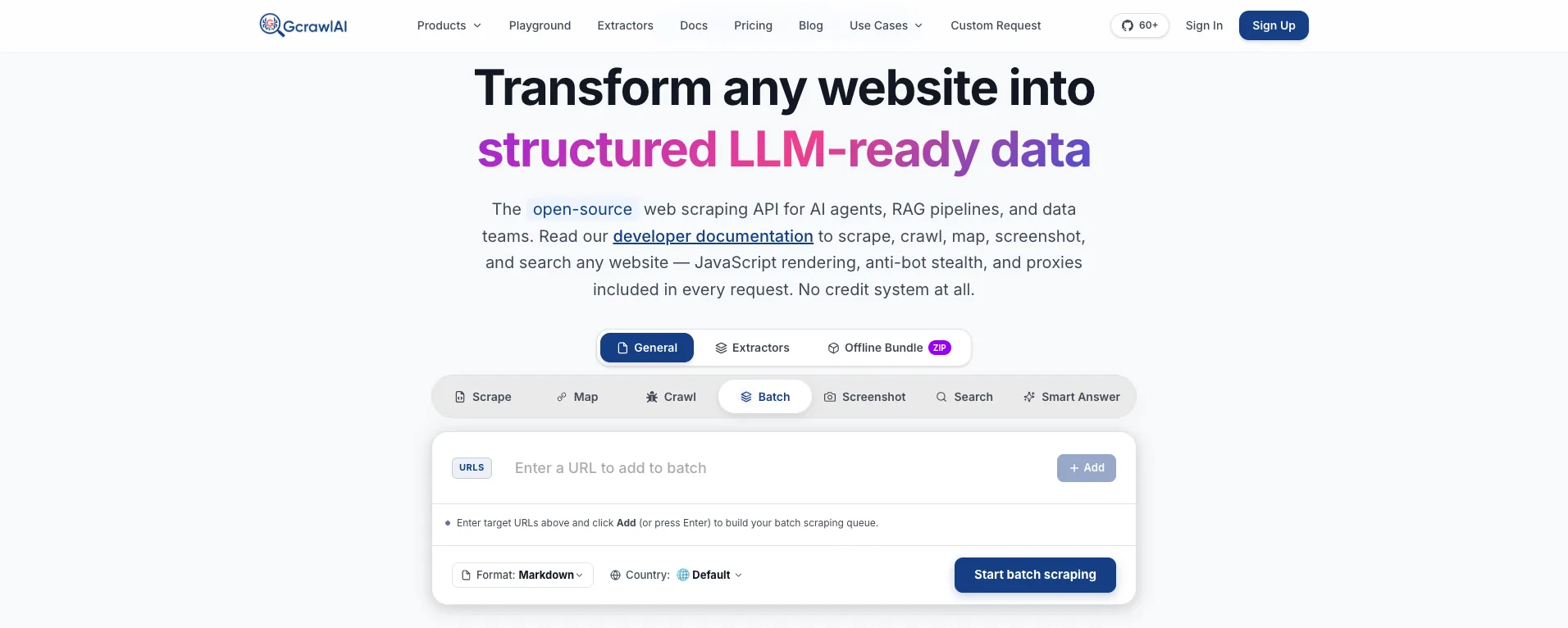
The homepage puts it plainly: JavaScript rendering, anti-bot stealth and proxies are included in every request, with no credit system. For this job that means the browser, the residential IP and the session that the site's own JavaScript expects all come with the one request, and you don't have to reverse-engineer how the signature is made.
Many framework sites embed their data in the rendered page, so the same extraction you'd run on a plain HTML response works on what GcrawlAI returns. You also get the page as Markdown when there's no embedded JSON to read:
# pip install gcrawl-sdk parsel
"""When the hidden API is signed or blocked, let GcrawlAI render the page in a real browser,
then read the same embedded JSON from the HTML it returns."""
import json
import os

from gcrawl_sdk import GcrawlClient, ScrapeOptions
from parsel import Selector

gc = GcrawlClient(api_key=os.getenv("GCRAWL_API_KEY", "gc-YOUR_API_KEY"))


def page_data(url: str, geo: str = "US") -> dict:
    page = gc.scrape(url=url, options=ScrapeOptions(html_enabled=True, html_clean=False,
                                                    markdown_enabled=True, proxy_geo=geo), wait=True)
    sel = Selector(page.html or "")
    data = {"markdown": page.markdown}                              # the rendered page as text, always
    if blob := sel.css("script#__NEXT_DATA__::text").get():          # framework state, if the site embeds it
        data["next_data"] = json.loads(blob)["props"]["pageProps"]
    data["json_ld"] = [json.loads(b) for b in sel.css('script[type="application/ld+json"]::text').getall()]
    return data


if __name__ == "__main__":
    print(json.dumps(page_data("https://example.com/product/123"), indent=2)[:600])
- Rendering and access: a real browser through residential IPs in the country you choose, with stealth escalation and retries inside the request.
- Structured output: HTML, Markdown or JSON, and extractors that return structured fields for common page types.
- Scrape, crawl, screenshots and Search API: scrape single pages, crawl whole sites, capture screenshots, or use the Search API.
- For developers and AI agents: a Python SDK, an MCP server for Claude, Cursor and other agents, the Playground to test a page whose API you can't replay, and the docs.
The MIT-licensed core runs on your own servers if you'd rather own the stack:
git clone https://github.com/GramosoftAI/GcrawlAI.git && cd GcrawlAI
python -m venv .venv && source .venv/bin/activate
pip install -r requirements.txt && playwright install
cp .env.example .env                      # add your database, Redis and proxy settings
python -m api.core.db_setup
redis-server &
celery -A web_crawler.crawler.celery_config worker -l info &
uvicorn api.api:app --port 8000
Pricing is a free plan of 50 requests a month with no card, paid plans from $0.67 to $1.45 per 1,000 requests, and a self-hosted core that costs nothing. The plan table is in the cost section.
Where it falls short: GcrawlAI returns the rendered page, not the raw response of the site's internal API, so you read the data from embedded JSON, HTML or Markdown. It won't log in for you, and it costs more per page than a working hidden API call. Use it for the endpoints you can't replay, not the ones you can.
"The first question we ask on any new target is where the page gets its data. Half the time the answer is a clean JSON endpoint, and the scraper becomes a twenty-line loop. We only reach for a browser when that endpoint is signed or guarded."
Rajesh Kannan, Co-Founder & CTO at Gramosoft
Why the data isn't in the HTML
Sites built with React, Vue, Angular, Next.js or Nuxt often send a near-empty HTML document first, then run JavaScript that calls backend endpoints and paints the results into the page. Your HTTP client stops after the first response. The browser keeps going and makes the second, third and fourth requests that carry the actual data.
You can check in a few seconds. Right-click the page and choose View Page Source, not Inspect. Source shows the raw HTML your script receives; Inspect shows the DOM after JavaScript ran. If source shows an empty <div id="root">, a stack of <script> tags or a request to enable JavaScript, the data is loaded later.
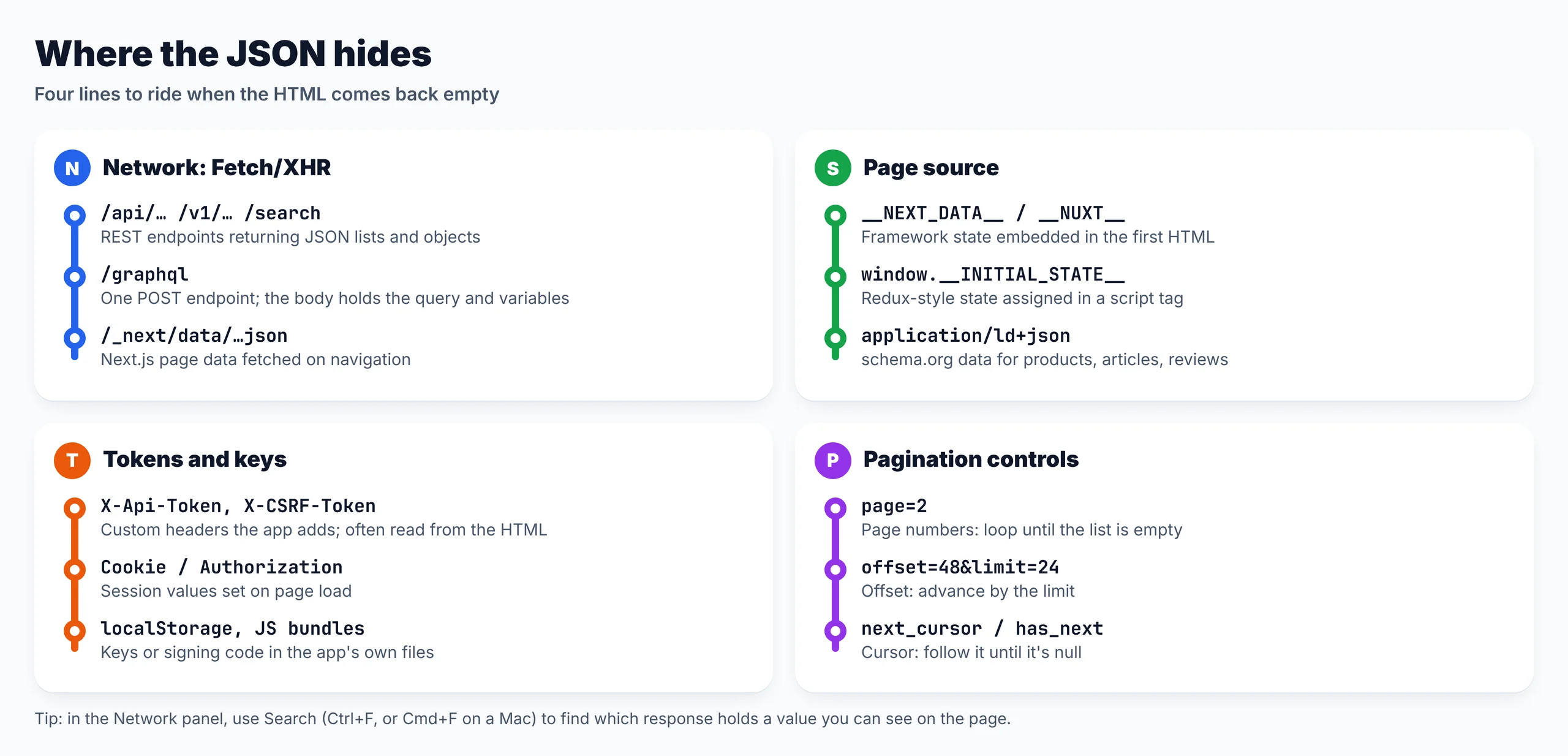
- Background requests: Fetch or XHR calls to JSON or GraphQL endpoints after the page loads.
- Embedded JSON: data shipped inside the first HTML, in
__NEXT_DATA__,window.__INITIAL_STATE__or JSON-LD. - A mix of both: the first screen embedded, the rest fetched as you scroll or click.
Find the request in DevTools
Open the page in Chrome or Firefox, press F12 and switch to the Network tab. Tick Preserve log, reload, and click the Fetch/XHR filter so images, fonts and CSS disappear. Then do what a user does: scroll, click Load more, open a filter. Each new row is a request the page made for you.
- Clear the log first with the clear button, then trigger exactly one action. Fewer rows, easier hunting.
- Search the responses. In the Network panel, use Search (Ctrl+F, or Cmd+F on a Mac) and type a value you can see, such as a product name. It points you to the response that contains it.
- Read the name and size. Paths with
/api/,/v1/,/graphql,/searchor.jsonare strong signals, and data responses are usually larger than tracking calls. - Open Preview or Response to confirm the JSON holds your fields, then check Headers and Payload for the method, query parameters and body.
- Right-click, Copy, Copy as cURL to take the whole request with you.
Here's what Copy as cURL gave us for the product list in our lab store. Every header the browser sent comes along, most of them unnecessary:
# What "Copy as cURL" gave us for the lab store's product request (token shortened)
curl 'http://127.0.0.1:8770/api/products?limit=12&cursor=MTI=' \
  -H 'Accept: application/json' \
  -H 'Referer: http://127.0.0.1:8770/' \
  -H 'User-Agent: Mozilla/5.0 (X11; Linux x86_64) AppleWebKit/537.36 (KHTML, like Gecko) HeadlessChrome/141.0.0.0 Safari/537.36' \
  -H 'X-Api-Token: 1793760000.3f9c2a…' \
  -H 'X-Requested-With: XMLHttpRequest' \
  -H 'sec-ch-ua: "Chromium";v="141", "Not?A_Brand";v="8"' \
  -H 'sec-ch-ua-mobile: ?0' \
  -H 'sec-ch-ua-platform: "Linux"'
Find hidden APIs automatically with Playwright
Clicking through DevTools works for one site. For many, let a script do the watching. Playwright can load the page, act like a user, and record every response that came back as JSON, then rank them by whether they contain a value you saw on screen. The best candidate is usually at the top.
"""Find the JSON behind a page automatically: load it in a browser, act like a user, and record every
response that came back as JSON. Ranks them by whether they contain a value you can see on the page.
pip install playwright && playwright install chromium"""
import json, sys
from urllib.parse import urlparse
from playwright.sync_api import sync_playwright

URL = sys.argv[1] if len(sys.argv) > 1 else "http://127.0.0.1:8770/"
SEEN_ON_PAGE = sys.argv[2] if len(sys.argv) > 2 else "Trail Shoe 13"     # a value you can see after loading more


def sniff(url, needle, clicks=4):
    found = []

    def on_response(resp):
        if "json" not in resp.headers.get("content-type", ""):
            return
        req = resp.request
        try:
            body = resp.text()
        except Exception:
            return
        found.append({"method": req.method, "url": resp.url, "status": resp.status, "bytes": len(body),
                      "has_value": needle in body, "keys": list(json.loads(body))[:4] if body.startswith("{") else [],
                      "headers": req.headers, "post_data": req.post_data})

    with sync_playwright() as p:
        browser = p.chromium.launch()
        page = browser.new_page()
        page.on("response", on_response)
        page.goto(url, wait_until="networkidle")
        for _ in range(clicks):                                # behave like a user: load more results
            more = page.get_by_role("button", name="Load more")
            if not more.is_visible():
                break
            n = page.locator("li.product").count()
            more.click()
            page.wait_for_function(f"document.querySelectorAll('li.product').length > {n}")
        browser.close()
    return sorted(found, key=lambda r: (not r["has_value"], -r["bytes"]))


if __name__ == "__main__":
    hits = sniff(URL, SEEN_ON_PAGE)
    for r in hits:
        u = urlparse(r["url"])
        print(f"{'*' if r['has_value'] else ' '} {r['method']:4} {r['status']} {r['bytes']:>6} B  {u.path}?{u.query}  keys={r['keys']}")
    json.dump(hits, open("captured.json", "w"), indent=2)
    print(f"{len(hits)} JSON responses saved to captured.json (* = contains '{SEEN_ON_PAGE}')")
Run against our lab store, it found the product endpoint and a GraphQL call the page made in the background:
* GET  200    988 B  /api/products?limit=12&cursor=MTI=  keys=['items', 'next_cursor']
  GET  200   1000 B  /api/products?limit=12&cursor=MzY=  keys=['items', 'next_cursor']
  GET  200    999 B  /api/products?limit=12&cursor=NDg=  keys=['items', 'next_cursor']
  GET  200    993 B  /api/products?limit=12&cursor=MjQ=  keys=['items', 'next_cursor']
  GET  200    980 B  /api/products?limit=12  keys=['items', 'next_cursor']
  POST 200    364 B  /graphql?  keys=['data']
6 JSON responses saved to captured.json (* = contains 'Trail Shoe 13')
The cursor values in those URLs (MTI=, MjQ=) are base64 for 12 and 24, the offsets of the next page. Reading parameters like that tells you how pagination works before you write any loop. The script also saves each request's headers and body to captured.json for the next step.
Replay the request and trim the headers
Start by replaying the request exactly as the browser sent it, then remove headers one at a time and see which removals break it. Whatever survives is the minimum your scraper needs. Fewer headers mean less to keep in sync when the site changes, and a clearer picture of what the endpoint actually checks.
"""Trim a captured request to the headers that matter: replay it with everything the browser sent,
then drop one header at a time and see which removals break it. Uses captured.json from find_api.py.
pip install httpx"""
import json, sys, time
import httpx

hits = json.load(open("captured.json"))
req = next(h for h in hits if h["has_value"])                   # the request that carried the page's data
browser_headers = {k: v for k, v in req["headers"].items() if not k.startswith(":")}


def works(headers):
    r = httpx.get(req["url"], headers=headers, timeout=10)
    ok = r.status_code == 200 and "items" in r.text               # check the shape, not just the status
    return ok, r.status_code


print(f"full request ({len(browser_headers)} headers):", works(browser_headers))
needed = []
for name in sorted(browser_headers):
    trimmed = {k: v for k, v in browser_headers.items() if k != name}
    ok, status = works(trimmed)
    print(f"  without {name:18} -> {status} {'still works' if ok else 'BREAKS'}")
    if not ok:
        needed.append(name)
minimal = {k: browser_headers[k] for k in needed}
print("minimal set:", sorted(minimal), "->", works(minimal))

if "--wait" in sys.argv:                                         # tokens expire: replay the same request later
    time.sleep(65)
    print("same minimal request 65 s later ->", works(minimal))
full request (8 headers): (True, 200)
  without accept             -> 406 BREAKS
  without referer            -> 200 still works
  without sec-ch-ua          -> 200 still works
  without sec-ch-ua-mobile   -> 200 still works
  without sec-ch-ua-platform -> 200 still works
  without user-agent         -> 200 still works
  without x-api-token        -> 403 BREAKS
  without x-requested-with   -> 200 still works
minimal set: ['accept', 'x-api-token'] -> (True, 200)
same minimal request 65 s later -> (False, 403)
Only two of the eight headers mattered: Accept, without which the endpoint refused to answer, and X-Api-Token. The last line is the important one. The same minimal request, replayed 65 seconds later, failed with 403 because the token had expired. A copied cURL command works once; a scraper has to know where the token comes from.
- Accept, Referer and User-Agent: some endpoints check them; send what the browser sent if removing them breaks the call.
- Custom
X-headers: app-specific tokens and CSRF values, usually set by the page's own JavaScript. - Cookies and
Authorization: session values issued on page load; they expire, which is the most common reason yesterday's script returns 401 or 403 today.
Find where tokens come from
A short-lived token has to be issued somewhere the browser can read it, which means your scraper can usually read it too. Search the page source for the token's value: in our store it sat in a window.__CONFIG__ script on the HTML page. Cookies, local storage and the app's JavaScript bundles are the other usual places.
| Symptom on replay | Likely cause | Fix |
|---|---|---|
| 403 or 401 after it worked once | Token or session cookie expired | Read a fresh one from the page, retry once |
| 406 or an HTML page instead of JSON | Missing Accept: application/json |
Send the header the browser sent |
| 200 with empty or different JSON | A parameter or header got dropped | Compare your request with the browser's, field by field |
| Signature or timestamp error | A value computed by the app's JavaScript | Render the page instead of rebuilding the signature |
| 404 | Endpoint renamed after a release | Find it again in the Network tab |
| 429 | Too many requests | Slow down and back off |
When the value is computed rather than issued, you'll see it change with every request and find no copy of it in the HTML. Rebuilding that logic from minified code is possible, but it breaks with every release. That's the point where rendering the page is cheaper than reverse-engineering it.
Paginate through the API
The page shows a Load more button; the API behind it has a cleaner control. Compare the first and second requests in the Network tab to see which pattern it uses, then loop on that instead of clicking. This script follows the cursor, refreshes the token on 403 and checks each response's shape:
"""Scrape the store through its hidden JSON API: read the short-lived token from the HTML,
follow the cursor to the end, refresh the token when it expires, and check every page's shape.
pip install httpx"""
import json, re
import httpx

BASE = "http://127.0.0.1:8770"


def fresh_token(client):
    html = client.get(f"{BASE}/").text
    return json.loads(re.search(r"window\.__CONFIG__ = (\{.*?\});", html).group(1))["apiToken"]


def all_products(limit=24):
    with httpx.Client(timeout=15, headers={"Accept": "application/json"}) as client:
        token, cursor, rows = fresh_token(client), None, []
        while True:
            params = {"limit": limit, **({"cursor": cursor} if cursor else {})}
            r = client.get(f"{BASE}/api/products", params=params, headers={"X-Api-Token": token})
            if r.status_code == 403:                         # token expired: get a new one, retry once
                token = fresh_token(client)
                r = client.get(f"{BASE}/api/products", params=params, headers={"X-Api-Token": token})
            r.raise_for_status()
            data = r.json()
            if not isinstance(data.get("items"), list) or "next_cursor" not in data:
                raise ValueError(f"unexpected shape: {list(data)}")   # a 200 can still be the wrong JSON
            rows += data["items"]
            cursor = data["next_cursor"]
            if not cursor:
                return rows


if __name__ == "__main__":
    rows = all_products()
    print(len(rows), "products;", rows[0])
    print("fields:", sorted(rows[0]))
60 products; {'id': 1, 'name': 'Trail Shoe 01', 'price': 50.5, 'stock': 7, 'rating': 3.1}
fields: ['id', 'name', 'price', 'rating', 'stock']
- Page numbers (
page=2): increase until the list comes back empty. - Offset and limit (
offset=48&limit=24): advance by the limit. Many endpoints cap the limit; ours allowed 24 even though the page asked for 12. - Cursor (
next_cursor,has_next): pass the value from each response into the next until it's null. It's the most reliable of the three on large lists.
Asking for bigger pages is worth trying: our scraper used 24 items per request, half the number of calls the page itself made. Don't push past what the browser could ask for, though, and stop when the API says there's nothing more.
Check for embedded JSON first
Sometimes there's no second request to find. Framework sites often put the first view's data in the HTML they send, inside a script tag the page reads on startup. If your data is there, one plain request and a JSON parse are all you need, with no headers, tokens or pagination to manage.
"""Sometimes there's no second request to find: the first HTML already carries the data.
Pull it out of __NEXT_DATA__, JSON-LD and window.__STATE__-style assignments. pip install httpx parsel"""
import json, re
import httpx
from parsel import Selector

html = httpx.get("http://127.0.0.1:8770/", timeout=15).text
page = Selector(html)

next_data = page.css("script#__NEXT_DATA__::text").get()          # Next.js
if next_data:
    props = json.loads(next_data)["props"]["pageProps"]
    print("__NEXT_DATA__:", len(props["products"]), "products of", props["total"])

for block in page.css('script[type="application/ld+json"]::text').getall():   # schema.org
    item = json.loads(block)
    print("JSON-LD:", item["@type"], item["name"], item["offers"]["price"])

for name, blob in re.findall(r"window\.(__\w+__)\s*=\s*(\{.*?\});", html):   # __INITIAL_STATE__, __CONFIG__, ...
    print(f"window.{name}:", list(json.loads(blob)))
__NEXT_DATA__: 12 products of 60
JSON-LD: Product Trail Shoe 01 50.5
window.__CONFIG__: ['apiToken']
Our store embedded the first 12 of 60 products in __NEXT_DATA__, which is typical: embedded data covers the first screen, and the API covers the rest. JSON-LD is worth checking on product, article and review pages because it follows the schema.org vocabulary, so the same parser works across many sites.
Replay a GraphQL endpoint
GraphQL sites usually expose one endpoint, often /graphql, and every request is a POST whose body names an operation, a query and its variables. You'll find the body under the Payload tab rather than in the URL. To scrape it, keep the query exactly as captured and change only the variables.
"""Replay a GraphQL call: same endpoint, same query, change only the variables. pip install httpx"""
import httpx

QUERY = "query Reviews($page:Int){reviews(page:$page){stars text}}"
with httpx.Client(timeout=15) as client:
    for page in (1, 2, 3):
        r = client.post("http://127.0.0.1:8770/graphql",
                        json={"operationName": "Reviews", "variables": {"page": page}, "query": QUERY})
        reviews = r.json()["data"]["reviews"]                       # GraphQL nests results under "data"
        print(f"page {page}: {len(reviews)} reviews, first: {reviews[0]}")
page 1: 10 reviews, first: {'stars': 2, 'text': 'Review 1'}
page 2: 10 reviews, first: {'stars': 2, 'text': 'Review 11'}
page 3: 10 reviews, first: {'stars': 2, 'text': 'Review 21'}
Results sit under a data key, one level deeper than a typical REST response. Some sites send only a hash of a stored query instead of the full text, so copy the body exactly as the browser sent it. If a query you write yourself is rejected, go back to the captured one.
Our test: hidden API vs headless browser
We built a small local store that behaves like a modern JavaScript site: an empty HTML shell, products loaded from an internal API with a short-lived token, a GraphQL call, embedded __NEXT_DATA__ and JSON-LD. Then we collected all 60 products three ways, five runs each, on November 3, 2026.
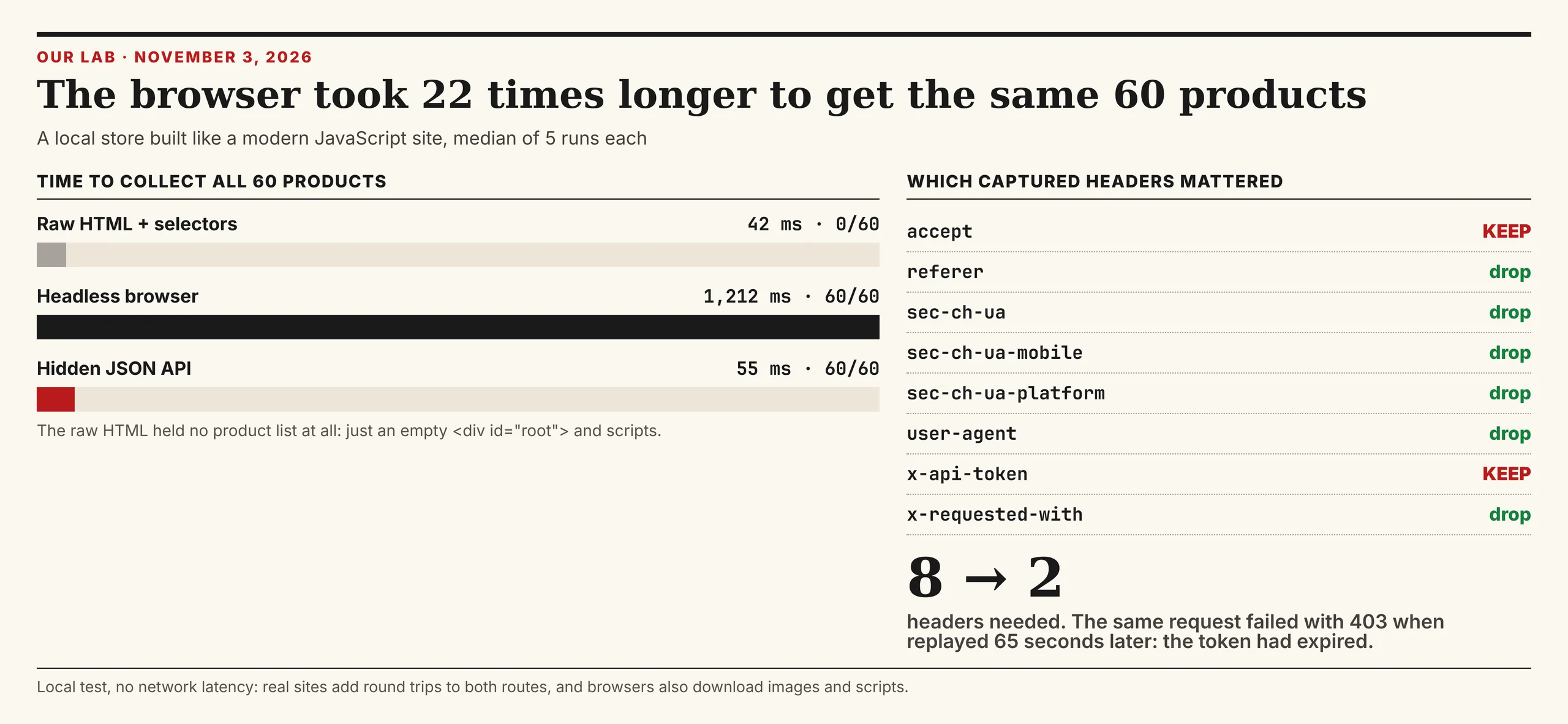
raw HTML + selectors :  0 products     42.5 ms    1515 B
headless browser      : 60 products   1211.9 ms    7860 B
hidden JSON API       : 60 products     54.9 ms    6407 B
Plain HTML parsing found nothing, because the product list isn't in the HTML. The headless browser found everything in a median of 1,212 ms; the hidden API found the same 60 products in 55 ms, about 22 times faster. This was a local test with no network latency, so real sites add time to both routes, and real browsers also download images and scripts our store didn't have.
"The speed gap is the headline, but the expired token is the lesson. Copy as cURL hands you a request that works for a minute. A scraper that lasts knows where every value in that request comes from."
Rajesh Kannan, Co-Founder & CTO at Gramosoft
What scraping protected pages costs
A hidden API you can replay costs almost nothing beyond your own servers. The bill arrives when the endpoint is signed or blocked and you need rendering, residential IPs or a scraping API. For 100,000 successful protected pages a month, credit-based APIs cost $249 to $399 and GcrawlAI costs $101; for plain pages, they're cheaper.
| Option, 100,000 successful pages a month | Plain HTML pages | Protected pages (JS rendering + premium proxies) | Are failed requests billed? |
|---|---|---|---|
| GcrawlAI (every request rendered, residential IPs included) | $101 (Growth $79 + 20,000 overage at $1.10 per 1,000) | $101 (same request, no multiplier) | No: failed requests are never charged |
| ScraperAPI | $49 (Hobby, 100,000 credits) | $299 (Business; 25 credits per page = 2.5M credits) | Charges only 200 and 404 responses |
| ZenRows | $39 (Build B3, 120,000 credits) | $399 (Growth G3; 25 credits per page = 2.5M credits) | Failed requests never charged; 404 and 410 count as successful |
| ScrapingBee | $49 (Freelance, 250,000 credits; JS off) | $249 (Business; 25 credits per page = 2.5M credits) | Charges only 200, 404 and 410 |
List-price arithmetic, not a benchmark. Credit costs and billing rules come from ScraperAPI's credit docs, ZenRows' pricing docs and ScrapingBee's FAQ, checked November 1, 2026. The honest read: a hidden API you can replay beats every option here, and for plain HTML, ZenRows, ScraperAPI and ScrapingBee cost less than GcrawlAI. GcrawlAI wins on protected pages, because rendering, residential IPs and stealth are in the one request.
GcrawlAI plans (GcrawlAI pricing, checked October 28, 2026):
| Plan | Price | Requests/month | Concurrent | Per 1,000 | Overage per 1,000 |
|---|---|---|---|---|---|
| Free | $0 forever, no card | 50 | 2 | – | – |
| Starter | $29/month | 20,000 | 10 | $1.45 | $1.60 |
| Growth (most popular) | $79/month | 80,000 | 35 | $0.99 | $1.10 |
| Pro | $199/month | 250,000 | 50 | $0.80 | $0.90 |
| Scale | $499/month | 750,000 | 100 | $0.67 | $0.75 |
| Enterprise | Volume pricing | 2M+ | Custom | – | – |
| Self-hosted | $0 (MIT) | Your servers | Your servers | Infrastructure only | – |
Every plan, Free included, has scrape, crawl, the Search API, JavaScript rendering, residential IP rotation and stealth escalation in each request, and each feature counts as one request. Failed requests are never charged. Annual billing charges 10 months for 12, unused requests on paid plans roll over once, and Indian customers are billed in INR with a GST invoice.
Which route fits your target
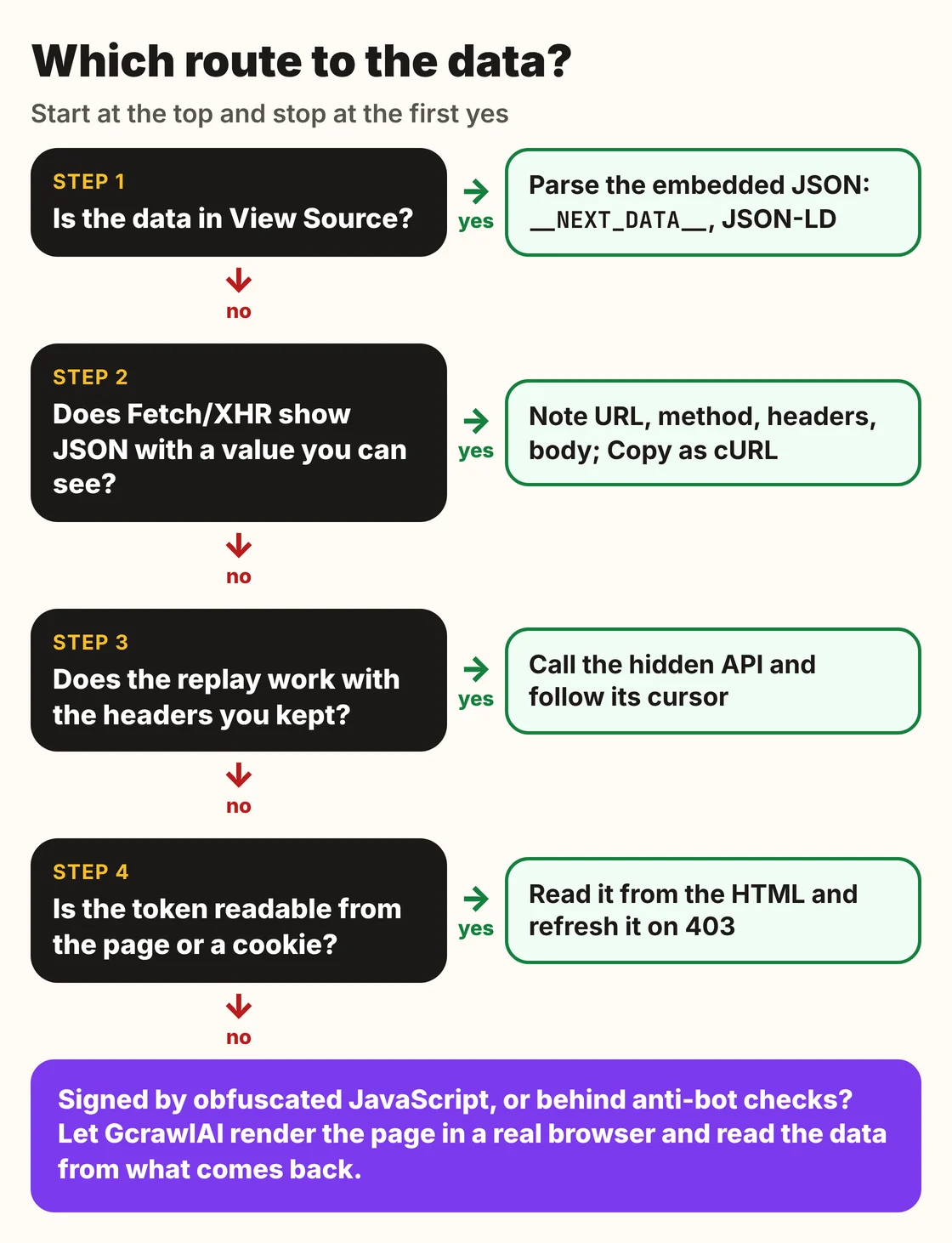
Pick the simplest route that gives you reliable data, and move to the next one only when it fails. Embedded JSON beats an API call, an API call beats a browser, and a browser you run yourself is the most work of all. The table shows where GcrawlAI fits at each step.
| What you see | Route | Where GcrawlAI fits |
|---|---|---|
| Data in View Source | Parse the embedded JSON | Not needed until the page starts blocking; then GcrawlAI returns the same HTML |
| JSON in Fetch/XHR, replays cleanly | Call the hidden API | Keep GcrawlAI as the fallback for the day it stops working |
| Token in the page or a cookie | Read it, refresh it on 403 | GcrawlAI when the token comes with a challenge |
| Signature from obfuscated JavaScript | Render the page | GcrawlAI renders it in a real browser, one request per page |
| API answers in a browser, 403 from your server | Fix IP and handshake | GcrawlAI includes residential IPs and a real browser |
| AI agents need the page | A tool the agent can call | GcrawlAI MCP server with scrape, crawl and Search API |
When a replayed request is all you need
For plenty of sites, the hidden API is the whole job: a token you can read, a cursor to follow and a shape check, run at a polite pace. That costs nothing but your time and keeps working until the site ships a new frontend. Bring in GcrawlAI when replaying stops working and rendering becomes the only reliable route.
Even then you can stay on your own servers: the MIT-licensed GcrawlAI core self-hosts for free, and the free Cloud plan's 50 requests a month are enough to test the pages whose APIs you can't replay. Paste one into the Playground to compare. For the build-or-buy trade-off, read web scraping with Python vs a scraping API.
Is it OK to call a site's hidden API?
A hidden API being reachable isn't the same as being allowed. You're making the same public request the browser makes, but the site's terms, robots.txt, rate limits and the kind of data still matter. Stay on public, unauthenticated endpoints, keep your request rate well under what a busy user generates, and stop when asked.
Don't call endpoints behind a login, don't forge signatures or bypass access controls, and don't collect personal data you have no basis to hold. Check whether the site offers an official API or data export first. For the legal background, read what web scraping is and where it's legal, and get advice for your own case.
Frequently asked questions
What is a hidden API?
An undocumented endpoint a website's own frontend calls in the background to load data, usually JSON over Fetch, XHR or GraphQL. It isn't published for outside developers, but it's the real source of what you see on the page.
How do I find a website's hidden API?
Open DevTools, go to the Network tab, filter to Fetch/XHR, and trigger the data by scrolling, clicking or filtering. Search the responses for a value you can see on the page; the request whose response contains it is your endpoint.
Do I need Selenium or Playwright to scrape a hidden API?
Not to call it: an HTTP client like httpx or requests is enough. A browser helps you discover endpoints automatically, and it's needed when the request depends on values only the page's JavaScript can produce.
Why does my copied cURL command stop working?
Usually because a token or session cookie in it expired. In our test, the same request failed with 403 after 65 seconds. Find where the token comes from, often the page HTML or a cookie, and fetch a fresh one when you get a 401 or 403.
How much faster is a hidden API than a headless browser?
In our local test, the hidden API collected 60 products in 55 ms and a headless browser took 1,212 ms, about 22 times longer. On real sites both routes are slower because of network round trips, and the browser also loads images and scripts.
Is scraping a hidden API legal?
It depends on the site's terms, whether the endpoint needs a login, the type of data and your jurisdiction. Public, unauthenticated endpoints called at a gentle rate carry the least risk. This is general information, not legal advice.
Is GcrawlAI open source, and can I use it commercially?
Related guides
- How to Scrape Dynamic JavaScript Websites with Python (2026 Guide)
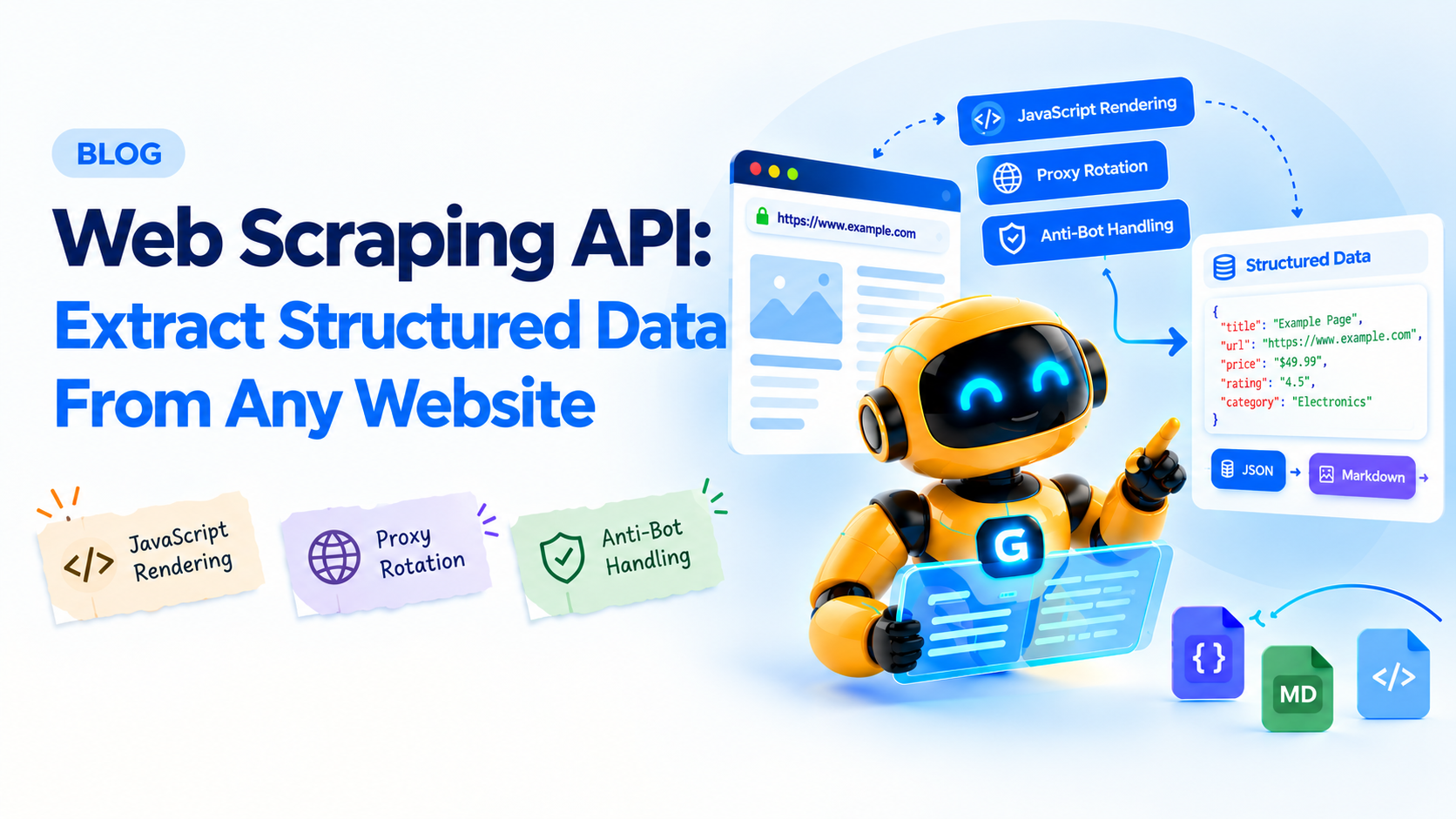
- Extract structured data from any website
- How to Fix 403 Forbidden Errors in Python Requests (2026)
- 429 Too Many Requests: How to Fix It When Web Scraping
- How to Bypass Cloudflare When Web Scraping (2026)
- Python Web Scraping Frameworks Compared: Scrapy vs Crawlee vs Scrapling (2026)
- Web Scraping with Python vs a Scraping API: When to Stop Writing Your Own Scraper
- Web Scraping vs Web Crawling: What's the Difference?
- What Is Web Scraping? How It Works, Uses & Legality