By Rajesh Kannan, Co-Founder & CTO, Gramosoft · Last updated: · Lab results from our own test on November 5, 2026 (Crawl4AI 0.9.5, Playwright, trafilatura, html2text)
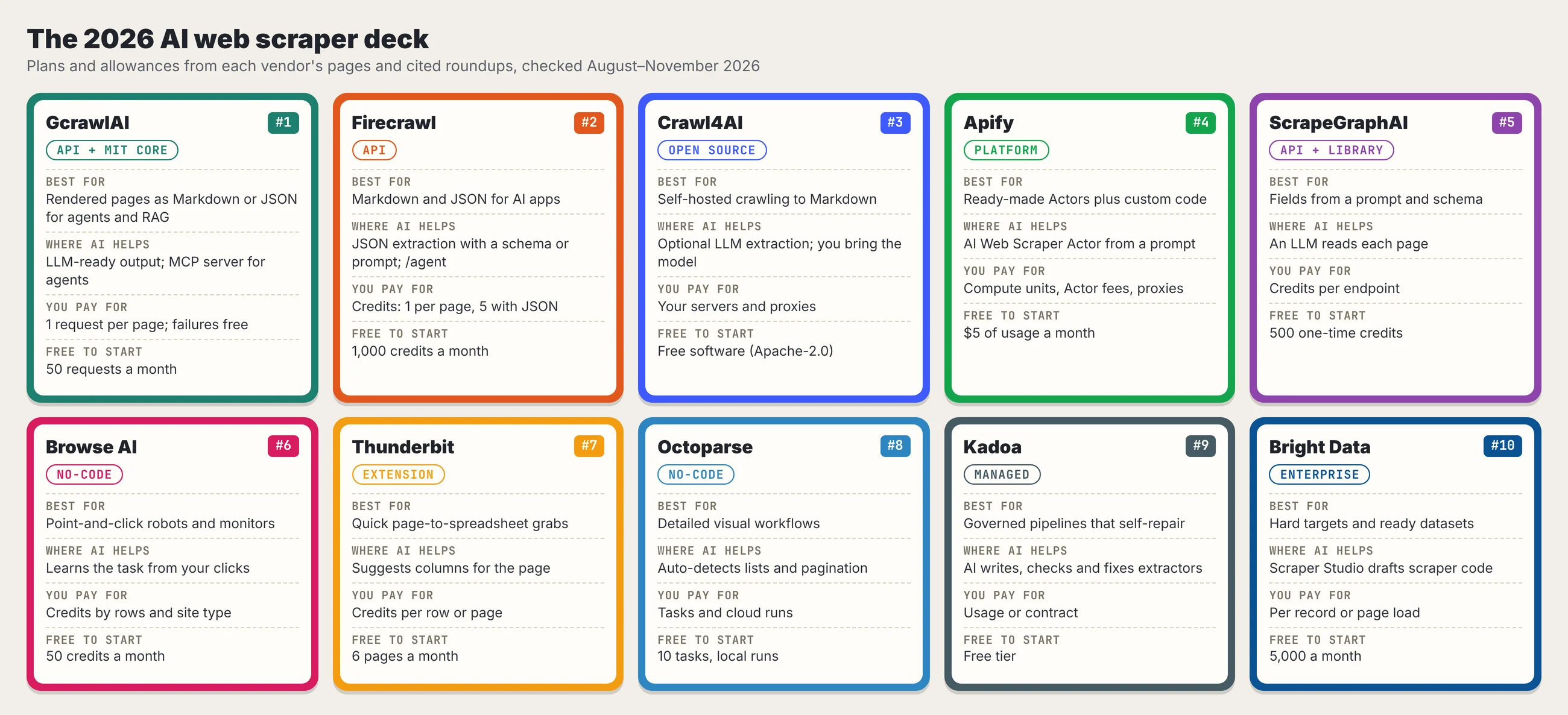
The best AI web scrapers in 2026 are GcrawlAI and Firecrawl for developers feeding AI apps, Crawl4AI for self-hosting, Apify and ScrapeGraphAI for custom extraction, Browse AI, Thunderbit and Octoparse for no-code work, and Kadoa and Bright Data for enterprise pipelines. This guide compares all ten, shows what our lab saw them hand to a model, and explains how to test one before you trust it.
TL;DR
- For AI apps and agents: GcrawlAI renders each page in a real browser and returns Markdown, HTML or JSON for one request per page, with failed requests free. Firecrawl is the other strong API, billed in credits.
- To self-host: Crawl4AI is free and Apache-2.0, but you run the browsers, proxies and fixes.
- Without code: Browse AI for monitoring, Thunderbit for quick spreadsheet grabs, Octoparse for detailed visual workflows.
- What our lab found: plain-HTTP routes and Crawl4AI's defaults kept 6 of 12 facts, because they missed every page built in JavaScript. Waiting for the content fixed it. A saved extraction schema returned 0 of 20 rows after a redesign, and still reported success.
- The real test: check what comes back, not whether the job finished.
What is the best AI web scraper in 2026? It depends on the job. For developers feeding LLMs, RAG pipelines or agents, GcrawlAI returns rendered, LLM-ready pages for one request each, and Firecrawl is the main credit-based alternative. Crawl4AI is the best free self-hosted option. Non-technical teams should start with Browse AI, Thunderbit or Octoparse, and enterprises with governed pipelines should look at Kadoa or Bright Data.
The best AI web scrapers at a glance
| # | Tool | Type | Best for |
|---|---|---|---|
| 1 | GcrawlAI | API, MCP, MIT core | Rendered, LLM-ready pages for agents and RAG |
| 2 | Firecrawl | API | Markdown and schema JSON for AI apps |
| 3 | Crawl4AI | Open source | Self-hosted crawling to Markdown |
| 4 | Apify | Platform | Ready-made Actors plus custom code |
| 5 | ScrapeGraphAI | API and library | Fields from a prompt and a schema |
| 6 | Browse AI | No-code | Point-and-click robots and monitoring |
| 7 | Thunderbit | Chrome extension | Quick page-to-spreadsheet extraction |
| 8 | Octoparse | No-code desktop | Detailed visual workflows |
| 9 | Kadoa | Managed platform | Governed pipelines that repair themselves |
| 10 | Bright Data | Enterprise platform | Hard targets and ready-made datasets |
1. GcrawlAI: rendered, LLM-ready pages for agents and RAG
An AI application needs the page a reader sees, as clean text it can cite. GcrawlAI renders every request in a real browser and returns Markdown, HTML or JSON, so your model, agent or RAG index starts from the finished page rather than an empty JavaScript shell or a pile of menus and footers.
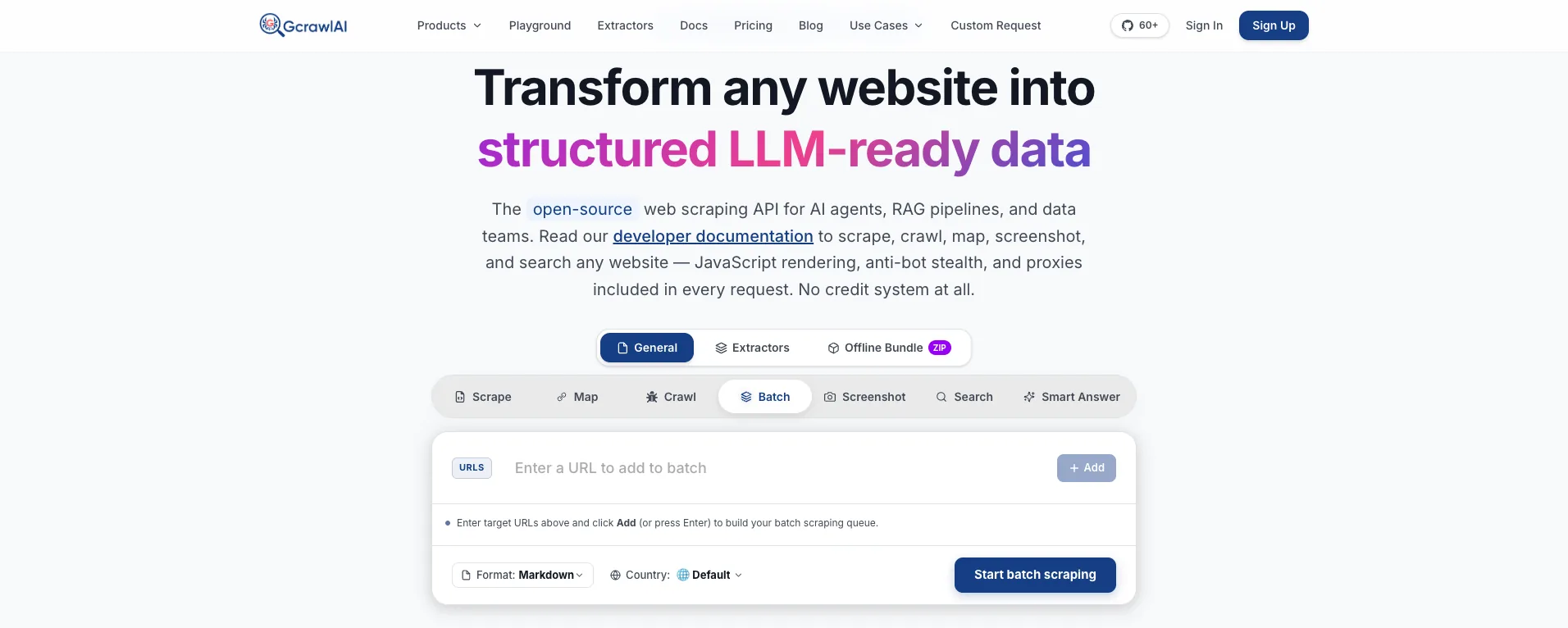
The homepage puts it in one line: JavaScript rendering, anti-bot stealth and proxies come with every request, with no credit system. One page, one search, one extraction or one crawled page each count as a single request, so AI workloads don't hit 5x or 25x multipliers.
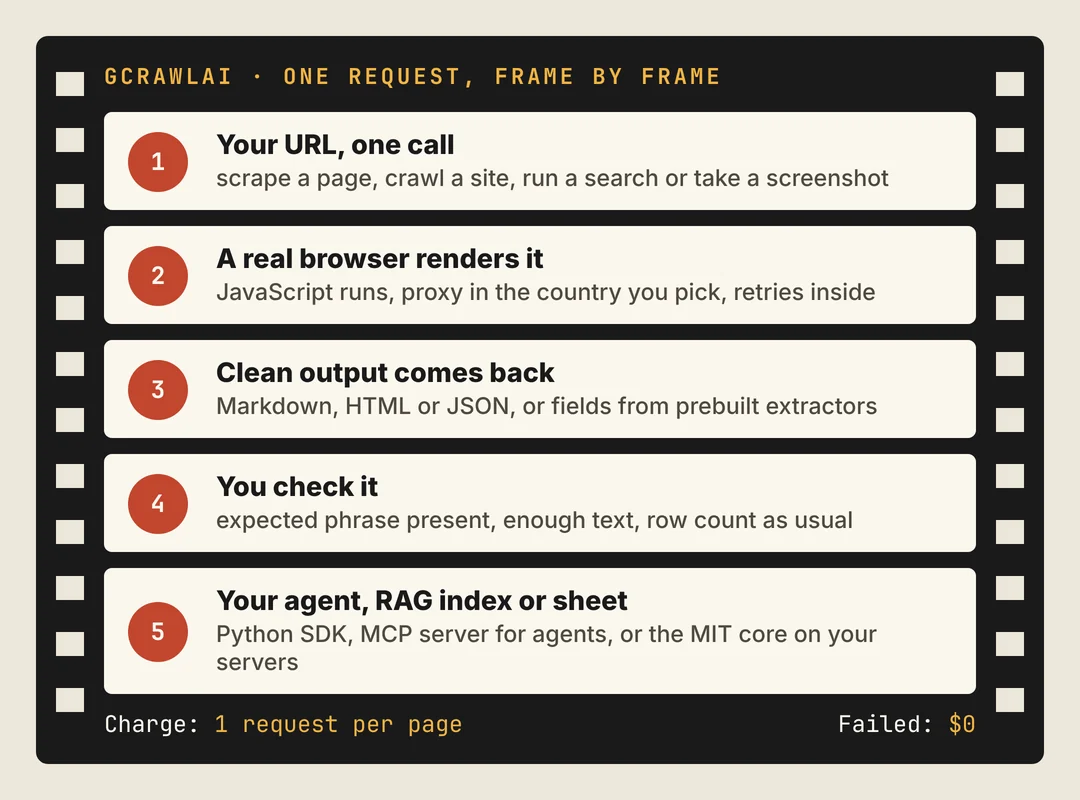
Here's the pattern our lab argues for: render the page, then refuse to pass it on unless the text you expect is there. A short page or a missing phrase gets flagged instead of indexed.
# pip install gcrawl-sdk
"""Render pages to clean Markdown with GcrawlAI and refuse to pass an empty shell downstream.
Each page is one request; failed requests aren't charged."""
import os
from gcrawl_sdk import GcrawlClient, ScrapeOptions

gc = GcrawlClient(api_key=os.getenv("GCRAWL_API_KEY", "gc-YOUR_API_KEY"))
pages = {   # URL -> a phrase that must appear when the page really loaded
    "https://example.com/help/warranty": "warranty",
    "https://example.com/help/shipping": "delivery",
}

for url, must_have in pages.items():
    page = gc.scrape(url=url, options=ScrapeOptions(markdown_enabled=True, proxy_geo="US"), wait=True)
    text = (page.markdown or "").strip()
    if len(text) < 200 or must_have.lower() not in text.lower():
        print(f"CHECK {url}: {len(text)} characters, '{must_have}' missing")   # alert, don't index
        continue
    print(f"OK {url}: {len(text.split())} words of Markdown")
- Rendering and access: a real browser through residential IPs in the country you choose, with retries and stealth escalation inside the request.
- Output for models: Markdown, HTML or JSON, plus prebuilt extractors that return structured fields for common page types.
- Scrape, crawl, screenshots and Search API: scrape pages, crawl whole sites, capture screenshots, or find sources with the Search API.
- For developers and AI agents: a Python SDK, an MCP server for Claude, Cursor and other agents, a Chrome extension, the Playground and the docs.
The MIT-licensed core also runs on your own servers: clone it from GitHub and the setup script in the code download starts the API with Redis and a Celery worker.
Pricing is a free plan of 50 requests a month with no card, paid plans from $0.67 to $1.45 per 1,000 requests, and a self-hosted core that costs nothing. Failed requests are never charged. The full plan table is in the cost section.
Where it falls short: GcrawlAI has no point-and-click builder for non-technical users, and custom extractors beyond the prebuilt ones are an Enterprise option. No service reaches every page, so test your own targets on the free plan. It won't solve CAPTCHAs meant for humans or log in for you.
"The AI part of an AI scraper is the easy demo. The hard part is getting the real page, every time, and noticing the day it quietly stops."
Rajesh Kannan, Co-Founder & CTO at Gramosoft
What counts as an AI web scraper
"AI web scraper" now covers three different products. Some use AI once to build a scraper that then runs on saved rules. Some send every page through a model with a prompt or schema. Others run agents that build, monitor and repair whole pipelines. Each has different costs, speed and failure modes.
- AI-assisted building: AI spots repeated items and drafts the selectors; saved rules run afterwards. Predictable and cheap at volume, as Web Scraper's comparison explains, but rules can break on redesigns.
- Runtime AI extraction: a model reads each page and returns fields. Flexible across layouts, but every page costs inference and can return a confident wrong value.
- Agent-built pipelines: agents generate deterministic extractors, check outputs and repair them when a site changes. Kadoa argues this is the only kind that solves maintenance.
A fourth group, LLM-ready scraping APIs such as GcrawlAI and Firecrawl, focuses on fetching and cleaning the page so your own model or agent does the reading. That's the layer most RAG and agent teams need first, because a model can't extract what never reached it.
The other best AI web scrapers in 2026
The nine tools below cover developer APIs, open source, no-code apps and enterprise platforms. Descriptions and allowances come from each vendor and the roundups linked in each section; prices are collected in the cost section. Rank by the job you're doing: a no-code monitor and a RAG ingestion API solve different problems.
2. Firecrawl: Markdown and schema JSON for AI apps
Firecrawl turns pages into Markdown or schema-defined JSON, with scrape, crawl, map, search, interact and agent endpoints, an MCP server and SDKs in several languages, according to its own roundup. Its JSON extraction costs 5 credits per page against 1 for a basic scrape. Firecrawl concedes credit pricing can be hard to predict for very high-volume crawls, and that self-hosting the open-source version needs DevOps work.
3. Crawl4AI: the free, self-hosted option
Crawl4AI is an Apache-2.0 Python crawler that renders pages with Playwright and outputs Markdown, with CSS, XPath and LLM-based extraction strategies. There's no subscription, but you supply the browsers, proxies, model calls and monitoring. Version 0.9.5 also advertises a hosted Crawl4AI Cloud when you install it. In our lab its defaults returned the "Loading…" shell on JavaScript pages until we told it what to wait for.
4. Apify: Actors for known sites and custom code
Apify runs serverless programs called Actors, with a marketplace of ready-made scrapers and an AI Web Scraper that takes natural-language instructions. A maintained Actor for your exact site can beat asking a model to rediscover it every run. The catch, as Web Scraper notes, is that the bill can include Actor fees, compute, storage, transfer and proxies, and Actor quality varies by author.
5. ScrapeGraphAI: fields from a prompt and a schema
ScrapeGraphAI maps a natural-language request and a JSON schema to structured data, as an open-source library or a hosted API with scrape, extract, search, crawl and monitor endpoints. It handles varied layouts well. Because a model reads every page, cost and accuracy depend on the model, and outputs need validation before you trust them at volume.
6. Browse AI: no-code robots and monitoring
Browse AI records a task from your clicks, turns it into rows and reruns it on a schedule, with alerts, spreadsheets, webhooks and an API. It's strongest for watching pages for changes. BenchLM warns that credit use rises with rows, runs and premium sites, and that a redesign can quietly move a field.
7. Thunderbit: quick grabs into a spreadsheet
Thunderbit is a Chrome extension that suggests columns for a page and exports to Sheets, Airtable or Notion, with pagination and subpage support, plus a separate developer API. Gumloop calls it best for marketplaces and leads. It suits one-off tasks more than scheduled production jobs.
8. Octoparse: detailed visual workflows
Octoparse is a desktop app with a built-in browser and a visual workflow designer for clicks, pagination, scrolling and logins. AI auto-detection drafts the workflow and you refine it. It's powerful for non-coders who need control, but the interface is heavy for simple jobs and its output isn't shaped for LLMs.
9. Kadoa: governed pipelines that repair themselves
Kadoa has agents generate deterministic extractors, validate each run against history and repair the code when a layout changes, with scheduling, monitoring and warehouse delivery. It's aimed at finance and enterprise data teams, so smaller users may find it more than they need.
10. Bright Data: hard targets and ready datasets
Bright Data combines proxy networks, scraper APIs for popular sites, a Browser API and Scraper Studio, which drafts scraper code from a plain-language request. Its Web Scraper API bills per delivered record. The breadth suits enterprises; Firecrawl's roundup flags pricing complexity across products and a cost that can be high for small teams.
Also worth knowing: agent platforms such as Gumloop wrap scraping inside broader workflow automation, and Import.io sells managed data delivery. They're good fits when scraping is a step, not the product.
What our lab saw each route hand to the model
We built an eight-page fictional store site, four pages server-rendered and four that build their text in JavaScript, each with a promo bar, menu, cookie banner, newsletter box and footer. Six page-to-Markdown routes processed it. We counted known facts kept, boilerplate leaked and words per page, then tested a saved extraction schema.
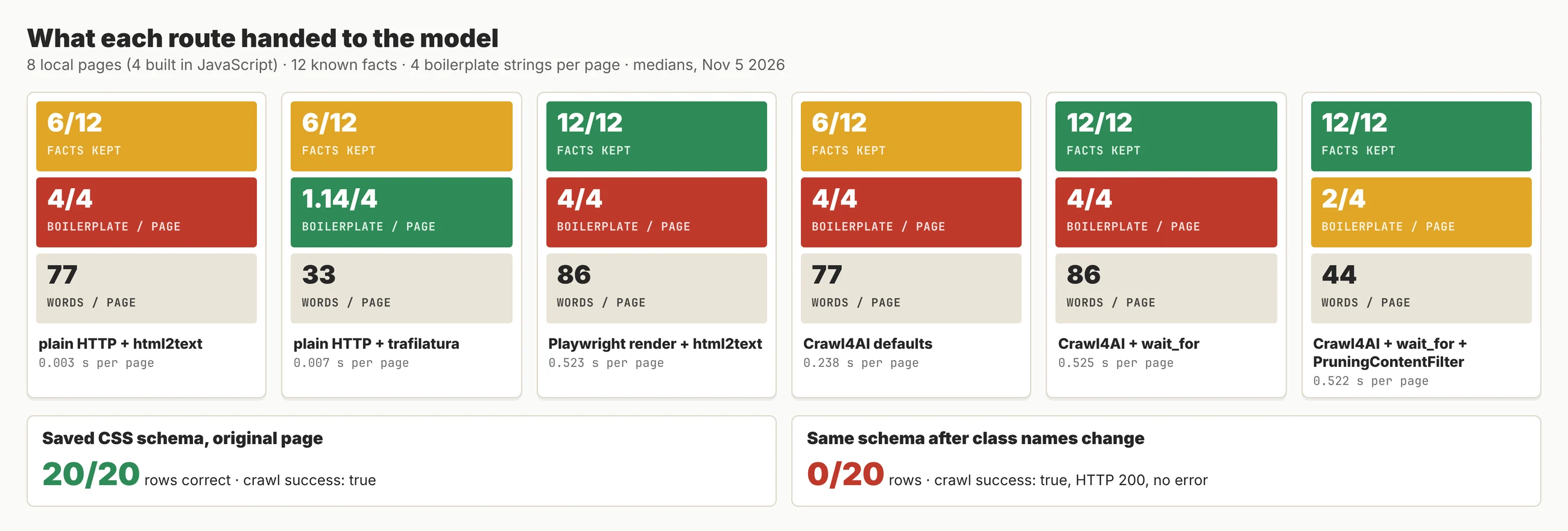
| Route | Facts kept (of 12) | JavaScript-page facts (of 6) | Boilerplate strings per page (of 4) | Words per page | Seconds per page |
|---|---|---|---|---|---|
| Plain HTTP + html2text | 6 | 0 | 4 | 77 | 0.003 |
| Plain HTTP + trafilatura | 6 | 0 | 1.14 | 33 | 0.007 |
| Playwright render + html2text | 12 | 6 | 4 | 86 | 0.52 |
| Crawl4AI defaults | 6 | 0 | 4 | 77 | 0.24 |
| Crawl4AI + wait_for | 12 | 6 | 4 | 86 | 0.53 |
| Crawl4AI + wait_for + PruningContentFilter | 12 | 6 | 2 | 44 | 0.52 |
Three findings matter for choosing a tool. First, rendering in a browser isn't enough on its own: Crawl4AI's defaults returned before our 300 ms script ran and saved "Loading…" for every JavaScript page. Second, cleaning matters as much as rendering: the best route halved the words per page and dropped half the boilerplate while keeping every fact. Third, no route removed everything, so the promo bar and cookie banner still reached the model.
The fix in Crawl4AI is two settings: wait for the real content, then filter the page down to its main text.
# pip install crawl4ai && crawl4ai-setup        (Crawl4AI 0.9.5, Apache-2.0)
"""Render a page that builds its text in JavaScript, wait for the real content, and keep only the main text."""
import asyncio, os
from crawl4ai import AsyncWebCrawler, BrowserConfig, CrawlerRunConfig
from crawl4ai.markdown_generation_strategy import DefaultMarkdownGenerator
from crawl4ai.content_filter_strategy import PruningContentFilter

URL = os.getenv("URL", "https://example.com/help/warranty")   # a page you're allowed to collect

config = CrawlerRunConfig(
    wait_for="css:main p",          # without this, the default returned the "Loading…" shell in our lab
    markdown_generator=DefaultMarkdownGenerator(content_filter=PruningContentFilter()),
)

async def main():
    async with AsyncWebCrawler(config=BrowserConfig(headless=True)) as crawler:
        result = await crawler.arun(URL, config=config)
        print(result.markdown.fit_markdown)

asyncio.run(main())
The second test was worse because it was silent. A Crawl4AI CSS schema read all 20 products correctly from the original page. After we renamed two class names, the same schema returned 0 rows, while the crawl reported success, HTTP 200 and no error. Any tool that runs saved rules can do this, which is why the next section matters.
The lab is deliberately small: one fictional site, local pages, no anti-bot systems and no model extraction. It measures what reaches the model, not answer quality or success rates on protected sites. The scripts and results are in the code download.
"Zero rows with a green tick is the most expensive bug in scraping. Nobody gets paged, and the dashboard just goes flat."
Rajesh Kannan, Co-Founder & CTO at Gramosoft
How to test an AI web scraper before you trust it
A polished demo proves a tool worked on one page once. Before you commit, run every shortlisted tool on the same 20 or so pages, including the awkward ones, and judge the data, not the job status. Our lab's silent zero-row result is exactly what this catches.
- Include hostile pages: a JavaScript-built card, pagination or "load more", duplicate mobile and desktop markup, a changed label and one deliberate outlier, as BenchLM suggests.
- Check per field, per run: did price parse on roughly as many items as last time? A Reddit practitioner in r/AI_Agents put it well: check fields, not "did the job exit 0".
- Keep evidence: store the source URL, fetch time and raw capture next to each record, so a disputed value can be traced.
- Count cost per accepted record: total cost divided by complete, correct records, the measure Web Scraper recommends over headline prices.
- Log what the deployed scraper sees: a scraper that works locally can get a block page from a data-centre IP. Log the raw HTML, not just the parsed output.
What this guide doesn't cover
This guide compares tools for collecting public web data for AI use. It doesn't rank model accuracy for extraction, and we didn't run a head-to-head success-rate test against protected sites, so vendor claims about anti-bot success stay unverified here. Our lab used local pages only, without logins or anti-bot systems.
It also doesn't cover getting around protections. If a site blocks automated access, shows a CAPTCHA or puts content behind a login, ask for access, use an official API or license the data.
What AI web scrapers cost
AI scrapers bill in incompatible units: requests, credits, compute units, rows, records or tasks. Compare them on the same workload. For 100,000 successful protected pages a month, credit-based scraping APIs cost $249 to $399 at list price, and GcrawlAI costs $101, with failed requests free.
| Option, 100,000 successful pages a month | Plain HTML pages | Protected pages (JS rendering + premium proxies) | Are failed requests billed? |
|---|---|---|---|
| GcrawlAI (every request rendered, residential IPs included) | $101 (Growth $79 + 20,000 overage at $1.10 per 1,000) | $101 (same request, no multiplier) | No: failed requests are never charged |
| ScraperAPI | $49 (Hobby, 100,000 credits) | $299 (Business; 25 credits per page = 2.5M credits) | Charges only 200 and 404 responses |
| ZenRows | $39 (Build B3, 120,000 credits) | $399 (Growth G3; 25 credits per page = 2.5M credits) | Failed requests never charged; 404 and 410 count as successful |
| ScrapingBee | $49 (Freelance, 250,000 credits; JS off) | $249 (Business; 25 credits per page = 2.5M credits) | Charges only 200, 404 and 410 |
List-price arithmetic, not a benchmark. Credit costs and billing rules come from ScraperAPI's credit docs, ZenRows' pricing docs and ScrapingBee's FAQ, checked November 1, 2026. The honest read: for plain HTML, ZenRows, ScraperAPI and ScrapingBee cost less than GcrawlAI, and Firecrawl's Standard plan ($99 for 100,000 basic-page credits) is about the same. The gap opens on structured output: at 5 credits per JSON page, 100,000 Firecrawl extractions need 500,000 credits, the $399 Growth plan.
Entry prices for the other AI scrapers (from the sources linked; units differ, so test your own workload):
| Tool | Free to start | Paid from | What you pay for | Source |
|---|---|---|---|---|
| Firecrawl | 1,000 credits a month | $19/month (5,000 credits); Standard $99 (100,000) | Credits: 1 per page, 5 with JSON | Firecrawl, Nov 2, 2026 |
| Crawl4AI | Free software | No subscription | Your servers, proxies and model calls | Web Scraper, Aug 20, 2026 |
| Apify | $5 of usage a month | Starter $19/month + $0.20 per compute unit | Compute, Actor fees, proxies | Firecrawl, Nov 2, 2026 |
| ScrapeGraphAI | 500 one-time credits | $20/month (10,000 credits) | Credits per endpoint | Web Scraper, Aug 20, 2026 |
| Browse AI | 50 credits a month, 2 domains | $19/month billed annually | Credits by rows and site type | Gumloop, Oct 6, 2026 |
| Thunderbit | 6 pages a month | $15/month (500 credits) | Credits per row or page | Gumloop, Oct 6, 2026 |
| Octoparse | 10 tasks, local runs | $83/month ($69 billed annually) | Tasks and cloud runs | Gumloop, Oct 6, 2026 |
| Kadoa | Free tier | $99/month | Usage-based credits | Kadoa, Jan 13, 2026 |
| Bright Data | 5,000 records a month | $1.50 per 1,000 records, pay as you go | Delivered records | Firecrawl, Nov 2, 2026 |
GcrawlAI plans (GcrawlAI pricing, checked October 28, 2026):
| Plan | Price | Requests/month | Concurrent | Per 1,000 | Overage per 1,000 |
|---|---|---|---|---|---|
| Free | $0 forever, no card | 50 | 2 | – | – |
| Starter | $29/month | 20,000 | 10 | $1.45 | $1.60 |
| Growth (most popular) | $79/month | 80,000 | 35 | $0.99 | $1.10 |
| Pro | $199/month | 250,000 | 50 | $0.80 | $0.90 |
| Scale | $499/month | 750,000 | 100 | $0.67 | $0.75 |
| Enterprise | Volume pricing | 2M+ | Custom | – | – |
| Self-hosted | $0 (MIT) | Your servers | Your servers | Infrastructure only | – |
Every plan, Free included, has scrape, crawl, the Search API, JavaScript rendering, residential IP rotation and stealth escalation in each request, and each feature counts as one request. Failed requests are never charged. Annual billing charges 10 months for 12, unused requests on paid plans roll over once, and Indian customers are billed in INR with a GST invoice.
Which AI web scraper fits your job
Start with who will run it and where the data goes. Developers feeding models want an API with clean output; operations teams want a no-code tool they can repair themselves; data teams want governed pipelines. The table shows the best route for each job and where GcrawlAI fits alongside it.
| Your job | Start with | Where GcrawlAI fits |
|---|---|---|
| Pages for a RAG index or an AI agent | GcrawlAI | Rendered Markdown per page, crawl for whole sites, MCP for agents |
| Structured fields at volume | GcrawlAI or Firecrawl | JSON and prebuilt extractors at one request each, no 5x JSON charge |
| Self-hosted, full control | Crawl4AI | The MIT GcrawlAI core self-hosts too, with the Cloud as a managed option |
| Many known sites, ready-made scrapers | Apify | Use GcrawlAI extractors and scrape for sites without a maintained Actor |
| No-code monitoring or quick spreadsheet grabs | Browse AI, Thunderbit or Octoparse | The GcrawlAI Chrome extension and Playground for one-off pages |
| Governed enterprise pipelines | Kadoa or Bright Data | GcrawlAI Enterprise with volume pricing and custom extractors |
| Fresh answers from the live web | Search plus scrape | GcrawlAI Search API, then scrape the results |
When your own code is enough
Many jobs don't need AI at all. If the data sits in the HTML or a JSON endpoint, requests or httpx plus a parser is faster and cheaper than any tool here. Use a model only where layouts vary or the text is unstructured, and keep it out of the per-page loop when a saved rule will do.
When you need rendering, clean Markdown or structured fields without running browsers, send those pages to GcrawlAI and keep your checks. The free Cloud plan's 50 requests a month are enough to test your real targets, the Playground shows the output without code, and the MIT core self-hosts for free. For the build-or-buy trade-off, read web scraping with Python vs a scraping API.
Using AI web scrapers responsibly
AI changes how a page is read, not whether you're allowed to collect it. Read the site's terms and robots.txt, prefer official APIs or licensed data, stay on public pages, keep request rates low, and don't collect personal data you have no lawful basis to hold. When a site shows a CAPTCHA, stop and ask for access.
Keep a source URL and fetch time on every record, so AI outputs can be traced back and corrected. For the rules sites publish, read how to check if a website allows scraping, and for the legal background, what web scraping is and where it's legal.
"Pick the scraper your team will actually check every week. A tool nobody watches is just a slower way to collect wrong data."
Rajesh Kannan, Co-Founder & CTO at Gramosoft
Frequently asked questions
What is the best AI web scraper in 2026?
There's no single winner. For developers feeding LLMs, RAG or agents, GcrawlAI returns rendered, LLM-ready pages for one request each, and Firecrawl is the main credit-based alternative. Crawl4AI is the best free self-hosted option. Browse AI, Thunderbit and Octoparse suit non-coders, and Kadoa and Bright Data suit enterprise pipelines.
What is the best AI web scraper for RAG?
One that renders JavaScript and returns clean Markdown with the source URL. In our lab, routes that didn't wait for JavaScript lost half the facts, and the best cleaning halved the words per page. GcrawlAI, Firecrawl and a tuned Crawl4AI all fit; test them on your own pages.
Can ChatGPT or Claude scrape websites?
They can read pages they're given or fetch some through tools, but they don't replace rendering, retries, proxies, scheduling or validation. Pair the model with a scraper that fetches the page, then let the model read or extract from the clean text. An MCP server, such as GcrawlAI's, gives an agent that scraping tool directly.
Do AI web scrapers hallucinate data?
Model-based extraction can return a plausible value the page doesn't support. Constrain outputs with a schema, keep the source text, and validate required fields. Rule-based extraction has the opposite risk: in our lab a saved schema returned zero rows after a redesign while reporting success.
What is the best free AI web scraper?
Crawl4AI is free and open source if you run the infrastructure. GcrawlAI's core is MIT licensed for self-hosting, and its Cloud has a free plan of 50 requests a month. Firecrawl gives 1,000 free credits a month, and Browse AI, Thunderbit and Octoparse have small free plans.
Do AI scrapers stop scrapers from breaking?
No. AI can detect fields, regenerate selectors or suggest repairs, but sites still change navigation, markup and access rules. Production jobs still need per-field checks, alerts on empty results and a way to fix the extractor.
Is GcrawlAI open source, and does it work with AI agents?
Related guides
- 9 Best Firecrawl Alternatives in 2026: Scraping APIs, Open Source and Agent Tools
- 9 Best Octoparse Alternatives in 2026: No-Code Tools to Scraping APIs
- 9 Best Apify Alternatives in 2026: Scraping Without Compute Units
- Best Open-Source Web Crawlers in 2026 (Self-Hosted)
- Website Data for LLM: How to Extract Clean, Token-Efficient Web Data for AI & RAG (2026 Guide)
- Extract Structured Data from Any Website
- Model Context Protocol (MCP) Web Scraping: How to Connect AI Agents to the Live Web
- How to Scrape Dynamic JavaScript Websites with Python (2026 Guide)