Website Data for LLM: How to Extract Clean, Token-Efficient Web Data for AI & RAG (2026 Guide)
Whether you are building an enterprise Retrieval-Augmented Generation (RAG) pipeline, an autonomous research agent in Claude or Cursor, or a domain-specific AI copilot, your model is only as accurate as the website data for LLM grounding you feed into its context window.
Yet most engineering teams make a costly mistake when collecting web data for large language models: they use legacy HTTP scrapers (like requests, BeautifulSoup, or raw Puppeteer dumps) and pass uncleaned HTML or flattened text strings directly into embeddings and prompts.
The result? A single 150 KB web page consumes nearly 38,500 tokens of noisy DOM tags, inline scripts, navigation menus, and cookie banners—while containing fewer than 2,800 tokens of actual informational content. In this 2026 engineering guide, we break down what makes website data truly “LLM-ready,” compare raw HTML against semantic Markdown and structured JSON, and show how GcrawlAI extracts clean website data for LLMs in a single API call with zero credit multipliers.
To prepare website data for an LLM, you must render dynamic client-side JavaScript, bypass anti-bot protections, strip non-content DOM boilerplate (
<nav>, <footer>, ads, scripts), and convert the main article body into clean Markdown or schema-validated JSON. Using an LLM-native scraping API like GcrawlAI reduces token overhead by up to 82% and prevents vector embedding pollution.Why Raw HTML Fails as Website Data for LLMs
Large language models are trained extensively on Markdown documentation, technical repositories, and structured JSON—not minified production HTML trees. Feeding raw or poorly parsed website data into an LLM causes four compounding engineering failures:
1. 80%+ Context Window Waste
Inline SVGs, Tailwind utility classes, hydration state blobs (__NEXT_DATA__), and tracking scripts inflate token counts by 5x–10x, driving up inference bills and triggering “lost-in-the-middle” attention degradation.
2. Vector Embedding Pollution
When cookie banners, Mega-Menu links, and legal footers are chunked alongside page content, embedding models (text-embedding-3-large, Cohere, BGE) generate diluted vectors that tank top-k retrieval precision.
3. Destroyed Document Hierarchy
Calling soup.get_text() strips HTML tags but also destroys headings (H1–H4), nested lists, code blocks, and pricing tables—leaving the LLM unable to tell which price belongs to which tier.
4. Blank SPAs & Anti-Bot Blocks
Over 65% of modern SaaS docs, e-commerce catalogs, and financial portals use client-side React/Next.js rendering protected by Cloudflare Turnstile or DataDome, returning empty shells to standard HTTP clients.
Benchmark: Raw HTML vs. Plain Text vs. Clean Markdown & JSON
We benchmarked four extraction methods across 500 real-world technical documentation and e-commerce URLs to measure token efficiency and RAG retrieval recall:
| Website Data Format | Avg. Tokens / Page | Preserves Hierarchy & Tables? | RAG Top-5 Recall | Best LLM Use Case |
|---|---|---|---|---|
| Raw HTML | 38,400 tokens | ❌ Buried in noisy DOM tags | 54.2% | Legacy regex / CSS selector scraping |
| Flattened Plain Text | 3,450 tokens | ❌ Loses tables, code & headers | 71.8% | Basic keyword search |
| Clean Markdown (GcrawlAI) | 2,720 tokens (-82%) | ✅ Native #, lists, | tables |
94.6% | RAG, Agent Grounding, Knowledge Bases |
| Structured JSON (GcrawlAI) | 1,890 tokens (-95%) | ✅ Strict typed key-value schema | 96.8% | Tool Calling, E-Commerce, Price Tracking |
The 4-Stage Pipeline for Extracting Website Data for LLMs
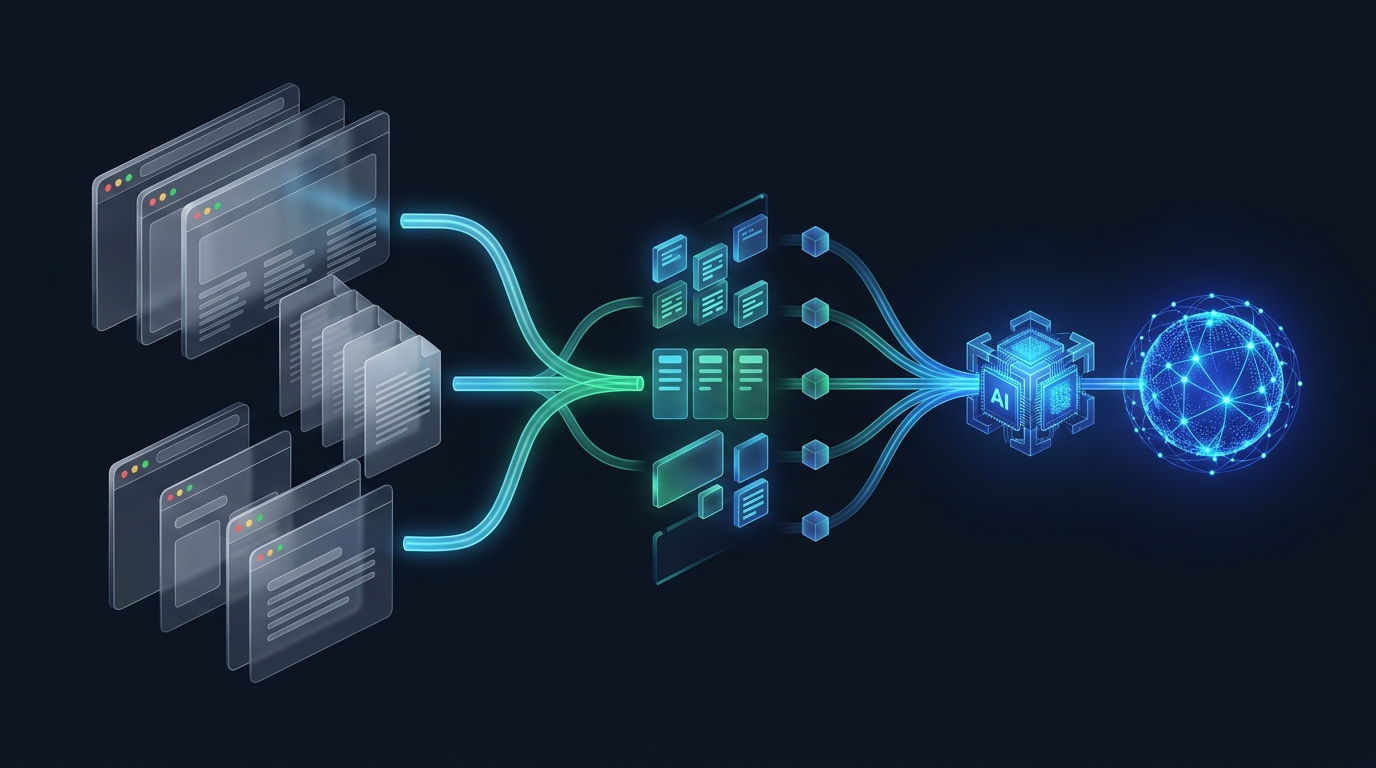
To reliably turn any public URL into high-signal LLM context, your extraction pipeline needs four automated stages:
- Automated Headless JS Rendering & Stealth Escalation: Execute client-side React, Vue, and Next.js bundles in a real browser environment (see how dynamic JS scraping works) while rotating residential IPs and TLS fingerprints to prevent 403 blocks.
- Main-Content DOM Isolation: Strip
<header>,<nav>,<footer>, cookie consent overlays, and sidebar widgets so only the primary article or product payload remains. - Semantic Markdown & Table Reconstruction: Convert HTML headings into
#/##markers, preserve fenced code blocks with language tags, and transform complex HTML<table>elements into clean Markdown pipe tables. - Header-Aware Chunking or Live MCP Streaming: Split Markdown along semantic heading boundaries (
MarkdownHeaderTextSplitter) for RAG vector storage, or stream results directly to your agent over the Model Context Protocol (MCP).
Code Tutorial: How to Extract Website Data for LLMs with GcrawlAI
1. Convert Any Single Webpage into LLM-Ready Markdown (POST /v1/scrape)
With GcrawlAI’s Scrape API, JavaScript rendering, stealth headers, and residential proxies are included in every request with honest 1 request = 1 request pricing:
import requests

response = requests.post(
    "https://api.gcrawlai.com/v1/scrape",
    headers={"Authorization": "Bearer YOUR_API_KEY"},
    json={
        "url": "https://docs.stripe.com/payments",
        "format": "markdown",
        "onlyMainContent": True,
        "render_js": True,
        "stealth": True
    }
)

data = response.json()["data"]
print(data["markdown"])  # Clean, citation-ready Markdown for your LLM
2. Crawl an Entire Website for RAG Knowledge Bases (POST /v1/crawl)
Need to ingest an entire documentation portal or help center into Pinecone, Qdrant, or pgvector? Use GcrawlAI’s Domain Crawler to discover and extract every subpage automatically:
crawl_response = requests.post(
    "https://api.gcrawlai.com/v1/crawl",
    headers={"Authorization": "Bearer YOUR_API_KEY"},
    json={
        "url": "https://docs.example.com",
        "maxDepth": 3,
        "limit": 100,
        "format": "markdown"
    }
)
print(crawl_response.json())
3. Ground AI Agents with Live Search + Scrape (POST /v1/search & Native MCP)
When your AI agent doesn’t know the exact URL ahead of time, GcrawlAI’s Search API queries the live web and returns ranked results paired with clean, de-duplicated snippets in ~130 ms typical server-side latency—or connects directly to Claude, Cursor, Windsurf, Cline, LangChain, and 60+ agent tools over native MCP:
{
  "mcpServers": {
    "gcrawlai": {
      "url": "https://mcp.gcrawlai.com",
      "headers": {
        "Authorization": "Bearer gcrawl_live_..."
      }
    }
  }
}
Why Flat 1:1 Request Pricing Matters for LLM Data Pipelines
Most legacy web scraping APIs advertise a low base price, then silently apply 5x credit multipliers for JavaScript rendering and 10x to 25x multipliers for stealth residential proxies. When an autonomous AI agent or nightly RAG sync crawls 50,000 pages, a 10x credit multiplier turns a predictable pipeline into a surprise four-figure bill.
GcrawlAI eliminates credit math completely:
- 1 Request = 1 Request: JS rendering, 3-tier anti-bot stealth, and residential proxy rotation are included by default with zero credit multipliers.
- Hard-Capped & Predictable: Hit your monthly quota and calls pause cleanly until reset—so a runaway agent loop can never rack up surprise overage charges.
- MIT Open-Source & Self-Hostable: Start with 200 free monthly requests on the cloud API or self-host via Docker.
Frequently asked questions
What is the best format for website data for LLMs?
<p>Clean Markdown is the best general-purpose format for feeding website data into LLMs and RAG pipelines because it preserves document hierarchy (headings, lists, code blocks, and tables) while cutting token usage by over 80% compared to raw HTML. When extracting specific records like product prices or flight fares, structured JSON is ideal.</p>
How do I extract website data for an LLM from JavaScript-heavy sites?
<p>Use an AI web scraping API with built-in headless browser rendering like GcrawlAI (/v1/scrape). GcrawlAI automatically renders client-side React, Next.js, and Vue applications, bypasses Cloudflare and DataDome protections using rotating residential proxies, and returns clean Markdown or JSON.</p>
How can I feed an entire website into an LLM or RAG vector database?
<p>Call GcrawlAI's /v1/crawl endpoint with the root domain URL and a maxDepth limit. GcrawlAI discovers all internal pages, extracts only the main content as clean Markdown, and returns structured documents ready to split with MarkdownHeaderTextSplitter and embed into Pinecone, Qdrant, or pgvector.</p>
Can AI agents like Claude, Cursor, and LangChain fetch live website data automatically?
<p>Yes. You can connect GcrawlAI's native Model Context Protocol (MCP) server (https://mcp.gcrawlai.com) or REST endpoints (/v1/search and /v1/scrape) to over 60 agent tools including Claude, Cursor, Windsurf, Cline, LangChain, LlamaIndex, and n8n in under a minute.</p>