By Rajesh Kannan, Co-Founder & CTO, Gramosoft · Last updated: · Apify pricing checked on apify.com on October 31, 2026; other prices checked on each vendor's own pages between October 26 and 28, 2026
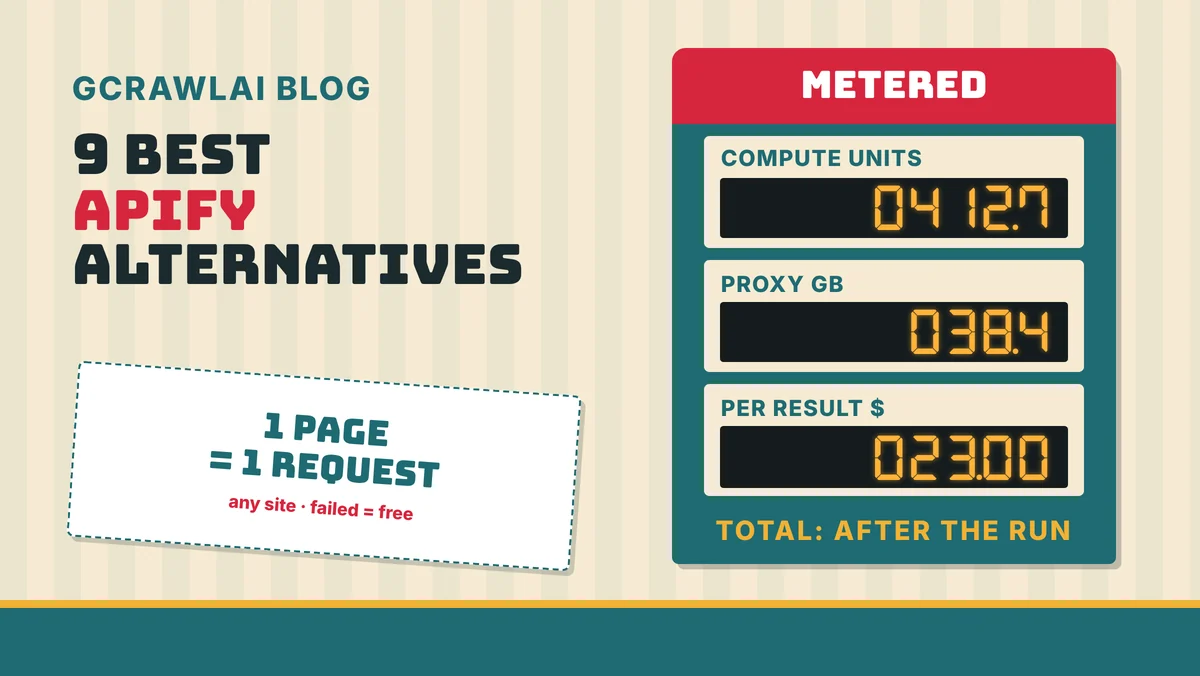
Apify is a strong platform when someone has already built the scraper you need. The catch is the bill: a run is charged in compute units, proxy gigabytes and, often, a per-result fee set by the Actor's developer, so you only learn the real cost after the job has run. This guide ranks nine alternatives, starting with GcrawlAI, where every page is one request, with prices checked on each vendor's own pages.
TL;DR
- Best overall: GcrawlAI. One request per page on every site, with rendering, residential IPs and anti-bot included, failed requests never charged, a Python SDK, MCP for AI agents and an MIT core you can self-host.
- Apify's real cost is three meters: compute units ($0.20 down to $0.13 each), residential proxies ($8 down to $7 per GB) and per-event fees that each Actor's developer sets.
- Other APIs: Firecrawl for Markdown, Bright Data for a flat rate per request, Zyte for Scrapy teams, ScraperAPI and ZenRows for published credit multipliers.
- No-code and open source: Octoparse and Browse AI if nobody on the team codes, Scrapy if you want to own the whole crawler.
- Honest cost note: at 10,000 pages a month, Zyte's cheapest tier, Bright Data and Apify's own $2.30-per-1,000 example are cheaper than GcrawlAI's $29 Starter plan.
What is the best Apify alternative? For most teams it's GcrawlAI: a scraping API with a Python SDK, MCP for AI agents and a self-hostable MIT core, where every page costs one request whatever it needs and failed requests are free. You get a price per page before the job runs, instead of compute units, proxy gigabytes and Actor fees afterwards.
Quick comparison (details and sources for each tool follow)
| Tool | Type | Best for | Billing unit | Free plan |
|---|---|---|---|---|
| GcrawlAI | Scraping API, SDK, MCP, open source | Protected and JavaScript sites, AI agents, predictable bills | Request (all features included) | 50 requests/month, no card |
| Firecrawl | Scraping API | Markdown for LLM apps | Credit (1 per page, more for JSON) | 1,000 credits/month |
| Bright Data | Unlocker API, proxies, datasets | Enterprise volume at a flat rate | Successful request | 5,000 requests/month |
| Zyte | Scraping API + Scrapy Cloud | Teams standardised on Scrapy | Response, by site tier | $5 credit |
| ScraperAPI | Scraping API | Amazon, Google and Walmart data | Credit (1 to 30+ per page) | 5,000 trial credits |
| ZenRows | Scraping API | Fixed multipliers you can model | Credit (1 to 25 per page) | 5,000 credits/month |
| Octoparse | No-code desktop app | Non-coders on Windows or macOS | Plan (tasks) + add-ons | 10 local tasks |
| Browse AI | No-code robots | Monitoring pages for changes | Credit (10 rows on standard sites) | 50 credits/month |
| Scrapy | Open-source framework | Python teams that want full control | Your own servers | Free (BSD) |
The 9 best Apify alternatives in 2026
These nine tools cover the three reasons teams leave Apify: an unpredictable bill, Actors that break when their maintainer moves on, and the work of picking and tuning a different scraper for every site. They're ranked by how well each one replaces Apify for a general scraping workload, with GcrawlAI first and verified pricing for each.
1. GcrawlAI: one request per page, no meters
Best for: teams scraping protected or JavaScript-heavy sites who want a bill they can predict, plus RAG pipelines and AI agents · License: MIT core, managed Cloud API · Language: Python SDK (gcrawl-sdk 0.5.8), REST, MCP
GcrawlAI replaces the Actor model with one API that works on any URL. You don't pick a scraper per site, size its memory or buy proxy bandwidth. A page goes through a real browser and residential IPs, Cloudflare, DataDome, Akamai and PerimeterX are handled on the way, and the whole thing is one request. A blocked page, CAPTCHA, timeout or server error isn't billed.
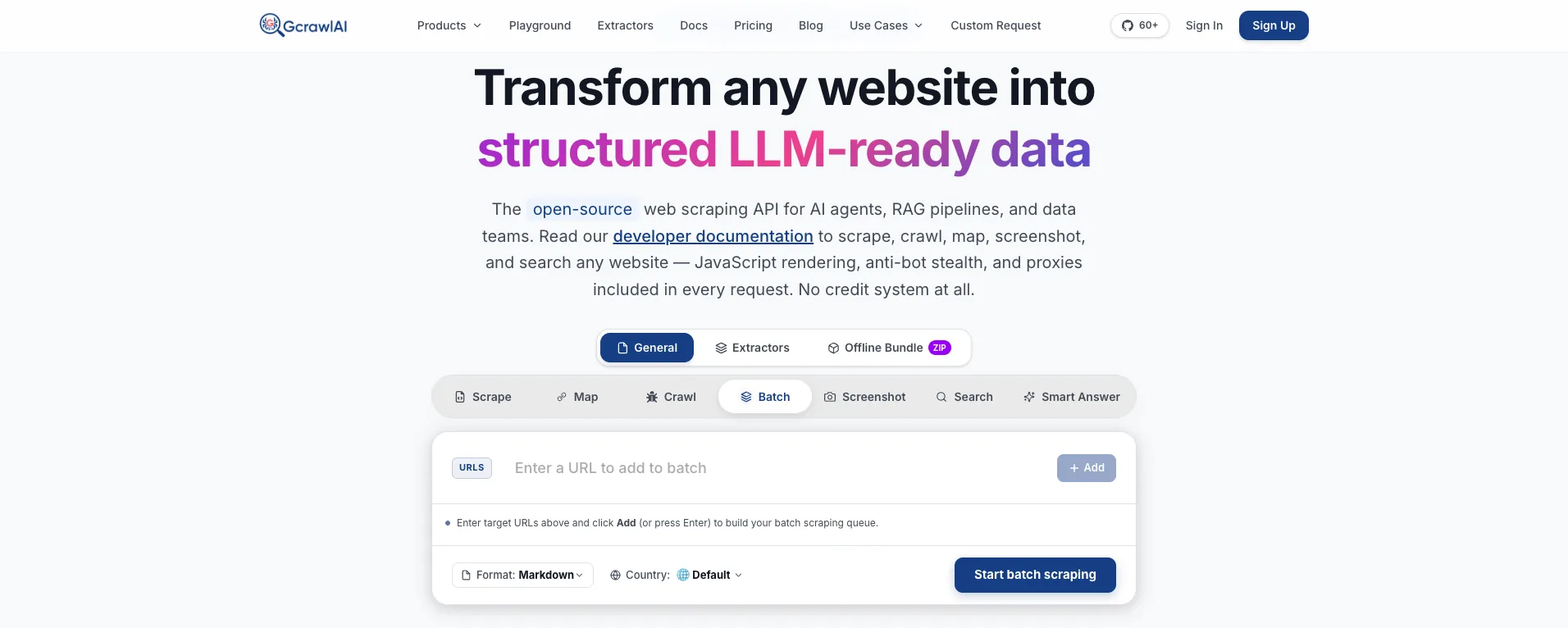
The homepage says it plainly: JavaScript rendering, anti-bot stealth and proxies are included in every request, with no credit system at all. The Batch tab shown above is the nearest thing to an Apify run: add a list of URLs, pick a format (Markdown by default) and a country, and start one batch job.
- Scrape, crawl and map: scrape a page into HTML, Markdown or JSON, crawl a site with depth control and duplicate filtering, or map its URLs first.
- Bulk jobs: batch runs and async jobs with webhooks, so a nightly crawl doesn't need a scheduler of its own.
- Search and Deep Search: a Search API for ranked results, and Deep Search, which merges several engines into one list.
- Extractors: ready-made structured data for common targets, the closest thing to a Store Actor, and custom extractors for your own sites through a custom request.
- Screenshots and offline bundles: screenshots on mobile, tablet and desktop, and offline HTML bundles for audits.
- Agents and testing: an MCP server for Claude, Cursor and other agents, the Playground, and the docs.
A single page, a whole-site crawl like a content-crawler Actor run, and a search, each priced per request:
# pip install gcrawl-sdk
from gcrawl_sdk import GcrawlClient, ScrapeOptions

client = GcrawlClient(api_key="gc-YOUR_API_KEY")   # or GCRAWL_API_KEY; base_url="http://localhost:8000" when self-hosted

if __name__ == "__main__":
    # One page, rendered, through residential IPs: one request, no compute units or proxy GB to add up.
    page = client.scrape(
        url="https://www.example-shop.com/product/123",
        options=ScrapeOptions(html_enabled=True, markdown_enabled=True, proxy_geo="US"),
        wait=True,
    )
    print(len(page.html or ""), "bytes of rendered HTML")   # for your own selectors
    print(page.markdown[:300])                              # LLM-ready Markdown

    # What a site-crawler Actor run does: every page of a site, each page one request.
    job = client.crawl(url="https://docs.example.com/", limit=200, formats=["markdown"], wait=True)
    print(job.status, len(job.pages), "pages,", job.pages_failed, "failed (not billed)")

    # Ranked search results, one request per page of results.
    hits = client.search(query="best running shoes 2026", pagination=1, geo="US")
    for r in hits.results[:3]:
        print(r.position, r.title, r.url)
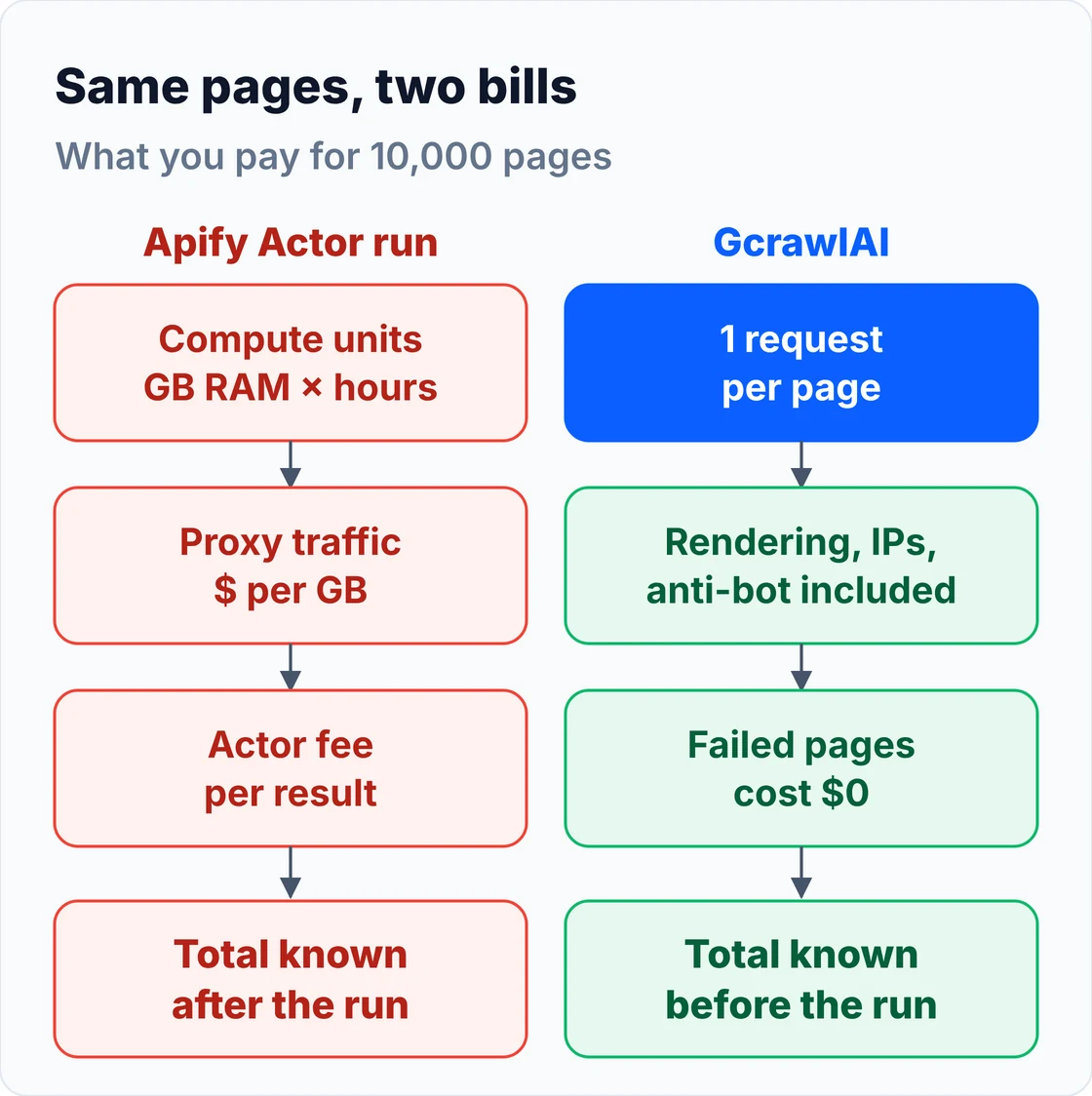
Teams that liked Apify's hosted runs get the same shape from a crawl job: you send a start URL and a limit, and the pages come back without a server of your own. The diagram shows where the two bills differ.
And the self-hosted core, for data that must stay on your own servers:
git clone https://github.com/GramosoftAI/GcrawlAI.git && cd GcrawlAI
python -m venv .venv && source .venv/bin/activate
pip install -r requirements.txt && playwright install
cp .env.example .env                      # add your database, Redis and proxy settings
python -m api.core.db_setup
redis-server &
celery -A web_crawler.crawler.celery_config worker -l info &
uvicorn api.api:app --port 8000
Pricing (GcrawlAI pricing, checked October 28, 2026):
| Plan | Price | Requests/month | Per 1,000 |
|---|---|---|---|
| Free | $0 forever, no card | 50 | – |
| Starter | $29/month | 20,000 | $1.45 |
| Growth (most popular) | $79/month | 80,000 | $0.99 |
| Pro | $199/month | 250,000 | $0.80 |
| Scale | $499/month | 750,000 | $0.67 |
| Enterprise | Volume pricing | 2M+ | Custom |
| Self-hosted | $0 (MIT) | Your servers | Infrastructure only |
Every page is one request on every site, failed requests are never charged, and unused requests on paid plans roll over once. Apify's prepaid usage, by contrast, expires at the end of each cycle. Concurrency and overage rates are in the cost section below.
Where it falls short: there's no marketplace with thousands of community scrapers, so for a niche site you write selectors or ask for a custom extractor. There's no prompt-driven browsing agent and no plain-English extraction parameter; structured data comes from the extractors, Markdown for your LLM, or your own selectors. There are no dedicated Amazon or Walmart endpoints yet, the ecosystem is younger than Apify's, and self-hosting means bringing your own proxy accounts.
"With Apify, the question teams ask us is never the rate. It's how many compute units a run will burn before they press start. We built GcrawlAI so the answer is on the pricing page: one request per page, on every site."
Rajesh Kannan, Co-Founder & CTO at Gramosoft
2. Firecrawl: Markdown for LLMs
Best for: pages that go straight into a model or vector store · Type: scrape, crawl, map and search API with an AGPL open-source core
Firecrawl returns clean Markdown by default and prices most pages at one credit, so it replaces Apify's content-crawler Actors for AI work. It suits RAG and agent pipelines more than classic e-commerce extraction. We compared it with GcrawlAI in our Firecrawl alternatives guide.
Pricing (Firecrawl pricing, billing docs, checked October 27, 2026):
| Plan | Price/month | Credits |
|---|---|---|
| Free | $0 | 1,000 a month |
| Hobby | $19 | 5,000 |
| Standard | $99 | 100,000 |
| Growth | $399 | 500,000 |
JSON output adds 4 credits, and pages that return 403 or 404 still cost a credit.
Where it falls short: credits are scarce per dollar at the low end, there's nothing between $19 and $99, and unused credits don't roll over below annual Scale.
3. Bright Data: one flat rate per request
Best for: enterprise teams that want a flat price and a large proxy network · Type: Web Unlocker API on a proxy network, plus browsers, scrapers and datasets
Bright Data's Web Unlocker charges the same rate for every successful request, whatever the site. That's the opposite of Apify's metered runs, and the easiest enterprise option to budget. It also sells ready-made datasets if you'd rather buy the data than scrape it. More in our Bright Data alternatives guide.
Pricing (Unlocker pricing, checked October 27, 2026):
| Plan | Price | Requests included | Per 1,000 |
|---|---|---|---|
| Free tier | $0 | 5,000 a month | – |
| Pay as you go | Usage only | – | $1.50 |
| Scale | $499/month | 383,000 | $1.30 after that |
Only successful requests are billed.
Where it falls short: there's no plan between pay as you go and $499 a month, and the product catalogue takes time to learn.
4. Zyte: for teams built on Scrapy
Best for: engineering teams whose spiders are written in Scrapy · Type: Zyte API for fetching, plus Scrapy Cloud for hosting spiders
Zyte maintains Scrapy, so it's the natural home for spiders you'd otherwise run as Apify Actors. Zyte API fetches pages with rendering and bans handled, and Scrapy Cloud hosts and schedules the spiders. The price per response depends on a tier Zyte assigns each site after your first requests.
Pricing (Zyte pricing, Zyte API pricing docs, checked October 28, 2026), pay as you go per 1,000 successful responses:
| Site tier | HTTP response | Browser-rendered |
|---|---|---|
| Tier 1 | $0.13 | $1.01 |
| Tier 3 | $0.44 | $4.02 |
| Tier 5 | $1.27 | $16.08 |
Monthly commitments of $100 to $500 lower these rates, pay as you go stops at $100 a month, and Scrapy Cloud costs $9 per unit a month after one free unit.
Where it falls short: you don't know a site's tier until you've sent requests, and tiers are reviewed quarterly, so the same job can cost 16 times more on a hard site.
5. ScraperAPI: structured e-commerce and search data
Best for: high-volume Amazon, Google and Walmart scraping · Type: scraping API with structured endpoints, async jobs and DataPipeline
ScraperAPI covers the same popular targets as many Store Actors, with structured endpoints that return JSON. It prices by domain type, and the credit cost of each category is published, so a bill is easier to forecast than an Actor run.
Pricing (ScraperAPI pricing, checked October 27, 2026):
| Plan | Price/month | Credits |
|---|---|---|
| Hobby | $49 | 100,000 |
| Startup | $149 | 1,000,000 |
| Business | $299 | 3,000,000 |
| Scaling | $475 | 5,000,000 |
| Page type | Credits per page |
|---|---|
| Standard page | 1 |
| Amazon | 5 |
| Google and Bing | 25 |
| Cloudflare, DataDome or PerimeterX bypass | +10 |
Where it falls short: protected pages cost 11 times a plain one, Hobby and Startup only geotarget the US and EU, and credits don't roll over.
6. ZenRows: fixed multipliers you can model
Best for: teams who want to know the cost of a hard page before they send it · Type: scraping API with SDKs, a scraping browser and an MCP server
ZenRows prices by the features a request uses, not by site, so you can work out a worst-case bill in advance, which Apify's per-run metering doesn't allow. Its adaptive mode starts cheap and escalates only when a site needs it. More in our ZenRows alternatives guide.
Pricing (ZenRows pricing, checked October 27, 2026):
| Plan | Price/month | Credits |
|---|---|---|
| Free | $0 | 5,000 a month |
| Build | $19 to $39 | 45,000 to 120,000 |
| Launch | $69 to $129 | 250,000 to 700,000 |
| Growth | $199 to $399 | 1.2 million to 3 million |
| Request type | Credits per page |
|---|---|
| Standard | 1 |
| JavaScript rendering | 5 |
| Premium proxy | 10 |
| JavaScript + premium proxy | 25 |
Where it falls short: a rendered page on premium proxies costs 25 times a plain one, and credits don't roll over.
7. Octoparse: point-and-click for non-coders
Best for: analysts and marketers who don't code and want a visual builder · Type: desktop app with cloud runs and templates
Octoparse replaces Apify's Store for people who never wanted to configure an Actor: you click the data on a page and it builds the scraper, with templates for popular sites. It covers simple, structured pages well. We reviewed it in depth in our Octoparse alternatives guide.
Pricing (Octoparse plan comparison, checked October 26, 2026):
| Plan | Monthly billing | Yearly billing | What you get |
|---|---|---|---|
| Free | $0 | $0 | 10 tasks, local runs only |
| Standard | $83/month | $69/month | 100 tasks, cloud runs |
| Professional | $299/month | $249/month | More tasks and cloud capacity |
Residential proxies cost $3 per GB and CAPTCHA solving $1 to $1.50 per 1,000 solves on top of the plan.
Where it falls short: the builder runs only on Windows and macOS, protected sites cost extra, and complex multi-step sites need workarounds.
8. Browse AI: monitoring pages for changes
Best for: non-technical teams watching prices, job boards or listings · Type: cloud no-code robots trained in a Chrome extension
Browse AI records what you click and turns it into a robot that runs in the cloud on a schedule. Its strength is change detection, which on Apify means scheduling an Actor and comparing datasets yourself. It connects to Google Sheets, Zapier and similar tools without code.
Pricing: billed in credits. Per Browse AI's help center, one credit buys 10 rows on a standard site, premium sites with stronger bot protection cost 2 to 10 credits per task, and each detail page is a separate task. The free plan has 50 credits a month across 2 websites, and credits don't roll over. We couldn't load Browse AI's pricing page directly, so check current plan prices there.
Where it falls short: credits go fast on deep pagination and detail pages, and you can't tune proxies or browser behaviour when a protected site blocks a robot.
9. Scrapy: the open-source framework
Best for: Python developers who want full control and no vendor bill · License: BSD · Version: 2.19.0 (PyPI, checked October 31, 2026)
Scrapy is the framework many Apify Actors would be if you wrote them yourself: spiders, pipelines, retries, throttling and concurrency, all in Python, running on any server. You pay only for hosting. Apify's own open-source library, Crawlee, is the other option if your team prefers JavaScript.
Where it falls short: no JavaScript rendering, proxies or bot handling out of the box. You add Playwright and a proxy provider, or put a scraping API like GcrawlAI behind it as the fetch layer. For a deeper look, read Python Web Scraping Frameworks Compared: Scrapy vs Crawlee vs Scrapling (2026).
How Apify pricing works
Apify charges in three layers: a monthly plan that prepays platform usage, compute units for the memory and time each run uses, and proxy traffic. On top of that, many Store Actors add their own fee per result or event. The rates below come from Apify's pricing page, checked on October 31, 2026.
Plans (Apify pricing):
| Plan | Price/month | Compute unit | Residential proxy | Concurrent runs |
|---|---|---|---|---|
| Free | $0 ($5 usage) | $0.20 | $8/GB | 5 |
| Starter | $19 ($17 yearly) | $0.20 | $8/GB | 32 |
| Scale | $199 ($179 yearly) | $0.16 | $7.50/GB | 128 |
| Business | $999 ($899 yearly) | $0.13 | $7/GB | 256 |
| Enterprise | Custom | Custom | Custom | Custom |
A compute unit is 1 GB of memory running for one hour. Each paid plan's price is prepaid usage, so Starter's $19 buys $19 of compute, proxies and Actor fees, and unused usage expires at the end of the cycle. SERP proxies cost $2.50 down to $1.70 per 1,000 searches, and datacenter IPs beyond each plan's allowance cost $1 down to $0.60 each.
How Store Actors charge (same page):
| Actor pricing model | What you pay |
|---|---|
| Pay per event | A fixed price per event the developer defines, such as $2.30 per 1,000 results |
| Pay per usage | Only platform usage: compute units, proxy, storage and data transfer |
| Pay per event + usage | The event fee plus the run's platform usage |
That's why an Apify bill is hard to predict. The same 10,000 pages cost different amounts depending on which Actor you pick, how much memory it asks for, how long the browser takes on each page, and how many gigabytes of residential traffic the site needs.
What 10,000 and 100,000 pages a month cost
For protected pages that need a browser, GcrawlAI costs $29 for 10,000 pages and $101 for 100,000, on any site. Apify at its own $2.30-per-1,000 example comes to $23 and $230 of usage. The table shows the cheapest published plan for each tool where a fixed rate exists.
| Tool (how a protected, rendered page is billed) | 10,000 pages/month | 100,000 pages/month |
|---|---|---|
| GcrawlAI (1 request, any site) | $29 (Starter) | $101 (Growth + overage) |
| Apify, at its $2.30 per 1,000 results example | $23 of usage (Starter or above) | $230 of usage (Scale or above) |
| Zyte, Tier 1 browser site | $10.10 (pay as you go) | $100 ($100 commitment) |
| Zyte, Tier 5 browser site | $120 ($100 commitment) | $768 ($500 commitment) |
| Bright Data Web Unlocker ($1.50 per 1,000) | $15 | $150 |
| Firecrawl (1 credit) | $99 (Standard) | $99 (Standard) |
| ZenRows (JavaScript + premium proxy, 25 credits) | $69 (Launch 250K) | $399 (Growth 3M) |
| ScraperAPI (protected page, 11 credits) | $149 (Startup) | $299 (Business) |
These are list prices, not a benchmark. The Apify row assumes one result per page at the example rate on Apify's pricing page; a real Actor can cost more or less, and pay-per-usage Actors add compute units and proxy gigabytes instead. Free tiers are left out. Octoparse and Browse AI bill by task and row, and Scrapy by your own servers, so they aren't in the table.
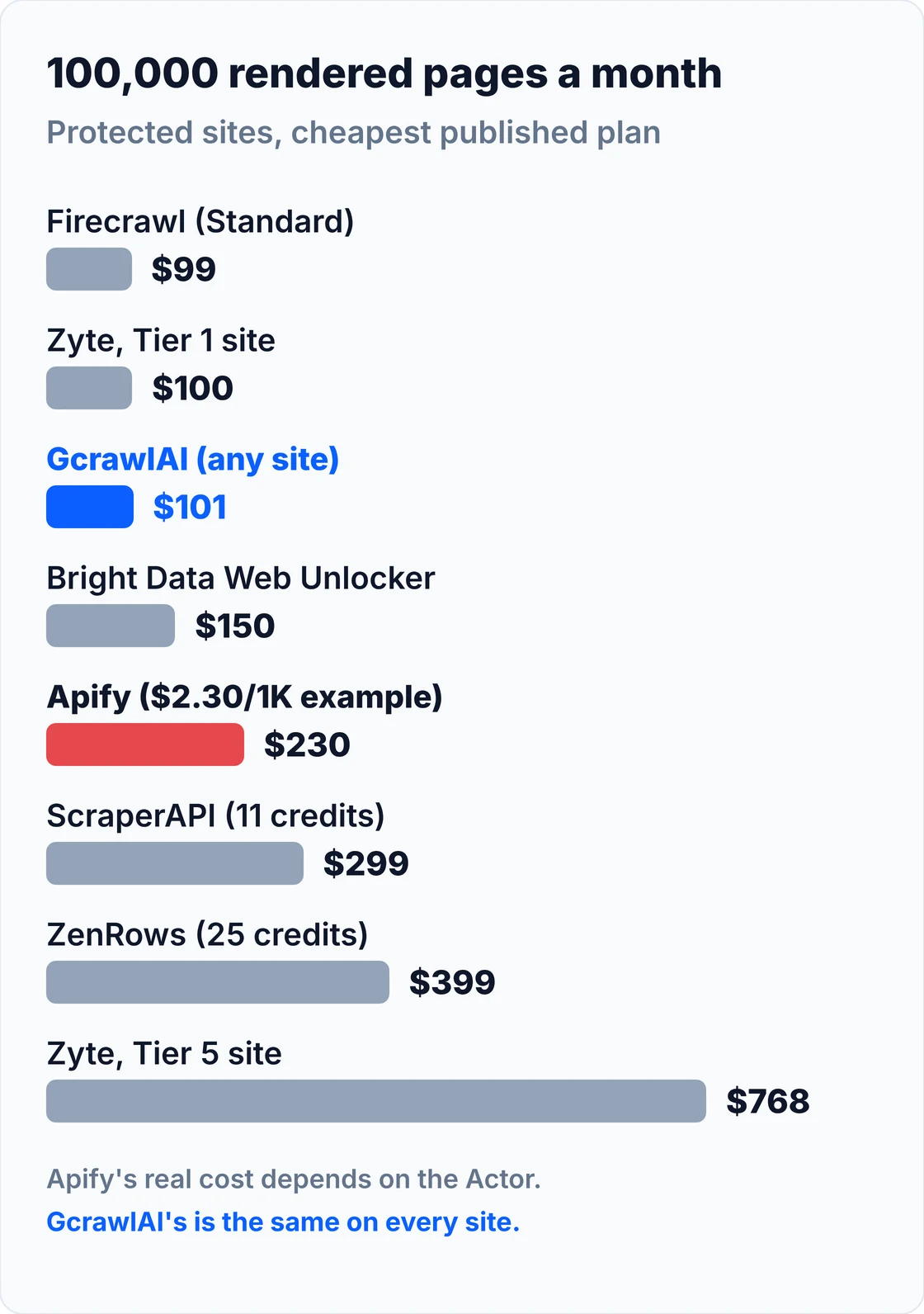
At 10,000 pages, Zyte on a Tier 1 site, Bright Data and the Apify example are all cheaper than GcrawlAI's $29 Starter plan, and at 100,000 pages Firecrawl and Zyte Tier 1 are a dollar or two below it. What GcrawlAI adds is a price that doesn't move with the site or the scraper: the same 100,000 pages cost $101 whether the site is simple or behind Cloudflare.
GcrawlAI's plans, for the cost section above:
| Plan | Price | Requests/month | Concurrent | Per 1,000 | Overage per 1,000 |
|---|---|---|---|---|---|
| Free | $0 forever, no card | 50 | 2 | – | – |
| Starter | $29/month | 20,000 | 10 | $1.45 | $1.60 |
| Growth (most popular) | $79/month | 80,000 | 35 | $0.99 | $1.10 |
| Pro | $199/month | 250,000 | 50 | $0.80 | $0.90 |
| Scale | $499/month | 750,000 | 100 | $0.67 | $0.75 |
| Enterprise | Volume pricing | 2M+ | Custom | – | – |
| Self-hosted | $0 (MIT) | Your servers | Your servers | Infrastructure only | – |
Annual billing charges 10 months for 12, unused requests on paid plans roll over once, and Indian customers are billed in INR with a GST invoice. Full details are on the pricing page.
"We don't win every line of a cost table, and we'd rather say so. What we promise is that the line is known before you start. Compute units and proxy gigabytes are only known after."
Rajesh Kannan, Co-Founder & CTO at Gramosoft
Why teams look for an Apify alternative
Apify works well when a maintained Actor already does exactly what you need. Teams start looking elsewhere when the bill is hard to forecast, when an Actor they depend on stops being updated, or when they need the same scraper to work across hundreds of different sites. These are the reasons we hear most often.
- The bill arrives after the run. Compute units depend on the memory an Actor asks for and how long each page takes, and residential traffic is billed per gigabyte. You can estimate, but you can't quote a price per page in advance.
- Actor fees vary by developer. Store Actors set their own per-event prices on top of platform usage, so two scrapers for the same site can cost very different amounts.
- Community Actors can go stale. When a site changes and the Actor's maintainer doesn't update it, the run fails or returns partial data, and you look for another Actor or write your own.
- Prepaid usage expires. Unused usage on a paid plan doesn't carry over to the next cycle.
- One scraper per site doesn't scale to long-tail sites. For hundreds of different domains, a general API that renders any URL is simpler than finding an Actor for each one. Our guide to scraping dynamic JavaScript websites explains what that API has to handle.
Which Apify alternative should you choose?
Start with why you're leaving Apify. If it's an unpredictable bill, use GcrawlAI, where every page is one request. If you need the data on your own servers, self-host GcrawlAI's MIT core. If you need Markdown for an LLM, AI agent access or structured extractors, GcrawlAI covers those as well. The table maps the common cases.
| If you need… | Pick | Why |
|---|---|---|
| A price per page you can budget | GcrawlAI | One request per page on every site, failed requests free |
| One scraper for hundreds of different sites | GcrawlAI | Rendering, residential IPs and anti-bot escalation work on any URL, no Actor per site |
| Ready-made structured data | GcrawlAI extractors | Ready-made extractors, plus custom extractors for your own targets |
| Hosted crawls without your own servers | GcrawlAI crawl and batch | Async jobs with webhooks, each page one request |
| Data on your own servers | GcrawlAI self-hosted | MIT core, no per-page fee |
| Pages for an LLM or RAG pipeline | GcrawlAI | Clean Markdown or JSON from the same request |
| AI agents on the live web | GcrawlAI | MCP server, Search API and Deep Search on one account |
| Enterprise volume and invoicing | GcrawlAI Enterprise | 2M+ requests a month, volume pricing, custom concurrency and extractors, INR or USD invoices |
When Apify is still the right choice, and when GcrawlAI is
Apify still makes sense for a narrow set of jobs: a popular site where a well-maintained Store Actor returns exactly the fields you need, or a team that has built its own Actors and wants Apify to host them. For protected sites, bulk crawls and AI agents, GcrawlAI does the work on one key, at one request per page.
Keep Apify only for:
- A specific Store Actor you already rely on and that its developer keeps up to date.
- Custom Actors your team has written and doesn't want to host itself.
Use GcrawlAI for the rest. Here's what one account gives you:
- Scrape: any URL as HTML, Markdown or JSON, with JavaScript rendering, residential IP rotation and stealth escalation in the same single request.
- Crawl and map: a whole site with depth control and duplicate filtering, or its URL list without rendering every page.
- Batch and async jobs: thousands of URLs in one job, with results by webhook.
- Search API and Deep Search: ranked results by country and page, and several engines merged into one list.
- Extractors: ready-made structured data, and custom extractors for your own sites.
- Screenshots and offline bundles: mobile, tablet and desktop captures, and offline HTML bundles for audits.
- Built for AI agents: an MCP server for Claude, Cursor and other agents, plus the Python SDK and REST API.
- Try before you build: the Playground, and a Chrome extension that turns data you pick on a page into an API call.
- Your own servers: the MIT-licensed core runs self-hosted for teams whose data can't leave their network.
- Billing that doesn't move: one request per page, failed requests never charged, unused requests rolled over once, no compute units or proxy gigabytes, and INR invoices with GST for Indian teams.
If you're on Apify today, start with the free plan's 50 requests: run the site your most expensive Actor scrapes through GcrawlAI, check the output, and compare the bill.
Scraping responsibly
Every tool on this list can reach protected pages, so how you use them matters. Collect public data, respect the terms that apply to you, keep request rates reasonable, and don't collect personal data you don't need. Nothing in this guide is about getting past logins. See What Is Web Scraping? for the basics.
For the technical side of getting blocked, our guides on Cloudflare and 403 errors explain what's happening and what a scraping API does about it.
Frequently asked questions
What is the best Apify alternative?
GcrawlAI, for most teams. Every page is one request on every site, with JavaScript rendering, residential IPs and anti-bot handling included, and failed requests are never charged. It has a Python SDK, MCP for AI agents and an MIT core you can self-host, plus a free plan of 50 requests a month with no card.
How much does Apify cost?
Apify has a free plan with $5 of usage a month, Starter at $19, Scale at $199 and Business at $999, each prepaid against usage. Compute units cost $0.20 down to $0.13, residential proxies $8 down to $7 per GB, and Store Actors can add their own per-event fees, such as $2.30 per 1,000 results.
What is an Apify compute unit?
One compute unit is 1 GB of memory running for one hour. An Actor that uses 4 GB for 30 minutes uses two compute units. The total depends on how much memory the Actor requests and how long the run takes, which is why the cost of a page isn't fixed.
Is GcrawlAI open source, and can I use it commercially?
Yes. GcrawlAI's core is MIT-licensed on GitHub, so you can self-host it and use it commercially at no license cost, bringing your own proxy accounts. The managed Cloud API adds hosted rendering, residential IPs, anti-bot handling, the Python SDK and MCP access, from a free plan of 50 requests a month.
Is there a free Apify alternative?
Yes. GcrawlAI has a free plan of 50 requests a month with no card and a free self-hosted MIT core. Scrapy and Crawlee are free open-source frameworks. Bright Data gives 5,000 Unlocker requests a month, ZenRows 5,000 credits a month and Firecrawl 1,000 credits a month.
What is the best Apify alternative for non-coders?
Octoparse, if you want a point-and-click desktop builder with templates, or Browse AI, if you mainly need to monitor pages for changes. GcrawlAI's Playground and Chrome extension let non-developers try a page without code, and developers can then run the same request through the SDK.