By Rajesh Kannan, Co-Founder & CTO, Gramosoft · Last updated: · API limits and prices checked November 16, 2026
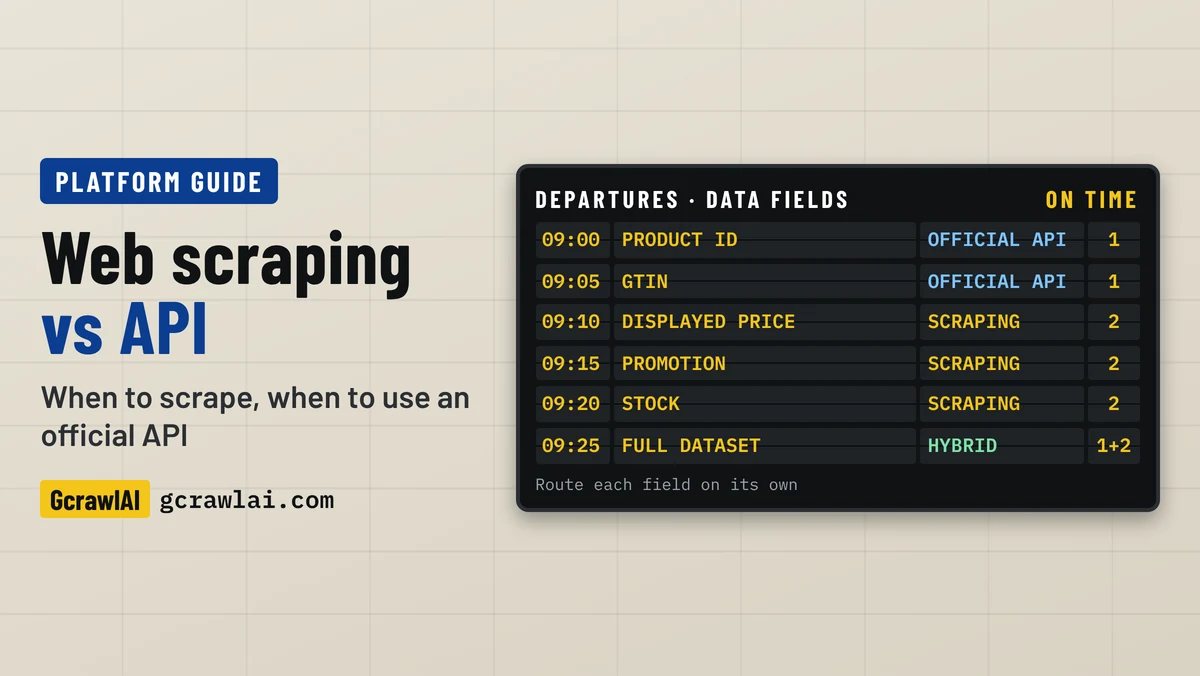
Most data projects hit the same fork early: is there an official API for this, and if there is, does it give you what you need? This guide starts with the GcrawlAI route for the fields an API leaves out, then compares web scraping and APIs field by field, shows what real APIs omit, and ends with a working hybrid that uses both.
TL;DR
- Use an official API when it returns every field you need, at the volume and freshness you need, under terms you can accept. It's the cleaner, more stable route.
- Scrape when there's no API, when it leaves out fields the page shows (displayed prices, promotions, stock, full reviews), or when access, limits or price rule it out.
- Use both for most production pipelines: the API for stable identity, scraping for page-only observations, with the source and time stored on every value.
- Scrape through an API: GcrawlAI loads each page in a real browser through a residential IP and returns HTML, Markdown or JSON in one request. Failed pages are never charged.
- Compare cost per validated record, not cost per request. A cheap call that returns a consent wall is not cheap.
Should you use web scraping or an API? Use an official API when it covers every field you need under workable limits and terms. Scrape when there's no API or it leaves out page-only data such as displayed prices, promotions or full reviews. Many teams combine both: the API for identity, a scraping API like GcrawlAI for the missing fields.
Web scraping vs API at a glance
| Factor | Official API | Web scraping | Scraping API (GcrawlAI) |
|---|---|---|---|
| Data you get | Only the fields the provider exposes | Anything a visitor's page shows | Anything a visitor's page shows |
| Format | Documented JSON | HTML you parse | HTML, Markdown or JSON |
| Stability | Versioned, with notice of changes | Breaks on redesigns | Fetching handled for you; your selectors can still break |
| Limits | Published quotas and plans | Blocks, CAPTCHAs, your own pacing | Plan concurrency; browser and IPs included |
| Cost | Free tier, then per call or plan | Servers, proxies, upkeep | 1 request per page; failed pages free |
| Permission | Licensed by the API terms | Site terms, robots.txt, the law | Site terms, robots.txt, the law |
When the API falls short: scrape the missing fields with GcrawlAI
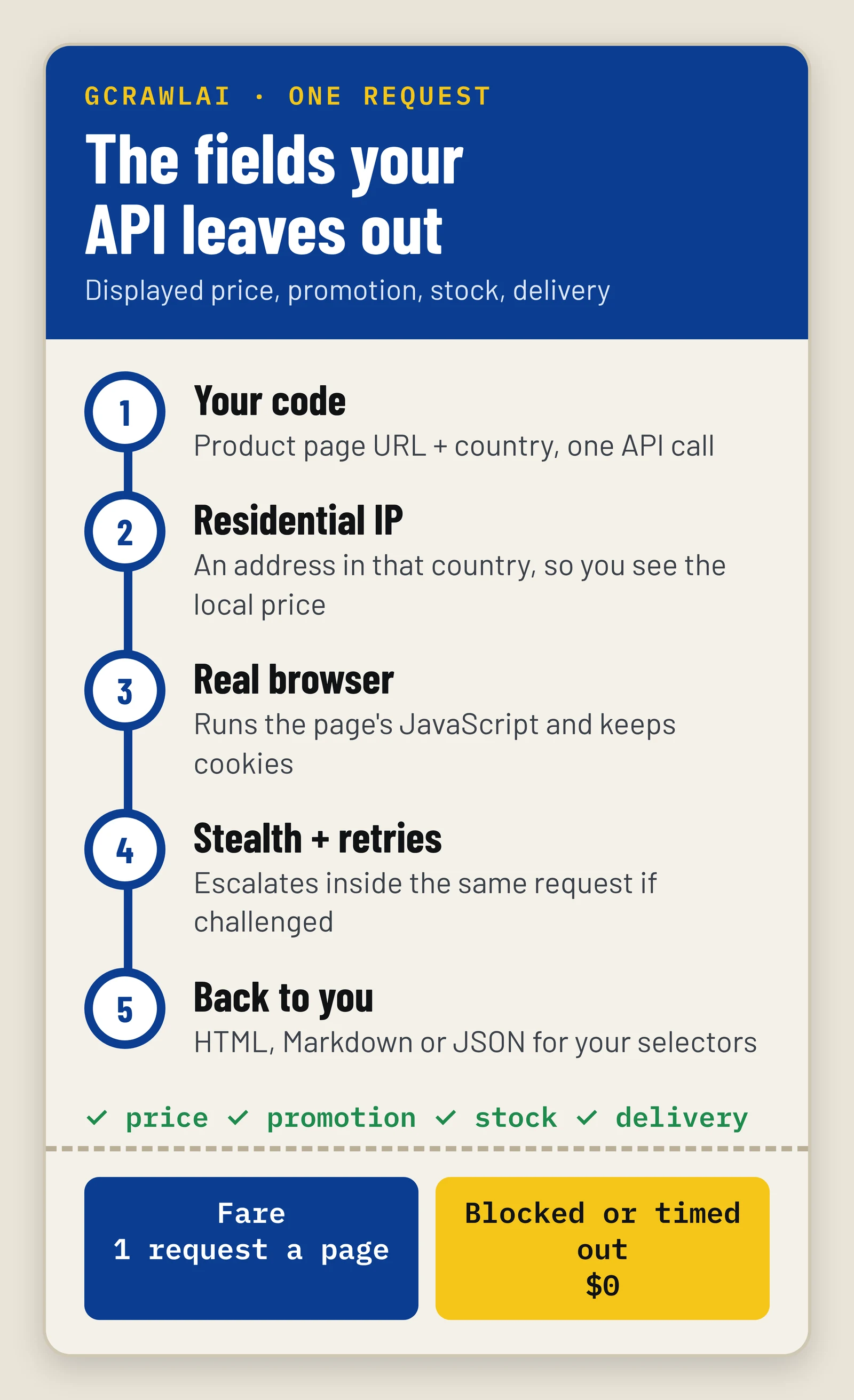
An API that omits the field you need forces you back to the page. GcrawlAI makes that step an API call too: one request loads the page in a real browser through an in-country residential IP and returns HTML, Markdown or JSON, so your code only reads the fields. Blocked pages and timeouts are never billed.
The Cloud API, the Python SDK and the MCP server all sit on the same engine, and the core is MIT-licensed, so you can run it on your own servers. What you get in one request:
- A real browser: pages that build their content with JavaScript come back rendered, so the displayed price and stock message are in the HTML.
- Residential IPs by country: see the page a shopper in the US, India or Germany sees, which matters when prices and stock differ by region.
- Anti-bot handling inside the request: stealth escalation and retries for Cloudflare, DataDome, Akamai and PerimeterX, with no credit multipliers.
- Output your pipeline can use: HTML for your selectors, Markdown for an LLM, or JSON from the scrape endpoint, plus map, crawl, screenshots and the Search API.
- Agents included: the MCP server lets an AI agent call scrape, crawl and search as tools. Try a page with no code in the Playground.
This script reads the four page-only fields from a product page. The last check matters: a page can return 200 and still be a consent wall, so test for the field you need.
gcrawlai_page_fields.py
# pip install gcrawl-sdk beautifulsoup4
"""Scrape the fields an official API leaves out (displayed price, promotion, stock, delivery)
from a public product page with GcrawlAI. One request per page; failed pages are not billed."""
from bs4 import BeautifulSoup
from gcrawl_sdk import GcrawlClient, ScrapeOptions

client = GcrawlClient(api_key="gc-YOUR_API_KEY")   # or GCRAWL_API_KEY; base_url="http://localhost:8000" when self-hosted

SELECTORS = {                                       # change these to match the site you collect from
    "displayed_price": "[data-testid=price-now]",
    "promo_badge": ".promo-badge",
    "availability": "[data-testid=stock-status]",
    "delivery": "[data-testid=delivery-estimate]",
}


def text(soup, css):
    node = soup.select_one(css)
    return node.get_text(" ", strip=True) if node else None


def page_fields(url: str, country: str = "US") -> dict:
    """Render the page in a real browser through an in-country residential IP and read the fields."""
    result = client.scrape(url=url, options=ScrapeOptions(html_enabled=True, markdown_enabled=False,
                                                          proxy_geo=country), wait=True)
    soup = BeautifulSoup(result.html or "", "html.parser")
    fields = {name: text(soup, css) for name, css in SELECTORS.items()}
    # A 200 can still be a consent wall or an empty template: check the field you need.
    fields["ok"] = fields["displayed_price"] is not None
    return fields


if __name__ == "__main__":
    print(page_fields("https://shop.example.com/p/A1842"))
Pricing: a free plan of 50 requests a month with no card, paid plans from $0.67 to $1.45 per 1,000 requests, and a self-hosted open-source core that costs nothing. Every page is one request, and failed pages are never charged. The plan table is in the cost section below.
Where it falls short: it doesn't replace an official API for writes, payments or account data, and it doesn't give you permission the site's terms withhold. Structured fields come from your selectors or an extractor, not a plain-English prompt, and self-hosting means bringing your own proxy accounts.
"Teams don't fail because they picked scraping or an API. They fail because they picked one for the whole dataset. Decide per field: if the API has it, take it from the API. If only the page has it, read the page and keep a note of where each value came from."
Rajesh Kannan, Co-Founder & CTO at Gramosoft
Web scraping vs API: the differences that matter
An API is a door the data owner built for programs: documented fields, published limits and terms. Web scraping reads the pages built for people and rebuilds the structure yourself. They differ on seven things that decide which one you can live with in production, from field coverage to legal standing.
- Coverage: an API returns what the provider chose to expose. A page shows promotions, seller offers, stock messages, delivery dates and rankings an API often leaves out.
- Structure: API fields arrive named and typed. Scraped values come from selectors, so a layout change can quietly fill
current_pricewith the crossed-out price. - Stability: APIs version their contracts and announce breaking changes. Pages change whenever the front-end team ships.
- Speed and limits: an API payload is usually smaller and faster, but quotas cap it. Scraping is capped by blocks, rendering time and how gently you should crawl.
- Cost: an API bills per call or plan. Scraping bills in servers, proxies and repair time, or per page on a scraping API.
- Access: an API can require approval, a commercial relationship or sales thresholds. A public page needs none of that, but public is not the same as permitted.
- Freshness: neither is real time by default. An API can serve a cache; a page can be personalised by country or session. Store when each value was observed.
Official API, internal API or scraping API?
"API" covers three different things, and mixing them up causes most of the confusion in this debate. An official API is published by the data owner. An internal API powers the site's own front end. A scraping API, such as GcrawlAI, fetches public pages for you behind an API-shaped request.
| Official API | Internal (hidden) API | Scraping API (GcrawlAI) | Your own scraper | |
|---|---|---|---|---|
| Who runs it | The data owner | The site, for its own pages | The scraping provider | Your team |
| Documented | Yes | No; can change any day | Yes, the API is; the target pages aren't | Only by you |
| Fetching, browsers, IPs | Not needed | Often tokens and cookies | Provider | Your team |
| Parsing | Not needed | JSON, but undocumented | Your selectors, Markdown or JSON | Your team |
| Permission | The API licence | Site terms; often not intended for you | Site terms and the law | Site terms and the law |
An endpoint you find in the browser's Network tab is not a public API. It may need short-lived tokens and can disappear without notice. A scraping API doesn't turn a site into an API either: it takes the browser, proxy and retry work off your hands, while permission and data quality stay with you.
What real official APIs leave out
An API existing is where the evaluation starts, not where it ends. These five well-known APIs show the usual gaps: capped fields, eligibility rules, rate limits, per-read prices and shutdowns. Each was checked on the provider's own documentation on November 16, 2026, and each is a reason teams end up scraping some fields.
| API | The limit | What it means for your data |
|---|---|---|
| Google Places API (New) | A maximum of 5 reviews and 10 photos per place | Fine for a place card, not for review analysis |
| Amazon Creators API | Needs at least 10 qualifying sales in the past 30 days; PA-API 5.0 now returns 403 | Not a product feed for most data teams |
| GitHub REST API | 60 requests an hour without a token, 5,000 with one | Generous once authenticated; plan around it |
| X API (pay per use) | $0.005 per post read, $0.010 per user read, a 3 million post-read monthly cap | $500 per 100,000 posts read |
| Google Custom Search JSON API | Closed to new customers; discontinued January 1, 2027 | No self-serve Google results API for new projects |
Sources: Google's Place resource reference, Amazon's Creators API prerequisites and PA-API 5 deprecation notice, GitHub's REST rate limits, X's pay-per-usage pricing and post cap, and Google's Custom Search JSON API overview. For search results, our guide to scraping Google search results with Python covers the options after that shutdown.
GitHub is the counter-example: when an API covers your fields at a limit you can live with, scraping the same pages would only add work and risk. Use it.
How to decide: check every field, not the whole source
Choose per field, not per website. List the fields your dataset needs, then ask four questions of each in order: is there an official API with it, is the method permitted, does it meet your volume and freshness, and does it cost less per validated record. The first "no" sends that field down another route.
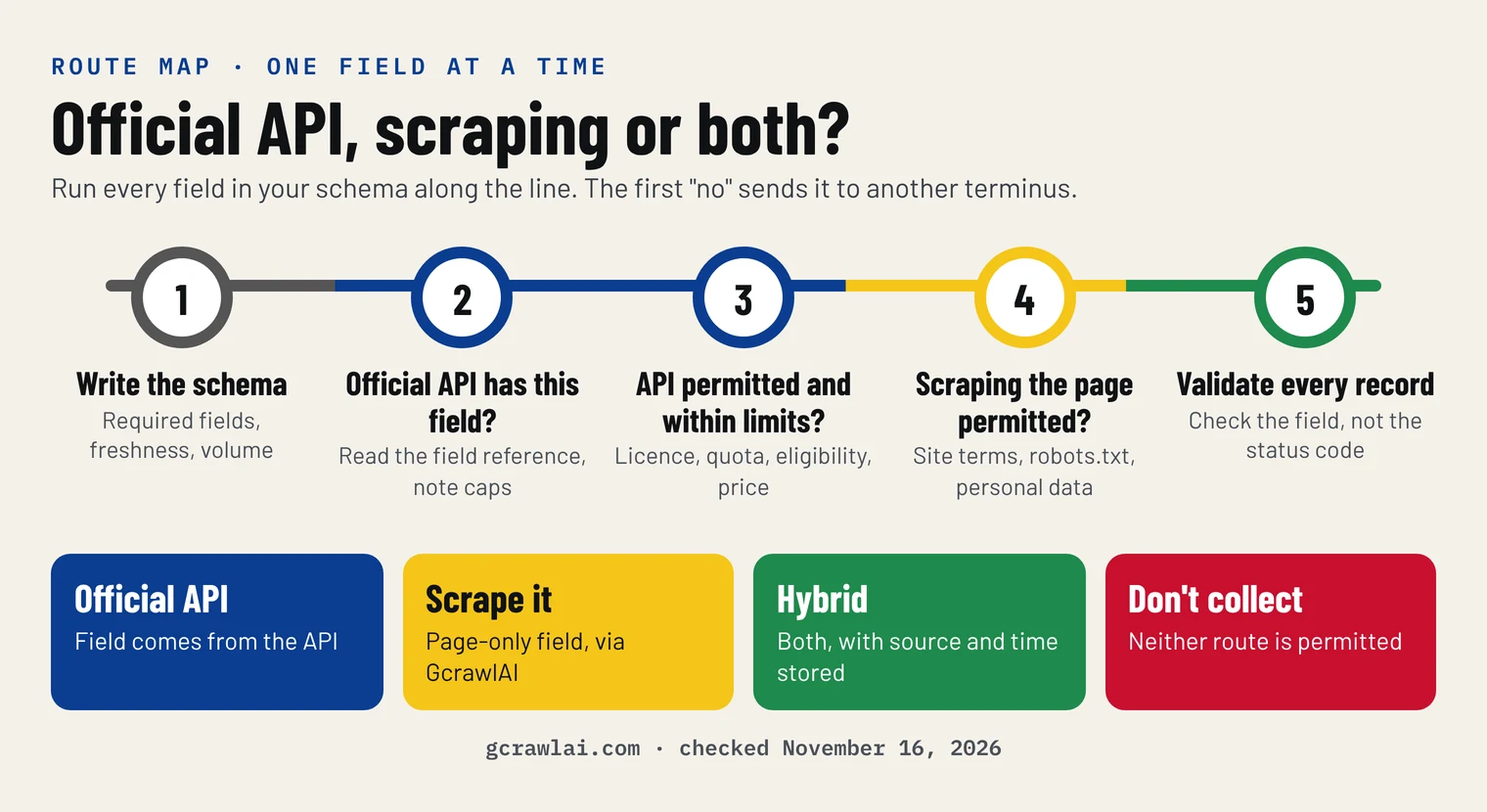
- Write the schema first. Required fields, optional fields, freshness and volume. A source that can't fill a required field isn't a complete solution, though it can still be part of one.
- Check for an official API per field. Read the field reference, not the marketing page. Note caps such as "maximum of 5 reviews".
- Check permission per route. The API licence for the API route; the site's terms and robots.txt for the scraping route. If neither passes, don't collect that field.
- Check limits and freshness. Can the quota cover your peak? Does a cache make the API older than the page?
- Price it per validated record. Then pick the cheapest route that passes, field by field.
Combine both: the API for identity, scraping for page-only fields
Most production pipelines use both. The API supplies stable identity such as product IDs, GTINs and catalogue prices, and the page supplies what shoppers see today: the displayed price, the promotion, the stock message and the delivery date. The join only works if every value carries its source, its collection time and a conflict rule.
| Field | Source | Conflict rule |
|---|---|---|
| Product ID, GTIN | Official API | Never overwrite from page text |
| Name | Official API | Use the page only when the API value is empty |
| List price, currency | Official API | API wins |
| Displayed price | Page (GcrawlAI) | Store with country and collection time |
| Promotion, stock, delivery | Page (GcrawlAI) | Time-stamped observation; newest valid wins |
The merge below takes any API client and any page fetcher, such as the GcrawlAI function above. It stores the source and time on every value, rejects records that miss a required field or show an impossible price, and writes only the records that pass:
hybrid_merge.py
"""Field-level hybrid: an official API for stable identity, scraping for page-only observations.
Every value keeps its source and collection time, and every record is validated before it counts."""
import json
import re
from datetime import datetime, timezone

# Which source owns each field, and whether the record is useless without it.
FIELD_SOURCE = {
    "product_id": ("api", True), "name": ("api", True), "gtin": ("api", True),
    "list_price": ("api", True), "currency": ("api", True),
    "displayed_price": ("page", True), "availability": ("page", True),
    "promo_badge": ("page", False), "delivery": ("page", False),
}
REQUIRED = [f for f, (_, req) in FIELD_SOURCE.items() if req]


def money(value):
    """'$1,099.00' -> 1099.0; None stays None."""
    if value is None or isinstance(value, (int, float)):
        return value
    digits = re.sub(r"[^\d.]", "", str(value))
    return float(digits) if digits else None


def merge(api_rec: dict, page_rec: dict, now: str) -> dict:
    record = {}
    for field, (source, _) in FIELD_SOURCE.items():
        value = (api_rec if source == "api" else page_rec).get(field)
        if field == "name" and value is None:              # conflict rule: page text only fills an empty API value
            value, source = page_rec.get("name"), "page"
        if field.endswith("price"):
            value = money(value)
        record[field] = {"value": value, "source": source, "collected_at": now}
    return record


def validate(record: dict) -> list:
    problems = [f"missing {f}" for f in REQUIRED if record[f]["value"] in (None, "")]
    shown, listed = record["displayed_price"]["value"], record["list_price"]["value"]
    if shown is not None and listed and not (0.2 * listed <= shown <= 1.5 * listed):
        problems.append(f"displayed price {shown} out of range for list price {listed}")
    return problems


def run(product_ids, api_fetch, page_fetch, page_url, out_path="products.jsonl"):
    """api_fetch(pid) -> dict, page_fetch(url) -> dict. Writes valid records and prints a summary."""
    now = datetime.now(timezone.utc).isoformat(timespec="seconds")
    good, rejected = [], []
    for pid in product_ids:
        rec = merge(api_fetch(pid), page_fetch(page_url(pid)), now)
        problems = validate(rec)
        (rejected if problems else good).append((pid, problems))
        if not problems:
            with open(out_path, "a", encoding="utf-8") as f:
                f.write(json.dumps(rec) + "\n")
    for pid, problems in rejected:
        print(f"rejected {pid}: {'; '.join(problems)}")
    print(f"{len(good)} of {len(product_ids)} records validated and written to {out_path}")
    return good, rejected
We ran it offline against four fixture products, where the fourth page came back as a consent wall with a 200 status. This is a logic check, not a scraping test:
demo_output.txt (printed output)
API alone fills 5 of 7 required fields
rejected A4: missing displayed_price; missing availability
3 of 4 records validated and written to products.jsonl
at 100,000 pages for $101 and a 75% pass rate: $0.00135 per validated record
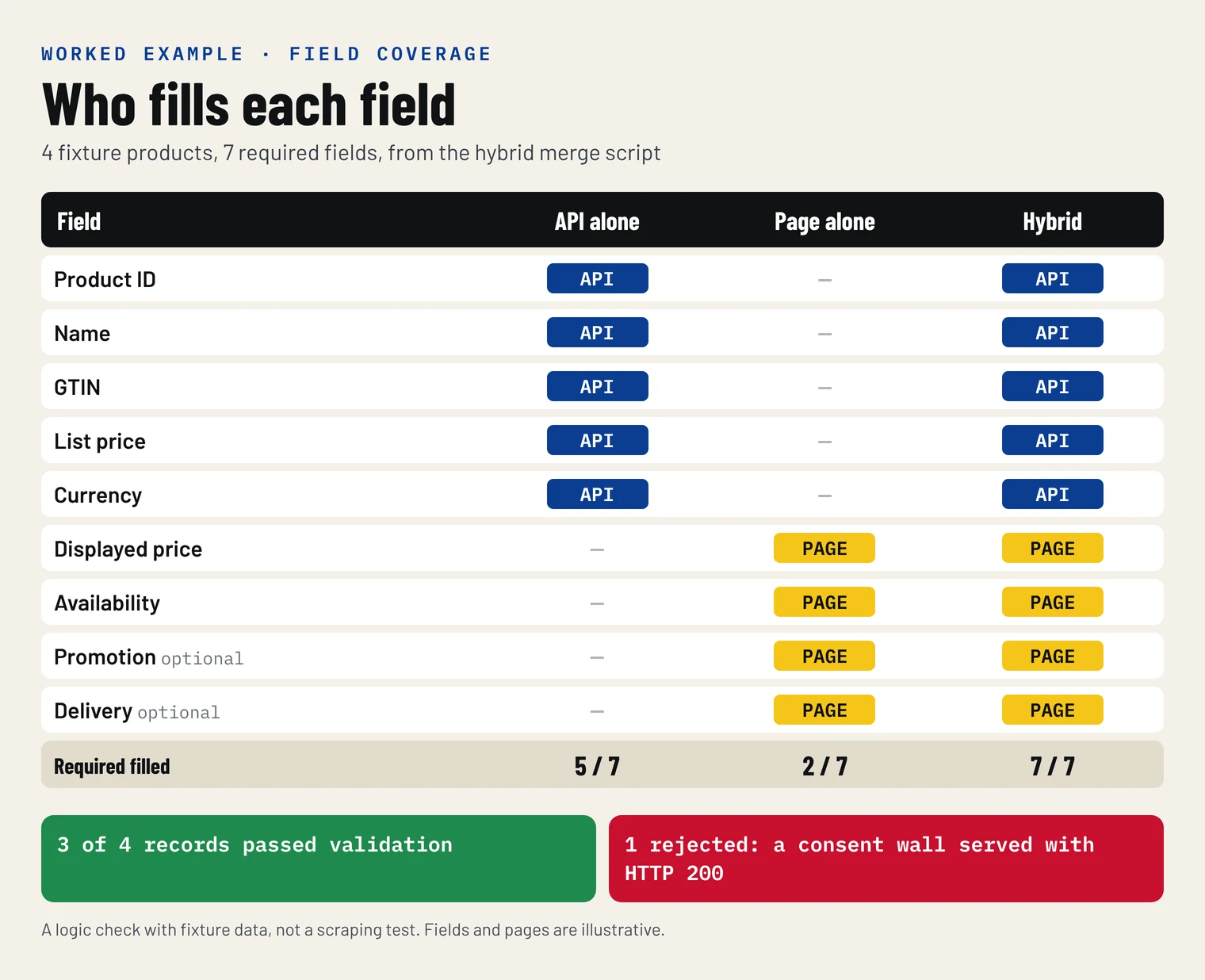
The API alone filled 5 of the 7 required fields; the page filled the other two, and the validator caught the consent wall instead of saving an empty record. For the step before this one, finding which URLs to collect, see how to crawl an entire website with sitemap and link discovery.
"A 200 status tells you the server sent something. It doesn't tell you it sent the price. Every pipeline we build checks the field it came for, because the expensive failures are the quiet ones."
Rajesh Kannan, Co-Founder & CTO at Gramosoft
Cost per validated record, not per request
The fair way to compare an API, your own scraper and a scraping API is total monthly cost divided by records that pass your checks for completeness, freshness and correctness. A cheap request that returns a consent wall costs money and yields nothing, and an API that omits a required field yields nothing at any price.
Cost per validated record = total monthly collection cost ÷ records that pass validation. In the example above, 100,000 product pages a month on GcrawlAI's Growth plan cost $101 ($79 for 80,000 requests plus 20,000 at the $1.10 overage), and at a 75% pass rate that's about $0.00135 per validated record. An official API that covers your fields can beat that: GitHub's REST API costs nothing for public repository data. One that charges per read, like X's at $0.005 a post, costs $500 per 100,000.
GcrawlAI's plans:
| Plan | Price | Requests a month | Pages in parallel | Per 1,000 | Overage per 1,000 |
|---|---|---|---|---|---|
| Free | $0, no card | 50 | 2 | – | – |
| Starter | $29 a month | 20,000 | 10 | $1.45 | $1.60 |
| Growth | $79 a month | 80,000 | 35 | $0.99 | $1.10 |
| Pro | $199 a month | 250,000 | 50 | $0.80 | $0.90 |
| Scale | $499 a month | 750,000 | 100 | $0.67 | $0.75 |
| Enterprise | Volume pricing | 2M+ | Custom | – | – |
| Self-hosted | $0 (MIT) | Your servers | Your workers | Infrastructure only | – |
Annual billing charges 10 months for 12, unused requests on paid plans roll over once, and Indian customers are billed in INR with a GST invoice. Rendering, residential IPs and anti-bot handling are inside every request, and blocked pages, CAPTCHAs, timeouts and server errors are never billed. A page that loads but holds the wrong content, like the consent wall above, is a successful request, which is why the validator matters.
Terms, robots.txt and the law
An API comes with a licence that says what you may store and share. Scraping comes with the site's terms, its robots.txt and the law where you and the data subjects are. Technical access never settles permission on either route. This is general information, not legal advice; check your own case.
- API terms limit use too. A key doesn't authorise every use: licences often restrict caching, retention, display and redistribution.
- Read the site's terms and robots.txt. RFC 9309 defines robots.txt as a crawl policy, not an access control, but ignoring a site-wide disallow is hard to defend.
- Public isn't unrestricted. Courts have treated collecting public pages without logging in as not unauthorised access in the US, but contracts, copyright and database rights still apply.
- Personal data is regulated on every route. Under the GDPR and similar laws, collect only what the question needs and have a lawful basis.
- Don't get around access controls. Logins, paywalls and explicit blocks are a signal to ask for an API or a data licence instead.
For the longer version, see What Is Web Scraping? How It Works, Uses & Legality.
"If an official API gives you the field under terms you can accept, use it, even if scraping looks cheaper on paper. We built GcrawlAI for the data that only lives on the page, not to route around a door the owner already opened."
Rajesh Kannan, Co-Founder & CTO at Gramosoft
Which should you use for your project?
Match the route to the job. Writes, payments and account data belong to official APIs. Page-only observations across many sites belong to scraping, and most product and market data needs both. GcrawlAI has a place in each case: as the page layer next to an API, or as the whole collection layer when no API exists.
| Your situation | Use | Where GcrawlAI fits |
|---|---|---|
| An official API has every field you need | The official API | Only for fields the API adds later or drops |
| The API has identity, the page has prices and stock | Hybrid | Scrapes the page-only fields, one request per page |
| No API exists, public pages are permitted | Web scraping | The whole collection layer: browser, residential IPs, retries |
| Comparable data from many unrelated sites | Web scraping into one schema | Same request shape for every site |
| Pages build content with JavaScript or sit behind bot checks | Browser-based scraping | Renders and handles anti-bot inside the request |
| Prices or stock differ by country | Scraping with geo-targeting | In-country residential IPs per request |
| An AI agent needs live web data | Search and scraping APIs | MCP tools for search, scrape and crawl |
| Payments, orders, account changes | The official API only | Not the right tool |
| Neither route is permitted | Don't collect; ask for a licence | Not the right tool |
Frequently asked questions
What is the difference between web scraping and an API?
An API is an interface the data owner builds for programs: you call documented endpoints and get structured data, usually JSON, under published limits and terms. Web scraping extracts data from pages built for people, so you rebuild the structure from HTML and repair it when the site changes. A scraping API like GcrawlAI does the fetching for you.
Is an API always better than web scraping?
No. An API is better when it returns every field you need at your volume and freshness, under terms you can accept. It isn't when it caps fields (Google Places returns at most 5 reviews), needs eligibility you don't have, or costs more than your budget per record. Then scraping, or a hybrid, is the better route.
Can I scrape a website that already has an API?
Check the API first. If it supplies the fields under workable terms, use it. If it doesn't, read the site's terms and robots.txt before scraping the missing fields, collect only public pages, keep your request rate low, and don't get around logins or blocks. An API existing doesn't by itself forbid scraping, and it doesn't permit it either.
What is a web scraping API?
A service that loads web pages for you and returns their content through its own API. GcrawlAI, for example, renders each page in a real browser through a residential IP, handles anti-bot checks and retries inside one request, and returns HTML, Markdown or JSON. It removes infrastructure work; it doesn't change the target site's terms.
Is web scraping cheaper than using an API?
Not by default. Compare cost per validated record, not price per request. A free API that covers your fields beats any scraper. A per-read API like X's ($0.005 a post) can cost more than scraping, and a DIY scraper adds servers, proxies and repair time. On GcrawlAI, failed pages are never billed.
Is it legal to scrape data if there's no API?
Often, for public pages, but it depends on the site's terms, the data and your jurisdiction. Respect robots.txt, avoid personal data without a lawful basis, keep request rates low and stay away from logins and paywalls. This is general information, not legal advice; check your specific case with a lawyer.
Can I use an API and web scraping together?
Yes, and most production pipelines do. Take stable identity such as IDs and catalogue fields from the API, scrape page-only fields such as displayed prices and stock, and store the source and collection time with every value. Validate each record before saving it, so a consent wall never becomes a row.
Related guides
- What Is Web Scraping? How It Works, Uses & Legality
- Extract structured data from any website
- Web Scraping vs Web Crawling: What's the Difference?
- How to Scrape Google Search Results With Python (2026)
- Flight Data Scraping: How to Extract Airline Prices and Schedules
- How to Crawl an Entire Website: Sitemap and Link Discovery
- Model Context Protocol (MCP) Web Scraping: How to Connect AI Agents to the Live Web
- Residential vs Datacenter Proxies, and How IP Rotation Works (2026 Guide)
- How to Scrape Imperva (Incapsula)-Protected Websites
- Fix 405 Method Not Allowed and 500 Errors in Web Scraping
- 7 Cheapest Reliable Web Scraping APIs for High Volume in 2026