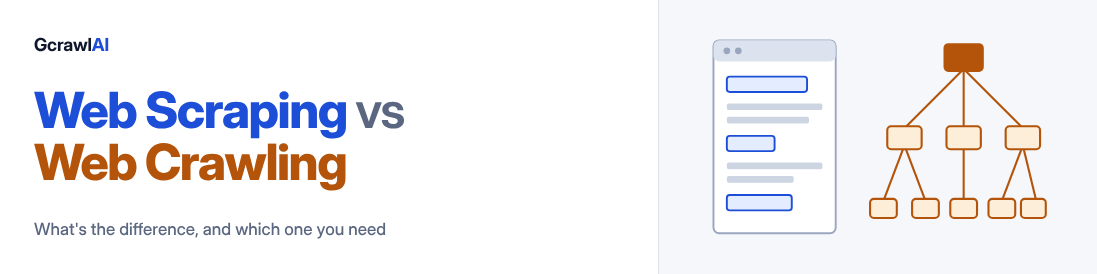
Web scraping extracts specific data from pages you already have the URLs for. Web crawling follows links to find pages you didn't know existed. Scraping answers "what is on this page?" Crawling answers "which pages are there?" Most real projects need both, in that order: crawl to find, scrape to extract.
People use "scraper" and "crawler" as if they were the same word. They aren't, and the mix-up costs real time. Teams build a crawler when a ten-line loop over a URL list would have done the job. Others write a scraper for a single page and then wonder why they only have 40 products out of 6,000.
This guide separates the two properly. You'll get the differences side by side, how each one works under the hood, a simple way to decide which one your project needs, and Python code for both.
Web scraping vs web crawling at a glance
| Web scraping | Web crawling | |
|---|---|---|
| Job | Extract data from a page | Discover pages by following links |
| Input | URLs you already have | One or more seed URLs |
| Output | Structured data: JSON, CSV, Markdown | A list of URLs, often with page content |
| Scope | One page, or a fixed list | A section, a whole site, or many sites |
| Speed | Seconds per page | Minutes to hours, depending on site size |
| Hard part | Parsing: layouts change and selectors break | Navigation: duplicates, traps, scope control |
| Runs | On demand or on a schedule | As a background job, often recurring |
| Typical use | Track the price of 500 known products | Find every product page on a store |
What is web scraping?
Web scraping is automated data extraction from a web page. You hand the scraper a URL and tell it what you want: a price, a job title, the full article text. It gives that back in a format a program can use.
Every scraper, from a weekend script to a commercial API, does the same five things:
- Request the page at a known URL.
- Render it. On most modern sites the content arrives through JavaScript, so a plain HTTP request returns a shell with empty containers. A headless browser has to run the page first.
- Locate the data, with CSS selectors, XPath, or a model that reads the page the way a person would.
- Extract and clean it into JSON, CSV or Markdown.
- Store it somewhere useful.
A scraper has no interest in the rest of the site. It doesn't follow links and it doesn't know what else exists. That narrowness is what makes scraping fast and predictable.
The weak point is step three. Selectors are tied to a page's HTML structure, and that structure changes without warning. A class renamed from price-box to product-price is enough to return empty fields for a week before anyone notices. If you want the fundamentals in more depth, we cover them in What Is Web Scraping?
What is web crawling?
Web crawling is automated page discovery. A web crawler, also called a spider or bot, starts from a seed URL, reads the page, collects every link on it, and adds the new ones to a queue. Then it takes the next URL from the queue and does it again.
That queue is called the crawl frontier, and nearly every design decision in a crawler is about managing it.
Four things decide whether a crawl is useful or a mess:
- Scope. A page limit, a depth limit, and a same-domain rule. Without them a crawler leaves your target through the first external link and never comes back.
- Order. Breadth-first visits everything one click from the start before going deeper, which suits site mapping. Depth-first follows one path to the bottom, which suits finding a page buried in a hierarchy.
- Deduplication. Sites serve the same page at several addresses: with and without a trailing slash, with tracking parameters, with a session ID. A crawler that doesn't normalise URLs spends half its budget re-reading pages it already has.
- Politeness. Read
robots.txt, space out requests, and identify yourself. A crawl that hammers a server gets blocked, and it deserves to.
Search engines are the best-known crawlers. Googlebot discovers pages by following links, then passes each page on to be parsed and indexed. Discovery first, extraction second. Keep that order in mind, because it is the pattern for almost everything else.
How scraping and crawling work together
Treat them as two stages of one pipeline instead of two competing techniques. Crawling produces the URL list. Scraping turns each URL into data.
Take an online store. You want the price of every laptop it sells, but you don't have the product URLs. The crawler walks the category pages and collects 1,200 product links. The scraper then visits each one and pulls title, price and stock status. Tomorrow you skip the crawl, because you already have the list, and only re-scrape.
That last point is the one people miss. Crawling is expensive and the URL list changes slowly. Scraping is cheap and prices change daily. Run them on different schedules.
Which one do you need?
One question settles most cases: do you already have the URLs?
Choose scraping when
- You have the URLs: from a sitemap, a spreadsheet, a search result, or last week's crawl.
- You need a few specific fields, and you need them fresh.
- The job repeats. Price checks, stock checks and rank tracking are scraping jobs.
Choose crawling when
- You know the site but not its pages.
- You need coverage: every doc page for a chatbot, every listing for a dataset, every URL for an SEO audit.
- The site adds pages often and you need to catch the new ones.
If you're unsure, map the site first. Looking at the raw URL list for two minutes tells you how big the job is and which sections you can ignore. It is the cheapest step in the pipeline and the one most often skipped.
Web scraping example in Python
Here is the scraping half using GcrawlAI, our open-source web scraping API. It renders JavaScript, handles proxies and returns clean Markdown, so the example stays short. Install the SDK:
pip install gcrawl-sdkThen scrape one page:
from gcrawl_sdk import GcrawlClient, ScrapeOptions

client = GcrawlClient(api_key="gc-YOUR_API_KEY")

# Scrape URL into clean Markdown for LLMs
result = client.scrape(
    url="https://gramosoft.tech",
    formats=["markdown", "html", "seo"],
    wait=True
)

print("Markdown Content:
", result.markdown)
print("SEO Page Title:", result.seo_json.get("title") if result.seo_json else "N/A")
One known URL goes in, the page content comes back as Markdown with the navigation, footer and ads removed. No link following, no queue. Prefer plain HTTP? The same call with cURL:
# 1. Install official Python SDK
pip install gcrawl-sdk

# 2. Scrape via cURL terminal
curl -X POST "https://gcrawlai.com/gc/api/v1/scrape" \
  -H "X-API-Key: gc-YOUR_API_KEY" \
  -H "Content-Type: application/json" \
  -d '{"url":"https://example.com","markdown":{"enabled":true}}'
The API responds with a job ID that you poll for the result. The SDK's wait=True does the polling for you.
When you have a list of URLs, don't write a loop. Send them as one batch:
urls = [
    "https://example.com/products/laptop-14",
    "https://example.com/products/laptop-16",
]

result = client.batch(urls=urls, formats=["markdown"], wait=True)

for page in result.pages:
    print(page.url)
Still scraping. You supplied every URL yourself.
Web crawling example in Python
Now the other half. You have a domain and no URL list. Start with a map:
site_map = client.links(
    url="https://example.com",
    limit=200,
    wait=True,
)

for link in site_map.links:
    print(link)
That returns the links the site exposes, without the page content. If you want the content of everything, run a crawl:
result = client.crawl(
    url="https://example.com",
    limit=50,                  # hard cap on pages
    formats=["markdown"],
    same_domain_only=True,     # never leave the site
    include_subdomains=False,
    wait=True,
)

for page in result.pages:
    print(page.url, len(page.markdown or ""))
The two scope settings from earlier are right there: limit is the page budget and same_domain_only keeps the crawler on the site. Discovery, deduplication and queueing happen on the server.
Often you only want one section, say the documentation. Map, filter, then batch scrape:
docs_urls = [str(u) for u in site_map.links if "/docs/" in str(u)]

docs = client.batch(urls=docs_urls, formats=["markdown"], wait=True)
This is the pattern we'd suggest for most RAG projects. You pay to extract only the pages you'll use, and you can read the URL list before spending anything on it.
A crawl is a background job. Small sites finish inside the SDK's default wait. For larger ones, raise the timeout argument or start the job without wait and poll for the result.
Where each one goes wrong
Scraping problems
- Empty results from JavaScript sites. The request succeeded and the HTML has no data in it. The page needed a browser to render.
- Selectors that rot. A redesign changes the markup and your fields come back blank with no error. Validate the output, not just the status code.
- Blocks. Rate limits, CAPTCHAs and fingerprint checks arrive once you scale past a few hundred requests from one IP address.
Crawling problems
- Crawl traps. Calendars with a "next month" link that never ends, and filter combinations that generate millions of URLs for the same 200 products.
- Duplicates. The same page under five URLs. Without normalisation your page count is inflated and your dataset is full of repeats.
- No budget. A crawl without a page limit is a bill without a limit.
- Crawling when you didn't need to. If the site publishes a sitemap, the discovery work has been done for you.
One cost point applies to both. Many scraping APIs price in credits, where a JavaScript-rendered or proxied page costs several times a plain one. A 10,000-page crawl of a modern site can be billed as 50,000 credits or more. Check the multiplier before you estimate a crawl. GcrawlAI doesn't use credits: one request is one request, with rendering, stealth and proxies included.
Common use cases
| Project | Technique | Why |
|---|---|---|
| Price monitoring | Scraping | Known product URLs, checked on a schedule |
| RAG knowledge base | Crawl, then scrape | Every docs page is needed, as clean Markdown |
| SEO site audit | Crawling | The point is to find every URL, broken link and missing tag |
| Lead enrichment | Scraping | You have the company domains and need details from each |
| Competitor catalogue | Crawl, then scrape | Discover the products first, then extract specs and prices |
| News and brand monitoring | Crawling, recurring | New pages appear daily and have to be found |
| AI agent browsing | Scraping | The agent picks a URL and needs its content right now |
Scraping and crawling tools compared
The tools fall into three groups. Libraries give you control and leave the plumbing to you. Frameworks include the queue, retries and pipelines. APIs run the infrastructure and bill per request.
| Tool | Type | Scrapes | Crawls | Renders JS | Good for |
|---|---|---|---|---|---|
| BeautifulSoup | Python library | Yes | No | No | Parsing static HTML |
| Scrapy | Python framework | Yes | Yes | With a plugin | Large custom crawls |
| Playwright | Browser automation | Yes | By hand | Yes | Dynamic pages, logins |
| Crawlee | JS and Python framework | Yes | Yes | Yes | Browser-based crawling |
| GcrawlAI | API, or self-hosted | Yes | Yes | Yes | LLM-ready Markdown without running infrastructure |
A rough rule: static pages and a small list, use BeautifulSoup. Thousands of pages with custom logic and a team to maintain it, use Scrapy or Crawlee. If you'd sooner not run browsers, proxies and queues yourself, use an API. GcrawlAI is MIT-licensed on GitHub, so you can also host it on your own servers.
Legal and polite collection
The same rules apply whether you scrape one page or crawl a million. This is general guidance, not legal advice.
- Read robots.txt. It states which paths a site wants bots to stay out of. It was standardised as RFC 9309 in 2022.
- Read the terms of service, particularly for anything behind a login.
- Be careful with personal data. Privacy laws such as GDPR can apply to personal data even when it is publicly visible.
- Respect copyright. Collecting facts is different from republishing someone's content.
- Throttle. Your data collection should never be the reason a site slows down.
The short version
Scraping extracts. Crawling discovers. If you have the URLs, scrape them. If you don't, crawl or map to get them, then scrape. Run discovery rarely and extraction often, set a page limit on every crawl, and look at the URL list before you pay to process it.
Get that order right and the choice of tool matters much less than people think.
Frequently asked questions
Is a web crawler the same as a web scraper?
No. A crawler is a navigation program that keeps a queue of URLs and follows links. A scraper is an extraction program that reads one page and returns the data on it. Many tools ship both, which is why the names get mixed up.
Can you scrape a website without crawling it?
Yes. If you already have the URLs, from a sitemap, an export or a search result, you can scrape them directly. You only need a crawler when the list of pages is unknown.
Which is faster, scraping or crawling?
Scraping a known URL is faster because it is a single fetch. A crawl has to fetch a page, read its links, queue them and repeat, so its duration grows with the size of the site and the page limit you set.
Is web scraping or web crawling legal?
Collecting publicly available data is common practice, but the answer depends on what you collect, where you are and how you use it. Personal data, content behind a login, copyrighted material and a site's terms of service all change the picture. Ask a lawyer before a commercial project.
Do search engines and AI companies crawl or scrape?
Both. A search engine crawls to discover pages, then extracts the text, links and metadata from each one to build its index. AI data pipelines work the same way: crawl for coverage, scrape for clean content.
What is the best way to crawl a website for RAG?
Map the site first so you can see the URL list, filter it down to the sections you care about, then scrape those pages to clean Markdown. Markdown without navigation, footers and ads keeps chunks small and retrieval accurate.