By Rajesh Kannan, Co-Founder & CTO, Gramosoft · Last updated: · Discovery code run against a local 73-page test site on October 25, 2026; Sitemaps protocol limits checked the same day
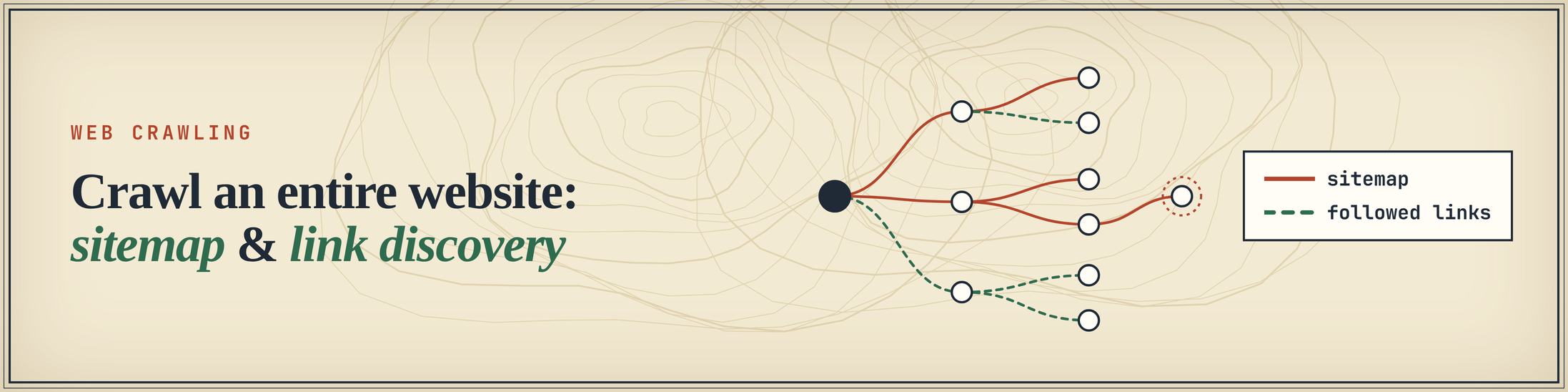
To crawl an entire website you first need the full list of its pages. There are two ways to build it. Sitemap discovery reads the URL list the site publishes for search engines. Link discovery starts at the homepage and follows links. Each misses pages the other finds, so a complete crawl uses both.
This guide shows how to find and parse sitemaps, how to run a link crawl that doesn't fall into traps, and what each method missed on a test site we built for this post. It starts with the fastest route, GcrawlAI, which maps and crawls a site in two calls, then shows how to build it yourself.
TL;DR
- Start with the sitemap. Read the
Sitemap:lines in robots.txt, follow sitemap indexes, and decompress gzipped files. On our test site, 5 requests listed 81% of the real pages. - Then crawl links, with guards: normalise URLs, cap depth and pages, cap repeats per path, and obey robots.txt. A naive crawl made 300 requests, 232 of them to junk URLs, mostly an endless calendar.
- Render JavaScript when navigation is built in the browser. Six docs pages only appeared once the pages were rendered.
- Combine both: sitemap URLs plus a rendered link crawl found all 73 pages in 85 requests. Neither method got there alone.
- GcrawlAI does it as a service: its map endpoint reads robots.txt sitemaps, sitemap indexes and page links, and its crawl endpoint returns rendered pages as Markdown, with no credit multipliers and failed requests never charged.
How do you crawl an entire website? Read robots.txt for Sitemap: lines and collect every URL from the sitemaps, following indexes and gzipped files. Then run a breadth-first link crawl from the homepage, seeded with those URLs, that normalises URLs, caps depth and pages, skips traps and disallowed paths, and renders JavaScript where needed. Merge the two lists.
How to crawl an entire website with GcrawlAI
GcrawlAI maps and crawls a whole site in two calls. The map endpoint, links in the Python SDK, discovers a site's URLs from robots.txt sitemaps, sitemap indexes and the homepage's links. The crawl endpoint then follows links and returns rendered pages as Markdown or HTML. Rendering, proxies and anti-bot handling are part of each request.
"""The managed version: map the site with GcrawlAI, then crawl it. pip install gcrawl-sdk"""
from gcrawl_sdk import GcrawlClient

client = GcrawlClient(api_key="gc-YOUR_API_KEY")   # add base_url="http://localhost:8000" for a self-hosted server

# 1. Map: robots.txt sitemaps, sitemap indexes and homepage links, de-duplicated, no page content yet
site_map = client.links(url="https://example.com", limit=5000, same_domain_only=True, wait=True)
urls = [u for u in site_map.links if "/blog/" in u]          # filter before you spend requests
print(len(site_map.links), "URLs mapped,", len(urls), "in /blog/")

# 2. Crawl: rendered pages as Markdown, same domain only, capped
result = client.crawl(url="https://example.com/blog/", limit=200, formats=["markdown"],
                      same_domain_only=True, wait=True)
for page in result.pages:
    print(page.url, len(page.markdown or ""))
What the open-source map code does, from the GcrawlAI repository:
- Sitemaps first: reads
Sitemap:lines from robots.txt, probes/sitemap_index.xmland/sitemap.xml, and fetches child sitemaps from an index in parallel, skipping other hosts. - Browser-first scan: runs in a real browser, so links built by JavaScript count. If a static scan finds very few URLs, it falls back to the browser.
- Normalisation: removes trailing slashes,
.htmlendings and tracking parameters such asutm_*,gclidandfbclid, and drops image, video and archive URLs. - A
limiton URLs, and same-domain and subdomain switches for both map and crawl.
Beyond discovery, GcrawlAI handles the parts a whole-site crawl runs into:
- One request includes everything: JavaScript rendering, rotating residential proxies, anti-bot handling for Cloudflare, DataDome, Akamai and PerimeterX, and CAPTCHA solving, with no credit multipliers.
- Failed requests are never charged.
- Async batch jobs with webhooks for large URL lists.
- Python SDK, and MCP so AI agents can map and crawl a site on request.
- Pricing: a free plan with no card, paid plans from $0.98 to $6.33 per 1,000 requests, and an MIT-licensed core you can self-host for nothing.
Where it falls short: the map returns one merged URL list, so if you want to know which URLs only the sitemap knows about, run that comparison yourself. Crawl options cover page limits and domain scope. Add your own include and exclude filtering on the mapped list before you crawl.
"Map before you crawl. Knowing a site has 4,000 URLs, and that you need 600 of them, is worth more than any crawler optimisation."
Rajesh Kannan, Co-Founder & CTO at Gramosoft
Sitemap discovery vs link discovery
Sitemap discovery is cheap and finds pages nothing links to, but it only knows what the site's generator chose to list, and the list goes stale. Link discovery finds everything a visitor can reach, including new pages, but it costs one request per page and can wander into endless generated URLs. Each fixes the other's blind spot.
| Sitemap discovery | Link discovery | |
|---|---|---|
| How it works | Read XML files the site publishes for search engines | Fetch pages, extract links, repeat breadth-first |
| Cost | One request per sitemap file, often thousands of URLs each | One request per page |
| Finds | Orphan pages, deep pages, listed sections | Everything reachable, including pages added since the sitemap was built |
| Misses | Unlisted sections, new pages, pagination | Orphan pages, pages beyond your depth limit, JavaScript-only links unless rendered |
| Risks | Dead URLs, stale lists, no sitemap at all | Infinite calendars and filters, duplicate URLs, load on the site |
| Use it for | The first, fast map | Filling the gaps and checking coverage |
How to find and parse a website's sitemap
Check robots.txt first. Sites announce sitemaps there with a line such as Sitemap: https://example.com/sitemap_index.xml, and there can be several. If there's none, try common paths like /sitemap.xml, /sitemap_index.xml and, on WordPress, /wp-sitemap.xml. Expect sitemap indexes that point to more sitemaps, and gzipped files.
The Sitemaps protocol sets the rules your parser has to cope with. Each file "must have no more than 50,000 URLs and must be no larger than 50MB", so big sites split their URLs across many files listed in an index, which can itself list up to 50,000 sitemaps. Files may be gzipped. A sitemap can only list URLs on its own host and under its own path.
- Index or list? A
<sitemapindex>root means every<loc>is another sitemap to fetch. A<urlset>root means they're pages. - Gzip: check the first two bytes (
1f 8b), not the file name. Some servers send gzip from a.xmlURL. - Filter as you go: drop URLs robots.txt disallows, and normalise them so duplicates collapse.
"""Find every URL a site lists in its sitemaps: robots.txt first, then common paths,
following sitemap indexes and gzipped files, without fetching a single page."""
import gzip, re
from urllib.parse import urljoin
from urllib.robotparser import RobotFileParser
import requests
from normalize import normalize

UA = {"User-Agent": "SiteMapper/1.0 (+https://example.com/bot)"}
LOC = re.compile(rb"<loc>\s*([^<\s]+)\s*</loc>", re.I)
COMMON = ["/sitemap_index.xml", "/sitemap.xml", "/sitemap-index.xml", "/wp-sitemap.xml"]

def get(url):
    r = requests.get(url, headers=UA, timeout=20)
    if r.status_code != 200:
        return None
    body = r.content
    return gzip.decompress(body) if body[:2] == b"\x1f\x8b" else body   # trust the bytes, not the extension

def robots(base):
    rp = RobotFileParser(urljoin(base, "/robots.txt"))
    rp.read()
    return rp

def discover(base, max_sitemaps=500):
    rp = robots(base)
    queue = list(rp.site_maps() or []) or [urljoin(base, p) for p in COMMON]
    seen_maps, pages = set(), set()
    while queue and len(seen_maps) < max_sitemaps:
        sm = queue.pop(0)
        if sm in seen_maps:
            continue
        seen_maps.add(sm)
        xml = get(sm)
        if not xml:
            continue
        locs = [m.decode().strip() for m in LOC.findall(xml)]
        if b"<sitemapindex" in xml[:500].lower():
            queue += locs                               # an index lists more sitemaps, not pages
        else:
            pages |= {normalize(u) for u in locs if rp.can_fetch(UA["User-Agent"], u)}
    return pages, seen_maps

if __name__ == "__main__":
    import sys
    urls, maps = discover(sys.argv[1] if len(sys.argv) > 1 else "https://example.com")
    print(f"{len(urls)} URLs from {len(maps)} sitemaps")
Treat the result as candidates, not facts. On our test site, two sitemap entries returned 404, and three new blog posts weren't listed at all.
How to discover pages by following links
A link crawl is a breadth-first search. Fetch the homepage, extract same-site links, queue the ones you haven't seen, and repeat level by level. Breadth-first reaches the important pages early, because most sites keep them a few clicks from the homepage. Without guards it can also run forever, so the guards matter as much as the loop.
Step 1: normalise every URL
One page can appear as /about, /about/, /about?utm_source=nav and /about#team. Give each page one spelling before you queue it: lowercase the scheme and host, drop fragments, tracking parameters and filter parameters, sort what's left, and pick one trailing-slash rule.
"""One spelling per page, so the same URL is never queued twice."""
from urllib.parse import urlsplit, urlunsplit, parse_qsl, urlencode

DROP_PARAMS = {"utm_source", "utm_medium", "utm_campaign", "utm_term", "utm_content",
               "gclid", "fbclid", "ref", "sort", "color", "sessionid"}   # tracking and facet params

def normalize(url):
    p = urlsplit(url)
    query = sorted((k, v) for k, v in parse_qsl(p.query) if k.lower() not in DROP_PARAMS)
    if query == [("page", "1")]:                    # /products?page=1 is /products
        query = []
    path = p.path.rstrip("/") or "/"
    return urlunsplit((p.scheme.lower(), p.netloc.lower(), path, urlencode(query), ""))  # no #fragment
Step 2: crawl breadth-first with guards
The crawler below takes any fetch function, so the same code runs on plain HTTP, a headless browser or a scraping API. It stays on one host, obeys robots.txt, and stops at a depth limit and a page budget. It also caps how many URLs it will queue for any one path, which is what stops calendars and filter pages from producing URLs forever.
"""Breadth-first link discovery with the guards a whole-site crawl needs."""
import time
from collections import deque, Counter
from urllib.parse import urljoin, urlsplit
from bs4 import BeautifulSoup
from normalize import normalize

def links_in(html, page_url):
    soup = BeautifulSoup(html, "html.parser")
    for a in soup.find_all("a", href=True):
        href = a["href"].strip()
        if not href.startswith(("mailto:", "tel:", "javascript:")):
            yield normalize(urljoin(page_url, href))

def crawl(start, fetch, rp=None, seeds=(), max_depth=6, max_pages=500, per_path=25, delay=0.5, ua="SiteMapper/1.0"):
    """fetch(url) -> HTML or None. seeds: URLs already known (from the sitemap) to start alongside the homepage."""
    host = urlsplit(start).netloc.lower()
    queue = deque([(normalize(start), 0)] + [(u, 1) for u in seeds])
    queued = {u for u, _ in queue}
    per_path_count = Counter()
    found, requests_made = [], 0
    while queue and len(found) < max_pages:
        url, depth = queue.popleft()
        if rp and not rp.can_fetch(ua, url):
            continue
        html = fetch(url); requests_made += 1
        time.sleep(delay)
        if html is None:                                  # 404, error, or not HTML
            continue
        found.append(url)
        if depth >= max_depth:
            continue
        for link in links_in(html, url):
            sp = urlsplit(link)
            if sp.netloc != host or link in queued:
                continue
            per_path_count[sp.path] += 1                  # calendars and filters repeat one path forever
            if per_path_count[sp.path] > per_path:
                continue
            queued.add(link)
            queue.append((link, depth + 1))
    return found, requests_made
- Depth limit: set it from the site's structure. Pagination adds a level per page, so a depth of 4 cut our crawl off at page 3 of the product listing.
- Page budget: a hard ceiling you choose before the run, not whenever the queue happens to run out.
- Per-path cap: 25 URLs per path is plenty for real sections and stops
/calendar?month=…early. - Politeness: keep a delay between requests, identify your crawler, and slow down on 429 or 503 responses. Our guide to fixing 403 errors covers what happens when you don't.
Step 3: render pages whose links come from JavaScript
If a site builds its menus or tables of contents in the browser, plain HTTP sees no links, and your crawl stops short with no error. Spot it by comparing view-source with the rendered page. Where they differ, fetch those pages through a headless browser or a rendering API before extracting links. Scraping dynamic JavaScript websites covers the trade-offs.
What each method found on a 73-page test site
We built a small shop site with the problems real crawls hit and ran each strategy against it on October 25, 2026. Sitemap discovery missed new and unlisted pages. Link crawling missed orphans and JavaScript links. A naive crawl burned most of its budget on a calendar. Only sitemap URLs plus a rendered, guarded link crawl found all 73 pages.
The test site has 73 real pages and these traps:
- A sitemap index pointing to three sitemaps, one of them gzipped.
- A stale blog sitemap that is missing the three newest posts.
- Two dead URLs in the sitemaps.
- Four orphan products that are listed in the sitemap but linked from nowhere.
- Paginated product listings.
- Docs links injected by JavaScript.
- An endless events calendar, plus sort and filter links.
- Tracking parameters and fragments on internal links.
- A
/cartpath disallowed in robots.txt.
$ python run_lab.py
strategy                             real pages  junk  dupes  requests
Sitemap only                       59/73 ( 81%)     2      0         5
Naive link crawl                   63/73 ( 86%)   232      5       300
Link crawl, guarded, depth 4       54/73 ( 74%)     4      0        58
Link crawl, guarded, depth 6       63/73 ( 86%)     6      0        69
Link crawl, guarded + rendered     69/73 ( 95%)     6      0        75
Sitemap + rendered link crawl      73/73 (100%)     6      0        85

Sitemap only missed 14: /blog/post-11, /blog/post-12, /blog/post-13, /docs, /docs/auth, /docs/errors, /docs/install, /docs/limits ...

Naive link crawl missed 10: /docs/auth, /docs/errors, /docs/install, /docs/limits, /docs/quickstart, /docs/webhooks, /products/p-37, /products/p-38 ...

Link crawl, guarded, depth 4 missed 19: /docs/auth, /docs/errors, /docs/install, /docs/limits, /docs/quickstart, /docs/webhooks, /products/p-28, /products/p-29 ...

Link crawl, guarded, depth 6 missed 10: /docs/auth, /docs/errors, /docs/install, /docs/limits, /docs/quickstart, /docs/webhooks, /products/p-37, /products/p-38 ...

Link crawl, guarded + rendered missed 4: /products/p-37, /products/p-38, /products/p-39, /products/p-40

sitemap entries that return 404: 2
| Strategy | Real pages found | Junk URLs | Requests | What it missed |
|---|---|---|---|---|
| Sitemap only | 59 of 73 (81%) | 2 dead | 5 | 3 new posts, docs, product pagination |
| Naive link crawl | 63 of 73 (86%) | 232 | 300 (cap hit) | Orphans, JavaScript docs links |
| Guarded link crawl, depth 4 | 54 of 73 (74%) | 4 | 58 | Products past listing page 3, orphans, docs |
| Guarded link crawl, depth 6 | 63 of 73 (86%) | 6 | 69 | Orphans, JavaScript docs links |
| Guarded + rendered | 69 of 73 (95%) | 6 | 75 | 4 orphan products |
| Sitemap + guarded, rendered link crawl | 73 of 73 (100%) | 6 | 85 | Nothing |
The "junk" for guarded crawls is a few calendar months, which the depth limit stops. "Rendered" used a local headless Chromium. This is one small, synthetic site: it shows how each method fails, not how often it fails on real sites.
- Each method's misses were the other's finds. The sitemap listed the four orphan products. The link crawl found the three new posts and the paginated listings.
- Guards beat brute force. The naive crawl made 300 requests and found no more real pages than the guarded crawl's 69, because 231 of its fetches were calendar months.
- Depth is easy to get wrong. Pagination pushed the last product pages to depth 5, so a depth-4 limit lost nine products without any warning.
"A crawl that ends without errors isn't a complete crawl. Compare what the sitemap lists with what the links reach. The pages in one list and not the other are where your coverage problems are."
Rajesh Kannan, Co-Founder & CTO at Gramosoft
The full recipe for crawling an entire website
Put the two methods in order: map first, then crawl. Mapping with sitemaps is cheap and tells you the size of the job before you spend requests. The link crawl, seeded with the sitemap URLs, fills the gaps. Comparing the two lists afterwards shows orphans, stale sitemap entries and sections you forgot to render.
- Read robots.txt. Note the
Sitemap:lines, disallowed paths and any crawl delay. - Map with sitemaps. Follow indexes, decompress gzip, normalise, and drop disallowed URLs.
- Filter and budget. Keep only the sections you need, and set a page limit before you fetch anything.
- Crawl links from the homepage and the sitemap URLs. Use breadth-first order, depth and per-path caps, a delay, and rendering where navigation is built by JavaScript.
- Compare the two lists. Pages only in the sitemap are orphans or dead. Pages only in the link crawl are missing from the sitemap.
- Fetch the content of the final list, as HTML or Markdown, and re-map on a schedule because sitemaps change.
How to crawl a website politely and legally
Crawling a whole site sends it many requests, so politeness becomes part of the design. Obey robots.txt, keep a delay between requests, back off on 429 and 503 responses, identify your crawler, and crawl only public pages. Read each site's terms before you collect anything for commercial use. This isn't legal advice.
- robots.txt: skip disallowed paths and honour
Crawl-delaywhere it's set. Python'surllib.robotparserreads both. - Rate: one request a second per site is a safe default for small sites, and respect
Retry-After. - Scope: no login-only pages, no personal data, and no republishing a site's content as your own.
Our guides to what web scraping is and web scraping vs web crawling cover the basics.
Frequently asked questions
How do I find a website's sitemap?
Open /robots.txt and look for Sitemap: lines. If there are none, try /sitemap.xml, /sitemap_index.xml and, on WordPress sites, /wp-sitemap.xml. Many large sites publish an index that points to several smaller sitemaps, sometimes gzipped.
Is crawling from a sitemap enough?
Rarely. Sitemaps list what the site's generator includes, and they go stale. On our test site the sitemap found 81% of pages, missing new posts, pagination and an unlisted docs section. Use it as a fast first map, then fill gaps with a link crawl.
How do I stop a crawler getting stuck in infinite URLs?
Normalise URLs, drop tracking and filter parameters, set a depth limit and a page budget, and cap how many URLs you queue for any one path. On our test site, a crawl without these guards spent 231 of 300 requests on an endless calendar.
Why does my crawler find so few pages?
Usually the site builds its links with JavaScript, so plain HTTP sees an almost empty page. A depth limit that is too low, or a block page returned with status 200, can do the same. Render the pages, raise the depth, and check the response bodies.
Can GcrawlAI crawl an entire website?
Yes. GcrawlAI's map endpoint discovers URLs from sitemaps and page links, and its crawl endpoint returns rendered pages as Markdown or HTML, with a page limit and domain scope. JavaScript rendering, proxies and anti-bot handling are one request, with no credit multipliers, and failed requests are never charged.
Is it legal to crawl an entire website?
Crawling public pages at a modest rate is common, but it depends on the site's terms, what you collect and where you are. Obey robots.txt, avoid login-only pages and personal data, keep request rates low, and take legal advice for commercial use.