By Rajesh Kannan, Co-Founder & CTO, Gramosoft · Last updated: · Flight Price Intelligence page and Ryanair v. Booking.com sources checked on October 25, 2026
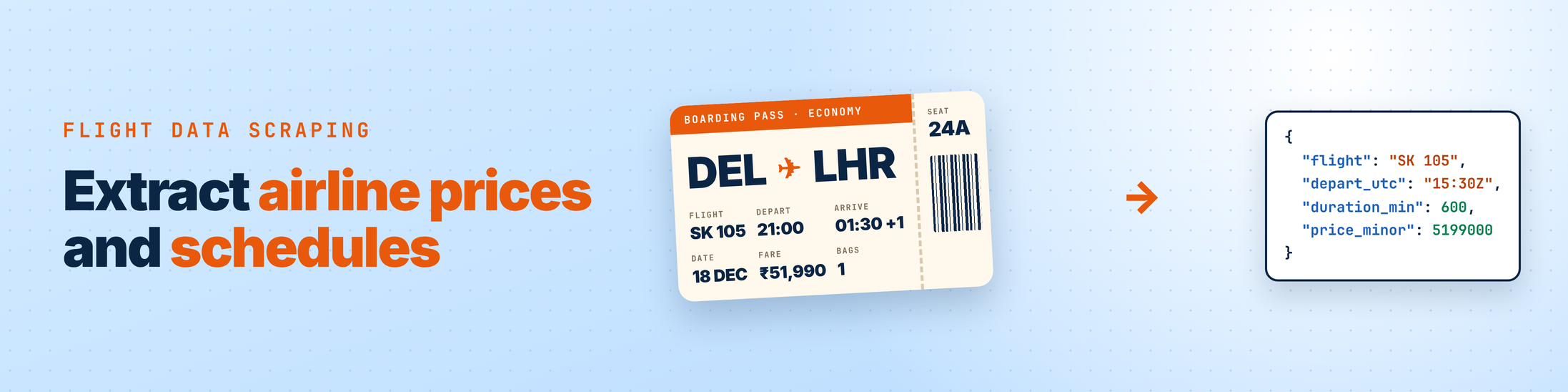
Flight data scraping means pulling fares and schedules out of airline sites, online travel agencies and metasearch pages, then turning them into clean records you can compare. Fetching the page is only half the job. The other half is reading fares that hide in JSON, and getting time zones, codeshares and overnight arrivals right.
This guide shows what flight data you can collect, where it sits on a page, four ways to extract it, and how to get schedules right. GcrawlAI fetches the pages, and if you'd rather skip parsers altogether, its Flight Price Intelligence API returns fares and schedules as structured JSON.
TL;DR
- Look for JSON first. Most fare pages carry the search result as embedded JSON or load it from a background call. Reading that beats CSS selectors, which break whenever a site redesigns.
- Schedules need time zones. Store every time with its airport's zone, then compute duration. Subtracting local clock times makes a 10-hour Delhi to London flight that leaves at 21:00 and lands at 01:30 look like 4h30m.
- One schema for every source: IATA codes, marketing and operating flight numbers, UTC and local times, duration in minutes, price in minor units with currency, fare brand and bags.
- GcrawlAI fetches the pages: JavaScript rendering, rotating residential proxies, anti-bot handling and CAPTCHA solving are one request, with no credit multipliers, and failed requests are never charged.
- No parsers at all: the Flight Price Intelligence API monitors airline booking engines and aggregators and returns flight numbers, IATA codes, timestamps, layovers and baggage as JSON.
How do you scrape airline prices and schedules? Build a search URL with the route, date, currency and country fixed, fetch the rendered results page from that country, and extract fares from embedded JSON, the background fare API, accessibility labels or HTML cards. Then normalise every flight into one schema with time-zone-aware times and total prices, and reject empty pages.
What flight data you can extract
Flight data splits into two kinds. Prices describe what a seat costs on a given search: total fare, currency, cabin, fare brand and baggage. Schedules describe the flight itself: flight number, operating carrier, airports, departure and arrival times, duration and stops. Most projects need both, joined on flight number and departure time.
| Field | Example | Where it usually appears | Watch out for |
|---|---|---|---|
| Total price and currency | ₹52,499 INR | Fare card, embedded JSON | Fees added at checkout; prices change by country |
| Cabin and fare brand | Economy, "Saver" | Fare card, JSON | Same flight, several brands and prices |
| Baggage allowance | 1 checked bag | Fare details, JSON | Often only on a second click |
| Marketing flight number | SK 2711 | Card, JSON | Spacing varies: "SK2711" vs "SK 2711" |
| Operating carrier | Operated by GA 7 | Small print, JSON | Codeshares: one plane, several flight numbers |
| Airports | DEL, DXB, LHR | Card, URL, JSON | City codes vs airport codes (LON vs LHR) |
| Departure and arrival | 21:00 → 01:30 +1 | Card, JSON | Local times, "+1" day badges, no time zone |
| Duration and stops | 10h, nonstop | Card | Compute it yourself and compare |
| Seats left | "4 left at this price" | Card, JSON | Shown only when low; absence isn't "plenty" |
Where airline prices and schedules come from
Fares come from three kinds of sites. Airline websites sell their own seats with the full detail of fare brands and baggage. Online travel agencies resell those seats, sometimes with their own fees. Metasearch sites show many airlines and agencies on one page, which makes them the cheapest place to collect a whole route in one request.
| Source | Prices | Schedules | Typical difficulty | Use it for |
|---|---|---|---|---|
| GcrawlAI Flight Price Intelligence API | Live fares by cabin | Flight numbers, timestamps, layovers | None: structured JSON | Many routes and carriers without parsers |
| Airline websites | Exact fare brands, bags | Full detail, codeshares | High: search forms, bot protection | Fare-class and baggage detail |
| Online travel agencies | Resale price incl. fees | Good | Medium to high | OTA vs direct price checks |
| Metasearch pages | Cheapest per flight, many sellers | Good summary | Medium: heavy JavaScript | Whole-route snapshots |
| Airline timetables, flight status pages | No | Planned and actual times | Low to medium | Schedules, delays |
The free official routes have mostly closed. Google shut down its QPX Express flight API in April 2018 (TechCrunch), and several API providers report that Amadeus wound down its self-service portal in 2026, so check current access with Amadeus before planning around it. That gap is why most teams extract fares from public pages.
Four places fare data hides on a results page
Before you write a selector, find where the fares actually live. Open a search in your browser, then check the page source, the Network tab and the accessibility labels. Fares usually sit in one of four places, and the higher on this list you find them, the less your extractor will break when the site changes its design.
| Where | How to spot it | Stability | Needs a browser? |
|---|---|---|---|
| 1. Embedded JSON | View source and search for a fare you can see, e.g. "52499". Look in <script type="application/json"> or a page-state blob |
High | Often no |
| 2. Background fare API | DevTools → Network → Fetch/XHR, run the search, find the response with itineraries or offers |
High | No, if the endpoint answers a plain request |
| 3. Accessibility labels | Inspect a fare card and read its aria-label: one sentence with price, airline and times |
Medium to high | Usually yes |
| 4. Rendered HTML cards | Class names like .price, or generated names like .YM1z |
Low | Yes |
Accessibility labels are worth knowing about. Sites keep them readable for screen readers, so they change far less often than generated class names, and one regular expression can read the whole card.
"Most broken flight datasets aren't caused by blocks. They're caused by times without time zones and prices without fees. Get the schema right first, and every chart and alert built on it gets easier."
Rajesh Kannan, Co-Founder & CTO at Gramosoft
Getting schedules right: time zones, overnight flights and codeshares
Schedule data looks simple and isn't. Airline pages show local times at each airport with no time zone, mark next-day arrivals with a small "+1", and list the same plane under several flight numbers. If your extractor ignores these, durations, connection times and de-duplication all come out wrong, quietly and without errors.
- Store the zone with the time. Keep a map of airport code to IANA zone (
DEL → Asia/Kolkata,LHR → Europe/London). Save both local and UTC times. UTC is for sorting and maths, local is for display. - Handle daylight saving. London is UTC+0 in December and UTC+1 in summer. A zone-aware library such as Python's
zoneinfohandles this; a fixed offset doesn't. - Read "+1" and "+2" badges, and if a page shows none, treat an arrival earlier than the departure as the next day.
- Sanity-check durations. A nonstop under 20 minutes or a segment over 24 hours almost always means a parsing bug.
- Keep marketing and operating flight numbers. De-duplicate on operating flight and departure time when you count seats or flights, and on marketing flight when you compare what each seller charges.
- Connections: store each segment with an itinerary ID and compute the layover from UTC times.
Why flight sites block scrapers, and how to stay unblocked
Each fare search hits an airline's reservation system, which costs it money, so airline and travel sites guard their search pages closely. Expect bot managers such as Akamai and PerimeterX, search forms that must be filled before any fare appears, fares loaded by JavaScript, and prices that change with the visitor's country.
- Prefer metasearch and fare endpoints. One metasearch page covers every carrier on a route, and a JSON endpoint is lighter than a full page.
- Check the body, not the status code. Count fares on every response and treat zero as a failure.
- Keep the country and currency fixed for every request in a series, or you'll compare different markets.
- Pace yourself. One search per route and date every few hours is enough for most uses. Our guide to fixing 403 errors in Python requests covers what to do when you're blocked anyway.
- Render only when you must. Use a browser for pages whose fares are built by JavaScript, and plain requests for everything else. Scraping dynamic JavaScript sites explains the difference.
GcrawlAI puts JavaScript rendering, rotating residential proxies, anti-bot handling for Cloudflare, DataDome, Akamai and PerimeterX, and CAPTCHA solving into one request, so your scraper doesn't have to manage browsers or proxy pools.
Scraping API or Flight Price Intelligence API?
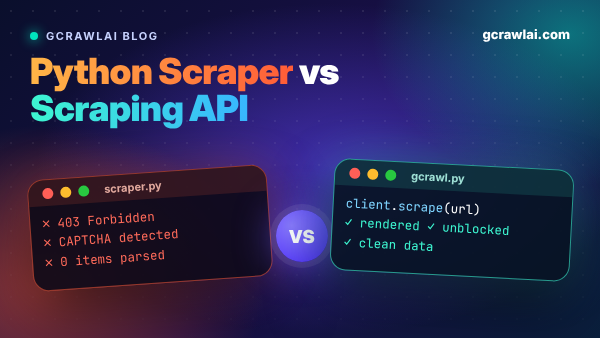
GcrawlAI gives you two ways to get flight data. The scraping API returns rendered pages, and you write the extractors. The Flight Price Intelligence API skips the extractors and returns structured fares and schedules. Pick the first for full control over a few sites, the second for many routes and carriers.
The scraping API: you own the extractors
- Rendered pages with JavaScript already run, plus
auto_scrollfor long result lists. - Country-specific residential IPs through
proxy_geo, so you see local fares and currency. - Anti-bot and CAPTCHA handling in the same request, with no credit multipliers for any feature.
- Failed requests are never charged, which matters on sites that have bad hours.
- Python SDK, async batch jobs with webhooks for large route grids, and MCP so an AI agent can look up a fare on request.
- Pricing: a free plan with no card, paid plans from $0.98 to $6.33 per 1,000 requests, and an MIT-licensed core on GitHub you can self-host for nothing.
The Flight Price Intelligence API: no extractors to maintain
The Flight Price Intelligence API monitors airline booking engines and travel aggregators and returns the data already normalised, so there are no extractors to write and no time zones to fix.
- Fares by cabin: Economy, Premium Economy, Business and First, for one-way, round-trip and multi-city searches across IATA airport pairs.
- One schema: flight numbers, IATA codes, departure and arrival timestamps, layover durations and baggage allowances, as JSON or validated against your own JSON Schema.
- Browser emulation built in: search forms, date pickers and fares that update after the page loads.
- Recurring monitors every 15 minutes, hourly or daily, with residential proxy locations for local fares and currency.
- Delivery: synchronous responses for live lookups, async batch jobs for large route lists, and webhooks to your endpoint or cloud storage.
| You need | Use |
|---|---|
| Structured fares and schedules for many routes and carriers | Flight Price Intelligence API |
| A few specific sites, custom fields, full control | GcrawlAI scraping API + your extractors |
| Fare data for an AI agent or LLM workflow | Either, connected over MCP |
| Data on your own servers only | Self-hosted open-source core |
| To sell and book tickets | A booking API such as Duffel, alongside either |
Where it falls short: neither option books tickets, and neither replaces a licensed distribution feed if your contracts require one.
"Write extractors for the two or three sites you know inside out. For everything else, let the API handle the parsing, and spend your time on what the fares tell you."
Rajesh Kannan, Co-Founder & CTO at Gramosoft
Is flight data scraping legal?
Collecting publicly displayed fares and schedules at a modest rate is common, but airlines do take scrapers to court, and the rules differ by country. Read each site's terms, keep to public pages, keep request rates low, and take legal advice before using scraped fares commercially. Nothing here is legal advice.
The best-known case is Ryanair v. Booking.com in the US. A Delaware jury found Booking.com liable under the Computer Fraud and Abuse Act in 2024, and on January 22, 2025 the court overturned the verdict because Ryanair hadn't proved the $5,000 minimum loss the law requires (Eric Goldman's Technology & Marketing Law Blog). Ryanair appealed (RCFP). Never scrape behind a login, never collect passenger data, and don't republish a site's content as your own. Our guide to what web scraping is covers the basics. This guide doesn't cover solving CAPTCHAs by hand or getting around access controls.
Frequently asked questions
Can I scrape airline websites directly?
Yes, but airline sites are among the hardest to scrape: search forms, bot protection and fares loaded by JavaScript. Look for embedded JSON or a fare endpoint first, fetch from the country you're tracking, and use a scraping API such as GcrawlAI to handle rendering and anti-bot checks.
How do I scrape flight schedules, not just prices?
Extract the flight number, operating carrier, airports and local departure and arrival times, then attach each airport's time zone and compute UTC times and duration. Airline timetable and flight-status pages are good schedule sources, and the Flight Price Intelligence API returns timestamps and layovers directly.
Why are my scraped flight durations wrong?
You're probably subtracting local times from two different time zones, or missing a "+1" next-day badge. Store each time with its airport's IANA zone, convert to UTC, then subtract. Reject segments under 20 minutes or over 24 hours as parsing errors.
Is there a free API for flight prices?
Few remain. Google's QPX Express API closed in 2018, and several providers report that Amadeus wound down its self-service portal in 2026. Most developers now extract fares from public pages, starting on GcrawlAI's free plan, which needs no card, or its self-hosted open-source core.
How does GcrawlAI help with flight data scraping?
GcrawlAI returns airline and travel pages fully rendered from country-specific residential IPs, with anti-bot and CAPTCHA handling in one request, no credit multipliers, and failed requests never charged. Its Flight Price Intelligence API goes further and returns fares and schedules as structured JSON.
How often should I scrape flight prices?
Once or twice a day per route and date builds a useful fare history. Close to departure, when fares move faster, every few hours is reasonable. Scraping every few minutes adds little and gets you rate limited sooner.