By Rajesh Kannan, Co-Founder & CTO, Gramosoft · Last updated: · Checked against RFC 9110, AWS WAF and Scrapy documentation; billing rules checked on ScraperAPI, ZenRows and ScrapingBee pages on November 1, 2026
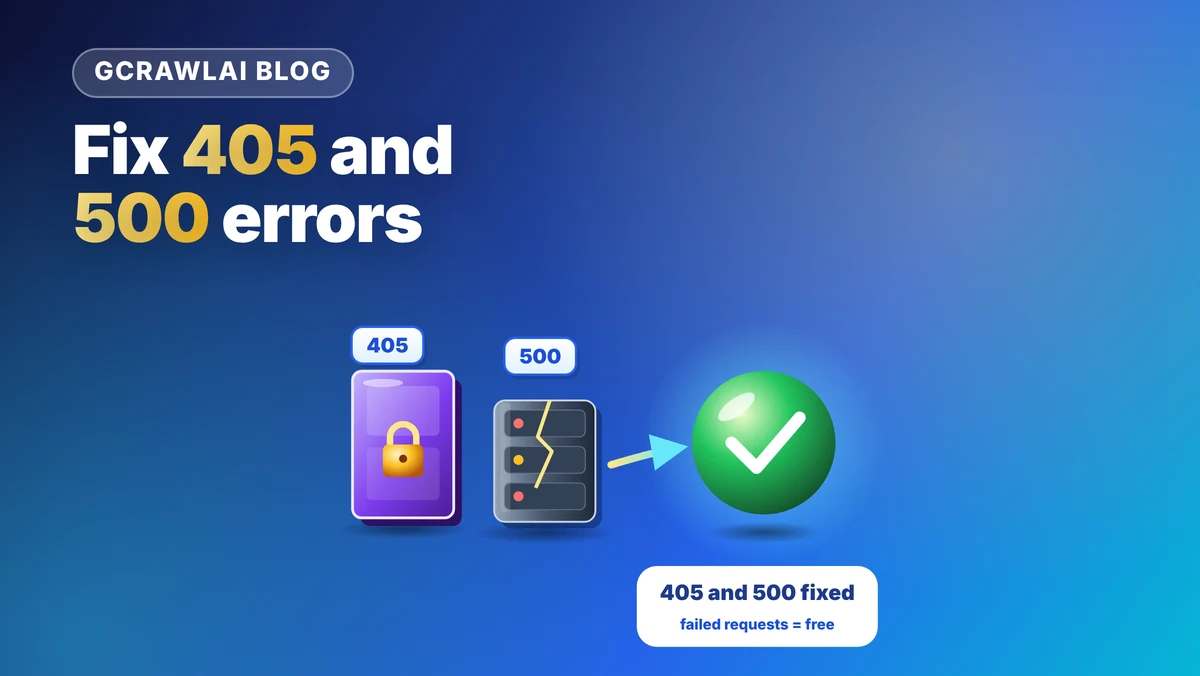
A 405 Method Not Allowed in a scraper is confusing because the method usually isn't the problem: the same URL opens fine in Chrome. A 500 Internal Server Error is confusing for the opposite reason: it looks like the site's fault, but your request often caused it. This guide starts with how GcrawlAI avoids both, then shows how to tell a real 405 from a disguised block, when a 500 is yours to fix, and Python code for both.
TL;DR
- Read the Allow header first: every 405 must list the methods the URL accepts. If your method is missing, send the listed one. If it's listed, or GET was refused on a normal page, it's a refusal, not a method problem.
- A 405 on GET is a block or a config rule: servers must support GET, and AWS WAF's CAPTCHA action returns 405 with an
x-amzn-waf-action: captchaheader. - Check for redirects: a 301 or 302 can turn your POST into a GET, which the final URL rejects.
- A 500 you get every time on one URL is your request; random 500s that clear on retry are the server. Retry only idempotent GETs, with backoff.
- Fastest fix: GcrawlAI loads pages in a real browser with residential IPs, stealth escalation and internal retries, and never bills blocked pages or server errors.
How do you fix a 405 or 500 error when web scraping? For a 405, read the Allow header: send a listed method if yours is missing, or fix your client's identity if the method was right. For a 500, retry GETs with backoff, and if one URL fails every time, fix the parameters you send. GcrawlAI handles blocks and retries in one request and doesn't bill failures.
405 vs 500 at a glance
| You see | Most likely cause | How to confirm | Fix | Retry? |
|---|---|---|---|---|
| 405, Allow lacks your method | Wrong method for the endpoint | Allow header, DevTools Method column |
Send the listed method and body | No |
| 405 on a page GET | WAF or bot check | Works in Chrome; WAF headers present | Real browser, full headers, new IP | Not as-is |
| 405 after a redirect | 301/302 turned POST into GET | response.history |
Call the final URL directly | No |
| 500 on one URL, every time | Your parameters crash the endpoint | Other pages on the site work | Fix params, body or headers | No |
| 500 on random URLs | Server overload or a bug | Clears on retry, many URLs affected | Backoff, lower concurrency | Yes, GET only |
Fix 405 and 500 errors at the source with GcrawlAI
GcrawlAI loads each URL the way a visitor's browser does: a real browser GET, through a rotating residential IP, with stealth escalation and internal retries when a site pushes back. That removes the disguised 405s and most transient 500s before they reach your code, and blocked pages, CAPTCHAs, timeouts and server errors are never billed.
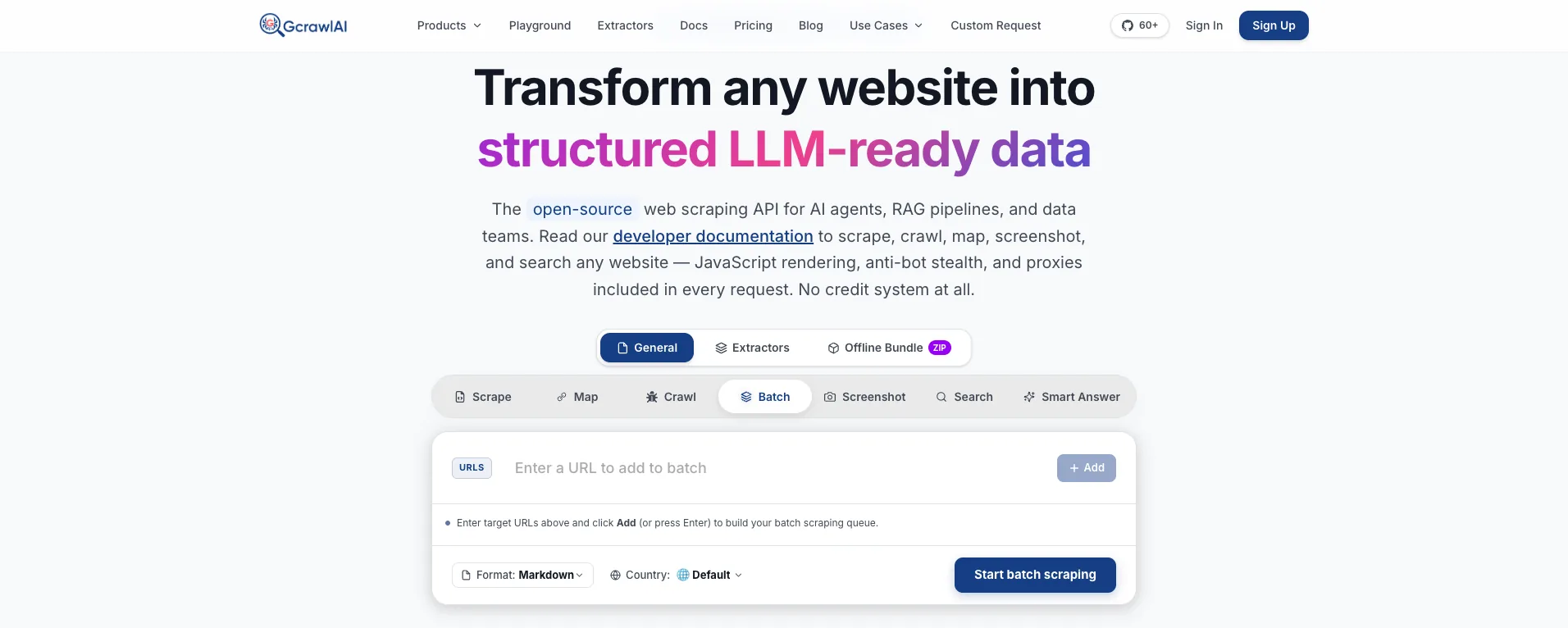
The homepage puts it plainly: JavaScript rendering, anti-bot stealth and proxies are included in every request, with no credit system. A WAF that answers a Python client with 405 sees a real Chrome session instead, and a 500 from an overloaded origin is retried inside the same request.
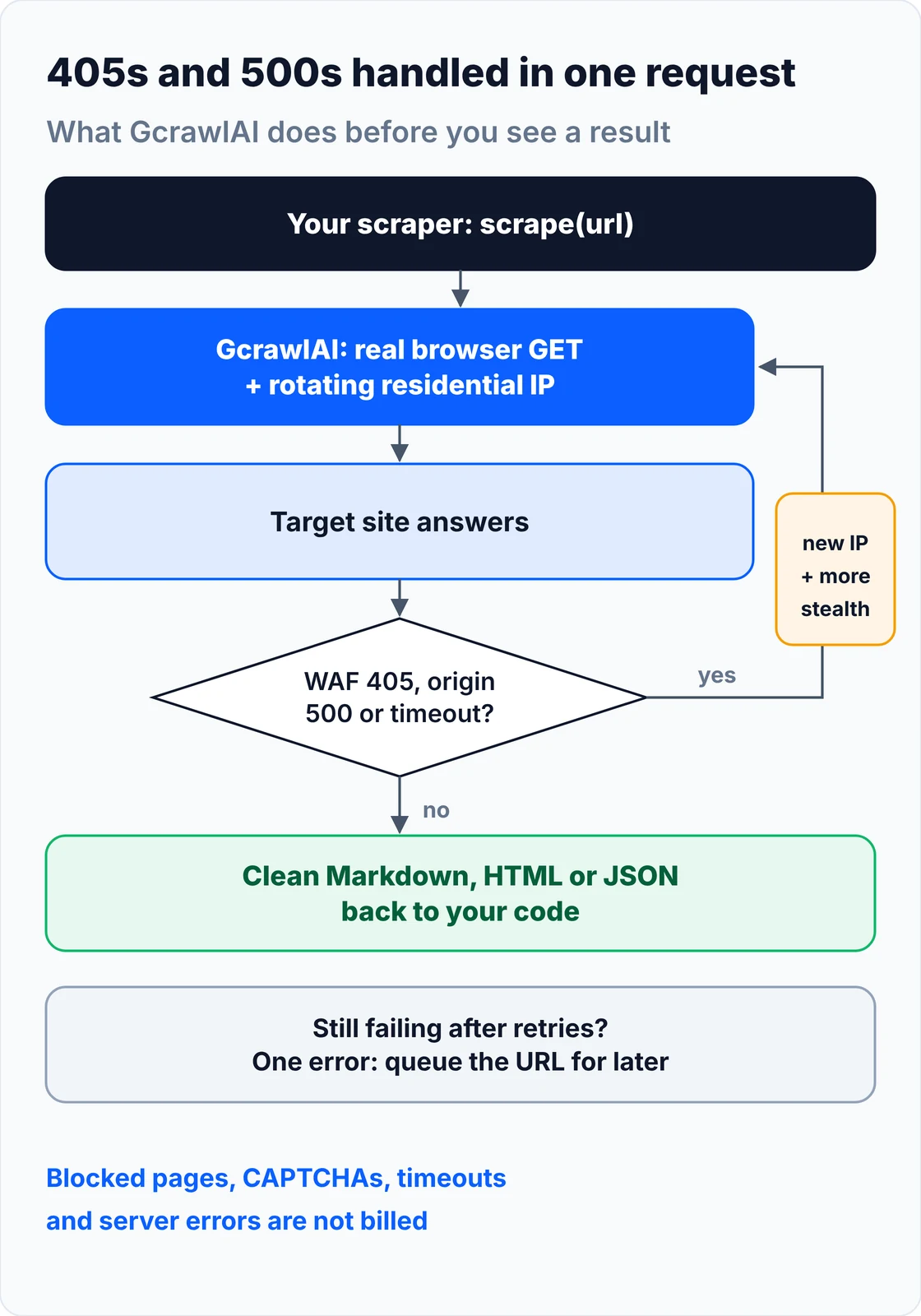
Your code handles two outcomes: content, or one error to queue. A 4xx from the GcrawlAI API itself means a key, plan or payload problem to fix, not something to retry:
# pip install gcrawl-sdk
"""Fetch a page through GcrawlAI and handle the few errors your own code still sees."""
import logging
import os

from gcrawl_sdk import GcrawlClient, ScrapeOptions
from gcrawl_sdk.exceptions import GcrawlAPIError, GcrawlTimeoutError

log = logging.getLogger("scraper")
gc = GcrawlClient(api_key=os.getenv("GCRAWL_API_KEY", "gc-YOUR_API_KEY"))


def fetch_markdown(url: str, geo: str = "US") -> str | None:
    """One request: rendering, residential IPs, stealth escalation and internal retries included."""
    try:
        page = gc.scrape(url=url, options=ScrapeOptions(markdown_enabled=True, proxy_geo=geo), wait=True)
    except GcrawlTimeoutError:
        log.warning("timeout, requeue: %s", url)          # the API call itself timed out
        return None
    except GcrawlAPIError as err:
        if err.status_code < 500:                         # key, plan or payload problem: fix, don't retry
            log.error("request rejected %s: %s", err.status_code, err.response_data)
            raise
        log.warning("api %s, requeue: %s", err.status_code, url)
        return None
    return page.markdown or None                          # empty = nothing useful on the page


if __name__ == "__main__":
    md = fetch_markdown("https://example.com/")
    print(md[:300] if md else "no content, queued for retry")
- Real browser navigation: every request is rendered in a browser, so the page gets the GET it expects, cookies and verification flows included.
- Residential IPs and geotargeting: pick a country per request; IP-based refusals stop following your scraper around.
- Stealth escalation and internal retries: a blocked or failed load is retried with a stronger setup inside the same request, and retries never multiply the cost.
- Scrape, crawl, batch and Search API: scrape pages to Markdown, HTML or JSON, crawl whole sites with async jobs and webhooks, and use the Search API for ranked results.
- For developers and AI agents: a Python SDK, an MCP server for Claude, Cursor and other agents, the Playground to test a failing URL, and the docs.
The MIT-licensed core runs on your own servers if you'd rather own the stack:
git clone https://github.com/GramosoftAI/GcrawlAI.git && cd GcrawlAI
python -m venv .venv && source .venv/bin/activate
pip install -r requirements.txt && playwright install
cp .env.example .env                      # add your database, Redis and proxy settings
python -m api.core.db_setup
redis-server &
celery -A web_crawler.crawler.celery_config worker -l info &
uvicorn api.api:app --port 8000
Pricing is a free plan of 50 requests a month with no card, paid plans from $0.67 to $1.45 per 1,000 requests, and a self-hosted core that costs nothing. Failed requests are never charged. The plan table and a cost comparison are in the cost section.
Where it falls short: GcrawlAI fetches pages; it doesn't replay your POST to a private search or login endpoint, so a genuine method mismatch on an API you call directly is still yours to fix. A 500 caused by bad parameters stays a 500 until you change them. Every request goes through a browser, so plain pages cost the same as hard ones, and the ecosystem is younger, with fewer ready-made integrations.
"When a scraper gets a 405 on a product page, nobody on the other side forgot to allow GET. Something decided the client didn't look like a browser. Read the Allow header and the response headers before you touch the request method."
Rajesh Kannan, Co-Founder & CTO at Gramosoft
What a 405 Method Not Allowed error means
A 405 means the server found the URL and knows the HTTP method you sent, but that method isn't allowed on that resource. RFC 9110 requires every 405 to carry an Allow header listing the methods that are allowed, which makes it one of the few errors that tells you the fix in the response.
Three details from the spec matter for scrapers. An empty Allow header means the resource accepts no methods at all, usually because it was switched off. Proxies must not change the Allow header, so what you read is what the origin sent. And all general-purpose servers must support GET and HEAD, so a 405 on a plain GET of a web page isn't an ordinary method mismatch: something is blocking it.
| Code | What it says | How it differs from 405 |
|---|---|---|
| 400 Bad Request | The request is malformed | The method is fine; the content is broken |
| 403 Forbidden | Understood and refused | Admits a refusal; a disguised 405 often means the same thing |
| 404 Not Found | Nothing at this URL | 404: wrong path. 405: right path, wrong method |
| 415 Unsupported Media Type | Wrong body format | Usually a wrong Content-Type on a POST |
| 501 Not Implemented | Method unknown to the whole server | 405 is per resource; 501 is server-wide |
Why your scraper gets a 405: six causes
A 405 in a scraper comes from one of six places: a real method mismatch, a security layer answering with 405, a redirect that changed your method, a probe that used the wrong method, a CORS preflight, or a server rule. Each needs a different fix, so identify which one you have before changing anything.
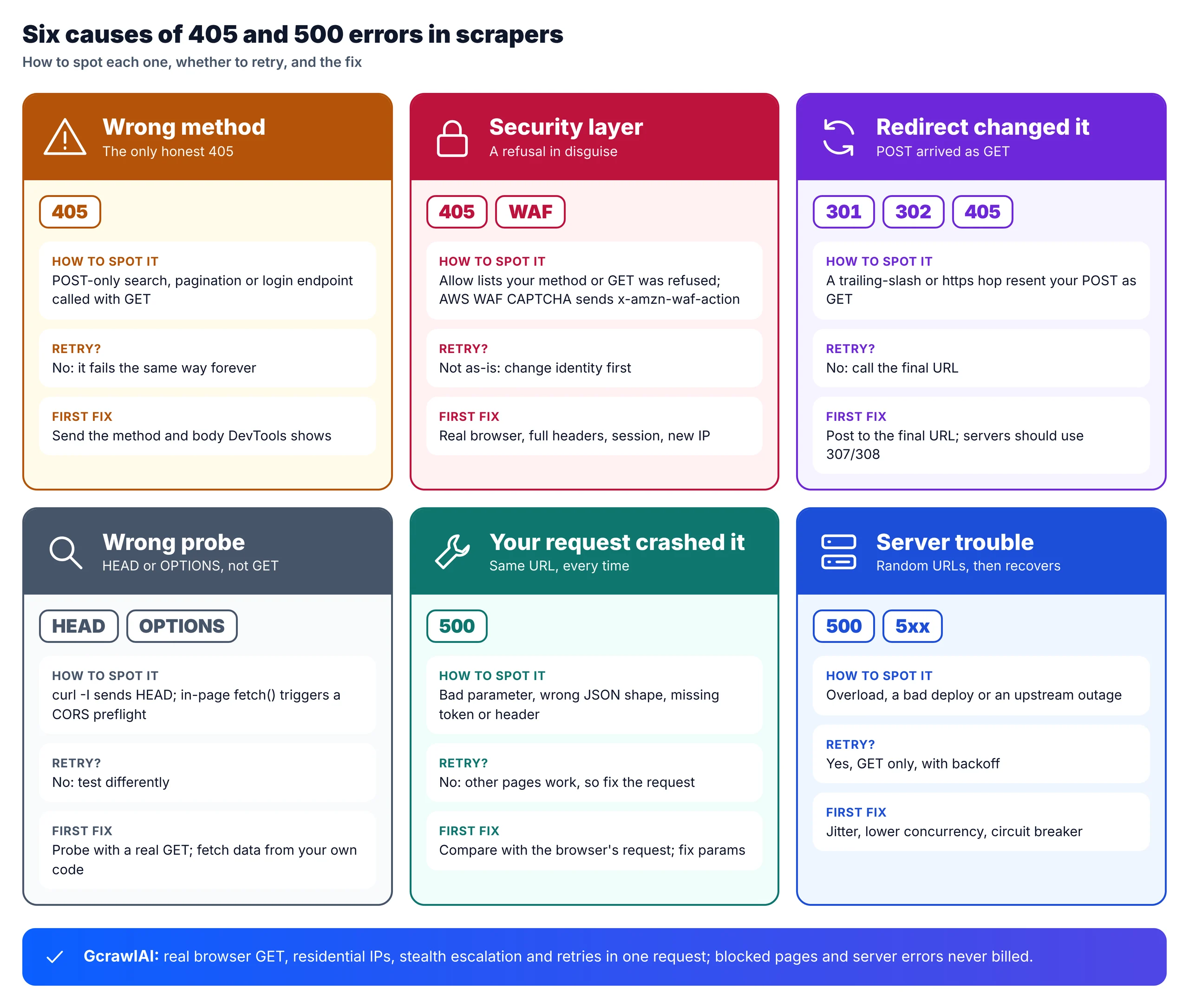
1. A real method mismatch
Search boxes, "load more" buttons, pagination handlers and login forms usually call endpoints that accept POST only. Copy the URL from DevTools, send GET, and you get an honest 405. The Allow header lists a method you didn't use, and DevTools shows POST in the Method column.
2. A security layer answering 405
Some protection layers refuse non-browser clients with 405 instead of 403. One is documented: AWS WAF's CAPTCHA action returns 405 Method Not Allowed with x-amzn-waf-action: captcha when a request has no valid CAPTCHA token, and its Challenge action returns a 202 with x-amzn-waf-action: challenge. The method was right; the client wasn't trusted. A Chrome User-Agent alone rarely fixes it, because TLS fingerprints, HTTP/2 settings, header order and missing cookies still point to a script.
3. A redirect that changed your method
When a POST gets a 301 or 302 (a trailing-slash fix or an http-to-https hop), clients may resend it as a GET, and the final URL rejects GET. Your code sent the right method to the URL you wrote and the wrong one to the URL you reached. Servers that need to keep the method use 307 or 308.
4. A probe that used the wrong method
curl -I sends HEAD, not GET, so a 405 from that probe says nothing about what a normal page load returns, and HEAD has no body to inspect. Some uptime and link checkers use HEAD too. Test with a real GET before drawing conclusions.
5. A CORS preflight
Browser automation that fires cross-origin fetch() calls from inside a page triggers an automatic OPTIONS preflight. A route without an OPTIONS handler answers 405, and the real request is never sent. This is a browser-side check, separate from a server-side client getting a 405.
6. A server or framework rule
nginx limit_except, Apache <Limit> rules, method filters in a WAF, static hosts and CDNs that only serve GET and HEAD, and the IIS WebDAV module, which claims PUT and DELETE, all produce 405s. Frameworks differ too: Express answers an unhandled method with 404 by default, not 405.
How to diagnose a 405 in five checks
Diagnosing a 405 takes five checks in order: read the Allow header, find which request failed, look for security-layer headers, check the redirect history, and compare with a browser. Stop as soon as one gives a clear answer. Each check rules out a cause, so you change the right thing instead of guessing.
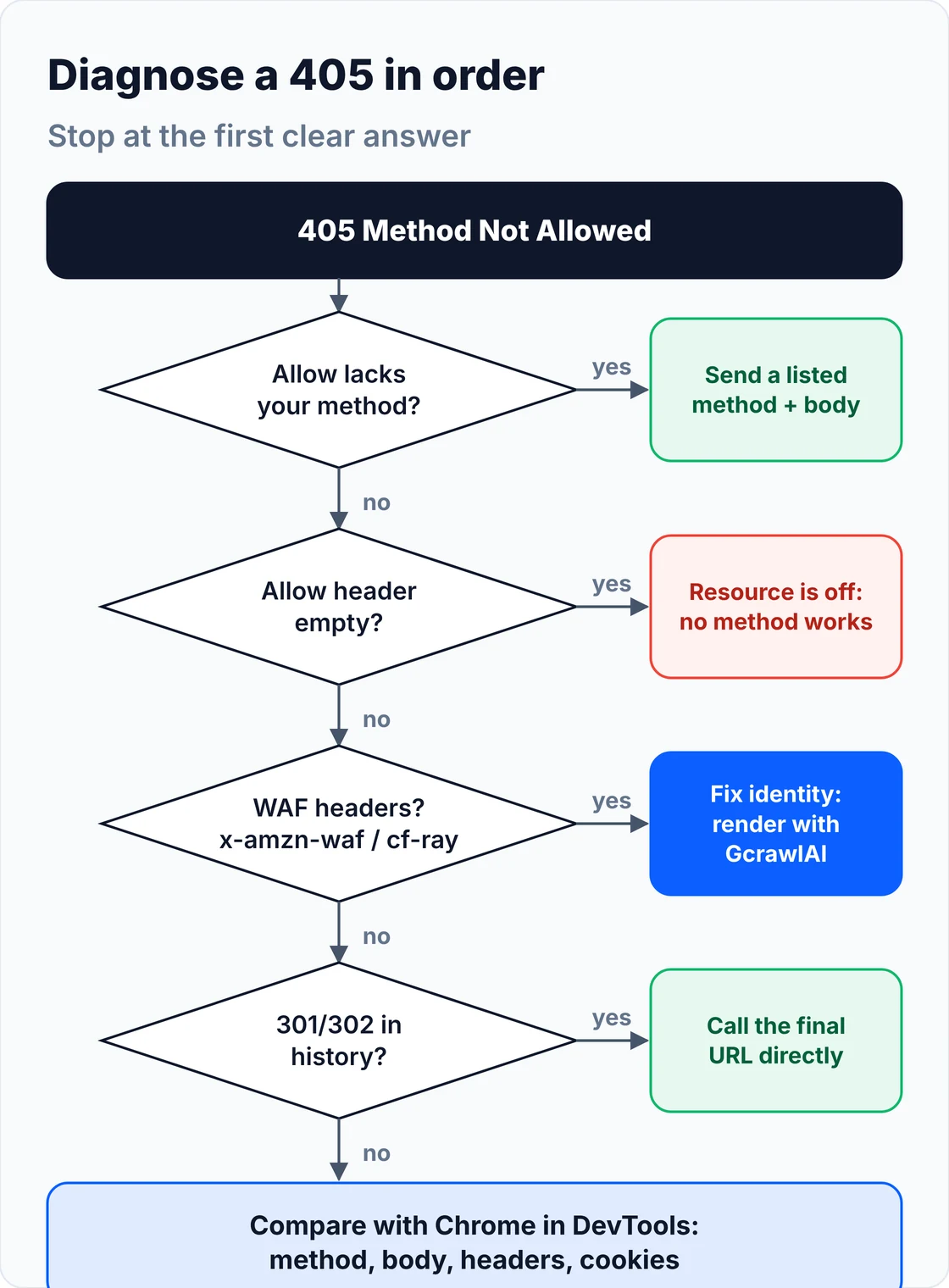
- Read
Allow: on the 405 itself, or withcurl -i -X OPTIONS. Your method missing means a method problem; your method listed means a refusal. - Find the failing request: in DevTools with Preserve log on, is it the main document, a Fetch/XHR for the data, a HEAD probe, an OPTIONS preflight or an unrelated asset?
- Look at response headers:
x-amzn-waf-action,cf-rayorserver: cloudflare, and Akamai or DataDome headers mean a security layer answered, not the application. - Check redirects: print
response.history; a 301 or 302 between your URL and the final one explains a POST that arrived as GET. - Compare with the browser: works in Chrome but fails in your script from the first request means your client's fingerprint; works and then stops after many requests means volume; clears after a pause means a temporary limit.
This function turns those checks into a verdict for one response, so your scraper can log why each 405 happened instead of just counting them:
# pip install requests
"""Tell a real 405 (wrong method) from a refusal, a redirect that changed the method, or a bad probe."""
import requests

HEADERS = {
    "User-Agent": "Mozilla/5.0 (Windows NT 10.0; Win64; x64) AppleWebKit/537.36 "
                  "(KHTML, like Gecko) Chrome/156.0.0.0 Safari/537.36",
    "Accept": "text/html,application/xhtml+xml,application/xml;q=0.9,*/*;q=0.8",
    "Accept-Language": "en-US,en;q=0.9",
}
WAF_MARKERS = {"x-amzn-waf-action": "AWS WAF", "cf-ray": "Cloudflare", "x-akamai-transformed": "Akamai",
               "x-datadome": "DataDome", "x-sucuri-id": "Sucuri"}


def allowed_methods(resp) -> set[str]:
    return {m.strip().upper() for m in resp.headers.get("Allow", "").split(",") if m.strip()}


def explain_405(resp, sent_method: str) -> str:
    """Classify one 405 response. `resp` is a requests.Response (or anything with the same fields)."""
    headers = {k.lower(): v for k, v in resp.headers.items()}
    for marker, vendor in WAF_MARKERS.items():
        if marker in headers:
            return f"refusal by {vendor} ({marker}: {headers[marker]}): fix identity, not the method"
    for hop in getattr(resp, "history", []):
        if hop.status_code in (301, 302, 303) and sent_method == "POST":
            return f"redirect {hop.status_code} turned POST into GET: use the final URL directly"
    allow = allowed_methods(resp)
    if "Allow" in resp.headers and not allow:
        return "empty Allow header: the resource is switched off, no method will work"
    if allow and sent_method not in allow:
        return f"real method mismatch: send one of {sorted(allow)}"
    if sent_method in ("GET", "HEAD"):
        return "405 on GET/HEAD of a page: servers must support GET, so this is a block or a config rule"
    return "unclear: compare with the browser's request in DevTools (method, body, headers, cookies)"


def probe(url: str, method: str = "GET", data=None, session=None) -> str:
    s = session or requests.Session()
    resp = s.request(method, url, headers=HEADERS, json=data, timeout=15, allow_redirects=True)
    if resp.status_code != 405:
        return f"{method} {url} -> {resp.status_code} (not a 405)"
    return f"{method} {url} -> 405: {explain_405(resp, method)}"


if __name__ == "__main__":
    print(probe("https://example.com/"))
How to fix each kind of 405
Fix the cause the diagnosis found: send the method and body the endpoint expects, call the final URL when a redirect changed your method, give your client a browser's identity when a security layer refused it, and test with GET rather than HEAD. Never retry a confirmed method mismatch; it fails the same way every time.
Send the method the endpoint expects
Reproduce the request DevTools shows: same method, same JSON or form body, same Content-Type, and any headers the page's own JavaScript adds. In requests that means session.post(url, json=payload) rather than get(). Don't switch a product page to POST just because it returned 405; use the method the site's own page uses.
Call the final URL
If response.history shows a 301 or 302, post straight to the final URL (with or without the trailing slash, on https) so no redirect gets a chance to change the method.
Look like a browser when the method was right
Send a full, current browser header set from a requests.Session so cookies persist, and only set a Referer that would be true. If that isn't enough, the remaining gap is the TLS and HTTP/2 fingerprint: a client such as curl_cffi narrows it, and a real browser closes it. When the 405 only appears after a run of successful requests, slow down and spread requests across IPs. Our guides to fixing 403 Forbidden in Python requests and bypassing Cloudflare when web scraping cover the identity side in depth.
Test with GET, and leave preflights alone
Swap curl -I for a bounded GET with curl -i, and if the 405 is on an OPTIONS preflight inside browser automation, fetch the data from your own code instead of from page JavaScript, so no preflight is involved.
What a 500 Internal Server Error means when scraping
A 500 means the server hit an unexpected condition and couldn't complete the request. It's the server's catch-all, with no required header to explain it. In scraping, a 500 is either the site breaking under load or a bug, or your request triggering that bug, and the two need opposite fixes: patience, or a changed request.
Scrapers cause more 500s than people expect. A missing or malformed parameter, a page number past the end, a JSON body in the wrong shape, a missing CSRF token, or a header an internal API relies on can crash a fragile endpoint every single time. Too many concurrent requests can push a small site into 500s too. And infrastructure fails at scale: during Cloudflare's November 18, 2025 outage, its core proxy returned 5xx errors for several hours across sites behind it, through no fault of anyone's scraper.
How to fix 500 errors in a scraper
Fix a 500 by first deciding whose it is. If one URL fails every time while the site's other pages load, your request is crashing the endpoint: change the parameters, body or headers. If random URLs fail and recover, the server is struggling: retry GETs with backoff and jitter, cut concurrency, and pause the domain when most requests fail.
- Retry GET, not POST: GET is idempotent; retrying a POST can submit a form or create an order twice.
- Back off with jitter and a cap: random waits up to an exponentially growing limit stop your workers retrying in lockstep.
- Test a control page: if the homepage loads while your URL keeps returning 500, the problem is your request.
- Use a circuit breaker: when most recent requests to a domain fail, stop sending for a few minutes rather than adding load to a struggling server.
- Read the body: some 500 pages include an error ID or message that names the failing field.
# pip install requests
"""Handle 500s: retry idempotent GETs with backoff, spot 500s your request causes, and pause a failing domain."""
import random
import time
from collections import defaultdict, deque
from urllib.parse import urlsplit

import requests

from diagnose_405 import HEADERS


class DomainBreaker:
    """Open the breaker when too many recent requests to one domain returned 5xx; skip it for a while."""

    def __init__(self, window: int = 20, max_fail_ratio: float = 0.5, cooldown: float = 300, clock=time.monotonic):
        self.recent = defaultdict(lambda: deque(maxlen=window))
        self.open_until = {}
        self.ratio, self.cooldown, self.clock = max_fail_ratio, cooldown, clock

    def allow(self, host: str) -> bool:
        return self.clock() >= self.open_until.get(host, 0)

    def record(self, host: str, failed: bool) -> None:
        q = self.recent[host]
        q.append(failed)
        if len(q) >= 10 and sum(q) / len(q) > self.ratio:
            self.open_until[host] = self.clock() + self.cooldown
            q.clear()


breaker = DomainBreaker()


def get_with_500_handling(url: str, session=None, attempts: int = 4, sleep=time.sleep):
    """Only for GET: it's idempotent, so a retry can't create a duplicate order or form submission."""
    s = session or requests.Session()
    host = urlsplit(url).hostname
    seen_500 = 0
    for attempt in range(attempts):
        if not breaker.allow(host):
            return None, f"{host} paused: too many 5xx, try later"
        resp = s.get(url, headers=HEADERS, timeout=(5, 30))
        failed = resp.status_code >= 500
        breaker.record(host, failed)
        if not failed:
            return resp, f"ok after {attempt + 1} attempt(s)"
        if resp.status_code == 500:
            seen_500 += 1
            if seen_500 >= 2 and _control_ok(s, url):
                return None, "deterministic 500: other pages work, so this request crashes the endpoint; fix params/body"
        sleep(random.uniform(0, min(30, 2 ** attempt)))     # full jitter, capped
    return None, f"gave up after {attempts} attempts"


def _control_ok(session, url: str) -> bool:
    """Fetch the site's homepage as a control: if it works, the server is fine and your URL is the problem."""
    parts = urlsplit(url)
    try:
        return session.get(f"{parts.scheme}://{parts.netloc}/", headers=HEADERS, timeout=(5, 15)).status_code < 500
    except requests.RequestException:
        return False


if __name__ == "__main__":
    r, why = get_with_500_handling("https://example.com/")
    print(why)
The offline test below fakes the responses, so it runs in under a second. It checks each 405 verdict (method mismatch, AWS WAF refusal, redirect, empty Allow, blocked GET), a deterministic 500, a transient 500 that clears on retry, and the circuit breaker opening and closing:
"""Offline test: fake responses, no network. Checks the 405 classifier and the 500 handling."""
import fix_500
from diagnose_405 import explain_405


class Fake:
    def __init__(self, status, headers=None, history=()):
        self.status_code, self.headers, self.history = status, headers or {}, list(history)


class Session:
    def __init__(self, replies):
        self.replies, self.calls = list(replies), []

    def get(self, url, **kw):
        self.calls.append(url)
        return self.replies.pop(0)


out = []
# 405 cases
out.append("POST to GET-only route: " + explain_405(Fake(405, {"Allow": "GET, HEAD"}), "POST"))
out.append("GET blocked by AWS WAF: " + explain_405(Fake(405, {"x-amzn-waf-action": "captcha", "Allow": "GET"}), "GET"))
out.append("POST after 301: " + explain_405(Fake(405, {"Allow": "POST"}, history=[Fake(301)]), "POST"))
out.append("Empty Allow: " + explain_405(Fake(405, {"Allow": ""}), "POST"))
out.append("GET, Allow lists GET: " + explain_405(Fake(405, {"Allow": "GET, POST"}), "GET"))

# 500 cases (fresh breaker, no real sleeping)
fix_500.breaker = fix_500.DomainBreaker()
s = Session([Fake(500), Fake(500), Fake(200)])             # page, page again, homepage control
r, why = fix_500.get_with_500_handling("https://shop.example/p?page=0", session=s, sleep=lambda x: None)
out.append(f"Deterministic 500: {why} (calls={len(s.calls)})")

s = Session([Fake(500), Fake(200)])
r, why = fix_500.get_with_500_handling("https://shop.example/p/2", session=s, sleep=lambda x: None)
out.append(f"Transient 500: {why}")

t = [0.0]
fix_500.breaker = fix_500.DomainBreaker(clock=lambda: t[0])
for _ in range(10):
    fix_500.breaker.record("down.example", True)
out.append(f"Breaker after 10 straight 5xx: open={not fix_500.breaker.allow('down.example')}")
t[0] = 301
out.append(f"Breaker after 301 s: open={not fix_500.breaker.allow('down.example')}")

assert out[0].endswith("send one of ['GET', 'HEAD']") and "AWS WAF" in out[1] and "turned POST into GET" in out[2]
assert "switched off" in out[3] and "block or a config rule" in out[4]
assert "deterministic 500" in out[5] and "ok after 2" in out[6] and out[7].endswith("True") and out[8].endswith("False")
open("demo_output.txt", "w").write("\n".join(out) + "\n")
print("\n".join(out))
POST to GET-only route: real method mismatch: send one of ['GET', 'HEAD']
GET blocked by AWS WAF: refusal by AWS WAF (x-amzn-waf-action: captcha): fix identity, not the method
POST after 301: redirect 301 turned POST into GET: use the final URL directly
Empty Allow: empty Allow header: the resource is switched off, no method will work
GET, Allow lists GET: 405 on GET/HEAD of a page: servers must support GET, so this is a block or a config rule
Deterministic 500: deterministic 500: other pages work, so this request crashes the endpoint; fix params/body (calls=3)
Transient 500: ok after 2 attempt(s)
Breaker after 10 straight 5xx: open=True
Breaker after 301 s: open=False
405 and 500 in Scrapy, requests and Playwright
Each tool surfaces these errors differently, and two of them hide them by default. requests doesn't raise on a 405 or 500 unless you call raise_for_status, and Scrapy drops non-2xx responses before your callback runs. Make the errors visible first, then handle them; otherwise a spider can return nothing without explaining why.
| Tool | What you see | Check first |
|---|---|---|
| requests / httpx | status_code 405 or 500, no exception |
Whether you check the status at all |
| Scrapy | 405 dropped silently; 500 retried twice by default | HTTPERROR_ALLOWED_CODES and RETRY_HTTP_CODES |
| Playwright / Selenium | The navigation's status, or a failed background XHR | Whether the page or a data request failed |
| curl | Body only, unless -i or -v |
Don't use -I; it sends HEAD |
In Scrapy, let 405s reach your callback so you can log the Allow header, and keep 405 out of the retry list. Scrapy's defaults already retry 500, 502, 503, 504, 522, 524, 408 and 429 twice:
# settings.py (Scrapy): see 405s and 500s instead of losing them silently
HTTPERROR_ALLOWED_CODES = [405]          # let 405 responses reach your callback so you can read Allow and headers
RETRY_ENABLED = True
RETRY_HTTP_CODES = [500, 502, 503, 504, 522, 524, 408, 429]   # Scrapy's default list: 405 is not in it, keep it that way
RETRY_TIMES = 2                          # retries in addition to the first download (Scrapy's default)
DOWNLOAD_DELAY = 1.0                     # pace per domain; 500s often follow a burst
CONCURRENT_REQUESTS_PER_DOMAIN = 4
AUTOTHROTTLE_ENABLED = True


# in your spider
def parse(self, response):
    if response.status == 405:
        self.logger.warning("405 %s Allow=%s headers=%s", response.url,
                            response.headers.get("Allow"), response.headers.keys())
        return
    ...
For a framework comparison, see Scrapy vs Crawlee vs Scrapling, and for pages that only fill in with JavaScript, how to scrape dynamic JavaScript websites with Python.
What failed requests cost you
Scraping APIs don't bill a 405 or a 500 by their own rules, so the real cost is the successful retry: the rendering and premium proxies that get past a disguised 405. For 100,000 successful protected pages a month that costs $249 to $399 on credit-based APIs and $101 on GcrawlAI, which is pricier for plain HTML.
| Option, 100,000 successful pages a month | Plain HTML pages | Protected pages (JS rendering + premium proxies) | Are 405 and 500 billed? |
|---|---|---|---|
| GcrawlAI (every request rendered, residential IPs included) | $101 (Growth $79 + 20,000 overage at $1.10 per 1,000) | $101 (same request, no multiplier) | No: blocked pages, CAPTCHAs, timeouts and server errors never billed |
| ScraperAPI | $49 (Hobby, 100,000 credits) | $299 (Business; 25 credits per page = 2.5M credits) | Charges only 200 and 404; 500 not charged |
| ZenRows | $39 (Build B3, 120,000 credits) | $399 (Growth G3; 25 credits per page = 2.5M credits) | Failed requests never charged; 404 and 410 count as successful |
| ScrapingBee | $49 (Freelance, 250,000 credits; JS off) | $249 (Business; 25 credits per page = 2.5M credits) | Charges only 200, 404 and 410 |
List-price arithmetic, not a benchmark. Credit costs and billing rules come from ScraperAPI's credit docs and status code docs, ZenRows' pricing docs and ScrapingBee's FAQ, checked November 1, 2026. The honest read: for plain HTML a cheap request can fetch, ZenRows, ScraperAPI and ScrapingBee cost less than GcrawlAI. GcrawlAI wins once pages need a browser or sit behind bot checks, because rendering, residential IPs and stealth are already in the one request.
GcrawlAI plans (GcrawlAI pricing, checked October 28, 2026):
| Plan | Price | Requests/month | Concurrent | Per 1,000 | Overage per 1,000 |
|---|---|---|---|---|---|
| Free | $0 forever, no card | 50 | 2 | – | – |
| Starter | $29/month | 20,000 | 10 | $1.45 | $1.60 |
| Growth (most popular) | $79/month | 80,000 | 35 | $0.99 | $1.10 |
| Pro | $199/month | 250,000 | 50 | $0.80 | $0.90 |
| Scale | $499/month | 750,000 | 100 | $0.67 | $0.75 |
| Enterprise | Volume pricing | 2M+ | Custom | – | – |
| Self-hosted | $0 (MIT) | Your servers | Your servers | Infrastructure only | – |
Every plan, Free included, has scrape, crawl, the Search API, JavaScript rendering, residential IP rotation and stealth escalation in each request. Failed requests are never charged. Annual billing charges 10 months for 12, unused requests on paid plans roll over once, and Indian customers are billed in INR with a GST invoice.
Which fix for which error?
Match the fix to the cause: a real method mismatch needs the right method and body, a disguised 405 needs a browser's identity, a redirect needs the final URL, and a 500 needs either a corrected request or patient retries. GcrawlAI covers the identity and retry work, so your code only fixes requests it builds itself.
| You're getting | Do this yourself | Where GcrawlAI fits |
|---|---|---|
| 405 on a page that opens in Chrome | Browser headers, session, TLS-matching client, new IP | GcrawlAI loads it in a real browser with residential IPs |
| 405 with AWS WAF or Cloudflare headers | A real browser that completes the challenge | GcrawlAI renders and escalates stealth in one request |
| 405 on a POST-only endpoint | Send the method and body DevTools shows | Scrape the rendered page with GcrawlAI instead of calling the endpoint |
| 405 after a redirect | Call the final URL | GcrawlAI follows redirects as a browser does |
| 500 on random URLs | Backoff, jitter, lower concurrency, breaker | GcrawlAI retries internally and doesn't bill server errors |
| 500 on one URL every time | Fix the parameters or body | Test the corrected URL in the GcrawlAI Playground |
| Errors across a whole site crawl | Queue, retry and log per URL | GcrawlAI crawl with async jobs and webhooks |
When fixing it in your own code is enough
Your own code is enough when the 405 is a real method mismatch on an endpoint you call, the 500s come from parameters you can correct, and the sites aren't protected. The diagnosis and 500 handling in this guide cover that. Bring in GcrawlAI when 405s appear on pages that open fine in a browser.
Even then you can stay on your own servers: the MIT-licensed GcrawlAI core self-hosts for free with the same browser engine, and the free Cloud plan's 50 requests a month are enough to test the URLs that keep failing. Paste one into the Playground to see whether it comes back clean. For the build-or-buy trade-off, read web scraping with Python vs a scraping API.
When the answer is to stop
Sometimes a 405 or a wall of errors is a site saying it doesn't want automated traffic on that path. Check robots.txt and the terms, look for an official API, scrape public pages only, and keep request rates low enough never to cause a site's 500s. Don't try to get around access controls on data you aren't allowed to collect.
If a protected workflow is essential to your business, ask the site owner for an approved access route or use a licensed data source. For the legal background, read what web scraping is and where it's legal, and get advice for your own case.
Frequently asked questions
What does 405 Method Not Allowed mean in web scraping?
Formally, the URL exists but doesn't accept the HTTP method you sent. In scraping it's often a refusal in disguise: the method was right, but a WAF didn't trust your client. Read the Allow header to tell them apart. GcrawlAI loads pages in a real browser, which avoids the disguised kind.
Why do I get a 405 in Python but not in Chrome?
Your script looks different below the headers. Chrome negotiates TLS differently, usually speaks HTTP/2, sends a full header set in a consistent order and carries cookies from earlier visits. A default requests call matches none of that, so a security layer can refuse it, sometimes with 405.
Should I retry a 405 error?
Not unchanged. A real method mismatch fails the same way forever, so fix the method. A disguised block needs a different identity first (a real browser, a session, another IP). Keep 405 out of automatic retry lists such as Scrapy's RETRY_HTTP_CODES.
How do I find which methods a URL allows?
Read the Allow header on the 405 response, which RFC 9110 requires, or send an OPTIONS request with curl -i -X OPTIONS. An empty Allow header means the resource is switched off and no method will work.
Is a 500 error my scraper's fault?
Sometimes. If one URL returns 500 every time while the site's other pages load, your parameters, body or headers are crashing the endpoint. If random URLs fail and recover, the server is overloaded or buggy, and backoff with lower concurrency is the fix.
Do scraping APIs charge for 405 and 500 errors?
By their own published rules, ScraperAPI charges only 200 and 404 responses, ZenRows never charges failed requests, and ScrapingBee charges only 200, 404 and 410, per their docs checked November 1, 2026. GcrawlAI never bills blocked pages, CAPTCHAs, timeouts or server errors.