By Rajesh Kannan, Co-Founder & CTO, Gramosoft · Last updated: · Every approach tested against a local Cloudflare-style gate on October 22, 2026
You know the page. "Just a moment..." A spinner, a line about checking your browser, and then, for your scraper, nothing. The script that worked last month now gets a 403 with a wall of JavaScript instead of the product page, and the client wants to know why the numbers stopped.
Most advice on this is a list of tools. That's the wrong starting point. Cloudflare doesn't run one check, it runs several, and each one fails in its own way. If you know which check stopped you, the fix is usually small. If you don't, you end up stacking proxies, stealth plugins and CAPTCHA solvers on top of each other and hoping.
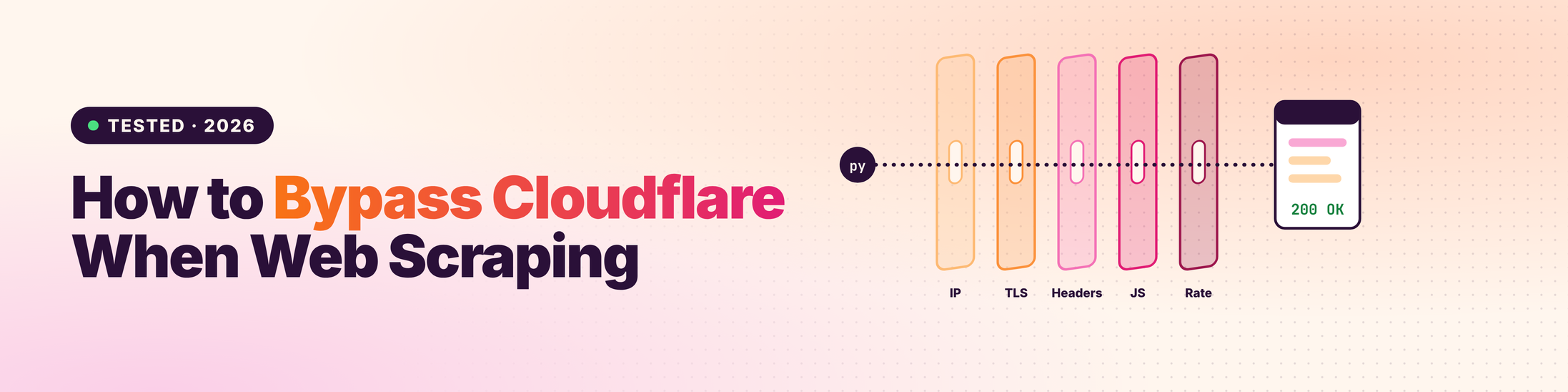
This guide shows how to bypass Cloudflare when web scraping in 2026. We start by working out which block you hit, then climb a ladder from the cheapest fix to the heaviest. To test the code, we built a small local site that blocks the way Cloudflare does and ran every approach against it. You'll see what got through and what didn't.
TL;DR
- Diagnose first. Check the
cf-mitigated: challengeheader and the error code (1020, 1015, 1010 and so on). Each one points to a different fix. - Fix the TLS fingerprint. Python's
requestsis caught by its TLS handshake, whatever User-Agent you send.curl_cffiwithimpersonate="chrome"fixes that in one line. - JavaScript challenges need a real browser. In our tests, headless Playwright and headless Nodriver both leaked "HeadlessChrome" and failed. Nodriver running headful on a virtual display passed.
- Solve once, then reuse. Get
cf_clearancein the browser, then scrape withcurl_cffiusing the same User-Agent and the same IP. Change either and you're challenged again. - Pace yourself. Even with clearance, a burst of requests gets error 1015. At scale, a managed scraping API takes the upkeep off your hands.
How do you bypass Cloudflare when web scraping? First identify the block from the error code or the cf-mitigated header. Then fix the cheapest layer that's failing: browser-like headers and pacing, a browser TLS fingerprint with curl_cffi, a stealth browser such as Nodriver for JavaScript challenges, and clearance cookies reused with the same IP and User-Agent. For production volume, a managed scraping API handles all of it.
What Cloudflare checks before it lets you in
Cloudflare scores every request on several layers at once: the IP's reputation, the TLS and HTTP/2 fingerprint of your client, your headers, JavaScript detections that look for headless browsers, and on paid plans a machine-learning bot score. It then allows the request, serves a challenge, or blocks it. Passing one layer isn't enough.
Cloudflare's own documentation describes the engines behind this. Heuristics match requests against a database of known bad fingerprints. JavaScript Detections inject a small script to spot headless browsers. On Business and Enterprise plans, a supervised machine-learning model gives each request a bot score from 1 to 99. Site owners then write rules on top: challenge anything below a score, block a country, rate-limit a path.
Swipe sideways to see the full table →
| Layer | What it looks at | What usually fails it |
|---|---|---|
| IP reputation | Who owns the IP, its history, how many requests it sends | Cloud and datacenter IPs, abused proxy ranges |
| TLS and HTTP/2 fingerprint | How your client opens the connection (cipher order, extensions, frame settings) | requests, httpx, default curl |
| Headers | Whether headers match the browser you claim to be | Missing Accept-Language, a Chrome User-Agent over a Python handshake |
| JavaScript detections | Browser APIs, navigator.webdriver, headless traces |
Default Playwright, Puppeteer and Selenium |
| Challenge pages and Turnstile | Whether a real browser can run the challenge | Any client that can't run JavaScript |
| Bot score and behaviour | Timing, navigation patterns, session history | Perfectly regular requests, jumping straight to deep URLs |
| Rate limiting | Requests per IP or session over time | Bursts, too much concurrency |
First, work out which Cloudflare block you hit
Read the response before you change anything. A cf-mitigated: challenge header means a challenge page. Cloudflare says that header is set on every challenge type and challenge is its only value. Error pages carry a code instead: 1020 is a firewall rule, 1015 is rate limiting, 1010 is your browser signature. Each one points to a different fix.
This helper works with both requests and curl_cffi responses. It checks the header Cloudflare documents for detecting challenges, then looks for an error code in the body.
import re

ERROR_CODES = {
    "1003": "direct IP access not allowed",
    "1006": "your IP address is banned",
    "1009": "your country or region is blocked",
    "1010": "blocked on browser signature",
    "1015": "rate limited",
    "1020": "blocked by a firewall rule",
}

def cloudflare_block(resp):
    """Return a short reason if a response is a Cloudflare block or challenge, else None.

    Works with requests and curl_cffi responses.
    """
    if resp.headers.get("cf-mitigated") == "challenge":
        return "challenge page"
    body = resp.text[:5000]
    code = re.search(r"error code:?\s*(10\d\d)", body, re.I)
    if code:
        return f"{code.group(1)}: {ERROR_CODES.get(code.group(1), 'Cloudflare error')}"
    if resp.status_code == 429:
        return "rate limited"
    if resp.status_code in (403, 503) and "Just a moment" in body:
        return "challenge page"
    return None
Don't rely on the status code alone. Challenge pages come back as 403 or 503 with HTML, even when you asked for JSON, and a scraper that only checks for 200 can happily save the challenge page as data.
Swipe sideways to see the full table →
| What you see | What it means | Start with |
|---|---|---|
cf-mitigated: challenge, "Just a moment..." |
A challenge page: Cloudflare wants proof of a real browser | TLS fix first, then a stealth browser |
| Error 1020 | A firewall rule matched your request | Better IP (residential), browser-like headers |
| Error 1015 or HTTP 429 | You're being rate limited | Slow down, honour Retry-After |
| Error 1010 | Blocked on your browser's signature | A real or stealth browser |
| Error 1009 | Your country or region is blocked | A proxy in an allowed country |
| Error 1006 | Your IP address is banned | A different, cleaner IP |
| Error 1003 | You connected to the IP instead of the domain | Request the hostname, not the IP |
| A Turnstile widget on a form | The site wants a human to submit that form | Usually a sign to stop (see below) |
The error descriptions come from Cloudflare's 1xxx error reference. If you're seeing plain 403s with no Cloudflare markers, the cause may be something else entirely. Our guide to fixing 403 Forbidden errors in Python Requests covers the general case.
The bypass ladder: start cheap, climb only when you must
Each step up the ladder costs more, in speed, memory, money or upkeep. So start at the bottom: browser-like headers and pacing, then a browser TLS fingerprint, then a stealth browser for JavaScript challenges, then reusing clearance cookies, and finally a managed API. Stop at the first step where your target returns real pages.
Swipe sideways to see the full diagram →
Most teams make the mistake of jumping straight to the top rung. They launch a browser for every page of a site that only checks TLS fingerprints, and pay for it in servers. Others never climb, and keep rotating proxies at a JavaScript challenge that no proxy can solve.
Step 1: Fix your TLS fingerprint with curl_cffi
Python's requests library opens its TLS connection in a way no browser does, so Cloudflare can spot it before it reads a single header. Changing the User-Agent doesn't help. curl_cffi reproduces a real browser's TLS and HTTP/2 fingerprint. Swapping it in is often the whole fix on sites with lighter protection.
When a client connects over HTTPS, its first message (the ClientHello) lists cipher suites and extensions in a set order. Chrome, Firefox and Safari each have a recognisable pattern, and Chrome adds random "GREASE" values that Python's ssl module never sends. Cloudflare turns that into a fingerprint such as JA3 or JA4 and compares it with the browser your User-Agent claims to be.
from curl_cffi import requests
from detect_block import cloudflare_block

class Blocked(Exception):
    pass

session = requests.Session(impersonate="chrome")   # browser TLS + HTTP/2 + headers
session.headers.update({"Accept-Language": "en-US,en;q=0.9"})

def fetch(url):
    resp = session.get(url, timeout=30)
    reason = cloudflare_block(resp)
    if reason:
        raise Blocked(reason)
    return resp.text
mpersonate="chrome" picks the newest Chrome profile in your installed version. As of version 0.16.3 (September 2026), curl_cffi ships profiles up to Chrome 150, along with Firefox and Safari ones. Keep it updated: a fingerprint from a Chrome version nobody runs any more is its own warning sign.
In our lab, this was the line between two kinds of failure. requests was stopped at the TLS check, with or without a Chrome User-Agent and full browser headers. curl_cffi passed the TLS and header checks and got as far as the JavaScript challenge, which no HTTP client can solve.
Step 2: Use a stealth browser for JavaScript challenges
When Cloudflare serves a JavaScript challenge, you need something that runs JavaScript and looks like a person's browser while doing it. Stock Playwright, Puppeteer and Selenium give themselves away through navigator.webdriver and headless traces. Nodriver, SeleniumBase UC Mode and Camoufox patch those leaks, and run best headful.
These are the maintained options as of October 2026, with their latest releases on PyPI:
- Nodriver (0.50.6, October 8, 2026). From the author of undetected-chromedriver. It drives Chrome directly over the DevTools protocol without WebDriver, so there's no
navigator.webdriverflag to hide. It's our default for new Python projects. - SeleniumBase UC Mode (4.56.3, October 21, 2026). The easiest switch if your team already uses Selenium, with helpers for challenge pages built in.
- Camoufox (0.5.8, October 6, 2026). A patched Firefox. Useful when a site is profiling Chrome-based automation specifically.
- Patchright (1.64.1, October 15, 2026). A patched drop-in for Playwright, if you want to keep Playwright's API.
Run them headful. In our lab, headless Playwright failed on two counts: navigator.webdriver was true and the User-Agent said "HeadlessChrome". Adding --disable-blink-features=AutomationControlled fixed the first but not the second. Headless Nodriver hid webdriver but still sent "HeadlessChrome". The same Nodriver code running headful passed first time.
On a Linux server with no screen, run headful Chrome on a virtual display. xvfb-run python scraper.py is all it takes, and it's how we ran every browser test here.
Step 3: Solve the challenge once, then reuse the cookie
Running a browser for every page is slow and expensive. Once the browser passes the challenge, Cloudflare sets a cf_clearance cookie that proves it. Copy that cookie, plus the browser's exact User-Agent, into a curl_cffi session on the same IP. You can then fetch pages at HTTP speed until the clearance expires.
First, get the clearance with Nodriver. Use the same proxy here that you'll scrape with later:
import nodriver as uc

async def get_clearance(url, proxy=None, wait=15):
    """Open the page in a real Chrome, let the challenge finish, return cookies + User-Agent."""
    args = ["--lang=en-US"]
    if proxy:
        args.append(f"--proxy-server={proxy}")        # same proxy you'll scrape with later
    browser = await uc.start(headless=False, browser_args=args)
    try:
        page = await browser.get(url)
        for _ in range(wait * 2):                     # poll until cf_clearance appears
            await page.sleep(0.5)
            cookies = {c.name: c.value for c in await browser.cookies.get_all()}
            if "cf_clearance" in cookies:
                ua = await page.evaluate("navigator.userAgent")
                return cookies, ua
        raise RuntimeError("challenge did not clear; the browser itself is being flagged")
    finally:
        browser.stop()
Then hand it to a light HTTP session. This class refreshes the clearance automatically when it's rejected, waits out rate limits, and spaces requests at random intervals:
import asyncio, random, time
from curl_cffi import requests
from detect_block import cloudflare_block
from get_clearance import get_clearance

class ClearedSession:
    """Solve the challenge once in a browser, then scrape with a light HTTP client."""

    def __init__(self, start_url, proxy=None):
        self.start_url, self.proxy = start_url, proxy
        self.http = requests.Session(impersonate="chrome")
        if proxy:
            self.http.proxies = {"http": proxy, "https": proxy}
        self.refresh()

    def refresh(self):
        cookies, ua = asyncio.run(get_clearance(self.start_url, self.proxy))
        self.http.cookies.clear()
        for name, value in cookies.items():
            self.http.cookies.set(name, value)
        self.http.headers.update({"User-Agent": ua, "Accept-Language": "en-US,en;q=0.9"})

    def get(self, url, retries=2):
        for attempt in range(retries + 1):
            resp = self.http.get(url, timeout=30)
            reason = cloudflare_block(resp)
            if not reason:
                return resp.text
            if "rate limited" in reason:
                time.sleep(int(resp.headers.get("Retry-After", 10)))
            elif attempt < retries:
                self.refresh()                        # clearance expired or was rejected
        raise RuntimeError(f"still blocked: {reason}")

    def crawl(self, urls, delay=(2, 5)):
        for url in urls:
            yield url, self.get(url)
            time.sleep(random.uniform(*delay))        # human-ish pacing, not a fixed beat
Three rules make or break this pattern:
- Same User-Agent. Send the exact string the browser had, not a "similar" Chrome one. In our lab, a valid cookie with a different User-Agent went straight back to the challenge.
- Same IP. Cloudflare says clearance is "securely tied to the specific visitor and device it was issued to." If your proxy rotates between the browser and the HTTP client, the cookie is worthless. Use a sticky session.
- It expires. The lifetime is whatever the site owner set as Challenge Passage, and Cloudflare can re-challenge a session early if it looks suspicious. Plan to refresh, don't hard-code a timer.
"Most Cloudflare problems we debug aren't fingerprint problems. They're consistency problems: a cookie from one IP used on another, or a browser User-Agent pasted onto a client that doesn't look like that browser."
Rajesh Kannan, Co-Founder & CTO at Gramosoft
What we found when we tested every approach
We ran 11 tests against a local gate that copies Cloudflare's main layers: a TLS check, a header check, a JavaScript proof-of-work challenge that rejects automation flags, a clearance cookie tied to IP and User-Agent, and a rate limit. Only a headful stealth browser cleared the challenge, and only consistent cookie reuse kept pages coming.
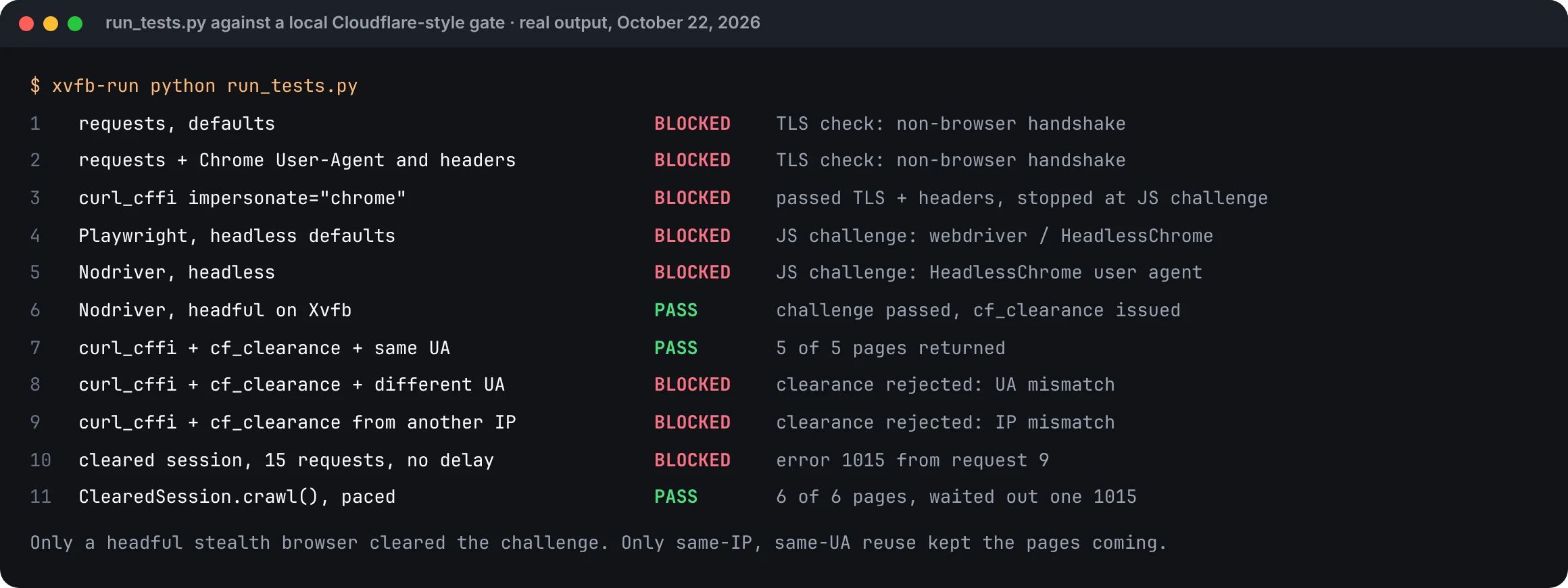
A note on what this does and doesn't prove. Our gate is a simplified copy, not Cloudflare. Real Cloudflare adds machine-learning scores, IP reputation and per-site rules we can't reproduce on a laptop. But the order of failures matches what you'll see in the wild, and the code ran end to end.
- Headers alone did nothing.
requestswith a full set of Chrome headers failed at the same TLS check asrequestswith none. curl_cffimoved the block, it didn't remove it. It passed TLS and headers, then hit the JavaScript challenge, which is the honest result. On sites that only check fingerprints, this step alone is enough.- Headless was the giveaway. Both headless browsers failed the challenge. The headful Nodriver run passed and got a clearance cookie.
- One browser launch, many pages. With the cookie and the same User-Agent,
curl_cffifetched every page it asked for. Changing the User-Agent or the source IP sent it back to the challenge. - Clearance isn't a licence to hammer. Fifteen back-to-back requests on a cleared session hit the rate limit at request 9. The
ClearedSessionclass waited out its one 1015 and finished the crawl.
What about Cloudflare Turnstile?
Turnstile is Cloudflare's CAPTCHA replacement. It runs small browser checks and, if satisfied, issues a token the site verifies on its server. Each token is valid for 300 seconds and can be redeemed only once. When Turnstile guards page access, a stealth browser often passes it. When it guards a login or form, treat it as a stop sign.
The server-side validation docs are clear on the token rules: five minutes, one use, and a second attempt fails with timeout-or-duplicate. So "solve one token and reuse it" doesn't work, whatever some guides suggest.
CAPTCHA-solving services do exist, and some scrapers wire them in to get a token for each request. We don't recommend it as a default. It adds 10 to 30 seconds and a fee to every solve, and a Turnstile on a signup, login or checkout form is the site owner saying that action is for humans. If the data you want sits behind one, ask for access or look for an official API.
What no longer works in 2026
A lot of popular Cloudflare advice is out of date. Cloudscraper's last release was April 2023 and undetected-chromedriver's was February 2024. FlareSolverr's README now says none of its CAPTCHA solvers work. Plain requests with a copied User-Agent fails on TLS, and datacenter IPs struggle on any site with bot management turned on.
- Cloudscraper (1.2.71, April 2023). It tried to solve Cloudflare's older JavaScript challenge without a browser. The challenge has changed many times since.
- undetected-chromedriver (3.5.5, February 2024). Its author's newer project, Nodriver, is the maintained successor.
- FlareSolverr. Still used as a proxy that hands back cookies, but its README states that "at this time none of the captcha solvers work." Expect it to fail on harder challenges.
- Rotating User-Agents on a Python client. A Chrome User-Agent on a non-browser handshake is a mismatch, and a mismatch is easier to spot than an honest Python client.
- Hitting the origin server directly. Some guides suggest finding the site's real IP to skip Cloudflare entirely. Many sites now reject direct traffic (error 1003), and deliberately routing around a site's protection is the kind of thing that turns a terms-of-service question into a legal one. Don't.
Which proxies work best against Cloudflare?
IP reputation is the first thing Cloudflare scores, so the proxy matters. Residential and mobile IPs carry far more trust than datacenter ranges from cloud providers, which many sites challenge on sight. Whatever you use, pick sticky sessions: your clearance cookie is tied to the IP it was issued on, so the IP must stay put.
- Datacenter proxies are cheap and fast. They're fine for sites with light protection and often fail where bot management is turned on.
- Residential proxies come from home internet connections and are the usual choice for Cloudflare-protected sites. Most are billed per GB.
- Mobile proxies share IPs across many real phone users, which makes sites reluctant to block them. They're the most expensive option, so keep them for the hardest targets.
Rotate between sessions, not within one. A new IP for each request looks like a hundred different visitors appearing from nowhere, and it throws away the clearance you just earned. One IP per session, a natural pace, and a fresh IP for the next session is the pattern that holds up.
When to stop doing this yourself
Bypassing Cloudflare on one site is a weekend project. Keeping it working across fifty sites is a job, because detection changes, browsers update, and proxies get burned. Once you're spending more time fixing the scraper than using the data, a managed scraping API that handles fingerprints, browsers, proxies and challenges is usually cheaper.
Running browsers at scale means managing memory (each Chrome instance takes hundreds of megabytes), crash recovery, browser version pinning, proxy health, and monitoring that notices when success rates drop. None of it is your actual product.
Be careful with success-rate claims, including vendors' own. The most transparent public benchmark we know of is Scrapeway's Cloudflare test, which pays for the plans it tests and checks that real content comes back. In its August 14–28, 2026 run against one Cloudflare-protected job site, success ranged from 97% for Scrapfly down to 48% for ScraperAPI, 46% for Firecrawl, 44% for WebScrapingAPI and 35% for ScrapingBee. One target over two weeks isn't a universal ranking. Test any service on your own URLs before you commit.
GcrawlAI wasn't part of that benchmark, so we won't claim a number. What we can tell you is how it works. GcrawlAI's managed Cloud API includes JavaScript rendering, rotating proxies and anti-bot handling in every request, with no credit multipliers when a page needs a browser. Pricing runs from $1 to $6 per 1,000 requests depending on plan, and the free plan needs no card.
from gcrawl_sdk import GcrawlClient, ScrapeOptions   # pip install gcrawl-sdk

client = GcrawlClient(api_key="gc-YOUR_API_KEY")

# JS rendering, proxies and anti-bot handling are part of the one request
result = client.scrape(
    url="https://shop.example.com/product/ridge-runner-3",
    options=ScrapeOptions(markdown_enabled=True, proxy_geo="US"),
    wait=True,
)
print(result.markdown[:300])
The same scraping is available to AI agents through GcrawlAI's MCP server, and through the Python SDK in your own pipelines. If you'd rather run it yourself, the core is open source on GitHub and self-hostable. You can try any URL in the playground before writing code, or see the Scrape API page for what it returns.
"Getting past Cloudflare once proves you can. Staying past it every day for months is the expensive part, and that's the part worth handing off."
Rajesh Kannan, Co-Founder & CTO at Gramosoft
Which approach should you use?
Match the approach to the block and the volume. For a site that only checks fingerprints, curl_cffi is enough. For a JavaScript challenge on a few hundred pages, a headful stealth browser plus cookie reuse works well. For many protected sites or production pipelines, a managed scraping API costs less than maintaining the stack yourself.
Swipe sideways to see the full table →
| Your situation | Use | Why |
|---|---|---|
403 with requests, no challenge page |
curl_cffi with impersonate="chrome" |
Fixes TLS, HTTP/2 and headers in one line |
| "Just a moment..." challenge, small job | Nodriver or SeleniumBase UC, headful | Runs the challenge like a real browser |
| Challenge, thousands of pages | Browser for clearance, curl_cffi for pages |
One browser launch, HTTP-speed scraping |
| Error 1020 or 1006 | Residential proxies with sticky sessions | The block is on your IP, not your client |
| Error 1015 or 429 | Slower pace, less concurrency | No tool fixes going too fast |
| Many protected sites, production | A managed scraping API | Someone else maintains the arms race |
| Turnstile on a login or form, or a sign-in page | Stop, ask for access or use an API | The site is saying that action is for humans |
If the page also needs JavaScript to render its content after the challenge, see our guide to scraping dynamic JavaScript websites with Python. For a deeper look at the build-or-buy decision, read web scraping with Python vs a scraping API.
When you shouldn't bypass Cloudflare
Some walls aren't meant to be climbed. Cloudflare Access puts content behind a login, and getting around that is unauthorised access. Sites can also require cryptographically signed bot identities through Web Bot Auth, which you can't fake. And when a site deliberately blocks automated traffic to a page, respect that unless you have permission.
- Login walls and Cloudflare Access. If content needs an account, scrape it only with your own authorised account and within its terms.
- Web Bot Auth. Cloudflare's Web Bot Auth lets bots sign each request with a registered key using HTTP message signatures. If you run a legitimate crawler at scale, registering and signing is the honest way in, and some sites will treat you better for it.
- Personal data. Getting past a challenge doesn't change what data protection law says you can collect and keep.
- Load. Pace your scraper so the site's real users never notice it. Cloudflare's rate limits exist partly to protect them.
Scraping public data is legal in many places, but the details depend on where you are, the site's terms and what you collect. Our guide to what web scraping is and when it's legal is a good starting point, and for anything regulated, talk to a lawyer. GcrawlAI's anti-bot guide covers other protection systems besides Cloudflare.
Frequently asked questions
Why does Cloudflare block Python requests even with a real User-Agent?
Because Cloudflare reads your TLS handshake before your headers. Python's requests opens connections in a way no browser does, so a Chrome User-Agent on top of it is a mismatch. curl_cffi with impersonate="chrome" sends a real Chrome fingerprint and usually fixes it.
Can I bypass Cloudflare without a browser?
Sometimes. If the site only checks TLS fingerprints, headers and IP reputation, curl_cffi and a good proxy are enough. If it serves a JavaScript challenge, you need a real browser at least once to earn the cf_clearance cookie, which you can then reuse in an HTTP client.
What is the cf_clearance cookie?
It's the cookie Cloudflare sets after your browser passes a challenge, so you aren't challenged again on every page. Cloudflare says it's tied to the visitor and device it was issued to. To reuse it, keep the same IP and the exact same User-Agent. It expires after the period the site owner sets.
Does headless Chrome work against Cloudflare?
Often not. Headless browsers leak signs such as navigator.webdriver and "HeadlessChrome" in the User-Agent. In our tests, headless Playwright and headless Nodriver both failed the challenge, while headful Nodriver passed. On a server, run headful Chrome on a virtual display with xvfb-run.
What does Cloudflare error 1020 mean?
Error 1020, "Access denied", means a firewall rule set by the site owner matched your request. It's often triggered by datacenter IPs, a blocked country or suspicious headers. Try a residential proxy and browser-like headers. If it persists, the site may be blocking that page for all automated traffic.
How long does a Cloudflare Turnstile token last?
Each Turnstile token is valid for 300 seconds (five minutes) and can be validated only once, according to Cloudflare's documentation. A second validation fails with timeout-or-duplicate. That's why tokens can't be reused across requests the way cf_clearance cookies can.