By Rajesh Kannan, Co-Founder & CTO, Gramosoft · Last updated: · Written and tested against Scrapling 0.5 (released October 17, 2026); adaptive results measured in our own offline test on November 2, 2026
Every scraper breaks the same way: the site ships a redesign, .product-title becomes .item-name, and your script returns an empty list without an error. Scrapling is a Python library built around that problem. This tutorial takes you from install to adaptive selectors, stealth fetching and spiders on Scrapling 0.5, shows where adaptive matching stopped working in our own test, and how GcrawlAI fits in when the fetch is the part that fails.
TL;DR
- Scrapling is three tools in one: a fast parser with adaptive selectors, HTTP and stealth-browser fetchers, and a Spider framework.
- Adaptive in two steps: run
css(selector, auto_save=True)while it works, thenadaptive=Trueafter the redesign. - Our test: adaptive mode saves only the first match, so call
find_similar()to get the full list back. - It has a threshold: when classes and tags both changed, the best match scored 38.29%, under the default 40%, and nothing came back until
percentage=30. - v0.5 broke old tutorials:
css_first()is gone, there's noDynamicFetcher, and Camoufox isn't a dependency. - Blocked on the fetch? Let GcrawlAI fetch through residential IPs and a real browser, and keep Scrapling for parsing.
How do you do adaptive web scraping with Scrapling? Install it with pip install scrapling, select elements with page.css(selector, auto_save=True) so Scrapling stores each element's fingerprint in SQLite, and after the site changes call page.css(selector, adaptive=True) to relocate it by similarity. Add find_similar() to recover the whole list. When the fetch gets blocked, GcrawlAI fetches the HTML and Scrapling still parses it.
Scrapling 0.5 at a glance
| Piece | What it does | Needs a browser? |
|---|---|---|
Selector (parser) |
CSS, XPath, text and regex search, adaptive relocation, find_similar() |
No |
Fetcher / FetcherSession |
HTTP requests with browser TLS impersonation (curl_cffi), HTTP/3, retries | No |
StealthyFetcher / StealthySession |
A stealth Chromium that renders JavaScript and can solve Cloudflare's challenge | Yes (scrapling install) |
Spider |
Async crawling with concurrency, follow(), pause and resume |
Only if a session needs one |
| MCP server and shell | Scrapling as a tool for AI agents, and an interactive scraping shell | Depends on the fetcher |
Pair Scrapling with GcrawlAI for the fetch
Scrapling's adaptive parser fixes broken selectors, but it can't fix a blocked request. GcrawlAI handles the fetch: each request runs a real browser through a residential IP in the country you choose, with stealth escalation and retries built in. You get the HTML back, hand it to Scrapling's Selector, and your adaptive selectors keep working unchanged.
The homepage says it directly: JavaScript rendering, anti-bot stealth and proxies are included in every request, with no credit system. That split suits Scrapling well. Scrapling's parser works on any HTML string, so fingerprints, find_similar() and every selector in this tutorial behave the same whether the page came from Scrapling's fetchers or from GcrawlAI.
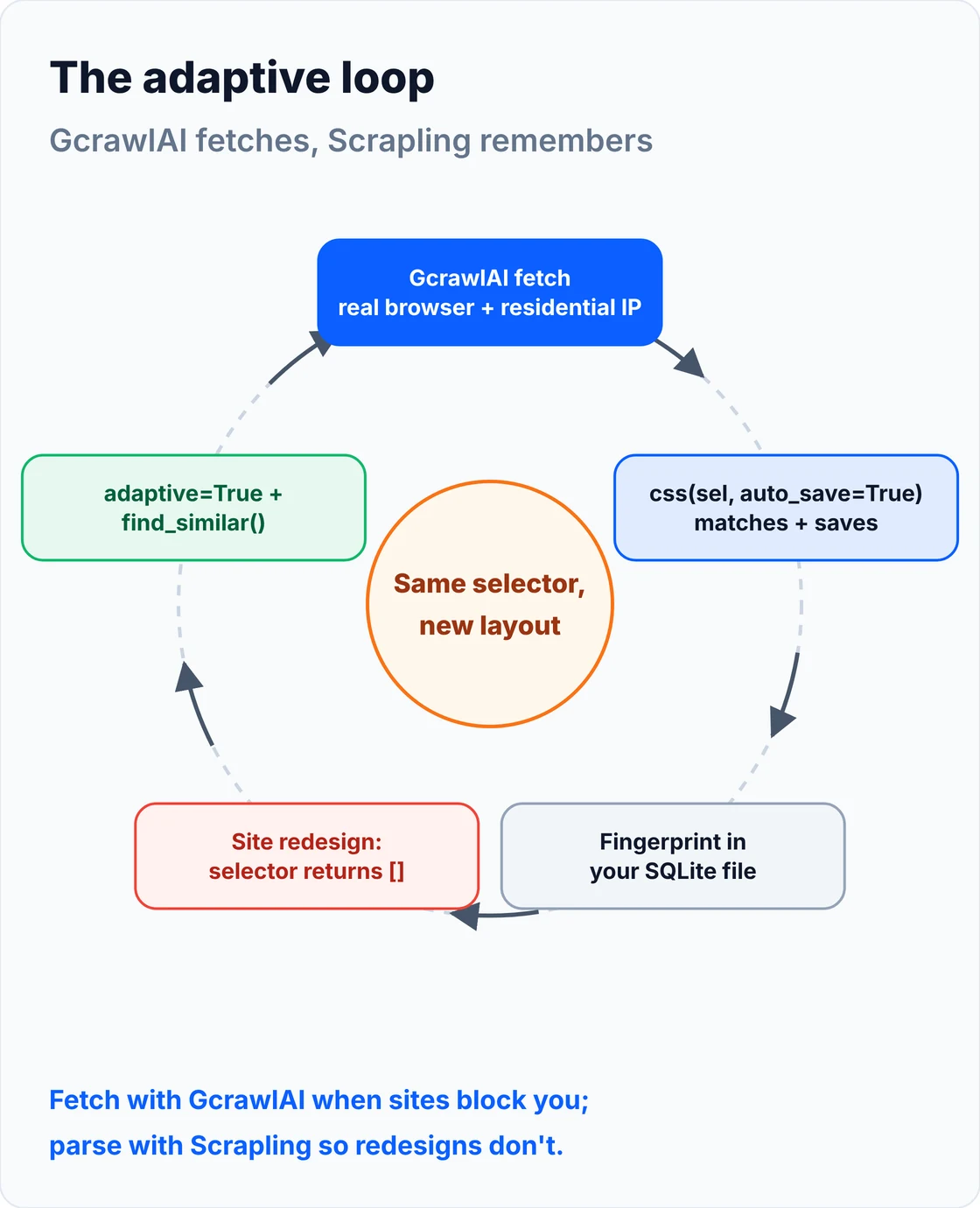
Here's the whole pairing. The function tries the selector normally, refreshes the fingerprint when it works, and falls back to adaptive relocation with a looser threshold when a redesign breaks it:
# pip install gcrawl-sdk scrapling
"""GcrawlAI fetches the page (real browser, residential IPs, stealth); Scrapling parses it adaptively.

Scrapling's parser works on any HTML, so adaptive selectors keep working even when the fetch
happens somewhere else. Fingerprints live in your own SQLite file, next to your code.
"""
import os

from gcrawl_sdk import GcrawlClient, ScrapeOptions
from scrapling.parser import Selector

gc = GcrawlClient(api_key=os.getenv("GCRAWL_API_KEY", "gc-YOUR_API_KEY"))
STORE = "scrapling_elements.db"


def fetch_html(url, geo="US"):
    page = gc.scrape(url=url, options=ScrapeOptions(html_enabled=True, markdown_enabled=False, proxy_geo=geo), wait=True)
    return page.html or ""


def product_names(url, selector=".product-title"):
    page = Selector(fetch_html(url), url=url, adaptive=True, storage_args={"storage_file": STORE, "url": url})
    names = page.css(selector, auto_save=True)                 # normal run: match and refresh the fingerprint
    if names:
        return [n.text for n in names]
    first = page.css(selector, adaptive=True, percentage=30)   # selector broke: relocate from the fingerprint
    if not first:
        return []
    return [first[0].text] + [n.text for n in first[0].find_similar()]


if __name__ == "__main__":
    print(product_names("https://example.com/products"))
- The fetch: residential IP rotation with country targeting, a real browser's TLS and headers, JavaScript rendering and stealth escalation, all in one request.
- The parse: Scrapling on your side, with fingerprints in your own SQLite file, so nothing about your selectors leaves your project.
- Scrape, crawl, screenshots and Search API: scrape to HTML, Markdown or JSON, crawl whole sites, capture screenshots, or use the Search API.
- For developers and AI agents: a Python SDK, an MCP server for Claude, Cursor and other agents, the Playground to test a page your script gets blocked on, and the docs.
The MIT-licensed core runs on your own servers if you'd rather own the stack:
git clone https://github.com/GramosoftAI/GcrawlAI.git && cd GcrawlAI
python -m venv .venv && source .venv/bin/activate
pip install -r requirements.txt && playwright install
cp .env.example .env                      # add your database, Redis and proxy settings
python -m api.core.db_setup
redis-server &
celery -A web_crawler.crawler.celery_config worker -l info &
uvicorn api.api:app --port 8000
Pricing is a free plan of 50 requests a month with no card, paid plans from $0.67 to $1.45 per 1,000 requests, and a self-hosted core that costs nothing. The plan table is in the cost section.
Where it falls short: GcrawlAI fetches public pages; it won't log in for you or get past a site that refuses every visitor, and those URLs come back as an error. Every request runs a browser through residential IPs, so plain pages that Scrapling's Fetcher already gets for free cost the same as hard ones. Use it for the pages that block you, not every page.
"Scrapling and a scraping API solve different failures. One keeps your selectors alive through a redesign; the other keeps your requests alive through a block. Most teams we talk to need both, and they shouldn't have to rewrite their parser to get the second."
Rajesh Kannan, Co-Founder & CTO at Gramosoft
What Scrapling is, and what changed in 0.5
Scrapling is an open-source Python scraping library by Karim Shoair, licensed BSD-3 and requiring Python 3.10 or later. It bundles a parser, fetchers and a crawler, and its signature feature is adaptive element tracking. Version 0.5 shipped on October 17, 2026, and several of its API changes break code from older tutorials.
The source and release notes are on Scrapling's GitHub repository. We checked every call in this guide against the installed 0.5 package, because many tutorials still show the older API:
| You'll see in older tutorials | In Scrapling 0.5 |
|---|---|
page.css_first(".price") |
Removed. Use page.css(".price").get() for text, or page.css(".price")[0] for the element |
from scrapling.fetchers import DynamicFetcher |
Not exported. Use StealthyFetcher or StealthySession for browser rendering |
| StealthyFetcher "uses Camoufox" (Firefox) | Camoufox isn't a dependency; the browser fetchers run Chromium through patchright and Playwright |
| Fingerprints "just work" with no setup | They do, but the default database sits inside the installed package; point storage_args at your own file |
Version 0.5 also added request recording (record_requests), saving and loading browser state, shadow DOM piercing (pierce_shadow), breadth-first or depth-first crawl strategies, and MCP server improvements for AI agents.
Install Scrapling
Scrapling installs in layers, so you only pull in what you use. The base package is the parser alone, which is all adaptive selectors need. The fetchers extra adds HTTP and browser fetching plus spiders, and one more command downloads the browser. Extras for the MCP server and shell sit on top of those.
pip install scrapling                 # parser only: Selector, css, xpath, adaptive
pip install "scrapling[fetchers]"     # + Fetcher, StealthyFetcher, sessions and spiders
scrapling install                     # downloads the browser that StealthyFetcher drives
# extras: "scrapling[ai]" adds the MCP server, "scrapling[shell]" the shell, "scrapling[all]" both
If you only parse HTML you already have, from files, a queue or GcrawlAI, stop after the first line. Skip scrapling install unless you'll use StealthyFetcher; it downloads a full browser.
Your first scrape with Fetcher
Fetcher sends plain HTTP requests, but with a browser's TLS fingerprint and headers through curl_cffi, so it passes checks that block requests. It returns a response you can query straight away with CSS or XPath. For static pages it's the fastest option Scrapling has, with no browser involved.
# pip install "scrapling[fetchers]"
from scrapling.fetchers import Fetcher

page = Fetcher.get("https://quotes.toscrape.com/", impersonate="chrome")   # browser-grade TLS and headers
print(page.status)

for quote in page.css(".quote"):
    print(quote.css(".text::text").get(), "-", quote.css(".author::text").get())

print(page.css(".tag::text").getall()[:5])        # every match as a list
print(page.css(".author::text").get())            # first match (css_first() is gone in v0.5)
Three habits to pick up early. .css() always returns a list-like Selectors object, so .get() gives the first value and .getall() gives all of them. The ::text and ::attr(href) pseudo-elements work as they do in Scrapy. And impersonate="chrome" is what makes the TLS handshake look like a browser's, so keep it on.
How adaptive selectors work
Adaptive scraping happens in two runs. On a normal run, auto_save=True stores a fingerprint of the matched element: its tag, attributes, text, path and neighbours. After a redesign breaks the selector, adaptive=True scores every element on the page against that fingerprint and returns the closest match above a percentage threshold.
auto_save=True: use it on every run where the selector works, so the fingerprint follows small changes over time.adaptive=True: tries the selector first, and relocates from the fingerprint only when it matches nothing.percentage: the minimum similarity score, 40 by default. Lower it carefully; too low and you'll match the wrong element.identifier: a name for the fingerprint, so two selectors on one page don't overwrite each other.storage_args: where fingerprints live. Pass{"storage_file": "...db", "url": url}so they sit in your project.
Fingerprints are keyed by the site's domain, which is why you pass url. If you don't set storage_args, Scrapling writes to a database inside its own package folder. That works on a laptop but gets wiped by a reinstall, and isn't shared between containers.
Our test: where adaptive selectors stopped working
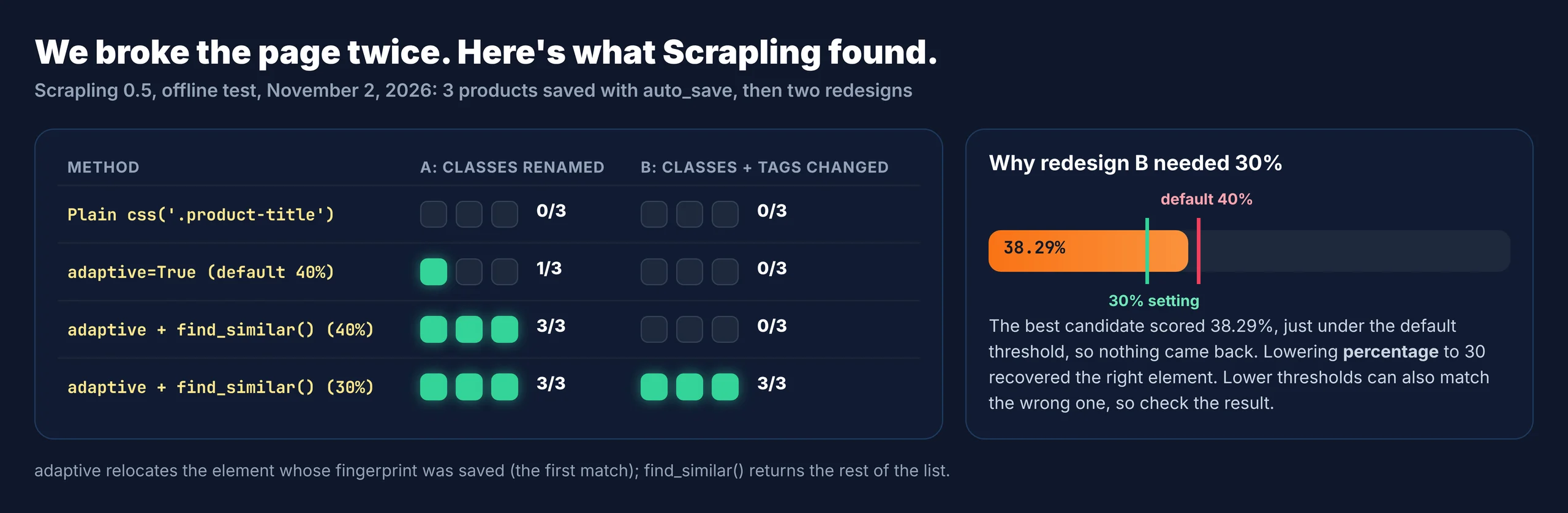
We wanted to see adaptive mode fail, not just succeed. We saved fingerprints on version 1 of a three-product page, then ran the same selector against two redesigns: one that renamed every class, and one that also changed the tags and added a badge. Everything ran offline in Scrapling 0.5 on November 2, 2026.
The test script, with the three page versions inline so you can rerun it yourself:
"""Scrapling adaptive selectors, tested offline: save element fingerprints on version 1 of a page,
then find the same elements after two redesigns, with no network and no selector changes.
pip install scrapling   (the parser alone is enough for this script)
"""
import os
from scrapling.parser import Selector

URL = "https://shop.example/products"
DB = "scrapling_elements.db"                 # keep the fingerprints in your project, not in site-packages
STORE = {"storage_file": DB, "url": URL}

V1 = """<html><body><main>
  <div class="product"><h2 class="product-title">Steel Kettle</h2><span class="price">$39</span></div>
  <div class="product"><h2 class="product-title">Glass Teapot</h2><span class="price">$24</span></div>
  <div class="product"><h2 class="product-title">Pour-over Set</h2><span class="price">$31</span></div>
</main></body></html>"""

# Redesign A: every class renamed, one extra wrapper div
V2 = """<html><body><main><section class="grid">
  <div class="card"><h2 class="item-name">Steel Kettle</h2><span class="cost">$39</span></div>
  <div class="card"><h2 class="item-name">Glass Teapot</h2><span class="cost">$24</span></div>
  <div class="card"><h2 class="item-name">Pour-over Set</h2><span class="cost">$31</span></div>
</section></main></body></html>"""

# Redesign B: classes renamed, tags changed (h2 -> h3, span -> p) and a badge added before the title
V3 = """<html><body><main><ul class="list">
  <li class="tile"><em>New</em><h3 class="name">Steel Kettle</h3><p class="amount">$39</p></li>
  <li class="tile"><em>New</em><h3 class="name">Glass Teapot</h3><p class="amount">$24</p></li>
  <li class="tile"><em>New</em><h3 class="name">Pour-over Set</h3><p class="amount">$31</p></li>
</ul></main></body></html>"""


def page(html):
    return Selector(html, url=URL, adaptive=True, storage_args=STORE)


def all_items(first):
    """Adaptive mode relocates the element whose fingerprint was saved (the first match);
    find_similar() then collects its structural siblings."""
    return [first.text] + [x.text for x in first.find_similar()] if first else []


if __name__ == "__main__":
    if os.path.exists(DB):
        os.remove(DB)

    # Run 1: the selectors work, and auto_save stores the first match's fingerprint in SQLite
    v1 = page(V1)
    titles = v1.css(".product-title", auto_save=True)
    prices = v1.css(".price", auto_save=True)
    print("v1 titles:", [t.text for t in titles], "| prices:", [p.text for p in prices])

    for label, html in (("Redesign A: classes renamed", V2), ("Redesign B: classes and tags changed", V3)):
        p = page(html)
        print(f"\n{label}")
        print("  plain .product-title     :", [x.text for x in p.css(".product-title")])
        print("  adaptive (default 40%)   :", [x.text for x in p.css(".product-title", adaptive=True)])
        for pct in (40, 30):
            hit = p.css(".product-title", adaptive=True, percentage=pct)
            print(f"  adaptive + find_similar ({pct}%):", all_items(hit[0]) if hit else "no match")
And the output, unedited:
v1 titles: ['Steel Kettle', 'Glass Teapot', 'Pour-over Set'] | prices: ['$39', '$24', '$31']

Redesign A: classes renamed
  plain .product-title     : []
  adaptive (default 40%)   : ['Steel Kettle']
  adaptive + find_similar (40%): ['Steel Kettle', 'Glass Teapot', 'Pour-over Set']
  adaptive + find_similar (30%): ['Steel Kettle', 'Glass Teapot', 'Pour-over Set']

Redesign B: classes and tags changed
  plain .product-title     : []
WARNING: Adaptive relocation found no element above the 40% threshold (top score: 38.29%). Lower `percentage` if this is the right element.
  adaptive (default 40%)   : []
WARNING: Adaptive relocation found no element above the 40% threshold (top score: 38.29%). Lower `percentage` if this is the right element.
  adaptive + find_similar (40%): no match
  adaptive + find_similar (30%): ['Steel Kettle', 'Glass Teapot', 'Pour-over Set']
Two findings matter for real projects. First, adaptive mode found only Steel Kettle, because auto_save stores the first match's fingerprint, not one per element. find_similar() on that element brought back all three. Second, redesign B scored 38.29%, just under the default threshold, so the default returned nothing. Scrapling did log a warning with the top score, which tells you exactly how far to lower percentage.
"The warning with the top score is the most useful line Scrapling prints. Log it, alert on it, and treat any relocation under 40% as something a person should check before the data ships."
Rajesh Kannan, Co-Founder & CTO at Gramosoft
Find elements without selectors
Sometimes you don't have a working selector at all, only a value you can see on the page. Scrapling can search by visible text or by a regular expression, and find_similar() turns one found element into the whole list of elements built the same way. Together they make a quick way to bootstrap a scraper.
# No selector at all: find by visible text, then expand to every element built the same way
from adaptive_demo import V3, page

p = page(V3)
kettle = p.find_by_text("Steel Kettle")                      # exact text, first match
print(kettle.tag, dict(kettle.attrib))
print([x.text for x in kettle.find_similar()])                # the other product names
print([x.text for x in p.find_by_regex(r"^\$\d+$", first_match=False)])   # every price
h3 {'class': 'name'}
['Glass Teapot', 'Pour-over Set']
['$39', '$24', '$31']
find_similar() compares structure, not text: same tag, same depth, similar parent. By default it ignores href and src so links to different products still count as similar, and similarity_threshold (0.2 by default) controls how strict the comparison is.
Render JavaScript with StealthyFetcher
StealthyFetcher launches a patched Chromium, renders the page, and returns the same response object as Fetcher, so your selectors don't change. Use it for pages that build content with JavaScript or run a browser check. Wrap many pages in StealthySession so one browser stays open and cookies carry between requests.
# pip install "scrapling[fetchers]" && scrapling install
from scrapling.fetchers import StealthyFetcher, StealthySession

# One-off: launch a stealth Chromium, render JavaScript, wait for the network to settle
page = StealthyFetcher.fetch("https://quotes.toscrape.com/js/", headless=True, network_idle=True, block_ads=True)
print(len(page.css(".quote")), "quotes rendered by JavaScript")

# Many pages: keep one browser open and reuse it (cookies and state carry over)
with StealthySession(headless=True, solve_cloudflare=True, block_ads=True) as session:
    for n in (1, 2):
        page = session.fetch(f"https://quotes.toscrape.com/js/page/{n}/", network_idle=True)
        print(n, page.css(".quote .text::text").getall()[:1])
network_idle=True: waits until network activity stops, which is usually when rendered content has arrived.wait_selector: waits for a specific element instead, faster when you know what you need.solve_cloudflare=True: attempts Cloudflare's interstitial and Turnstile challenge on session requests.block_ads=True: skips ad and tracker requests, which speeds up rendering.proxyorproxy_rotator: routes the browser through your own proxies; Scrapling doesn't include any.
A stealth browser fixes the browser signals, but your IP is still yours. From a cloud server, a datacenter IP is often enough to get challenged before any fingerprint is read. That's the point where a residential proxy pool or GcrawlAI earns its cost.
Crawl a site with a Spider
For more than a handful of pages, Scrapling's Spider class gives you a Scrapy-style crawler with async requests underneath. You define start URLs and a parse method that yields items and follow-up requests. Set crawldir and the crawl saves its state, so you can stop it and resume later.
# pip install "scrapling[fetchers]"
from scrapling.spiders import Spider, Response


class QuotesSpider(Spider):
    name = "quotes"
    start_urls = ["https://quotes.toscrape.com/"]
    concurrent_requests = 4                         # stay polite
    robots_txt_obey = True                          # off by default; honour robots.txt

    async def parse(self, response: Response):
        for quote in response.css(".quote"):
            yield {"text": quote.css(".text::text").get(), "author": quote.css(".author::text").get()}
        next_link = response.css(".next a::attr(href)").get()
        if next_link:
            yield response.follow(next_link)


result = QuotesSpider(crawldir="./crawl_state").start()   # Ctrl+C pauses; rerun to resume
print(len(result.items), "quotes")
result.items.to_json("quotes.json")
concurrent_requests caps parallel requests, robots_txt_obey (off by default) skips URLs the site's robots.txt disallows, and response.follow() resolves relative links for you. Items come back on result.items with a to_json() export. A spider can also send different URLs to different sessions, for example cheap HTTP requests for listing pages and a stealth browser only for the detail pages that need one.
Scrapling cheat sheet
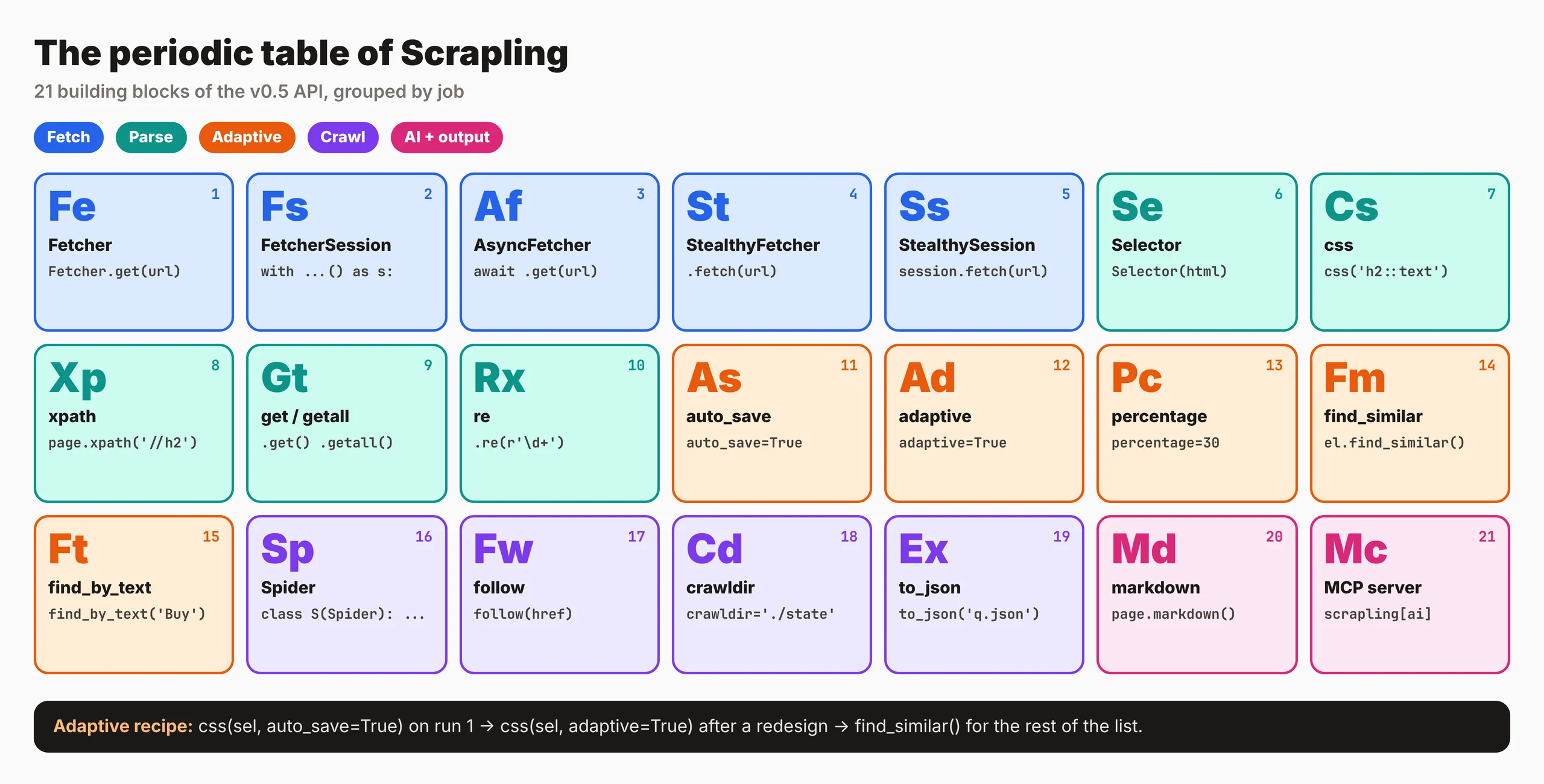
Every call this tutorial uses fits on one page. The groups follow the order you'll reach for them: install, fetch, select, adapt and crawl. Keep it next to your editor while you write your first spider, and check any call you copy from an older tutorial against the 0.5 changes table above before you rely on it.
What blocked pages cost to fetch
Scrapling itself is free. The cost appears when its own fetchers get blocked and you add residential proxies, browser servers or a scraping API. For 100,000 successful protected pages a month, credit-based APIs cost $249 to $399 and GcrawlAI costs $101; for plain pages, they're cheaper.
| Option, 100,000 successful pages a month | Plain HTML pages | Protected pages (JS rendering + premium proxies) | Are failed requests billed? |
|---|---|---|---|
| GcrawlAI (every request rendered, residential IPs included) | $101 (Growth $79 + 20,000 overage at $1.10 per 1,000) | $101 (same request, no multiplier) | No: failed requests are never charged |
| ScraperAPI | $49 (Hobby, 100,000 credits) | $299 (Business; 25 credits per page = 2.5M credits) | Charges only 200 and 404 responses |
| ZenRows | $39 (Build B3, 120,000 credits) | $399 (Growth G3; 25 credits per page = 2.5M credits) | Failed requests never charged; 404 and 410 count as successful |
| ScrapingBee | $49 (Freelance, 250,000 credits; JS off) | $249 (Business; 25 credits per page = 2.5M credits) | Charges only 200, 404 and 410 |
List-price arithmetic, not a benchmark. Credit costs and billing rules come from ScraperAPI's credit docs, ZenRows' pricing docs and ScrapingBee's FAQ, checked November 1, 2026. The honest read: for plain HTML, Scrapling's free Fetcher beats all of them, and ZenRows, ScraperAPI and ScrapingBee cost less than GcrawlAI. GcrawlAI wins on protected pages, because rendering, residential IPs and stealth are already in the one request.
GcrawlAI plans (GcrawlAI pricing, checked October 28, 2026):
| Plan | Price | Requests/month | Concurrent | Per 1,000 | Overage per 1,000 |
|---|---|---|---|---|---|
| Free | $0 forever, no card | 50 | 2 | – | – |
| Starter | $29/month | 20,000 | 10 | $1.45 | $1.60 |
| Growth (most popular) | $79/month | 80,000 | 35 | $0.99 | $1.10 |
| Pro | $199/month | 250,000 | 50 | $0.80 | $0.90 |
| Scale | $499/month | 750,000 | 100 | $0.67 | $0.75 |
| Enterprise | Volume pricing | 2M+ | Custom | – | – |
| Self-hosted | $0 (MIT) | Your servers | Your servers | Infrastructure only | – |
Every plan, Free included, has scrape, crawl, the Search API, JavaScript rendering, residential IP rotation and stealth escalation in each request, and each feature counts as one request. Failed requests are never charged. Annual billing charges 10 months for 12, unused requests on paid plans roll over once, and Indian customers are billed in INR with a GST invoice.
Which setup to choose
Match the setup to what actually breaks. If selectors break, Scrapling's adaptive parser is the fix and costs nothing. If requests get blocked, the fix is in the fetch, and that's where GcrawlAI fits. Most real projects mix both: Scrapling everywhere, and a managed fetch only for the hard domains.
| Your situation | Scrapling setup | Where GcrawlAI fits |
|---|---|---|
| Static pages, no blocking | Fetcher + auto_save |
Not needed; keep GcrawlAI for the domains that start blocking |
| JavaScript-rendered pages | StealthyFetcher or StealthySession |
GcrawlAI renders without running browsers yourself |
| Blocked from a cloud server | Your own residential proxies via proxy_rotator |
GcrawlAI includes residential IPs in every request |
| Site redesigns often | adaptive=True + find_similar(), with the score logged |
Fetch with GcrawlAI, parse adaptively with Scrapling |
| Large crawls | Spider with crawldir |
GcrawlAI crawl jobs, or route hard URLs through it |
| AI agents need web data | scrapling[ai] MCP server |
GcrawlAI MCP server with scrape, crawl and Search API |
When Scrapling on its own is enough
Plenty of sites need nothing more than Scrapling. If its Fetcher gets clean responses and your selectors only break on the occasional redesign, adaptive mode and a logged similarity score will carry you a long way for free. Bring in GcrawlAI when blocks, not selectors, become the daily problem.
Even then you can stay on your own servers: the MIT-licensed GcrawlAI core self-hosts for free, and the free Cloud plan's 50 requests a month are enough to test the pages your scripts get blocked on. Paste one into the Playground to compare. For the build-or-buy trade-off, read web scraping with Python vs a scraping API.
Scrape responsibly with Scrapling
Adaptive selectors and a stealth browser make Scrapling powerful, and that power comes with obligations. A login wall, a terms-of-service ban, personal data or a robots.txt disallow is the site saying no, and looking like a browser doesn't change that. Keep concurrency low, cache what you've fetched, and stop when asked.
Scrapling's spiders only honour robots.txt when you set robots_txt_obey = True; in our local test it skipped the disallowed page and counted it in the crawl stats. Turn it on, and set polite limits yourself. For the legal background, read what web scraping is and where it's legal, and get advice for your own case.
Frequently asked questions
What is Scrapling used for?
Scraping websites in Python with less maintenance. It parses HTML with CSS, XPath, text and regex search, fetches pages over HTTP or through a stealth browser, crawls with spiders, and relocates elements after a redesign with adaptive selectors.
How do Scrapling adaptive selectors work?
Run css(selector, auto_save=True) while the selector works, and Scrapling stores a fingerprint of the element in SQLite. After a redesign, css(selector, adaptive=True) scores elements against that fingerprint and returns the best match above a threshold, 40% by default.
Why does adaptive mode return only one element?
In our test, auto_save stored only the first match's fingerprint, so adaptive relocation returned that one element. Call find_similar() on it to get the rest of the list back.
What replaced css_first in Scrapling 0.5?
css_first() no longer exists. Use page.css(selector).get() for the first text or HTML value, or page.css(selector)[0] when you need the element itself.
Is Scrapling better than BeautifulSoup or Scrapy?
It covers more ground than BeautifulSoup, adding fetching, crawling and adaptive selectors, and its parser is fast. Scrapy is more mature for very large crawls and has a bigger plugin ecosystem. For new scrapers that must survive redesigns, Scrapling is a strong default.
Can Scrapling bypass Cloudflare?
StealthySession has a solve_cloudflare option for Cloudflare's interstitial and Turnstile challenge. It doesn't change your IP, so a datacenter address can still be challenged or blocked. Residential proxies or GcrawlAI cover that part.
Is GcrawlAI open source, and can I use it commercially?
Related guides
- Python Web Scraping Frameworks Compared: Scrapy vs Crawlee vs Scrapling (2026)
- How to Scrape Dynamic JavaScript Websites with Python (2026 Guide)
- 429 Too Many Requests: How to Fix It When Web Scraping
- How to Bypass Cloudflare When Web Scraping (2026)
- How to Fix 403 Forbidden Errors in Python Requests (2026)
- ZenRows Alternatives: Best Anti-Bot Scraping APIs in 2026
- Web Scraping with Python vs a Scraping API: When to Stop Writing Your Own Scraper
- What Is Web Scraping? How It Works, Uses & Legality