By Rajesh Kannan, Co-Founder & CTO, Gramosoft · Last updated: · Lab results from our own local test on November 7, 2026 (Python 3.13, requests 2.34, Playwright 1.56); DataDome facts checked against DataDome's own docs and research the same day
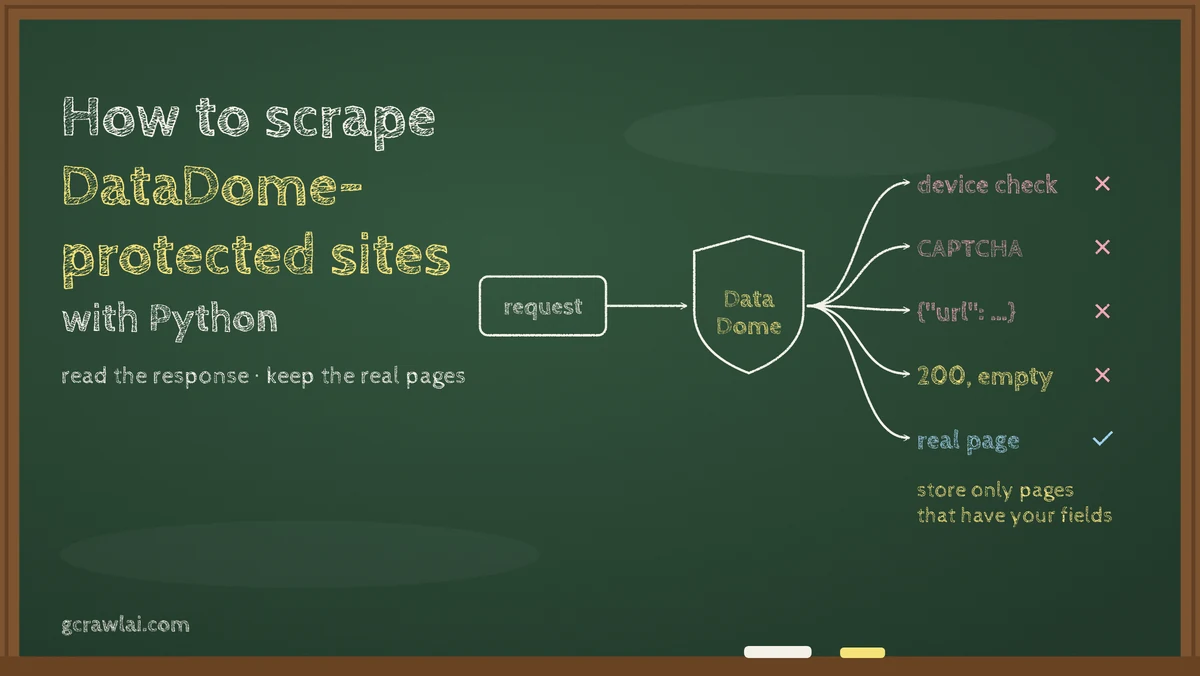
Your Python scraper requests a classifieds, travel or retail page and gets a 403 that says "Please enable JS and disable any ad blocker". That's usually DataDome. This guide starts with the GcrawlAI route, then shows how to recognise DataDome from Python, tell its five kinds of response apart, and make sure you store pages, not challenges.
TL;DR
- Fastest route: GcrawlAI sends every request through a proxy, a real browser and stealth mode, one request per page, and failed requests are never charged.
- Recognise it:
x-datadome: protected, adatadomecookie, thejs.datadome.co/tags.jsscript, and challenge links tocaptcha-delivery.com. - One 403, several meanings: a Device Check, a CAPTCHA and a hard block can look alike, and an API call can get a 403 JSON body with a single
urlkey that parses fine and holds no data. - Our test: of four common "is this data?" checks, only one stored all 41 real pages and none of 49 challenges. Checking for a 200 stored 4 empty shells; trusting
r.json()stored 20 challenges. - Plain
requestscan't pass: the Device Check needs JavaScript run in a real browser.
How do you scrape a DataDome-protected website with Python? Confirm it's DataDome first: look for x-datadome: protected, a datadome cookie and captcha-delivery.com links. requests alone gets only challenges, because DataDome checks the browser with JavaScript. Use an official API or ask for access where you can; for public pages you may collect, use a browser-based API such as GcrawlAI and store a page only if its expected fields are there.
DataDome pages through GcrawlAI: proxy, browser and stealth in one request
DataDome scores the connection, the browser and the behaviour behind each request before it lets a page through. Building all three yourself means browsers, residential proxies and session handling to run and maintain. GcrawlAI does it inside one API request and returns the rendered page, so your Python code only checks the content.
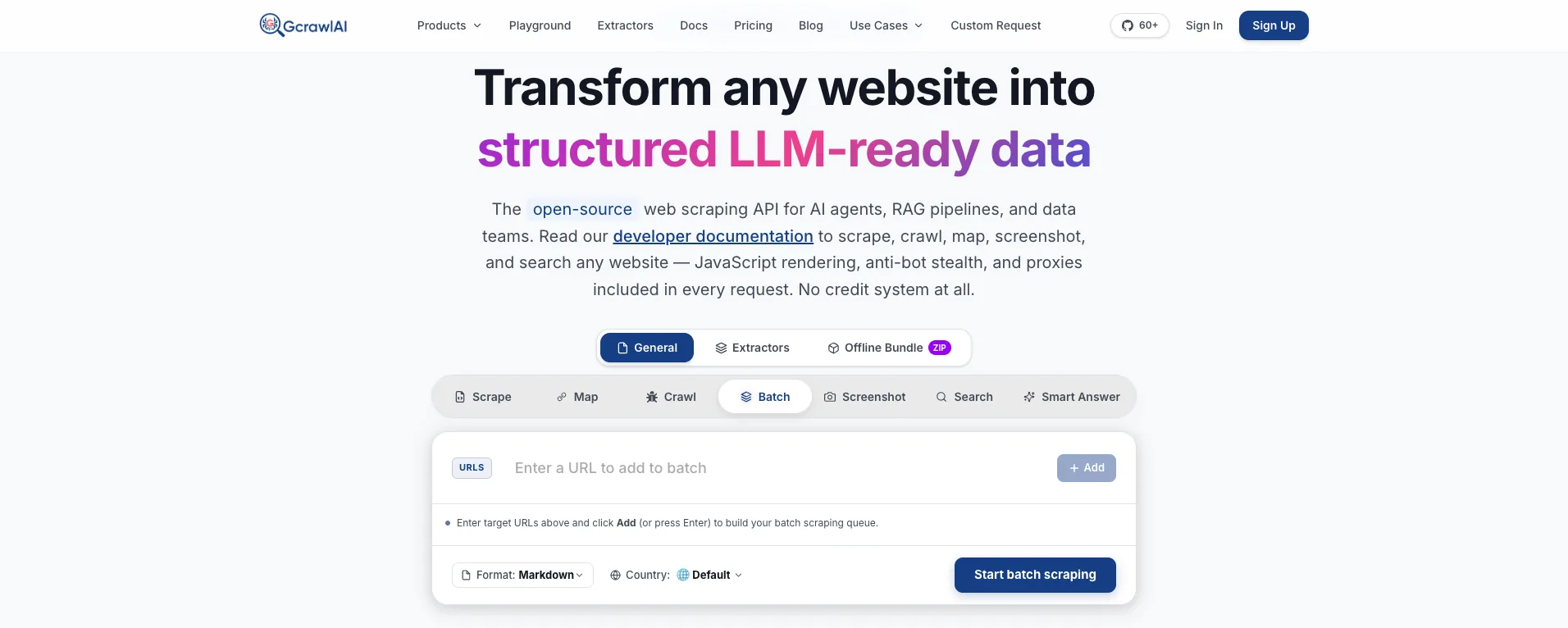
The homepage puts it in one line: JavaScript rendering, anti-bot stealth and proxies come with every request, with no credit system. GcrawlAI never fetches a page with a plain HTTP client, so there's no cheap mode that returns a DataDome challenge and calls it a result. The diagram shows the path every request takes:
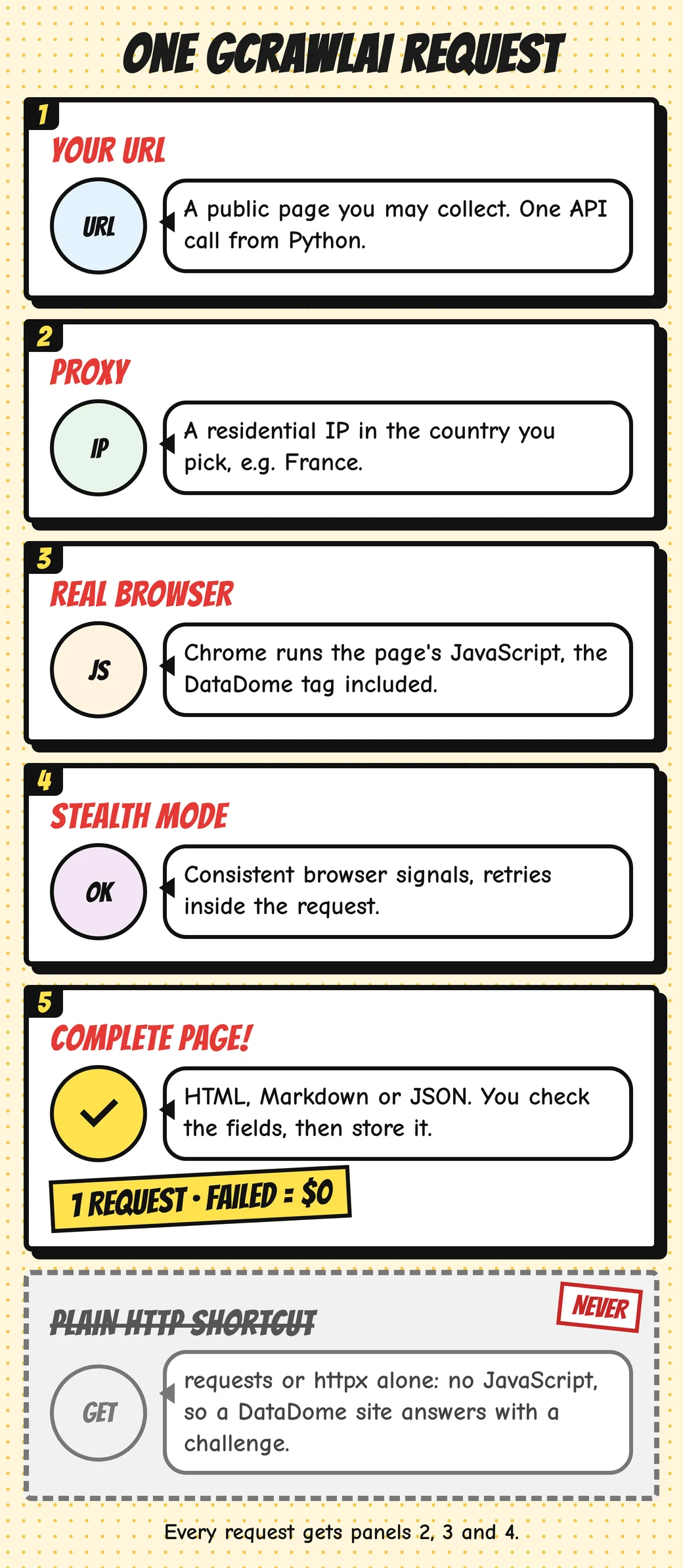
Here's the client. It asks for the page with a French exit IP (DataDome is common on French sites), then stores it only if the expected fields are present and no challenge markers are, because a 200 alone proves nothing:
# pip install gcrawl-sdk
"""Collect public pages you're allowed to scrape on a DataDome-protected site through GcrawlAI.
Every request runs through a proxy in the country you pick, a real browser and stealth mode.
Accept a page only when the fields you expect are in it; failed requests aren't charged."""
import os, time
from gcrawl_sdk import GcrawlClient, ScrapeOptions
from gcrawl_sdk.exceptions import GcrawlAPIError, GcrawlTimeoutError

gc = GcrawlClient(api_key=os.getenv("GCRAWL_API_KEY", "gc-YOUR_API_KEY"))
OPTS = ScrapeOptions(html_enabled=True, markdown_enabled=True, proxy_geo="FR", timeout=60)
CHALLENGE = ("captcha-delivery.com", "var dd=")

def fetch(url: str, must_have: list[str], tries: int = 3):
    for attempt in range(1, tries + 1):
        try:
            page = gc.scrape(url=url, options=OPTS, wait=True)
            html = page.html or ""
            if all(m in html for m in must_have) and not any(c in html for c in CHALLENGE):
                return page
            print(f"attempt {attempt}: no expected fields, not stored")
        except (GcrawlAPIError, GcrawlTimeoutError) as e:
            print(f"attempt {attempt}: {e}")
        time.sleep(5 * attempt)                     # slow down before the next try
    return None

if __name__ == "__main__":
    page = fetch("https://example.com/listing/123", must_have=['itemprop="price"', "<h1"])
    print(page.markdown[:400] if page else "no usable page")
- Every request, the full path: a residential IP in the country you pick, a real browser that runs the page's JavaScript, and stealth mode, with retries inside the request.
- Output you can check: HTML, Markdown or JSON, plus extractors that return structured fields for common page types.
- Scrape, crawl, screenshots and Search API: scrape single pages, crawl whole sites, capture screenshots or use the Search API.
- For developers and AI agents: a Python SDK, an MCP server for Claude, Cursor and other agents, the Playground to test a URL before writing code, and the docs.
The MIT-licensed core also runs on your own servers: clone it from GitHub, install the requirements, and start the API with Redis and a Celery worker. The setup script is in the code download, and you bring your own proxy accounts.
Pricing is a free plan of 50 requests a month with no card, paid plans from $0.67 to $1.45 per 1,000 requests, and a self-hosted core that costs nothing. Failed requests are never charged. The full plan table is in the cost section.
Where it falls short: DataDome runs separate models for each customer, so no service gets through on every DataDome site every time, GcrawlAI included. We haven't published a DataDome success rate, so test your own URLs on the free plan. A rendered request is also slower than a raw HTTP call, it won't log in for you, and it doesn't make collecting data acceptable when a site's terms say no.
"With DataDome, the error you see is the easy one. The expensive one is a challenge page your scraper saved as a product. Every GcrawlAI request goes through a proxy, a browser and stealth, and we still tell customers to check every page for the fields they expect."
Rajesh Kannan, Co-Founder & CTO at Gramosoft
What DataDome is and what it decides
DataDome is a bot-protection service that sits in front of websites, mobile apps and APIs and decides, request by request, whether to allow, challenge or block. It doesn't run one checklist. It combines connection, browser and behaviour signals into a score, so the same scraper can pass on one DataDome site and fail on another.
The decision ends in one of three responses, which DataDome's response-page docs call Device Check, CAPTCHA and Block. Device Check, launched in December 2023, is invisible: it runs proof-of-work and device checks in the browser with no puzzle. The CAPTCHA is a slider. Block ends the session.
- The connection: DataDome's engineers describe using TLS fingerprints (JA3) to spot clients whose handshake doesn't match the browser they claim to be.
- The device: Picasso, described by DataDome in February 2024, draws a canvas challenge in the background of Device Check and CAPTCHA and checks that the result matches the claimed browser and operating system.
- Reputation and behaviour: IP quality, request pace and session history, which explains why a session can work for a while and then start getting challenges.
DataDome says it analyses 3 trillion data points a day, and that fewer than 1 in 10,000 human requests get challenged. If your scraper sees challenges at all, the score has already gone against it. The Cloudflare guide covers how a different vendor reaches the same kind of decision.
How to tell a 403 came from DataDome
Many protections return 403, so confirm the vendor before changing anything. DataDome leaves a recognisable set of signs: its own response header, a cookie, a script host and a challenge host. Two or more together are reliable. One catch: the header and cookie also appear on successful responses, so they prove DataDome is present, not that you were blocked.
| Signal | What it looks like | What it tells you |
|---|---|---|
| Response header | x-datadome: protected |
DataDome is in front of this site, on blocked and allowed responses alike |
| Challenge header | x-datadome-cid |
Often present on challenges, absent on normal pages |
| Cookie | Set-Cookie: datadome=…, long-lived, not HttpOnly |
The session DataDome's script reads and updates |
| Script | js.datadome.co/tags.js |
The JavaScript tag; on many sites it loads on every page |
| Challenge page | "Please enable JS and disable any ad blocker" and an inline var dd={…} |
A Device Check or CAPTCHA, not your page |
| Challenge host | geo.captcha-delivery.com in the HTML or JSON |
You were sent to a challenge |
The header and cookie patterns appear in DataDome's Protection API reference and in the tests published by Gologin, who also saw x-datadome: protected on a page that loaded normally. Aethyn's guide documents the JSON challenge body. For a general 403 checklist, see fixing 403 Forbidden errors in Python requests.
One 403, five different responses
Most DataDome guides stop at "you got blocked". In practice your scraper meets five different responses, and each needs a different reaction. Three are 403s that look much alike, one is a JSON body that parses cleanly, and one is a 200 with nothing in it. Naming each one is what keeps junk out of your data.
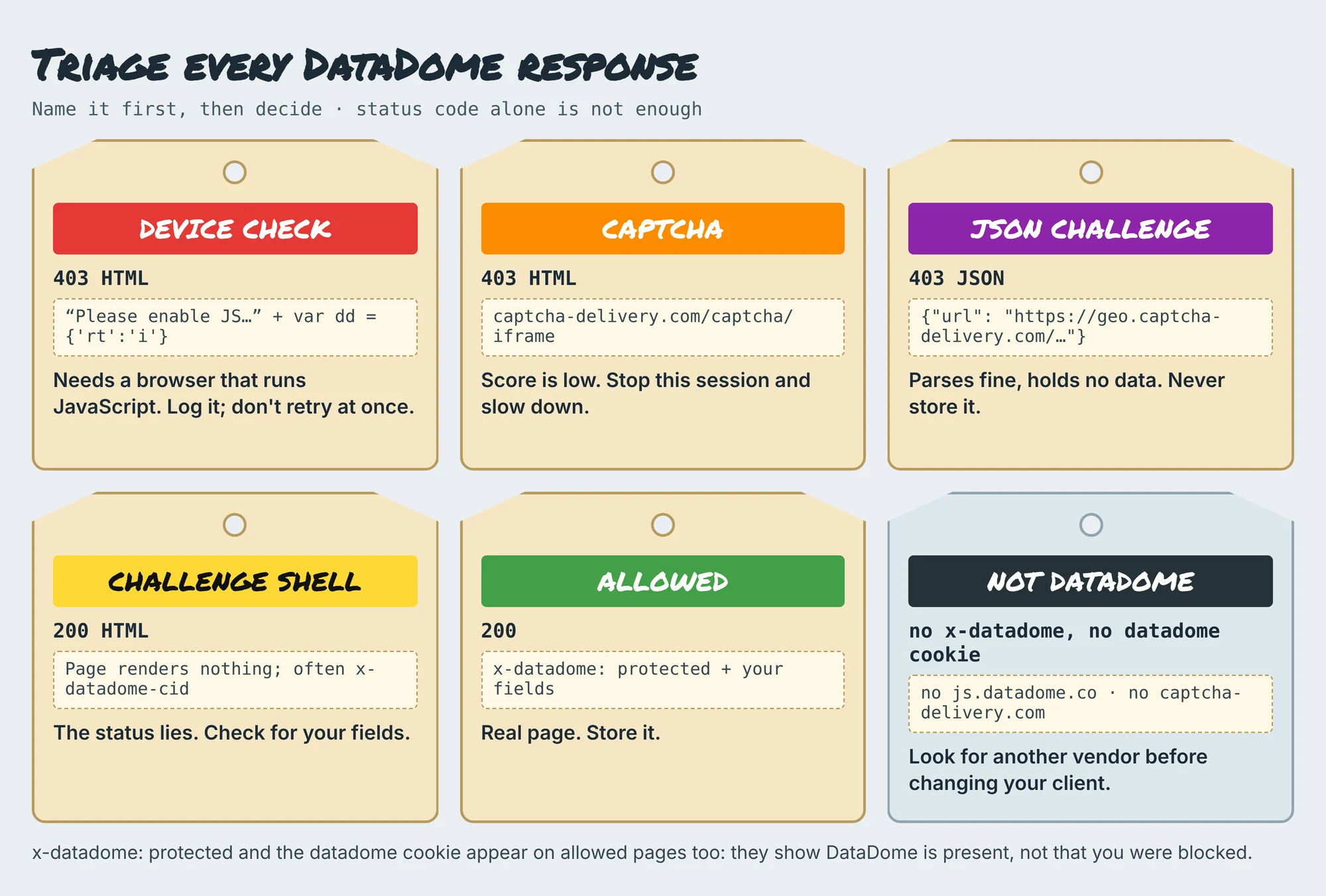
- Device Check: the browser must run DataDome's JavaScript. A plain HTTP client never gets past it; log it and don't retry at once.
- CAPTCHA: the score is low enough to need a person. Stop that session and slow down; solving CAPTCHAs is out of scope here.
- JSON challenge: an API call gets
{"url": "https://geo.captcha-delivery.com/captcha/?…"}with a 403. Code that skips the status check and callsr.json()stores it as a record. - Challenge shell: a 200 whose page never renders any content. Status checks pass it; content checks don't.
- Allowed: a 200 with
x-datadome: protectedand the data you expect. Store it.
This function names the response and accepts it only when it's a 200 holding the fields you expect. It needs nothing beyond the standard library, so it works with requests, httpx, Playwright or any API response:
# pip install requests
"""Recognise DataDome responses and accept a page only when the data you expect is in it."""
import json

def datadome_kind(status: int, headers: dict, text: str) -> str:
    """Name the response: allowed, device_check, captcha, json_challenge, challenge_shell or not_datadome."""
    h = {k.lower(): v for k, v in headers.items()}
    body = text or ""
    protected = (h.get("x-datadome", "").lower() == "protected" or "datadome=" in h.get("set-cookie", "").lower()
                 or "js.datadome.co" in body or "captcha-delivery.com" in body)
    if not protected:
        return "not_datadome"
    if body.lstrip().startswith("{"):
        try:
            data = json.loads(body)
        except ValueError:
            data = None
        if isinstance(data, dict) and set(data) == {"url"} and "captcha-delivery.com" in data["url"]:
            return "json_challenge"          # parses fine, contains no data
    if "var dd=" in body or "captcha-delivery.com" in body:
        return "captcha" if "'rt':'c'" in body or "/captcha/" in body else "device_check"
    if "x-datadome-cid" in h and status == 200:
        return "challenge_shell"
    return "allowed"                         # DataDome is present, but this response may hold data

def accept(status: int, headers: dict, text: str, must_have: list[str]) -> tuple[bool, str]:
    """Store a response only if it is a 200 AND every field you expect is in it. Log the kind either way."""
    kind = datadome_kind(status, headers, text)
    ok = status == 200 and kind in ("allowed", "not_datadome") and all(m in (text or "") for m in must_have)
    return ok, kind

if __name__ == "__main__":
    import requests
    url = "http://127.0.0.1:8855/products/1"          # the lab edge; use a page you are allowed to collect
    r = requests.get(url, timeout=20)
    print(r.status_code, accept(r.status_code, r.headers, r.text, ['class="name"', 'class="price"']))
Keep the "must have" list specific: a price element, a title, a JSON key that only real records carry. Log the kind for every response you reject. A rising share of captcha tells you to slow down long before you run out of data.
What our test showed: store pages, not challenges
We built a local toy edge that copies DataDome's public response shapes, then collected 90 responses with requests and a Chromium browser, fast and paced. We scored four common ways of deciding "this page is data". Only the check that named the response and looked for expected fields got all 90 right.
The toy edge is not DataDome and has none of its detection. It serves a Device Check to clients without a verified cookie, sets that cookie once a stand-in script runs in the browser, and answers sessions that go over 12 requests in 10 seconds with four empty 200 shells, then CAPTCHA pages. Every page carries the tags.js script, as many real sites do. The code is in the download.
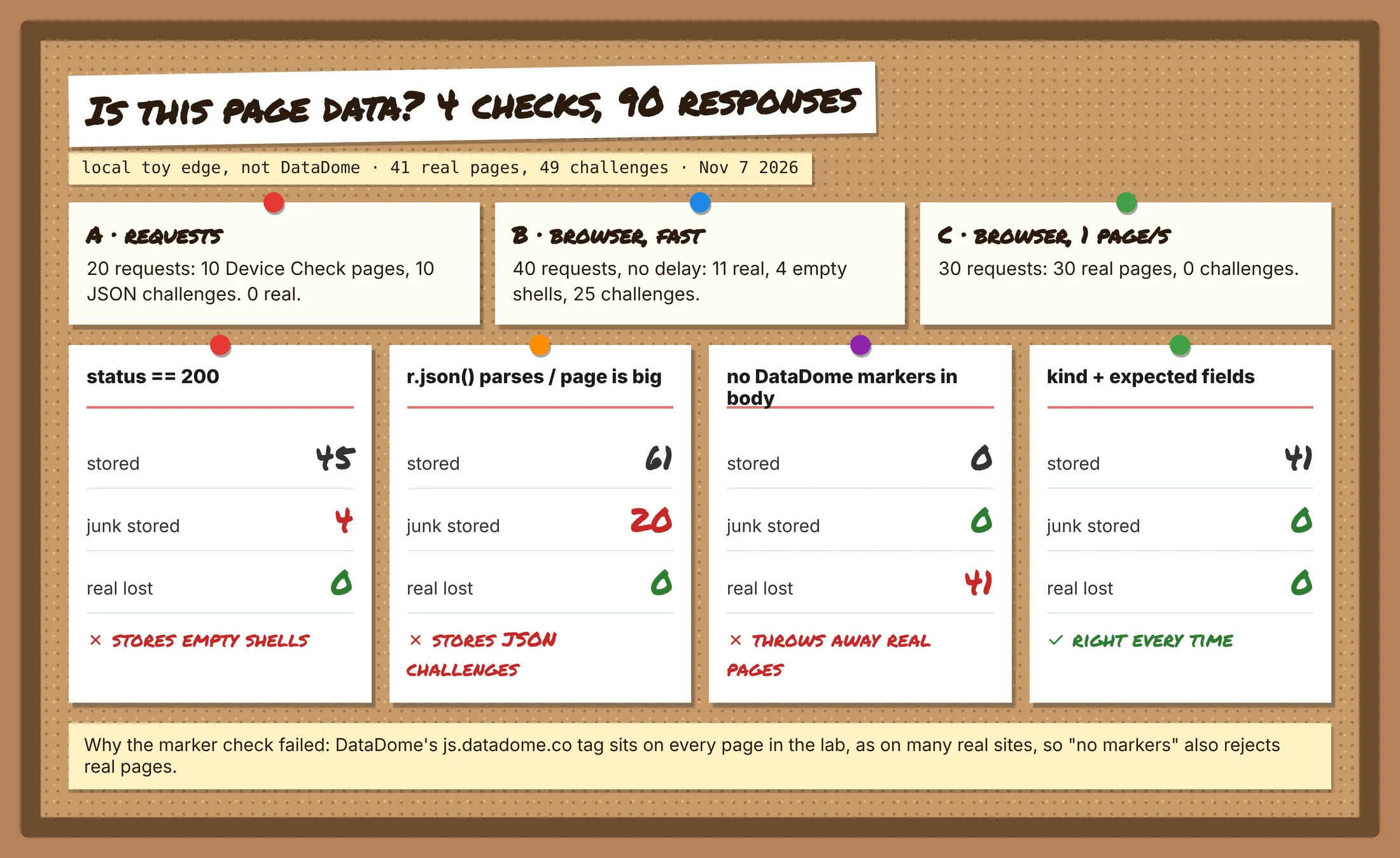
requestsgot 20 challenges out of 20: ten 403 Device Check pages and ten 403 JSON bodies. No JavaScript engine, no cookie, no data.- The browser passed the Device Check: its first response was a 403, then the stand-in script ran and the reload returned the page. Fast, it got 11 real pages, 4 shells and 25 challenges.
- Paced at one page a second, the same browser got 30 real pages out of 30.
- "Status is 200" stored the 4 shells. "It parses / it's big" stored all 20 JSON challenges. "No DataDome markers" threw away all 41 real pages, because the tag sits on every page.
A real DataDome site also checks TLS, the browser environment and Picasso, which our toy doesn't, so a stock headless browser often fails where ours passed. The lesson that carries over is about your own code: decide on the data, never on the status or a marker list.
"The marker-list check surprised people on our team. It looks careful, and it threw away every good page because DataDome's tag is on all of them. Decide on the fields you need, not on what you're afraid of seeing."
Rajesh Kannan, Co-Founder & CTO at Gramosoft
Keep sessions slow and stable
DataDome scores behaviour over the life of a session, so pace matters as much as the client. In our lab, the same browser went from 25 challenges in 40 requests to none in 30 once it slowed to one page a second. Real thresholds are unknown and differ by site, so start slow and measure.
- Back off on
captchaand shells: wait longer after each one instead of retrying at once. - Keep one IP and one country per session: a cookie issued in France that shows up from another country seconds later is a strong signal.
- Cap concurrency per site and read
robots.txt, including any crawl delay. The 429 guide covers backoff in detail. - Collect only the pages you need: fewer requests, fewer chances to be challenged, less load on the site.
What scraping protected pages costs
On DataDome sites every page needs JavaScript rendering and usually premium IPs, so compare providers on their protected-page price, not their headline rate. For 100,000 successful protected pages a month, credit-based APIs cost $249 to $399 at list price and GcrawlAI costs $101. For plain pages, they're cheaper.
| Option, 100,000 successful pages a month | Plain HTML pages | Protected pages (JS rendering + premium proxies) | Are failed requests billed? |
|---|---|---|---|
| GcrawlAI (every request rendered, residential IPs included) | $101 (Growth $79 + 20,000 overage at $1.10 per 1,000) | $101 (same request, no multiplier) | No: failed requests are never charged |
| ScraperAPI | $49 (Hobby, 100,000 credits) | $299 (Business; 25 credits per page = 2.5M credits) | Charges only 200 and 404 responses |
| ZenRows | $39 (Build B3, 120,000 credits) | $399 (Growth G3; 25 credits per page = 2.5M credits) | Failed requests never charged; 404 and 410 count as successful |
| ScrapingBee | $49 (Freelance, 250,000 credits; JS off) | $249 (Business; 25 credits per page = 2.5M credits) | Charges only 200, 404 and 410 |
List-price arithmetic, not a benchmark. Credit costs and billing rules come from ScraperAPI's credit docs, ZenRows' pricing docs and ScrapingBee's FAQ, checked November 1, 2026. The honest read: for plain HTML, ZenRows, ScraperAPI and ScrapingBee cost less than GcrawlAI. And a status-200 bill can include challenge shells, so the price that counts is the one per page with content.
GcrawlAI plans (GcrawlAI pricing, checked October 28, 2026):
| Plan | Price | Requests/month | Concurrent | Per 1,000 | Overage per 1,000 |
|---|---|---|---|---|---|
| Free | $0 forever, no card | 50 | 2 | – | – |
| Starter | $29/month | 20,000 | 10 | $1.45 | $1.60 |
| Growth (most popular) | $79/month | 80,000 | 35 | $0.99 | $1.10 |
| Pro | $199/month | 250,000 | 50 | $0.80 | $0.90 |
| Scale | $499/month | 750,000 | 100 | $0.67 | $0.75 |
| Enterprise | Volume pricing | 2M+ | Custom | – | – |
| Self-hosted | $0 (MIT) | Your servers | Your servers | Infrastructure only | – |
Every plan, Free included, has scrape, crawl, the Search API, JavaScript rendering, residential IP rotation and stealth escalation in each request, and each feature counts as one request. Failed requests are never charged. Annual billing charges 10 months for 12, unused requests on paid plans roll over once, and Indian customers are billed in INR with a GST invoice.
Which route fits your project
Start with the route that carries the least risk and the least upkeep, and move on only when it can't give you the data. For DataDome sites that order is usually an official source, then a browser-based API, then your own browsers. The table shows where GcrawlAI fits in each situation.
| Your situation | Route | Where GcrawlAI fits |
|---|---|---|
| The site offers an API, feed or partner programme | Use it | Not needed here; use GcrawlAI for your other sources |
| Public pages, terms allow collection, steady volume | Browser-based API plus content checks | GcrawlAI: proxy, browser and stealth on every request, one request per page |
| A handful of pages now and then | Manual, or a slow browser script | The GcrawlAI free plan's 50 requests a month |
| Not sure it's DataDome | Check headers, cookie and body first | Run the same URL in the GcrawlAI Playground and compare |
| You need the whole stack in-house | Self-host | The MIT GcrawlAI core with your own proxies |
| AI agents need the pages | A tool the agent can call | GcrawlAI MCP server with scrape, crawl and Search API |
When your own Python is enough
Some DataDome work needs no service: spotting which of your targets use it, watching whether your access still returns real content, or reading a few pages slowly from a site that allows it. The checker above costs nothing and belongs in any pipeline that touches protected pages, whatever fetches them.
When volume grows or your content rate drops, move the fetching to GcrawlAI and keep the checks. The free plan's 50 requests a month are enough to test your real URLs, the Playground shows the result without code, and the MIT core self-hosts for free. For the build-or-buy trade-off, read web scraping with Python vs a scraping API.
Is it OK to scrape a DataDome-protected site?
A site that runs DataDome is saying it doesn't want automated traffic it hasn't approved. That doesn't make every collection unlawful, but it raises the bar. Read the terms and robots.txt, ask for an API or licence, stay on public pages you're entitled to see, and keep your pace gentle.
What this guide doesn't cover, on purpose: stealth patches, fingerprint or canvas spoofing, TLS impersonation tricks, copying or replaying datadome cookies, and solving CAPTCHAs or Device Checks outside the browser that received them. Those techniques exist to defeat a control the site chose to deploy, they break with each update, and they carry the most legal risk. Don't scrape behind a login or collect personal data you have no basis to hold. For the legal background, read what web scraping is and where it's legal, and get advice for your own case.
"When someone brings us a DataDome site, the first question is whether there's an official feed. Often there is. The pages we do fetch are public ones they're entitled to, at a pace the site won't notice."
Rajesh Kannan, Co-Founder & CTO at Gramosoft
Frequently asked questions
How do I know if a website uses DataDome?
Look for an x-datadome: protected response header, a datadome cookie, the js.datadome.co/tags.js script, or links to captcha-delivery.com. Two or more together point to DataDome. The header and cookie also appear on pages that load fine, so check the body too.
Can Python requests scrape a DataDome-protected site?
Usually not. When DataDome issues a Device Check, the browser has to run its JavaScript, and requests and httpx can't. In our lab, requests got 20 challenges out of 20. They're still useful for detecting DataDome and checking responses.
What is the DataDome Device Check?
An invisible challenge DataDome launched in December 2023. It runs proof-of-work and device checks in the browser without showing a puzzle, and DataDome's Picasso canvas check runs in the background. Clients that can't run JavaScript never get past it.
Why does DataDome return a 403 with JSON?
When an API-style request is challenged, DataDome can return a 403 whose JSON body has one key, url, pointing to geo.captcha-delivery.com. It parses cleanly, so code that skips the status check stores it as data. In our lab that mistake stored 20 challenges.
Can I reuse the datadome cookie from my browser?
No. The cookie is tied to the browser, device signals and IP that earned it, so copying it into a script doesn't work for long, and replaying it is a way of defeating the protection. Let one browser session keep its own cookie, and don't share it across IPs.
Do residential proxies get past DataDome?
Not on their own. IP reputation is one signal among several, and a client that can't run the Device Check fails from any IP. Residential IPs help with reputation and spreading load; they don't run JavaScript or change how your client looks.
Is GcrawlAI open source, and can I use it commercially?
Yes. The GcrawlAI core is MIT licensed on GitHub, so you can self-host it and use it commercially. The managed Cloud API adds residential IPs and stealth on every request, with a Python SDK and MCP for AI agents, a free plan of 50 requests a month and paid plans from $0.67 to $1.45 per 1,000 requests.
Related guides
- How to Bypass Cloudflare When Web Scraping (2026)
- How to Fix 403 Forbidden Errors in Python Requests (2026)
- How to Scrape Dynamic JavaScript Websites with Python (2026 Guide)
- 429 Too Many Requests: How to Fix It When Web Scraping
- ZenRows Alternatives: Best Anti-Bot Scraping APIs in 2026
- Web Scraping with Python vs a Scraping API: When to Stop Writing Your Own Scraper
- Python Web Scraping Frameworks Compared: Scrapy vs Crawlee vs Scrapling (2026)
- Best Free Proxy Sites for Web Scraping in 2026
- What Is Web Scraping? How It Works, Uses & Legality