By Rajesh Kannan, Co-Founder & CTO, Gramosoft · Last updated: · Lab results from our own local test on November 7, 2026 (Python 3.13, requests 2.34, Playwright 1.56); Akamai facts checked against Akamai's own docs the same day
Your Python scraper hits a retail, airline or banking site and gets "Access Denied" with a long reference number, or a 200 page titled "Pardon Our Interruption". That's usually Akamai Bot Manager. This guide starts with the GcrawlAI route, then shows how to recognise Akamai from Python, read its responses, and keep sessions stable enough to get real pages.
TL;DR
- Fastest route: GcrawlAI sends every request through a residential proxy, a real browser and stealth mode, one request per page, and failed requests are never charged.
- Recognise it:
_abck,bm_szandak_bmsccookies, a sensor script,Server: AkamaiGHoston block pages, and "Access Denied … Reference #18.…". - Akamai scores sessions, not single requests: a 0–100 bot score that each site maps to watch, challenge or deny.
- Our test: a browser on a sticky IP at one page a second got 30 real pages out of 30. Rotating the IP on every request got 5 out of 20; going fast got 11 out of 30.
- A 200 isn't proof: plain
requestsgot twenty 200 responses and no real pages, so check content.
How do you scrape an Akamai-protected website with Python? Confirm it's Akamai Bot Manager: look for _abck and bm_sz cookies and "Access Denied … Reference #" pages. Plain requests can't run Akamai's sensor script, so use an official API where one exists, or a browser-based API such as GcrawlAI for public pages you may collect. Keep one IP per session, go slowly, and store only pages with the fields you expect.
Akamai pages through GcrawlAI: proxy, browser and stealth in one request
Akamai Bot Manager checks the connection, runs a sensor script in the browser and keeps scoring the session as it goes. Doing that yourself means real browsers, residential IPs and careful session handling to build and maintain. GcrawlAI does it inside one API request and returns the rendered page, so your Python code only checks the content.
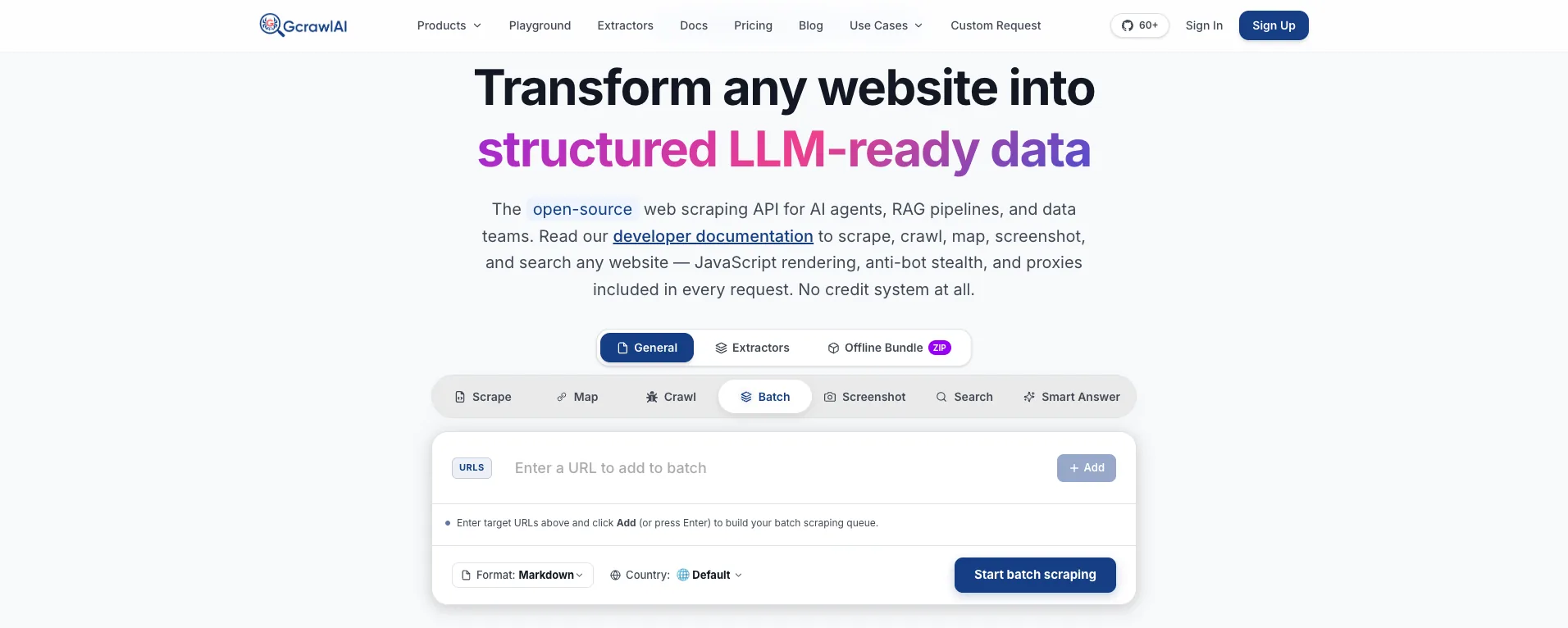
The homepage says it in one line: JavaScript rendering, anti-bot stealth and proxies come with every request, with no credit system. GcrawlAI never fetches a page with a plain HTTP client, so the sensor script always runs in a real browser. The diagram shows the path each request takes:
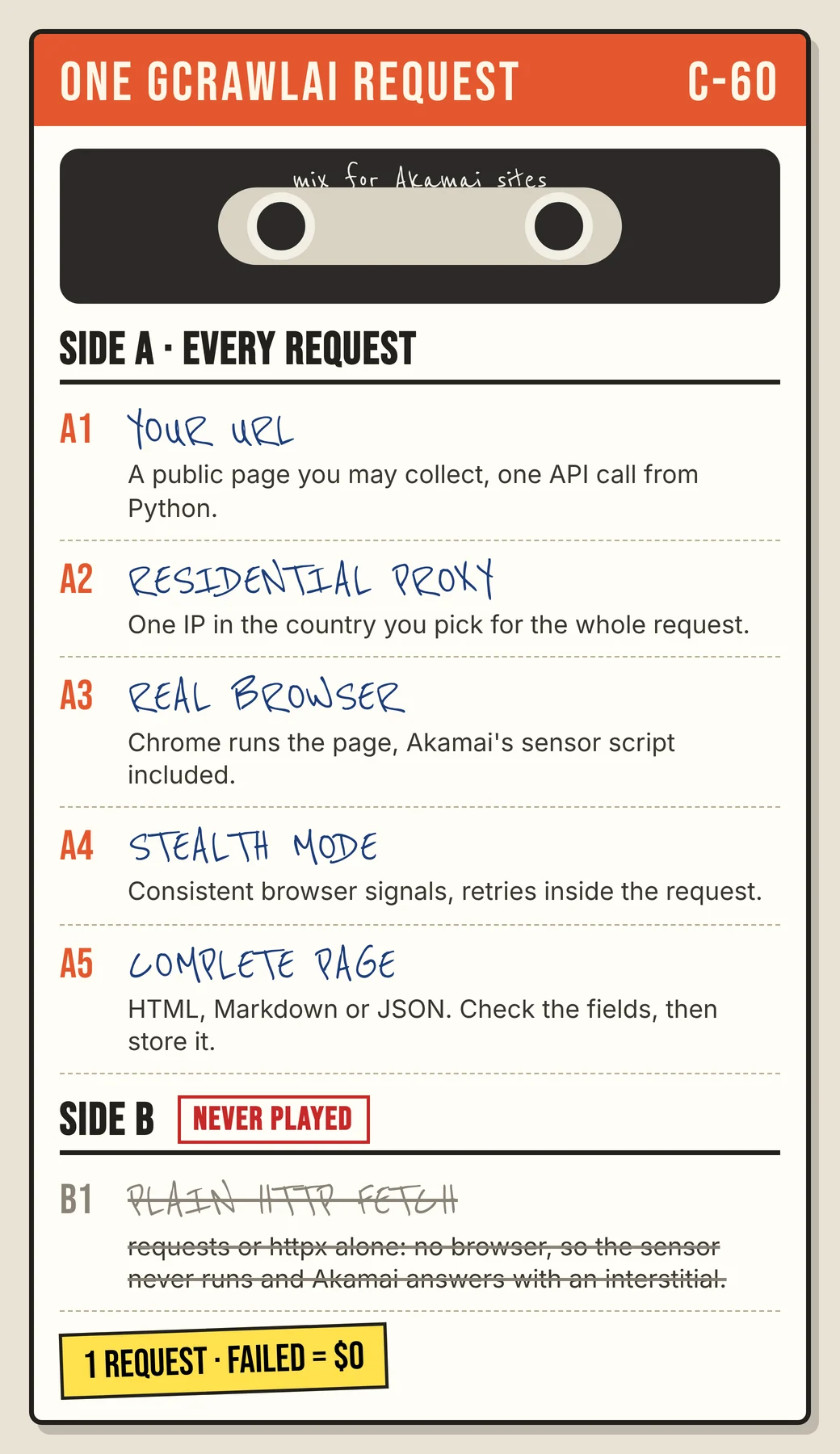
Here's the client. It asks for each page with a US residential IP and stores it only if the expected fields are present and no block text is. It also waits a second between pages, because pace still matters on Akamai sites:
# pip install gcrawl-sdk
"""Collect public pages you're allowed to scrape on an Akamai-protected site through GcrawlAI.
Every request runs through a residential proxy in the country you pick, a real browser and stealth mode.
Store a page only when the fields you expect are in it; failed requests aren't charged."""
import os, time
from gcrawl_sdk import GcrawlClient, ScrapeOptions
from gcrawl_sdk.exceptions import GcrawlAPIError, GcrawlTimeoutError

gc = GcrawlClient(api_key=os.getenv("GCRAWL_API_KEY", "gc-YOUR_API_KEY"))
OPTS = ScrapeOptions(html_enabled=True, markdown_enabled=True, proxy_geo="US", timeout=60)
BLOCKED = ("Access Denied", "Pardon Our Interruption")

def fetch(url: str, must_have: list[str], tries: int = 3):
    for attempt in range(1, tries + 1):
        try:
            page = gc.scrape(url=url, options=OPTS, wait=True)
            html = page.html or ""
            if all(m in html for m in must_have) and not any(b in html for b in BLOCKED):
                return page
            print(f"attempt {attempt}: expected fields missing, not stored")
        except (GcrawlAPIError, GcrawlTimeoutError) as e:
            print(f"attempt {attempt}: {e}")
        time.sleep(5 * attempt)                     # back off before the next try
    return None

if __name__ == "__main__":
    pages = ["https://example.com/p/1001", "https://example.com/p/1002"]
    for url in pages:
        page = fetch(url, must_have=['itemprop="price"', "<h1"])
        print(url, "stored" if page else "skipped")
        time.sleep(1.0)                             # one page a second per site is plenty
- Every request, the full path: a residential IP in the country you pick, a real browser that runs the page's JavaScript, and stealth mode, with retries inside the request.
- Output you can check: HTML, Markdown or JSON, plus extractors that return structured fields for common page types.
- Scrape, crawl, screenshots and Search API: scrape single pages, crawl whole sites, capture screenshots or use the Search API.
- For developers and AI agents: a Python SDK, an MCP server for Claude, Cursor and other agents, the Playground to test a URL before writing code, and the docs.
The MIT-licensed core also runs on your own servers: clone it from GitHub, install the requirements, and start the API with Redis and a Celery worker. The setup script is in the code download, and you bring your own proxy accounts.
Pricing is a free plan of 50 requests a month with no card, paid plans from $0.67 to $1.45 per 1,000 requests, and a self-hosted core that costs nothing. Failed requests are never charged. The full plan table is in the cost section.
Where it falls short: every Akamai site sets its own thresholds, so no service gets through every deployment every time, GcrawlAI included. We weren't in the public Akamai benchmark below, so test your own URLs on the free plan. A rendered request is slower than a raw HTTP call, it won't log in for you, and it doesn't make collecting data acceptable when a site's terms say no.
"Akamai doesn't judge one request, it judges the session. So we never hand a customer a page from a plain fetch: every GcrawlAI request gets a residential IP, a browser and stealth, and the customer still checks the fields before storing anything."
Rajesh Kannan, Co-Founder & CTO at Gramosoft
What Akamai Bot Manager is and how it scores you
Akamai Bot Manager runs on Akamai's edge network in front of a site and gives each request a bot score from 0 (human) to 100 (bot). The site owner decides what happens at each score: watch, challenge or deny. That's why the same scraper can pass on one Akamai site and fail on another.
Akamai's detection-methods documentation lists five ways it classifies traffic. The two that matter most for scrapers are transparent detection, which checks request traits for signs of automation, and active detection, which uses an interaction to confirm a real browser is on the other end.
- The connection: Akamai has written about fingerprinting the TLS Client Hello since 2019, when it tracked bots randomising their ciphers to hide. A Python handshake doesn't look like Chrome's.
- The sensor script: an obfuscated script on the page (the
bmakobject) reports browser data back to Akamai, tied to the_abckcookie that travels with later requests. - Behaviour: Bot Manager Premier adds behavioural detection on pages like login and checkout, looking at mouse, touch and typing patterns.
The responses are set per site. Akamai's guide to handling bots lists monitor, challenge, tarpit (slowing the response down) and deny, grouped into cautious, strict and aggressive score bands on its product page. A slow response can be the block.
How to tell Akamai Bot Manager is in front of a site
Akamai runs a CDN and a web application firewall as well as Bot Manager, so an Akamai header alone doesn't mean bot checks are on. The reliable signs are Bot Manager's own cookies and its block pages. Check them before you change anything in your scraper, because the fix depends on which layer stopped you.
| Signal | What it looks like | What it tells you |
|---|---|---|
| Edge header | Server: AkamaiGHost or X-Akamai-Transformed |
The site runs on Akamai's edge; not proof that Bot Manager is on |
| Bot Manager cookies | _abck, bm_sz, ak_bmsc (HttpOnly), bm_sv, bm_mi |
Bot Manager is scoring this session |
| Sensor script | An obfuscated script that creates a bmak object |
Your client must run JavaScript to be trusted |
| Block page | "Access Denied … You don't have permission … Reference #18.…" | A hard block at the edge; log the reference number |
| Interstitial | "Pardon Our Interruption", often with status 200 | A soft block; the status code looks fine |
| Odd errors | 429 on the first request, or ERR_HTTP2_PROTOCOL_ERROR in a browser |
Rate or session trouble that looks like an outage |
The cookie names come from ZenRows, Decodo and Browserless. Browserless also notes that Akamai's web application firewall, now sold as App & API Protector, is a different product: if rule-based filtering is blocking you, a browser won't help. For general 403 debugging, see fixing 403 Forbidden errors in Python requests.
Name the response before you store it
Akamai has several ways to say no, and only some of them look like errors. A 403 with a reference number is easy to spot. A 200 "Pardon Our Interruption" page or a 429 on the first request is easy to store by mistake. Naming each response keeps junk out of your data and tells you what to fix.
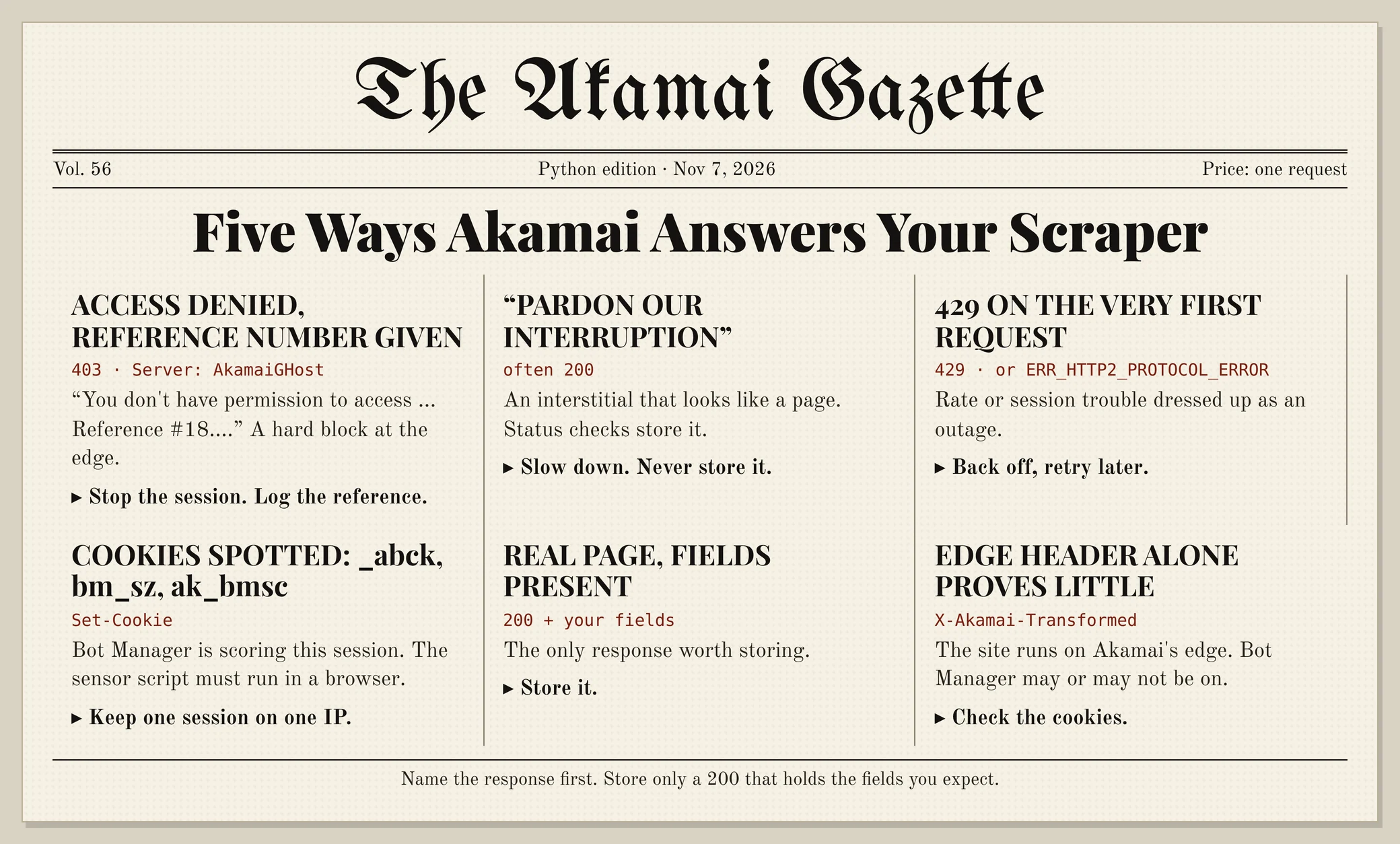
This function names the response and accepts it only when it's a 200 holding the fields you expect. It needs only the standard library, so it works with requests, Playwright or an API response. Pass the cookie names your client holds so it can spot Bot Manager:
# pip install requests
"""Name an Akamai response and accept it only when the data you expect is in it."""
import re

AKAMAI_COOKIES = ("_abck", "bm_sz", "ak_bmsc", "bm_sv", "bm_mi")

def akamai_kind(status: int, headers: dict, text: str, cookies: list[str] = ()) -> str:
    """Return access_denied, interstitial, rate_limited, allowed or not_akamai."""
    h = {k.lower(): v for k, v in headers.items()}
    body = text or ""
    names = set(cookies) | set(re.findall(r"(\w+)=", h.get("set-cookie", "")))
    edge = "akamaighost" in h.get("server", "").lower() or "x-akamai-transformed" in h
    bot_manager = any(c in names for c in AKAMAI_COOKIES) or "bmak" in body
    if "Access Denied" in body and re.search(r"Reference #\d+\.[0-9a-f]+", body):
        return "access_denied"                        # edge block page with a reference number
    if "Pardon Our Interruption" in body:
        return "interstitial"                         # often a 200: the status code looks fine
    if status == 429 and (edge or bot_manager):
        return "rate_limited"
    return "allowed" if (edge or bot_manager) else "not_akamai"

def accept(status: int, headers: dict, text: str, must_have: list[str], cookies: list[str] = ()) -> tuple[bool, str]:
    """Store a page only if it is a 200, not a block or interstitial, and holds every field you expect."""
    kind = akamai_kind(status, headers, text, cookies)
    ok = status == 200 and kind in ("allowed", "not_akamai") and all(m in (text or "") for m in must_have)
    return ok, kind

if __name__ == "__main__":
    import requests
    s = requests.Session()
    r = s.get("http://127.0.0.1:8856/products/1", timeout=20)   # the lab edge; use a page you may collect
    print(r.status_code, accept(r.status_code, r.headers, r.text, ['class="name"', 'class="price"'], list(s.cookies.keys())))
access_denied: stop this session and log the reference number. Retrying at once from the same IP rarely helps.interstitial: the session lost trust. Slow down; don't store the page.rate_limited: back off, then retry later. The 429 guide covers backoff.allowed: store it only if the fields are there.
What our test showed: sessions, IPs and pace
We built a local toy edge that copies Akamai's public response shapes, plus two toy proxies, one sticky and one rotating. Then we fetched 100 pages four ways. Only a browser that kept one IP and went at one page a second got every page. Rotating the IP and going fast both lost most of them.
The toy is not Akamai and has none of its detection. It serves a "Pardon Our Interruption" page with a stand-in sensor script until the browser runs it, then trusts the _abck cookie for the IP that ran it. The same cookie arriving from another IP gets "Access Denied". Over 12 page views in 10 seconds gets interstitials, and over 20 gets 429.
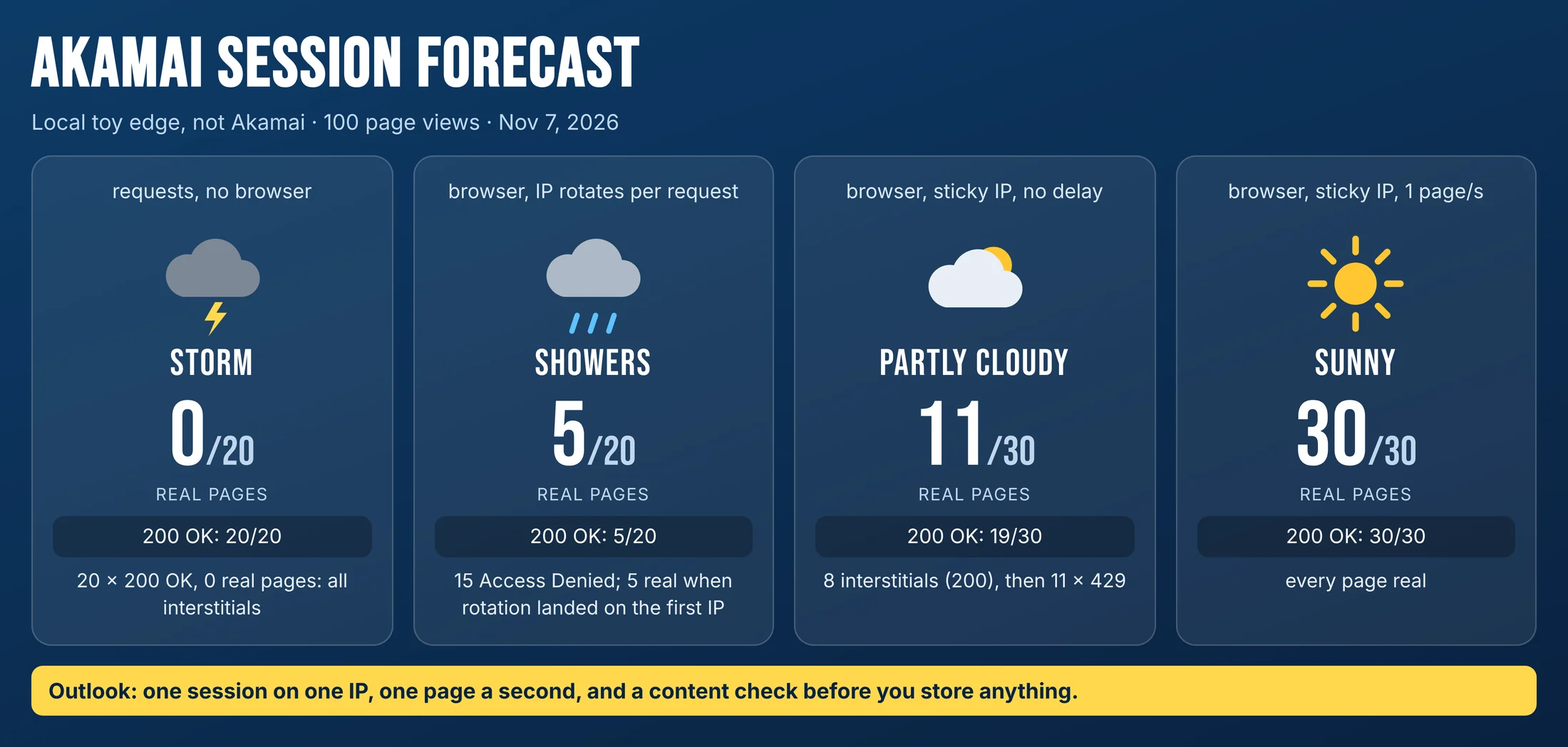
requests: 20 responses with status 200, 0 real pages. Every one was the interstitial, because nothing ran the sensor script. A status check would have stored all 20.- Browser, IP rotating per request: 5 real pages out of 20. The other 15 were "Access Denied", because the trusted cookie kept arriving from a new IP. The 5 that worked were the requests where rotation happened to land on the starting IP again.
- Browser, sticky IP, no delay: 11 real pages out of 30. 8 interstitials returned 200, then 11 requests got 429.
- Browser, sticky IP, one page a second: 30 out of 30.
Our toy checks none of Akamai's TLS, sensor or behaviour signals, so a stock headless browser often fails on a real site where ours passed. What carries over is the pattern. Browserless's write-up reports that Akamai binds its sensor data and cookies to the egress IP, and that rotating mid-session can bring the block back.
"Per-request IP rotation is the habit that hurts most on Akamai. People buy more proxies to fix it and make it worse. One IP per session, one page a second, and the content check does the rest."
Rajesh Kannan, Co-Founder & CTO at Gramosoft
Keep one session on one IP, at a human pace
Akamai trusts a session, not a request, so the way you run sessions decides most of the outcome. Keep a browser session's cookies and its IP together, change IPs only between sessions, and pace page views like a person reading. In our lab that turned 11 real pages out of 30 into 30 out of 30.
- Sticky sessions: keep one residential IP for a whole browsing session; rotate between sessions, never mid-session.
- Match the country: keep the browser's language and timezone in line with the IP's country.
- Pace and back off: start around one page a second per site, and wait longer after interstitials, 429s and slow responses, since Akamai can tarpit as well as block.
- Read
robots.txtand cap concurrency per site: fewer, slower requests are both kinder and more likely to work.
Rotating IPs faster doesn't fix a session problem. It breaks the link between the cookie and the IP, which is exactly what Akamai checks. If you need several sessions in parallel, give each its own sticky IP.
How scraping APIs score on Akamai
If you go the managed route, results differ between providers but less than on some other protections. The independent Scrapeway benchmark tested six scraping APIs against an Akamai-protected target, Walmart, from October 1 to November 1, 2026. Success ranged from 100% down to 84%.
| API | Success on Akamai | Avg. speed | Cost per 1,000 |
|---|---|---|---|
| Scrapfly | 100% | 18.2 s | $3.20 |
| ScraperAPI | 89% | 5.2 s | $2.45 |
| Firecrawl | 89% | 7.6 s | $0.83 |
| Scrapingdog | 89% | 5.5 s | $1.00 |
| WebScrapingAPI | 85% | 14.1 s | $2.45 |
| ZenRows | 84% | 15.3 s | $6.90 |
Source: Scrapeway, October 2026 Akamai benchmark, which counts a request as successful only if the expected content is there. GcrawlAI wasn't in this run, so we make no claim against these numbers. Walmart also runs PerimeterX, and one target is a small sample, so test your own pages and measure the content rate.
What scraping protected pages costs
On Akamai sites every page needs JavaScript rendering and usually premium IPs, so compare providers on their protected-page price, not their headline rate. For 100,000 successful protected pages a month, credit-based APIs cost $249 to $399 at list price and GcrawlAI costs $101. For plain pages, they're cheaper.
| Option, 100,000 successful pages a month | Plain HTML pages | Protected pages (JS rendering + premium proxies) | Are failed requests billed? |
|---|---|---|---|
| GcrawlAI (every request rendered, residential IPs included) | $101 (Growth $79 + 20,000 overage at $1.10 per 1,000) | $101 (same request, no multiplier) | No: failed requests are never charged |
| ScraperAPI | $49 (Hobby, 100,000 credits) | $299 (Business; 25 credits per page = 2.5M credits) | Charges only 200 and 404 responses |
| ZenRows | $39 (Build B3, 120,000 credits) | $399 (Growth G3; 25 credits per page = 2.5M credits) | Failed requests never charged; 404 and 410 count as successful |
| ScrapingBee | $49 (Freelance, 250,000 credits; JS off) | $249 (Business; 25 credits per page = 2.5M credits) | Charges only 200, 404 and 410 |
List-price arithmetic, not a benchmark. Credit costs and billing rules come from ScraperAPI's credit docs, ZenRows' pricing docs and ScrapingBee's FAQ, checked November 1, 2026. The honest read: for plain HTML, ZenRows, ScraperAPI and ScrapingBee cost less than GcrawlAI. And a status-200 bill can include interstitials, so the price that counts is the one per page with content.
GcrawlAI plans (GcrawlAI pricing, checked October 28, 2026):
| Plan | Price | Requests/month | Concurrent | Per 1,000 | Overage per 1,000 |
|---|---|---|---|---|---|
| Free | $0 forever, no card | 50 | 2 | – | – |
| Starter | $29/month | 20,000 | 10 | $1.45 | $1.60 |
| Growth (most popular) | $79/month | 80,000 | 35 | $0.99 | $1.10 |
| Pro | $199/month | 250,000 | 50 | $0.80 | $0.90 |
| Scale | $499/month | 750,000 | 100 | $0.67 | $0.75 |
| Enterprise | Volume pricing | 2M+ | Custom | – | – |
| Self-hosted | $0 (MIT) | Your servers | Your servers | Infrastructure only | – |
Every plan, Free included, has scrape, crawl, the Search API, JavaScript rendering, residential IP rotation and stealth escalation in each request, and each feature counts as one request. Failed requests are never charged. Annual billing charges 10 months for 12, unused requests on paid plans roll over once, and Indian customers are billed in INR with a GST invoice.
Which route fits your project
Start with the route that carries the least risk and the least upkeep, and move on only when it can't give you the data. For Akamai sites that order is usually an official source, then a browser-based API, then your own browsers on sticky IPs. The table shows where GcrawlAI fits in each case.
| Your situation | Route | Where GcrawlAI fits |
|---|---|---|
| The site offers an API, feed or partner programme | Use it | Not needed here; use GcrawlAI for your other sources |
| Public pages, terms allow collection, steady volume | Browser-based API plus content checks | GcrawlAI: residential proxy, browser and stealth on every request |
| A handful of pages now and then | Manual, or a slow browser on one IP | The GcrawlAI free plan's 50 requests a month |
| Not sure it's Bot Manager | Check cookies and block pages first | Run the same URL in the GcrawlAI Playground and compare |
| You need the whole stack in-house | Self-host | The MIT GcrawlAI core with your own proxies |
| AI agents need the pages | A tool the agent can call | GcrawlAI MCP server with scrape, crawl and Search API |
When your own Python is enough
Some Akamai work needs no service: checking which targets run Bot Manager, watching whether your access still returns real content, or reading a few pages slowly from a site that allows it. The checker above costs nothing and belongs in any pipeline that touches protected pages, whatever fetches them.
When volume grows or your content rate drops, move the fetching to GcrawlAI and keep the checks. The free plan's 50 requests a month are enough to test your real URLs, the Playground shows the result without code, and the MIT core self-hosts for free. For the build-or-buy trade-off, read web scraping with Python vs a scraping API.
Is it OK to scrape an Akamai-protected site?
A site that runs Bot Manager is saying it doesn't want automated traffic it hasn't approved. That doesn't make every collection unlawful, but it raises the bar. Read the terms and robots.txt, ask for an API or licence, stay on public pages you're entitled to see, and keep your pace gentle.
What this guide doesn't cover, on purpose: deobfuscating Akamai's sensor script or generating fake sensor data, copying or replaying _abck cookies, TLS impersonation tricks, stealth patches, solving challenges outside the browser that received them, and reaching a site's origin server around Akamai. That last one is a security issue, not scraping. We also skip cached copies from archives, which are often out of date. Don't scrape behind a login or collect personal data you have no basis to hold. For the legal background, read what web scraping is and where it's legal, and get advice for your own case.
"The first question on any Akamai site is whether there's an official feed. Airlines and retailers often have one. The pages we do fetch are public ones the customer is entitled to, at a pace the site won't notice."
Rajesh Kannan, Co-Founder & CTO at Gramosoft
Frequently asked questions
How do I know if a website uses Akamai Bot Manager?
Look for _abck, bm_sz or ak_bmsc cookies, an obfuscated sensor script, and "Access Denied … Reference #" block pages. Server: AkamaiGHost or X-Akamai-Transformed only shows the site uses Akamai's edge, not that Bot Manager is on.
Can Python requests scrape an Akamai-protected site?
Usually not. Akamai checks the TLS handshake and expects its sensor script to run in a browser, and requests can do neither. In our lab, requests got twenty 200 responses and no real pages. It's still useful for detection and for checking responses.
What does "Access Denied … Reference #18" mean?
It's Akamai's edge block page. The reference number identifies that blocked request, so log it. Retrying at once from the same session rarely works; stop, slow down, and check whether your session or IP changed.
Why does Akamai return 200 when it blocks me?
Soft blocks and interstitials such as "Pardon Our Interruption" can come back with status 200. A scraper that checks only the status code keeps storing them. Check that each page holds the fields you expect before storing it.
Should I rotate proxies on every request?
No. Akamai ties the session's trust to the IP that earned it. In our lab, rotating per request got 5 real pages out of 20, while one sticky IP got 30 out of 30. Keep one residential IP per session and rotate between sessions.
What is the _abck cookie?
It's the Akamai Bot Manager cookie tied to the sensor data your browser sent. It travels with later requests so Akamai can recognise the session. Let your own browser session earn and keep it; copying it into another client or IP doesn't work for long.
Is GcrawlAI open source, and can I use it commercially?
Yes. The GcrawlAI core is MIT licensed on GitHub, so you can self-host it and use it commercially. The managed Cloud API adds residential IPs and stealth on every request, with a Python SDK and MCP for AI agents, a free plan of 50 requests a month and paid plans from $0.67 to $1.45 per 1,000 requests.
Related guides
- How to Bypass Cloudflare When Web Scraping (2026)
- How to Fix 403 Forbidden Errors in Python Requests (2026)
- 429 Too Many Requests: How to Fix It When Web Scraping
- How to Scrape Dynamic JavaScript Websites with Python (2026 Guide)
- Best Free Proxy Sites for Web Scraping in 2026
- ZenRows Alternatives: Best Anti-Bot Scraping APIs in 2026
- Web Scraping with Python vs a Scraping API: When to Stop Writing Your Own Scraper
- Python Web Scraping Frameworks Compared: Scrapy vs Crawlee vs Scrapling (2026)
- What Is Web Scraping? How It Works, Uses & Legality