By Rajesh Kannan, Co-Founder & CTO, Gramosoft · Last updated: · Token rules checked against Google reCAPTCHA and Cloudflare Turnstile documentation on November 2, 2026; billing rules checked on ScraperAPI, ZenRows and ScrapingBee pages on November 1, 2026
Most scrapers meet their first CAPTCHA after a run that worked fine for days, and the instinct is to look for something that solves it. That's usually the wrong fight. A CAPTCHA is the last step of a risk check that already scored your request, so the reliable way to handle it is to stop failing that check. This guide starts with how GcrawlAI does that, then covers the CAPTCHA types you'll meet, how to detect them in code, how to avoid them, what to do when one appears, and where solving services fit.
TL;DR
- A CAPTCHA is a symptom: the site scored your IP, TLS fingerprint, headers, browser and pace as risky. Fix those and most challenges stop appearing.
- Detect by content, not status: challenge pages arrive as 403, 405, 429, 503 and sometimes 200. Check headers, vendor markers and text you expect on the real page.
- Respond in rungs: back off, retry once on a fresh IP and session, escalate to a real browser, then queue the URL. Pause domains whose challenge rate climbs.
- Solvers are a narrow last resort: a reCAPTCHA token lives two minutes and verifies once, a Turnstile token 300 seconds, and silent checks give a solver nothing to solve.
- Fastest route: GcrawlAI loads pages in a real browser with residential IPs and stealth escalation, and never bills CAPTCHA pages or blocks.
How do you handle CAPTCHAs when web scraping? Prevent them first: clean residential IPs, a browser-grade fingerprint, consistent headers, carried cookies and human pacing. Detect challenge pages in code, retry once on a fresh identity, then escalate to a real browser and queue what still fails. GcrawlAI does the prevention and escalation in one request. Never automate CAPTCHAs on login, signup or checkout.
CAPTCHA handling at a glance
| You see | What it usually means | First response |
|---|---|---|
| CAPTCHA on the first request | IP reputation or a non-browser fingerprint | Residential IP, browser-grade client or real browser |
| CAPTCHA after many clean requests | Volume or pace crossed a threshold | Slow down, pause the domain, rotate per session |
| CAPTCHA only in headless mode | Automation flags such as navigator.webdriver |
A properly configured real browser |
| A 200 with no product data | A challenge page served as success | Check for expected text, not the status |
| CAPTCHA on login or checkout | Abuse protection on a private flow | Stop; use an official API or ask for access |
Handle CAPTCHAs at the source with GcrawlAI
GcrawlAI works on the cause rather than the puzzle. Each URL loads in a real browser through a rotating residential IP, with a consistent fingerprint and session, so the risk check sees an ordinary visit. When a site still pushes back, stealth escalates and the IP switches inside the same request, and CAPTCHA pages, blocks and timeouts are never billed.
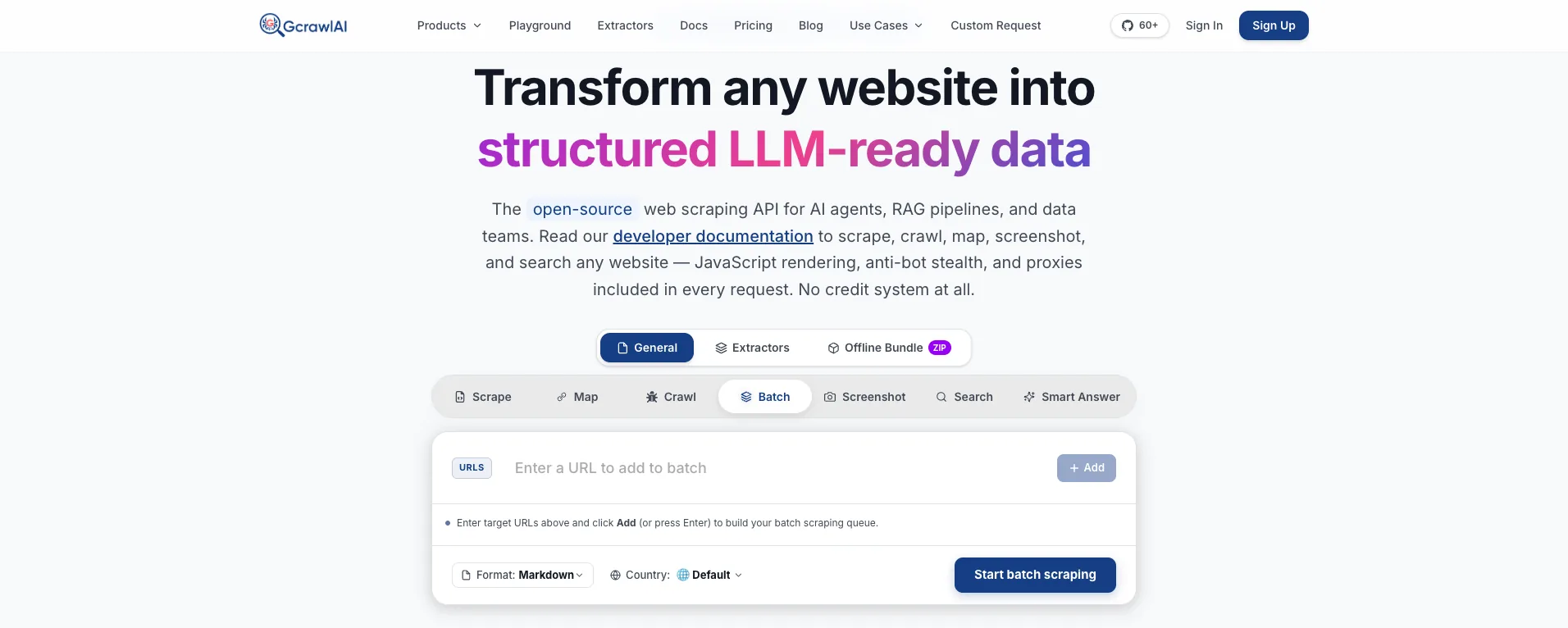
The homepage says it directly: JavaScript rendering, anti-bot stealth and proxies are included in every request, with no credit system. That matters for CAPTCHAs because the expensive part on other platforms, a rendered page through premium IPs, is the default here, not a multiplier you switch on after the first challenge.
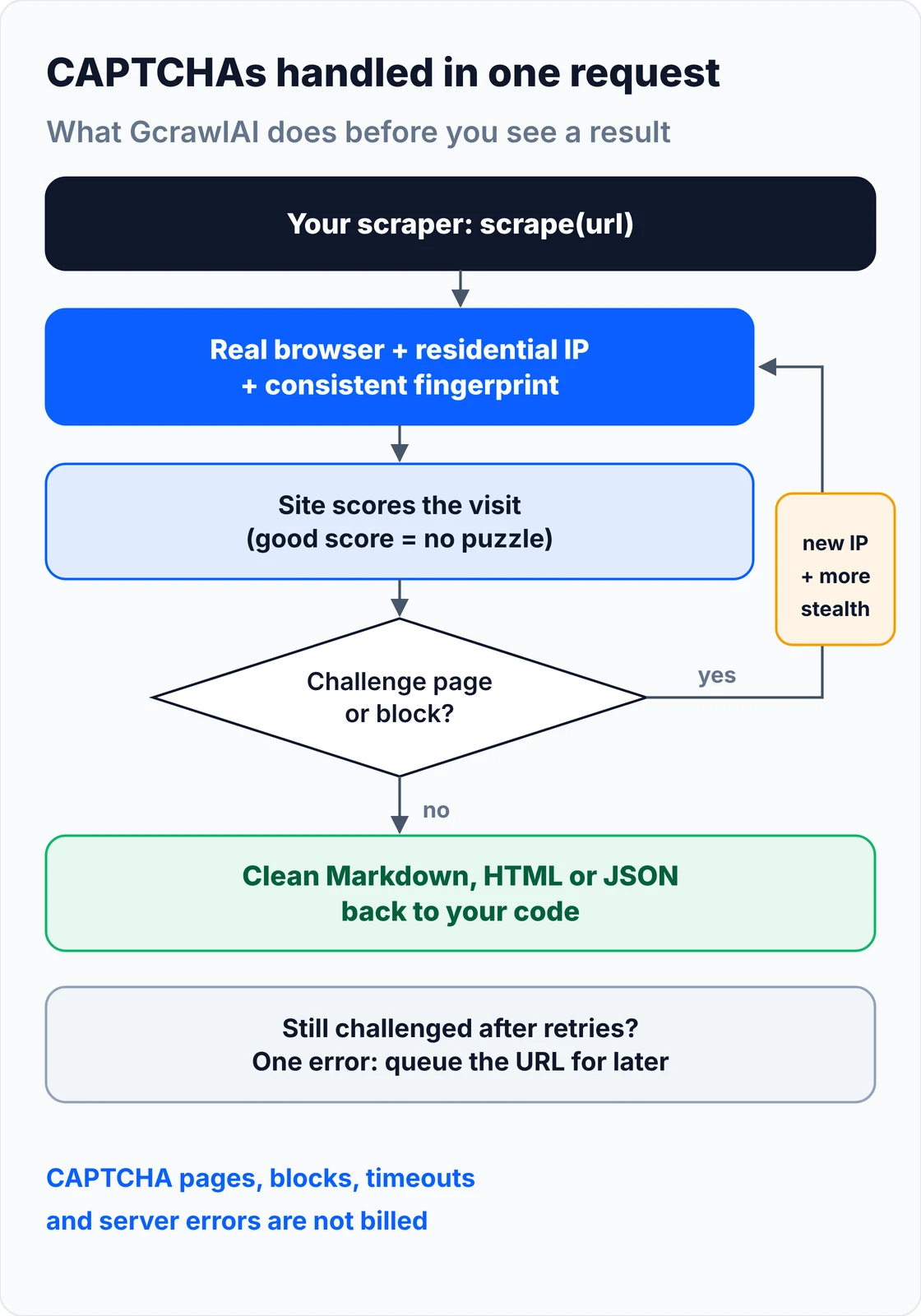
Your code handles two outcomes: content, or one error to queue. A 4xx from the GcrawlAI API itself means a key, plan or payload problem to fix, not something to retry:
# pip install gcrawl-sdk
"""Fetch a protected page through GcrawlAI: real browser, residential IP and stealth escalation in one call."""
import logging
import os

from gcrawl_sdk import GcrawlClient, ScrapeOptions
from gcrawl_sdk.exceptions import GcrawlAPIError, GcrawlTimeoutError

log = logging.getLogger("scraper")
gc = GcrawlClient(api_key=os.getenv("GCRAWL_API_KEY", "gc-YOUR_API_KEY"))


def fetch_markdown(url: str, geo: str = "US") -> str | None:
    """One request: rendering, residential IPs, stealth escalation and internal retries included."""
    try:
        page = gc.scrape(url=url, options=ScrapeOptions(markdown_enabled=True, proxy_geo=geo), wait=True)
    except GcrawlTimeoutError:
        log.warning("timeout, requeue: %s", url)          # the API call itself timed out
        return None
    except GcrawlAPIError as err:
        if err.status_code < 500:                         # key, plan or payload problem: fix, don't retry
            log.error("request rejected %s: %s", err.status_code, err.response_data)
            raise
        log.warning("api %s, requeue: %s", err.status_code, url)
        return None
    return page.markdown or None                          # empty = nothing useful on the page


if __name__ == "__main__":
    md = fetch_markdown("https://example.com/")
    print(md[:300] if md else "no content, queued for retry")
- Real browser for every request: JavaScript runs, cookies persist and background checks such as reCAPTCHA v3 scores and Turnstile see a real browser rather than a script.
- Residential IPs and geotargeting: pick a country per request, so IP reputation stops being the signal that triggers the challenge.
- Stealth escalation and internal retries: a challenged load is retried with a stronger setup inside the same request, and retries never multiply the cost.
- Scrape, crawl, batch and Search API: scrape pages to Markdown, HTML or JSON, crawl whole sites with async jobs and webhooks, and use the Search API for ranked results.
- For developers and AI agents: a Python SDK, an MCP server for Claude, Cursor and other agents, the Playground to test a URL that keeps showing a CAPTCHA, and the docs.
The MIT-licensed core runs on your own servers if you'd rather own the stack:
git clone https://github.com/GramosoftAI/GcrawlAI.git && cd GcrawlAI
python -m venv .venv && source .venv/bin/activate
pip install -r requirements.txt && playwright install
cp .env.example .env                      # add your database, Redis and proxy settings
python -m api.core.db_setup
redis-server &
celery -A web_crawler.crawler.celery_config worker -l info &
uvicorn api.api:app --port 8000
Pricing is a free plan of 50 requests a month with no card, paid plans from $0.67 to $1.45 per 1,000 requests, and a self-hosted core that costs nothing. Failed requests are never charged. The plan table and a cost comparison are in the cost section.
Where it falls short: GcrawlAI fetches public pages; it doesn't fill in a CAPTCHA on a form you submit, and it won't log in or check out for you. Some sites challenge every visitor regardless of how clean the session is, and those pages come back as an error to queue, not as content. Every request goes through a browser, so plain pages cost the same as hard ones, and the ecosystem is younger, with fewer ready-made integrations.
"Teams spend weeks wiring a solver into a scraper that a site has already decided not to trust. The puzzle is the last thing the site shows you. Fix the IP, the fingerprint and the pace, and most of the puzzles stop arriving."
Rajesh Kannan, Co-Founder & CTO at Gramosoft
Why a site shows your scraper a CAPTCHA
A site shows a CAPTCHA when its risk score for your request crosses a threshold. The score is built before any puzzle loads, from your IP's reputation, your TLS and HTTP/2 fingerprint, how consistent your headers are, whether the browser looks automated, and how fast and how often you ask. The puzzle is the verdict, not the test.
- IP reputation: datacenter ranges are cheap to buy in bulk and easy to flag, so they draw challenges faster than home or mobile addresses. Many requests from one IP add risk on any network.
- TLS and HTTP/2 fingerprint: Python
requestscan claim to be Chrome in its User-Agent, but its handshake isn't Chrome's, and the mismatch is visible before the first byte of HTML. - Headers: a User-Agent that disagrees with the
Sec-CH-UAclient hints, a missingAccept-Language, or headers that change mid-session. - Browser signals: default headless Chrome, Selenium and Puppeteer expose automation flags such as
navigator.webdriver, and fingerprints that don't match the claimed device. - Behaviour and session: perfectly regular intervals, bursts, a new session on every request, no cookies carried between pages, forms submitted faster than anyone types.
That's why the same scraper can run cleanly for a week and then hit a wall of puzzles: the site lowered its threshold, not the scraper. Google's own reCAPTCHA v3 documentation describes the model plainly: it returns a score for each request "without user friction", from 1.0 (very likely a good interaction) to 0.0 (very likely a bot), and suggests 0.5 as a default threshold. The site decides what a low score triggers.
The CAPTCHA types a scraper meets
Scrapers meet six kinds of CAPTCHA: checkbox and image grids such as reCAPTCHA v2 and hCaptcha, score-only checks such as reCAPTCHA v3, background widgets such as Cloudflare Turnstile, full-page interstitials, sliders and puzzles, and flat blocks with nothing to solve. Each one shows up differently in code and needs a different response.
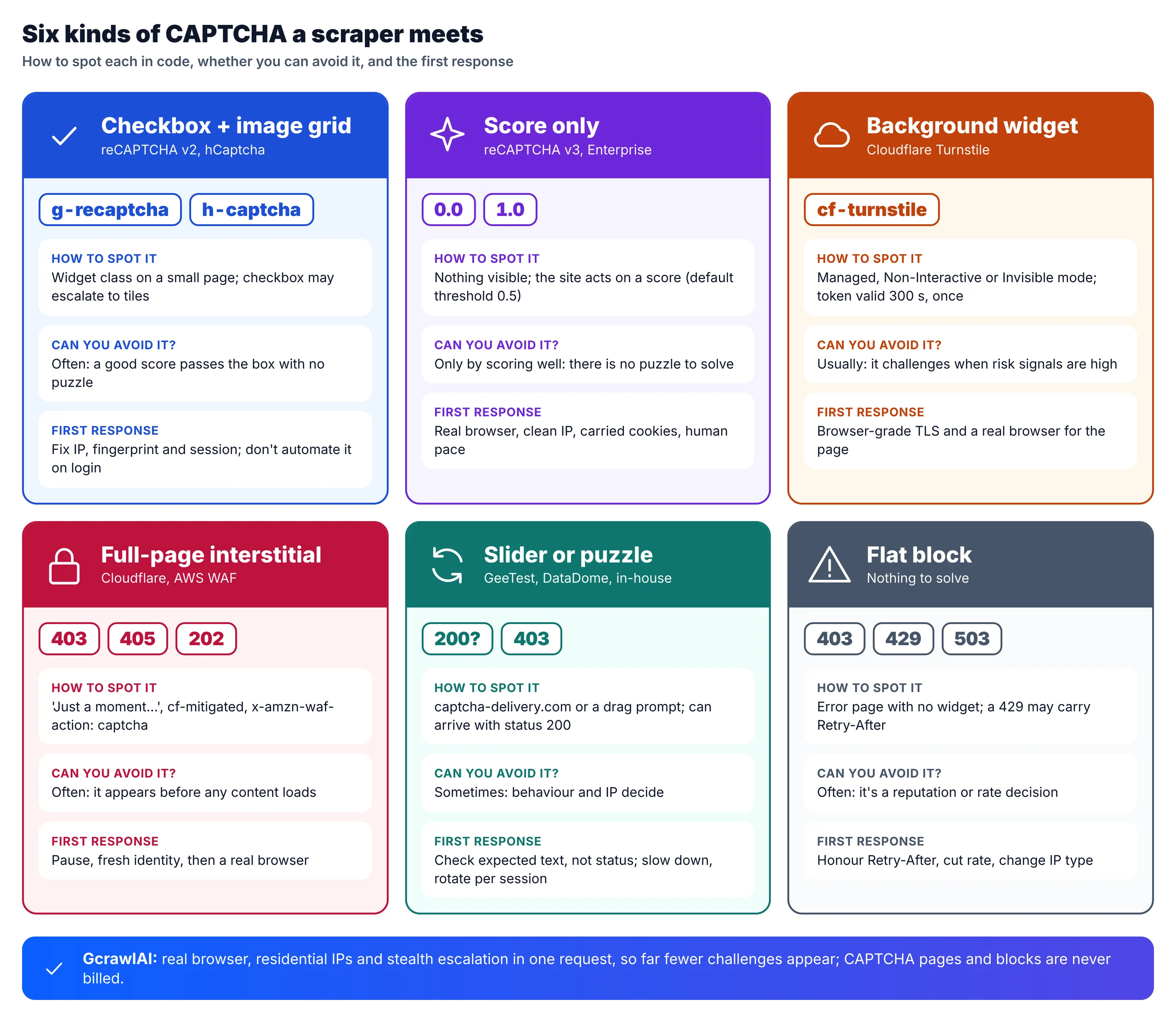
| Type | Examples | What your scraper receives |
|---|---|---|
| Checkbox, image grid | reCAPTCHA v2, hCaptcha | A widget; the checkbox passes alone when the background score is good |
| Score only | reCAPTCHA v3, reCAPTCHA Enterprise | Nothing visible; the site acts on a 0.0 to 1.0 score |
| Background widget | Cloudflare Turnstile | Managed, Non-Interactive or Invisible mode, chosen by the site |
| Full-page interstitial | Cloudflare challenge, AWS WAF CAPTCHA | "Just a moment..." page, or a 405 with x-amzn-waf-action: captcha |
| Slider, puzzle | GeeTest, DataDome, in-house puzzles | A drag or puzzle prompt, sometimes with status 200 |
| Text, audio, proof of work | Distorted text, audio clips, Friendly Captcha | Rare text images, an accessibility clip, or a silent computation |
Two details are worth knowing. Turnstile's Managed mode picks between a non-interactive check and a checkbox based on the visitor's risk, so a clean session often sees no prompt at all. And AWS WAF answers a request without a valid CAPTCHA token with 405 Method Not Allowed, while its silent Challenge action returns 202, which is why a CAPTCHA can look like an unrelated HTTP error. Our guide to bypassing Cloudflare when web scraping goes deeper on Cloudflare's checks.
How to detect a CAPTCHA in your scraper
Detect a CAPTCHA by what the response contains, not by its status code. Challenge pages come back as 403, 405, 429, 503 and sometimes 200, so check challenge headers first, then vendor markers on small pages, then whether the text you came for is actually there. A scraper that only checks status codes stores challenge pages as data.
- Headers that name the challenge:
x-amzn-waf-action: captchaorchallengefrom AWS WAF, andcf-mitigated: challengefrom Cloudflare. - Vendor markers in the body: "Just a moment..." or
cf_chl_(Cloudflare),captcha-delivery.com(DataDome),px-captcha(PerimeterX),awswaf(AWS WAF),KPSDK(Kasada). - Widgets on small pages only: many real pages load a reCAPTCHA or Turnstile script for their forms without blocking you, so a
g-recaptchaclass on a full product page isn't a challenge. Challenge pages are small. - The strongest check: confirm a string you expect on the real page, such as the product name or a price label. A 200 without it is a block, whatever the status says.
This classifier turns those checks into one verdict per response (ok, challenge or blocked, plus the vendor), so you can count challenges per domain and log which vendor you hit:
"""Decide whether a response is real content, a CAPTCHA/challenge page or a flat block.

Status codes alone miss challenges: they arrive as 403, 429, 503, 405 (AWS WAF) and sometimes 200.
"""
import re
from dataclasses import dataclass

# Markers that appear on a vendor's challenge page, not on normal content.
VENDOR_MARKERS = {
    "Cloudflare": r"<title>Just a moment\.\.\.</title>|cf_chl_|challenge-platform",
    "DataDome": r"captcha-delivery\.com|geo\.captcha-delivery",
    "PerimeterX": r"px-captcha|Access to this page has been denied",
    "AWS WAF": r"awswaf|gokuProps|aws-waf-token",
    "Kasada": r"KPSDK",
    "Akamai": r"Reference #\d+\.\w+|_abck",
}
# Visible widgets or prompts. A full page that merely loads one of these scripts is not blocked,
# so these only count on small pages (see SMALL_PAGE).
WIDGET_MARKERS = {
    "reCAPTCHA": r'class="g-recaptcha"|recaptcha/api2/anchor',
    "hCaptcha": r'class="h-captcha"|hcaptcha\.com/1/api',
    "Turnstile": r'class="cf-turnstile"',
    "generic": r"verify (?:that )?you are (?:a )?human|i'?m not a robot|unusual traffic|slide to verify",
}
SMALL_PAGE = 60_000          # challenge pages are small; real product pages rarely are


@dataclass
class Verdict:
    kind: str                # "ok", "challenge" or "blocked"
    vendor: str = ""
    reason: str = ""


def classify(status: int, headers: dict, html: str, expect: str | None = None) -> Verdict:
    h = {k.lower(): str(v).lower() for k, v in headers.items()}

    # 1. Headers that name the challenge outright.
    waf = h.get("x-amzn-waf-action", "")
    if waf in ("captcha", "challenge"):
        return Verdict("challenge", "AWS WAF", f"x-amzn-waf-action: {waf} (status {status})")
    if h.get("cf-mitigated") == "challenge":
        return Verdict("challenge", "Cloudflare", "cf-mitigated: challenge")

    # 2. Vendor challenge pages, whatever the status (200 included).
    for vendor, pattern in VENDOR_MARKERS.items():
        if re.search(pattern, html, re.I) and len(html) < SMALL_PAGE:
            return Verdict("challenge", vendor, "vendor challenge page")

    # 3. A visible CAPTCHA widget on a small page.
    if len(html) < SMALL_PAGE:
        for vendor, pattern in WIDGET_MARKERS.items():
            if re.search(pattern, html, re.I):
                return Verdict("challenge", vendor, "CAPTCHA widget or prompt on a small page")

    # 4. Refusals with nothing to solve.
    if status in (401, 403, 405, 429, 503):
        return Verdict("blocked", reason=f"HTTP {status} without a recognisable challenge")

    # 5. The strongest check: is the content you came for actually there?
    if expect and expect.lower() not in html.lower():
        return Verdict("blocked", reason=f"200 but expected text {expect!r} is missing")
    return Verdict("ok")
Treat "challenge" as a normal outcome in your pipeline, alongside success and blocked. Save the HTML and, in a browser, a screenshot, so you can see what the site showed when a selector suddenly returns nothing.
How to avoid triggering CAPTCHAs
Avoiding CAPTCHAs means removing the signals the risk score reads: use an allowed data source when one exists, send traffic from reputable IPs, look like a browser below the headers, run a real browser only where pages need JavaScript, keep sessions and cookies, and pace requests like a person. Prevention costs less than solving and keeps working when puzzles change.
1. Check for an allowed route first
An official API, an export, a partner feed or a public JSON endpoint beats any workaround. Open DevTools, filter the Network tab by Fetch/XHR, and look for the request that carries the data; it's often a cleaner target than the HTML page, though it can be protected too.
2. Fix the network layer
Move from datacenter to residential or mobile IPs for sites that score IP reputation, and keep one IP per session when a flow relies on cookies. Rotate per session rather than per request: an IP that changes on every page while the cookies stay the same is itself a signal. Our comparison of free proxy sites explains why free pools are usually flagged already.
3. Look like a browser below the headers
Send a complete, current header set that matches the browser you claim to be, including client hints, and keep it identical across the session. If a site still challenges a plain HTTP client, the remaining gap is the TLS and HTTP/2 fingerprint: a client such as curl_cffi with a Chrome profile narrows it, and a real browser closes it. Our guide to fixing 403 Forbidden in Python requests covers the header and fingerprint work step by step.
4. Use a real browser where pages need it
Pages that build content with JavaScript, and checks that score the browser itself, need a browser. Default automation leaks its identity, and patched drivers such as undetected-chromedriver or SeleniumBase UC mode help for a while until vendors update their checks. Keep the browser's fingerprint consistent with your IP's location and your headers. For the rendering side, see how to scrape dynamic JavaScript websites with Python.
5. Keep sessions and pace like a person
Carry cookies between pages instead of starting fresh each time, add random delays rather than fixed intervals, cut concurrency per domain, and fetch only what changed: daily deltas, not every product every minute. Only fill visible form fields, located by their labels, so hidden honeypot inputs stay empty. Rate limits often come before CAPTCHAs, so our guide to fixing 429 Too Many Requests is worth reading alongside this one.
What to do when a CAPTCHA appears
When a CAPTCHA appears, climb an escalation ladder instead of hammering the page. Stop if it guards login, signup or checkout. Otherwise pause and retry once on a fresh IP and session, escalate to a real browser if that fails, and queue the URL if it's still challenged. When a domain's challenge rate climbs, pause it and change approach.
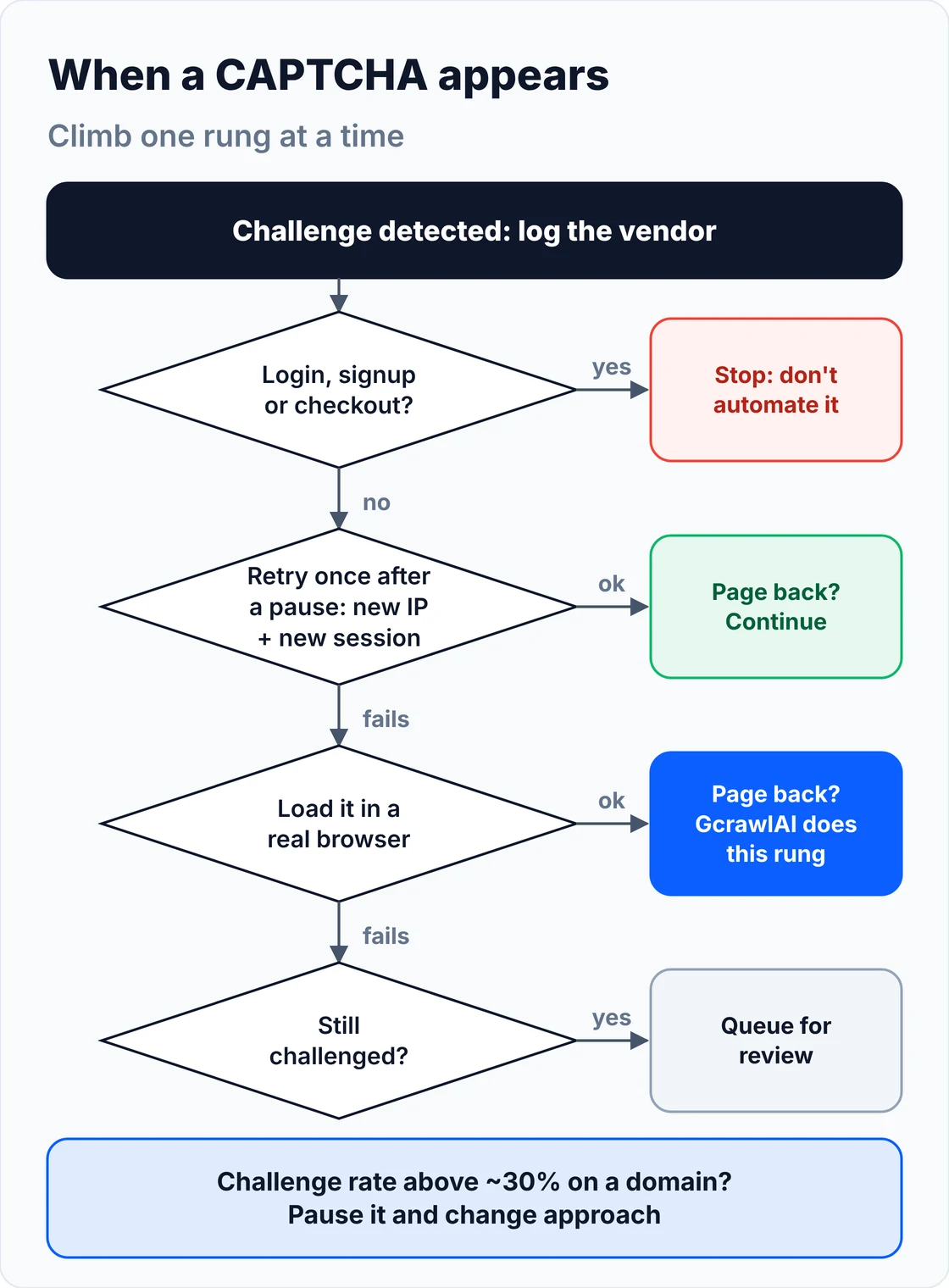
- Don't retry from the same identity: the same IP and cookies will score the same way, and repeated failures make the next score worse.
- Retry once, after a pause: a new IP and a new session, 20 to 60 seconds later, clears many challenges that came from a burst or a bad IP.
- Escalate the fetch path: plain client, then a TLS-matched client, then a real browser. This is the rung GcrawlAI handles for you.
- Keep a challenge budget: when more than about a third of a domain's recent requests are challenged, more retries won't help. Pause the domain and change something.
- Honour Retry-After: a 429 is a rate limit, not a CAPTCHA, and the header tells you how long to wait.
This handler implements the ladder with the classifier above. It skips protected paths, keeps a per-domain challenge budget, retries once on a fresh identity, and hands what's left to a browser fetcher you pass in, such as the GcrawlAI function from the first section:
"""Respond to CAPTCHAs with an escalation ladder instead of brute force.

1. Plain request on a persistent session.   2. On a challenge: pause, then retry once on a fresh
identity (new session + next proxy).   3. Still challenged: hand the URL to a real-browser fetcher
(GcrawlAI here).   4. Still failing: queue it for review.   Never automate login, signup or checkout.
A per-domain challenge budget pauses a domain whose challenge rate climbs.
"""
import random
import time
from collections import defaultdict, deque
from urllib.parse import urlparse

import requests

from detect_captcha import classify

HEADERS = {
    "User-Agent": "Mozilla/5.0 (Windows NT 10.0; Win64; x64) AppleWebKit/537.36 "
                  "(KHTML, like Gecko) Chrome/141.0.0.0 Safari/537.36",
    "Accept": "text/html,application/xhtml+xml,application/xml;q=0.9,*/*;q=0.8",
    "Accept-Language": "en-US,en;q=0.9",
}
PROTECTED_PATHS = ("/login", "/signin", "/signup", "/register", "/checkout", "/cart", "/account")


class ChallengeBudget:
    """Pause a domain when too many of its recent requests were challenged."""

    def __init__(self, window: int = 20, max_rate: float = 0.3, pause_s: float = 900):
        self.window, self.max_rate, self.pause_s = window, max_rate, pause_s
        self.recent = defaultdict(lambda: deque(maxlen=window))
        self.paused_until = defaultdict(float)

    def allowed(self, domain: str) -> bool:
        return time.monotonic() >= self.paused_until[domain]

    def record(self, domain: str, challenged: bool) -> None:
        r = self.recent[domain]
        r.append(challenged)
        if len(r) >= self.window // 2 and sum(r) / len(r) > self.max_rate:
            self.paused_until[domain] = time.monotonic() + self.pause_s
            r.clear()


budget = ChallengeBudget()


def new_session(proxy: str | None) -> requests.Session:
    s = requests.Session()
    s.headers.update(HEADERS)
    if proxy:
        s.proxies = {"http": proxy, "https": proxy}
    return s


def fetch(url, proxies=(None,), expect=None, browser_fetch=None, session=None, sleep=time.sleep):
    """Return (route, html) where route is direct, fresh-identity, browser or the reason it stopped."""
    domain = urlparse(url).netloc
    if urlparse(url).path.lower().startswith(PROTECTED_PATHS):
        return "skipped: protected flow", None                   # these CAPTCHAs exist to stop abuse
    if not budget.allowed(domain):
        return "paused: challenge budget", None

    pool = list(proxies)
    session = session or new_session(pool[0])
    for attempt, route in enumerate(("direct", "fresh-identity")):
        if attempt:                                                  # rung 2: wait, then new IP + session
            sleep(random.uniform(20, 60))
            session = new_session(pool[attempt % len(pool)])
        r = session.get(url, timeout=25)
        v = classify(r.status_code, r.headers, r.text, expect)
        budget.record(domain, v.kind != "ok")
        if v.kind == "ok":
            return route, r.text
        if r.status_code == 429:                                     # rate limit: honour Retry-After first
            wait = r.headers.get("Retry-After", "60")
            sleep(float(wait) if wait.isdigit() else 60)

    if browser_fetch:                                                # rung 3: real browser, residential IP
        html = browser_fetch(url)
        if html and classify(200, {}, html, expect).kind == "ok":
            return "browser", html
    return "queued: still challenged", None                         # rung 4: review, don't hammer
The offline test below fakes every response, so it runs in under a second with no network and no real sleeping. It checks the classifier on eight responses (a Cloudflare interstitial, an AWS WAF 405, a DataDome slider served as 200, a full page that merely loads reCAPTCHA), each rung of the ladder, the protected-path rule, the challenge budget and the Scrapy middleware further down:
"""Offline test: fake responses, no network, no real sleeping."""
import captcha_handler as ch
from detect_captcha import classify

REAL = "<html><title>Blue Kettle</title>" + "<p>Blue Kettle, 1.7 L, $39</p>" * 3000 + "</html>"
SMALL = lambda body: f"<html><body>{body}</body></html>"


class Fake:
    def __init__(self, status, text, headers=None):
        self.status_code, self.text, self.headers = status, text, headers or {}


class Session:
    def __init__(self, replies):
        self.replies = list(replies)

    def get(self, url, **kw):
        return self.replies.pop(0)


out = []
cases = [
    ("Real page", 200, {}, REAL, "Blue Kettle"),
    ("Cloudflare interstitial", 403, {"server": "cloudflare"}, SMALL("<title>Just a moment...</title>"), None),
    ("AWS WAF CAPTCHA", 405, {"x-amzn-waf-action": "captcha"}, SMALL("..."), None),
    ("DataDome slider served as 200", 200, {}, SMALL('<script src="https://geo.captcha-delivery.com/c.js">'), None),
    ("reCAPTCHA widget on a small page", 200, {}, SMALL('<div class="g-recaptcha" data-sitekey="x">'), None),
    ("Full page that only loads reCAPTCHA", 200, {}, REAL + '<div class="g-recaptcha">', "Blue Kettle"),
    ("Flat 403, nothing to solve", 403, {}, SMALL("Forbidden"), None),
    ("200 with the product missing", 200, {}, SMALL("Page unavailable"), "Blue Kettle"),
]
for name, status, headers, html, expect in cases:
    v = classify(status, headers, html, expect)
    out.append(f"{name}: {v.kind}{' / ' + v.vendor if v.vendor else ''}")
assert [l.split(": ")[1] for l in out] == ["ok", "challenge / Cloudflare", "challenge / AWS WAF",
    "challenge / DataDome", "challenge / reCAPTCHA", "ok", "blocked", "blocked"], out

waits = []
nosleep = waits.append
ch.budget = ch.ChallengeBudget()
cf = Fake(403, SMALL("<title>Just a moment...</title>"))

# Ladder: challenged once, clean on a fresh identity.
ch.new_session = lambda proxy: Session([Fake(200, REAL)])
route, _ = ch.fetch("https://shop.example/p/1", proxies=["p1", "p2"], expect="Blue Kettle",
                    session=Session([cf]), sleep=nosleep)
out.append(f"Challenged, then fresh identity: {route}")
assert route == "fresh-identity" and 20 <= waits[-1] <= 60

# Ladder: challenged twice, the real browser gets the page.
ch.new_session = lambda proxy: Session([cf])
route, _ = ch.fetch("https://shop.example/p/2", proxies=["p1", "p2"], expect="Blue Kettle",
                    session=Session([cf]), browser_fetch=lambda u: REAL, sleep=nosleep)
out.append(f"Challenged twice, browser fallback: {route}")
assert route == "browser"

# Ladder: no browser fallback, so the URL is queued instead of hammered.
route, _ = ch.fetch("https://shop.example/p/3", session=Session([cf]), sleep=nosleep)
out.append(f"Challenged twice, no fallback: {route}")
assert route.startswith("queued")

# Protected flows are never automated.
route, _ = ch.fetch("https://shop.example/checkout", sleep=nosleep)
out.append(f"Checkout URL: {route}")
assert route.startswith("skipped")

# Challenge budget: a domain challenged on most requests gets paused.
b = ch.ChallengeBudget(window=10, max_rate=0.3, pause_s=900)
for _ in range(5):
    b.record("hard.example", True)
out.append(f"Budget after 5 challenges in a row: {'paused' if not b.allowed('hard.example') else 'open'}")
assert not b.allowed("hard.example") and b.allowed("easy.example")

# Scrapy middleware: retry once on a new proxy, then give up.
try:
    from scrapy.exceptions import IgnoreRequest
    from scrapy.http import HtmlResponse, Request
    from scrapy_captcha import CaptchaMiddleware

    class Spider:
        class logger:
            info = staticmethod(lambda *a: None)

    class Stats(dict):
        def inc_value(self, key):
            self[key] = self.get(key, 0) + 1

    stats = Stats()
    mw = CaptchaMiddleware(["http://res1:8000"], stats)
    req = Request("https://shop.example/p/9")
    resp = HtmlResponse(req.url, status=403, body=b"<title>Just a moment...</title>", request=req)
    retry = mw.process_response(req, resp, Spider)
    assert retry.meta["proxy"] == "http://res1:8000" and retry.dont_filter
    try:
        mw.process_response(retry, resp.replace(request=retry), Spider)
        gave_up = False
    except IgnoreRequest:
        gave_up = True
    ok = HtmlResponse(req.url, status=200, body=REAL.encode(), request=req)
    assert mw.process_response(req, ok, Spider) is ok and gave_up
    out.append(f"Scrapy middleware: retried on new proxy, then dropped; stats {dict(stats)}")
except ImportError:
    out.append("Scrapy middleware: skipped (scrapy not installed)")

print("\n".join(out))
print("All checks passed.")
Real page: ok
Cloudflare interstitial: challenge / Cloudflare
AWS WAF CAPTCHA: challenge / AWS WAF
DataDome slider served as 200: challenge / DataDome
reCAPTCHA widget on a small page: challenge / reCAPTCHA
Full page that only loads reCAPTCHA: ok
Flat 403, nothing to solve: blocked
200 with the product missing: blocked
Challenged, then fresh identity: fresh-identity
Challenged twice, browser fallback: browser
Challenged twice, no fallback: queued: still challenged
Checkout URL: skipped: protected flow
Budget after 5 challenges in a row: paused
Scrapy middleware: retried on new proxy, then dropped; stats {'captcha/challenge/Cloudflare': 2, 'captcha/gave_up': 1}
All checks passed.
CAPTCHA-solving services: how they work and where they stop
A solving service takes a challenge's details, returns a token from AI or human workers, and leaves your code to submit it. Tokens are short-lived and single-use, bound to the page that issued them, and useless against silent checks or flat blocks. That makes solvers a narrow, authorised last resort, not a scraping strategy.
The flow is the same across providers: your code reads the site key and page URL, creates a task, polls for the result, and submits the returned token with the form or page. Three limits decide whether that works:
- Token life: Google's reCAPTCHA documentation says each response token "is valid for two minutes, and can only be verified once". A Turnstile token lasts 300 seconds and is single-use, and an expired or reused one fails with
timeout-or-duplicate. - Binding: a token is tied to the site key, page URL, challenge variant and, for reCAPTCHA v3, the action name. A page refresh or a changed form invalidates it, and some tasks need the same IP and session for solving and submitting.
- "Ready" isn't "accepted": the provider finishing its task doesn't mean the site accepts the token. Measure accepted pages, not returned tokens.
There are costs beyond the fee. Firecrawl's glossary puts typical pricing at $1 to $3 per 1,000 solves and 10 to 60 seconds per challenge, which caps throughput. Tasks can send page URLs, cookies and proxy credentials to a third party. And a score-only check or a flat 403 has no puzzle to send at all.
| Approach | What it returns | Works on | Main limit |
|---|---|---|---|
| Prevention (IPs, fingerprint, pace) | The page, with no challenge | Every type that depends on a score | Takes work to keep consistent |
| Solving service | A token you submit | Visible puzzles with documented task types | Short token life, per-solve fee, latency, data sharing |
| OCR or your own ML model | An answer to one puzzle type | Simple text and some image grids | Training and upkeep; behaviour still scored |
| Scraping API (GcrawlAI) | The page content | Score-based checks, interstitials, most blocks | Doesn't submit forms or log in for you |
"A solver answers the question the site asked. It can't change the answer the site already gave about your traffic. When a domain keeps challenging every clean session, we stop and look for another route to the data."
Rajesh Kannan, Co-Founder & CTO at Gramosoft
CAPTCHAs in requests, Scrapy, Playwright and Selenium
Each tool hides CAPTCHAs in its own way. requests returns a challenge page as an ordinary response, Scrapy drops non-2xx responses before your callback and happily parses a challenge served as 200, and browsers show the challenge in the page rather than in a status. Make challenges visible in each tool, then route them through the same ladder.
| Tool | How a CAPTCHA shows up | Check first |
|---|---|---|
| requests / httpx | A normal response with a challenge body | Run the classifier on every response |
| Scrapy | 403/503 dropped silently; a 200 challenge parsed as data | HTTPERROR_ALLOWED_CODES and a downloader middleware |
| Playwright / Puppeteer | A challenge frame or interstitial in the page | Visible text and frames after the page settles |
| Selenium | Same, plus navigator.webdriver leaks by default |
The browser's automation flags |
In Scrapy, a downloader middleware is the right place: it sees every response, can retry with a new proxy and a fresh cookie jar, and records challenge counts per vendor in the crawl stats. Turn on AutoThrottle so fewer challenges happen in the first place:
"""Scrapy downloader middleware: catch CAPTCHA pages (even 200s), retry once with another proxy, then drop.

settings.py:
    DOWNLOADER_MIDDLEWARES = {"myproject.scrapy_captcha.CaptchaMiddleware": 560}
    CAPTCHA_PROXIES = ["http://user:pass@res1:8000", "http://user:pass@res2:8000"]
    HTTPERROR_ALLOWED_CODES = [403, 405, 429, 503]   # let challenge pages reach the middleware
    AUTOTHROTTLE_ENABLED = True                      # fewer challenges in the first place
"""
import random

from scrapy.exceptions import IgnoreRequest

from detect_captcha import classify


class CaptchaMiddleware:
    def __init__(self, proxies, stats, max_retries=1):
        self.proxies, self.stats, self.max_retries = proxies, stats, max_retries

    @classmethod
    def from_crawler(cls, crawler):
        s = crawler.settings
        return cls(s.getlist("CAPTCHA_PROXIES"), crawler.stats, s.getint("CAPTCHA_MAX_RETRIES", 1))

    def process_response(self, request, response, spider):
        if not hasattr(response, "text"):                        # images, PDFs: nothing to check
            return response
        v = classify(response.status, response.headers.to_unicode_dict(), response.text,
                     request.meta.get("expect"))
        if v.kind == "ok":
            return response
        self.stats.inc_value(f"captcha/{v.kind}/{v.vendor or 'none'}")
        tries = request.meta.get("captcha_retries", 0)
        if tries < self.max_retries and self.proxies:
            spider.logger.info("%s on %s (%s), retrying on a new proxy", v.kind, request.url, v.reason)
            meta = {**request.meta, "captcha_retries": tries + 1,
                    "proxy": random.choice(self.proxies), "cookiejar": f"fresh-{tries + 1}"}
            return request.replace(meta=meta, dont_filter=True)  # new IP and a new cookie jar
        self.stats.inc_value("captcha/gave_up")
        raise IgnoreRequest(f"{v.kind} after {tries} retries: {request.url}")
For a framework comparison, see Scrapy vs Crawlee vs Scrapling.
What CAPTCHAs cost you
CAPTCHAs cost money twice: in the rendering and premium proxies needed to avoid them, and in solver fees when you don't. For 100,000 successful protected pages a month, credit-based scraping APIs cost $249 to $399 and GcrawlAI costs $101; for plain HTML that never challenges, GcrawlAI is the pricier option.
| Option, 100,000 successful pages a month | Plain HTML pages | Protected pages (JS rendering + premium proxies) | Are CAPTCHA pages and blocks billed? |
|---|---|---|---|
| GcrawlAI (every request rendered, residential IPs included) | $101 (Growth $79 + 20,000 overage at $1.10 per 1,000) | $101 (same request, no multiplier) | No: blocked pages, CAPTCHAs, timeouts and server errors never billed |
| ScraperAPI | $49 (Hobby, 100,000 credits) | $299 (Business; 25 credits per page = 2.5M credits) | Charges only 200 and 404 responses |
| ZenRows | $39 (Build B3, 120,000 credits) | $399 (Growth G3; 25 credits per page = 2.5M credits) | Failed requests never charged; 404 and 410 count as successful |
| ScrapingBee | $49 (Freelance, 250,000 credits; JS off) | $249 (Business; 25 credits per page = 2.5M credits) | Charges only 200, 404 and 410 |
List-price arithmetic, not a benchmark. Credit costs and billing rules come from ScraperAPI's credit docs and status code docs, ZenRows' pricing docs and ScrapingBee's FAQ, checked November 1, 2026. The honest read: for plain HTML that never meets a CAPTCHA, ZenRows, ScraperAPI and ScrapingBee cost less than GcrawlAI. GcrawlAI wins once pages need a browser or sit behind bot checks, because rendering, residential IPs and stealth are already in the one request. A do-it-yourself stack adds residential proxy bandwidth plus solver fees, which Firecrawl puts at $1 to $3 per 1,000 solves, on top of the engineering time.
GcrawlAI plans (GcrawlAI pricing, checked October 28, 2026):
| Plan | Price | Requests/month | Concurrent | Per 1,000 | Overage per 1,000 |
|---|---|---|---|---|---|
| Free | $0 forever, no card | 50 | 2 | – | – |
| Starter | $29/month | 20,000 | 10 | $1.45 | $1.60 |
| Growth (most popular) | $79/month | 80,000 | 35 | $0.99 | $1.10 |
| Pro | $199/month | 250,000 | 50 | $0.80 | $0.90 |
| Scale | $499/month | 750,000 | 100 | $0.67 | $0.75 |
| Enterprise | Volume pricing | 2M+ | Custom | – | – |
| Self-hosted | $0 (MIT) | Your servers | Your servers | Infrastructure only | – |
Every plan, Free included, has scrape, crawl, the Search API, JavaScript rendering, residential IP rotation and stealth escalation in each request. Failed requests are never charged. Annual billing charges 10 months for 12, unused requests on paid plans roll over once, and Indian customers are billed in INR with a GST invoice.
Which approach for which CAPTCHA?
Match the approach to the challenge: score-based checks and interstitials need a cleaner identity, visible puzzles on public pages usually disappear when the identity is fixed, flat blocks need slower pacing or a different IP type, and CAPTCHAs on private flows need permission. GcrawlAI covers the identity and escalation work, so your code handles the rest.
| You're getting | Do this yourself | Where GcrawlAI fits |
|---|---|---|
| CAPTCHAs on the first request | Residential IP, browser-grade TLS, full headers | GcrawlAI sends a real browser through residential IPs |
| "Just a moment..." or an AWS WAF 405 | A real browser that completes the check | GcrawlAI renders and escalates stealth in one request |
| Low reCAPTCHA v3 scores, silent blocks | Real browser, carried cookies, human pace | GcrawlAI keeps a consistent browser session per request |
| Challenges after many clean requests | Slow down, challenge budget, rotate per session | GcrawlAI crawl with async jobs spreads the load |
| Challenge pages served as 200 | Expected-text checks in your parser | GcrawlAI returns content or an error, not a challenge page |
| A CAPTCHA on a public form you must submit | Ask for an API or access; human review | Use GcrawlAI for the public pages around it |
| CAPTCHAs on login, signup or checkout | Stop; official API or written permission | Not a GcrawlAI use case either |
When handling it in your own code is enough
Your own code is enough when CAPTCHAs are occasional, the sites score mainly on IP and pace, and a classifier, a polite pace and one retry on a fresh identity keep the challenge rate low. The detector and ladder in this guide cover that. Bring in GcrawlAI when challenges appear on the first request.
Even then you can stay on your own servers: the MIT-licensed GcrawlAI core self-hosts for free with the same browser engine, and the free Cloud plan's 50 requests a month are enough to test the URLs that keep challenging you. Paste one into the Playground to see whether it comes back clean. For the build-or-buy trade-off, read web scraping with Python vs a scraping API.
Where to draw the line
A CAPTCHA on a login, signup, checkout or account page exists to stop abuse, and automating past it usually breaks the site's terms and may break the law. Keep automated handling to public pages, check robots.txt and the terms, prefer official APIs, don't collect personal data, and keep request rates low enough never to burden the site.
If the data behind a protected flow is essential to your business, ask the site owner for an approved access route or use a licensed data source. A site that challenges every clean visitor on a path is telling you something; respect it. For the legal background, read what web scraping is and where it's legal, and get advice for your own case.
Frequently asked questions
Why does my scraper keep getting CAPTCHAs?
The site scored your requests as risky. The usual causes are a datacenter IP, a TLS fingerprint that isn't a browser's, headers that don't match each other, headless automation flags, no cookies between pages, or too many requests too fast. Fix the signal the site reads, and the challenge often stops. GcrawlAI handles those signals in each request.
How do I detect a CAPTCHA page in Python?
Check the response headers for x-amzn-waf-action or cf-mitigated, look for vendor markers such as "Just a moment..." or captcha-delivery.com on small pages, and confirm that text you expect on the real page is present. Don't rely on the status code: challenge pages can return 200.
Can a CAPTCHA page return a 200 status code?
Yes. Some vendors and in-house systems serve challenge or denial pages with a success status, so a scraper that only checks status codes stores them as data. Decide success by content, such as a product name or price label, not by the status line.
How long is a reCAPTCHA or Turnstile token valid?
Google says a reCAPTCHA response token is valid for two minutes and can be verified only once. Cloudflare says a Turnstile token is valid for 300 seconds and can be validated once; expired or reused tokens fail with timeout-or-duplicate. That's why solver tokens must be used immediately, in the same page context.
Do rotating proxies stop CAPTCHAs?
Only partly. A fresh, reputable IP resets IP reputation, but it does nothing for a non-browser TLS fingerprint or headless automation flags, which the site sees on every IP. Rotate per session rather than per request, and fix the fingerprint first.
Should I use a CAPTCHA-solving service?
Only as a last resort on public pages you're allowed to automate. Solvers add latency and a per-solve fee, share page data with a third party, and can't help with score-only checks or flat blocks. Prevention, or a scraping API such as GcrawlAI that returns page content, is usually cheaper and more reliable.