By Rajesh Kannan, Co-Founder & CTO, Gramosoft · Last updated: · Plans and credit costs checked on each vendor's own pricing page or help center on October 27, 2026
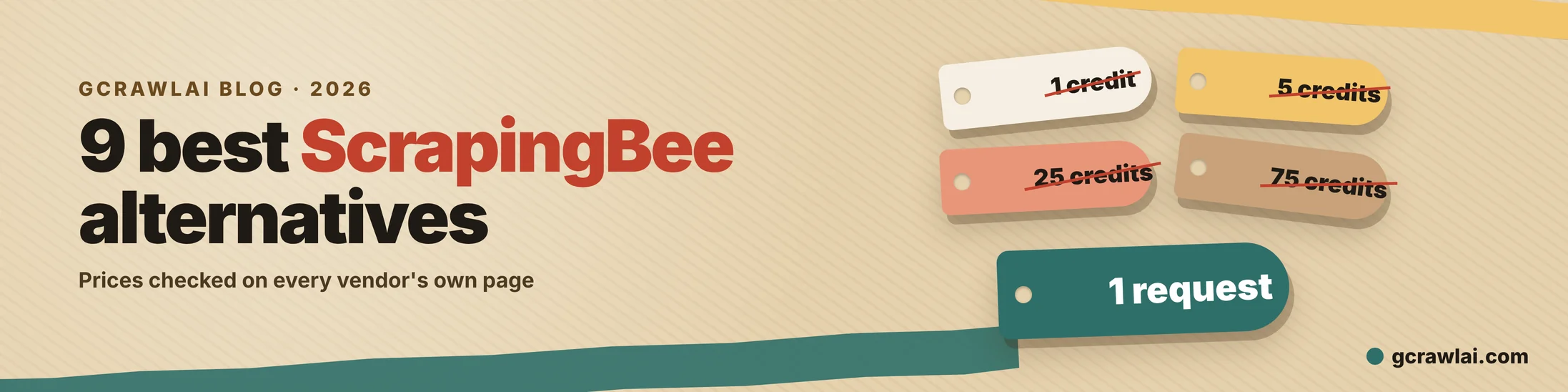
ScrapingBee is a good API with an awkward bill. JavaScript rendering is on by default at 5 credits, premium proxies with rendering cost 25, and stealth proxies cost 75, so a 250,000-credit plan can mean 3,333 pages on a hard site. Here are nine alternatives, GcrawlAI first, with prices from each vendor's own page, what 10,000 pages a month costs on each, and a helper that runs your existing ScrapingBee params on GcrawlAI.
TL;DR
- GcrawlAI bills one request per page, whether it needs a browser, residential proxies or anti-bot handling, and never bills failed requests. It has a Python SDK, MCP for AI agents and an MIT core you can self-host.
- ScrapingBee's help center lists Freelance at $49.99 for 250,000 credits, Startup $99.99 for 1 million and Business $249.99 for 3 million. A page costs 1 to 75 credits.
- For 10,000 protected, rendered pages a month: GcrawlAI Starter $29, ScrapingAnt $49, ScrapingBee $49.99 (or $99.99 with stealth), ZenRows $69, Firecrawl $99, ScraperAPI $149.
- Closest like-for-like swaps: ZenRows (same 1/5/10/25 credit menu, free 5,000 credits a month) and ScrapingAnt (no concurrency cap, free 10,000 credits a month).
- Our
ScrapingBeeCompathelper accepts ScrapingBee's params andextract_rulesunchanged.
What is the best ScrapingBee alternative? For most teams it's GcrawlAI: one request covers rendering, residential proxies and anti-bot, so hard pages cost the same as easy ones, and failed requests are free. ZenRows is the closest like-for-like swap, ScrapingAnt the cheapest for rendered pages, and Scrapfly the strongest on heavily protected sites.
Swipe sideways to see the full table →
| Tool | Type | Best for | Billing unit | Free plan |
|---|---|---|---|---|
| GcrawlAI | Scraping API + MIT core | Protected and JS sites, RAG, AI agents | 1 successful request (failed free) | 50 requests/month, no card |
| ZenRows | Scraping API | Like-for-like move off ScrapingBee | Credits (1 to 25 per page) | 5,000 credits/month |
| ScraperAPI | Scraping API | Amazon, Google and Walmart volume | Credits (1 to 30+ per page) | 7-day trial, 5,000 credits |
| Scrapfly | Scraping API + cloud browser | Heavily protected targets | Credits (by feature) | 1,000 credits |
| ScrapingAnt | Scraping API | Cheap rendering, unlimited parallel requests | Credits (1 to 25 per page) | 10,000 credits/month |
| Scrapingdog | Scraping API | Cheaper Google, YouTube and Amazon pulls | Credits | 100 credits |
| Crawlbase | Crawling API | Pay-per-success usage billing | Successful requests, tiered | 5,000 requests |
| Firecrawl | Markdown API | Pages straight into an LLM | Credits (1 to 5 per page) | 1,000 credits/month |
| Apify | Actor marketplace | A ready-made scraper per site | Compute units + proxy GB | $5 usage/month |
The 9 best ScrapingBee alternatives in 2026
Every tool here fetches pages for you with proxies and a headless browser handled on the vendor's side. What differs is the billing unit and how much a hard page costs. GcrawlAI leads because a protected, rendered page costs one request, the same as a plain one. The rest run from the closest swap to the most specialised.
1. GcrawlAI: one request per page, no credit menu
Best for: teams scraping JavaScript-heavy or protected sites, and RAG pipelines and AI agents · License: MIT core, managed Cloud API · Language: Python SDK (gcrawl-sdk 0.5.8), REST, MCP
GcrawlAI does the same job as ScrapingBee's HTML API, fetch any URL behind rotating proxies with a real browser, but without the flags that multiply the bill. Rendering, residential IP rotation and stealth escalation for Cloudflare, DataDome, Akamai and PerimeterX are always on, and a blocked page, CAPTCHA, timeout or server error isn't billed.
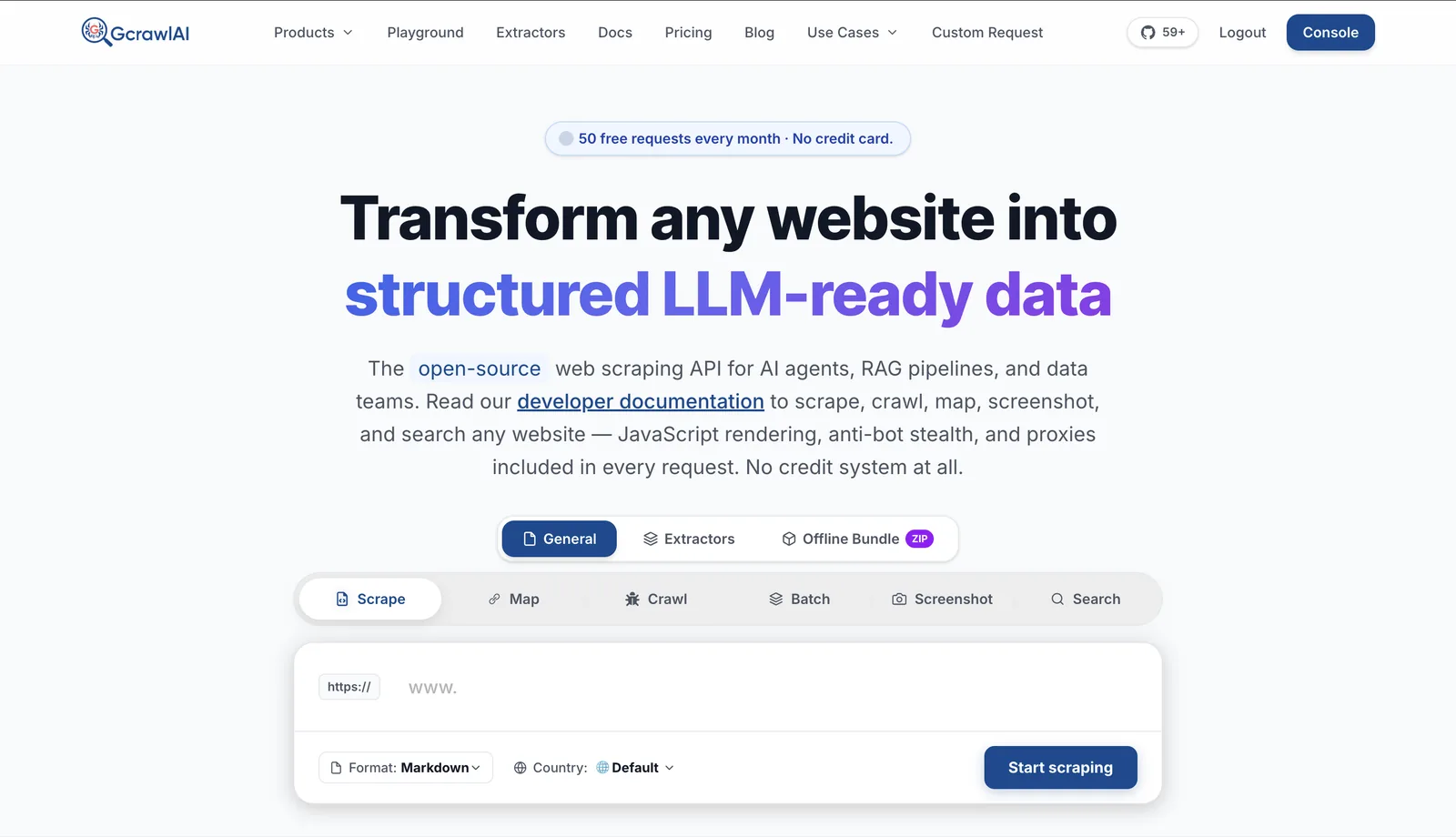
- One call, two outputs: rendered HTML for your own selectors, and clean Markdown or JSON for LLMs, from the same request.
- More than a fetch: crawl with depth control and duplicate filtering, map a site's URLs, Search API and Deep Search, screenshots on mobile, tablet and desktop.
- Agents and pipelines: an MCP server for Claude, Cursor and other agents, and async batch jobs with webhooks for large runs.
- Ready-made extractors: structured data for common targets, such as the Google Flights Extractor.
- Try it first: the Playground and docs run the same API.
- Self-host: the MIT-licensed core runs on your servers with FastAPI, Celery, Redis, PostgreSQL and stealth Playwright.
The ScrapingBee call with render_js, premium_proxy and country_code, as one GcrawlAI request:
# pip install gcrawl-sdk
from gcrawl_sdk import GcrawlClient, ScrapeOptions

client = GcrawlClient(api_key="gc-YOUR_API_KEY")   # or GCRAWL_API_KEY; base_url="http://localhost:8000" when self-hosted

if __name__ == "__main__":
    # The ScrapingBee "render_js + premium_proxy + country_code" call, as one GcrawlAI request.
    # Rendering, residential proxies and anti-bot escalation are always on; nothing to toggle.
    page = client.scrape(
        url="https://www.example-shop.com/product/123",
        options=ScrapeOptions(html_enabled=True, markdown_enabled=True, proxy_geo="US"),
        wait=True,
    )
    print(page.markdown[:300])   # LLM-ready Markdown
    print(len(page.html or ""), "bytes of rendered HTML")   # or the HTML, for your own selectors
And the self-hosted core, if the data must stay on your own servers:
git clone https://github.com/GramosoftAI/GcrawlAI.git && cd GcrawlAI
python -m venv .venv && source .venv/bin/activate
pip install -r requirements.txt && playwright install
cp .env.example .env                      # add your database, Redis and proxy settings
python -m api.core.db_setup
redis-server &
celery -A web_crawler.crawler.celery_config worker -l info &
uvicorn api.api:app --port 8000
Pricing: a free plan of 50 requests a month with no card, paid plans from $0.67 to $1.45 per 1,000 requests, and the self-hosted core costs nothing. Failed requests are never charged.
Where it falls short: there's no plain-English ai_query parameter; you get structured data from the extractors, Markdown for your LLM, or your own selectors. There are no dedicated Amazon or Walmart endpoints yet, and the integration list is shorter than older vendors'. Self-hosting means bringing your own proxy accounts.
"Every team that moved to us from a credit API asked the same question first: what does a hard page cost? Our answer is the same as an easy one. One page is one request, and if we can't get it, you don't pay."
Rajesh Kannan, Co-Founder & CTO at Gramosoft
2. ZenRows: the closest like-for-like swap
Best for: teams who like ScrapingBee's model but want a standing free plan · Type: scraping API with Fetch, Extract, Crawl, Batch and Browser primitives
ZenRows prices requests on almost the same menu as ScrapingBee, so migration is mostly a change of endpoint. It adds a free monthly allowance, persistent browser sessions, and an MCP server, CLI and SDKs on every plan.
Pricing (ZenRows pricing): free 5,000 credits a month with 5 concurrent requests; Build $19 to $39 for 45,000 to 120,000 credits; Launch $69 to $129 for 250,000 to 700,000; Growth $199 to $399 for 1.2 to 3 million. A standard request is 1 credit, JavaScript 5, premium proxy 10, both 25. Failed requests aren't charged, but 404 and 410 count as successful. Annual billing charges 10 months for 12.
Where it falls short: the 25-credit multiplier for rendered pages on premium proxies is the same trap, just smaller than ScrapingBee's 75. Credits don't roll over.
3. ScraperAPI: structured e-commerce and search data
Best for: high-volume Amazon, Google and Walmart scraping · Type: scraping API with structured endpoints, async jobs and DataPipeline
ScraperAPI is one endpoint for any URL plus parsed-JSON endpoints for the big commerce and search sites. Its Domain Cost Estimator shows what a URL will cost, and max_cost caps spending per request.
Pricing (ScraperAPI pricing): Hobby $49 for 100,000 credits and 20 threads; Startup $149 for 1 million and 50; Business $299 for 3 million; Scaling $475 for 5 million; 10% off annually; a 7-day trial with 5,000 credits. A standard page is 1 credit, Amazon 5, Google and Bing 25, LinkedIn 30, and bypassing Cloudflare, DataDome or PerimeterX adds 10.
Where it falls short: Hobby and Startup are limited to US and EU geotargeting, credits don't roll over, and protected pages cost 11 times a plain one.
4. Scrapfly: built for the hardest targets
Best for: sites behind strong bot protection, and multi-step flows in a hosted browser · Type: scraping, extraction, screenshot and crawler APIs, cloud browser, MCP server
Scrapfly's Unblocker handles anti-bot systems with one parameter, and its Cloud Browser lets your own Playwright or Puppeteer code drive a managed Chromium over CDP. SDKs cover Python, TypeScript, Go, Rust and Scrapy.
Pricing (Scrapfly pricing): free 1,000 credits; Discovery $30 for 200,000 credits; Pro $100 for 1 million; Startup $250 for 2.5 million; Enterprise $500 for 5.5 million. Pro and up switch to pay-as-you-go overflow instead of stopping. The Unblocker page says failed requests are free.
Where it falls short: per-feature credit costs aren't on the pricing page; you need the estimator or a cost=true call to forecast a bill, which is why it's not in our cost table.
5. ScrapingAnt: cheap rendering and no concurrency cap
Best for: bursty jobs that need many parallel requests on a small plan · Type: scraping API with real Chrome rendering and rotating proxies
ScrapingAnt's plan prices line up with ScrapingBee's, with more credits at each tier and no concurrency cap on any plan. It also sells standalone proxies, billed by bandwidth.
Pricing (ScrapingAnt site): free 10,000 credits every month, no card; Enthusiast $19 for 100,000; Startup $49 for 500,000; Business $249 for 3 million; Business Pro $599 for 8 million. The default request, Chrome rendering on standard proxies, costs 10 credits, and options take it up to 25. Failed requests cost 0.
Where it falls short: a rendered request costs 10 credits, twice ScrapingBee's 5, so the extra credits shrink fast on rendered pages.
6. Scrapingdog: cheaper search and video pulls
Best for: Google, YouTube and Amazon data at a lower credit cost · Type: scraping API with dedicated search, video and commerce APIs, SDKs and an MCP server
Scrapingdog pitches itself directly against ScrapingBee on price. Its own comparison lists Google at 5 credits, YouTube 5 and Amazon 1, with no separate stealth tier.
Pricing (Scrapingdog pricing): free 100 credits; Lite $40 for 200,000 credits and 5 concurrency; Standard $90 for 1 million and 50; Pro $200 for 3 million and 100; Premium $350 for 6 million.
Where it falls short: the free allowance is small, the Lite plan allows only 5 concurrent requests, and the credit cost of a rendered generic page isn't on the page we checked.
7. Crawlbase: pay only for successful requests
Best for: variable workloads where a usage bill beats a monthly bucket · Type: Crawling API, async Crawler, Smart AI Proxy, storage and a Web MCP server
Crawlbase folds proxy rotation and CAPTCHA handling into every request and treats JavaScript as a request type. Its async Crawler queues large batch jobs you collect later.
Pricing (Crawlbase pricing explained): up to 5,000 free requests, no card; standard requests from $3 per 1,000 for the first 1,000 down to $0.60 per 1,000 past 11,000, falling further with volume. Only successful requests are charged.
Where it falls short: JavaScript requests and harder domains cost more, at rates the article doesn't publish, so a bill is hard to forecast before you run it.
8. Firecrawl: Markdown for LLMs
Best for: pages that go straight into a model or vector store · Type: scrape, crawl, map and search API with an AGPL open-source core
Firecrawl returns Markdown by default, with schema-based JSON as an option, so there's no HTML to parse. Rendering and enhanced proxies cost the same single credit as a basic page.
Pricing (Firecrawl pricing, billing docs): free 1,000 credits a month; Hobby $19 for 5,000; Standard $99 for 100,000; Growth $399 for 500,000. JSON output adds 4 credits, and pages that return 403 or 404 still cost a credit.
Where it falls short: credits are scarce per dollar at the low end, and unused credits don't roll over below annual Scale. We compare it in detail in why companies switch from Firecrawl to GcrawlAI.
9. Apify: a ready-made scraper per site
Best for: targets that already have a maintained Actor, such as Google Maps or social platforms · Type: cloud Actor platform with scheduling, storage and webhooks
Apify replaces "fetch and parse it yourself" with "run someone's tested scraper". Its Website Content Crawler returns Markdown for RAG, and the open-source Crawlee library lets you build your own Actors.
Pricing (Apify pricing): free $5 of usage a month; Starter $19, Scale $199 and Business $999 as prepaid usage; compute units $0.20 down to $0.13; residential proxies $8 down to $7 per GB. Unused usage expires each cycle.
Where it falls short: cost per page depends on how each Actor is built, so it doesn't compare cleanly with a per-request API.
Why teams leave ScrapingBee
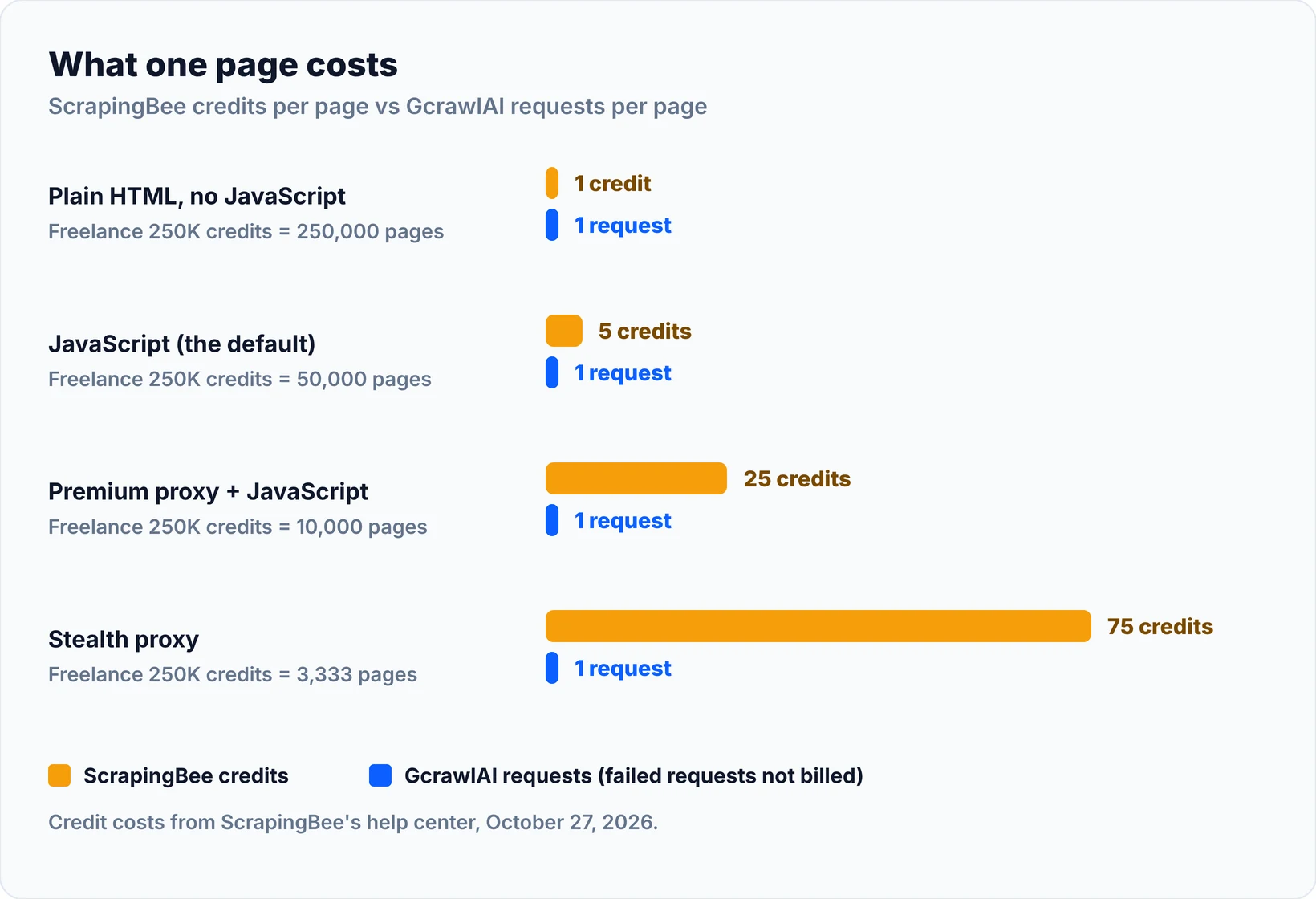
ScrapingBee works, and its docs are clear. Teams leave because the number of pages a plan buys depends on the target. Rendering is on by default at 5 credits, premium proxies with rendering cost 25, stealth costs 75, and you only learn which a domain needs once requests start failing or credits disappear.
Here's what ScrapingBee's own help center says, checked October 27, 2026 (plans, credit costs):
- Plans: Freelance $49.99 a month for 250,000 credits and 10 concurrent requests; Startup $99.99 for 1 million and 50; Business $249.99 for 3 million and 100; Business+ $599.99 for 8 million and 200. New accounts get 1,000 free credits once.
- Credit menu: 1 credit with no JavaScript, 5 with it, 10 or 25 on premium proxies, 75 on stealth proxies where JavaScript can't be turned off. The AI query add-on adds 5, and Google URLs cost 15.
- What that means: Freelance's 250,000 credits buy 50,000 rendered pages, 10,000 premium rendered pages, or 3,333 stealth pages.
- Ownership: ScrapingBee is now part of the Oxylabs group, and its announcement says existing plans stay the same and Google calls dropped from 25 credits to 15.
Pages that need a browser are usually the expensive ones. Our guide to scraping dynamic JavaScript websites with Python explains why, and bypassing Cloudflare when scraping covers the protected ones.
What 10,000 pages a month costs
For 10,000 rendered pages behind bot protection, GcrawlAI Starter costs $29 because every page is one request. ScrapingBee needs Freelance at $49.99, or Startup at $99.99 if the site forces stealth proxies. On rendered pages without protection, ScrapingAnt's $19 plan is cheaper. This is list-price arithmetic, not a benchmark.
"""List-price arithmetic: the cheapest published plan covering 10,000 pages a month,
for two page types: JavaScript-rendered, and JavaScript-rendered behind bot protection.

Prices and credit costs checked on each vendor's own pricing page or help center on
October 27, 2026. Arithmetic from published plans, not a benchmark.
"""
PAGES = 10_000

# tool: (plans [(name, $/month, credits)], credits per JS page, credits per protected JS page, note)
VENDORS = {
    "GcrawlAI": ([("Starter", 29, 20_000)], 1, 1, "1 request either way; failed requests free"),
    "ScrapingAnt": ([("Enthusiast", 19, 100_000), ("Startup", 49, 500_000)], 10, 25,
                    "default render 10; options up to 25 credits"),
    "ZenRows": ([("Build 45K", 19, 45_000), ("Build 80K", 29, 80_000), ("Build 120K", 39, 120_000),
                 ("Launch 250K", 69, 250_000)], 5, 25, "JS 5, JS + premium proxy 25"),
    "ScrapingBee": ([("Freelance", 49.99, 250_000), ("Startup", 99.99, 1_000_000)], 5, 25,
                    "JS 5, premium + JS 25 (stealth 75)"),
    "ScrapingBee*": ([("Freelance", 49.99, 250_000), ("Startup", 99.99, 1_000_000)], 5, 75,
                     "*same, if the site needs stealth proxies"),
    "Firecrawl": ([("Hobby", 19, 5_000), ("Standard", 99, 100_000)], 1, 1,
                  "1 credit; Hobby's 5,000 is too small"),
    "ScraperAPI": ([("Hobby", 49, 100_000), ("Startup", 149, 1_000_000)], None, 11,
                   "1 + 10 for bot-protected pages; JS cost not listed"),
}


def cheapest(plans, per_page):
    if per_page is None:
        return None
    return next(((n, p) for n, p, c in plans if c >= PAGES * per_page), None)


if __name__ == "__main__":
    print(f"{'Tool':<13} {'JS page':<20} {'Protected JS page':<20} note")
    for tool, (plans, js, prot, note) in VENDORS.items():
        a, b = cheapest(plans, js), cheapest(plans, prot)
        fmt = lambda x: f"${x[1]} {x[0]}" if x else "n/a"
        print(f"{tool:<13} {fmt(a):<20} {fmt(b):<20} {note}")
    print("Left out: Scrapfly and Scrapingdog (per-feature credit costs not published),")
    print("Crawlbase (usage rate card), Apify (depends on the Actor).")
Tool          JS page              Protected JS page    note
GcrawlAI      $29 Starter          $29 Starter          1 request either way; failed requests free
ScrapingAnt   $19 Enthusiast       $49 Startup          default render 10; options up to 25 credits
ZenRows       $29 Build 80K        $69 Launch 250K      JS 5, JS + premium proxy 25
ScrapingBee   $49.99 Freelance     $49.99 Freelance     JS 5, premium + JS 25 (stealth 75)
ScrapingBee*  $49.99 Freelance     $99.99 Startup       *same, if the site needs stealth proxies
Firecrawl     $99 Standard         $99 Standard         1 credit; Hobby's 5,000 is too small
ScraperAPI    n/a                  $149 Startup         1 + 10 for bot-protected pages; JS cost not listed
Left out: Scrapfly and Scrapingdog (per-feature credit costs not published),
Crawlbase (usage rate card), Apify (depends on the Actor).
Two caveats. ScrapingAnt's protected figure uses the top of its 1-to-25 credit range, and ScraperAPI doesn't list a JavaScript credit cost on its pricing page, so only its bot-protection surcharge is modelled. Scrapfly, Scrapingdog, Crawlbase and Apify are left out because their per-feature costs aren't published in a form we could check.
GcrawlAI's plans, from gcrawlai.com/pricing:
Swipe sideways to see the full table →
| Plan | Price | Requests/month | Concurrent | Per 1,000 | Overage per 1,000 |
|---|---|---|---|---|---|
| Free | $0, no card | 50 | 2 | Free | None |
| Starter | $29/month | 20,000 | 10 | $1.45 | $1.60 |
| Growth | $79/month | 80,000 | 35 | $0.99 | $1.10 |
| Pro | $199/month | 250,000 | 50 | $0.80 | $0.90 |
| Scale | $499/month | 750,000 | 100 | $0.67 | $0.75 |
| Self-hosted | $0 (MIT) | Your servers | Your servers | Infrastructure only | None |
Every plan, Free included, has every endpoint, JavaScript rendering, residential IP rotation, stealth escalation and LLM-ready output. Annual billing charges 10 months for 12, unused requests on paid plans roll over once, and Indian customers can pay in INR with a GST invoice.
How to migrate from ScrapingBee to GcrawlAI
Moving from ScrapingBee to GcrawlAI is mostly deleting flags. Rendering and proxy escalation are automatic, country_code becomes proxy_geo, and extract_rules maps to CSS selectors on the returned HTML. The helper below takes your existing params dict and returns what ScrapingBee would.
Swipe sideways to see the full table →
| ScrapingBee | GcrawlAI | Notes |
|---|---|---|
render_js |
Always on | No 5-credit charge |
premium_proxy, stealth_proxy |
Automatic escalation | Still one request |
country_code |
proxy_geo in ScrapeOptions |
In-country residential IPs |
extract_rules |
Selectors on the returned HTML | The helper below accepts the same rules |
ai_query, ai_extract_rules |
Markdown into your LLM, or an extractor | No 5-credit add-on |
screenshot |
Screenshot endpoint | Mobile, tablet and desktop |
js_scenario |
Map by hand | Use auto_scroll for infinite scroll |
| Google Search API | Search API | One request per search |
"""Run ScrapingBee-style requests on GcrawlAI.

Takes the same params dict you pass to ScrapingBee's HTML API (render_js,
premium_proxy, stealth_proxy, country_code, extract_rules, ...) and returns
what ScrapingBee would: the page HTML, or JSON when extract_rules is set.
Rendering and proxy escalation are automatic on GcrawlAI, so those flags are
accepted and ignored instead of multiplying the cost.
"""
from bs4 import BeautifulSoup
from gcrawl_sdk import GcrawlClient, ScrapeOptions

NO_OP = {"render_js", "premium_proxy", "stealth_proxy", "block_resources", "block_ads", "wait"}  # handled automatically


def _pick(soup, rule):
    # ScrapingBee shorthand: "h1" or "a@href"; full form: {"selector": ..., "type": "list", "output": "@src"}
    if isinstance(rule, str):
        rule = {"selector": rule}
    sel, attr = rule["selector"], rule.get("output", "text")
    if "@" in sel and attr == "text":
        sel, attr = sel.split("@", 1)[0], "@" + sel.split("@", 1)[1]
    nodes = soup.select(sel)
    get = (lambda n: n.get(attr[1:])) if attr.startswith("@") else (lambda n: n.get_text(" ", strip=True))
    if rule.get("type") == "list":
        return [get(n) for n in nodes]
    return get(nodes[0]) if nodes else None


class ScrapingBeeCompat:
    def __init__(self, client=None):
        self.client = client or GcrawlClient()   # reads GCRAWL_API_KEY

    def get(self, url, params=None):
        params = dict(params or {})
        unknown = set(params) - NO_OP - {"country_code", "extract_rules", "timeout"}
        if unknown:
            raise ValueError(f"map these by hand: {sorted(unknown)}")
        opts = ScrapeOptions(html_enabled=True, proxy_geo=params.get("country_code", "US").upper(),
                             timeout=int(params.get("timeout", 30000)) // 1000 or 30)
        html = self.client.scrape(url=url, options=opts, wait=True).html or ""
        rules = params.get("extract_rules")
        if not rules:
            return html
        soup = BeautifulSoup(html, "html.parser")
        return {name: _pick(soup, rule) for name, rule in rules.items()}


if __name__ == "__main__":
    bee = ScrapingBeeCompat()
    print(bee.get("https://books.toscrape.com/", {"render_js": "true", "extract_rules": {"title": "h1"}}))
We checked the helper offline with a stub client that returns a fixture product page. It's a logic check of the parameter mapping and extract_rules output, not a scraping test:
"""Offline check of scrapingbee_compat.py: a stub client returns a fixture page,
so this runs with no network and no API key. It checks the parameter mapping and
extract_rules output, not scraping."""
from types import SimpleNamespace as NS

from scrapingbee_compat import ScrapingBeeCompat

PAGE = """<html><h1>Wireless Mouse</h1><p class="price">$24.99</p>
<span class="stock">In stock</span><img class="hero" src="/img/mouse.jpg">
<ul><li class="spec">2.4 GHz</li><li class="spec">1600 DPI</li><li class="spec">AA battery</li></ul></html>"""


class Stub:
    calls = []
    def scrape(self, url, options, wait):
        Stub.calls.append(options)
        return NS(html=PAGE)


if __name__ == "__main__":
    bee = ScrapingBeeCompat(client=Stub())
    params = {
        "render_js": "true", "premium_proxy": "true", "country_code": "gb",
        "extract_rules": {
            "name": "h1", "price": ".price", "stock": ".stock",
            "image": "img.hero@src", "specs": {"selector": "li.spec", "type": "list"},
        },
    }
    row = bee.get("https://shop.example/mouse", params)
    for k, v in row.items():
        print(f"{k:<6} {v}")
    print("geo sent:", Stub.calls[-1].proxy_geo, "| requests:", len(Stub.calls))
    assert row["specs"] == ["2.4 GHz", "1600 DPI", "AA battery"] and row["image"] == "/img/mouse.jpg"
    try:
        bee.get("https://shop.example/", {"js_scenario": "{}"})
    except ValueError as e:
        print("flagged:", e)
name   Wireless Mouse
price  $24.99
stock  In stock
image  /img/mouse.jpg
specs  ['2.4 GHz', '1600 DPI', 'AA battery']
geo sent: GB | requests: 1
flagged: map these by hand: ['js_scenario']
If you need fields rather than HTML, our guide to extracting structured data from any website goes further, and the MCP web scraping guide covers agents.
"Run your worst hundred URLs through both APIs for a week and divide the bill by the pages you actually got. That number is the only price that matters."
Rajesh Kannan, Co-Founder & CTO at Gramosoft
Which ScrapingBee alternative should you choose?
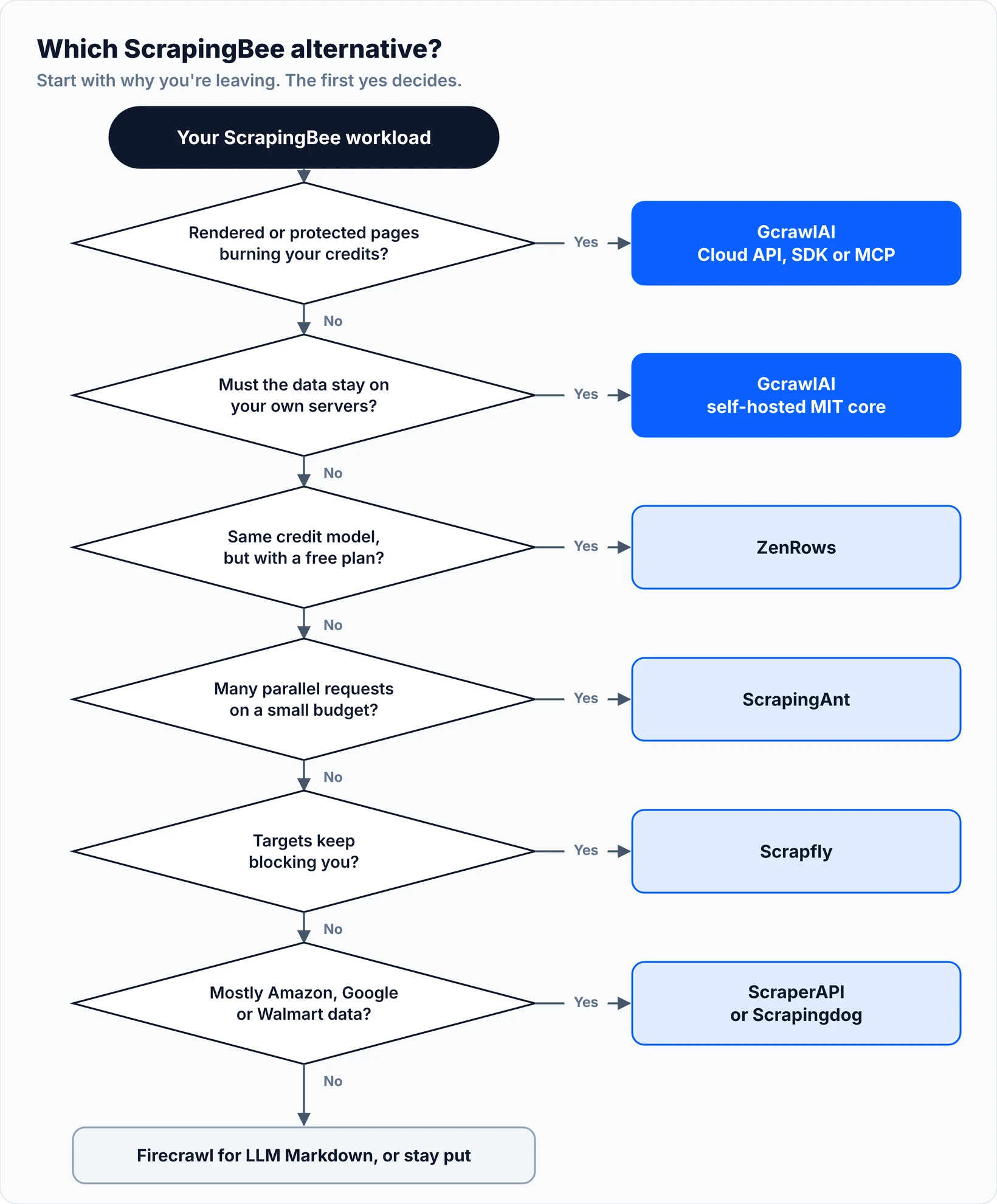
Name the reason you're leaving, then match it. If hard pages drain your credits, use GcrawlAI. If you like ScrapingBee's model and want a free plan, use ZenRows. If you need parallel requests on a small budget, use ScrapingAnt. If targets keep blocking you, try Scrapfly.
Swipe sideways to see the full table →
| Your reason for leaving | Pick | Why |
|---|---|---|
| Rendered and protected pages burn credits | GcrawlAI Cloud API | One request per page; failed requests free |
| Data must stay on your own servers | GcrawlAI self-hosted | MIT core, no per-page fee |
| Same model, with a free monthly plan | ZenRows | Same credit menu, 5,000 free credits |
| Many parallel requests, small budget | ScrapingAnt | No concurrency cap, 10,000 free credits |
| Targets keep blocking you | Scrapfly | Unblocker plus a cloud browser |
| Mostly Amazon, Google or Walmart | ScraperAPI or Scrapingdog | Structured endpoints for those sites |
| Usage varies a lot month to month | Crawlbase | Pay only for successful requests |
| Pages go straight into an LLM | Firecrawl | Markdown by default |
| A ready-made scraper exists | Apify | Rent the Actor instead of building one |
When ScrapingBee is still the right choice
ScrapingBee is still a sound pick when most of your pages render on classic proxies, your volume fits a plan, and you use its extras: plain-English ai_query extraction, JavaScript scenarios, or the dedicated Amazon, Walmart and YouTube APIs. At 5 credits a page, Freelance buys 50,000 rendered pages, which is plenty for many teams.
Switching a working integration has a real cost. Move when a specific limit shows up on your invoice, like stealth pages or a concurrency cap, not because a list says so.
"If ScrapingBee is cheap for your sites, stay. We'd rather earn the workloads where it isn't."
Rajesh Kannan, Co-Founder & CTO at Gramosoft
Scraping responsibly
Every tool here is for public web data. Respect each site's terms and robots.txt, keep request rates reasonable, and don't scrape behind logins you aren't authorised to use or collect personal data without a lawful basis. Our guide to what web scraping is and when it's legal covers the basics.
Anti-bot handling in these APIs exists so legitimate requests to public pages aren't blocked by mistake. It isn't a way past paywalls, account walls or access controls, and none of the code in this post tries to do that.
Frequently asked questions
How much does ScrapingBee cost?
ScrapingBee's help center lists Freelance at $49.99 a month for 250,000 credits, Startup $99.99 for 1 million, Business $249.99 for 3 million and Business+ $599.99 for 8 million. A page costs 1 credit without JavaScript, 5 with it, 25 on premium proxies and 75 on stealth proxies.
Is there a free ScrapingBee alternative?
Yes. GcrawlAI has a free plan of 50 requests a month with no card and an MIT core you can self-host for free. ScrapingAnt gives 10,000 credits a month, ZenRows 5,000, Firecrawl 1,000, and Crawlbase up to 5,000 free requests. ScrapingBee gives 1,000 credits once.
Is GcrawlAI open source, and can I use it commercially?
Yes. GcrawlAI's core is MIT-licensed on GitHub, so you can self-host it and use it commercially. The managed Cloud API adds hosted infrastructure, residential proxies, the Python SDK and MCP, with a free plan and paid plans from $0.67 to $1.45 per 1,000 requests.
Why does ScrapingBee use so many credits?
JavaScript rendering is on by default and costs 5 credits, premium proxies with rendering cost 25, and stealth proxies cost 75, with JavaScript always on. Some domains need the expensive tiers to return content, so a plan's credits cover far fewer pages on hard sites than on easy ones.
Was ScrapingBee acquired by Oxylabs?
Yes. ScrapingBee is now part of the Oxylabs group. Its own announcement says ScrapingBee keeps running as its own product, existing subscription plans stay the same, and Google API calls dropped from 25 credits to 15.
How hard is it to migrate from ScrapingBee to GcrawlAI?
Usually a few hours. Drop render_js and the proxy flags, change country_code to proxy_geo, and keep your extract_rules. The ScrapingBeeCompat helper in this post accepts your existing params dict and returns the same HTML or JSON.