
By Rajesh Kannan, Co-Founder & CTO, Gramosoft · Last updated: · Features, partner counts and API access checked on each site's own help, about and developer pages on November 16, 2026
A flight comparison site shows fares from many sellers for one route and date, so you don't open ten tabs. They aren't the same kind of business, though: some only compare and send you elsewhere, some sell the ticket themselves, and one, GcrawlAI, returns the comparison as data. This guide compares ten of them on who sells the ticket, how many sellers each searches, the date tools, price alerts and whether you can get the fares in code. We start with GcrawlAI, the tool we build, which is for teams that need fares at scale. If you're buying one ticket today, start with Google Flights and Skyscanner.
TL;DR
- Fares as data: GcrawlAI. Its Google Flights Extractor returns every listed flight as JSON in one request, and its scrape endpoint loads any airline or travel agency page from the country you choose. 50 free requests a month, $0.67 to $1.45 per 1,000 after that, failed requests never charged.
- One traveller, flexible dates: Google Flights for the date grid and price graph, then Skyscanner, which compares 1,200+ partners, for the widest seller list.
- Specialists: KAYAK for price forecasts and Hacker Fares, Kiwi.com for self-transfer routes, Wego for the Gulf, ixigo and MakeMyTrip for Indian trips you book in one app, ITA Matrix to see how a fare is built.
- The type matters: a metasearch sends you to the seller, who handles changes and refunds; a travel agency sells the ticket and handles them itself.
- No free fare API: Google ended QPX Express in 2018, Skyscanner and Kiwi.com only accept approved partners, and Amadeus closed its self-service APIs on July 17, 2026.
What is the best flight comparison site? For one trip, use two: Google Flights to find the cheapest dates with its calendar and price graph, then Skyscanner, which compares 1,200+ partners, to see every seller for that date. Confirm the total on the seller's page before paying. To compare fares across many routes as data, use GcrawlAI.
| Site | Type | Sells the ticket? | Best for | Fares as data |
|---|---|---|---|---|
| GcrawlAI | Scraping API with a Google Flights Extractor | No, it returns data | Comparing many routes, dates and countries in code | Yes: API, Python SDK, MCP, free plan |
| Google Flights | Metasearch | No | Finding the cheapest dates | No public API since 2018 |
| Skyscanner | Metasearch | No | The widest list of sellers | Approved commercial partners only |
| KAYAK | Metasearch | No | Price forecasts, Hacker Fares | No self-serve fare API that we found |
| momondo | Metasearch (KAYAK family) | No | A second metasearch view | No self-serve fare API that we found |
| Kiwi.com | Online travel agency | Yes | Self-transfer routes across airlines | Invitation-only partners |
| Wego | Metasearch with some bookings | Sometimes | Middle East and Gulf routes | No self-serve fare API that we found |
| ixigo | Online travel agency | Yes | Indian flights, trains and buses | No self-serve fare API that we found |
| MakeMyTrip | Online travel agency | Yes | Booking and managing a whole trip in India | No self-serve fare API that we found |
| ITA Matrix | Fare search tool | No | Fare codes and how a fare is built | No |
The 10 best flight comparison sites, one by one
Each entry says what the site is, who sells the ticket, what it does well and where it falls short, with every feature checked on the site's own pages on November 16, 2026. GcrawlAI comes first because it's ours and because it answers a different question: what do all these sites show, as data?
1. GcrawlAI: compare fares across sites as data
Best for: travel agencies, airlines, fare-alert apps and analysts who need the same comparison for many routes, every day. Type: web scraping API with a dedicated Google Flights Extractor; MIT-licensed open-source core. Price: 50 free requests a month with no card, then $0.67 to $1.45 per 1,000 requests.
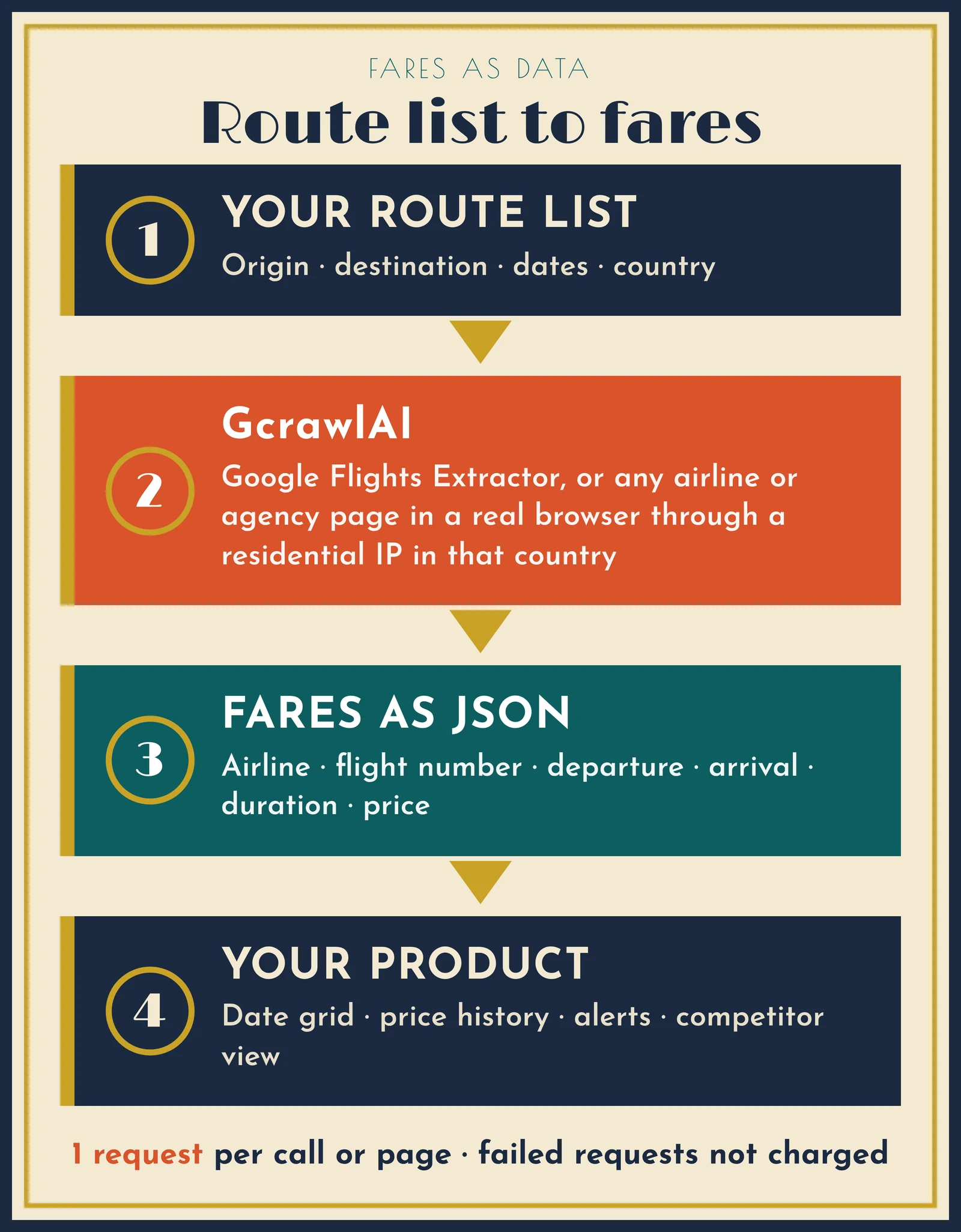
GcrawlAI isn't a place to book a ticket. It does the part the comparison sites won't do for you: it loads their results pages and gives you the fares back as structured data. Each page loads in a real browser through a residential IP in the country you pick, so you see the prices a traveller in that market sees.
- Google Flights Extractor: send a route, date and country; get back every listed flight with airline, flight number, departure, arrival, duration and price as JSON.
- Any airline or agency page: the scrape endpoint returns HTML, Markdown or JSON for any public results page, with
proxy_geosetting the country. - Everything in one request: JavaScript rendering, rotating residential IPs and stealth escalation for Cloudflare, DataDome, Akamai and PerimeterX. Blocked pages, CAPTCHAs, timeouts and server errors are never billed.
- Built for schedules: async batch jobs with webhooks, plus crawl, map and the Search API for finding fare pages.
- How you connect: the managed Cloud API, the Python SDK, MCP for AI agents, the Playground to try a request, or the MIT core on your own servers.
- Fare monitoring as a product: Flight Price Intelligence compares your flights with competitors' on the same route.
One request to the extractor looks like this:
extractor_request.sh
# One request: every flight Google Flights lists for Chennai -> Delhi on 18 Dec 2026, seen from India
curl -s -X POST https://gcrawlai.com/gc/api/v1/google-flights \
  -H "X-API-Key: gc-YOUR_API_KEY" \
  -H "Content-Type: application/json" \
  -d '{"trip_type": "oneway", "origin": "MAA", "destination": "DEL",
       "outbound_date": "2026-12-18", "proxy_geo": "IN"}'
# -> {"status": ..., "flights": [{"airline", "flight_number", "departure",
#                                 "arrival", "duration", "price"}, ...]}
Where it falls short: there's no booking, no consumer app and no ready-made date grid or alert screen; you build those on the data, as in the script below. The dedicated extractor covers Google Flights today; other airline and agency pages go through the scrape endpoint with your own selectors. Self-hosting the open-source core means bringing your own proxy accounts. For a single trip, the free sites below are the better tool.
"Every comparison site is a snapshot from one country at one minute. When a travel business asks us for fare data, the first thing we fix is where the page is loaded from, because the same seat can carry a different price in another market."
Rajesh Kannan, Co-Founder & CTO at Gramosoft
2. Google Flights: best for finding the cheapest dates
Best for: travellers who can move their dates. Type: metasearch. Price: free.
Google Flights shows the lowest total price for each day in its calendar, and its price graph shows fare trends by month or week, according to Google's help page. Results come in "Best" and "Cheapest" tabs, and the Cheapest tab adds itineraries from online travel agencies. You can track prices for your dates or for "Any dates", which emails you when the route's minimum price drops significantly over a month (tracking help).
Google doesn't sell tickets. You book with one of more than 300 airline and agency partners, sometimes without leaving Google through "Book on Google", which passes your details to the seller (booking help).
Where it falls short: Google says calendar prices are updated about once every 24 hours, so the cheapest day can be a day old; check the live price before you book. There has been no public fare API since QPX Express shut down on April 10, 2018.
3. Skyscanner: the widest list of sellers
Best for: seeing every airline and agency selling your flight. Type: metasearch. Price: free, with no booking fees.
Skyscanner compares 1,200+ vetted airlines, hotels, car hire firms and travel agencies, and says it is "not a travel agent or booking platform" (Skyscanner). Each provider carries a user-generated quality rating, which helps when the cheapest seller is one you've never heard of. Its partner pages put the audience at more than 160 million users a month, and its search is built for flexible plans, including open-ended destinations.
Where it falls short: you leave Skyscanner to book, and the seller handles any change or refund. Its Travel API is for established businesses with a large audience, and each application is reviewed.
4. KAYAK: price forecasts and Hacker Fares
Best for: deciding whether to book now or wait. Type: metasearch, part of Booking Holdings. Price: free.
KAYAK's Price Forecast uses historical data to say whether a route's price is likely to change within 7 days, and Price Alerts send an email or push notification when it moves (KAYAK). Its flexible calendar compares prices ±3 days from your dates, and Hacker Fares combine one-way tickets when that beats a return.
Where it falls short: a Hacker Fare is two separate tickets, so a schedule change on one doesn't move the other. Like any metasearch, KAYAK sends you to the seller to pay.
5. momondo: a second metasearch view
Best for: a cleaner second look at the same market. Type: metasearch. Price: free, with no booking fees.
momondo was founded in Copenhagen in 2006, doesn't sell tickets and has contractual partnerships with most of the 700+ provider sites in its results (momondo). It joined Booking Holdings in 2017 and is managed by KAYAK.
Where it falls short: because KAYAK runs both, checking momondo after KAYAK is a less independent second opinion than pairing either one with Google Flights or Skyscanner.
6. Kiwi.com: routes the airlines don't sell together
Best for: cheap or awkward routes that need two airlines. Type: online travel agency. Price: free to search; you buy from Kiwi.com.
Kiwi.com, founded in Brno in 2012, combines flights from airlines that don't normally work together into one itinerary, which it calls self-transfer and the industry calls virtual interlining (Kiwi.com). The Kiwi.com Guarantee, an optional add-on at checkout, covers missed connections on eligible bookings.
Where it falls short: on a self-transfer you collect your bags and check in again at each connection. Kiwi.com's partner platform, Tequila, has taken new partners by invitation only since May 2024.
7. Wego: Middle East and Gulf routes
Best for: flights to and within the Gulf. Type: metasearch with on-platform bookings. Price: free to search.
Wego describes itself as the largest online travel marketplace and number one travel app in the Middle East and North Africa, combining search with bookings on its own platform (Wego). It supports Arabic and local payment methods such as Tabby and MADA in the Gulf.
Where it falls short: its strengths are regional. For routes outside the Middle East and Asia, Google Flights and Skyscanner usually give a wider view.
8. ixigo: Indian flights, trains and buses in one app
Best for: domestic Indian trips where a train or bus may beat the flight. Type: online travel agency. Price: free to search; you book with ixigo.
ixigo began in 2007 as a flights metasearch and now sells flights, trains, buses, hotels and cabs, run by Le Travenues Technology (ixigo). Its train tools, such as PNR confirmation predictions, are why many Indian travellers already have it installed.
Where it falls short: as an agency it shows the fares it sells, not every seller's. Compare the final total, including any convenience fee, with a metasearch before paying.
9. MakeMyTrip: book and manage a whole trip
Best for: flights, hotels and holidays booked and managed in one place. Type: online travel agency. Price: free to search; you book with MakeMyTrip.
Founded in 2000, MakeMyTrip also owns Goibibo and redBus, and sells air tickets, hotels, holiday packages, rail and bus tickets and car hire (MakeMyTrip). One company handles your booking, changes and refunds.
Where it falls short: it shows one seller's prices, and Goibibo belongs to the same group, so checking both isn't an independent comparison. Search a metasearch first.
10. ITA Matrix: see how a fare is built
Best for: frequent flyers who care about fare classes and routings. Type: fare search tool from ITA Software, owned by Google. Price: free.
Matrix shows the fare basis codes, taxes and surcharges behind every itinerary, lets you force routings with routing codes, and searches a month-long calendar of the lowest fares. It is the engine Google bought before building Google Flights.
Where it falls short: you can't book on it; Google's own help says to take the details to an airline or travel agent (Matrix help). The interface takes practice, and there's no API.
Metasearch, travel agency or data tool: why the type matters
The type decides who you pay and who helps when a flight changes. A metasearch compares sellers and sends you to one; that seller handles changes and refunds. A travel agency sells the ticket and handles everything, but shows only its own fares. A data tool such as GcrawlAI collects fares for you to compare.
| Type | Who you pay | Who handles changes | Examples |
|---|---|---|---|
| Data tool | Nobody for the ticket; the tool bills per request | Not applicable: you book elsewhere | GcrawlAI |
| Metasearch | The airline or agency you click through to | That airline or agency | Google Flights, Skyscanner, KAYAK, momondo |
| Metasearch with bookings | Either the site or the seller, depending on the offer | Read the booking page for each offer | Wego |
| Online travel agency | The agency | The agency | Kiwi.com, ixigo, MakeMyTrip |
| Fare search tool | The airline or agent you take the itinerary to | That airline or agent | ITA Matrix |
If a cheap fare comes from a seller you don't know, check its rating on Skyscanner and its refund terms before paying. The difference between two sellers is often smaller than the cost of a refund that takes months.
How to compare a flight properly in five steps
The cheapest booking usually comes from changing the date, not the site. Start with a date grid, then list every seller for the cheapest day, check the same flight on a second site, and compare totals including fees and bags. Track the route if you're not ready, and re-check the live price before you pay.
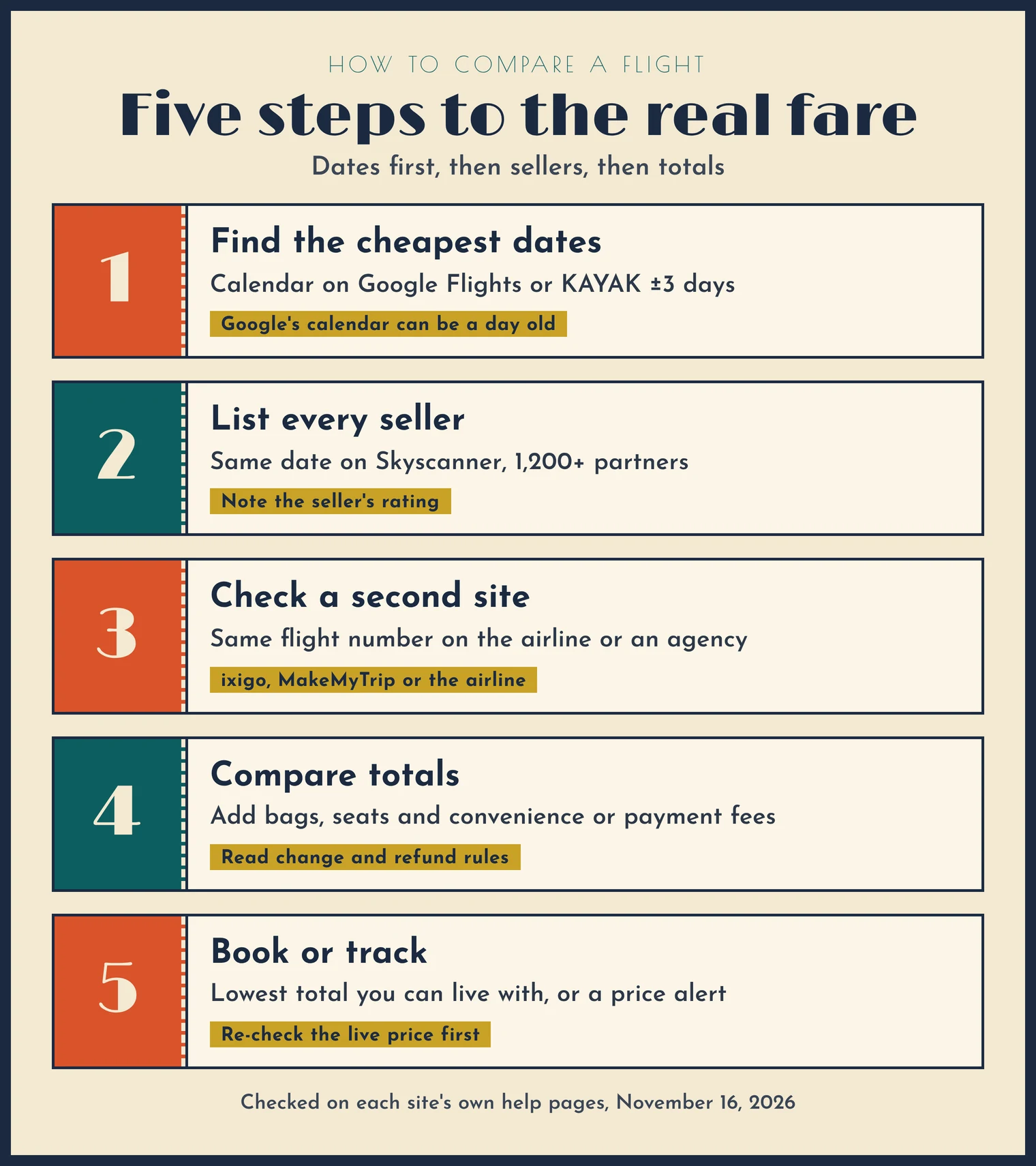
- Find the cheapest dates. Use the calendar on Google Flights or KAYAK's ±3 days view. Remember that Google's calendar prices can be up to a day old.
- List every seller for that date. Run the same search on Skyscanner, which compares the most partners.
- Check the same flight on a second site. Look up the flight number on the airline's own site or an agency such as MakeMyTrip or ixigo.
- Compare totals, not headline fares. Add checked bags, seat fees and any convenience or payment fee, and read the change and refund rules.
- Book or track. Book with the seller whose total is lowest and whose terms you can live with, or set a price alert on Google Flights or KAYAK.
"Check the seller's total, not the headline fare. On a results page the fare and the amount you finally pay can be two different numbers, and the gap is where most bad bookings come from."
Rajesh Kannan, Co-Founder & CTO at Gramosoft
Why the same flight costs different amounts on each site
Sites show different prices for the same seat for five reasons: they search different sellers, they refresh at different times, they price for the country you search from, they add different fees, and some sell self-transfer combinations that others don't. None of this means one site is wrong; it means a single site is a partial view.
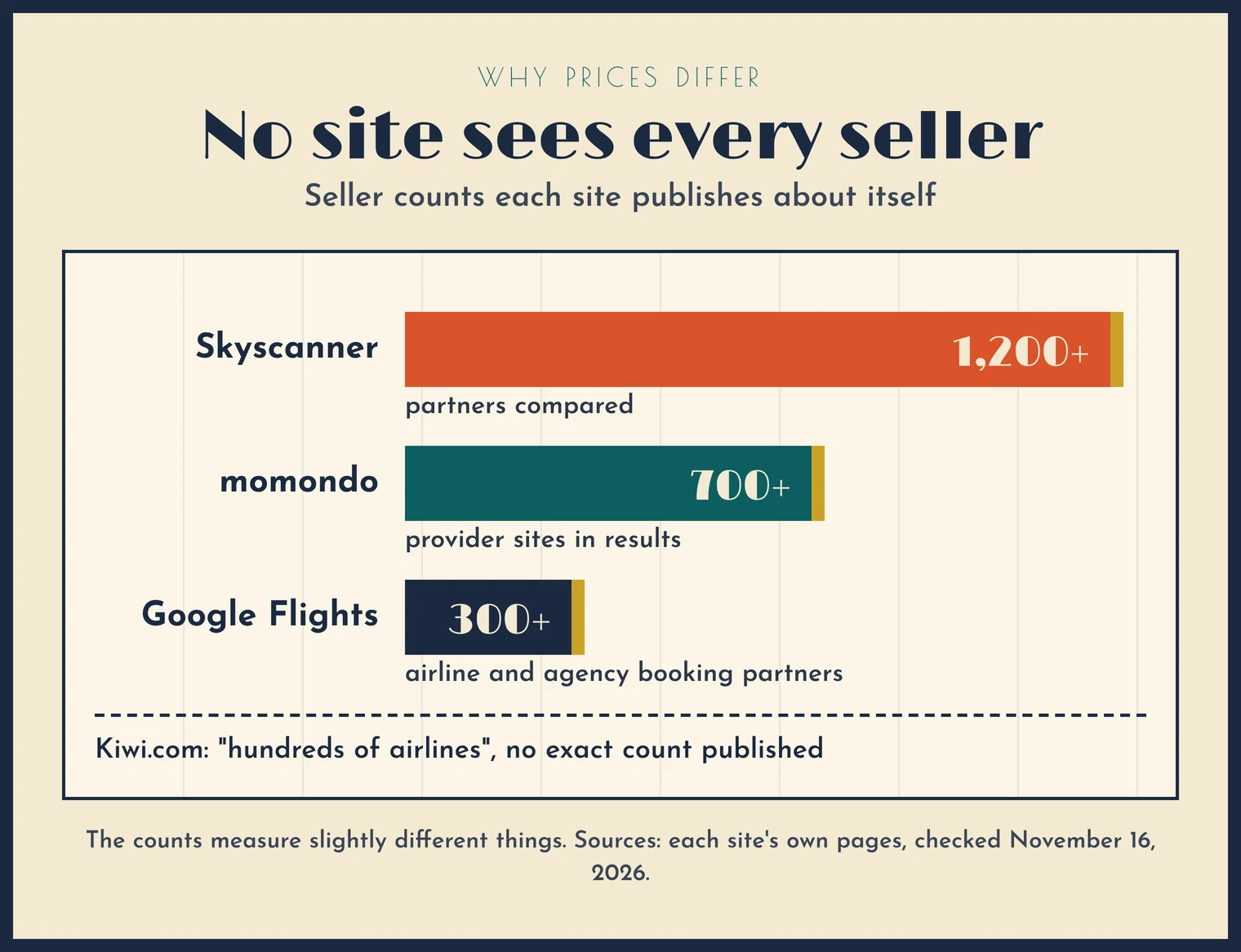
- Different sellers. Skyscanner compares 1,200+ partners, momondo's results come from 700+ provider sites, and Google Flights books through 300+ airline and agency partners. These counts measure slightly different things, but the point stands: no site sees every seller.
- Different refresh times. A cached fare can lag the live one; Google's calendar refreshes about once a day.
- Different markets. The country and currency of the search can change the fare. That's why GcrawlAI loads each page through an IP in the country you choose.
- Different fees. Agencies can add convenience or payment fees at checkout, and low-cost fares often exclude checked bags.
- Different ticket structures. Kiwi.com's self-transfers and KAYAK's Hacker Fares can undercut a single ticket, with less protection if something changes.
Need fares as data? The big sites won't sell you an API
If you run a travel business or a fare-alert product, you need these comparisons as data, not as a page you read. In 2026 none of the big sites offers a self-serve fare API. You either sign a partner contract, wait for an invitation, or collect the public results pages yourself with a scraping API such as GcrawlAI.
| Source | Fare API access, November 2026 | Source checked |
|---|---|---|
| GcrawlAI | Self-serve: sign up, get a key, 50 free requests a month | GcrawlAI pricing |
| Google Flights / QPX Express | Shut down April 10, 2018; enterprise contracts only | Engadget |
| Skyscanner Travel API | Established businesses with a large audience; applications reviewed | Skyscanner docs |
| Kiwi.com Tequila | New partners by invitation only since May 2024 | Kiwi.com media |
| Amadeus Self-Service APIs | Keys disabled July 17, 2026; Enterprise APIs remain | PhocusWire |
The script below rebuilds Google Flights' date grid in code. It asks the GcrawlAI Google Flights Extractor for each day around a target date, from India, and keeps the cheapest fare per day. Run it on a schedule and store the rows, and you have your own price history and alerts. For the full method, including airline sites, see our flight data scraping guide, how to scrape Google Flights prices and tracking prices across airlines.
fare_date_grid.py
"""Build your own date grid for one route with the GcrawlAI Google Flights Extractor.

Checks the cheapest one-way fare for each day around a target date, from a chosen
country, and prints the spread. Fares are what the results page showed at that
moment: confirm the total (fees, bags) on the seller's page before paying.

pip install requests
export GCRAWL_API_KEY=gc-YOUR_API_KEY
python fare_date_grid.py MAA DEL 2026-12-18
"""
import datetime as dt
import os
import re
import sys

import requests

API = "https://gcrawlai.com/gc/api/v1/google-flights"
KEY = os.environ.get("GCRAWL_API_KEY", "gc-YOUR_API_KEY")


def money(value):
    """'₹5,890' or 5890 -> 5890.0; None if there is no number."""
    if isinstance(value, (int, float)):
        return float(value)
    m = re.search(r"\d[\d,]*(?:\.\d+)?", str(value or ""))
    return float(m.group().replace(",", "")) if m else None


def flights_for(origin, dest, day, geo="IN", post=requests.post):
    body = {"trip_type": "oneway", "origin": origin, "destination": dest,
            "outbound_date": day.isoformat(), "proxy_geo": geo}
    r = post(API, json=body, headers={"X-API-Key": KEY}, timeout=180)
    r.raise_for_status()
    return r.json().get("flights") or []


def date_grid(origin, dest, center, spread=3, geo="IN", post=requests.post):
    rows = []
    for offset in range(-spread, spread + 1):
        day = center + dt.timedelta(days=offset)
        priced = [(money(f.get("price")), f) for f in flights_for(origin, dest, day, geo, post)]
        priced = [(p, f) for p, f in priced if p]
        if not priced:
            rows.append((day, None, "no priced flights returned"))
            continue
        p, f = min(priced, key=lambda x: x[0])
        rows.append((day, p, f"{f.get('airline', '?')} {f.get('flight_number', '')} dep {f.get('departure', '?')}".strip()))
    return rows


def report(origin, dest, rows):
    ok = [r for r in rows if r[1]]
    print(f"{origin} -> {dest}, cheapest one-way fare per day")
    for day, price, note in rows:
        print(f"  {day:%a %d %b}  {('%10s' % f'{price:,.0f}') if price else '         -'}  {note}")
    if ok:
        lo, hi = min(ok, key=lambda r: r[1]), max(ok, key=lambda r: r[1])
        print(f"cheapest day: {lo[0]:%a %d %b} at {lo[1]:,.0f}; dearest: {hi[0]:%a %d %b} at {hi[1]:,.0f}")
        print(f"moving the date saves {hi[1] - lo[1]:,.0f} ({(hi[1] - lo[1]) / hi[1]:.0%} of the dearest day)")
    print(f"{len(rows)} requests, one per day checked")


if __name__ == "__main__":
    o, d, day = sys.argv[1], sys.argv[2], dt.date.fromisoformat(sys.argv[3])
    report(o, d, date_grid(o, d, day))
We checked the logic offline, with a stub in place of the API and made-up fares. The output shows the shape of the result, not real prices:
demo_output.txt (printed output)
MAA -> DEL, cheapest one-way fare per day
  Tue 15 Dec       6,105  Carrier B B 204 dep 21:40
  Wed 16 Dec       5,480  Carrier B B 204 dep 21:40
  Thu 17 Dec       5,890  Carrier C C 88 dep 13:05
  Fri 18 Dec       7,950  Carrier A A 611 dep 06:10
  Sat 19 Dec       8,640  Carrier A A 615 dep 18:25
  Sun 20 Dec           -  no priced flights returned
  Mon 21 Dec       6,760  Carrier C C 92 dep 09:30
cheapest day: Wed 16 Dec at 5,480; dearest: Sat 19 Dec at 8,640
moving the date saves 3,160 (37% of the dearest day)
7 requests, one per day checked
Two things the test confirms: a day that returns no priced flights (here, a sold-out day) is reported, not silently skipped, and the spread between the cheapest and dearest day is printed, because that's the number that tells a traveller or a revenue team whether moving the date is worth it.
What tracking fares with GcrawlAI costs
Each extractor call or page load is one request, whatever rendering or proxies it needs, and failed requests are never charged. Monthly requests are routes × dates checked × checks a day × 30. For one trip the free comparison sites cost nothing, so GcrawlAI only makes sense at volume.
- 20 routes × 7 dates, once a day: 140 requests a day, 4,200 a month. Starter covers it.
- 20 routes × 30 dates, once a day: 600 a day, 18,000 a month. Still Starter, at $29.
- 50 routes × 30 dates, once a day: 1,500 a day, 45,000 a month. Growth, at $79, with async jobs and webhooks.
| Plan | Price | Requests/month | Concurrent | Per 1,000 | Overage per 1,000 |
|---|---|---|---|---|---|
| Free | $0, no card | 50 | 2 | – | – |
| Starter | $29 | 20,000 | 10 | $1.45 | $1.60 |
| Growth | $79 | 80,000 | 35 | $0.99 | $1.10 |
| Pro | $199 | 250,000 | 50 | $0.80 | $0.90 |
| Scale | $499 | 750,000 | 100 | $0.67 | $0.75 |
| Enterprise | Volume pricing | 2M+ | Custom | – | – |
| Self-hosted | $0 (MIT) | Your servers | Your workers | Infrastructure only | – |
Annual billing charges 10 months for 12, unused requests on paid plans roll over once, and Indian customers are billed in INR with a GST invoice. Every plan, Free included, has every endpoint, JavaScript rendering, residential IP rotation and stealth escalation. See pricing.
Which flight comparison site should you use?
Pick by the job, not the brand. For one trip, pair a date tool with a wide seller list and book where the total is lowest. For India, add an agency that sells trains too. For many routes, every day, collect the fares as data. GcrawlAI fits each row differently, from none at all to the whole job.
| If you need… | Use | Where GcrawlAI fits |
|---|---|---|
| The cheapest dates for one trip | Google Flights, then KAYAK's calendar | Not needed for one trip; at scale, the date-grid script does the same for every route |
| Every seller for one flight | Skyscanner | Scrape each seller's page from the right country to compare totals |
| To know whether to wait | KAYAK Price Forecast, Google Flights tracking | Daily snapshots give you your own price history |
| A route no single airline sells | Kiwi.com | Collect the route's fares across dates to spot when it's cheapest |
| Gulf and Middle East flights | Wego | Set proxy_geo to a Gulf country to see local prices |
| Indian trips with trains or buses | ixigo or MakeMyTrip | Compare their totals with the airline's own page |
| Fare classes and routings | ITA Matrix | Not a fit: Matrix is the tool for this |
| Fares for many routes, every day | GcrawlAI | The whole job: Google Flights Extractor, scrape endpoint, async batches and webhooks |
"Comparison sites are built for one traveller and one booking. The moment you need the same comparison for fifty routes every morning, you need it as data, and that's the gap we built GcrawlAI to fill."
Rajesh Kannan, Co-Founder & CTO at Gramosoft
Is it legal to collect fares from these sites?
Collecting public fares is common, but it isn't automatically allowed everywhere. Read each site's terms, collect only public pages, stay out of logins and booking flows, keep your request rate modest, and never store travellers' personal data. Where a partner API is open to you, it's the cleaner route. This isn't legal advice.
GcrawlAI loads public pages; it doesn't sign in, hold seats or complete bookings, and it doesn't give you permission a site's terms withhold. For the wider picture, read What Is Web Scraping? How It Works, Uses & Legality.
Frequently asked questions
What is the best flight comparison site?
No single site is cheapest every time. For one trip, use Google Flights to find the cheapest dates and Skyscanner, which compares 1,200+ partners, to see every seller, then confirm the total on the seller's page. To compare many routes as data, use GcrawlAI.
Is Google Flights or Skyscanner better?
They're better at different things. Google Flights is best for dates, with a calendar of the lowest price per day and a price graph. Skyscanner is best for sellers, comparing 1,200+ partners. Use Google Flights to pick the day and Skyscanner to pick who to buy from.
Do flight comparison sites sell tickets?
Metasearch sites such as Google Flights, Skyscanner, KAYAK and momondo don't; they send you to the airline or agency. Kiwi.com, ixigo and MakeMyTrip are travel agencies that sell the ticket themselves. Wego does both. GcrawlAI sells no tickets; it returns fares as data.
Why do prices differ between flight comparison sites?
Each site searches a different set of sellers, refreshes at different times, prices for the country you search from and adds different fees. Google says its calendar prices update about once every 24 hours, so always check the live total before paying.
Is there a free flight price API in 2026?
Not from the big sites. Google shut QPX Express in 2018, Skyscanner's Travel API is for approved businesses, Kiwi.com's Tequila is invitation-only and Amadeus closed its self-service APIs on July 17, 2026. GcrawlAI's Google Flights Extractor is self-serve, with 50 free requests a month.
Is GcrawlAI open source, and is it a booking site?
GcrawlAI's core is MIT-licensed and self-hostable, and there's a managed Cloud API, Python SDK and MCP server. It isn't a booking site: it collects fares from comparison sites, airlines and agencies, one request per page, with failed requests never charged.
How many sites should I check before booking a flight?
Two or three is enough: one date tool such as Google Flights, one wide metasearch such as Skyscanner, and the airline's own site for the same flight. Checking a few nearby dates usually saves more than checking a fourth site.
Related guides
- Flight Data Scraping: How to Extract Airline Prices and Schedules
- Residential vs Datacenter Proxies, and How IP Rotation Works (2026 Guide)
- How to Scrape Imperva (Incapsula)-Protected Websites
- Extract structured data from any website
- What Is Web Scraping? How It Works, Uses & Legality
- Model Context Protocol (MCP) Web Scraping: How to Connect AI Agents to the Live Web
- 10 Best User Agents for Web Scraping in 2026: Current Strings, Matching Headers and Rotation
- Best Free Proxy Sites for Web Scraping in 2026
- 7 Cheapest Reliable Web Scraping APIs for High Volume in 2026