By Rajesh Kannan, Co-Founder & CTO, Gramosoft · Last updated: · Tracker code run against three local mock airline sites on October 24, 2026; Google Flights and Duffel docs checked the same day
Airfares change many times a day, and the same seat can cost a different total on the airline's site, an online travel agency and a metasearch engine. Tracking that by hand across several airlines doesn't work. This guide shows three ways to track flight prices automatically, from free alerts to a small Python tracker that checks several airlines, compares the real total price, keeps a history and alerts you when a fare drops. It uses GcrawlAI to fetch the fare pages, and if you'd rather not write parsers at all, GcrawlAI's Flight Price Intelligence API returns structured fares directly.
TL;DR
- For one trip: turn on Google Flights "Track prices" or a KAYAK or Skyscanner alert. Free, but each shows one platform's view and alerts only by email or app.
- For many routes, your own rules or business use: build a tracker. Fetch each airline's fare page, parse it, convert every fare to the total you'd actually pay, store each check, and alert on a percentage drop or a target price.
- GcrawlAI does the fetching: JavaScript rendering, rotating residential proxies, anti-bot handling and CAPTCHA solving are one request, with no credit multipliers, and failed requests are never charged. Its Flight Price Intelligence API goes further and returns fares, schedules and seat availability as structured JSON.
- Compare totals, not headline fares. In our demo, one site's advertised ₹4,750 fare was really ₹5,049 once its ₹299 convenience fee was added.
- Check politely: every 6 to 12 hours is enough for most trips, one page per site per check, tightening only in the last two weeks.
How do you track flight prices across multiple airlines automatically? Pick your routes and dates, list the airline and booking pages that sell them, and fetch each page on a schedule. Parse every fare into the same format, add fees so you compare total prices, save each check to a database, and send an alert when the cheapest total drops or falls below your target.
Three ways to track flight prices automatically
There are three practical ways to track fares across airlines: free alerts from metasearch apps, page monitors that watch a fare page for changes, and your own tracker built on a scraping API or a flight API. They differ in how many airlines and routes they cover, what rules you can set, and where the data ends up.
| Approach | Best for | Covers | Alert rules | You get the data? | Effort |
|---|---|---|---|---|---|
| Your own tracker with GcrawlAI | Many routes, business use, custom rules | Any airline, OTA or metasearch page you choose | Anything: % drop, target, per airline, time window | Yes, full history in your database | An afternoon to set up |
| GcrawlAI Flight Price Intelligence API | Teams that want fare data without writing parsers | Airline booking engines and travel aggregators | Recurring monitors every 15 minutes, hourly or daily; you set the rules | Yes, structured JSON by API or webhook | Minutes to first data |
| Metasearch alerts (Google Flights, KAYAK, Skyscanner) | One or two personal trips | Sources inside that platform | The platform's own threshold | No, only emails | Minutes |
| Page-change monitors | Watching a handful of fare pages | Any page with a stable URL | Price changed or crossed a number | Partly, as change history | Minutes per page |
| Flight APIs (for example Duffel) | Products that also book tickets | Airlines connected to that API | Anything you code | Yes | Days, plus an account and approval |
The quick option: free flight price alerts
If you're tracking one trip for yourself, free alerts are enough. Google Flights, KAYAK and Skyscanner let you save a search and get an email or app notification when the price moves. Set them on your exact dates, add a flexible-dates alert if the tool offers one, and check the airline's own site before you book.
On Google Flights you search, then turn on Track prices for the route or for a specific flight. Google's help page says you get email updates "when the price for a flight or route you're tracking changes significantly", and that tracking "Any dates" emails you when the route's minimum price "drops significantly over a month". KAYAK and Skyscanner work the same way from a saved search.
Their limits are why people build trackers:
- One platform's view. Each tool shows the sources it indexes. A fare on the airline's own site or a smaller agency can be missing.
- Headline fares. Alerts usually show the fare before convenience fees, seat or baggage charges, so the cheapest alert isn't always the cheapest ticket.
- Fixed thresholds. You can't say "only BlueJet and Skyline, nonstop, before 10 am, under ₹5,200".
- No data. You get emails, not a price history you can chart, share or feed into pricing decisions.
How to build your own multi-airline flight price tracker
A flight price tracker has five parts: a list of routes and sources, a fetcher that returns each fare page fully rendered, one small extractor per site, a database of every check, and alert rules. The example below tracks Chennai to Delhi across three airline sites, adds hidden fees so totals are comparable, and alerts on drops and targets.
Step 1: list your routes and sources
Start with the routes and dates you care about and the pages that sell them: the airline's own results page, one or two online travel agencies and a metasearch page. Use URLs where the route and date sit in the address itself, so the same URL reproduces the same search every time.
Each source gets a URL template and an extractor, because every site lays out fares differently. Here one site uses a plain table, one keeps fares in a JSON blob and adds a convenience fee at checkout, and one builds its fare cards with JavaScript after the page loads:
"""Where to look and how to read each fare page. One entry per airline or booking site."""
import json, re
from bs4 import BeautifulSoup

ROUTES = [  # origin, destination, departure date, alert if total fare falls below this (INR)
    {"origin": "MAA", "dest": "DEL", "date": "2026-12-18", "target": 5200},
]

def money(text):
    """'₹ 5,349' or 'INR 5349.00' -> 5349.0"""
    return float(re.sub(r"[^\d.]", "", text))

# --- extractors: each takes rendered HTML and returns a list of normalised fares -------------
def parse_skyline(html):
    """Airline A: a plain HTML results table, prices already include taxes."""
    soup, rows = BeautifulSoup(html, "html.parser"), []
    for tr in soup.select("table.fares tbody tr"):
        c = [td.get_text(strip=True) for td in tr.select("td")]
        rows.append({"flight": c[0], "depart": c[1], "arrive": c[2], "stops": int(c[3]), "total": money(c[4])})
    return rows

def parse_bluejet(html):
    """Airline B: fares sit in a JSON blob; the convenience fee is added at checkout, so add it here."""
    blob = BeautifulSoup(html, "html.parser").select_one("script#fare-data").string
    data = json.loads(blob)
    fee = data["convenience_fee"]
    return [{"flight": f["no"], "depart": f["dep"], "arrive": f["arr"], "stops": f["stops"],
             "total": f["base"] + f["taxes"] + fee} for f in data["flights"]]

def parse_coastal(html):
    """Airline C: cards built by JavaScript after the page loads (needs a rendered page)."""
    soup, rows = BeautifulSoup(html, "html.parser"), []
    for card in soup.select("div.flight-card"):
        rows.append({"flight": card["data-flight"], "depart": card.select_one(".dep").text, "arrive": card.select_one(".arr").text,
                     "stops": int(card["data-stops"]), "total": money(card.select_one(".price").text)})
    return rows

SOURCES = {
    "Skyline Air": {"url": "https://www.skyline.example/search?from={origin}&to={dest}&date={date}", "parse": parse_skyline},
    "BlueJet":     {"url": "https://book.bluejet.example/flights/{origin}-{dest}/{date}", "parse": parse_bluejet},
    "Coastal":     {"url": "https://coastal.example/fares?o={origin}&d={dest}&dt={date}", "parse": parse_coastal},
}
The airlines here are fictional, so the code runs against a local demo. For real sites, open the results page in your browser's developer tools and point each extractor at the elements or JSON that hold the fares. When a site changes its layout, only that one extractor needs fixing.
Step 2: fetch, normalise, store and alert
The tracker fetches every source for every route, turns each fare into the same record (airline, flight number, times, stops and total price), saves the whole check to SQLite, and compares the new cheapest total with the previous check. It alerts when the cheapest fare falls 5% or more, or drops below your target.
"""Track fares for each route across several airlines, keep the history, and alert on real drops.

    pip install gcrawl-sdk beautifulsoup4
    python tracker.py            # run it from cron every few hours
"""
import sqlite3
import time
from datetime import datetime, timezone

import requests
from gcrawl_sdk import GcrawlClient, ScrapeOptions   # pip install gcrawl-sdk
from sources import ROUTES, SOURCES

client = GcrawlClient(api_key="gc-YOUR_API_KEY")
DB = sqlite3.connect("fares.db")
DB.execute("""CREATE TABLE IF NOT EXISTS fares (checked_at TEXT, route TEXT, date TEXT, source TEXT,
              flight TEXT, depart TEXT, arrive TEXT, stops INT, total REAL)""")
DROP_ALERT = 0.05          # alert when the cheapest fare falls 5% or more since the last check
WEBHOOK = None             # a Slack or Discord incoming-webhook URL, if you want alerts there

def fetch_html(url):
    """Rendered HTML of a fare page. JavaScript rendering, rotating proxies and anti-bot handling
    are part of the one GcrawlAI request, and a request that fails is not charged."""
    result = client.scrape(url=url, options=ScrapeOptions(html_enabled=True, markdown_enabled=False,
                                                          proxy_geo="IN"), wait=True)
    return result.html or ""

def check_route(r, fetch=fetch_html):
    route, now, found = f"{r['origin']}-{r['dest']}", datetime.now(timezone.utc).isoformat(timespec="milliseconds"), []
    for name, src in SOURCES.items():
        try:
            rows = src["parse"](fetch(src["url"].format(**r)))
        except Exception as exc:                       # one broken site must not stop the others
            print(f"  {name}: skipped ({exc.__class__.__name__})")
            continue
        for f in rows:
            found.append((now, route, r["date"], name, f["flight"], f["depart"], f["arrive"], f["stops"], f["total"]))
        time.sleep(2)                                  # be gentle: one page per site per check
    if not found:
        return
    prev = DB.execute("SELECT MIN(total) FROM fares WHERE route=? AND date=? AND checked_at=(SELECT MAX(checked_at) "
                      "FROM fares WHERE route=? AND date=?)", (route, r["date"], route, r["date"])).fetchone()[0]
    DB.executemany("INSERT INTO fares VALUES (?,?,?,?,?,?,?,?,?)", found); DB.commit()
    best = min(found, key=lambda x: x[-1])
    print(f"{route} {r['date']}: {len(found)} fares from {len({x[3] for x in found})} sites, "
          f"cheapest {best[3]} {best[4]} at ₹{best[-1]:,.0f}" + (f" (was ₹{prev:,.0f})" if prev else ""))
    reasons = []
    if prev and best[-1] <= prev * (1 - DROP_ALERT):
        reasons.append(f"down {1 - best[-1] / prev:.0%} since last check")
    if best[-1] <= r["target"]:
        reasons.append(f"below your ₹{r['target']:,} target")
    if reasons:
        alert(f"✈ {route} on {r['date']}: {best[3]} {best[4]} {best[5]} is ₹{best[-1]:,.0f}, " + " and ".join(reasons))

def alert(text):
    print("  ALERT:", text)
    if WEBHOOK:
        requests.post(WEBHOOK, json={"text": text, "content": text}, timeout=10)

if __name__ == "__main__":
    for r in ROUTES:
        check_route(r)
A few details matter more than they look:
- One broken site never stops the run. Each source is wrapped in its own try block, so a layout change on one airline only skips that airline.
- Store every fare, not just the cheapest. Keeping every row lets you answer later questions: which airline undercuts on Fridays, how fast the cheapest bucket sells out, how prices move in the last fortnight.
- Fetch from the country you'd book from.
proxy_geo="IN"asks for an Indian IP, so you see Indian prices and currency rather than a foreign version of the page.
Step 3: run it and read the history
We ran the tracker three times against three local mock airline sites, with fares changing between checks. The JavaScript site was rendered in a headless browser, the way GcrawlAI renders real pages. A small report script prints the cheapest fare per airline at each check from the stored history:
"""Cheapest fare per airline at each check, from the SQLite history."""
import sqlite3
db = sqlite3.connect("fares.db")
rows = db.execute("""SELECT checked_at, source, MIN(total) FROM fares WHERE route='MAA-DEL'
                     GROUP BY checked_at, source ORDER BY checked_at, source""").fetchall()
checks = sorted({r[0] for r in rows}); sources = sorted({r[1] for r in rows})
print(f"{'check':<8}" + "".join(f"{s:>14}" for s in sources))
for i, c in enumerate(checks, 1):
    best = {s: t for ch, s, t in rows if ch == c}
    print(f"{'#' + str(i):<8}" + "".join(f"{'₹' + format(best[s], ',.0f') if s in best else '-':>14}" for s in sources))
Here is the output of the three checks and the report:
$ python demo.py
--- check #1
MAA-DEL 2026-12-18: 6 fares from 3 sites, cheapest BlueJet BJ 641 at ₹5,049
  ALERT: ✈ MAA-DEL on 2026-12-18: BlueJet BJ 641 10:30 is ₹5,049, below your ₹5,200 target
--- check #2
MAA-DEL 2026-12-18: 6 fares from 3 sites, cheapest BlueJet BJ 641 at ₹5,289 (was ₹5,049)
--- check #3
MAA-DEL 2026-12-18: 6 fares from 3 sites, cheapest Skyline Air SK 101 at ₹4,990 (was ₹5,289)
  ALERT: ✈ MAA-DEL on 2026-12-18: Skyline Air SK 101 06:10 is ₹4,990, down 6% since last check and below your ₹5,200 target

$ python report.py
check          BlueJet       Coastal   Skyline Air
#1              ₹5,049        ₹5,640        ₹5,890
#2              ₹5,289        ₹5,480        ₹5,890
#3              ₹5,599        ₹5,480        ₹4,990
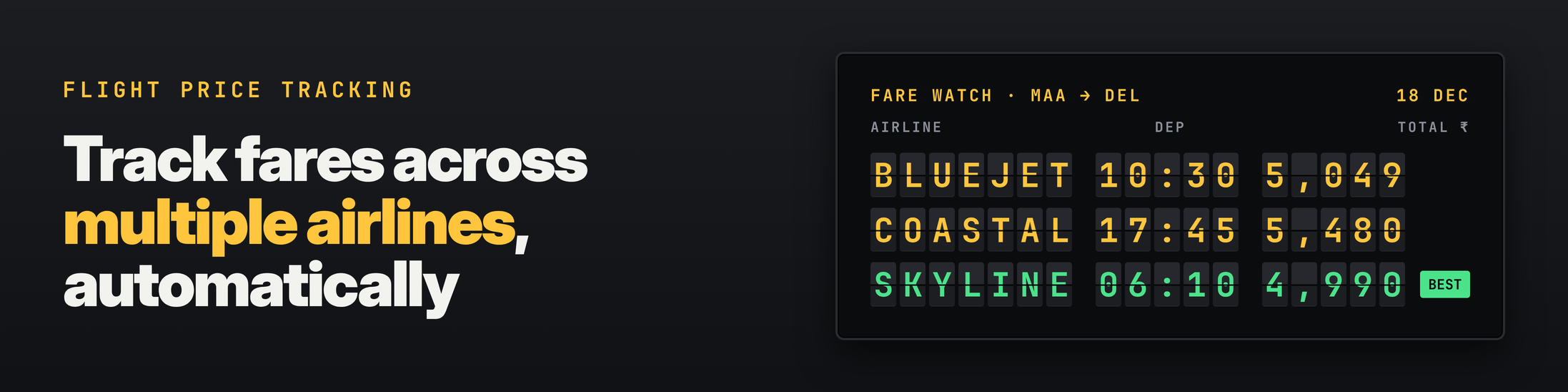
Two things show up straight away. On the first check, BlueJet advertised ₹4,750, but the tracker added its ₹299 convenience fee and stored ₹5,049, the price you'd actually pay. By the third check, BlueJet's advertised ₹5,300 was really ₹5,599, and Skyline Air's ₹4,990 nonstop was the cheapest ticket by a clear margin, which set off both alerts.
"The hard part of fare tracking isn't fetching pages. It's making two prices comparable. If one site shows taxes and another adds a fee at checkout, your tracker is comparing different things, and its alerts will lie to you."
Rajesh Kannan, Co-Founder & CTO at Gramosoft
Step 4: schedule it
Run the tracker from cron, a GitHub Actions schedule or any job runner. Every six hours is plenty for a trip weeks away. Close to departure, when fares move fastest, tighten it to every two hours. Each check costs one request per site per route, so ten routes on three sites four times a day is 120 requests a day.
# Check every 6 hours; tighten to every 2 hours in the last two weeks before departure
0 */6 * * *  cd /opt/fare-tracker && /opt/fare-tracker/venv/bin/python tracker.py >> tracker.log 2>&1
Send alerts where you'll see them. The tracker posts to any Slack or Discord incoming webhook, and the same alert() function can write to Telegram, email or a Google Sheet.
Why use GcrawlAI to fetch fare pages
Airline and travel sites are some of the hardest pages to fetch reliably. Fares load with JavaScript, prices depend on the visitor's country, and most sites run bot protection. GcrawlAI handles that inside one request, so your tracker code stays about parsing and alerting rather than browsers and proxies.
- Rendered pages: JavaScript runs before you get the HTML, so fare cards built in the browser are there to parse.
- Country-specific IPs: rotating residential proxies with a
proxy_geosetting show you local prices and currency. - Anti-bot and CAPTCHA handling are part of the same request, with no credit multipliers for any of them.
- Failed requests are never charged, which matters when one airline's site has a bad hour.
- Python SDK, async batch jobs with webhooks for large route lists, and MCP so an AI agent can check a fare on request.
- Pricing: a free plan with no card, paid plans from $0.98 to $6.33 per 1,000 requests, and an MIT-licensed core on GitHub that you can self-host for nothing.
With the scraping API you write one small extractor per site, and you'll update it when a site redesigns. If that upkeep is the part you'd rather skip, use the Flight Price Intelligence API below.
Skip the parsers: GcrawlAI Flight Price Intelligence API
Writing and maintaining one extractor per airline is the part of a fare tracker that takes the most upkeep. GcrawlAI's Flight Price Intelligence API does that part for you: it monitors airline booking engines and travel aggregators and returns live fares, flight schedules and seat availability as structured data.
- Fares by cabin: Economy, Premium Economy, Business and First, for one-way, round-trip and multi-city searches.
- Structured JSON: flight numbers, IATA codes, timestamps, layover durations and baggage allowances, so there's nothing to parse.
- Recurring monitors: route checks every 15 minutes, hourly or daily, instead of your own cron job.
- Geo-targeted pricing: residential proxy locations to see the fares and currency a local traveller sees.
- Delivery your way: synchronous responses for live lookups, async batch jobs for large route lists, and webhooks to your endpoint or cloud storage.
Use the DIY tracker above when you want full control over a few sites. Use the Flight Price Intelligence API when you're tracking many routes and carriers for a travel product, dynamic pricing or competitive intelligence, and you'd rather spend your time on the analysis than on parsers.
Where it falls short: neither the scraping API nor the Flight Price Intelligence API books tickets. If your product sells seats, pair it with a booking API such as Duffel.
Official flight APIs: when to use them instead
Flight APIs give you structured fares straight from airline and distribution systems, with no parsing and no layout changes to chase. They're the right choice if you also sell or book tickets. They're harder to get: most need a business account and approval, and they cover the airlines connected to them, not every site.
- Duffel lets you search and book. Its docs describe creating an "offer request" for passengers and journeys, getting back offers ("a bundle of flights you can buy from an airline at a particular price"), and creating an order to book.
- Amadeus was the common free starting point through its self-service developer portal. Several API providers report that the portal was wound down in 2026, with Amadeus pointing developers to its enterprise APIs, so check current access with Amadeus before planning around it.
- Airline NDC programmes give approved partners direct fares from a single airline.
Many teams use both: an API where they have access, and a scraping API for airline sites, low-cost carriers and OTAs the API doesn't cover, or to check the price a real visitor sees.
Common mistakes when tracking airfares
Most fare trackers that "don't work" fail in the same few ways: they compare prices that aren't comparable, use URLs that expire, check too often, or watch a single source. Fixing these matters more than any clever prediction, because an alert is only useful if the price in it is the price you can actually book.
- Comparing headline fares. Add convenience fees, payment charges and any fee the site adds at checkout before you compare sources.
- Session-bound URLs. Some searches embed a temporary token. Use URLs where the route and date are plain parameters, or rebuild the search URL from your route on each run.
- Ignoring geography and currency. The same flight can show different prices and currencies by country. Fetch from the country you'd book from, and store the currency.
- Checking every few minutes. Fares don't change that often for most trips, and hammering a site gets you rate limited. One page per site every few hours is enough.
- Alerting on every change. Alert on a percentage drop or a target, not every rupee. Otherwise people stop reading the alerts.
- Not keeping history. Without stored checks you can't tell a real drop from normal noise, or learn how a route behaves before departure.
"Store every check. After a month you stop guessing when to buy on your routes, because you can see how they actually behave."
Rajesh Kannan, Co-Founder & CTO at Gramosoft
Is it legal to track flight prices by scraping?
Collecting publicly displayed fares at a modest rate is common practice, but it isn't automatically allowed everywhere. Many airline and travel sites restrict automated access in their terms, and the rules differ by country. Read the terms of each site you track, keep request rates low, and use an official API where you have access.
Track public fare pages only, never pages behind a login, stay well under any rate limit, don't collect anyone's personal data, and don't republish a site's content as your own. If you track fares commercially, take legal advice for your market. Our guide to what web scraping is covers the basics. This guide doesn't cover beating CAPTCHAs by hand or getting around access controls.
Frequently asked questions
How often should I check flight prices?
Every 6 to 12 hours is enough for a trip several weeks away. In the last two weeks before departure, fares move faster, so check every two hours. Checking every few minutes adds little and can get you rate limited.
Why does the same flight show different prices on different sites?
Sites show different things: some include taxes, some add convenience or payment fees at checkout, and agencies may have their own promotions. Prices can also differ by country and currency. Compare total prices from the same country to see the real difference.
Can I track the price of a flight I've already booked?
Yes. Track the same route, date and flight number, and compare the current total with what you paid. Whether you can claim a drop depends on your fare rules: changeable fares often return the difference as credit, while basic fares usually don't.
Do I need a flight API to build a fare tracker?
No. A scraping API such as GcrawlAI can fetch rendered fare pages from airline and travel sites, and you parse the prices yourself, or GcrawlAI's Flight Price Intelligence API returns them already structured. A flight API like Duffel gives structured data and booking, but needs an account and covers only connected airlines.
How does GcrawlAI help with flight price tracking?
GcrawlAI returns airline and travel pages fully rendered, from country-specific residential IPs, with anti-bot and CAPTCHA handling included in one request and no credit multipliers. Failed requests are never charged. If you'd rather not write parsers, its Flight Price Intelligence API returns fares, schedules and seat availability as structured JSON, with recurring monitors and webhooks.
Can I get alerts on Slack, Telegram or email?
Yes. The tracker's alert function posts to any Slack or Discord incoming webhook, and you can extend it to Telegram, email or a spreadsheet. Alert on a percentage drop or a target price so you only hear about fares worth acting on.