By Rajesh Kannan, Co-Founder & CTO, Gramosoft · Last updated: · Code checked against llama-index-core 0.14.25 and gcrawl-sdk 0.5.8 (PyPI, October 25, 2026)
LlamaIndex is very good at everything that happens after a page arrives: splitting, embedding, retrieval, agents. Getting the page is the weak spot. A plain web reader indexes whatever the server sends back, and that is often a bot challenge, an empty JavaScript shell or three screens of sidebar links.
This guide starts with the GcrawlAI route: a small LlamaIndex reader that loads a list of URLs, a whole site or one section of a site as clean Markdown. Then it covers the parts most tutorials skip: an architecture you can copy, re-crawls that only re-embed changed pages, and an agent that searches the live web when the index is out of date.
TL;DR
- Fastest route: wrap the GcrawlAI Python SDK in a LlamaIndex
BaseReader. It returns rendered Markdown for any URL, a full-site crawl, or a mapped section, ready forVectorStoreIndex. - One request includes everything: JavaScript rendering, rotating residential proxies and anti-bot handling, with no credit multipliers. Failed requests are never charged.
- Guard the index: drop block pages and empty shells in the reader, give every page a stable ID, and keep metadata to the URL and title.
- Re-crawl safely: an
IngestionPipelinewith a docstore skips unchanged pages, and deletes missing pages only after a complete crawl. - Add live search: give a
FunctionAgenttwo tools, the docs index and the GcrawlAI Search API, so it can answer questions the last crawl missed.
How do you load a website into LlamaIndex? Fetch each page with a scraper that renders JavaScript and returns Markdown, wrap the text in LlamaIndex Document objects with a stable ID per URL, and build a VectorStoreIndex or run an IngestionPipeline. For a whole site, crawl it or map its URLs first, then load only the pages you need.
How to load any website into LlamaIndex with GcrawlAI
The quickest way to get web pages into LlamaIndex is to let GcrawlAI do the fetching and keep LlamaIndex for indexing. GcrawlAI renders the page, handles proxies and bot checks, and returns Markdown. A short custom reader turns that Markdown into Documents. You get one reader with three modes: URLs, whole site, or one section.
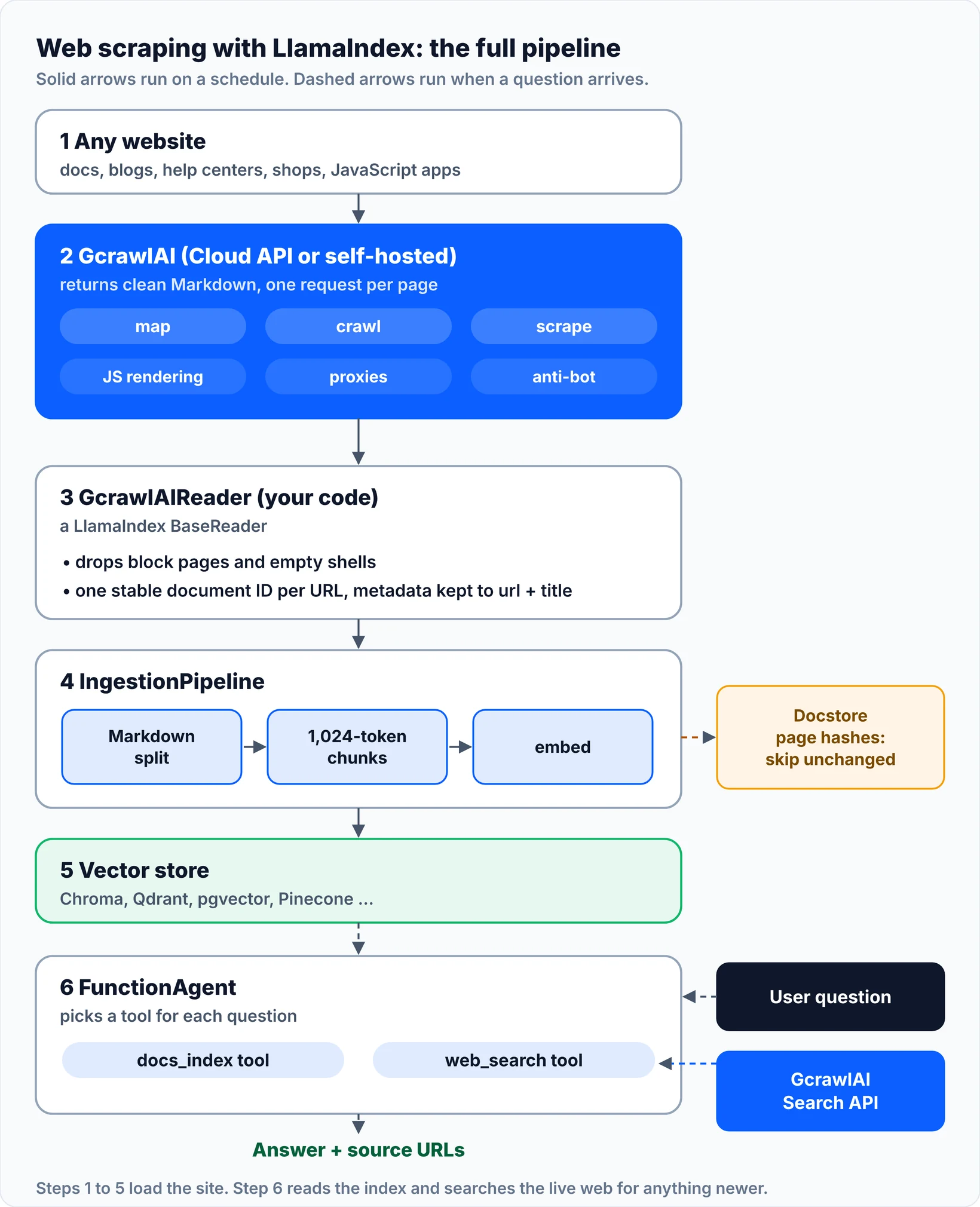
Here is the whole pipeline this guide builds. Steps 1 to 5 run on a schedule to load and refresh the site. Step 6 runs when someone asks a question.
Install the packages
You need Python 3.10 or later, a GcrawlAI API key (the free plan needs no card) and an OpenAI key for embeddings and answers. Any LlamaIndex-supported LLM and embedding model work the same way.
python -m venv .venv && source .venv/bin/activate
pip install llama-index-core llama-index-llms-openai llama-index-embeddings-openai \
            llama-index-vector-stores-chroma chromadb gcrawl-sdk
export GCRAWL_API_KEY="gc-YOUR_API_KEY"    # free plan, no card
export OPENAI_API_KEY="sk-..."
The reader: GcrawlAI pages as LlamaIndex Documents
This is the whole integration. It subclasses LlamaIndex's BaseReader, so it works anywhere a built-in reader does. Save it as gcrawl_reader.py.
"""GcrawlAI reader for LlamaIndex.

Loads web pages as LlamaIndex Documents through the GcrawlAI API:
a list of URLs, a whole site (crawl), or a site section (map, filter, scrape).
JavaScript rendering, proxies and anti-bot handling run on GcrawlAI's side.
"""
import re
from typing import Iterable, Iterator, List, Optional
from urllib.parse import urlsplit, urlunsplit

from gcrawl_sdk import GcrawlClient, ScrapeOptions
from llama_index.core.readers.base import BaseReader
from llama_index.core.schema import Document

# Text that shows up on challenge screens, login walls and error pages.
BLOCK_SIGNS = re.compile(
    r"verify you are human|access denied|enable javascript and cookies|"
    r"attention required|are you a robot|request blocked|page not found",
    re.I,
)


def doc_id(url: str) -> str:
    """One stable ID per page: lowercase host, no fragment, no trailing slash."""
    p = urlsplit(url.strip())
    path = p.path.rstrip("/") or "/"
    return urlunsplit((p.scheme.lower(), p.netloc.lower(), path, p.query, ""))


def page_title(markdown: str, url: str) -> str:
    m = re.search(r"^#\s+(.+)$", markdown, re.M)
    return m.group(1).strip() if m else url


def usable(markdown: Optional[str], min_chars: int) -> bool:
    """Keep real pages out of trouble: skip empty shells and block pages."""
    if not markdown or len(markdown.strip()) < min_chars:
        return False
    return not (len(markdown) < 3000 and BLOCK_SIGNS.search(markdown))


class GcrawlAIReader(BaseReader):
    """Turn URLs, a whole site, or one site section into LlamaIndex Documents."""

    def __init__(self, api_key: Optional[str] = None, base_url: Optional[str] = None,
                 geo: str = "US", min_chars: int = 200):
        # api_key falls back to the GCRAWL_API_KEY environment variable in the SDK.
        # base_url="http://localhost:8000" points the reader at a self-hosted server.
        self.client = GcrawlClient(api_key=api_key, base_url=base_url)
        self.geo = geo
        self.min_chars = min_chars
        self.skipped: List[str] = []
        self.complete = False   # True only after a crawl with zero failed pages

    def _doc(self, url: str, markdown: Optional[str]) -> Optional[Document]:
        if not usable(markdown, self.min_chars):
            self.skipped.append(url)
            return None
        return Document(
            id_=doc_id(url),
            text=markdown,
            # Keep metadata stable: LlamaIndex hashes it with the text, so a
            # crawl timestamp here would make every page look "changed".
            metadata={"url": url, "title": page_title(markdown, url)},
            excluded_embed_metadata_keys=["url"],
        )

    def lazy_load_data(self, urls: Optional[Iterable[str]] = None,
                       crawl_url: Optional[str] = None, limit: int = 50,
                       include_subdomains: bool = False) -> Iterator[Document]:
        self.skipped, self.complete = [], False
        if crawl_url:
            # Whole site: GcrawlAI discovers the links and returns every page.
            result = self.client.crawl(
                url=crawl_url, limit=limit, formats=["markdown"], geo=self.geo,
                same_domain_only=True, include_subdomains=include_subdomains, wait=True,
            )
            if result.status == "failed":
                raise RuntimeError(f"Crawl of {crawl_url} failed, nothing loaded")
            pages = [(p.url, p.markdown) for p in result.pages]
            self.complete = result.status == "completed" and not result.pages_failed
        else:
            opts = ScrapeOptions(markdown_enabled=True, proxy_geo=self.geo)
            pages = []
            for url in urls or []:
                r = self.client.scrape(url=url, options=opts, wait=True)
                pages.append((url, r.markdown))
        seen = set()
        for url, markdown in pages:
            doc = self._doc(url, markdown)
            if doc and doc.id_ not in seen:
                seen.add(doc.id_)
                yield doc

    def load_data(self, urls: Optional[Iterable[str]] = None,
                  crawl_url: Optional[str] = None, limit: int = 50,
                  include_subdomains: bool = False) -> List[Document]:
        return list(self.lazy_load_data(urls, crawl_url, limit, include_subdomains))

    def map_section(self, site: str, prefix: str, limit: int = 500) -> List[str]:
        """List a site's URLs without rendering them, then keep one section."""
        result = self.client.links(url=site, limit=limit, same_domain_only=True,
                                   geo=self.geo, wait=True)
        urls = [u if isinstance(u, str) else u.get("url", "") for u in (result.links or [])]
        return sorted({u for u in urls if urlsplit(u).path.startswith(prefix)})
Four choices in it matter more than they look:
- The block-page check. A challenge screen arrives as a normal page with a title and a paragraph of text. Nothing raises an error, so the reader checks short pages for the usual phrases and skips them. Skipped URLs land in
reader.skipped, so you can see what was dropped. - The document ID. Without an explicit
id_, every Document gets a random ID and LlamaIndex can't match a page to its earlier version. The reader uses the normalised URL. - The metadata. LlamaIndex hashes the text and metadata together. Anything that changes on every run, like a crawl timestamp, makes every page look new. So the metadata is just the URL and title, and the URL is left out of the embedding text.
- The
completeflag. After a crawl it'sTrueonly if the job finished with zero failed pages. The ingestion step uses it to decide whether deleting is safe.
Load a few URLs and ask a question
For a handful of known pages, pass the URLs and build an index in memory. This is the shortest path from a URL to an answer with sources.
# pip install llama-index-core llama-index-llms-openai llama-index-embeddings-openai gcrawl-sdk
# export GCRAWL_API_KEY=gc-YOUR_API_KEY  OPENAI_API_KEY=sk-...
from llama_index.core import Settings, VectorStoreIndex
from llama_index.embeddings.openai import OpenAIEmbedding
from llama_index.llms.openai import OpenAI

from gcrawl_reader import GcrawlAIReader

Settings.llm = OpenAI(model="gpt-4o-mini")
Settings.embed_model = OpenAIEmbedding(model="text-embedding-3-small")

if __name__ == "__main__":
    reader = GcrawlAIReader(geo="US")
    docs = reader.load_data(urls=[
        "https://docs.python.org/3/library/asyncio-task.html",
        "https://docs.python.org/3/library/asyncio-sync.html",
    ])
    print(f"loaded {len(docs)} pages, skipped {reader.skipped}")

    index = VectorStoreIndex.from_documents(docs)
    answer = index.as_query_engine(similarity_top_k=4).query(
        "When should I use asyncio.TaskGroup instead of gather()?"
    )
    print(answer)
    for node in answer.source_nodes:
        print(f"{node.score:.2f}  {node.metadata['url']}")
Load a whole site or one section
To index a full documentation site, pass crawl_url and a page limit. GcrawlAI discovers internal links and returns every page in one job. To index just one part of a site, map its URLs first. The map call lists URLs without rendering pages, so it's cheap, and you scrape only the paths you keep.
from gcrawl_reader import GcrawlAIReader

reader = GcrawlAIReader(geo="US")

if __name__ == "__main__":
    # Option A: the whole site. GcrawlAI follows internal links up to the limit.
    site_docs = reader.load_data(crawl_url="https://docs.example.com/", limit=200)
    print(f"crawl: {len(site_docs)} pages, complete={reader.complete}")

    # Option B: one section. Map the URLs first (cheap, no rendering),
    # keep the paths you want, then scrape only those.
    urls = reader.map_section("https://docs.example.com/", prefix="/api/")
    print(f"map: {len(urls)} URLs under /api/")
    section_docs = reader.load_data(urls=urls)
    print(f"scrape: {len(section_docs)} pages, skipped {len(reader.skipped)}")
| What you want in the index | Reader call | GcrawlAI feature behind it |
|---|---|---|
| A few known pages | load_data(urls=[...]) |
scrape |
| A whole site, up to a page limit | load_data(crawl_url=..., limit=200) |
crawl (link discovery, duplicate filtering) |
One section, like /api/ or /blog/ |
map_section(), then load_data(urls=...) |
map, then scrape |
| Facts newer than the last crawl | an agent tool, not the reader | Search API plus scrape |
What GcrawlAI handles for you
- Rendering and unblocking: JavaScript pages are rendered in a stealth browser, with rotating residential proxies and anti-bot handling for Cloudflare, DataDome, Akamai and PerimeterX.
- Markdown, JSON or HTML output, so the reader gets page content instead of raw markup.
- Scrape, crawl, map and Search API, plus Deep Search, which queries several engines and merges them into one ranked list.
- Sync requests and async batch jobs with webhooks for large sites.
- Three ways to run it: the managed Cloud API, the Python SDK shown here, and MCP so AI agents can call it directly. The MIT-licensed core is on GitHub; set
base_url="http://localhost:8000"in the reader to use your own server. - Pricing: one request includes every feature, with no credit multipliers, and failed requests are never charged. There's a free plan with no card, paid plans from $0.98 to $6.33 per 1,000 requests, and a self-hosted open-source core that costs nothing.
"Most bad RAG answers I've debugged weren't retrieval problems. The index was full of cookie banners, sidebars and challenge pages, and nobody had looked at what actually got embedded. Fix the input first."
Rajesh Kannan, Co-Founder & CTO at Gramosoft
Where it falls short
- No published LlamaIndex package yet. The reader is code you copy into your project. It's short, but you own it.
- Big crawls take time. A crawl is an async job, so a few hundred rendered pages can take minutes, not seconds. Use the map-then-scrape route when you only need part of a site.
- Public pages only. The reader doesn't log in, and it shouldn't. Content behind a login belongs in an official export or API.
- The block-page check is a heuristic. It catches the common challenge screens. For a site you index often, look at a sample of Documents before the first full ingest.
Why LlamaIndex's built-in web readers aren't enough
LlamaIndex ships many web readers, and the simple ones work well on static pages you control. The trouble starts on commercial sites. A plain HTTP fetch can't run JavaScript or get past bot checks like Cloudflare's, and nothing tells you it failed: the block page is indexed as if it were content.
The llama-index-readers-web package (version 0.7.0, checked October 25, 2026) includes these readers, among others:
| Reader | How it fetches | Good for | What goes wrong |
|---|---|---|---|
SimpleWebPageReader |
Plain HTTP request, optional HTML-to-text | Static pages you own | No JavaScript, no unblocking, keeps navigation text |
BeautifulSoupWebReader |
HTTP plus BeautifulSoup parsing | Simple sites with clean HTML | Same blocking and JavaScript limits |
TrafilaturaWebReader |
HTTP plus main-content extraction | News and blog articles | Still a plain fetch underneath |
SitemapReader |
Reads a sitemap, then fetches each URL | Sites with a complete sitemap | Misses pages the sitemap leaves out |
WholeSiteReader |
Follows links with Selenium | Small sites, local tests | You run and maintain the browser |
| Vendor readers (Firecrawl, Oxylabs, ZenRows, Zyte, Spider, ScrapFly and more) | A paid scraping API | Protected or JavaScript-heavy sites | Pricing and output vary by vendor |
Navigation noise is a real cost too. In a test on 30 LlamaIndex docs pages, Apify found that SimpleWebPageReader returned 362,849 tokens against 44,813 from a content crawler, and most of the difference was the sidebar repeated on every page. You pay to embed that, and it crowds real answers out of retrieval. The guide to clean, token-efficient website data for LLMs covers how to strip it.
How to keep the index fresh when you re-crawl
A website changes after you index it, so the crawl has to run again. Rebuilding the index from scratch re-embeds every page and costs money each time. An IngestionPipeline with a docstore stores a hash per page, re-embeds only new and changed pages, and can delete pages the site removed.
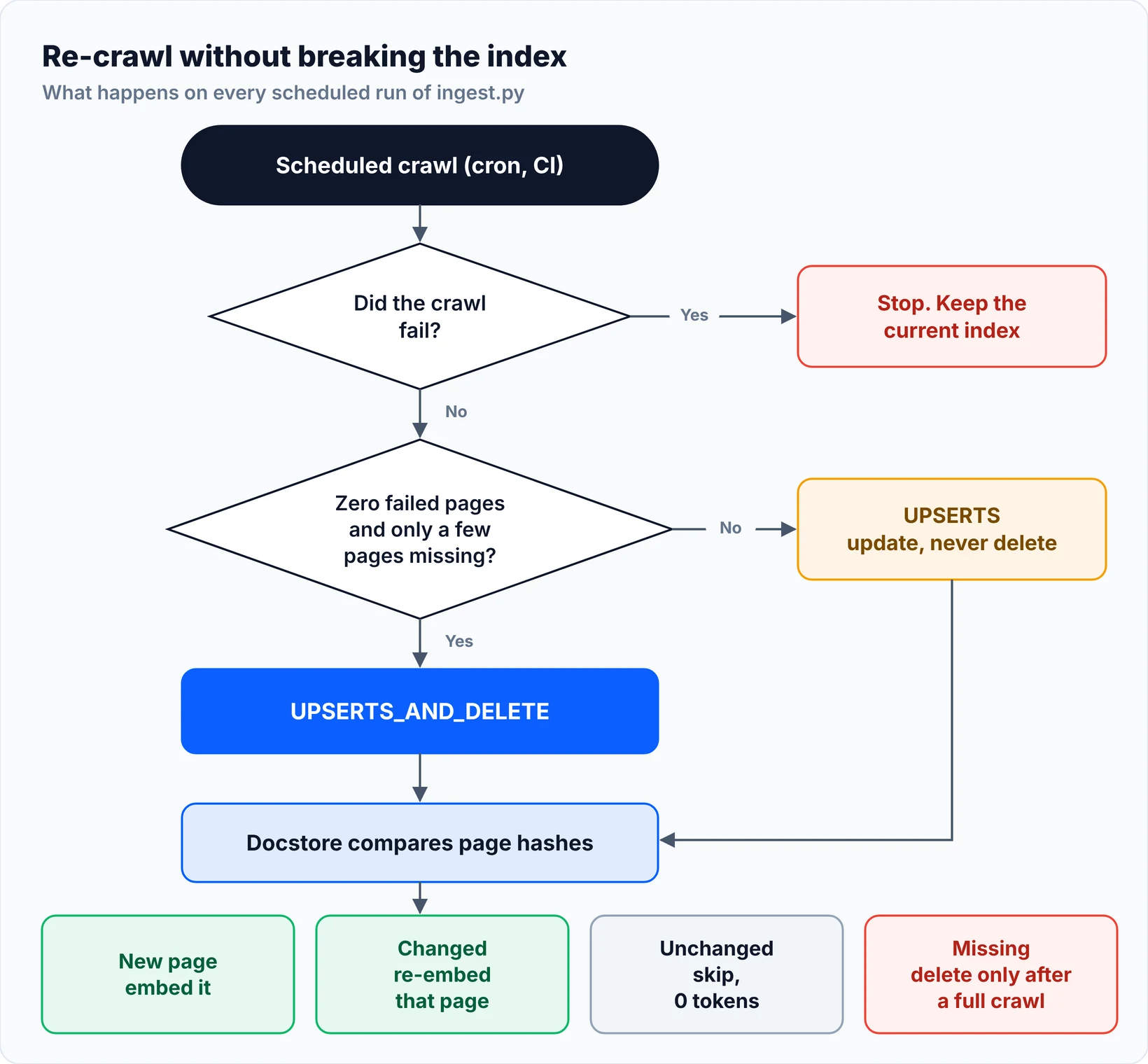
The risky part is deletion. With UPSERTS_AND_DELETE, any page missing from the new crawl is removed from the index. If a crawl stops halfway or a few pages fail, pages that still exist on the site disappear from your index, and nothing raises an error. So ingest.py deletes only when the crawl finished with zero failed pages and no more than a few pages went missing. Otherwise it falls back to UPSERTS, which updates pages but never deletes.
# pip install llama-index-vector-stores-chroma chromadb
import os

from llama_index.core.ingestion import DocstoreStrategy, IngestionPipeline
from llama_index.core.node_parser import MarkdownNodeParser, SentenceSplitter
from llama_index.core.storage.docstore import SimpleDocumentStore

STORAGE = "storage/docs-site/text-embedding-3-small"   # one folder per site and model
MAX_DROP = 0.10   # refuse to delete if a crawl lost more than 10% of known pages


def default_parts():
    import chromadb
    from llama_index.embeddings.openai import OpenAIEmbedding
    from llama_index.vector_stores.chroma import ChromaVectorStore

    chroma = chromadb.PersistentClient(path=f"{STORAGE}/chroma")
    store = ChromaVectorStore(chroma_collection=chroma.get_or_create_collection("pages"))
    return OpenAIEmbedding(model="text-embedding-3-small"), store


def build_pipeline(embed_model=None, vector_store=None, storage=STORAGE):
    if embed_model is None:
        embed_model, vector_store = default_parts()
    pipeline = IngestionPipeline(
        transformations=[
            MarkdownNodeParser(),                                 # split on headings first
            SentenceSplitter(chunk_size=1024, chunk_overlap=120),  # then cap chunk size
            embed_model,
        ],
        docstore=SimpleDocumentStore(),
        vector_store=vector_store,
    )
    if os.path.exists(f"{storage}/pipeline"):
        pipeline.load(f"{storage}/pipeline")
    return pipeline


def ingest(docs, complete, pipeline=None, storage=STORAGE):
    pipeline = pipeline or build_pipeline(storage=storage)
    known = len(pipeline.docstore.docs)
    allowed_drop = max(2, round(known * MAX_DROP))   # small sites may lose a page or two
    safe_to_delete = complete and known - len(docs) <= allowed_drop
    pipeline.docstore_strategy = (
        DocstoreStrategy.UPSERTS_AND_DELETE if safe_to_delete else DocstoreStrategy.UPSERTS
    )
    nodes = pipeline.run(documents=docs)
    pipeline.persist(f"{storage}/pipeline")
    embedded = len({n.ref_doc_id for n in nodes})
    print(f"{pipeline.docstore_strategy.value}: embedded {embedded}, "
          f"pages in index {known} -> {len(pipeline.docstore.docs)}")
    return pipeline


if __name__ == "__main__":
    from gcrawl_reader import GcrawlAIReader

    reader = GcrawlAIReader(geo="US")
    docs = reader.load_data(crawl_url="https://docs.example.com/", limit=200)
    ingest(docs, complete=reader.complete)
We checked this logic offline with a stub in place of the GcrawlAI client and LlamaIndex's MockEmbedding in place of OpenAI, on a fake eight-page site with one block page and one empty page. It tests the pipeline logic only, not scraping:
1. first crawl:                   upserts_and_delete: embedded 6, pages in index 0 -> 6
                                  chunks in vector store: 6
   skipped: ['https://docs.example.com/blocked/', 'https://docs.example.com/empty/']
2. same crawl again:              upserts_and_delete: embedded 0, pages in index 6 -> 6
                                  chunks in vector store: 6
3. one page edited, one removed:  upserts_and_delete: embedded 1, pages in index 6 -> 5
                                  chunks in vector store: 5
4. partial crawl, 4 pages failed: upserts: embedded 0, pages in index 5 -> 5
                                  chunks in vector store: 5
The second run embeds nothing. An edited page replaces its old chunk instead of adding a copy. A partial crawl with failed pages deletes nothing. The test script is in the code download.
A few rules keep this working in production:
- One docstore per site and embedding model. Two crawl jobs sharing one docstore will delete each other's pages, and a new embedding model needs a fresh index, not an update.
- Keep the docstore with the vectors. If the docstore is lost but the vectors stay, every page is embedded again and you get duplicate chunks. On CI runners, use a Redis, Postgres or MongoDB docstore instead of local files.
- Split very large pages. The hash covers the whole page, so one changed line re-embeds all of it. A changelog is better stored as one Document per release.
"The scariest bug in a RAG pipeline is a re-crawl that half-works. It deletes good pages quietly, and the first person to notice is a user asking about a page that's gone."
Rajesh Kannan, Co-Founder & CTO at Gramosoft
How to give a LlamaIndex agent live web search
An index only knows what the last crawl collected. Questions about the latest release, a price or today's news need live pages. A FunctionAgent with two tools handles both: the docs index for how-to questions, and a search tool that calls the GcrawlAI Search API and reads the top result.
import asyncio

from gcrawl_sdk import GcrawlClient, ScrapeOptions
from llama_index.core import Settings, VectorStoreIndex
from llama_index.core.agent.workflow import FunctionAgent
from llama_index.core.tools import FunctionTool, QueryEngineTool
from llama_index.embeddings.openai import OpenAIEmbedding
from llama_index.llms.openai import OpenAI

from ingest import default_parts

Settings.llm = OpenAI(model="gpt-4o-mini")
Settings.embed_model = OpenAIEmbedding(model="text-embedding-3-small")
gc = GcrawlClient()   # reads GCRAWL_API_KEY


def web_search(query: str) -> str:
    """Search the live web and read the top result. Use it for anything newer
    than the docs index: latest versions, release notes, prices, news."""
    hits = gc.search(query=query, pagination=1, geo="US").results[:3]
    if not hits:
        return "No results."
    top = gc.scrape(url=hits[0].url, wait=True,
                    options=ScrapeOptions(markdown_enabled=True, proxy_geo="US"))
    listing = "\n".join(f"- {h.title} ({h.url})" for h in hits)
    return f"Results:\n{listing}\n\nTop page ({hits[0].url}):\n{(top.markdown or '')[:6000]}"


def build_agent() -> FunctionAgent:
    _, store = default_parts()
    index = VectorStoreIndex.from_vector_store(store)
    docs_tool = QueryEngineTool.from_defaults(
        index.as_query_engine(similarity_top_k=5),
        name="docs_index",
        description="How-to answers from the crawled documentation site. "
                    "It only knows what the last crawl collected.",
    )
    return FunctionAgent(
        tools=[docs_tool, FunctionTool.from_defaults(web_search)],
        llm=Settings.llm,
        system_prompt="Answer how-to questions from docs_index. Use web_search for "
                      "anything current. Always list the source URLs you used.",
    )


if __name__ == "__main__":
    agent = build_agent()
    print(asyncio.run(agent.run("What changed in the newest release, and how do I upgrade?")))
The tool descriptions do the routing. Tell the agent what the index can't know, like newer releases, and it reaches for web_search for those questions. The search tool trims the page to 6,000 characters so one long result doesn't fill the context window. If your agent runs in an MCP client instead, GcrawlAI connects over MCP and exposes the same scrape and search abilities; the MCP web scraping guide covers that setup. To compare search tools for agents, see the best Tavily alternatives for AI agents.
Common problems and how to fix them
Most LlamaIndex web scraping problems don't raise errors. They show up later as odd answers, a growing bill or a shrinking index. This table maps the symptom you notice to its usual cause, so you can check the input before you start tuning retrieval or prompts.
| Symptom | Usual cause | Fix |
|---|---|---|
| Answers mention "verify you are human" or "access denied" | Block pages were indexed as content | Fetch through GcrawlAI and keep the reader's block-page check |
| Pages from a React or Vue site are empty | The reader didn't run JavaScript | Use a rendering fetch; skip pages under a minimum length |
| Every page re-embeds on every run | Random document IDs, or a timestamp in metadata | Use the URL as id_ and keep metadata stable |
| The index shrank after a re-crawl | UPSERTS_AND_DELETE after a partial crawl |
Delete only after a complete crawl |
| Duplicate chunks in results | Docstore lost, or the same page under two URLs | Persist the docstore; normalise URLs into one ID |
| Answers quote menus and footers | Raw HTML or full-page text | Index Markdown of the main content |
| Old facts about versions or prices | The index is only as fresh as its last crawl | Add a live search tool to the agent |
Which approach should you choose?
Pick the loader by the kind of site and how often it changes. A built-in reader is fine for a few static pages you control. Once pages need JavaScript, sit behind bot checks, or number in the hundreds and change weekly, a scraping API and an ingestion pipeline save more time than they cost.
| Your situation | Use |
|---|---|
| Protected or JavaScript-heavy sites, or many sites | GcrawlAI reader (Cloud API) |
| Same, but data must stay on your servers | GcrawlAI reader with the self-hosted MIT core |
| A docs site you re-index weekly | GcrawlAI crawl plus IngestionPipeline with a docstore |
| Questions about current versions, prices or news | FunctionAgent with a Search API tool |
| A few static pages you own | SimpleWebPageReader or TrafilaturaWebReader |
| Content behind a login | The site's official API or export, not a scraper |
"Start with one section of one site, read twenty of the Documents yourself, then scale. Ten minutes of reading saves a week of chasing strange answers."
Rajesh Kannan, Co-Founder & CTO at Gramosoft
Scraping responsibly for an index
Loading a website into an index is still web scraping, so the usual rules apply. Index public pages, respect robots.txt and the site's terms, keep request rates reasonable, and don't scrape behind logins or collect personal data you have no basis to store. If a site offers an API or a data export, use that first.
The reader in this guide handles block pages by skipping them, not by getting around them. It contains no CAPTCHA-solving code and no login handling. For a wider look at what's allowed and where the risks are, read what web scraping is and when it's legal.
Frequently asked questions
How do I load an entire website into LlamaIndex?
Crawl the site and turn each page into a Document with a stable ID. With the GcrawlAI reader in this guide, call load_data(crawl_url=..., limit=200). To load only one section, map the site's URLs first, filter them by path, and scrape just those.
How do I stop block pages from ending up in my index?
Fetch pages through a service that handles bot checks, then validate the content before indexing. The reader here skips empty pages and short pages that contain challenge phrases like "verify you are human", and lists every skipped URL so you can review them.
How do I update a LlamaIndex index without re-embedding everything?
Use an IngestionPipeline with a docstore and give each Document a stable ID, such as its URL. The pipeline compares page hashes and embeds only new and changed pages. In our offline test, a second run over an unchanged site embedded zero pages.
Is GcrawlAI open source, and can I use it with LlamaIndex commercially?
Yes. GcrawlAI's core is MIT-licensed on GitHub, so you can self-host it and use it commercially. You can also use the managed Cloud API with a free plan and no card; paid plans cost $0.98 to $6.33 per 1,000 requests, and failed requests are never charged.
Should I use LlamaIndex or LangChain for web scraping?
Either works, because the scraping happens before the framework. LlamaIndex is strongest at ingestion, indexing and retrieval, which is most of a website-to-index project. LangChain suits broader agent chains. The same GcrawlAI SDK calls work in both; only the wrapper changes.
Can a LlamaIndex agent search the web in real time?
Yes. Wrap a search function in a FunctionTool and give it to a FunctionAgent next to your index. The example here calls the GcrawlAI Search API, scrapes the top result and returns it as text, so the agent can answer questions newer than the last crawl.