By Rajesh Kannan, Co-Founder & CTO, Gramosoft · Last updated: · Billing rules and prices checked on ScraperAPI, ZenRows and ScrapingBee pages on November 1, 2026
Every scraper fails eventually, and it almost always fails with a status code: a 403 on Monday, a wall of 429s on Wednesday, a 503 that turns out to be a bot check. Each code points to a different fix, and retrying the wrong one wastes hours and money. This guide starts with how GcrawlAI absorbs most of these errors in one request, then goes through the 15 HTTP errors scrapers hit most, what each one means, and how to fix it, with Python code for diagnosis and retries.
TL;DR
- Read the body, not just the code: the same 403 or 503 can be a login wall, a geo rule, a real outage or a bot challenge. The response body and headers tell you which.
- Retry only what can succeed: 408, 429, 500, 502, 503, 504 and Cloudflare's 52x codes are worth retrying with backoff. 400, 401, 404, 407 and 410 never fix themselves.
- Respect Retry-After on 429 and 503, add jitter to your backoff, and cap the total wait.
- Blocks need a new identity, not more speed: 403, 444 and challenge pages call for real-browser rendering, better headers or a different IP.
- Fastest fix: GcrawlAI renders the page, rotates residential IPs, escalates stealth and retries inside one request, and never bills blocked pages, CAPTCHAs, timeouts or server errors.
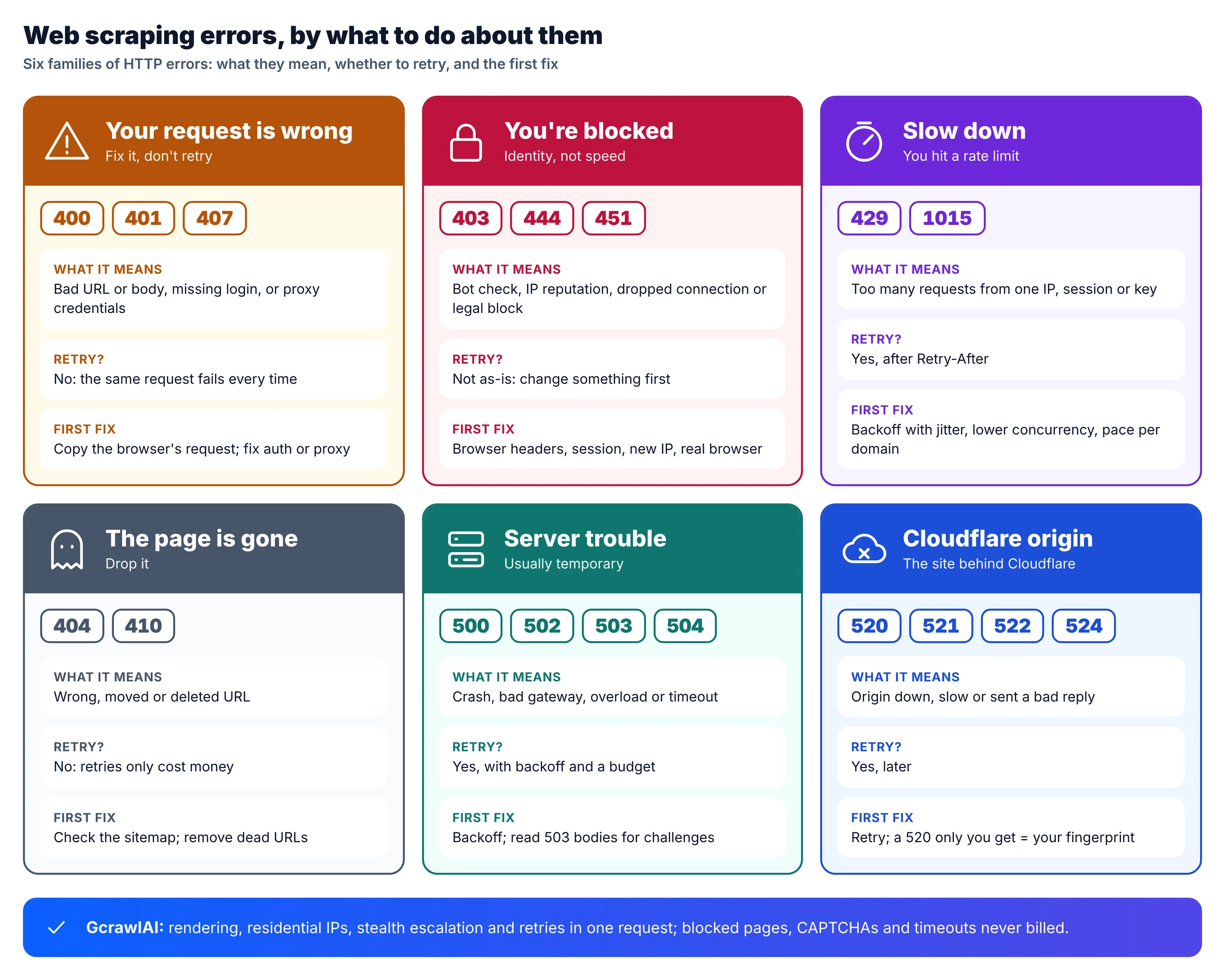
What are the most common web scraping errors? The 15 HTTP errors scrapers hit most are 400, 401, 403, 404, 407, 408, 410, 429, 444, 451, 500, 502, 503, 504 and Cloudflare's 520–524 family. 403 and 429 are blocks and rate limits, 5xx codes are usually temporary, and 404 and 410 mean the page is gone. GcrawlAI handles blocks and retries in one request and doesn't bill failures.
Quick reference: 15 common HTTP errors in web scraping
| Code | Name | What it usually means for a scraper | Retry? | First fix |
|---|---|---|---|---|
| 400 | Bad Request | Malformed URL, params, headers or body | No | Compare with the browser's request |
| 401 | Unauthorized | Missing or expired login, token or API key | No | Send valid credentials or a fresh session |
| 403 | Forbidden | Bot check, IP reputation, geo rule or no permission | Not as-is | Read the body, then fix identity |
| 404 | Not Found | Wrong or dead URL | No | Drop it or find the new URL |
| 407 | Proxy Authentication Required | Your proxy rejected its credentials | No | Fix the proxy user and password |
| 408 | Request Timeout | Request too slow to arrive | Yes | Retry, check your network |
| 410 | Gone | Removed for good | No | Remove it from the queue |
| 429 | Too Many Requests | Rate limited | Yes, later | Honor Retry-After, slow down |
| 444 | No Response (nginx) | Connection dropped on purpose | Not as-is | Change IP, headers or fingerprint |
| 451 | Unavailable For Legal Reasons | Blocked in your region by law | No | Use an allowed region or skip |
| 500 | Internal Server Error | Server bug, sometimes your input | Yes | Backoff; check your request |
| 502 | Bad Gateway | Proxy or upstream returned junk | Yes | Backoff; check your proxy |
| 503 | Service Unavailable | Overload, maintenance, or a challenge page | Depends | Read the body first |
| 504 | Gateway Timeout | Upstream too slow | Yes | Backoff, longer timeout |
| 520–524 | Cloudflare origin errors | Cloudflare couldn't get a good origin reply | Yes | Retry later; compare with a browser |
Fix scraping errors at the source with GcrawlAI
GcrawlAI removes most scraping errors before they reach your code. Each scrape request renders the page in a real browser, routes it through rotating residential IPs, escalates stealth when a site pushes back, and retries internally. You get clean Markdown, HTML or JSON back, and blocked pages, CAPTCHAs, timeouts and server errors are never billed.
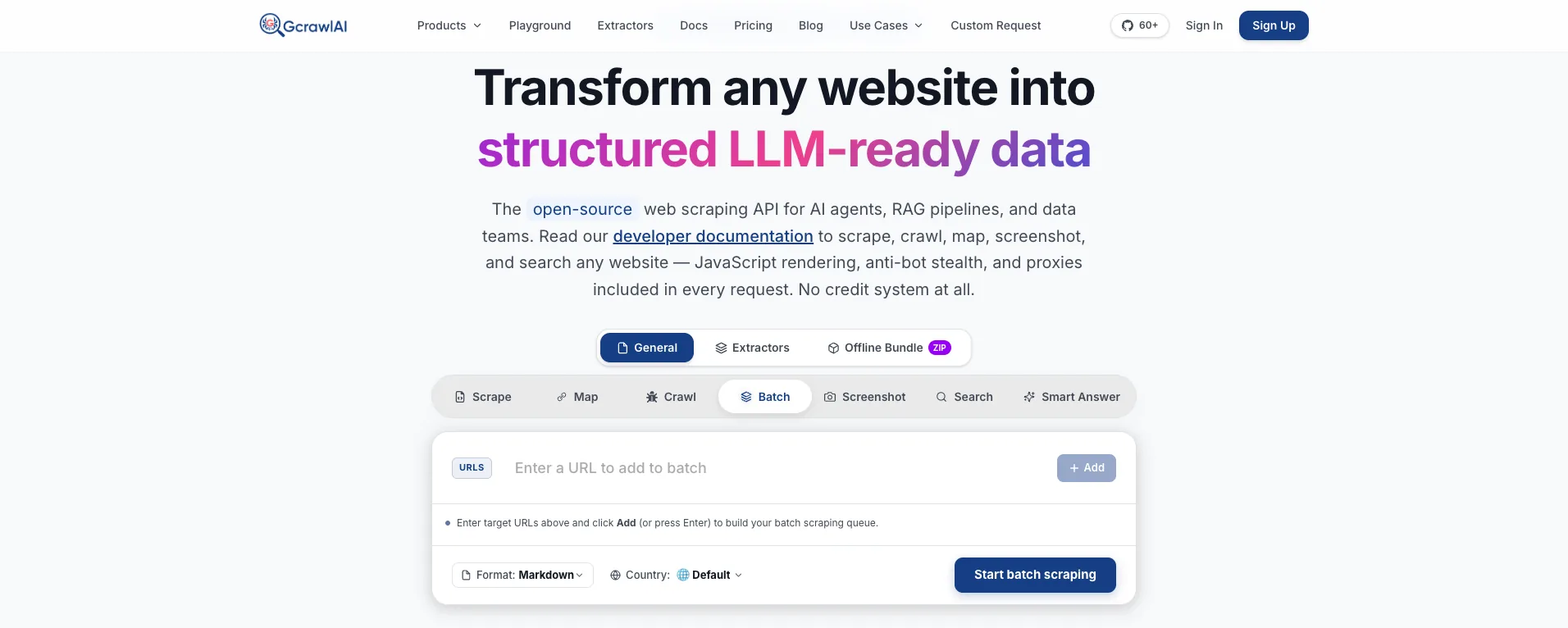
The homepage puts it plainly: JavaScript rendering, anti-bot stealth and proxies are included in every request, with no credit system. For error handling that means the 403s, challenge pages and empty JavaScript shells that eat most scraping time happen inside GcrawlAI, not in your retry loop.
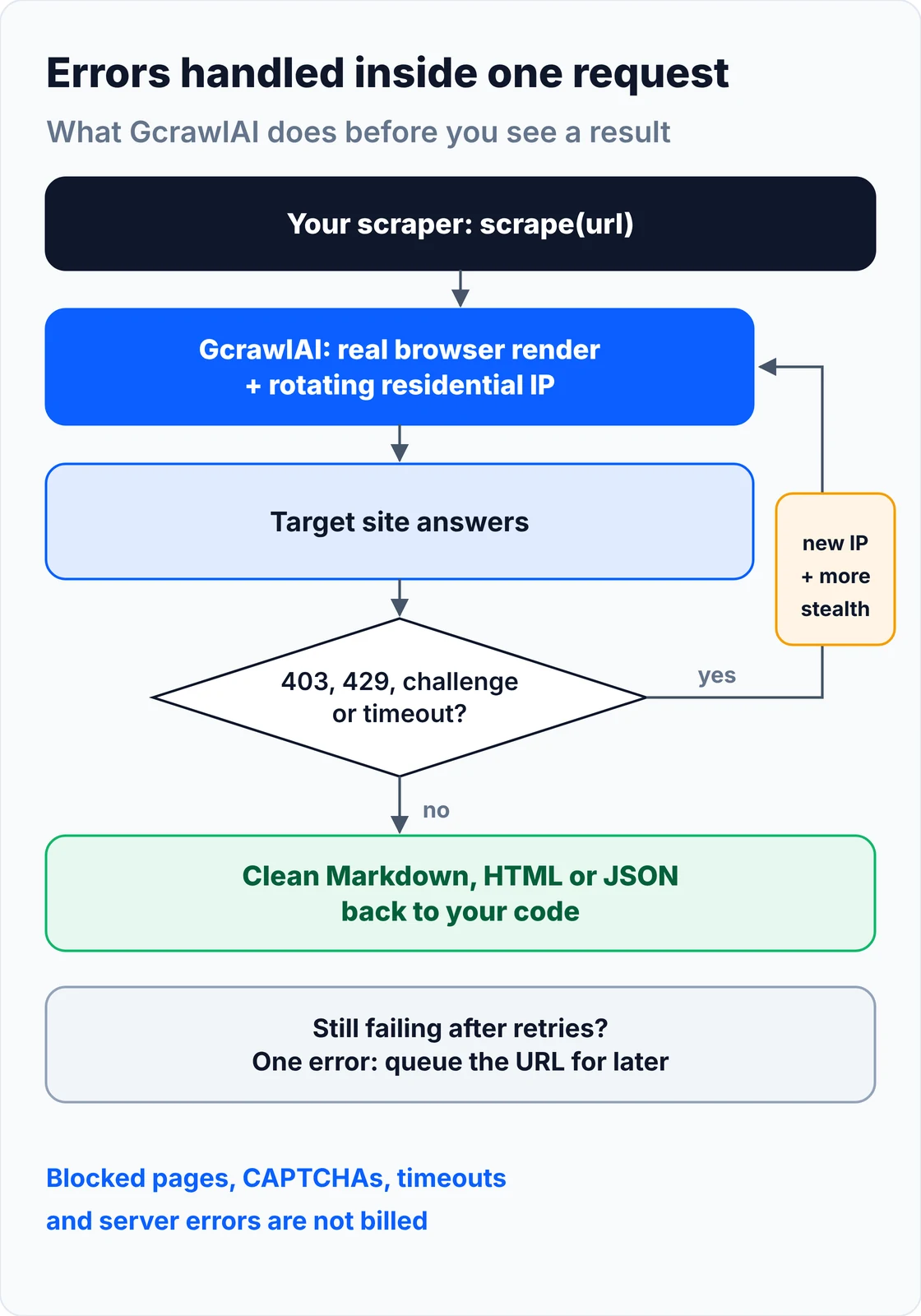
Your code shrinks to two cases: the request worked and you have content, or it didn't and you queue the URL for later. A 4xx from the API itself means a key, plan or payload problem to fix, not something to retry:
# pip install gcrawl-sdk
"""Fetch a page through GcrawlAI and handle the few errors your own code still sees."""
import logging
import os

from gcrawl_sdk import GcrawlClient, ScrapeOptions
from gcrawl_sdk.exceptions import GcrawlAPIError, GcrawlTimeoutError

log = logging.getLogger("scraper")
gc = GcrawlClient(api_key=os.getenv("GCRAWL_API_KEY", "gc-YOUR_API_KEY"))


def fetch_markdown(url: str, geo: str = "US") -> str | None:
    """One request: rendering, residential IPs, stealth escalation and internal retries included."""
    try:
        page = gc.scrape(url=url, options=ScrapeOptions(markdown_enabled=True, proxy_geo=geo), wait=True)
    except GcrawlTimeoutError:
        log.warning("timeout, requeue: %s", url)          # the API call itself timed out
        return None
    except GcrawlAPIError as err:
        if err.status_code < 500:                         # key, plan or payload problem: fix, don't retry
            log.error("request rejected %s: %s", err.status_code, err.response_data)
            raise
        log.warning("api %s, requeue: %s", err.status_code, url)
        return None
    return page.markdown or None                          # empty = nothing useful on the page


if __name__ == "__main__":
    md = fetch_markdown("https://example.com/")
    print(md[:300] if md else "no content, queued for retry")
- Rendering on every request: JavaScript-heavy pages come back filled in, so a 200 with an empty shell isn't your problem.
- Residential IP rotation and geotargeting: pick a country with one setting, which also handles most geo-based 403s.
- Stealth escalation and internal retries: when a site blocks, GcrawlAI retries with a stronger setup inside the same request, and retries never multiply the cost.
- Scrape, crawl, batch and Search API: scrape single pages, crawl whole sites with async jobs and webhooks, and use the Search API for ranked results.
- Built for developers and agents: a Python SDK, an MCP server for Claude, Cursor and other AI agents, the Playground to test a failing URL, and the docs.
The MIT-licensed core runs on your own servers if you'd rather own the stack:
git clone https://github.com/GramosoftAI/GcrawlAI.git && cd GcrawlAI
python -m venv .venv && source .venv/bin/activate
pip install -r requirements.txt && playwright install
cp .env.example .env                      # add your database, Redis and proxy settings
python -m api.core.db_setup
redis-server &
celery -A web_crawler.crawler.celery_config worker -l info &
uvicorn api.api:app --port 8000
Pricing is a free plan of 50 requests a month with no card, paid plans from $0.67 to $1.45 per 1,000 requests, and a self-hosted core that costs nothing. Failed requests are never charged. The plan table and a cost comparison are in the cost section.
Where it falls short: GcrawlAI can't fix a 404, a 410 or a 451; a page that doesn't exist, or is legally blocked, stays that way. Every request goes through a browser, so plain HTML pages cost the same as hard ones, and a simple requests call is cheaper and faster when it works. Pages behind your own login still need your credentials, and the ecosystem is younger, with fewer ready-made integrations.
"Most scraping bugs I've debugged weren't bugs in the parser. Someone retried a 403 fifty times, or parsed a challenge page as if it were the product. Read the response body first, and only retry what can actually succeed."
Rajesh Kannan, Co-Founder & CTO at Gramosoft
How to read a scraping error before you fix it
A status code tells you which layer refused you, not why. Before changing code, capture the status, the response headers and the first part of the body, then compare with the same request in a browser. The body usually names the cause: a login wall, a "Just a moment" challenge, a geo notice or a plain error page.
Check three things on every failure. The body: a Cloudflare or DataDome challenge page reads very differently from an application error. The headers: Server, CF-RAY and Retry-After tell you who answered and how long to wait. The browser comparison: copy the request as cURL from your browser's DevTools, run it, and the difference between that request and your scraper's is usually the bug.
This classifier turns a response into a verdict: which bucket it falls in, whether a retry can help, and what to change. It also catches challenge pages hiding behind 403, 429 or 503, and a 200 that's missing the content you expected:
"""Classify a scraping response: what went wrong, whether to retry, and what to change."""
from dataclasses import dataclass

CHALLENGE_SIGNS = ("just a moment", "checking your browser", "verify you are human",
                   "enable javascript and cookies", "access denied", "captcha", "cf-chl")

# status -> (bucket, retry?, first fix)
RULES = {
    400: ("bad request", False, "fix the URL, params or body; compare with the browser request"),
    401: ("bad request", False, "send valid credentials or a fresh session/token"),
    403: ("blocked", False, "check the body: login wall, geo rule or bot check; fix identity, not speed"),
    404: ("gone", False, "drop the URL; fix the link or find the new one in the sitemap"),
    407: ("bad request", False, "fix proxy credentials (user:pass@host:port)"),
    408: ("server", True, "retry with a longer timeout"),
    410: ("gone", False, "remove the URL from the queue for good"),
    429: ("slow down", True, "wait for Retry-After, cut concurrency, pace per domain"),
    444: ("blocked", False, "connection dropped on purpose: change IP, headers or TLS fingerprint"),
    451: ("blocked", False, "legal block in this region: try an allowed region or skip"),
    500: ("server", True, "retry with backoff; if it repeats, check your request"),
    502: ("server", True, "retry with backoff; a proxy or upstream hiccup"),
    503: ("server", True, "check the body: real outage = backoff, challenge page = render"),
    504: ("server", True, "retry with backoff and a longer timeout"),
    520: ("server", True, "Cloudflare got a bad origin reply: retry, then compare with a browser"),
    521: ("server", True, "origin is down: retry later"),
    522: ("server", True, "origin connection timed out: retry later"),
    524: ("server", True, "origin too slow: retry later with fewer concurrent requests"),
}


@dataclass
class Verdict:
    status: int
    bucket: str
    retry: bool
    fix: str


def classify(status: int, headers: dict, body: str, must_contain: tuple = ()) -> Verdict:
    text = (body or "")[:5000].lower()
    server = {k.lower(): v for k, v in (headers or {}).items()}.get("server", "").lower()
    if status in (403, 429, 503) and any(s in text for s in CHALLENGE_SIGNS):
        return Verdict(status, "challenge", False, f"bot challenge ({server or 'unknown CDN'}): render in a real browser or use an unblocking API")
    if 200 <= status < 300:
        if must_contain and not all(m.lower() in text for m in must_contain):
            return Verdict(status, "soft block", False, "200 OK but expected content missing: treat as blocked")
        return Verdict(status, "ok", False, "parse it")
    if status in RULES:
        bucket, retry, fix = RULES[status]
        return Verdict(status, bucket, retry, fix)
    if 500 <= status < 600:
        return Verdict(status, "server", True, "retry with backoff")
    return Verdict(status, "bad request", False, "read the body; fix the request")
15 common HTTP errors in web scraping and how to fix them
These are the 15 HTTP errors scrapers hit most, grouped by what you should do about them. For each one: what it means, why a scraper triggers it, and the fix. Client errors (4xx) mostly need a change to your request; server errors (5xx) mostly need patience and backoff.
1. 400 Bad Request
The server couldn't parse your request. In scraping it's usually a malformed query string, an unencoded character in the URL, a missing required parameter, a wrong Content-Type on a POST, or oversized cookies. Fix: URL-encode parameters, copy the exact request from DevTools, and strip it down until it works. Retrying an unchanged 400 never helps.
2. 401 Unauthorized
Authentication is missing or invalid: no session cookie, an expired token, or a wrong API key. The WWW-Authenticate header often says which scheme the server expects. Fix: log in with a session, refresh tokens before they expire, and keep credentials in environment variables. Only scrape pages behind a login you're entitled to use.
3. 403 Forbidden
The server understood the request and refused it. For scrapers that's usually bot detection: a default python-requests user agent, missing browser headers, a TLS fingerprint that doesn't match Chrome, or a datacenter IP with a poor reputation. It can also be a geo rule or a page you aren't allowed to see. Fix: read the body first, then send a full, current browser header set, keep cookies in a session, test a different IP, and render in a real browser if the page runs a JavaScript check. Our guide to fixing 403 Forbidden in Python requests goes step by step.
4. 404 Not Found
The URL doesn't exist: a typo, a moved product, a deleted page, or a link you built wrong (trailing slash, case, missing locale). Fix: don't retry. Log it, check the site's sitemap for the new URL, and fix how you build links. A sudden spike in 404s usually means the site changed its URL pattern.
5. 407 Proxy Authentication Required
Your proxy rejected the request before it reached the target. The proxy needs credentials, or the ones you sent are wrong, expired or out of balance. Fix: put the credentials in the proxy URL (http://user:pass@host:port), URL-encode special characters in the password, and check your proxy dashboard for an IP allowlist or an empty balance.
6. 408 Request Timeout
The server gave up waiting for your request to arrive. It's rare, and usually points to a slow or overloaded proxy, a flaky connection, or a large upload. Fix: retry once or twice, check the proxy's speed, and keep connect and read timeouts separate in your client.
7. 410 Gone
The page was removed on purpose and won't come back, a stronger signal than 404. Fix: remove the URL from your crawl queue and your database so you stop paying to re-check it.
8. 429 Too Many Requests
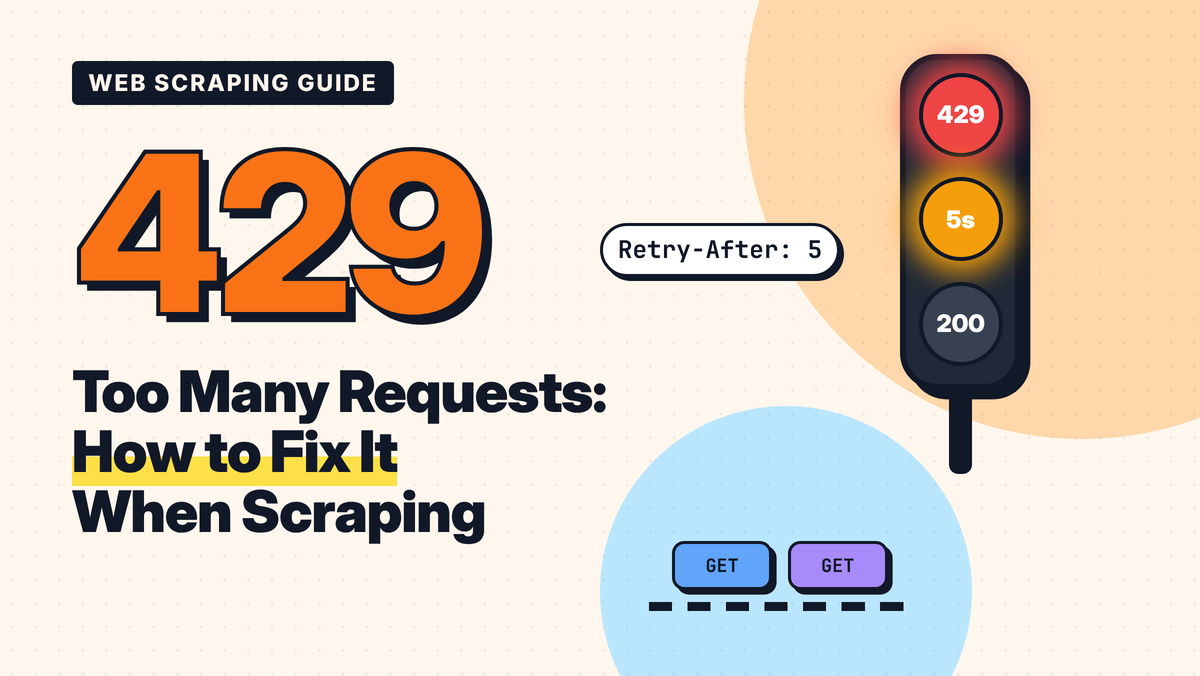
You hit a rate limit: too many requests from one IP, session or API key in a time window. Keep hammering and many sites escalate a 429 into a longer 403 ban. Fix: wait for the Retry-After header (seconds or an HTTP date), back off exponentially with jitter, lower concurrency, and pace requests per domain. Our 429 Too Many Requests guide and the Cloudflare error 1015 guide cover rate limits in depth.
9. 444 No Response
An nginx-only code: the server closed the connection without sending anything. Your client usually sees a connection reset or an empty reply rather than the number 444. Sites use it to drop traffic they've decided is automated. Fix: treat it like a hard 403: change the IP, send real browser headers, and use a client with a browser-like TLS fingerprint or a real browser.
10. 451 Unavailable For Legal Reasons
The content is withheld for legal reasons, most often by region, as defined in RFC 7725. Fix: request from a region where the page is lawfully served, if your use is allowed there, or skip it. Headers and retries won't change a legal block.
11. 500 Internal Server Error
The server crashed while handling your request. Usually it's the site's bug and temporary, but check whether your input caused it: a malformed parameter or an unexpected value can crash a fragile endpoint every time. Fix: retry with exponential backoff; if the same URL fails every time while others work, change the request, not the timing.
12. 502 Bad Gateway
A gateway, load balancer or proxy got an invalid reply from the server behind it. In scraping, your own proxy is a common culprit. Fix: retry with backoff, test the URL without your proxy, and rotate away from proxy endpoints that keep returning 502.
13. 503 Service Unavailable
The ambiguous one. It can mean real overload or maintenance, often with a Retry-After header, or it can be an anti-bot challenge served with a 503 status. Fix: read the body. A short "service unavailable" page needs backoff; a page saying "checking your browser" or "just a moment" needs a real browser or an unblocking API, because waiting won't solve a challenge.
14. 504 Gateway Timeout
A gateway waited for the server behind it and gave up. The origin is slow or overloaded, sometimes because of your own concurrency. Fix: retry with backoff, raise your read timeout, and cut concurrency for that domain. Scraping heavy pages off-peak also helps.
15. 520, 521, 522 and 524: Cloudflare origin errors
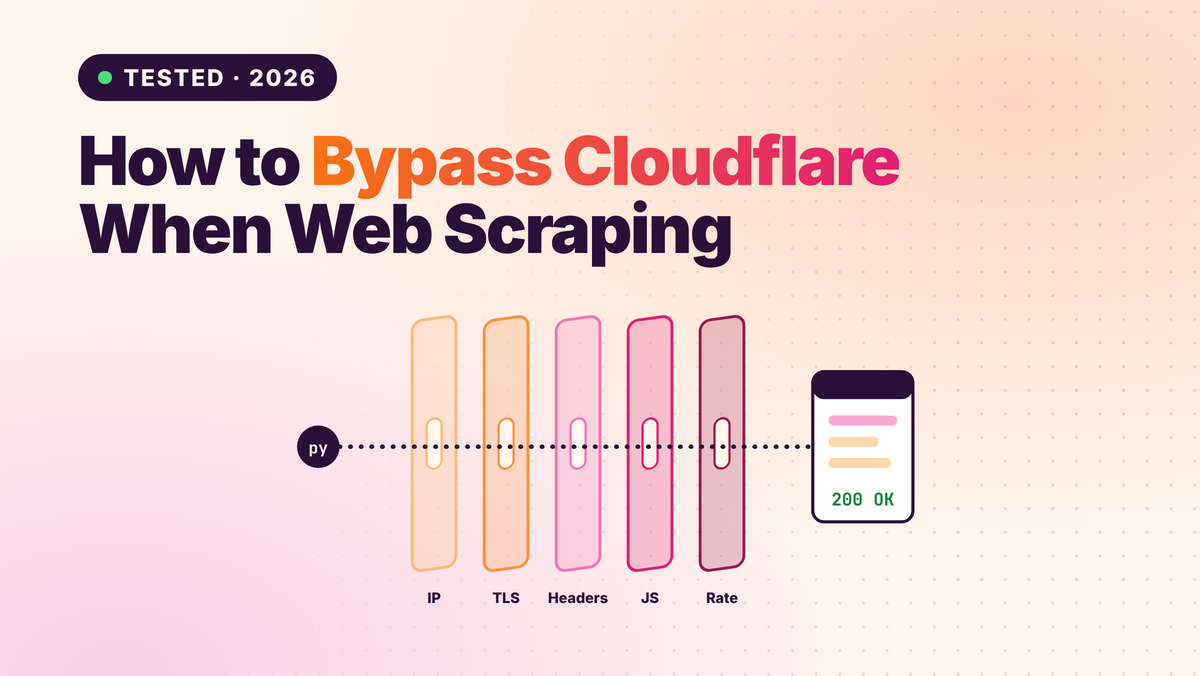
Cloudflare sits in front of a large share of websites and returns its own codes when it can't get a good reply from the origin server, as its 5xx error docs explain. 520 means the origin sent an empty or unexpected response, 521 means the origin refused the connection, 522 means the connection to the origin timed out, and 524 means the origin accepted the connection but took too long to answer. Fix: retry later with backoff. 521, 522 and 524 are the site's problem; a 520 that only your scraper gets, while a browser loads fine, points to your fingerprint, so compare the two. See how to bypass Cloudflare when web scraping.
Retry the right errors: backoff, jitter and Retry-After
Retry only errors that can succeed on a later attempt: 408, 429, 500, 502, 503, 504 and Cloudflare's 52x codes. Wait for the server's Retry-After when it sends one, otherwise back off exponentially with random jitter, cap the total wait, and give up cleanly. Never retry 400, 401, 404, 407, 410 or a persistent 403 unchanged.
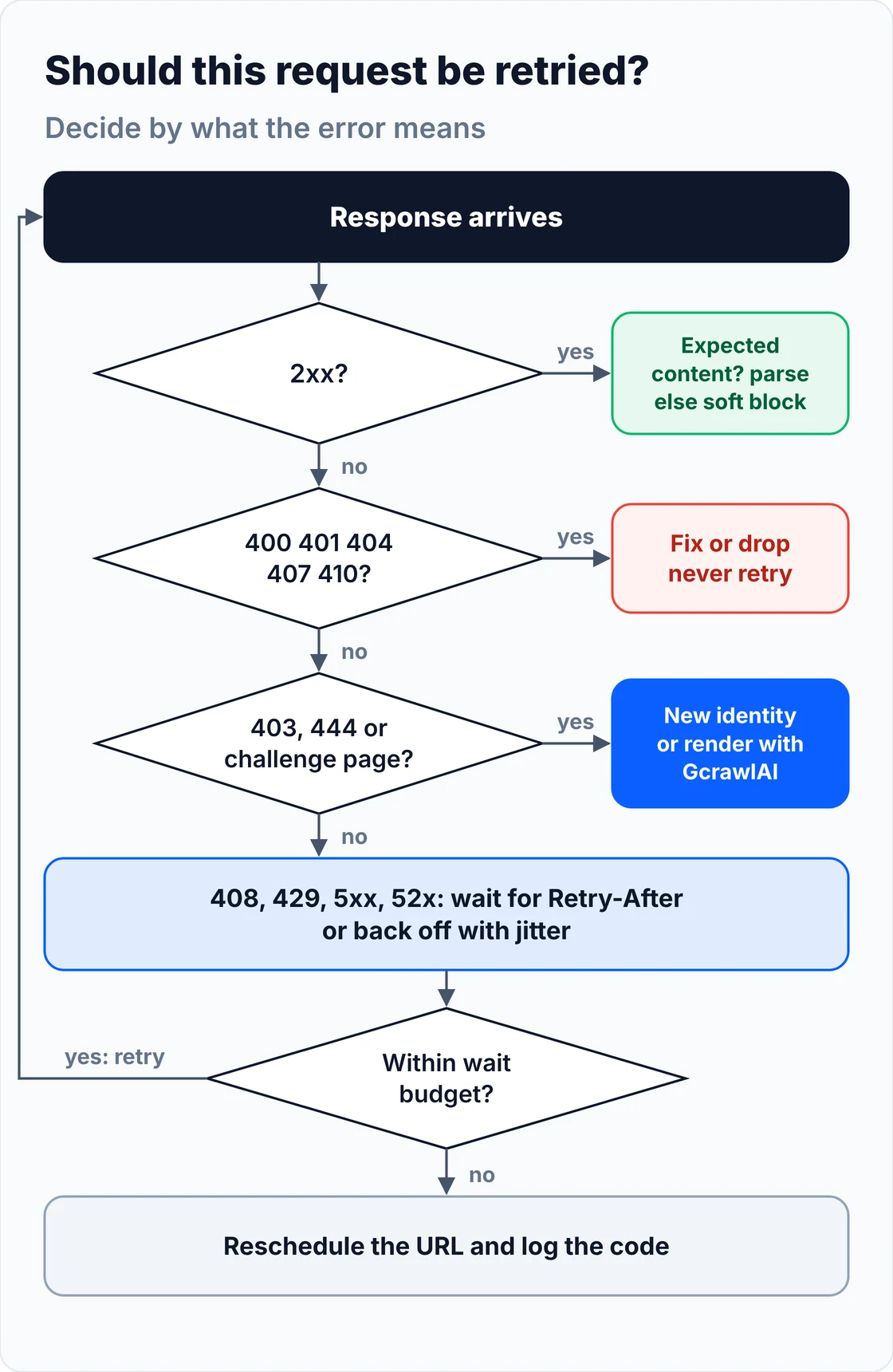
Jitter matters more than people expect: without it, a fleet of workers that all got a 429 retries at the same instant and triggers the limit again. The wait budget matters too: if a server asks you to wait an hour, reschedule the URL instead of holding a worker. This fetcher combines both with the classifier above and counts status codes per run so you can watch error rates:
# pip install requests
"""Retry only what can succeed: backoff with jitter, Retry-After, a wait budget and per-status stats."""
import random
import time
from collections import Counter
from datetime import datetime, timezone
from email.utils import parsedate_to_datetime

import requests

from diagnose import classify

HEADERS = {
    "User-Agent": "Mozilla/5.0 (Windows NT 10.0; Win64; x64) AppleWebKit/537.36 "
                  "(KHTML, like Gecko) Chrome/156.0.0.0 Safari/537.36",
    "Accept": "text/html,application/xhtml+xml,application/xml;q=0.9,*/*;q=0.8",
    "Accept-Language": "en-US,en;q=0.9",
}
STATS = Counter()                        # status code -> count, per run


def retry_after(value: str | None) -> float | None:
    """Retry-After is either seconds ("120") or an HTTP date."""
    if not value:
        return None
    if value.strip().isdigit():
        return float(value)
    try:
        when = parsedate_to_datetime(value)
        return max(0.0, (when - datetime.now(timezone.utc)).total_seconds())
    except (TypeError, ValueError):
        return None


def backoff(attempt: int, base: float = 1.0, cap: float = 60.0) -> float:
    """Full jitter: a random wait up to base * 2^attempt, capped."""
    return random.uniform(0, min(cap, base * 2 ** attempt))


def fetch(url: str, session=None, attempts: int = 5, budget: float = 120.0,
          must_contain: tuple = (), sleep=time.sleep) -> requests.Response | None:
    session = session or requests.Session()
    waited = 0.0
    for attempt in range(attempts):
        try:
            resp = session.get(url, headers=HEADERS, timeout=(5, 30))
        except (requests.ConnectionError, requests.Timeout):
            STATS["network"] += 1
            wait = backoff(attempt)
        else:
            STATS[resp.status_code] += 1
            verdict = classify(resp.status_code, resp.headers, resp.text, must_contain)
            if verdict.bucket == "ok":
                return resp
            if not verdict.retry:
                print(f"{resp.status_code} {verdict.bucket}: {verdict.fix}")
                return None
            wait = retry_after(resp.headers.get("Retry-After"))
            wait = backoff(attempt) if wait is None else wait
        if waited + wait > budget:
            print(f"wait budget spent, reschedule: {url}")
            return None
        waited += wait
        sleep(wait)
    print(f"gave up after {attempts} attempts: {url}")
    return None


if __name__ == "__main__":
    r = fetch("https://example.com/", must_contain=("example domain",))
    print(f"got {len(r.text)} bytes" if r is not None else "nothing usable", dict(STATS))
The test below fakes the responses, so it runs offline in under a second. It checks the classifier, both Retry-After formats, a 429 then 503 then 200 sequence, that a 404 is never retried, and that a one-hour Retry-After gets rescheduled instead of waited out:
"""Offline test: fake responses, no network. Checks classification, Retry-After and the retry loop."""
from datetime import datetime, timedelta, timezone
from email.utils import format_datetime

import resilient_fetch as rf
from diagnose import classify


class Fake:
    def __init__(self, status, body="", headers=None):
        self.status_code, self.text, self.headers = status, body, headers or {}


class Session:
    def __init__(self, replies):
        self.replies, self.calls = list(replies), 0

    def get(self, url, **kw):
        self.calls += 1
        return self.replies.pop(0)


waits = []
out = []
ok_page = "<html>" + "x" * 2000 + "<span class=price>$19</span> add to cart</html>"

# 1. classification
for st, body in [(404, ""), (429, ""), (403, "<title>Just a moment...</title>"), (502, ""), (407, "")]:
    v = classify(st, {"Server": "cloudflare"}, body)
    out.append(f"{st}: {v.bucket}, retry={v.retry}")
v = classify(200, {}, "<html>Please log in</html>", must_contain=("price",))
out.append(f"200 login wall: {v.bucket}")

# 2. Retry-After in both formats
out.append(f"Retry-After '30' -> {rf.retry_after('30'):.0f}s")
date = format_datetime(datetime.now(timezone.utc) + timedelta(seconds=90), usegmt=True)
out.append(f"Retry-After date -> about {round(rf.retry_after(date), -1):.0f}s")

# 3. 429 then 503 then 200: two waits, then success
s = Session([Fake(429, headers={"Retry-After": "2"}), Fake(503, "service busy"), Fake(200, ok_page)])
r = rf.fetch("https://shop.example/p/1", session=s, must_contain=("price",), sleep=waits.append)
out.append(f"429 -> 503 -> 200: success={r is not None}, calls={s.calls}, first wait={waits[0]:.0f}s")

# 4. 404 is never retried
s = Session([Fake(404)])
r = rf.fetch("https://shop.example/gone", session=s, sleep=waits.append)
out.append(f"404: calls={s.calls}, result={r}")

# 5. Retry-After longer than the budget: reschedule instead of waiting
s = Session([Fake(429, headers={"Retry-After": "3600"})])
r = rf.fetch("https://shop.example/p/2", session=s, sleep=waits.append)
out.append(f"Retry-After 3600 > budget: calls={s.calls}, result={r}")
out.append(f"stats: {dict(rf.STATS)}")

assert out[0].startswith("404: gone, retry=False") and "challenge" in out[2] and "soft block" in out[5]
assert "success=True, calls=3" in out[8] and "calls=1, result=None" in out[9]
open("demo_output.txt", "w").write("\n".join(out) + "\n")
print("\n".join(out))
404: gone, retry=False
429: slow down, retry=True
403: challenge, retry=False
502: server, retry=True
407: bad request, retry=False
200 login wall: soft block
Retry-After '30' -> 30s
Retry-After date -> about 90s
429 -> 503 -> 200: success=True, calls=3, first wait=2s
404: calls=1, result=None
Retry-After 3600 > budget: calls=1, result=None
stats: {429: 2, 503: 1, 200: 1, 404: 1}
The 200 OK that is really a block
The most expensive scraping error has no error code. A site returns 200 OK with a CAPTCHA, a login wall, a cookie banner or an empty JavaScript shell instead of the content, your scraper parses it happily, and you find the gap in your data a week later. Validate every page against content you expect.
- Check for a marker: a product page should contain a price, an article more than a few hundred words. The
must_containcheck in the classifier does this. - Watch page size: a sudden drop in average response size is often the first sign of a soft block.
- Look for challenge text: "verify you are human", "enable JavaScript and cookies" and similar phrases mean a bot check, whatever the status code.
- Render when the shell is empty: if the HTML has a root
divand no data, the content loads with JavaScript; see how to scrape dynamic JavaScript websites with Python.
Scraping errors that aren't HTTP status codes
Some failures never produce a status code because the request didn't complete. Connection resets, DNS failures, SSL errors, read timeouts and parsing errors show up as exceptions in your client instead. They need the same discipline: classify, retry the transient ones, and fix the ones caused by your setup.
| Error | Usual cause | Fix |
|---|---|---|
| ConnectionError / connection reset | Dropped by the site (often a silent block) or a dead proxy | Retry with backoff; if it repeats, change IP or fingerprint |
| Read or connect timeout | Slow site, slow proxy, or no timeout set | Set separate connect and read timeouts; retry |
| DNS resolution failed | Typo in the domain, or the domain expired | Check the hostname; don't retry in a loop |
| SSL certificate error | Expired certificate or a proxy intercepting TLS | Fix the proxy setup; don't turn off verification in production |
| Parsing error / missing element | The site changed its HTML, or you got a block page | Validate content first; use stable selectors |
What failed and blocked requests cost you
Errors cost money twice: in retries you pay for, and in credit multipliers for the rendering and premium proxies that avoid them. For 100,000 successful pages a month, plain HTML costs $39 to $49 on credit-based APIs and $101 on GcrawlAI; for protected pages that need rendering and premium proxies, it's $249 to $399 against the same $101.
| Option, 100,000 successful pages a month | Plain HTML pages | Protected pages (JS rendering + premium proxies) | What failures cost |
|---|---|---|---|
| GcrawlAI (every request rendered, residential IPs included) | $101 (Growth $79 + 20,000 overage at $1.10 per 1,000) | $101 (same request, no multiplier) | Blocked pages, CAPTCHAs, timeouts and server errors never billed |
| ScraperAPI | $49 (Hobby, 100,000 credits) | $299 (Business; 25 credits per page = 2.5M credits) | Charged for 200 and 404 responses; 500 not charged |
| ZenRows | $39 (Build B3, 120,000 credits) | $399 (Growth G3; 25 credits per page = 2.5M credits) | Failed requests never charged; 404 and 410 count as successful |
| ScrapingBee | $49 (Freelance, 250,000 credits; JS off) | $249 (Business; 25 credits per page = 2.5M credits) | Charged only for 200, 404 and 410 responses |
List-price arithmetic, not a benchmark. Credit costs and billing rules come from ScraperAPI's credit docs and status code docs, ZenRows' pricing docs and ScrapingBee's FAQ, all checked November 1, 2026. ScraperAPI also charges 10 credits per request on domains it classes as bot-protected, and up to 75 with ultra-premium proxies. The honest read: for plain HTML that a cheap request can fetch, ZenRows, ScraperAPI and ScrapingBee all cost less than GcrawlAI. GcrawlAI wins once pages need a browser or sit behind bot checks, because rendering, residential IPs and stealth are already in the one request, and the blocked attempts are free.
GcrawlAI plans (GcrawlAI pricing, checked October 28, 2026):
| Plan | Price | Requests/month | Concurrent | Per 1,000 | Overage per 1,000 |
|---|---|---|---|---|---|
| Free | $0 forever, no card | 50 | 2 | – | – |
| Starter | $29/month | 20,000 | 10 | $1.45 | $1.60 |
| Growth (most popular) | $79/month | 80,000 | 35 | $0.99 | $1.10 |
| Pro | $199/month | 250,000 | 50 | $0.80 | $0.90 |
| Scale | $499/month | 750,000 | 100 | $0.67 | $0.75 |
| Enterprise | Volume pricing | 2M+ | Custom | – | – |
| Self-hosted | $0 (MIT) | Your servers | Your servers | Infrastructure only | – |
Every plan, Free included, has scrape, crawl, the Search API, JavaScript rendering, residential IP rotation and stealth escalation in each request. Failed requests are never charged. Annual billing charges 10 months for 12, unused requests on paid plans roll over once, and Indian customers are billed in INR with a GST invoice.
How to prevent scraping errors before they happen
Most errors are cheaper to prevent than to fix. Pace requests per domain, send realistic headers, keep sessions, validate content, and watch error rates by status code so a rise in 403s or 429s warns you before the scraper is fully blocked. Treat a jump in any one code as a signal to change something.
- Pace per domain: a fixed delay with random jitter per hostname, and a concurrency cap; start with one worker and raise it while 429s stay flat.
- Look like a browser: a current user agent with the matching
Accept,Accept-Languageand client-hint headers; see our free proxy sites guide for why free IPs make blocks worse. - Track codes per run: the
STATScounter above, logged per domain, shows a soft block or a new rate limit the day it starts. - Alert on change, not volume: a site that normally returns 1% 403s and now returns 20% needs attention today.
- Re-test after site changes: a redesign moves URLs (404s) and selectors (empty fields) at the same time.
"Treat your error rate like uptime. When 403s for one domain go from one percent to twenty, the site has changed something, and the cheapest moment to react is that morning, not after a week of empty rows."
Rajesh Kannan, Co-Founder & CTO at Gramosoft
Which fix for which error?
Match the fix to the cause: request errors need a corrected request, rate limits need pacing, blocks need a better identity or a real browser, and server errors need backoff. GcrawlAI takes the blocking, rendering and retry work off your hands, so your own code only handles bad requests and dead URLs.
| You're getting | Do this yourself | Where GcrawlAI fits |
|---|---|---|
| 403, 444 or challenge pages | Browser headers, sessions, a real browser, another IP | GcrawlAI renders, rotates IPs and escalates stealth in one request |
| 429 or Cloudflare 1015 | Retry-After, backoff with jitter, lower concurrency | GcrawlAI rotates residential IPs; you pace within your plan's concurrency |
| 500, 502, 503, 504, 52x | Exponential backoff with a wait budget | GcrawlAI retries internally and doesn't bill server errors |
| 200 with an empty or blocked page | Content checks, rendering | GcrawlAI renders every page before returning it |
| Geo-based 403 or 451 | Request from an allowed country | GcrawlAI proxy_geo picks the country per request |
| 400, 401, 404, 407, 410 | Fix the request, credentials, proxy or URL list | GcrawlAI removes proxy credentials from your code entirely |
| Errors across a whole site crawl | Queue, retry and log per URL | GcrawlAI crawl with async jobs and webhooks |
When handling errors in your own code is enough
Your own retry code is enough when the sites are lightly protected, your volume is modest, and the errors are mostly 404s, timeouts and the occasional 503. The classifier and fetcher in this guide cover that. Bring in GcrawlAI when 403s, challenge pages or JavaScript shells start eating your time.
Even then you can stay on your own servers: the MIT-licensed GcrawlAI core self-hosts for free with the same rendering engine, and the free Cloud plan's 50 requests a month are enough to test the URLs that keep failing. Paste one into the Playground to see whether it comes back clean. For the build-or-buy trade-off in general, read web scraping with Python vs a scraping API.
Scrape politely and within the rules
Many scraping errors are a site asking you to stop or slow down, so treat them that way. Read robots.txt and the terms, honor Retry-After, keep request rates reasonable, scrape public pages only, keep personal data out of your datasets, and don't try to get around a 451 legal block where the content isn't lawfully available to you.
Identify a contact in your user agent or request headers when you crawl at volume, cache pages during development so you don't re-hit live sites, and stop when a site clearly says no. For the legal background, read what web scraping is and where it's legal, and get advice for your own case.
Frequently asked questions
What are the most common web scraping errors?
403 Forbidden and 429 Too Many Requests are the most common, followed by 404, 503 and Cloudflare's 520–524 codes. 403 usually means bot detection, 429 a rate limit, and 503 either an outage or a challenge page. GcrawlAI handles blocks and retries in one request and never bills failures.
Why do I get a 403 when scraping but not in my browser?
Your browser sends a full set of headers, cookies and a Chrome TLS fingerprint from a residential IP. A script sends a few headers from a server IP, which bot checks spot quickly. Match the browser's headers, keep a session, try another IP, and render the page if it runs a JavaScript check.
Which HTTP errors should a scraper retry?
Retry 408, 429, 500, 502, 503, 504 and Cloudflare's 520–524 with exponential backoff and jitter, honoring Retry-After. Don't retry 400, 401, 404, 407 or 410, and don't repeat a 403 unchanged; fix the request or the identity first.
How long should I wait after a 429 error?
As long as the Retry-After header says, in seconds or until the date it gives. Without it, back off exponentially from about one second with random jitter, lower your concurrency, and reschedule the URL if the wait would exceed your budget.
How do I tell a real 503 from a bot challenge?
Read the body. A real outage is a short error page, often with Retry-After. A challenge page contains text like "Just a moment" or "Checking your browser" and usually a CDN header such as CF-RAY. Outages need backoff; challenges need a real browser.
Do scraping APIs charge for failed requests?
Most charge only for successful requests, but "successful" varies. ScraperAPI bills 200 and 404 responses, ZenRows and ScrapingBee count 404 and 410 as successful, per their docs checked November 1, 2026. GcrawlAI never bills blocked pages, CAPTCHAs, timeouts or server errors.