By Rajesh Kannan, Co-Founder & CTO, Gramosoft · Last updated: · Every price, free tier and billing rule below was checked on the vendor's own pricing page or docs on November 2, 2026
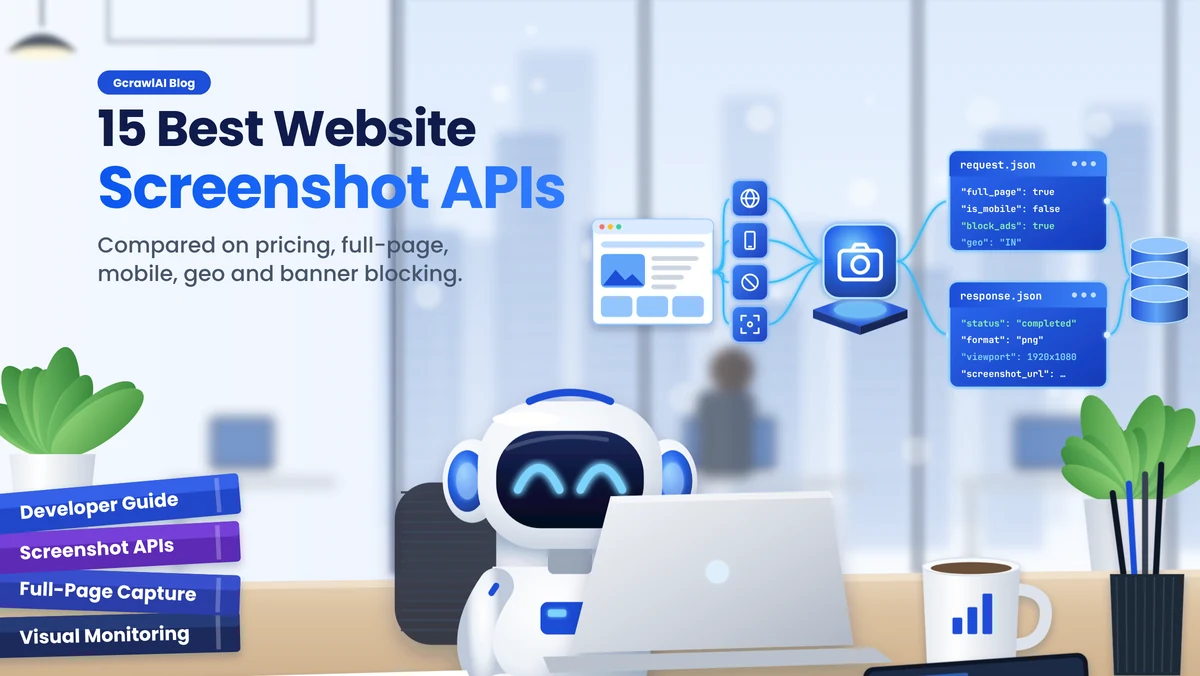
Taking a screenshot of a web page sounds trivial until you do it at scale. Single-page apps come back blank, lazy images leave gaps, cookie banners cover the hero, and a page loaded from the wrong country shows the wrong prices. This guide compares 15 website screenshot APIs for developers on what decides clean captures and what they really cost, starting with GcrawlAI, with code you can run today.
TL;DR
- Protected, JavaScript-heavy or country-specific pages: GcrawlAI captures through residential IPs with full-page, mobile, dark mode and banner blocking, at one request per screenshot.
- Deepest screenshot-only options: ScreenshotOne and Urlbox, with PDF, video and many output formats.
- Cheapest simple endpoint: ApiFlash at $7 for 1,000 or $180 for 100,000 a month.
- Screenshots inside scraping: Firecrawl, ScrapingBee and Scrapfly, priced in credits per screenshot.
- Check the billing rules: some APIs never bill failed captures; others bill browser time or error pages.
What is the best website screenshot API? For protected or country-specific pages, and for teams that also scrape, GcrawlAI: residential IPs, full-page and mobile capture, cookie-banner and ad blocking, and failed captures never billed. ScreenshotOne and Urlbox have the most screenshot-only options, and ApiFlash is the cheapest simple endpoint. Test any of them on five hard pages before you commit.
15 screenshot APIs at a glance (checked November 2, 2026)
| API | Best for | Free tier | Entry paid plan |
|---|---|---|---|
| GcrawlAI | Protected and geo-specific pages, scraping plus screenshots | 50 requests/month | $29 for 20,000 |
| ScreenshotOne | Screenshot-only depth | 100/month | $17 for 2,000 |
| Urlbox | Video, PDF, archiving | 7-day trial | $19 for 2,000 |
| ApiFlash | Cheap, simple endpoint | 100/month | $7 for 1,000 |
| Browserless | Your own Puppeteer/Playwright code | 1,000 units/month | $35 for 20,000 units |
| Firecrawl | Screenshot plus Markdown | 1,000 credits/month | $19 for 5,000 credits |
| ScrapingBee | Screenshots in a scraping API | 1,000 credits once | $19 for 75,000 credits |
| Scrapfly | Anti-bot scraping with screenshots | 1,000 credits once | $30 for 200,000 credits |
| Microlink | Link previews and metadata | 25/day | $49 for 46,000 |
| HTMLCSStoImage | HTML/CSS to image | 50/month | $14 for 1,000 |
| Doppio | Screenshots and PDFs together | 400/month | $16 for 4,000 |
| Screenshot Machine | Low-cost euro plans | 100/month | €9 for 2,500 |
| Screenshotlayer | Basic captures, legacy apps | 100/month, non-commercial | $19.99 for 10,000 |
| CaptureKit | Cached captures, storage upload | 100 credits | Not listed on its pricing page |
| Bannerbear | Templated social images | 30 credits once | $49 for 1,000 credits |
The 15 best website screenshot APIs in 2026
These 15 APIs cover the main ways teams capture web pages: dedicated screenshot services, scraping APIs that return screenshots, browser platforms, and image generators. They're ordered by how well each handles real pages for a general developer workload, with GcrawlAI first. Prices come from each vendor's own site.
1. GcrawlAI: clean captures through residential IPs, one request each
Best for: protected, JavaScript-heavy or country-specific pages, monitoring, and teams that scrape and capture the same sites · Type: scraping, crawling, Search and screenshot API · Access: REST, Python SDK (gcrawl-sdk), MCP, MIT core
GcrawlAI captures pages in a real browser through residential IPs, so it sees what a visitor in that country sees, not a block page. One call sets the viewport, full page or one element, mobile emulation, light or dark mode, cookie-banner and ad blocking, auto-scroll for lazy images, the output format, and the proxy country. Each screenshot is one request, and failed captures are never billed.
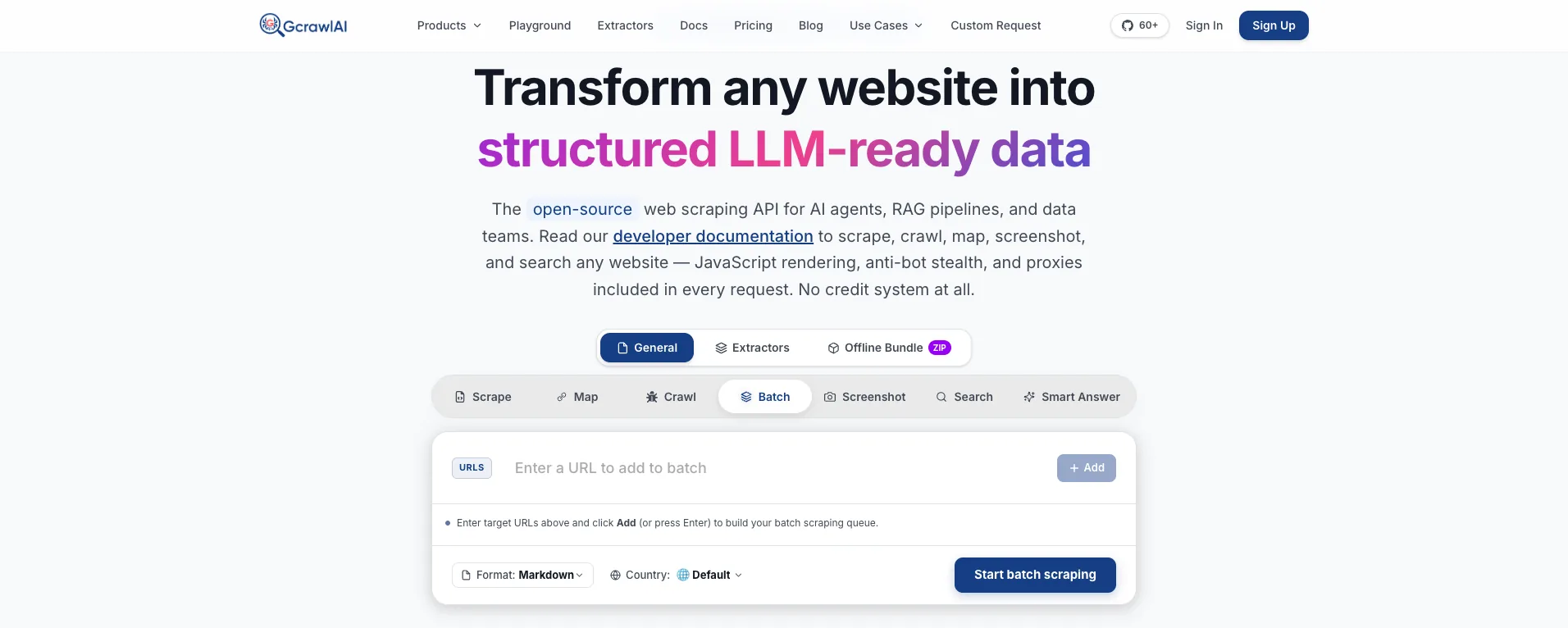
The homepage puts it plainly: JavaScript rendering, anti-bot stealth and proxies are included in every request, with no credit system. For screenshots that matters most on the pages other APIs struggle with: sites behind bot checks and pages that change by country, where a datacenter IP gets a challenge page instead of the content.
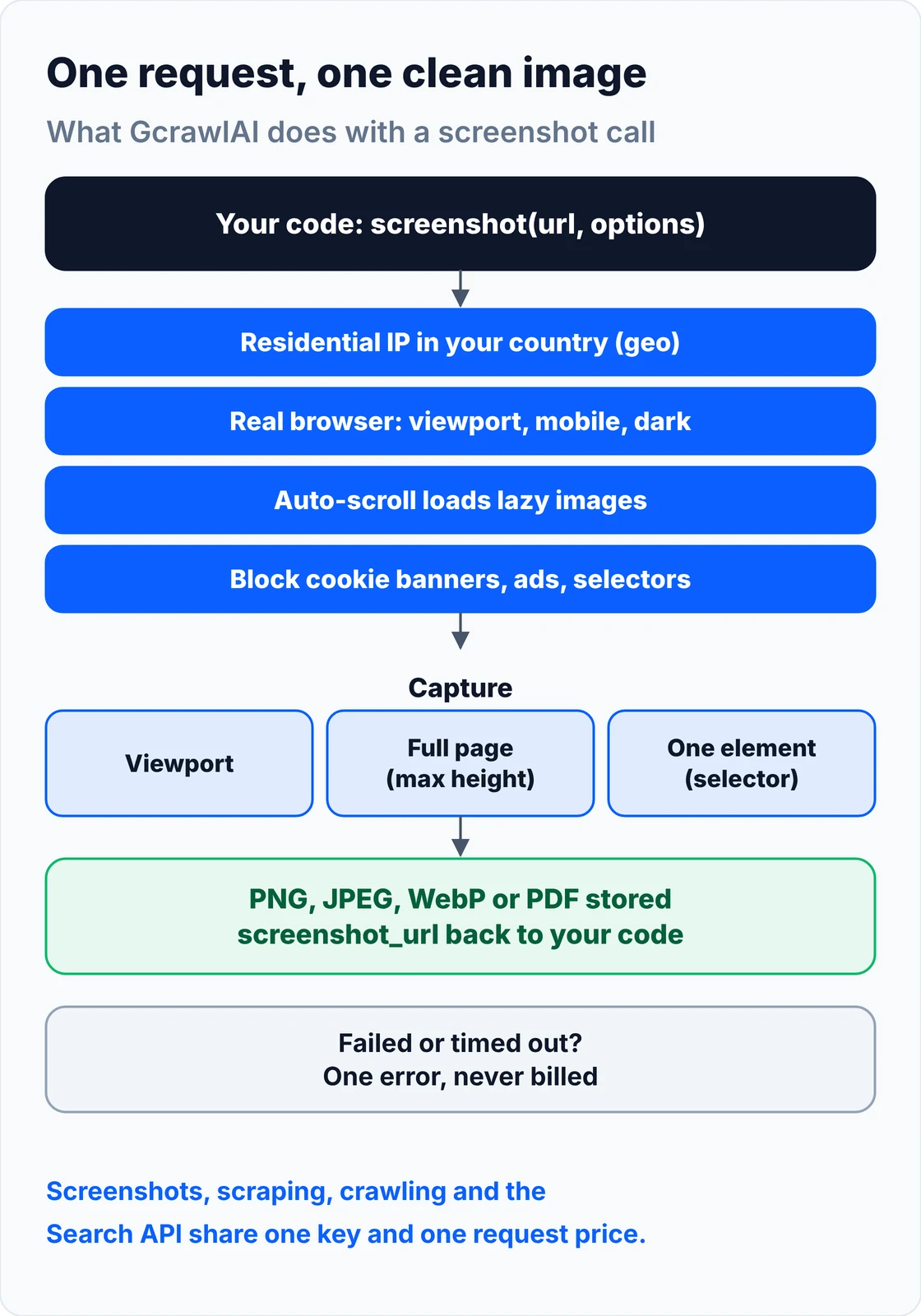
The GcrawlAI Screenshot API page sets out what the capture engine does: headless Chromium with hardware acceleration, automatic scrolling to trigger lazy-loaded content, a wait for web fonts, and cookie-banner rejection before the shot. It lists full-page and viewport capture on desktop, tablet and mobile profiles, retina output at 2x and 3x pixel ratios, dark mode and custom CSS overrides, and PNG, JPEG, WebP or vector PDF output. Viewports go up to 3840×2160 (4K) and full pages up to 20,000 pixels tall, with sync or async processing and webhooks for large jobs.
A screenshot request with every option shown. Turn on full_page, block_cookie_banners or block_ads as you need them, set proxy.geo to the country you want to see the page from, and list CSS selectors in hide_selectors to remove chat widgets or sticky bars:
curl -X POST "https://gcrawlai.com/gc/api/v1/screenshot" \
  -H "accept: application/json" \
  -H "X-API-Key: gc-YOUR_API_KEY" \
  -H "Content-Type: application/json" \
  -d '{
  "url": "https://gramosoft.tech",
  "proxy": {
    "geo": "IN"
  },
  "screenshot": {
    "enabled": true,
    "full_page": false,
    "format": "png",
    "quality": 90,
    "viewport_width": 1920,
    "viewport_height": 1080,
    "is_mobile": false,
    "color_scheme": "auto",
    "block_cookie_banners": false,
    "block_ads": false,
    "auto_scroll": true,
    "scroll_delay": 500,
    "selector": null,
    "hide_selectors": [],
    "full_page_max_height": null,
    "timeout": 30000
  }
}'
The same request with the Python SDK, first with the defaults, then with ScreenshotOptions. With wait=True the SDK polls until the capture is ready:
# pip install gcrawl-sdk
from gcrawl_sdk import GcrawlClient, ScreenshotOptions

client = GcrawlClient(api_key="gc-YOUR_API_KEY")

# 1. Simple call: viewport capture with the defaults
result = client.screenshot(url="https://gramosoft.tech", geo="default", wait=True)

# 2. Advanced call with ScreenshotOptions
options = ScreenshotOptions(
    enabled=True,
    full_page=False,
    format="png",
    quality=90,
    viewport_width=1920,
    viewport_height=1080,
    is_mobile=False,
    color_scheme="auto",
    block_cookie_banners=False,
    block_ads=False,
    auto_scroll=True,
    scroll_delay=500,
    selector="",
    hide_selectors=[],
    full_page_max_height=0,
    timeout=30000,
    proxy_geo="IN"
)

result = client.screenshot(
    url="https://gramosoft.tech",
    options=options,
    wait=True,
    poll_interval=2
)

if result.is_completed:
    print("Captured Screenshot URL:", result.screenshot_url)
The response gives you the status, the capture settings and a stored image URL:
{
  "status_code": 200,
  "crawl_id": "sc_9b0a1c2d3e4f5a6b",
  "status": "completed",
  "is_completed": true,
  "screenshot_url": "https://gcrawlai-storage.s3.amazonaws.com/screenshots/sc_gramosoft_desktop.png",
  "format": "png",
  "viewport_width": 1920,
  "viewport_height": 1080,
  "full_page": false
}
- Capture modes (Screenshot API): viewport, full page with a
full_page_max_heightcap for endless feeds, or a single element by CSSselector. - Clean output: cookie-banner and ad blocking,
hide_selectorsfor anything left over, andauto_scrollwith ascroll_delayso lazy images load before the shot. - Devices and themes: any viewport size, mobile emulation with
is_mobile, andcolor_schemefor light, dark or the site's default. - Country targeting:
proxy.geoloads the page through a residential IP in that country, so prices, language and consent banners match local visitors. - More than screenshots: scrape the same page to Markdown, HTML or JSON, crawl a whole site, or use the Search API, all on one key and one request price. Try a URL in the Playground or read the docs.
- For AI agents: an MCP server connects Claude, Cursor and other agents to GcrawlAI as a tool.
For monitoring or audits you'll usually capture a list of pages on desktop and mobile. This script does that with full-page capture and banners blocked, saves each image locally, and logs failures instead of stopping:
"""Capture desktop and mobile screenshots for a list of URLs with GcrawlAI and save them locally.

Full-page, cookie banners and ads blocked, chat widgets hidden. Failed captures are logged and skipped
(GcrawlAI doesn't bill failed requests), and a manifest records what was captured and when.
pip install gcrawl-sdk requests
"""
import csv
import os
import time
from pathlib import Path
from urllib.parse import urlsplit

import requests
from gcrawl_sdk import GcrawlClient, ScreenshotOptions
from gcrawl_sdk.exceptions import GcrawlAPIError, GcrawlTimeoutError

client = GcrawlClient(api_key=os.getenv("GCRAWL_API_KEY", "gc-YOUR_API_KEY"))
OUT = Path("shots")

DEVICES = {
    "desktop": dict(viewport_width=1440, viewport_height=900, is_mobile=False),
    "mobile": dict(viewport_width=390, viewport_height=844, is_mobile=True),
}


def options_for(device, geo="US"):
    return ScreenshotOptions(
        full_page=True, format="png", quality=90, color_scheme="auto",
        block_cookie_banners=True, block_ads=True, auto_scroll=True, scroll_delay=500,
        hide_selectors=["#intercom-container", ".chat-widget"],
        full_page_max_height=10000, timeout=30000, proxy_geo=geo, **DEVICES[device])


def capture(url, device, geo="US"):
    """Return the saved file path, or None if the capture failed."""
    try:
        result = client.screenshot(url=url, options=options_for(device, geo), wait=True, poll_interval=2)
    except (GcrawlAPIError, GcrawlTimeoutError) as err:
        print(f"failed {url} [{device}]: {err}")
        return None
    if not getattr(result, "is_completed", False) or not result.screenshot_url:
        print(f"no image {url} [{device}]: {getattr(result, 'status', 'unknown')}")
        return None
    name = urlsplit(url).netloc.replace(".", "-") + f"-{device}.png"
    path = OUT / name
    path.write_bytes(requests.get(result.screenshot_url, timeout=60).content)  # save it: keep your own copy
    return path


def run(urls, geo="US"):
    OUT.mkdir(exist_ok=True)
    with open(OUT / "manifest.csv", "a", newline="") as f:
        log = csv.writer(f)
        for url in urls:
            for device in DEVICES:
                path = capture(url, device, geo)
                log.writerow([time.strftime("%Y-%m-%dT%H:%M:%S"), url, device, geo, path or "FAILED"])


if __name__ == "__main__":
    run(["https://gramosoft.tech", "https://example.com"])
Screenshot URLs point to stored files, but keep your own copy of anything you need as a record. The MIT-licensed core runs on your own servers too:
git clone https://github.com/GramosoftAI/GcrawlAI.git && cd GcrawlAI
python -m venv .venv && source .venv/bin/activate
pip install -r requirements.txt && playwright install
cp .env.example .env                      # add your database, Redis and proxy settings
python -m api.core.db_setup
redis-server &
celery -A web_crawler.crawler.celery_config worker -l info &
uvicorn api.api:app --port 8000
Pricing: a free plan of 50 requests a month with no card, and paid plans from $0.67 to $1.45 per 1,000 requests. A screenshot is one request, whatever the options, and rendering, residential IPs and retries never multiply it. The plan table is in the cost section.
Where it falls short: there's no video or scrolling-video capture, and no scripted clicks or wait-for-selector before the shot, so very slow apps rely on auto-scroll and a longer timeout. Every request runs a full browser through residential IPs, which makes simple pages cost the same as hard ones, and the ecosystem is younger than ScreenshotOne's or Urlbox's.
"Most bad screenshots aren't rendering bugs. They're the page reacting to the visitor: a consent wall for an EU IP, a challenge page for a datacenter IP, a half-loaded app for an impatient browser. Fix the visitor and the screenshot fixes itself."
Rajesh Kannan, Co-Founder & CTO at Gramosoft
2. ScreenshotOne: the most screenshot options
Best for: products where the screenshot is the whole job and you want fine control · Type: dedicated screenshot API
ScreenshotOne is a screenshot-first API with the widest option set here. It outputs PNG, JPG, WebP, GIF, AVIF, TIFF, PDF, HTML and Markdown, captures full pages or one element, blocks ads and cookie banners, and supports async jobs, webhooks and S3 upload. SDKs cover Go, Java, Ruby, Python, C#, PHP and JavaScript. Failed requests and cached responses don't count toward your quota.
Pricing (ScreenshotOne pricing, checked November 2, 2026):
| Plan | Price/month | Screenshots | Overage per screenshot |
|---|---|---|---|
| Free | $0 | 100 | – |
| Basic | $17 | 2,000 | $0.009 |
| Growth | $79 | 10,000 | $0.006 |
| Scale | $259 | 50,000 | $0.004 |
Where it falls short: choosing the IP country starts on the $79 Growth plan, it's screenshot-only, so page content needs a second tool, and at 100,000 a month it costs $459 on list prices.
3. Urlbox: renders, video and archiving
Best for: archiving, compliance evidence, video captures and teams that need many output formats · Type: rendering API
Urlbox renders pages to PNG, JPEG, WebP, AVIF, SVG, PDF, HTML, MP4, WebM and Markdown. It captures full pages or elements, blocks ads, hides cookie banners or clicks "accept", and delivers through webhooks to S3, R2, Azure or Google Cloud Storage. Urlbox says it doesn't charge for requests that fail for any reason.
Pricing (Urlbox pricing, checked November 2, 2026):
| Plan | Price/month | Renders |
|---|---|---|
| Trial | $0 for 7 days, no card | – |
| Lo-Fi | $19 | 2,000 |
| Hi-Fi | $49 | 5,000 |
| Ultra | $99 | 15,000 |
| Business | $495 base + $3 per 1,000 | Usage-based |
Where it falls short: there's no free tier, plans below Business upgrade automatically when you exceed them, and high volume costs the most in this list.
4. ApiFlash: the cheapest simple endpoint
Best for: thumbnails, previews and simple captures on a budget · Type: dedicated screenshot API
ApiFlash is a Chrome-based screenshot API on AWS Lambda with a single endpoint. It returns PNG, JPEG or WebP, captures full pages, blocks ads, hides cookie banners and exports to S3. Its plans are the cheapest per screenshot among the dedicated services here, and code examples cover C#, Go, Java, Node, PHP, Python and Ruby.
Pricing (ApiFlash plans, checked November 2, 2026):
| Plan | Price/month | Screenshots |
|---|---|---|
| Free | $0 | 100 |
| Lite | $7 | 1,000 |
| Medium | $35 | 10,000 |
| Large | $180 | 100,000 |
Where it falls short: IP geolocation and managed proxies are Enterprise-only, there's no PDF output, and the site doesn't say whether failed captures count.
5. Browserless: hosted browsers for your own code
Best for: teams that already write Puppeteer or Playwright and want someone else to run the browsers · Type: browser platform with REST APIs
Browserless runs headless browsers you drive with Puppeteer, Playwright or its BrowserQL language, and it also has a REST /screenshot endpoint. You get full-page and element captures, a /pdf endpoint, consent-modal blocking, residential and datacenter proxies, and a self-hosted option under its Enterprise licence. It bills in units of browser time, not per screenshot.
Pricing (Browserless pricing, checked November 2, 2026; a unit is up to 30 seconds of browser time):
| Plan | Monthly | Annual (per month) | Units | Overage per unit |
|---|---|---|---|---|
| Free | $0 | $0 | 1,000 | – |
| Prototyping | $35 | $25 | 20,000 | $0.0020 |
| Starter | $200 | $140 | 180,000 | $0.0017 |
| Scale | $500 | $350 | 500,000 | $0.0015 |
Where it falls short: a request that fails mid-run still uses the browser time it consumed, residential proxy traffic costs 6 units per MB, and you write more of the capture logic yourself.
6. Firecrawl: a screenshot alongside Markdown
Best for: AI pipelines that want the page's Markdown and an image from one call · Type: scraping API for LLMs
Firecrawl treats a screenshot as one of its scrape output formats, with options for full page, quality and viewport, and a country setting. A scrape costs one credit whether you ask for Markdown, a screenshot or both. More on how it compares as a scraping API in our Firecrawl alternatives guide.
Pricing (Firecrawl pricing, checked November 2, 2026):
| Plan | Monthly | Annual (per month) | Credits |
|---|---|---|---|
| Free | $0 | $0 | 1,000 |
| Hobby | $19 | $16 | 5,000 |
| Standard | $99 | $83 | 100,000 |
Where it falls short: screenshot URLs expire after 24 hours, pages that return 403 or 404 still cost a credit, and screenshots aren't in the default self-hosted stack.
7. ScrapingBee: screenshots inside a scraping API
Best for: teams already scraping with ScrapingBee who want visual checks too · Type: scraping API with JavaScript rendering
ScrapingBee takes screenshots with screenshot, screenshot_full_page or screenshot_selector, blocks ads, and lets you choose a country on every plan. A screenshot needs JavaScript rendering, so it costs 5 credits, or 25 with premium proxies. It charges only for 200, 404 and 410 responses. More in our ScrapingBee alternatives guide.
Pricing (ScrapingBee pricing, checked November 2, 2026):
| Plan | Price/month | Credits | Standard screenshots (5 credits) |
|---|---|---|---|
| Free trial | $0 | 1,000 (once) | 200 |
| Hobby | $19 | 75,000 | 15,000 |
| Freelance | $49 | 250,000 | 50,000 |
| Startup | $99 | 1,000,000 | 200,000 |
Where it falls short: cookie-banner blocking isn't documented, there's no PDF, and protected pages that need premium proxies cost five times as much.
8. Scrapfly: a screenshot API built on anti-bot scraping
Best for: hard targets where the screenshot comes from a scraping stack · Type: scraping platform with a dedicated Screenshot API
Scrapfly's Screenshot API captures JPG, PNG, WebP or GIF, full pages or elements by CSS or XPath, removes cookie banners, ads and pop-ups with one option, and lets you pick a country. Async jobs report through webhooks, and captures can be cached. Each screenshot costs 60 credits.
Pricing (Scrapfly pricing and screenshot billing, checked November 2, 2026):
| Plan | Price/month | Credits | Screenshots (60 credits) |
|---|---|---|---|
| Free | $0 | 1,000 (once) | 16 |
| Discovery | $30 | 200,000 | 3,333 |
| Pro | $100 | 1,000,000 | 16,666 |
| Startup | $250 | 2,500,000 | 41,666 |
| Enterprise | $500 | 5,500,000 | 91,666 |
Where it falls short: at 60 credits a screenshot the per-image cost is high, and the screenshot billing page doesn't say whether failed captures are free.
9. Microlink: link previews with screenshots
Best for: link previews, CMS tools and apps that need metadata and an image · Type: browser API for previews and metadata
Microlink returns a page's metadata and a screenshot from one URL-style API. It captures full pages or elements, blocks ads, trackers and cookie consent, and can route through a residential proxy in a chosen country. Cached responses don't count against your quota, and requests pause at the limit rather than running up overage.
Pricing (Microlink pricing, checked November 2, 2026): free is 25 requests a day with no card; Pro is $49 a month for 46,000 requests; higher Pro tiers and Business are priced on request.
Where it falls short: prices above 46,000 requests aren't published, and it's built for previews rather than long scripted captures.
10. HTMLCSStoImage: images from HTML or a URL
Best for: social cards, email previews and generated images, plus public-page screenshots · Type: HTML/CSS-to-image API
HTMLCSStoImage turns your own HTML and CSS into an image, and also screenshots a public URL. It outputs PNG, JPG, WebP or PDF, supports full-screen capture, CSS selectors and consent-banner blocking, and offers webhooks on every plan. Official SDKs cover TypeScript, C#, Python, Ruby, PHP and Go.
Pricing (HTMLCSStoImage pricing, checked November 2, 2026):
| Plan | Price/month | Images |
|---|---|---|
| Free | $0 | 50 |
| Basic | $14 / $29 / $69 | 1,000 / 3,000 / 10,000 |
| Pro | $149 / $249 / $375 | 30,000 / 65,000 / 100,000 |
| Overage (optional) | $10 per 1,000 | – |
Where it falls short: website screenshots need a public URL, there's no ad blocking or country setting, and the site doesn't say whether failed images count.
11. Doppio: screenshots and PDFs on one platform
Best for: apps that generate both PDFs and screenshots, CI captures and reports · Type: HTML-to-PDF and screenshot rendering API
Doppio renders URLs or HTML into PDFs and screenshots, with full-page capture, clipped regions, async jobs with webhooks, and presigned uploads to S3, Google Cloud Storage, Spaces or MinIO. It says you pay only for successful renders, its servers are in Europe, and no document content is retained. Its free tier is the largest of the dedicated APIs here.
Pricing (Doppio pricing, checked November 2, 2026):
| Plan | Price/month | Documents |
|---|---|---|
| Basic | $0 | 400 |
| Premium | $16 | 4,000 |
| Premium+ | $48 | 12,000 |
| Pro | $129 (overage $0.0037 each) | 36,000 |
Where it falls short: no ad or cookie-banner blocking and no country targeting are listed, and element capture means clipping a region rather than naming a selector.
12. Screenshot Machine: long-running and low-cost
Best for: simple, steady capture jobs priced in euros · Type: dedicated screenshot API
Screenshot Machine captures JPG, PNG or GIF, full pages or a selector, on desktop, phone and tablet devices, and can click elements or hide them by CSS selector, which is how you remove cookie banners. Cached screenshots aren't billed, and PDF capture is a separate API. Code examples cover nine languages.
Pricing (Screenshot Machine pricing, checked November 2, 2026):
| Plan | Price/month | Screenshots | Overage each |
|---|---|---|---|
| Free | €0 | 100 | – |
| Basic | €9 | 2,500 | €0.004 |
| Pro | €59 | 20,000 | €0.003 |
| Enterprise | €99 | 50,000 | €0.002 |
Where it falls short: no built-in ad blocking or country targeting is listed, and banner removal means writing selectors per site.
13. Screenshotlayer: basic captures from APILayer
Best for: existing integrations and simple captures at low cost · Type: dedicated screenshot API
Screenshotlayer is one of the older screenshot APIs, run by APILayer. It returns PNG, JPEG or GIF, with WebP, HTTPS and retina output on paid plans, captures full pages, caches results for 30 days by default, and exports to FTP or S3 on the Professional plan and above. Its Basic plan is one of the cheapest ways to buy 10,000 screenshots a month.
Pricing (Screenshotlayer pricing, checked November 2, 2026):
| Plan | Monthly | Annual | Snapshots/month |
|---|---|---|---|
| Free | $0 | – | 100 (non-commercial) |
| Basic | $19.99 | $215.99 | 10,000 |
| Professional | $59.99 | $629.99 | 30,000 |
| Enterprise | $149.99 | $1,529.99 | 75,000 |
Where it falls short: no element capture, ad or banner blocking, country targeting or PDF is listed, and the free plan is for non-commercial use only.
14. CaptureKit: cached captures and storage upload
Best for: repeat captures of the same URLs where caching saves money · Type: screenshot and page-content API
CaptureKit captures PNG, JPEG, WebP or PDF, full pages with scrolling for lazy content or one selector, removes ads and cookie banners, and caches results from one hour to 30 days. It accepts your own HTTP, HTTPS or SOCKS5 proxy, uploads to S3 or R2, and emulates devices. Each call costs one credit.
Pricing (CaptureKit pricing, checked November 2, 2026): 100 free credits with no card; Pro includes 10,000 credits a month and Ultimate 50,000. The pricing page didn't show dollar prices when we checked, so confirm them before you budget.
Where it falls short: no official SDK, no published country setting, and paid prices and overage weren't visible on its pricing page.
15. Bannerbear: templated images with a screenshot endpoint
Best for: marketing teams generating social cards and previews from templates · Type: image and video generation API
Bannerbear generates images and videos from design templates and also has a screenshot endpoint for public pages. You set the URL, width, height (leave it out for a full page), mobile mode and language. Requests are async with webhooks by default, and a synchronous call times out after 10 seconds. Client libraries cover Node, PHP and Ruby.
Pricing (from Bannerbear's own comparison post, which it dates October 25, 2026; its pricing page didn't load for us): a free trial of 30 API credits, Automate at $49 a month for 1,000 credits, and Scale from $149 for 10,000 credits.
Where it falls short: it's an image generator first; there's no selector capture, ad blocking or proxy option for screenshots, and it doesn't say how many credits a screenshot uses.
What a screenshot API does, and what to test
A screenshot API loads a URL in a real browser, waits for it to render, and returns an image. Most of them use the same Chromium engine, so the differences are in what happens around the capture: scrolling, overlays, country, timeouts, and whether you pay when it fails. Test those before you choose.
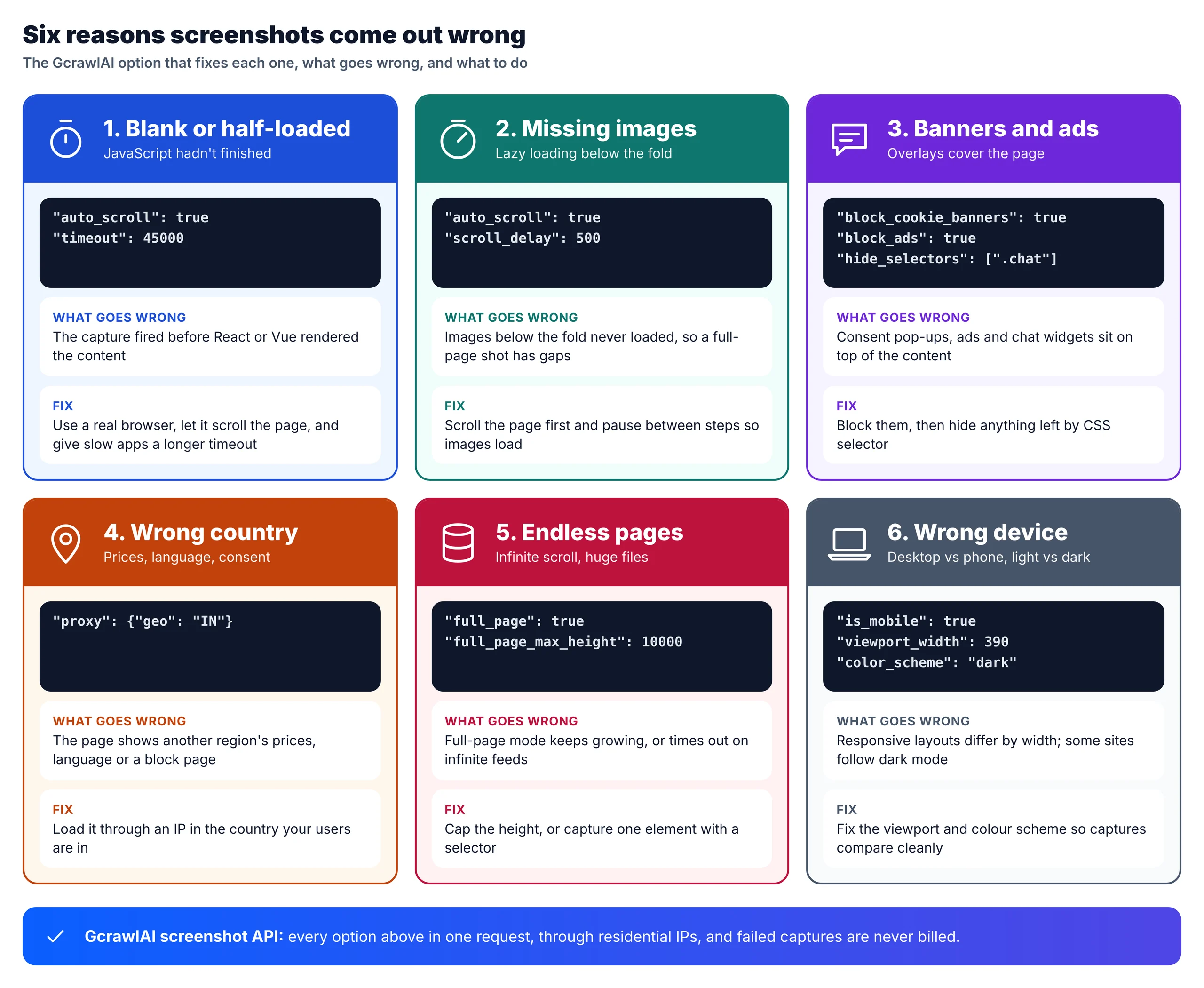
Build a small test set before you commit: one static page, one single-page app, one long page with lazy images, one page with a cookie banner, and one that changes by country. Run the same five through two or three APIs and compare the images, not the marketing pages. Count how many captures you had to retry, because that's what drives your real cost.
What 10,000 and 100,000 screenshots a month cost
At 10,000 screenshots a month most APIs cost $19 to $100. At 100,000 the spread is wide: about $99 to $101 for ScrapingBee, Firecrawl and GcrawlAI, $180 for ApiFlash, and $459 to around $795 for ScreenshotOne and Urlbox. Billing rules for failures matter as much as the list price.
| API | 10,000/month | 100,000/month | Failed captures billed? |
|---|---|---|---|
| GcrawlAI | $29 (Starter) | $101 (Growth $79 + 20,000 at $1.10/1,000) | No, never |
| ScreenshotOne | $79 (Growth) | $459 (Scale $259 + 50,000 at $0.004) | No; cached also free |
| Urlbox | $99 (Ultra) | About $795 (Business $495 + $3/1,000) | No |
| ApiFlash | $35 (Medium) | $180 (Large) | Not stated |
| Browserless | $35 (Prototyping, ~1 unit each) | About $195 monthly, or $140 on annual Starter | Browser time used before a failure is billed |
| Firecrawl | $44 (Hobby + $25 of credits) | $99 (Standard) | No result is free; 403/404 pages cost 1 credit |
| ScrapingBee | $19 (Hobby, 5 credits each) | $99 (Startup); premium proxies need 25 credits each | Bills 200, 404 and 410 only |
| Scrapfly | $100 (Pro, 60 credits each) | About $560 (Enterprise + overage) | Not stated for screenshots |
| Microlink | $49 (Pro, 46,000) | Not published | Not stated; cached free |
| HTMLCSStoImage | $69 | $375 | Not stated |
| Doppio | $48 (12,000) | About $366 (Pro + overage) | No ("successful renders") |
| Screenshot Machine | €37 (Basic + overage) | €199 (Enterprise + overage) | Not stated; cached free |
| Screenshotlayer | $19.99 (Basic) | About $350 (Enterprise + overage) | Not stated |
| CaptureKit | Not listed | Not listed | Not stated |
| Bannerbear | Credits per screenshot not stated | Custom | Not stated |
List-price arithmetic from each vendor's pricing page, checked November 2, 2026; figures marked "about" are our calculation from published overage rates. The honest read: at 10,000 a month, ScrapingBee ($19) and Screenshotlayer ($19.99) cost less than GcrawlAI ($29), and at 100,000, ScrapingBee and Firecrawl ($99) are $2 cheaper. GcrawlAI's price already includes residential IPs and stealth on every capture; on ScrapingBee that's the 25-credit premium proxy, which pushes 100,000 protected screenshots to its $249 Business plan.
GcrawlAI plans (GcrawlAI pricing, checked October 28, 2026):
| Plan | Price | Requests/month | Concurrent | Per 1,000 | Overage per 1,000 |
|---|---|---|---|---|---|
| Free | $0 forever, no card | 50 | 2 | – | – |
| Starter | $29/month | 20,000 | 10 | $1.45 | $1.60 |
| Growth (most popular) | $79/month | 80,000 | 35 | $0.99 | $1.10 |
| Pro | $199/month | 250,000 | 50 | $0.80 | $0.90 |
| Scale | $499/month | 750,000 | 100 | $0.67 | $0.75 |
| Enterprise | Volume pricing | 2M+ | Custom | – | – |
| Self-hosted | $0 (MIT) | Your servers | Your servers | Infrastructure only | – |
Every plan, Free included, has screenshots, scrape, crawl, the Search API, JavaScript rendering, residential IP rotation and stealth escalation in each request. Failed requests are never charged. Annual billing charges 10 months for 12, unused requests on paid plans roll over once, and Indian customers are billed in INR with a GST invoice.
Screenshot features compared
Every API here captures full pages, so the features that separate them are element capture, banner and ad blocking, country targeting and extra outputs like PDF. This table shows what each vendor documents. "Not listed" means we didn't find it in their docs, not that it can't be done another way.
| API | Element capture | Ad / cookie blocking | Country | Formats | |
|---|---|---|---|---|---|
| GcrawlAI | Yes | Both, plus hide selectors | Yes, residential | PNG, JPEG, WebP, PDF | Yes |
| ScreenshotOne | Yes | Both | Growth plan and up | 11 formats | Yes |
| Urlbox | Yes | Both | Not verified | 10 formats incl. video | Yes |
| ApiFlash | Not listed | Both | Enterprise only | PNG, JPEG, WebP | No |
| Browserless | Yes | Both (via options) | Proxies, country not verified | PNG, JPEG, WebP | Yes |
| Firecrawl | Not listed | Not listed | Yes | Image URL | Via action |
| ScrapingBee | Yes | Ads only | Yes | Not stated | No |
| Scrapfly | Yes, CSS or XPath | Both | Yes | JPG, PNG, WebP, GIF | Not listed |
| Microlink | Yes | Both | Yes, residential | PNG, JPEG | Separate product |
| HTMLCSStoImage | Yes | Cookie banners | No | PNG, JPG, WebP | Yes |
| Doppio | Clip region | Not listed | No | PNG, JPG, WebP | Yes |
| Screenshot Machine | Yes | Hide by selector | No | JPG, PNG, GIF | Separate API |
| Screenshotlayer | No | No | No | PNG, JPEG, GIF, WebP | No |
| CaptureKit | Yes | Both | Your own proxy | PNG, JPEG, WebP | Yes |
| Bannerbear | No | No | No | Not stated | For templates |
Which screenshot API should you choose?
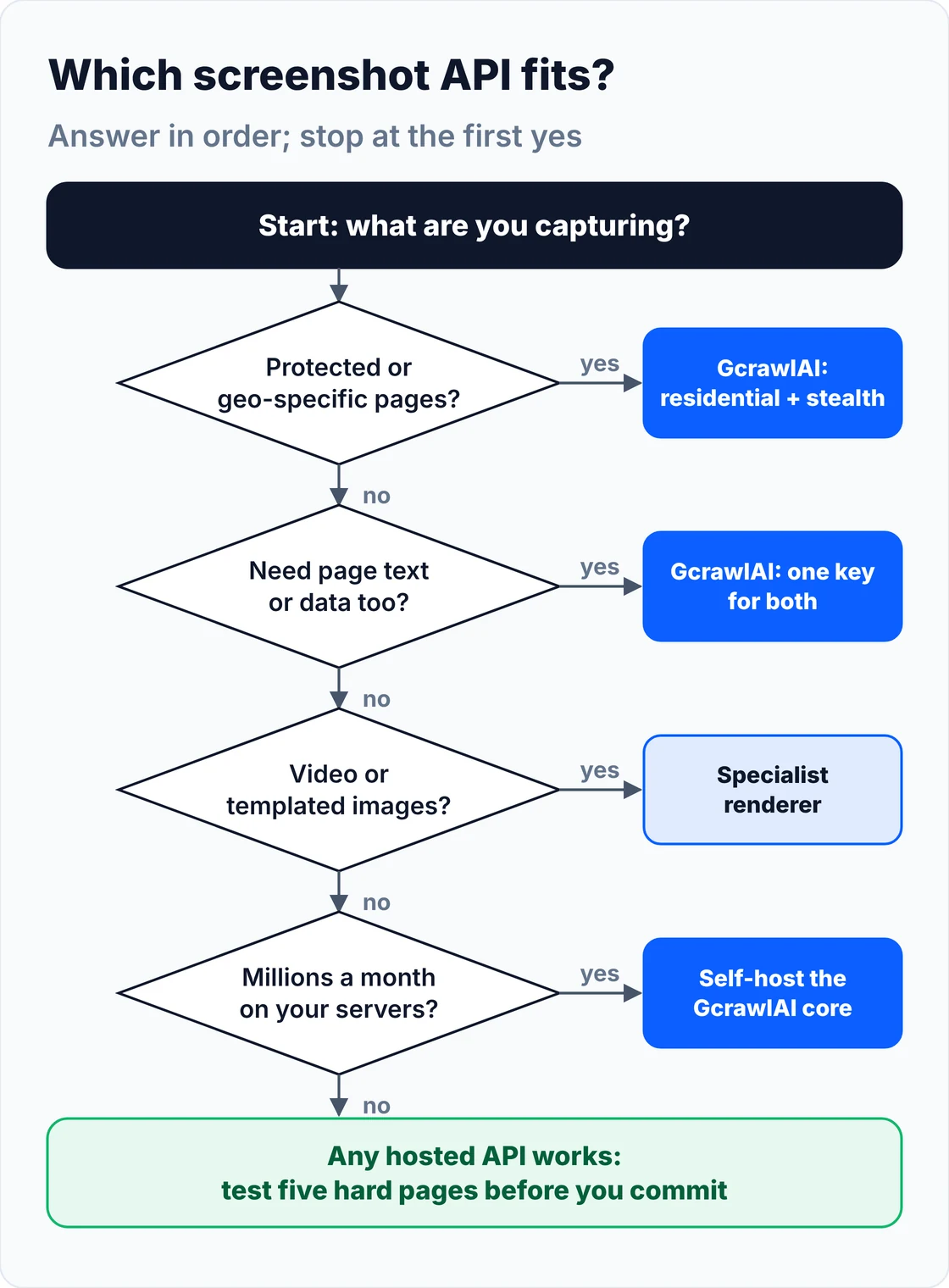
Start from the pages you need to capture, not the feature list. Protected and country-specific pages need residential IPs; long pages need scrolling and a height cap; previews need caching; archives need PDFs. GcrawlAI covers all four with one request per screenshot, and the table shows where it fits each job.
| Your job | What matters | Where GcrawlAI fits |
|---|---|---|
| Competitor or price monitoring | Country, banners, failures not billed | GcrawlAI captures through residential IPs in the right country |
| Pages behind bot checks | Stealth and real IPs | GcrawlAI includes stealth escalation in every request |
| Link previews and thumbnails | Speed, cache, low price | GcrawlAI viewport captures at one request each |
| Visual QA on desktop and mobile | Fixed viewport, mobile, dark mode | GcrawlAI sets viewport, is_mobile and color_scheme per call |
| AI agents that need to see pages | MCP, image plus content | GcrawlAI's MCP server and SDK, one key for images and content |
| Archives and PDFs | PDF output, full-page height | GcrawlAI outputs vector PDF and full pages up to 20,000 px; no video yet |
| Millions a month on your own servers | Control and cost | Self-host the MIT GcrawlAI core |
When doing it yourself is enough
If you capture a handful of your own pages, Playwright or Puppeteer on one server is enough: page.screenshot(full_page=True) and a scroll before it. The work starts with other people's sites, where you need proxies, banner handling, retries and monitoring. That's where GcrawlAI takes over without changing how you work.
You can stay on your own servers: the MIT-licensed GcrawlAI core self-hosts for free with the same browser engine, and the free Cloud plan's 50 requests a month are enough to test your five hardest pages. Paste one into the Playground to compare. For the build-or-buy trade-off in general, read web scraping with Python vs a scraping API.
"Teams self-host screenshots to save money, then spend it on the proxies, the font packages and the engineer who debugs blank captures at 2 a.m. Count the retries before you count the servers."
Rajesh Kannan, Co-Founder & CTO at Gramosoft
Capture pages responsibly
A screenshot is still automated access, so the same rules apply as for scraping. Capture public pages or pages you're authorised to see, respect robots.txt and terms of service, keep request rates gentle, and don't store personal data you have no reason to hold. Never send real login credentials to a third-party capture service.
If a screenshot will be used as evidence, store the image yourself with the URL, time, country and settings used, because hosted image links can expire. For the legal background, read what web scraping is and where it's legal.
Frequently asked questions
What is the best website screenshot API?
For protected or country-specific pages, and teams that also scrape, GcrawlAI: residential IPs, full-page and mobile capture, banner blocking, one request per screenshot. ScreenshotOne and Urlbox have the most screenshot-only options; ApiFlash is the cheapest simple endpoint.
Is there a free screenshot API?
Yes. ScreenshotOne, ApiFlash and Screenshot Machine give 100 screenshots a month, Doppio 400, Microlink 25 a day, HTMLCSStoImage 50, and GcrawlAI 50 requests a month. Screenshotlayer's 100 a month are for non-commercial use only.
How much does a screenshot API cost?
Entry plans run from $7 (ApiFlash, 1,000) to $49. At 100,000 a month, list prices range from about $99 (ScrapingBee, Firecrawl) and $101 (GcrawlAI) to $459 (ScreenshotOne) and around $795 (Urlbox), checked November 2, 2026.
Why do my screenshots come back blank or half-loaded?
The capture fired before JavaScript finished, or lazy images never loaded. Use an API that renders in a real browser, scrolls the page before capturing, and allows a longer timeout. Cookie banners and challenge pages are the other common cause.
How do I take a full-page screenshot with an API?
Turn on full-page mode, let the API scroll so lazy images load, and cap the height for infinite feeds. In GcrawlAI that's full_page, auto_scroll with scroll_delay, and full_page_max_height.
Can I take a screenshot from a specific country?
Yes, with APIs that offer country targeting. GcrawlAI and Microlink use residential IPs; ScrapingBee and Scrapfly take a country code; ScreenshotOne offers it from its Growth plan and ApiFlash on Enterprise only.