Imported Content
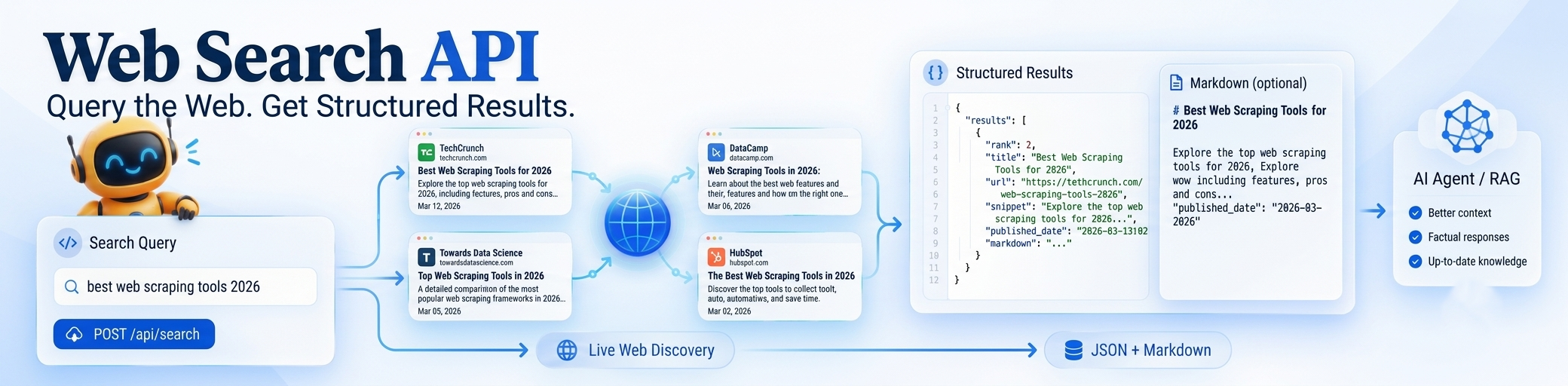
When engineering autonomous AI agents, research pipelines, or competitive monitoring bots, you rarely have a static list of URLs. A Web Search API solves the discovery bottleneck: you send an unstructured query, and receive clean, structured, and ranked results from a live web index — ready for immediate LLM processing or downstream scraping.
How a Search API Differs From Scraping or Crawling
Data engineering pipelines use three distinct mechanisms for gathering web intelligence. Choosing the right tool prevents wasted bandwidth, high proxy costs, and fragile parsers:
| Method | Input Required | Primary Role | Output Format |
|---|---|---|---|
| Web Search API | Keyword query or prompt | Discovery across the open web | Ranked JSON (titles, URLs, snippets, dates) |
| Web Scraper | Target URL | Deep extraction of a single page | Clean Markdown, HTML, or structured JSON |
| Web Crawler | Root domain / seed URL | Automated site-wide graph traversal | Sitemap discovery, multi-page data trees |
The tradeoff is control versus discovery speed. Scraping gives you 100% control over a specific URL, but cannot tell you what new articles were published this morning. A search API queries an indexed web universe in sub-second time, surfacing relevant source URLs without requiring prior knowledge of their existence.
Why Teams Use a Web Search API
Modern engineering teams integrate programmatic search into their stacks for four key use cases:
1. Real-Time RAG & LLM Grounding: Large Language Models are limited by their static training cutoff dates. Feeding real-time search results into context windows (ChatGPT, Claude 3.5 Sonnet, Gemini 1.5 Pro) prevents hallucination and grounds answers in up-to-the-minute facts.
2. Autonomous AI Research Agents: Multi-step agents (like AutoGPT, Deep Research, or LangGraph workflows) require an interactive search tool to plan, query sub-topics, read candidate pages, and synthesize executive reports.
3. Competitive Intelligence & Brand Monitoring: Automatically monitor competitor announcements, pricing adjustments, press releases, or negative customer sentiment across thousands of independent domains without maintaining brittle scrapers for each site.
4. Lead Generation & Entity Resolution: Search for founders, company domain matches, contact pages, and business listings across regional search indices.
A Quick Code Example
Executing a search request with GcrawlAI takes a single authenticated HTTP POST call:
import requests

response = requests.post(
    "https://gcrawlai.com/api/search",
    json={
        "query": "best headless browser scrapers 2026",
        "num_results": 5,
        "country": "us",
        "freshness": "month"
    },
    headers={
        "Authorization": "Bearer YOUR_GCRAWLAI_API_KEY",
        "Content-Type": "application/json"
    }
)

data = response.json()
for result in data.get("results", []):
    print(f"[{result['rank']}] {result['title']}")
    print(f"URL: {result['url']}")
print(f"Snippet: {result['snippet']}\n")curl -X POST "https://gcrawlai.com/api/search" \
-H "Authorization: Bearer YOUR_GCRAWLAI_API_KEY" \
-H "Content-Type: application/json" \
-d '{
"query": "e-commerce price scraping tools",
"num_results": 5,
"scrape_markdown": true
}'Scraping a search engine's front-end HTML results page directly is notoriously fragile — search engines employ aggressive bot detection, CAPTCHAs, and frequent DOM structure shifts. A dedicated search API returns clean, structured data guaranteed never to break your downstream parser.
Structured JSON Output Schema
Every response from GcrawlAI is formatted in strict, predictable JSON. When scrape_markdown: true is provided, full page contents are automatically pre-scraped and converted to clean Markdown ready for LLM consumption:
{
  "status": "success",
  "query": "best headless browser scrapers 2026",
  "total_results": 1420,
  "execution_time_ms": 340,
  "results": [
    {
      "rank": 1,
      "title": "Top Web Scraping Libraries for Developers in 2026",
      "url": "https://example.com/blog/scraping-tools-2026",
      "snippet": "An in-depth review comparing Playwright, Puppeteer, and GcrawlAI API for high-scale data extraction...",
      "published_date": "2026-02-14",
      "markdown": "# Top Web Scraping Libraries...\n\nExtracting modern web apps requires..."
    },
    {
      "rank": 2,
      "title": "Headless Browser Benchmarks: Memory vs Speed",
      "url": "https://example.org/benchmarks",
      "snippet": "We benchmarked Chromium instances against managed cloud extraction endpoints...",
      "published_date": "2026-01-20",
      "markdown": null
    }
  ]
}
Combining Search With Scraping and Crawling
Search rarely operates in isolation. In production RAG systems, the standard architectural pattern is a two-stage discovery and extraction pipeline: search discovers the top 5 high-authority pages, and a parallel scraping endpoint fetches full-fidelity content with JavaScript rendering.
import requests

API_KEY = "YOUR_GCRAWLAI_API_KEY"
HEADERS = {"Authorization": f"Bearer {API_KEY}", "Content-Type": "application/json"}

# Step 1: Discover relevant sources via Search API
search_res = requests.post(
    "https://gcrawlai.com/api/search",
    json={"query": "residential proxy providers comparison", "num_results": 3},
    headers=HEADERS
).json()

# Step 2: Scrape discovered target pages with full JavaScript rendering
for item in search_res.get("results", []):
    scrape_res = requests.post(
        "https://gcrawlai.com/api/scrape",
        json={"url": item["url"], "render_js": True, "format": "markdown"},
        headers=HEADERS
    ).json()

    print(f"Title: {item['title']}")
    print(f"Extracted Markdown ({len(scrape_res['markdown'])} chars)\n")
Pro Tip: Setting "scrape_markdown": true in the initial Search API request accomplishes both Step 1 and Step 2 in a single sub-second roundtrip, saving network latency and reducing code complexity.
API Parameters & Filtering
Customize and narrow your search results with fine-grained query controls:
| Parameter | Type | Default | Description |
|---|---|---|---|
query |
string | required | The search query string, keywords, or natural language prompt. |
num_results |
integer | 10 |
Number of ranked results to return (range: 1 to 100). |
country |
string | "us" |
Two-letter ISO country code for localized regional ranking (e.g. us, uk, de, in). |
language |
string | "en" |
ISO 639-1 language code filter (e.g. en, es, fr). |
freshness |
string | null |
Filter results by indexing timeframe: "day", "week", "month", or "year". |
scrape_markdown |
boolean | false |
If true, automatically scrapes target URLs and appends clean LLM Markdown to each item. |
Comparison With Alternative Search APIs
How does GcrawlAI compare to traditional SERP scrapers and standalone search providers?
| Feature | GcrawlAI | SerpApi | Tavily | Google Custom Search |
|---|---|---|---|---|
| Primary Focus | Full pipeline: Search + Scrape + Crawl | Raw SERP parsing | LLM search tool | Basic web search |
| Pre-Scraped Markdown | Yes (Built-in) | No (Snippet only) | Yes | No |
| Pricing Model | Flat-rate unified pool ($49 / 50k) | $50 / 5k searches (Expensive) | $20 / 4k searches | $5 / 1k queries + strict caps |
| JavaScript Rendering | Yes (Headless Chrome) | N/A (SERP only) | Partial | No |
| Bot Bypass & Proxies | Automated Smart Routing | Managed Proxies | Managed | Not applicable |
What a Production-Grade Search API Must Offer
- ✓Strict, Structured JSON Schema: Predictable titles, URLs, snippets, and timestamps without fragile HTML DOM extraction.
- ✓Real-Time Index Freshness: Access to fresh news and newly published blog posts, vital for financial and intelligence agents.
- ✓High Throughput & Low Latency: Sub-500ms response times capable of handling hundreds of concurrent agent requests.
- ✓Unified Scrape & Crawl Integration: Direct pairing with full-page Markdown converters without requiring third-party subscriptions.
One API for the Entire Data Pipeline
Search, scrape, crawl, map, and screenshot are often sold as fragmented tools across multiple vendors, multiplying API keys, subscription costs, and billing overhead. GcrawlAI unites all web extraction primitives into a single flat-rate account:
Discover sources with /search, render dynamic client-side DOMs with /scrape, traverse whole architectures with /crawl, and extract sitemaps with /map — with 1:1 predictable credit consumption.
Frequently asked questions
How fresh are the results from the GcrawlAI Search API?
GcrawlAI draws from an active, real-time web index. You can configure the freshness parameter to restrict results to the last 24 hours ("day"), past week, or past month — crucial for monitoring breaking topics.
Can search results be used directly, or do they need further scraping?
You can do both. For quick reference lookups, the structured title and snippet are sufficient. For deep synthesis or AI agent RAG, passing scrape_markdown: true automatically scrapes the target page and attaches clean Markdown directly into the response payload.
What is the latency of the Search API?
Standard search queries return in approximately 250ms to 450ms. If you enable simultaneous markdown scraping across top results, response times average 900ms to 1.5s.
Can I specify geo-locations or languages?
Yes, GcrawlAI supports ISO country codes (country: "us", "uk", "de", etc.) and language codes (language: "en", "es") for accurate local search results.
How are search requests billed?
Unlike competitors that charge 10x or 20x credit multipliers for search or JavaScript rendering, GcrawlAI uses flat-rate 1:1 billing on all plans. 1 search query = 1 credit.